You're sending cold emails at scale, and suddenly everything breaks. Your inbox placement tanks. Gmail starts bouncing messages. Outlook flags your domain. The math was so simple: More emails = more meetings. But reality had different plans.
Inbox rotation isn't a hack. It's the infrastructure decision that separates teams generating consistent pipeline from those constantly firefighting deliverability crises. When Gmail requires spam rates below 0.3% and Microsoft enforces tenant-level sending caps, you can't afford to treat email sending like it's 2015.
This guide covers the engineering behind inbox rotation: the math, the monitoring rules, the automation setup, and the compliance framework that makes it work in 2026.
Why Cold Email Deliverability Requires Inbox Rotation
Email deliverability operates on reputation budgets. Every mailbox provider asks one question: Is this sender likely to annoy my users?
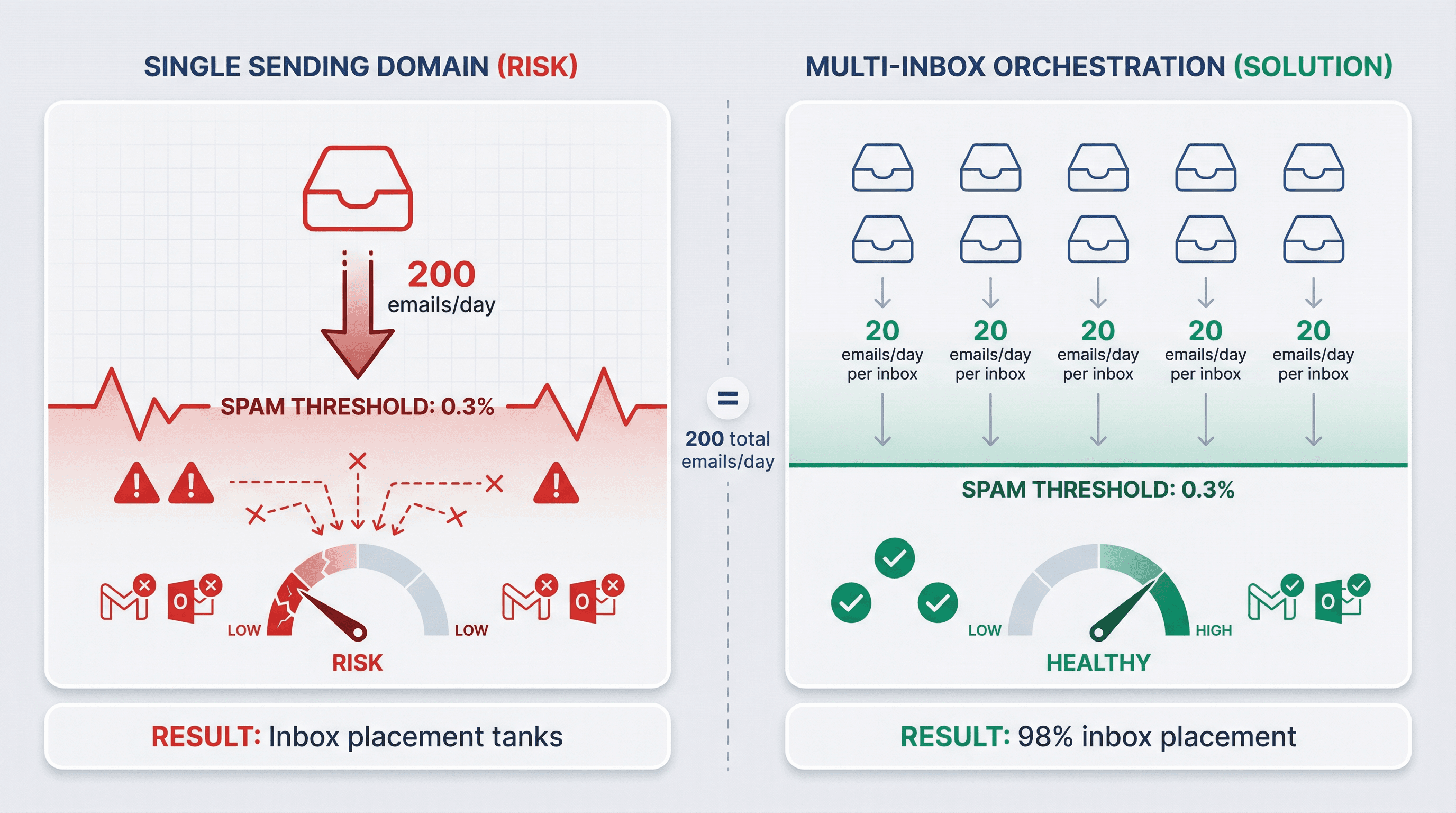
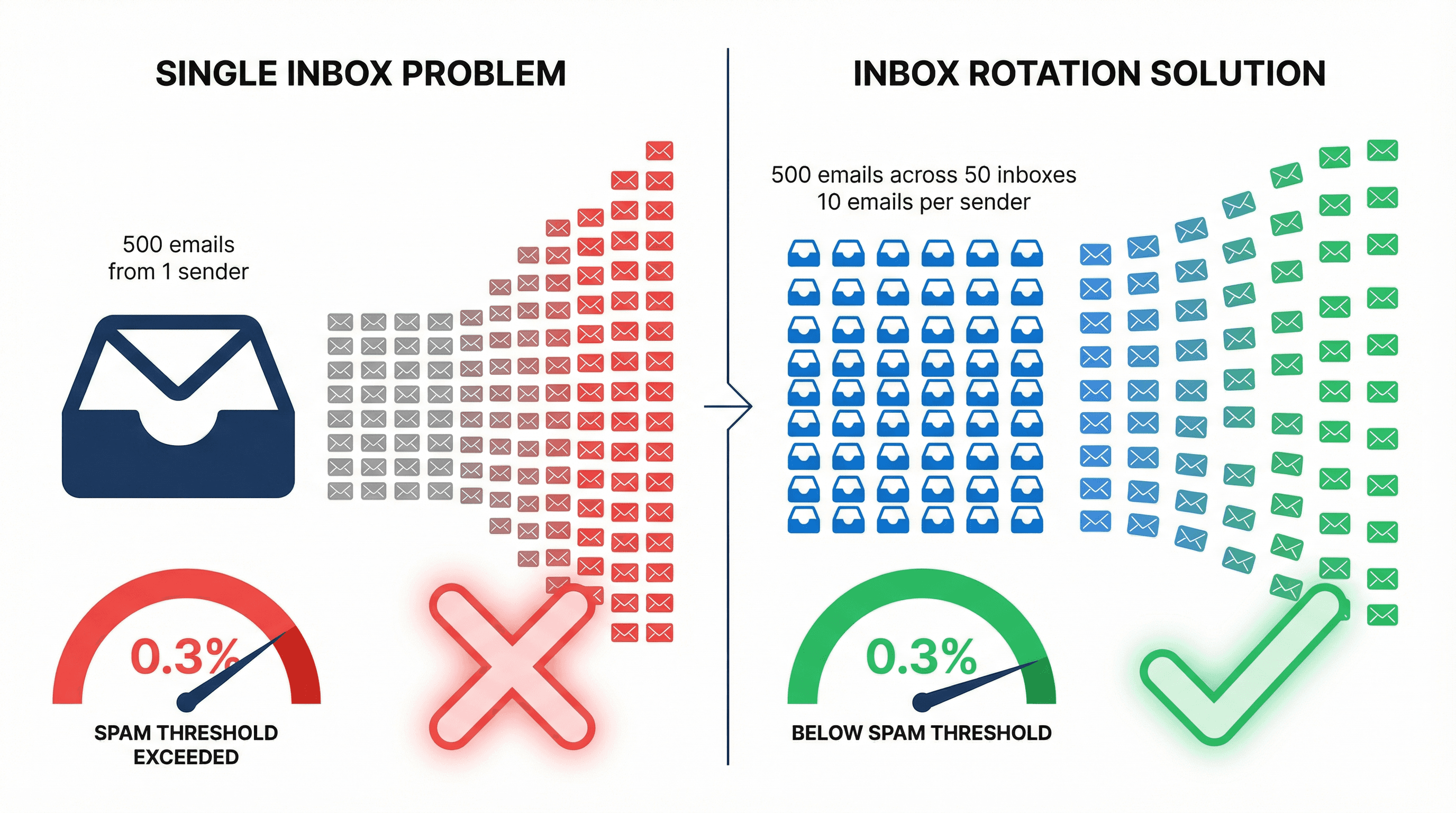
They answer using behavioral signals tracked at the sender level. When you send 500 emails from one inbox, you're creating a pattern that screams automation. When you send 500 emails across 50 inboxes (10 each), you're mimicking normal human behavior.
The math changed.
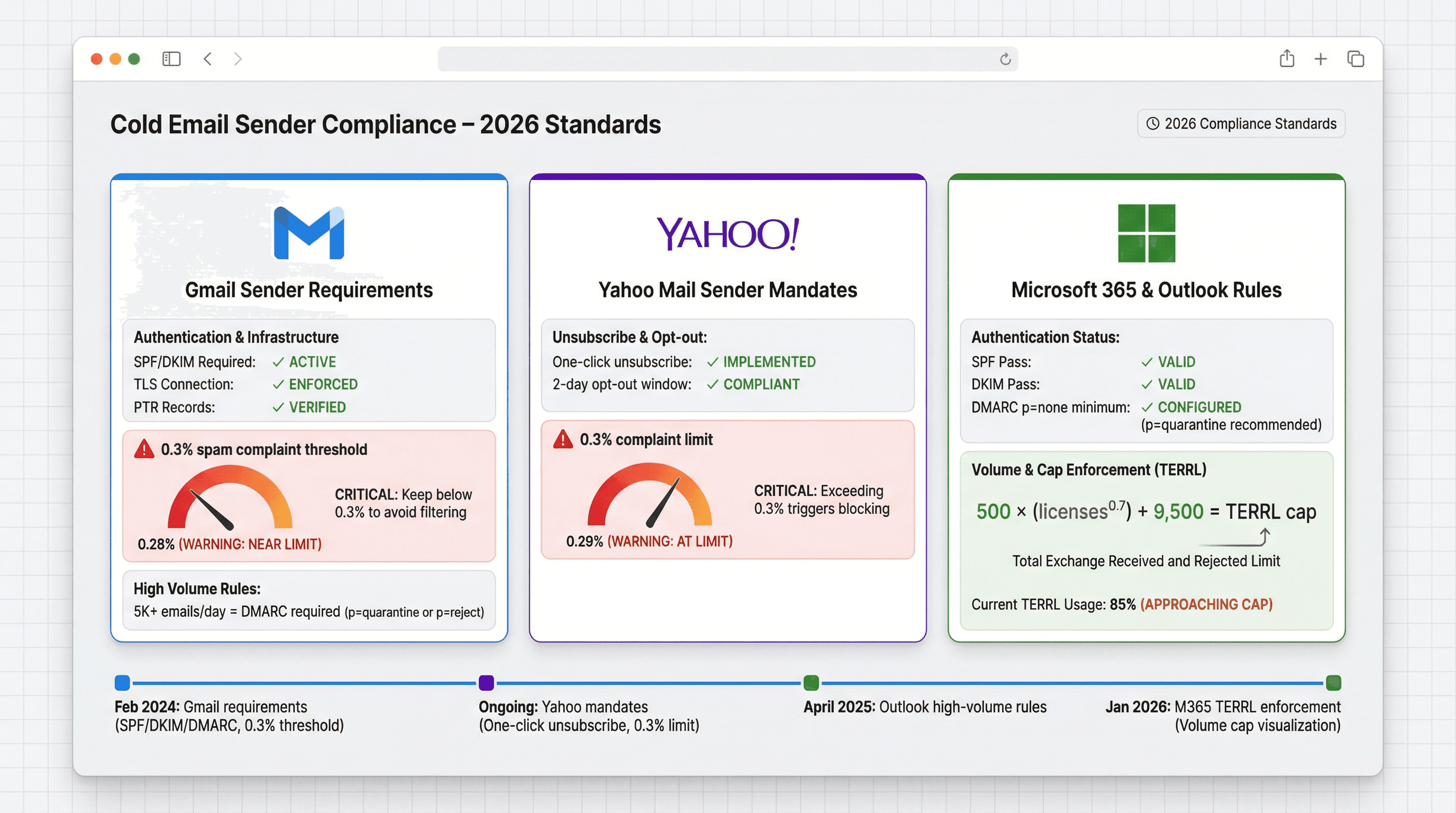
Google's February 2024 requirements made SPF/DKIM authentication mandatory and introduced the 0.3% spam complaint threshold. Yahoo followed with similar rules, requiring one-click unsubscribe and complaint rates below 0.3%. Microsoft announced high-volume sender requirements for Outlook.com, mandating DMARC alignment for domains sending 5,000+ emails daily.
Where teams once pushed 100-200 cold emails per inbox, current best practices suggest 20-50 per day during ramp, with conservative caps even after full warm-up.
Inbox rotation solves the core constraint: you need volume, but each sender must stay below detection thresholds. It's load distribution applied to cold email infrastructure.
How Does Inbox Rotation Work for Cold Email?
Core principle: Spread daily volume across many senders so no individual mailbox triggers spam filters.
Instead of one inbox sending 200 emails, you use:
10 inboxes sending 20 each, or
20 inboxes sending 10 each, or
50 inboxes sending 4 each
Each approach achieves 200 daily sends while keeping individual sender behavior in the "normal human" range.
What Makes a Working Inbox Rotation System?
① Volume Distribution
Keep each inbox well below provider limits. Research suggests bounce rates should stay below 2%. When individual senders exceed safe thresholds, the entire system becomes fragile. Understanding how many cold emails you can send per day is critical to maintaining deliverability.
② Domain Diversification
Don't put 50 inboxes on one domain. If that domain's reputation collapses, everything goes down. Best practices suggest 3-5 inboxes per domain, with multiple domains in your pool. This isolates risk and prevents single points of failure.
③ Temporal Spacing
Sending 100 emails at 9:00 AM sharp looks like automation. Rotation systems stagger sends throughout business hours with randomized delays. Modern platforms add 30-60 second intervals between sends to mimic human behavior.
④ Reputation Preservation
Low volume per inbox means limited exposure to complaints and bounces. If one prospect segment generates spam reports, only the inboxes that touched that segment are affected. The rest of your infrastructure stays clean.
Cold Email Compliance Requirements for 2026
The rules tightened significantly. Understanding them isn't optional when building compliant outreach systems.
What Are Gmail's Sender Requirements in 2026?
As of February 2024, Gmail requires:
SPF or DKIM authentication (both recommended for bulk senders)
Valid TLS connection
Forward and reverse DNS (PTR records)
For domains sending 5,000+ messages daily to Gmail, you also need:
DMARC policy (can be set to p=none)
List-unsubscribe headers
Functioning unsubscribe mechanism
Google explicitly states: aim for spam rates under 0.1%, avoid 0.3%+ at all costs. In June 2024, bulk senders exceeding 0.3% became ineligible for mitigation support. Learn more about DMARC, DKIM, and SPF setup for cold email.
What Are Yahoo's Email Sender Requirements?
Yahoo's best practices mandate:
Functional list-unsubscribe header (one-click preferred)
Clear unsubscribe link in message body
Honor unsubscribe requests within 2 days
Maintain spam complaint rate below 0.3%
What Are Microsoft's Outlook Sender Requirements?
Microsoft's high-volume sender requirements (domains sending 5,000+ emails/day to Outlook.com) include:
SPF pass
DKIM pass
DMARC alignment with at least p=none
Non-compliant messages route to junk or get rejected entirely.
What Are Microsoft 365 Tenant Sending Limits?
For teams using Exchange Online, Microsoft introduced tenant outbound limits (TERRL). The formula:
TERRL = 500 × (licenses^0.7) + 9,500
Trial tenants cap at 5,000 external recipients per day. This creates hard ceilings that rotation must account for. You can't just "add more inboxes forever" on Microsoft 365.
How to Calculate How Many Email Inboxes You Need
Calculate based on total volume (not just first touches):
Initial sends
Follow-up sequences
Warmup emails (if running continuously)
Occasional internal/ops emails
How Many Emails Can You Send Per Inbox Per Day?
Recent guidance suggests 20-50 emails per day per inbox for new domains, ramping over 2-4 weeks. Industry experts recommend not exceeding 40 cold emails per day per account.
Inbox Status | Daily Limit | Use Case |
|---|---|---|
New/Ramping | 10-25 emails | First 2 weeks |
Warmed (Conservative) | 30-40 emails | Standard operation |
Warmed (Upper Limit) | 40-50 emails | Maximum safe threshold |
Inbox Rotation Calculator Formula
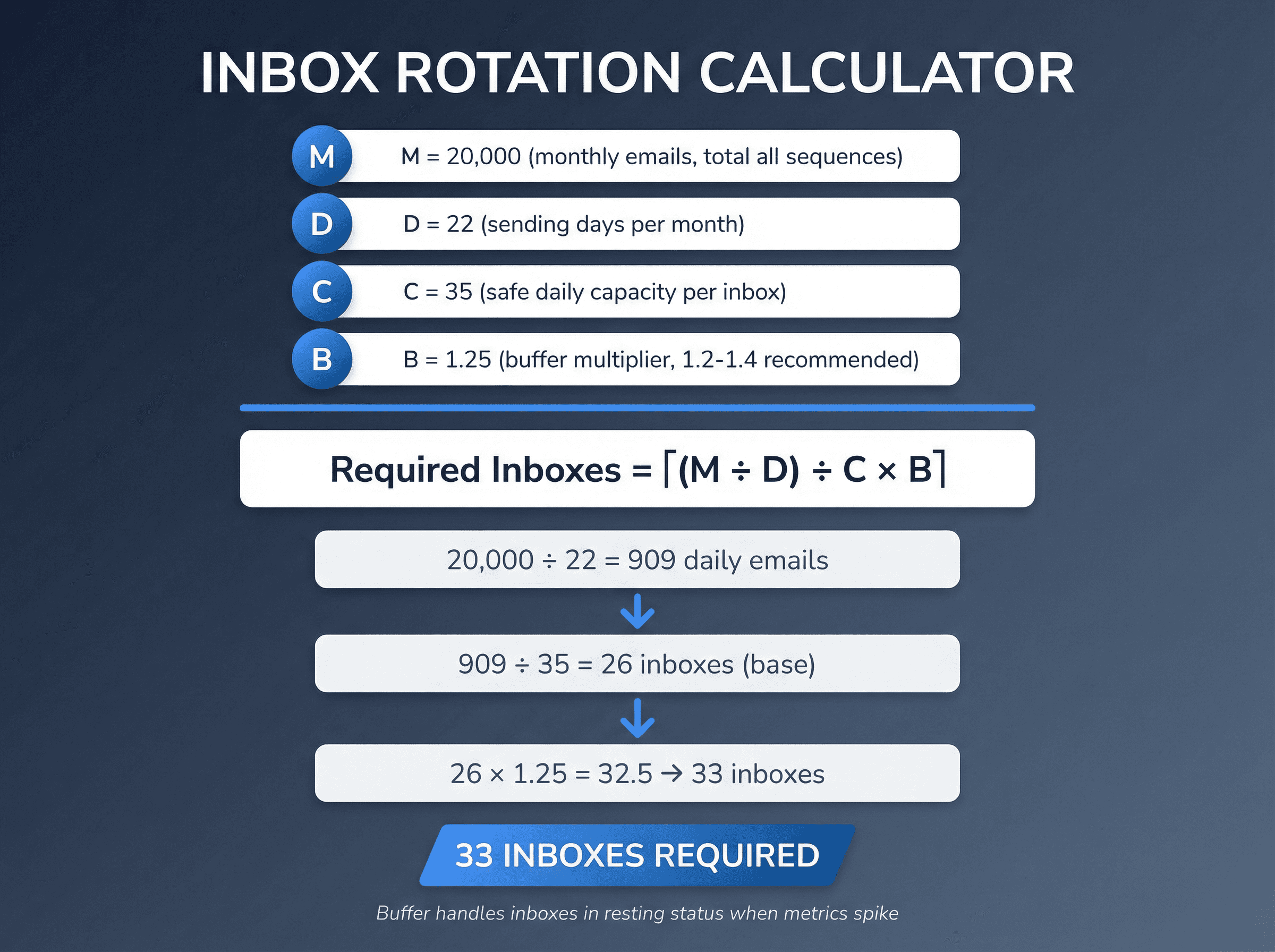
Define:
M = monthly emails (total, all sequences)
D = sending days per month (~20-22)
C = safe daily capacity per inbox (e.g., 35)
B = buffer multiplier (1.2-1.4 recommended)
Required inboxes = ceiling((M / D) / C × B)
Worked Example
You want 20,000 emails monthly (including follow-ups). You send 22 days/month. You cap at 35/day per inbox. You use a 1.25 buffer.
Daily required = 20,000 ÷ 22 ≈ 909 emails
Inboxes needed = 909 ÷ 35 ≈ 26
With buffer = 26 × 1.25 = 32.5 → 33 inboxes
The buffer handles inboxes going into "resting" status when metrics spike or segments underperform.
How to Set Up Inbox Rotation for Cold Email
Setting up rotation properly prevents expensive mistakes later. If you're wondering whether to build this yourself or outsource cold email, the implementation complexity is a key consideration.
Step 0: Choose Your Inbox Rotation Architecture
Single-domain pool (not recommended for cold email)
All inboxes on one domain. High risk if reputation collapses.
Multi-domain pool (most common)
Multiple domains with 3-5 inboxes each. Isolates reputation risk and prevents single point of failure.
Subdomain pool (for protecting brand domains)
Use subdomains of your primary domain. Common when brand protection is paramount.
For cold outbound, most teams use sending domains separate from their primary brand so deliverability incidents don't damage the main website's reputation.
Step 1: How to Set Up DNS and Email Authentication
Authentication isn't optional in 2026. For Gmail delivery, you need at minimum:
SPF or DKIM for all senders (both for bulk scale)
TLS connection
Proper DNS records
For Outlook high-volume, you need:
SPF pass
DKIM pass
DMARC aligned (p=none minimum)
One-Click Unsubscribe Headers
Gmail requires list-unsubscribe headers for bulk mail. Yahoo recommends one-click. Implementation:
Even for cold email (which technically isn't "bulk marketing"), making unsubscribe easy reduces complaint rates and improves deliverability. Learn more about email deliverability best practices.
Step 2: How to Create Email Inboxes for Cold Email
Provider limits aren't deliverability limits, but they're real constraints.
Google Workspace has published sending limits and will suspend sending for up to 24 hours if you exceed them. Exchange Online has service limits, and Microsoft now enforces tenant-level external recipient caps (TERRL).
Your rotation system must respect:
Per-mailbox behavior limits (for deliverability)
Tenant/provider hard caps (technical constraints)
Avoid creating all accounts on the same day. Spread account creation across several days so providers don't see suspicious spikes.
Step 3: How to Warm Up Email Inboxes for Cold Email
Recent guidance recommends 14-30 days for warming new assets, consistent with the 2-4 week ramp period.
Warmup builds controlled reputation. Start at 5-10 emails daily, increase weekly as engagement stays positive. Use automated warmup networks or send to engaged contacts who will interact.
Why it matters: Research shows properly warmed domains hit 98% inbox placement, while cold domains struggle to break 30%. Skip warmup and you're burning infrastructure from day one. If you're experiencing issues, check out our guide on what to do when email warmup isn't working.
Note: Google has historically cracked down on fake engagement from some warmup tools, so keep warmup realistic and avoid anything that looks like bot behavior. Learn how to warm up email domains properly.
Step 4: How to Configure Sticky Sender Rules
Critical for conversation integrity: Follow-ups should come from the same mailbox as the initial email.
A clean rotation system:
Assigns each prospect thread to one mailbox
Keeps follow-ups in that thread from the same sender
Only rotates on new threads
This prevents "who is this?" replies when follow-ups come from different addresses. When planning your sequences, review cold email follow-up tactics to maximize response rates.
Step 5: How to Set Sending Delays and Windows
Rotation doesn't help if each inbox sends in machine bursts.
Best practices recommend adding 30-60 second delays between emails. Practical implementation:
Set per-inbox minimum delay (30-90 seconds)
Send during business hours in target timezone
Avoid clustering all sends in one hour
Random intervals between sends make patterns look organic, not automated. Timing matters (see our research on the best time to send cold emails and the best days to email B2B prospects).
Step 6: How to Manage Email Replies Across Multiple Inboxes
More inboxes = more reply chaos without centralization.
Your system needs:
Unified inbox (or central routing) so you see all replies in one place
Auto-labeling by intent (positive/neutral/objection/unsubscribe)
Global suppression (opted-out contacts never get emailed again from any inbox)
Unified inbox and inbox rotation are core features teams look for in cold email agencies and platforms.
Best Inbox Rotation Strategies That Scale
Round Robin Email Distribution (Basic Approach)
Round robin cycles through inboxes:
Email 1 from Inbox A
Email 2 from Inbox B
Email 3 from Inbox C
The problem: if inbox health varies, test results get distorted. Your "subject line test" might just be measuring "healthy inboxes vs. weak inboxes." Learn how to A/B test cold emails properly while accounting for inbox rotation.
Advanced Inbox Portfolio Management Strategy
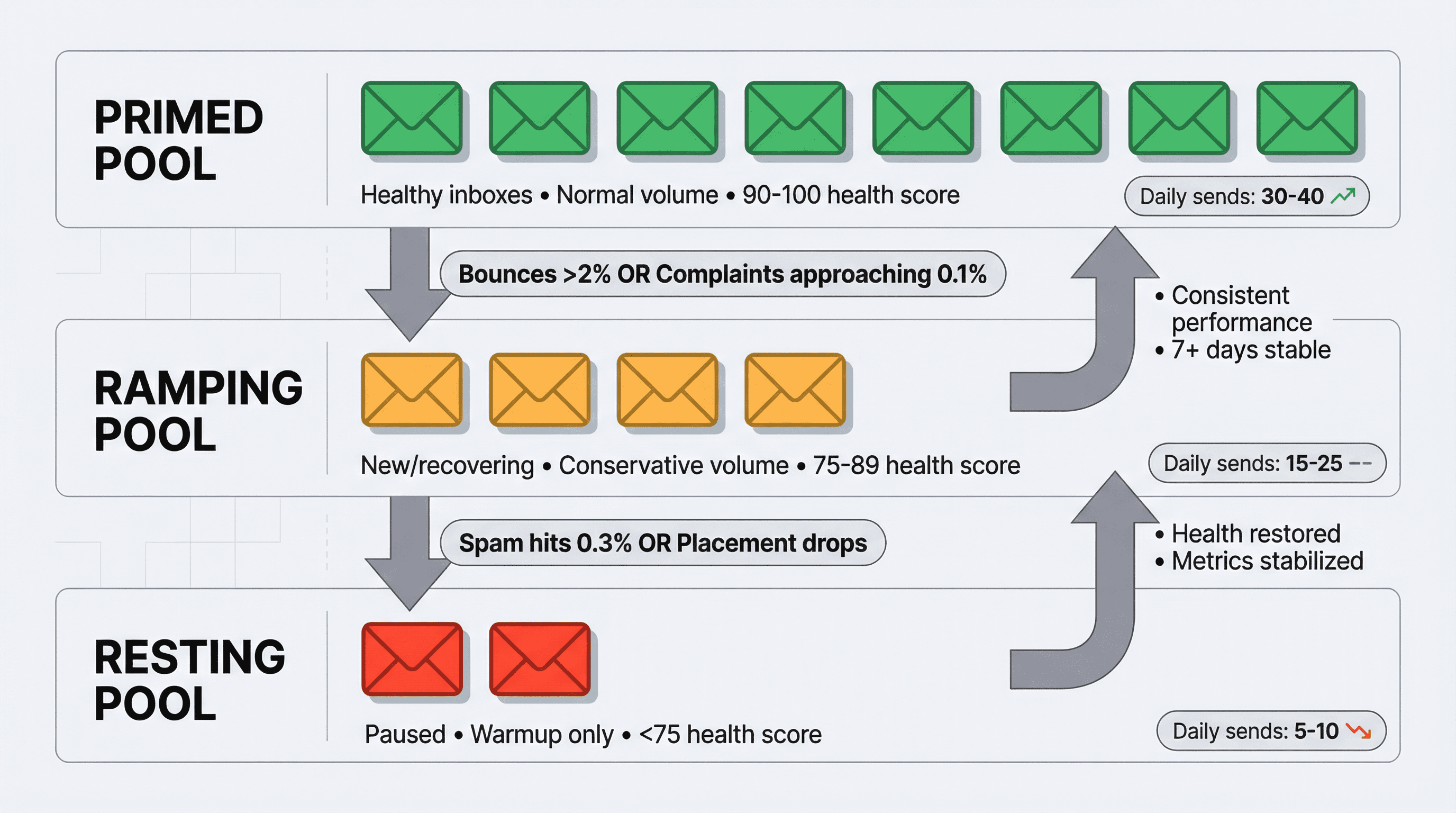
Industry leaders recommend treating inboxes like a portfolio, not just round robin. Segment inboxes by:
Provider (Google vs. Microsoft)
Domain age
Current health metrics
Move inboxes between pools based on performance:
→ Primed Pool
Healthy inboxes carrying normal volume
→ Ramping Pool
New or recovering inboxes at conservative volume
→ Resting Pool
Paused inboxes running warmup only
Simple Rule Engine for Inbox Selection
You don't need machine learning. You need deterministic rules.
Send Selection Logic:
This approach scales from 10 to 100+ inboxes without added complexity.
How to Monitor Email Inbox Health and Reputation
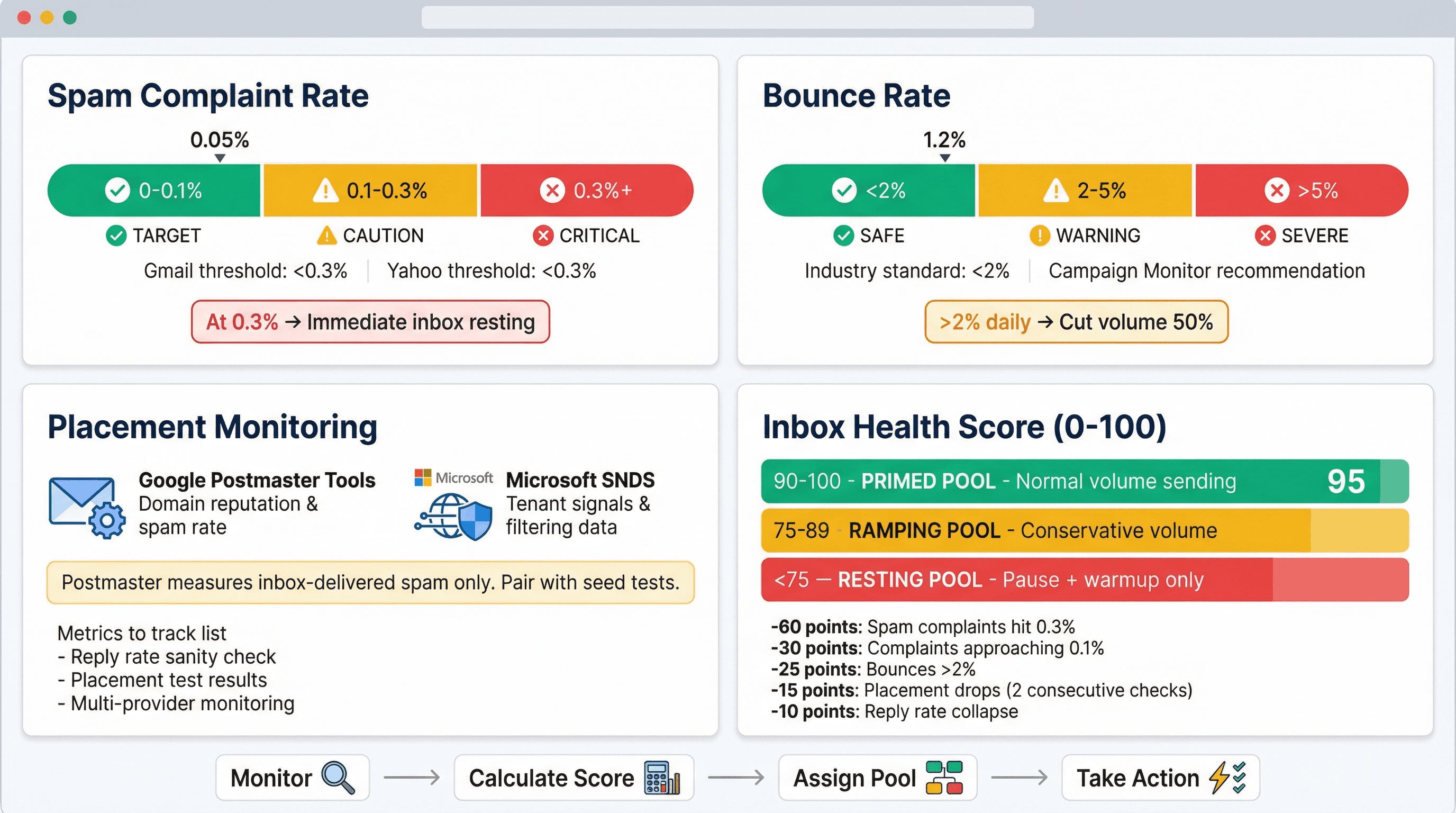
The three deliverability metrics that actually matter for email sender reputation:
What Is an Acceptable Email Spam Complaint Rate?
Aim under 0.1%
Avoid 0.3%+ (in June 2024, senders exceeding 0.3% became ineligible for mitigation)
Yahoo's threshold: keep complaints below 0.3%
Critical enforcement: Gmail spam complaint rate reaches 0.3% → immediate resting.
What Is a Good Email Bounce Rate?
Campaign Monitor best practices recommend bounce rates below 2%. CleverTap analysis suggests bounce under ~2% is safe, while >5% signals serious problems.
Industry consensus uses "daily bounce rate exceeds 2% → resting" as a concrete throttling trigger. Learn how to reduce email bounce rates systematically.
Hard bounces from bad data destroy sender reputation faster than almost anything else. This is why lead enrichment tools and waterfall enrichment are critical for maintaining data quality.
How to Track Email Inbox Placement
Google Postmaster Tools shows domain reputation and spam rate (when available). Microsoft SNDS/JMRP provides signals when applicable.
Important caveat: Postmaster spam rate is based on DKIM-authenticated messages and measures inbox-delivered mail marked as spam. If Gmail filters you straight to spam, the spam rate can appear deceptively low (because those emails don't count as "inbox-delivered spam reports"). Pair Postmaster data with placement tests and reply rate reality checks.
Email Inbox Health Score Framework
Create a 0-100 score per inbox:
Health Score | Pool Assignment | Status |
|---|---|---|
90-100 | Primed | Normal volume sending |
75-89 | Ramping | Conservative volume |
<75 | Resting | Pause + warmup only |
Start at 100, subtract:
-30 if spam complaints approaching 0.1%
-60 if spam complaints hit 0.3%
-25 if bounces >2%
-15 if placement drops below target for 2 consecutive checks
-10 if reply rate collapses while other factors stable
This portfolio model aligns with advanced rotation strategies used by leading cold email agencies.
What Metrics to Track for Email Inbox Rotation
Track per inbox and per domain:
Sends per day vs. cap
Hard bounce rate (daily + trailing 7-day)
Reply rate (sanity check, not vanity metric)
Unsubscribe count
Gmail Postmaster: domain reputation, spam rate
Microsoft: SNDS/JMRP signals when available
Set alerts for threshold breaches. Manual review is fine for small operations; at scale, automate the pause/rest decisions. Learn how to track cold email campaigns effectively.
Common Inbox Rotation Mistakes That Kill Deliverability
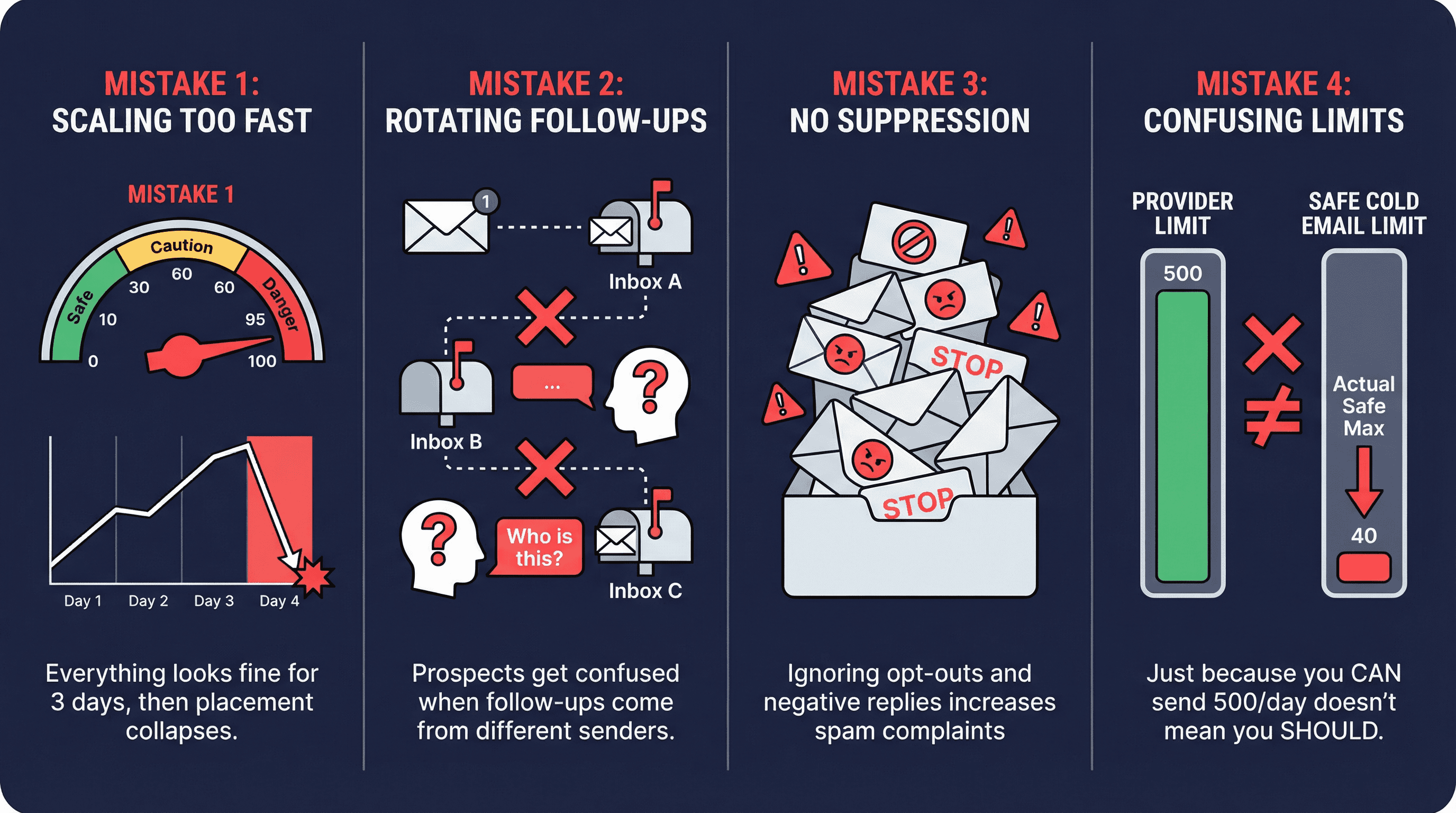
Mistake 1: Scaling Email Volume Too Fast
Symptom: Everything looks fine for 3 days, then placement collapses.
Fix:
Cap per inbox conservatively
Ramp weekly, not daily
Treat any bounce/complaint spike as "pause and investigate"
Understanding what causes cold emails to go to spam helps prevent these issues.
Mistake 2: Rotating Follow-Up Emails Across Different Inboxes
Symptom: Prospects reply "who is this?" or threads look broken.
Fix:
Sticky sender per lead thread
This is why writing effective follow-up emails requires proper technical infrastructure.
Mistake 3: No Email Suppression Management
Symptom: You keep emailing people who opted out or replied negatively. Complaints rise.
Fix:
Enforce global suppression across all inboxes
Honor unsubscribes quickly (Yahoo: within 2 days; CAN-SPAM: within 10 business days)
Understanding CAN-SPAM cold email requirements prevents compliance violations.
Mistake 4: Confusing Provider Limits with Safe Cold Email Limits
Google Workspace might technically allow high caps, but cold email deliverability caps are far lower. Even cold email best practices guides distinguish between provider hard limits and "safe cold email max."
Just because you can send 500/day doesn't mean you should.
Email Compliance Requirements Beyond Deliverability
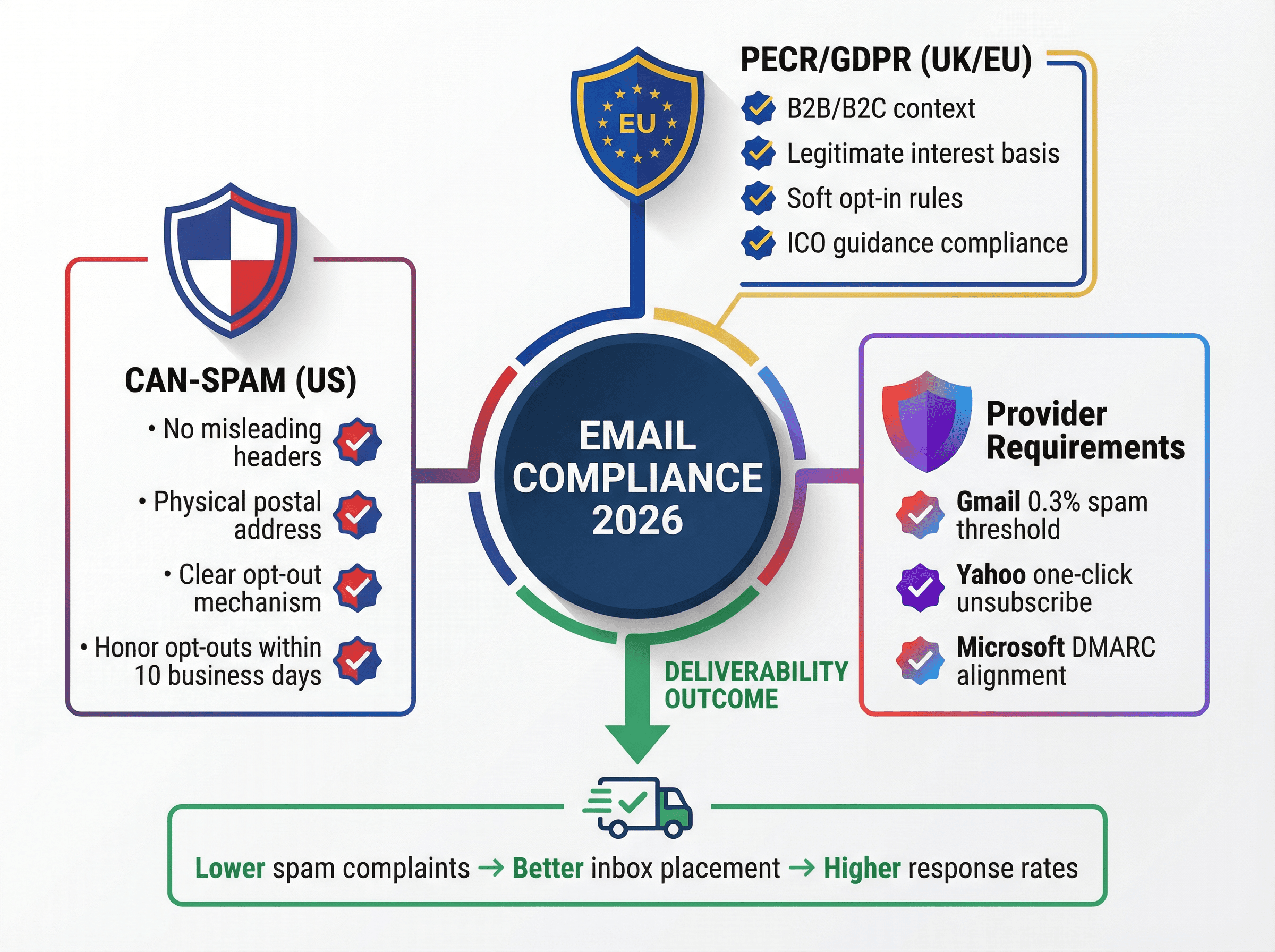
This isn't legal advice, but you need the basics for email outreach compliance.
What Are CAN-SPAM Requirements for Cold Email?
The FTC's CAN-SPAM compliance guidance covers:
Don't use misleading headers
Identify the message as an ad (when applicable)
Include physical postal address
Provide clear opt-out mechanism
Honor opt-outs within 10 business days
What Are UK and EU Email Compliance Requirements?
Rules vary by country and context (B2B vs. B2C, soft opt-in, legitimate interest). In the UK, ICO guidance explains how PECR applies to email marketing and consent/opt-out expectations.
Why Email Compliance Improves Deliverability
Most spam complaints aren't "you broke a rule." They're "I didn't ask for this, get it out of my face."
The simplest deliverability win:
Make opt-out easy
Target tightly
Stop emailing people who clearly don't want it
Google and Yahoo explicitly push unsubscribe mechanics as part of sender best practices.
How Outbound System Uses Inbox Rotation
Inbox rotation is the scale lever, but only when paired with:
Clean data (low bounces)
Tight targeting (low complaints)
Solid infrastructure (authentication + sending environment)
Active monitoring (throttling rules)
Infrastructure at Scale
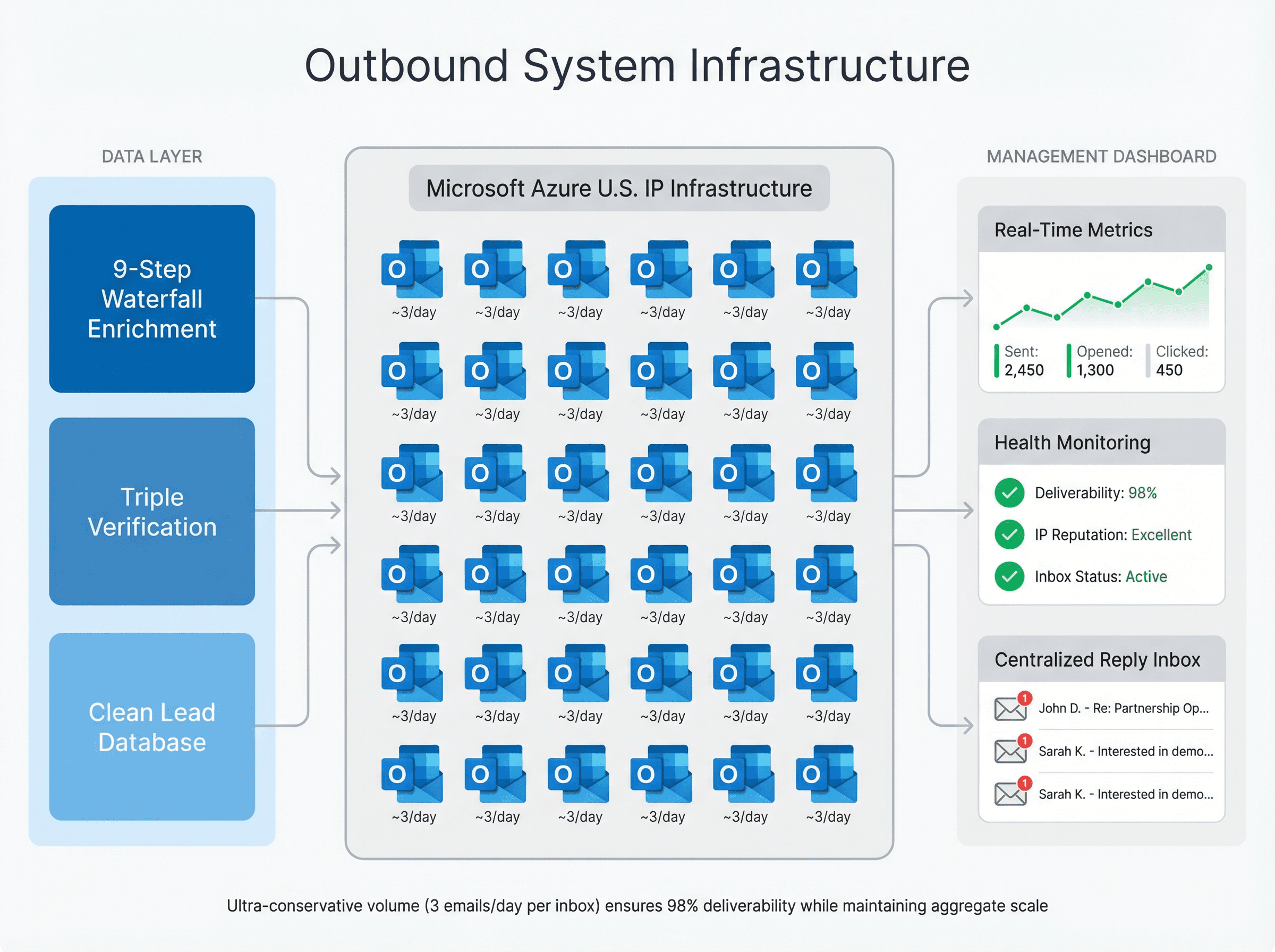
At Outbound System, we built our system around distributed sending infrastructure and centralized management. Our approach:
We run 350-700 Microsoft Outlook inboxes for clients' campaigns. Each address sends approximately 3 emails per day on average. That's an ultra-conservative volume that virtually guarantees deliverability while maintaining aggregate scale.
Our infrastructure approach uses:
Private Microsoft Azure U.S. IP infrastructure
9-step waterfall enrichment for data quality
Triple-verified email addresses before sending
AI personalization with human-written copy
Dedicated account strategists for optimization
Why This Matters
The difference between shared IP pools and private Microsoft infrastructure determines whether your emails land in inbox or spam. We control the sending environment completely, so deliverability issues are isolated and fixable.
For context on limits and infrastructure:
If you'd rather not become an email deliverability engineer, Outbound System runs the entire infrastructure end-to-end (domains, inboxes, data, copy, optimization). We handle rotation so you can focus on closing deals, not troubleshooting spam folders.
Interested in learning more? Book a 15-minute consultation to discuss your cold email infrastructure needs, or explore our case studies to see the results we've delivered for 1,000+ B2B clients.
Inbox Rotation Templates and Tools
Inbox Inventory Spreadsheet Template
Copy these columns into a tracking sheet:
Inbox email
Domain/subdomain
Provider (Google/Microsoft)
Domain age (months)
Warmup status (on/off)
Daily cap (total)
Cold cap (subset)
Min delay (seconds)
Pool (Primed/Ramping/Resting)
Last 7d bounce %
Last 7d reply %
Complaints (Postmaster/SNDS when available)
Notes/last action date
This mirrors the inventory + pools approach recommended in large-scale rotation systems.
Email Throttling Rules for Inbox Rotation
Condition | Action |
|---|---|
Bounces >2% today | Cut volume 50% tomorrow; re-verify leads; consider resting inbox |
Gmail spam complaints approaching 0.1% | Pause segment, tighten targeting |
Gmail spam complaints hit 0.3% | Rest inbox for 7 days, investigate |
Placement drops for 2 checks | Rest inbox, resume at ramping volume |
Inbox Rotation FAQ
What's the safest daily sending limit per inbox in 2026?
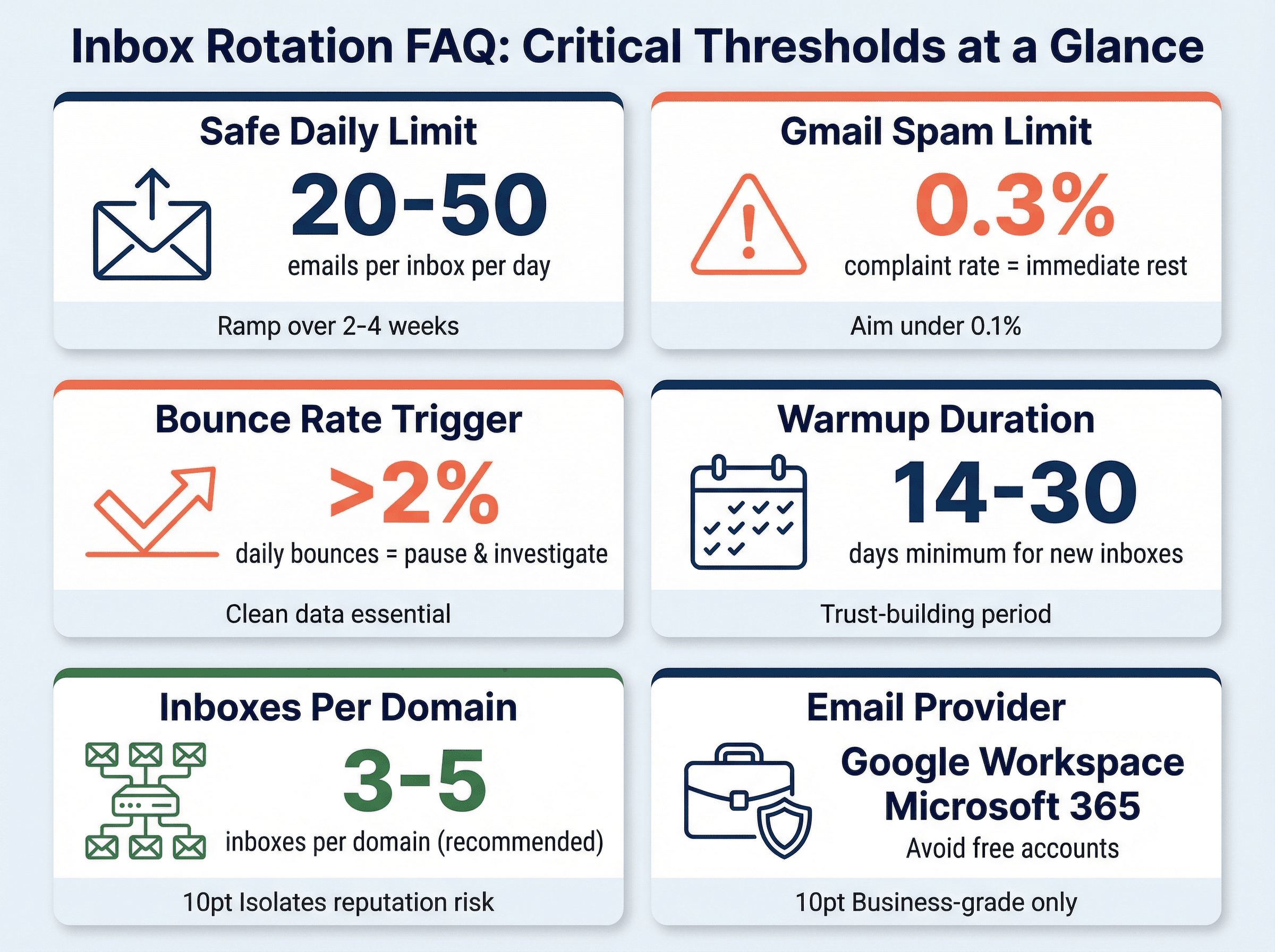
Consensus from recent deliverability practitioners: 20-50 emails per day per inbox for new domains/inboxes, with a ramp over 2-4 weeks. If you push higher, you need stronger proof from monitoring (complaints, bounces, placement).
What metrics should trigger pausing an inbox?
Good default triggers:
Spam complaints trending up (especially near 0.1%)
Placement tests show degradation for 2 consecutive runs
Do I need one-click unsubscribe for cold email?
Legally depends on jurisdiction and message classification. Practically: you want unsubscribe to be easy because spam complaints kill deliverability.
Gmail and Yahoo require/strongly recommend list-unsubscribe mechanisms for marketing/bulk mail. Even for cold email, making opt-out frictionless reduces complaint rates.
Postmaster Tools says my spam rate is low, but my replies died. Why?
Because Postmaster spam rate is based on inbox-delivered messages and DKIM authenticated mail. If Gmail filters you straight to spam, spam rate can appear deceptively low.
Pair Postmaster with:
Placement tests (seed accounts)
Reply rate tracking
Multiple provider monitoring
How many domains do I need?
For small operations (10-20 inboxes): 2-3 domains works. For scale (50+ inboxes): plan for 10-15 domains minimum. General rule: 3-5 inboxes per domain.
More domains = better reputation isolation and failure resilience. Consider whether Cloudflare is a good domain registrar for cold email.
Can I use free Gmail accounts?
Not recommended for production cold email. Free Gmail accounts have stricter limits, less control over authentication, and higher risk of sudden suspension. Use Google Workspace or Microsoft 365 for business sending.
How long does warmup really take?
Plan for 14-30 days minimum. Aggressive ramps (trying to hit full volume in a week) usually backfire with placement drops or spam folder routing.
The 2-4 week ramp isn't arbitrary. It's the time providers need to build trust in your sender behavior.
Should I use different email providers for rotation?
Not necessary, but diversity helps. A mix of Google Workspace and Microsoft 365 inboxes can provide additional resilience. Each provider has different filtering algorithms and failure modes.
Most teams standardize on one provider (usually Google Workspace or Microsoft 365) for simplicity.
Data Currency Note
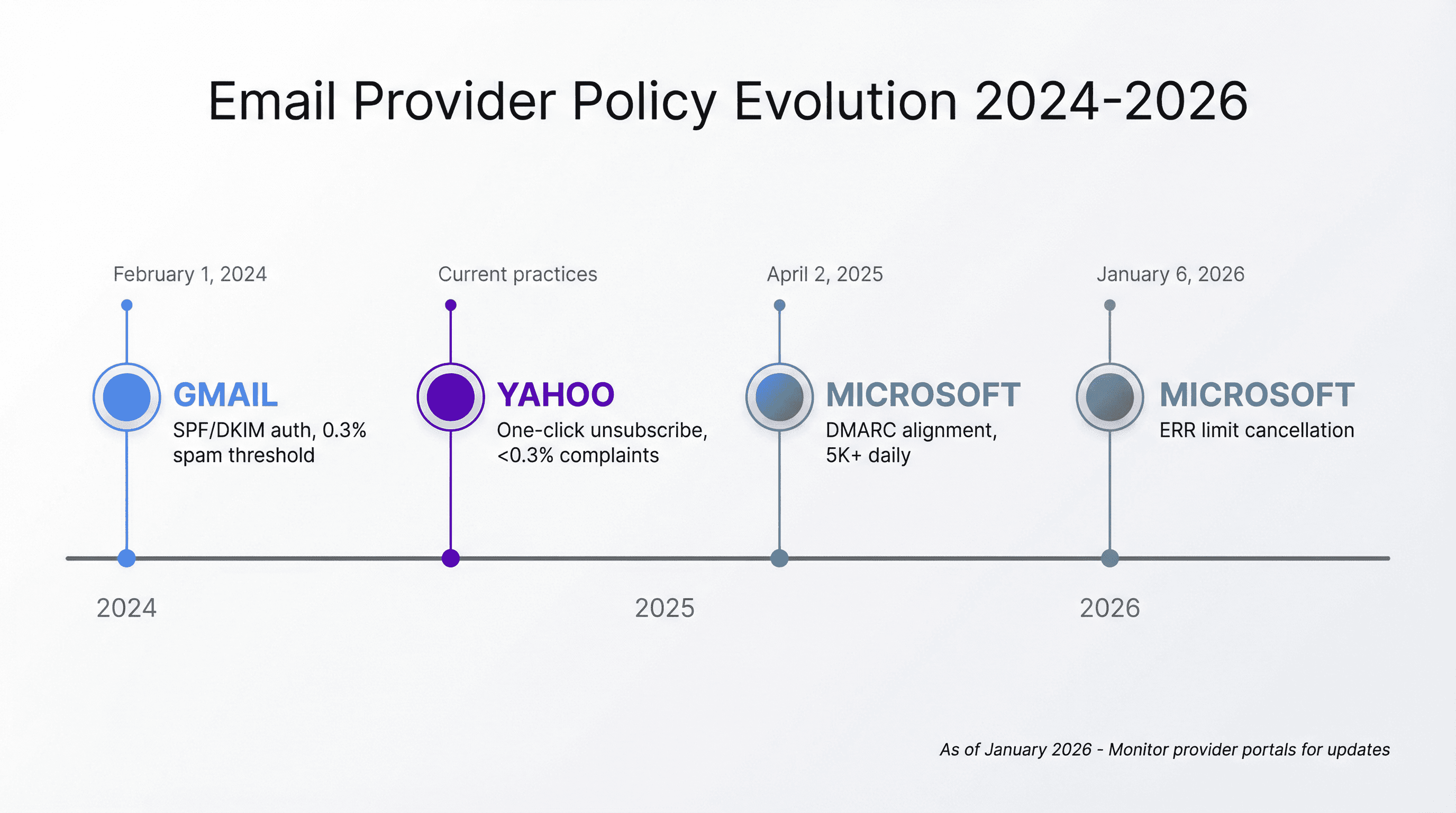
This guide reflects mailbox provider requirements and ecosystem guidance as of January 2026. Key policy dates referenced:
Gmail's February 1, 2024 sender requirements
Microsoft's April 2, 2025 Outlook.com high-volume sender requirements
Provider policies evolve. Monitor Google Postmaster Tools, Yahoo Sender Hub, and Microsoft sender support for updates.
Why Inbox Rotation Is Essential for Cold Email in 2026
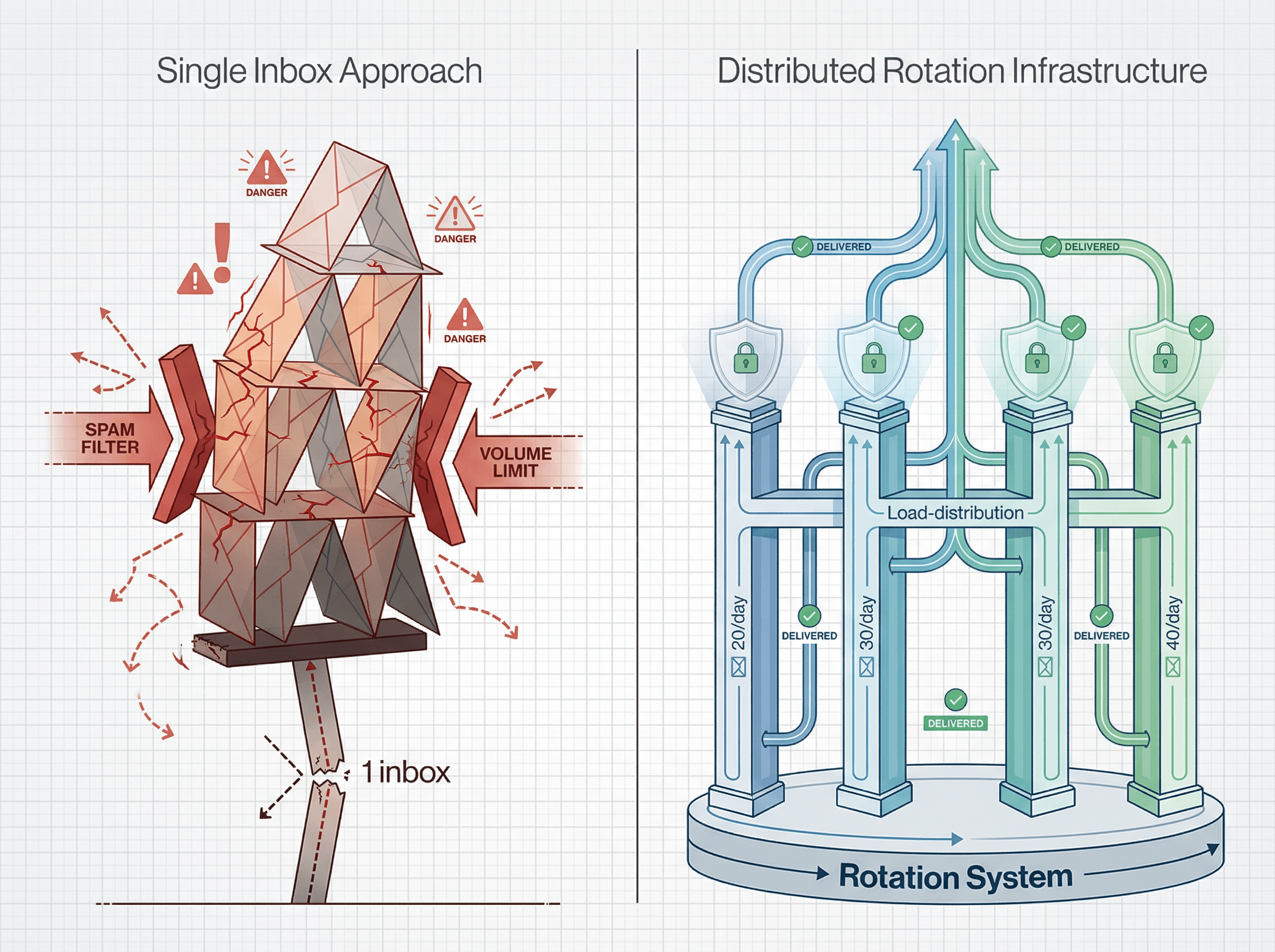
Inbox rotation has moved from "advanced tactic" to essential infrastructure for anyone doing serious cold email in 2026.
The math is straightforward: you can't hit volume targets from one inbox without destroying deliverability. The implementation takes planning, but modern tools make it achievable. The monitoring requires attention, but the frameworks exist.
What separates successful outbound sales programs from failed experiments isn't copy or targeting alone. It's the infrastructure discipline to send at scale while maintaining reputation. Understanding the difference between cold email vs email marketing helps clarify when rotation is necessary.
Master inbox rotation and you transform cold email into a controlled, scalable lead generation system. Given how strict email filters have become, this strategy has moved from nice-to-have to non-negotiable for B2B lead generation teams.
The companies winning with cold email in 2026 aren't sending the most volume. They're sending volume the smartest way. Inbox rotation is that foundation.
For more insights on cold emailing strategies and email outreach strategies that work in 2026, explore our blog or reach out to see how Outbound System's cold email agency can handle the complexity for you.