Sending cold emails without tracking their performance is like running a sales team blindfolded. You might close deals occasionally, but you won't know which tactics work or why they succeed.
The problem? Cold email tracking changed completely in the last few years. Privacy features like Apple's Mail Privacy Protection broke traditional metrics. Security bots now pre-click every link in your emails before human recipients even see them. And email providers like Google and Yahoo completely rewrote their sender requirements in 2024.
So if your "tracking system" is still a dashboard of open rates and click-through percentages, you're optimizing against distorted data.
This guide shows you how to track cold email campaigns in 2026 using metrics that actually work: deliverability signals, human engagement, meetings booked, and revenue attribution. We'll cover which metrics matter now (and which ones don't), how to set up tracking that survives privacy changes, and how to diagnose problems fast when performance drops.
All of this is based on what we've learned at Outbound System after sending 52M+ cold emails and generating $26M in closed revenue for 600+ B2B clients.
Why Cold Email Open Rates Don't Work Anymore
When someone searches "how to track cold email campaigns," they usually want three things:
1. Proof it's working (or not working)
Not "we sent 10,000 emails," but "we booked 14 qualified meetings and created $180K in pipeline."
2. Fast diagnosis
If results drop, they need to know immediately whether the problem is deliverability (emails not landing), targeting (wrong people), offer (people see it but don't care), or conversion (replies happen but meetings don't).
3. A repeatable system
A weekly scorecard they can run consistently, not a one-off report that takes three hours to assemble.
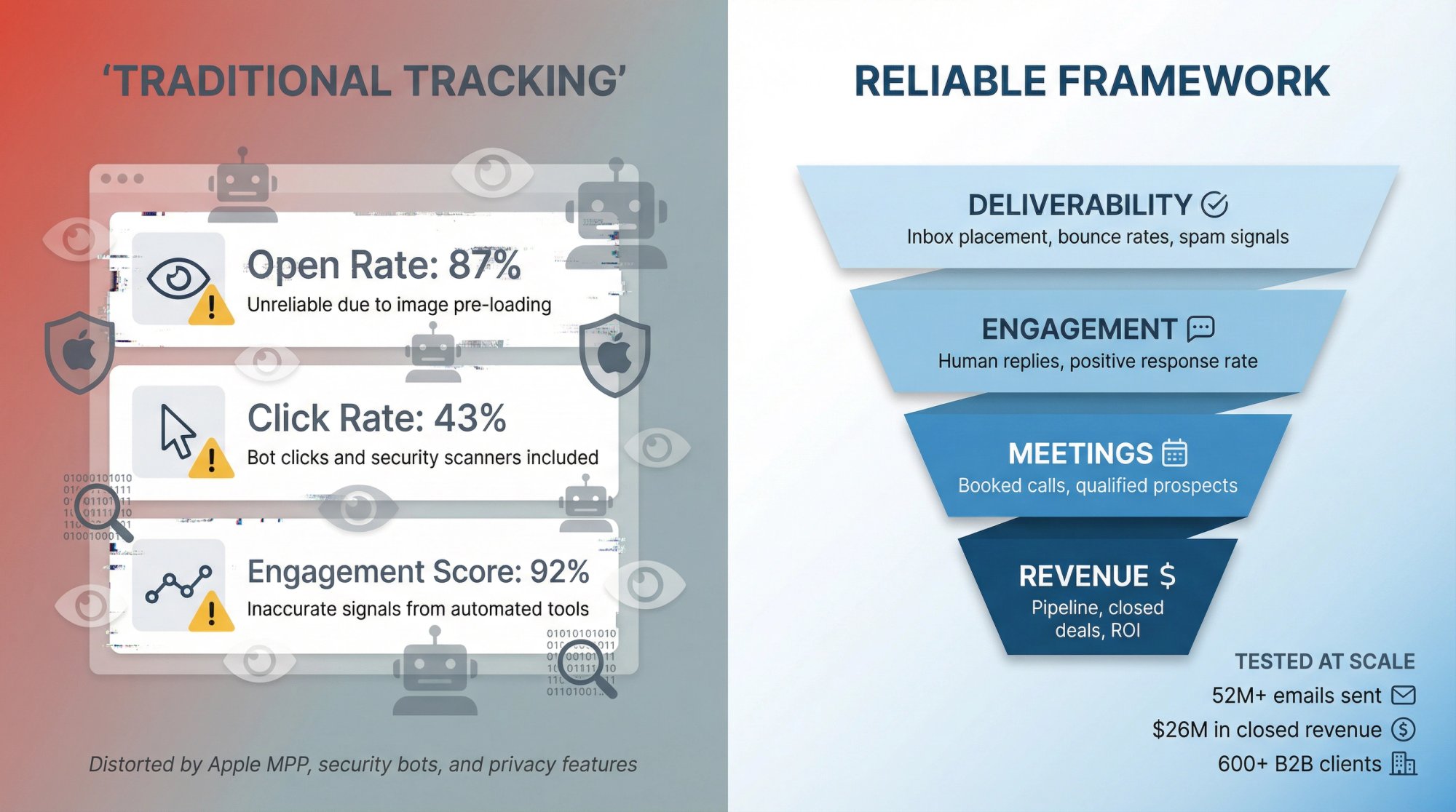
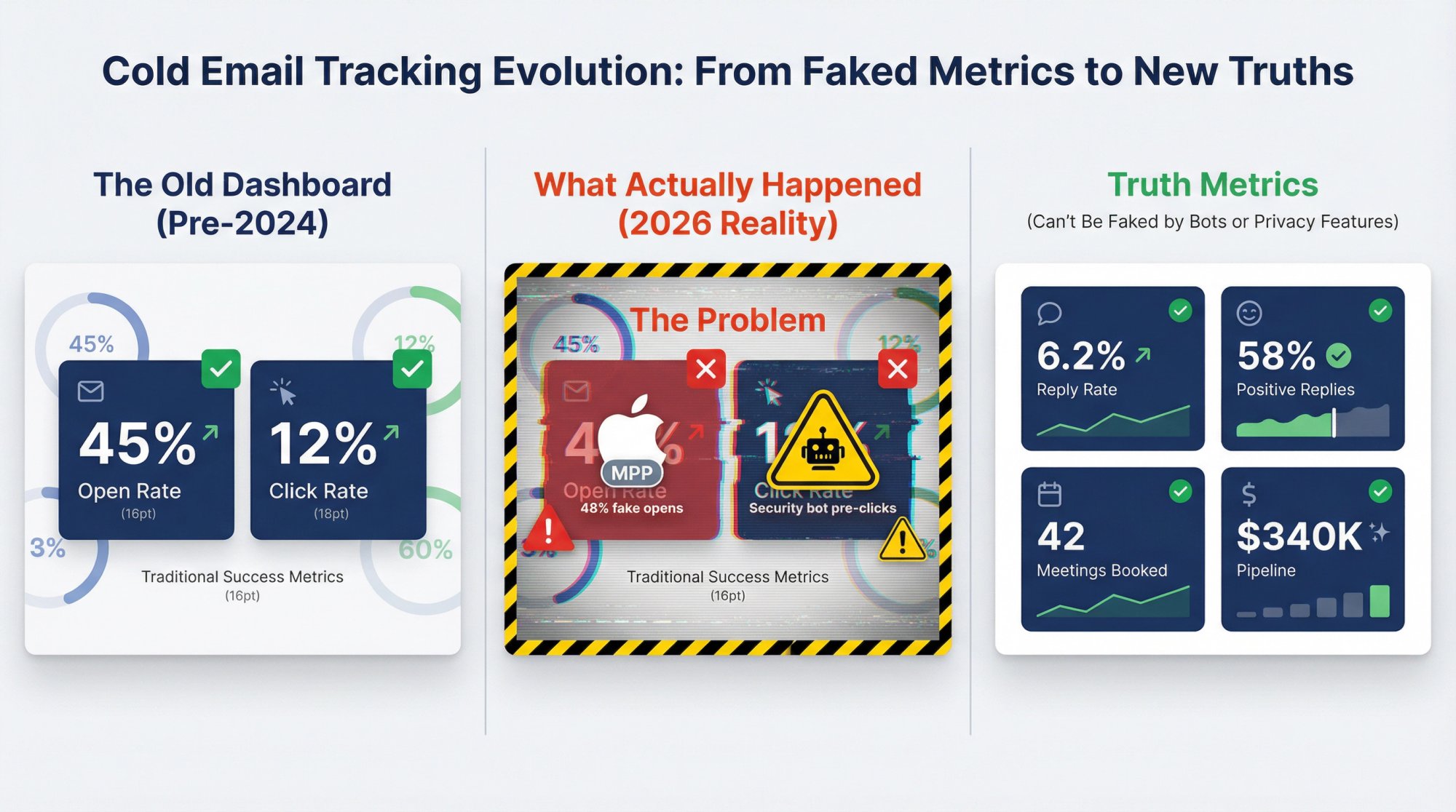
The hard truth: The classic "open rate + click rate" dashboard no longer gives you a reliable view of reality.
Apple's Mail Privacy Protection loads remote content in the background when emails arrive at the server, not when humans actually read them. Research shows you can't reliably distinguish real opens from Apple's prefetch behavior, which inflates unique open stats.
On top of that, clicks get polluted by security scanning. Mailbox providers and security layers often click every link automatically to check for malicious content before humans even see the email. You might see "5 opens and 3 clicks within 10 seconds of sending" from what looks like an interested prospect, but it's actually just a security filter doing its job.
So if your tracking is mostly opens and clicks, you're optimizing against phantom signals.
Here's what actually works in 2026:
This guide gives you a tracking system that still works in 2026: deliverability signals + human engagement + meetings + revenue attribution. We'll show you exactly what to measure, how to set it up, and how to diagnose problems when metrics shift.
Bottom line: If you can't track what happens after the inbox, your cold email analytics are just noise pretending to be insight.
What Metrics Actually Matter for Cold Email
Cold email is basically a measurement problem. You never observe "interest" directly. You observe signals.
Some signals are strong (a human reply asking questions). Some are weak (an open that might be Apple's privacy proxy). Some are noisy (a click that might be a bot scan).
So the goal isn't "track everything." The goal is:
→ Track the minimum set of signals that reliably predicts business outcomes
→ Separate diagnostic metrics (help you debug problems) from success metrics (what you optimize for)
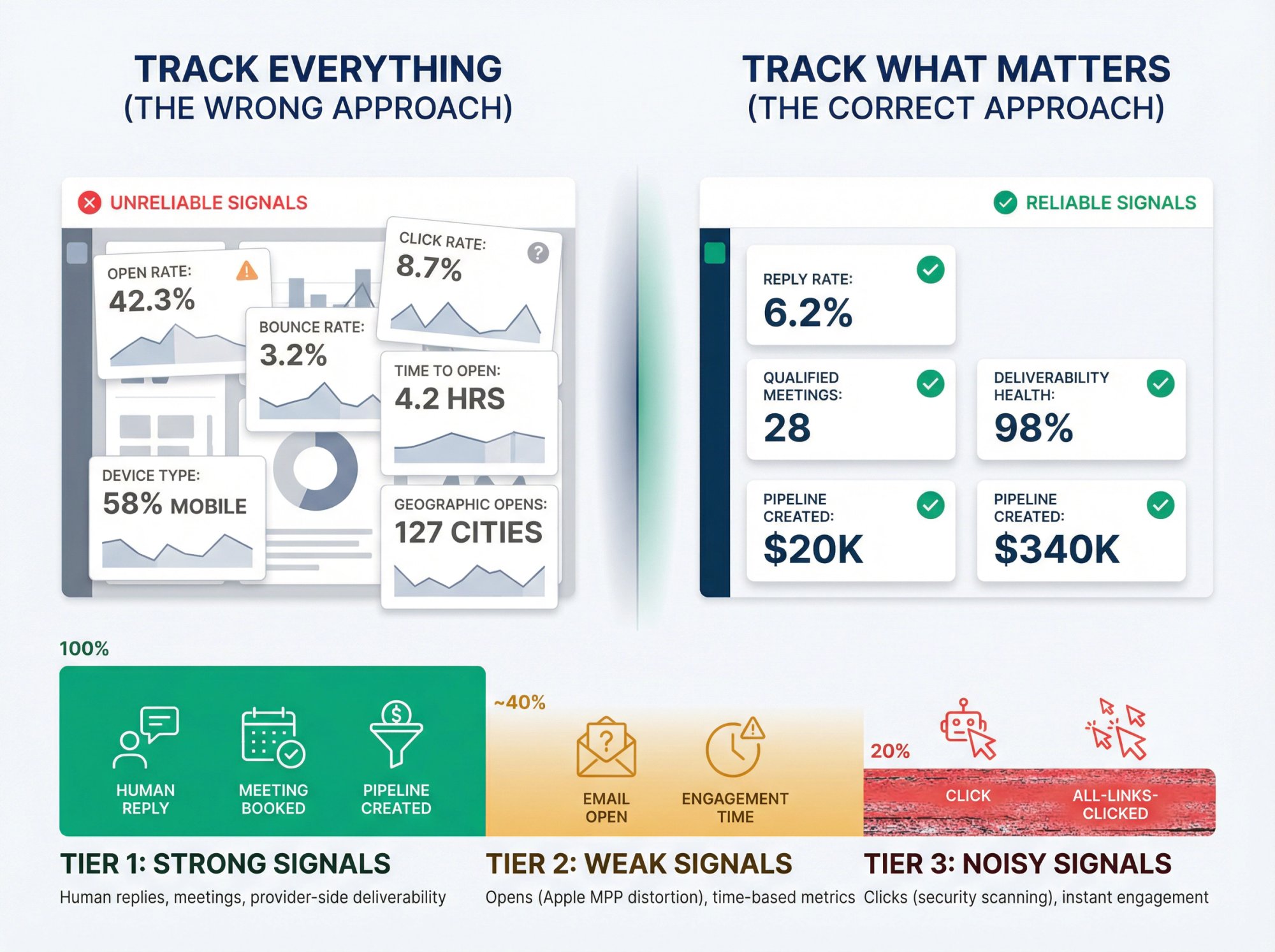
At Outbound System, we track what the market can't fake: replies, meetings, and provider-side deliverability health. As we explained in our blog, these metrics aren't distorted by Apple MPP or security bots.
Opens and clicks? We still look at them, but only as diagnostic hints, not success metrics.
The 4-Stage Cold Email Tracking Funnel
Track cold email like a pipeline, not like a newsletter. Here's the funnel that actually predicts business outcomes:
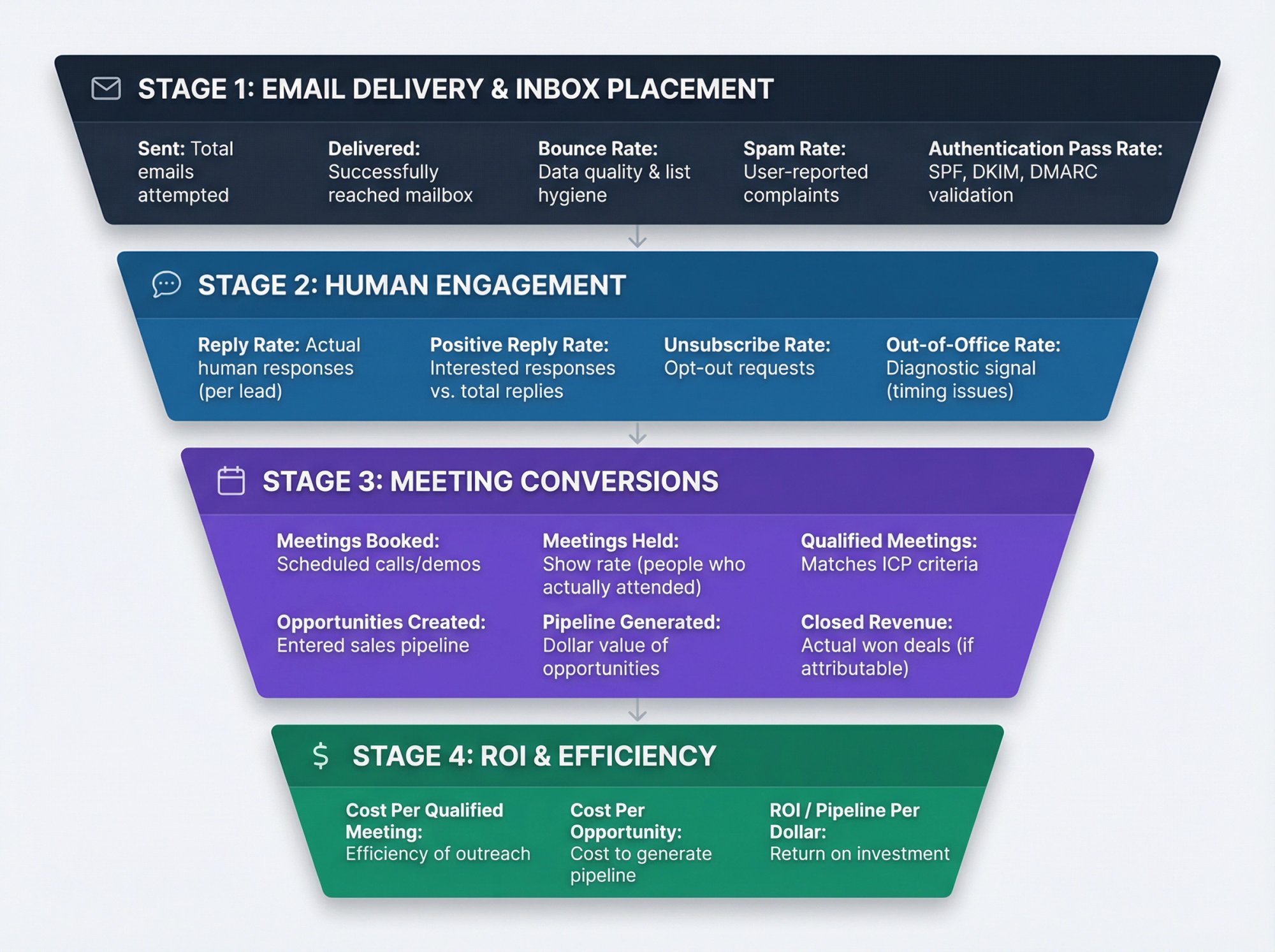
Stage 1: Email Delivery and Inbox Placement
You need to know: Did it reach the mailbox, and did it land in a reasonable folder?
Metric | What It Tells You |
|---|---|
Sent | Total emails attempted |
Delivered | Successfully reached a mailbox |
Bounce rate (hard + soft) | Data quality and list hygiene |
Spam rate | User-reported spam complaints |
Authentication pass rate | SPF, DKIM, DMARC validation |
Why this matters in 2026:
Google's sender guidelines explicitly tell bulk senders to monitor spam rate in Postmaster Tools and keep it below 0.10%, avoiding 0.30% or higher at all costs. Yahoo has similar requirements, enforcing spam complaint rates below 0.3% and requiring unsubscribes to be honored within 2 days.
If you send more than 5,000 messages per day to Gmail accounts, Google requires DMARC authentication and one-click unsubscribe for marketing messages. Learn more about setting up DMARC, DKIM, and SPF for proper authentication.
Stage 2: How to Track Human Engagement
You need to know: Did a human do something meaningful?
Metric | What It Tells You |
|---|---|
Reply rate | Actual human responses (per lead) |
Positive reply rate | Interested responses vs. total replies |
Unsubscribe rate | Opt-out requests |
Out-of-office rate | Diagnostic signal (timing issues) |
Stage 3: Tracking Meeting Conversions
You need to know: Did replies turn into meetings?
Metric | What It Tells You |
|---|---|
Meetings booked | Scheduled calls/demos |
Meetings held | Show rate (people who actually attended) |
Qualified meetings | Matches your ICP criteria |
Opportunities created | Entered sales pipeline |
Pipeline generated | Dollar value of opportunities |
Closed revenue | Actual won deals (if attributable) |
For more on optimizing your B2B appointment setting process, see our complete guide.
Stage 4: Cold Email ROI and Efficiency
You need to know: Is this worth scaling?
Metric | What It Tells You |
|---|---|
Cost per qualified meeting | Efficiency of your outreach |
Cost per opportunity | Cost to generate pipeline |
ROI / pipeline per dollar | Return on investment |
How to Define Cold Email Metrics Correctly
Most cold email dashboards lie because the definitions are sloppy.
Here's how to define metrics so they actually mean something:
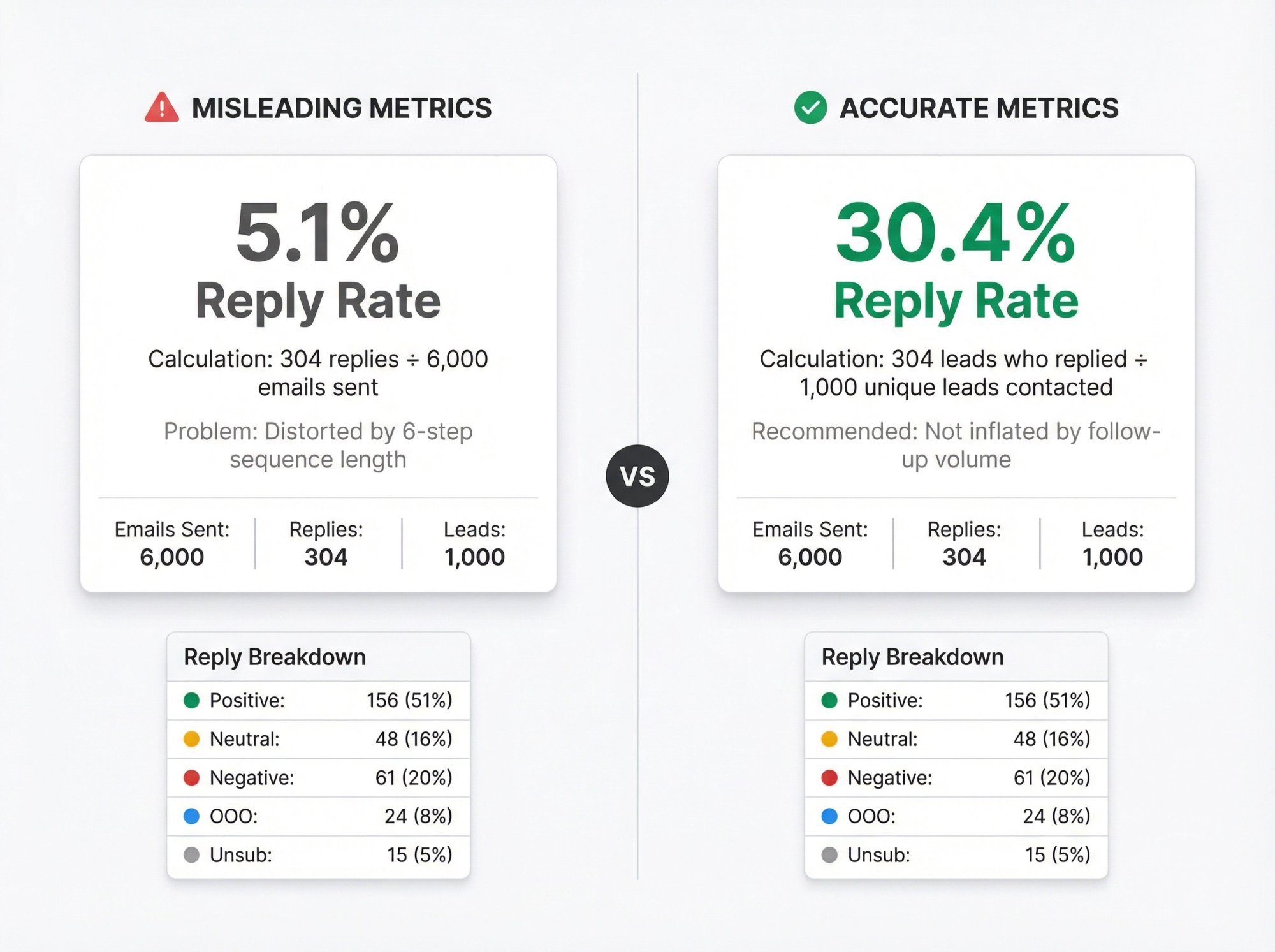
What Is Reply Rate? (3 Different Definitions)
Pick one and standardize it across your team:
1. Reply rate per email
Replies / total emails sent
Problem: Gets distorted by sequence length. A 6-step sequence inflates the denominator.
2. Reply rate per delivered email
Replies / delivered emails
Better, but still distorted by sequence length.
3. Reply rate per lead (recommended)
Leads who replied at least once / unique leads contacted
This is the cleanest "did this person respond to the campaign" metric. We use this definition at Outbound System because it treats reply and meeting metrics as the core truth.
Critical insight: Reply rate per lead is the clearest signal of campaign effectiveness because it's not inflated by follow-up volume and can't be faked by bots or privacy features.
How to Calculate Positive Reply Rate
Your tool will count these as "replies," but they should NOT count as success:
Out-of-office auto-replies
"Unsubscribe" replies
"Wrong person" replies
Angry replies
Spam complaints
So you need a classification layer:
Category | Example |
|---|---|
Positive | "Interested, let's talk next week" |
Neutral | "Not right now, circle back in Q2" |
Negative | "Not interested, please remove me" |
OOO / Auto | "Out of office until Monday" |
Unsubscribe | "Take me off your list" |
Other | Unclear or spam |
Industry data suggests a positive reply rate above 50% of total replies is a strong benchmark. If you're getting lots of replies but most are negative, you have a targeting or messaging problem.
Should You Track Open Rates and Clicks in 2026?
Let's be clear about what these metrics can and can't tell you anymore.
Open Rates: What They're Actually Measuring Now
Apple's Mail Privacy Protection hides recipient IP addresses and downloads remote content in the background when emails arrive, not when humans read them.
Research shows you can't reliably differentiate real opens from Apple prefetch behavior, and opens can be artificially inflated. With Apple Mail holding roughly 48% market share of email clients, this isn't a small problem.
Use opens for:
• Spotting "something is deeply wrong" (near-zero opens across the board can suggest blocking or severe deliverability issues)
• Directional A/B sanity checks if your audience isn't heavily Apple Mail, but assume distortion
Do NOT use opens for:
• Deciding who to follow up with ("non-openers" is no longer a clean segment)
• Measuring message-market fit
• Declaring campaign success
As we documented in our analysis, average open rates rose from 16.7% to 19.0% after Apple MPP launched, while actual engagement (clicks and replies) stayed flat. The opens were phantom signals.
Click Tracking: Bots vs. Real Clicks
Mailbox providers and security layers often click links during scanning to evaluate safety, which is not human engagement. You'll sometimes see every link in an email clicked within seconds of sending before the recipient even opens it.
Research has documented similar behavior, noting security tools and filters scan links and inflate engagement metrics. Microsoft Defender Safe Links explicitly scans and rewrites URLs with time-of-click verification.
Use clicks for:
• Validating that links are reachable
• Identifying segments where link scanning is happening (often enterprise security environments)
• Secondary signal when paired with downstream conversion (booked meeting)
Do NOT use clicks alone for:
• Lead scoring ("they clicked so they're hot" might be a bot)
• Automations that trigger aggressive follow-ups
Practical fix:
If you track clicks, also track:
• Time-to-click (bot clicks often happen immediately)
• Click distribution (every link clicked in the email is suspicious)
• User agent / bot filtering (if your platform supports it)
Best Cold Email Tracking Tools and Tech Stack
You don't need expensive tools to start tracking correctly. Here's how to build your stack based on where you are:
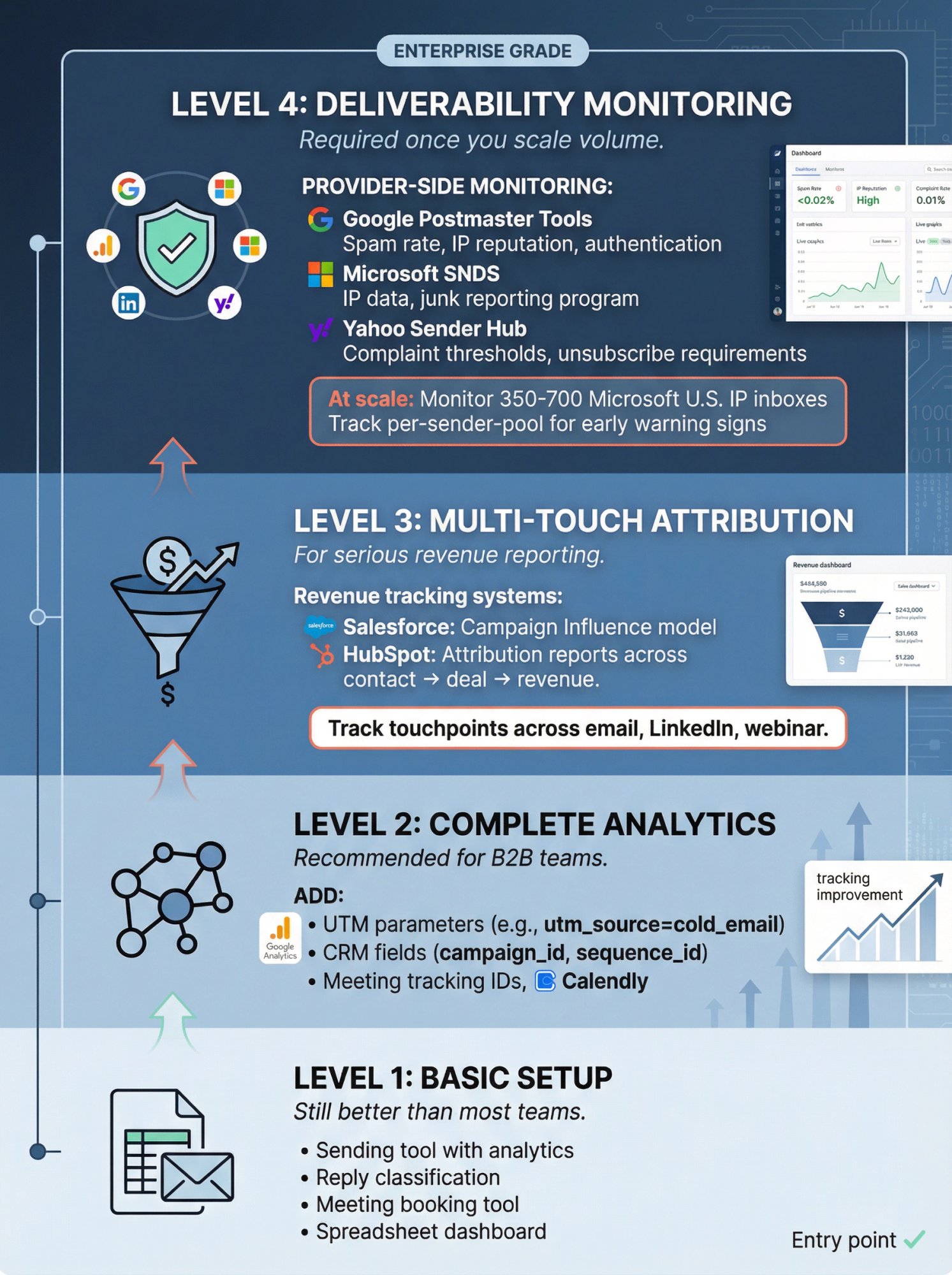
Level 1: Basic Cold Email Tracking Setup
Still better than most teams
What you need:
• A sending tool with analytics (sent, bounced, replies)
• A reply classification method (manual tagging or simple rules)
• A meeting booking source of truth (Calendly, HubSpot Meetings, Chili Piper, etc.)
• A spreadsheet or simple dashboard
This is enough to run cold email profitably if your definitions are tight and you review weekly.
Level 2: Complete Cold Email Analytics
Recommended for B2B teams
Add:
→ UTM parameters on any links you include
Google Analytics uses UTM parameters to identify campaigns that refer traffic. Calendly supports UTMs (utm_source, utm_medium, utm_campaign) for source tracking before someone books, with values under 255 characters.
→ CRM fields for campaign and sequence metadata
Store campaign_id, sequence_id, variant, segment, offer, sender_pool on contact records.
→ Meeting tracking IDs into CRM
Connect meetings back to the exact campaign that generated them.
Level 3: Multi-Touch Attribution for Revenue
For serious revenue reporting
If you run Salesforce:
Use Campaign Influence to attribute influence across campaigns and opportunities. This lets you see which touchpoints (email, LinkedIn, webinar, etc.) contributed to closed deals.
If you run HubSpot:
Build attribution reports across contact create, deal create, and revenue to see top/mid/bottom funnel impact.
Level 4: Email Deliverability Monitoring
Required once you scale volume
You need provider-side reputation and spam signals:
Google:
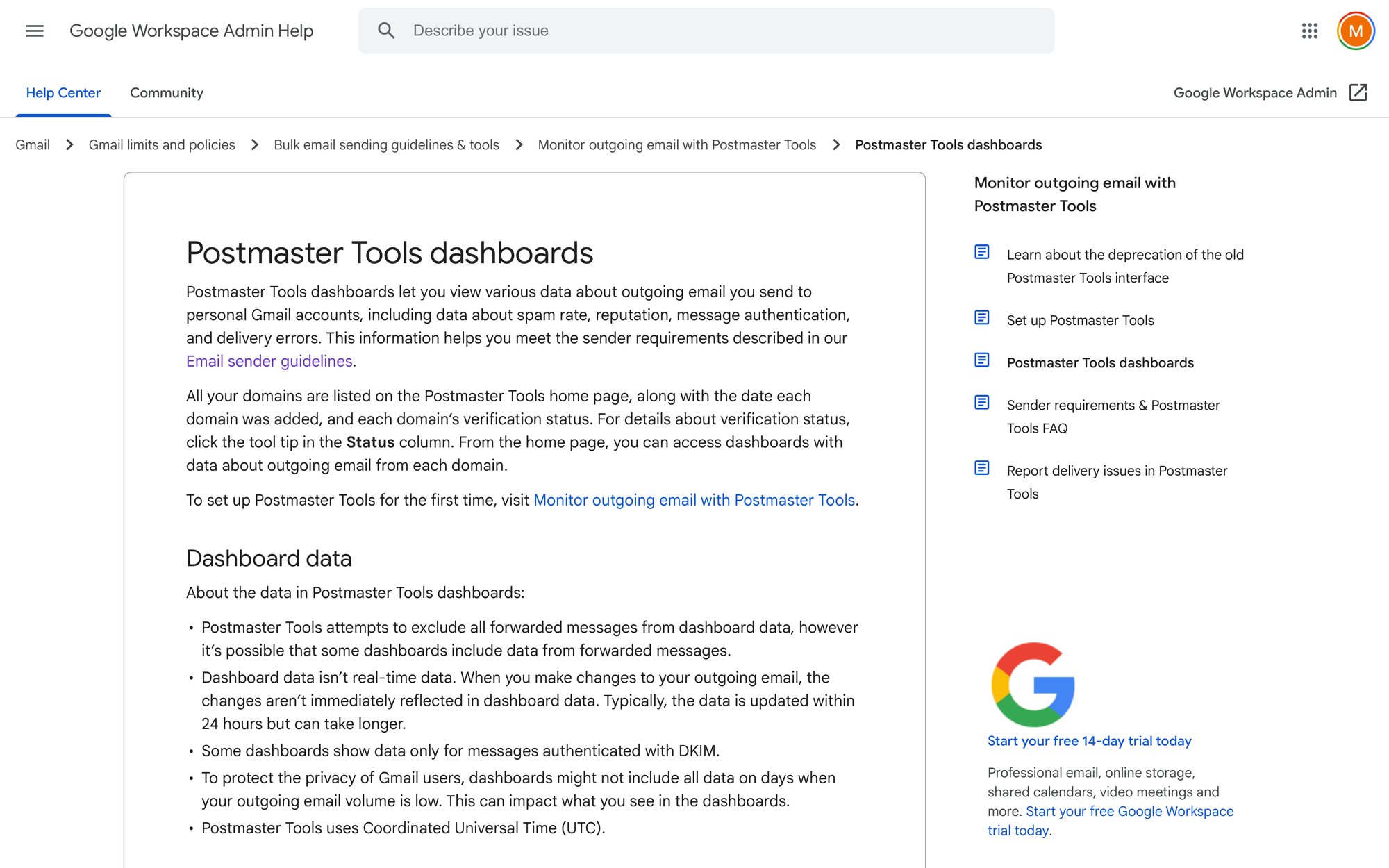
Postmaster Tools dashboards cover compliance status, spam rate, IP reputation, authentication, encryption, and more.
Microsoft (Outlook.com/Hotmail/Live):
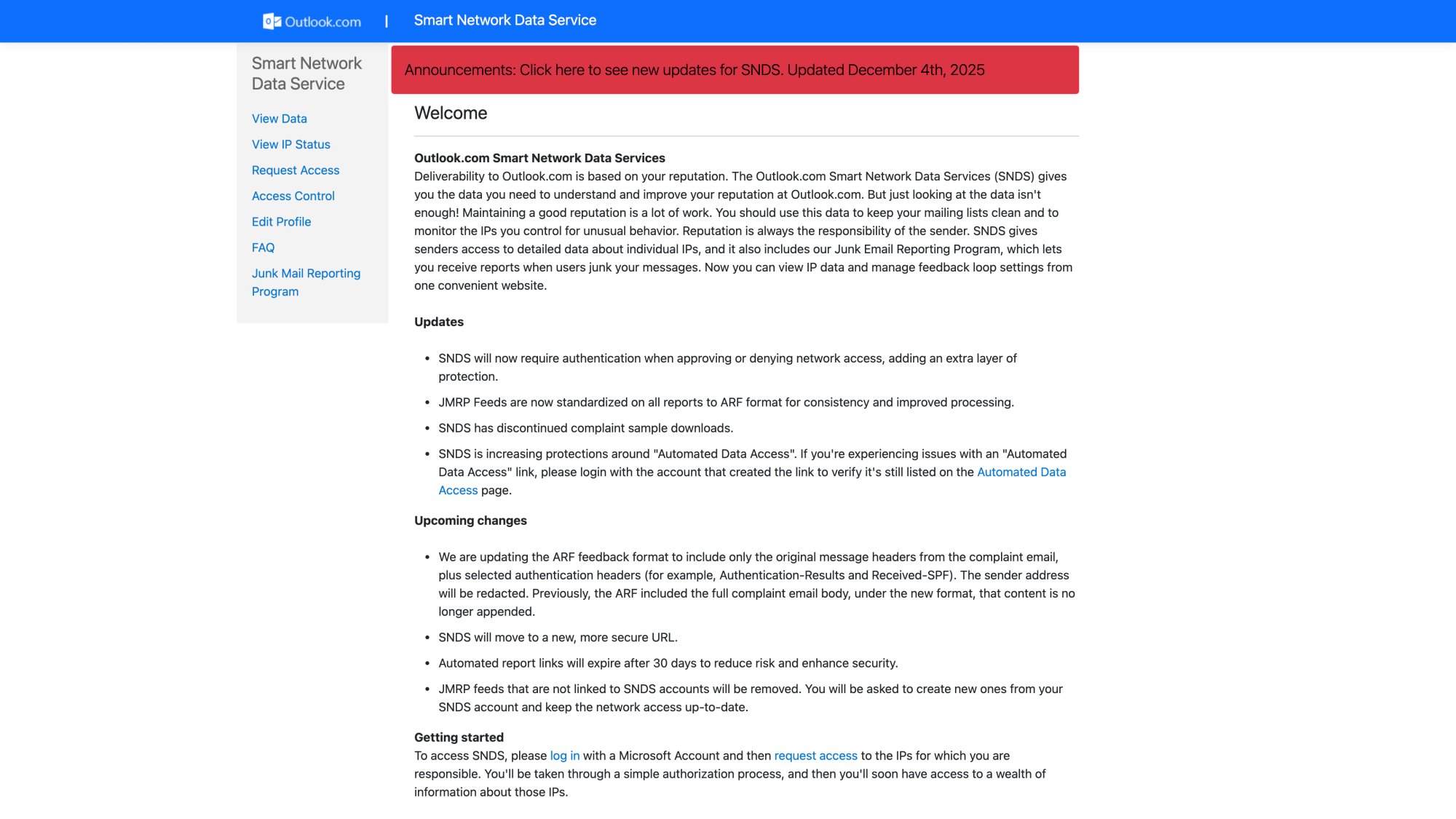
SNDS provides data about IPs and includes a junk email reporting program.
Yahoo:
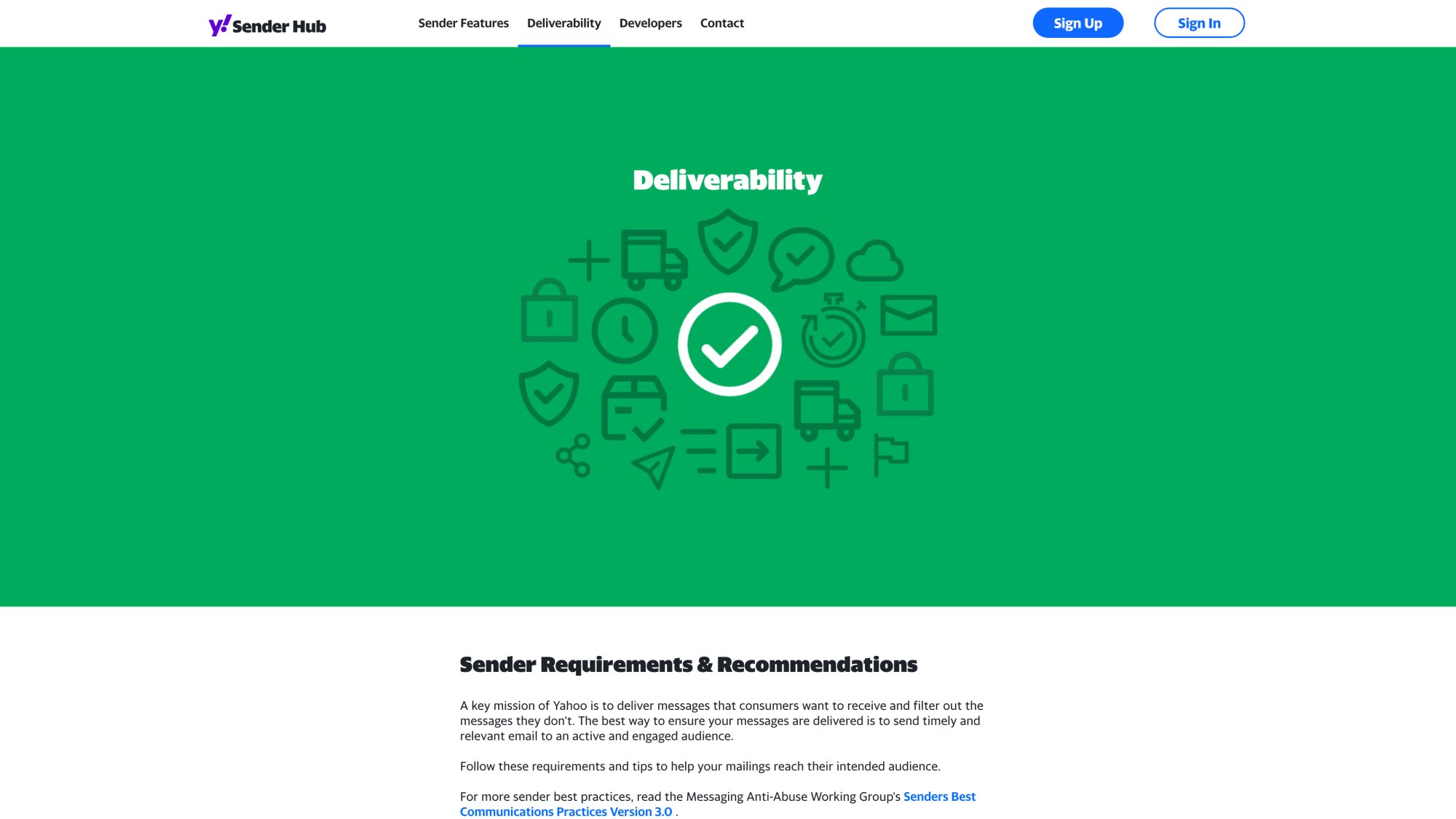
Sender Hub lays out spam complaint thresholds and unsubscribe requirements.
At Outbound System, we monitor these provider-side metrics across 350-700 Microsoft U.S. IP inboxes depending on the client tier. Learn more about why we use Microsoft Azure servers for cold email deliverability, because distributed sending patterns require per-sender-pool tracking to catch early warning signs.
How to Set Up Cold Email Tracking (Step-by-Step)
This is the part most guides skip. Here's how to set up a tracking system that survives privacy changes and bot activity:
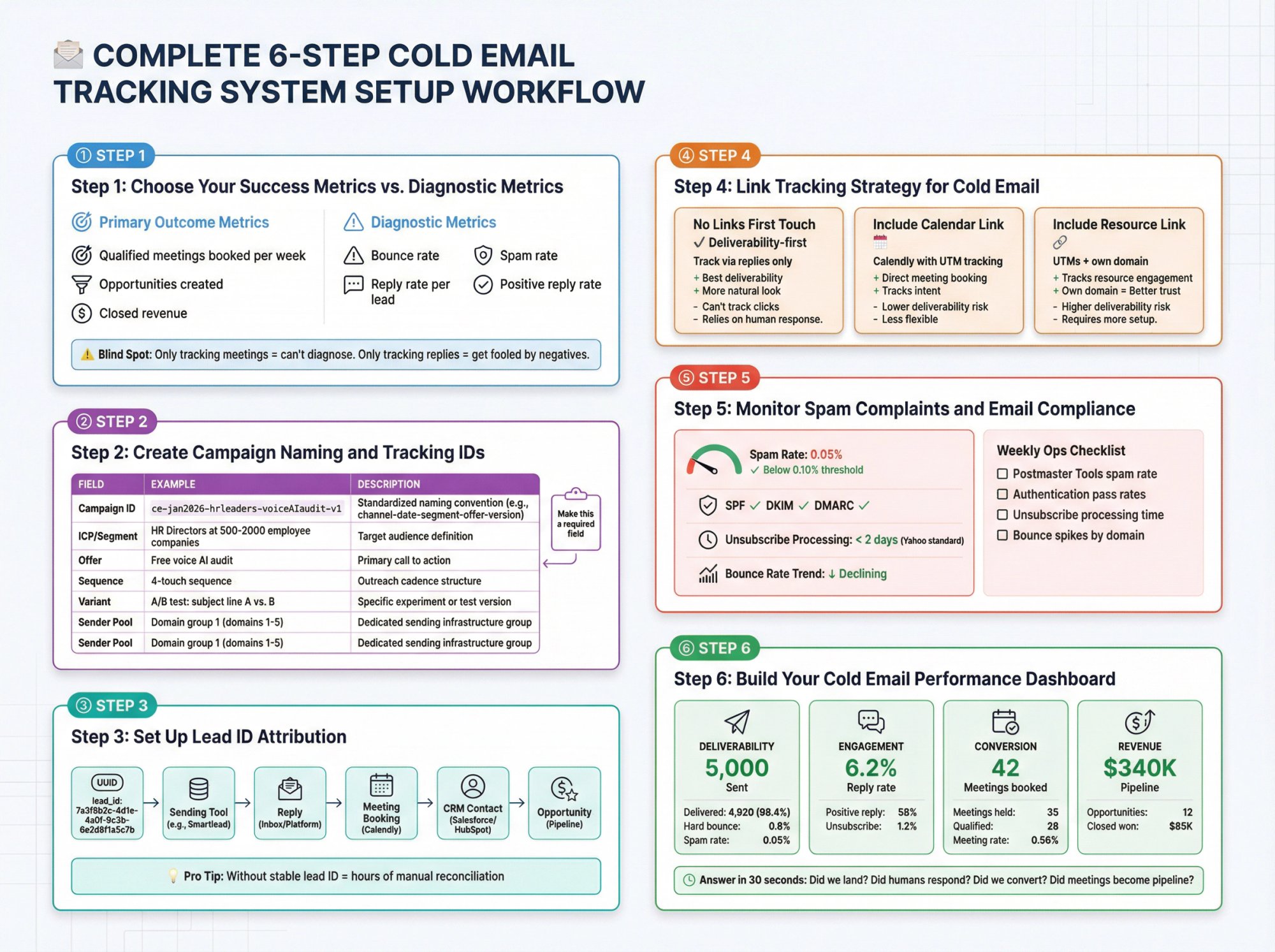
Step 1: Choose Your Success Metrics vs. Diagnostic Metrics
Pick one primary outcome metric:
• Qualified meetings booked per week (most common)
• Opportunities created
• Pipeline created
• Closed revenue
Then choose diagnostic metrics to debug:
① Bounce rate (data quality)
② Spam rate (sender reputation)
③ Reply rate per lead (inbox placement + message fit)
④ Positive reply rate (targeting quality)
⑤ Meeting rate from positive replies (conversion effectiveness)
Blind spot to avoid:
If you only track meetings, you won't know whether a drop is deliverability or offer. If you only track replies, you can "win" by getting lots of negatives. You need both.
Step 2: Create Campaign Naming and Tracking IDs
Every email event should be attributable to:
Field | Example |
|---|---|
Campaign ID | ce-jan2026-hrleaders-voiceAIaudit-v1 |
ICP / Segment | HR Directors at 500-2000 employee companies |
Offer | Free voice AI audit |
Sequence | 4-touch sequence |
Variant | A/B test: subject line A vs. B |
Sender Pool | Domain group 1 (domains 1-5) |
Your future self will thank you for this structure when you're analyzing 10 campaigns six months from now.
Make this a required field in your sending tool and CRM.
Step 3: Set Up Lead ID Attribution
If you want clean attribution, you need a stable ID that flows through:
→ Sending tool
→ Reply
→ Meeting booking
→ CRM contact
→ Opportunity
Pro tip: Without a stable lead ID that connects every touchpoint, you'll spend hours manually reconciling data between systems. Build this infrastructure once and save yourself countless spreadsheet headaches.
Common pattern:
① Generate a lead_id (UUID format)
② Store it in CRM
③ Include it in your sending tool custom fields
④ Optionally include it in links as a parameter
This is the secret to tracking a prospect from first email through closed deal without losing them in your systems.
Step 4: Link Tracking Strategy for Cold Email
Cold email differs from marketing email here. You have three approaches:
Option A: No links in first touch (deliverability-first)
Track via replies and meetings.
• CTA is "Worth exploring?" or "Open to a quick chat?"
• Send scheduling link only after interest
Pros: Better deliverability, fewer bot clicks, fewer spam triggers
Cons: Less "attribution" via web analytics, but you gain signal quality
Option B: Include a calendar link
If you include a meeting link, make it trackable. Calendly supports UTM tracking for source attribution.
Option C: Include a resource link
If you include a case study or page:
• Use UTMs
• Use your own domain (third-party shorteners trigger more scanning)
• Treat click data cautiously because of security scanners
Step 5: Monitor Spam Complaints and Email Compliance
If you send volume, your tracking stack must include provider-side metrics.
Google explicitly says to monitor spam rate in Postmaster Tools and keep it below 0.10%, avoiding 0.30% or higher. They define extra requirements for senders who exceed 5,000 messages per day to Gmail accounts, including DMARC and one-click unsubscribe.
Yahoo enforces similar standards and calls out honoring unsubscribes within 2 days.
Add these to your weekly ops checklist:
✓ Postmaster Tools spam rate trend
✓ Authentication pass rates (SPF, DKIM, DMARC)
✓ Unsubscribe processing time
✓ Bounce spikes by sender domain
Learn more about email outreach compliance rules and reducing email bounce rates.
Step 6: Build Your Cold Email Performance Dashboard
Your dashboard should answer, in 30 seconds:
① Did we land?
② Did humans respond?
③ Did we convert to meetings?
④ Did meetings become pipeline?
Here's a simple scorecard structure you can set up in any BI tool or spreadsheet:
Deliverability
• Sent: 5,000
• Delivered: 4,920 (98.4%)
• Hard bounce: 0.8%
• Spam rate: 0.05%
Engagement
• Reply rate per lead: 6.2%
• Positive reply rate: 58%
• Unsubscribe rate: 1.2%
Conversion
• Meetings booked: 42
• Meetings held: 35 (83% show rate)
• Qualified meetings: 28
• Meeting rate per lead: 0.56%
Revenue
• Opportunities created: 12
• Pipeline created: $340K
• Closed won: $85K (so far)
At Outbound System, we provide this as a unified inbox with real-time metrics so you can see these numbers live without building dashboards yourself.
How to Diagnose Cold Email Performance Problems
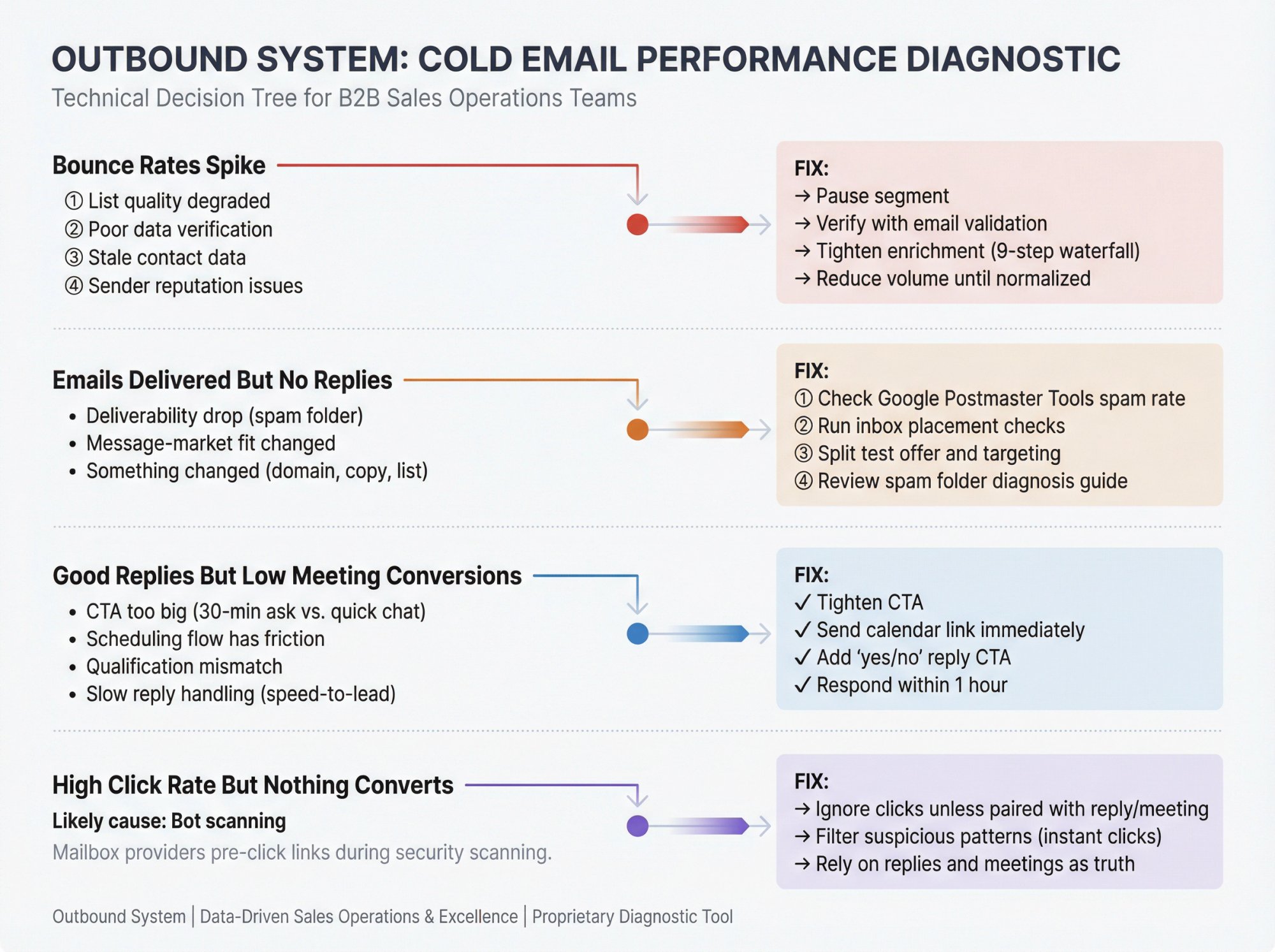
This is the part that saves you weeks. When performance drops, use this decision tree to diagnose fast:
What to Do When Bounce Rates Spike
Likely causes:
① List quality degraded
② New data source with poor verification
③ Targeting a segment with stale contact data
④ Sender reputation issues leading to deferrals and failures
Fix:
→ Pause the segment
→ Verify list with email validation tools
→ Tighten enrichment process (at Outbound System, we use 9-step waterfall enrichment to minimize bounces)
→ Reduce volume until bounce rate normalizes
Emails Delivered But No Replies
Likely causes:
• Deliverability drop you're not measuring (spam folder)
• Message-market fit changed
• You changed something (domain, warmup, copy, list source)
Fix:
① Check provider spam rate and reputation dashboards (Google Postmaster Tools)
② Run inbox placement checks if you have them
③ Split test offer and targeting (not just subject line)
④ Review our guide on how to fix cold emails going to spam
Good Reply Rate But Low Meeting Conversions
Likely causes:
• CTA is too big (asking for 30-minute meeting instead of quick chat)
• Scheduling flow has friction
• Qualification mismatch
• Reply handling is slow (speed-to-lead matters)
Fix:
✓ Tighten CTA
✓ Reduce steps to book (send calendar link immediately)
✓ Add a "two-option" reply CTA: "Is this relevant, yes/no?"
✓ Improve speed-to-lead (respond within 1 hour)
✓ Check our proven cold email follow-up tactics for conversion optimization
High Click Rate But Nothing Converts
Likely cause: Bot scanning
Mailbox providers may pre-click links during scanning, which is not engagement.
Fix:
→ Ignore clicks unless paired with downstream actions (reply or meeting)
→ Filter suspicious clicks (instant, all-links-clicked patterns)
→ Rely on replies and meetings as truth
Cold Email Compliance Tracking Requirements
You should track compliance events because they affect deliverability and risk.
Minimum compliance tracking:
• Unsubscribe requests
• Suppression list integrity
• Time-to-honor unsubscribe
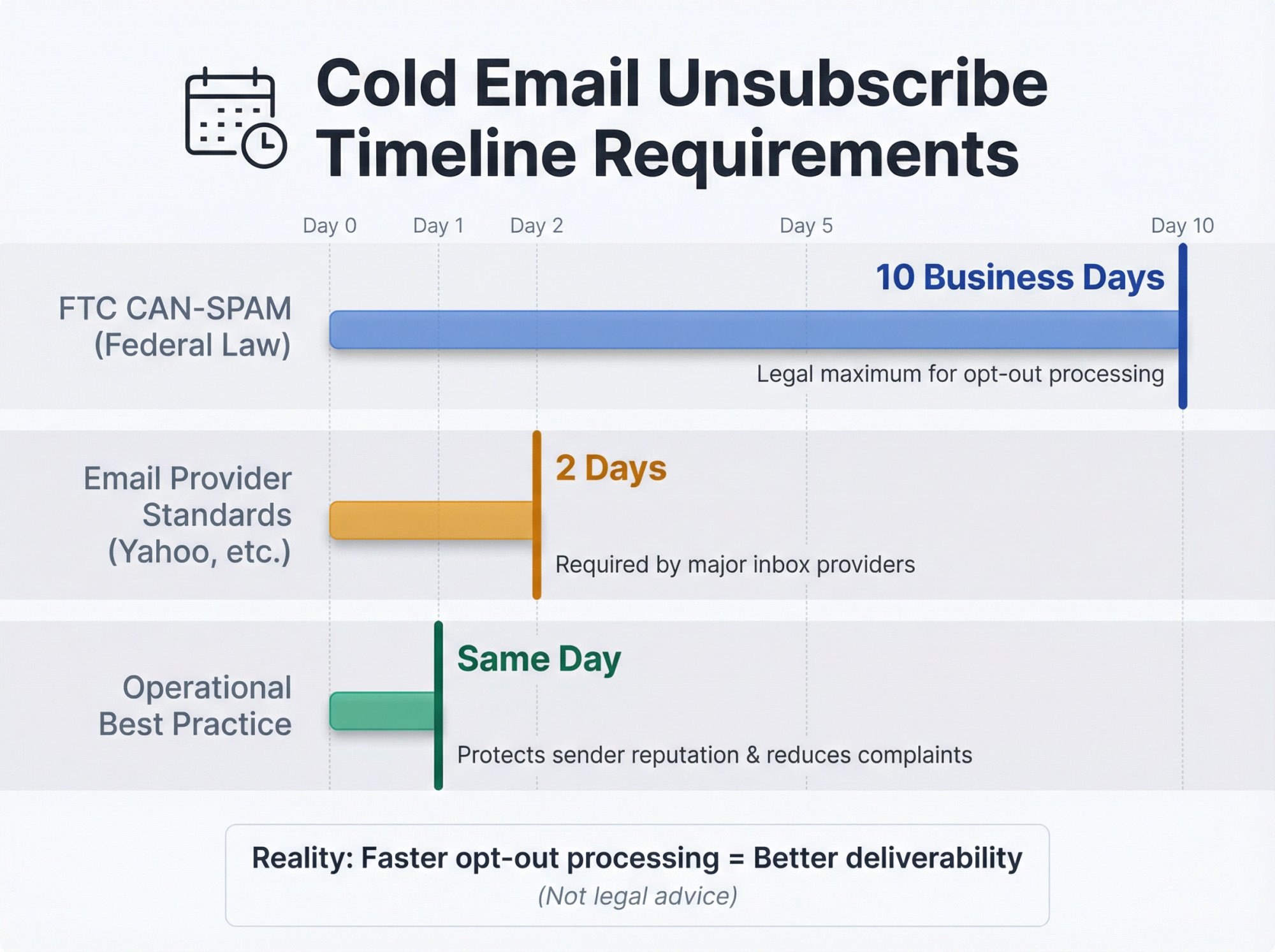
In the U.S., the FTC's CAN-SPAM compliance guidance requires honoring opt-out requests within 10 business days. But mailbox providers push faster timelines for deliverability. Learn more about CAN-SPAM cold email requirements.
Yahoo explicitly calls out 2 days for unsubscribe processing.
Operational reality: Faster opt-out handling usually reduces spam complaints and protects sender reputation. Not legal advice, but faster is better for deliverability.
Cold Email Tracking Templates You Can Copy
These are the building blocks of a real tracking system. Use them directly or adapt to your workflow.
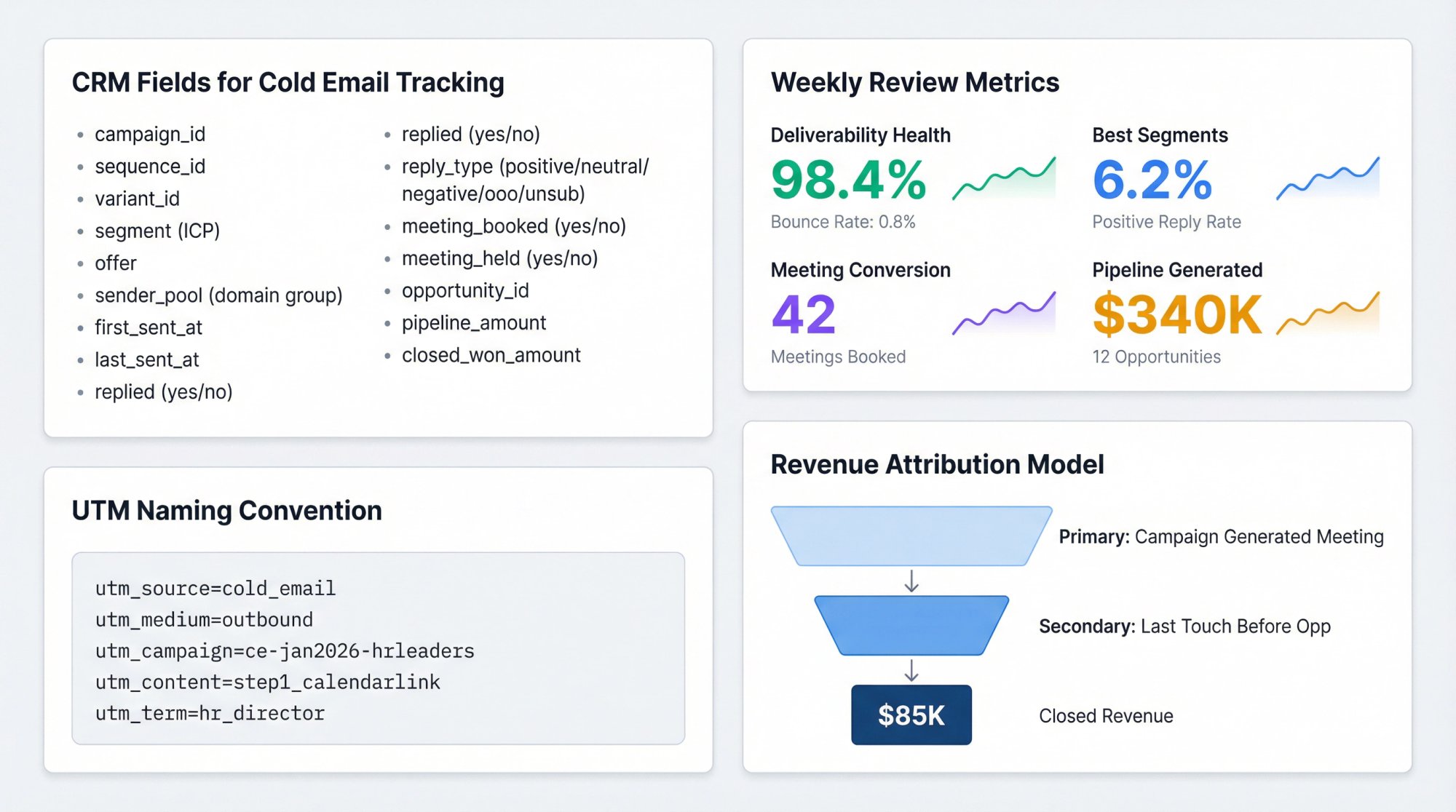
Template 1: CRM Fields for Cold Email Tracking
Add these fields in your CRM (contact or lead object) and in your sending tool:
• campaign_id
• sequence_id
• variant_id
• segment (ICP)
• offer
• sender_pool (domain group)
• first_sent_at
• last_sent_at
• replied (yes/no)
• reply_type (positive/neutral/negative/ooo/unsub)
• meeting_booked (yes/no)
• meeting_booked_at
• meeting_held (yes/no)
• opportunity_id
• pipeline_amount
• closed_won_amount
Template 2: Weekly Cold Email Review Agenda
30 minutes to stay on top of performance
① Deliverability health (spam rate trend, bounces)
② Best performing segments (positive reply per lead)
③ Worst performing segments (diagnose root cause)
④ Meeting conversion rate (positive reply → meeting)
⑤ Decide next week's experiments (maximum 2 tests)
Template 3: UTM Naming Convention for Cold Email
Use UTMs consistently so your CRM and analytics are usable.
Example:
Google Analytics' URL builder is designed for campaign attribution using utm parameters. Calendly notes UTM values should be under 255 characters.
Template 4: Cold Email Revenue Attribution Model
If you want a clean story without perfect multi-touch modeling, use:
Primary attribution: Campaign that generated the meeting
Secondary attribution: Last outbound touch before opportunity creation
Audit: If multiple campaigns touched the account, use influence reporting (Salesforce Campaign Influence is built for this)
How Outbound System Tracks Cold Email Performance
Our bias is simple: track what the market cannot fake.
Replies and meetings are not distorted by Apple MPP (opens are). Spam rate and authentication are the true "email health" metrics once you scale (Google explicitly tells you to watch Postmaster Tools spam rates). Clicks are treated carefully because of security scanning and automation.
We've seen this work at scale: 98% inbox placement and 6-7% response rates across 52M+ emails sent.
If you're running multi-inbox infrastructure like we do (350-700 Microsoft U.S. IP addresses depending on the plan), tracking also has to be per sender pool, not just per campaign. If you don't do that, you'll miss the early warning signs when one domain group starts degrading.
We provide every client with:
✓ Unified inbox (all prospect replies in one place)
✓ Real-time metrics dashboard (deliverability, engagement, conversion)
✓ A/B testing capabilities (built into the platform)
✓ Dedicated account strategist (analyzes data and recommends next steps)
If you're spending more time managing tracking dashboards than closing deals, we should talk.
Frequently Asked Questions
Should I track open rates at all?
Use opens only as a diagnostic hint, not a success metric. Apple MPP downloads remote content in the background and research shows opens can be unreliable and inflated.
A very low open rate (<15%) can signal a problem (deliverability or unappealing subject), but a high open rate doesn't always mean real human engagement.
What's the single most important deliverability metric to track?
If you have access, track user-reported spam rate (provider-side). Google explicitly says to monitor Postmaster Tools spam rates and keep them below 0.10%, avoiding 0.30% or higher.
This is the metric that determines whether your domain gets blocklisted.
Why do I see clicks instantly after sending?
Often security scanning. Mailbox providers and security tools pre-click links to validate safety, which research has shown is a real source of distorted engagement metrics.
If you see every link clicked within seconds of sending, it's almost certainly a bot.
How do I track meetings booked from cold email?
Use tracking IDs or UTMs on your scheduling links if you include them. Calendly supports UTM source tracking and lets you filter/export meetings by tracking IDs.
Or use the reply classification method (if someone replied positively and you sent them a calendar link, that meeting came from cold email).
Can I trust my click data?
Not entirely. Filter out:
• Instant clicks (within seconds of sending)
• All-links-clicked patterns (bot scanning)
• Enterprise domains (often have aggressive security layers)
Treat clicks as a weak signal unless paired with a reply or meeting.
What's a good reply rate benchmark?
Industry data for 2025 suggests 8.5% average reply rate for cold email campaigns, though this varies widely by targeting and offer.
At Outbound System, we typically see 6-7% response rates across our client base. As we noted in our tracking analysis, a reply rate above 1% strongly indicates your emails are landing in the primary inbox (since people can't reply to what they don't see).
How do I prove ROI to my boss?
Build a revenue attribution model:
① Tag every cold email lead in your CRM with campaign_id
② Track which campaigns generated meetings
③ Track which meetings turned into opportunities
④ Calculate: pipeline generated / campaign cost = ROI
Reality check: If you can't connect your cold email efforts to actual revenue, you're one budget cut away from losing your program. Build attribution infrastructure early, not when leadership asks for proof.
If you're using Salesforce or HubSpot, use their attribution reports for multi-touch analysis.
For more on demonstrating value, see our guide on lead generation for sales.
Should I track every email in my sequence?
Yes, track at the individual email level as well as the campaign overall. You might find Email #1 has a 40% open rate and 3% reply, while Email #2 has 25% opens but an additional 4% reply.
Research shows effective follow-up emails can increase total response rate by 65.8% compared to a single email. Track which email in your sequence gets the most engagement so you can optimize each touchpoint.
How does Outbound System handle tracking for clients?
We provide a unified inbox where all prospect replies flow into one place, with real-time metrics on deliverability, engagement, and conversion. Every client gets access to:
• Campaign-level performance dashboards
• A/B testing results
• Deliverability health monitoring (across our 350-700 Microsoft IP infrastructure)
• Weekly strategy calls with a dedicated account manager who analyzes your data
The tracking is built into our cold email service, so you don't need to stitch together tools or build dashboards. Learn more about how we compare to managing this in-house.
What if I don't want to manage all this tracking myself?
Most B2B teams don't have time to manage tracking infrastructure, monitor deliverability, analyze data weekly, and still focus on closing deals.
That's exactly why we built Outbound System. We handle the entire tracking stack (deliverability monitoring, metrics dashboards, attribution analysis) while you focus on taking meetings and closing revenue.
Our pricing starts at $499/month with month-to-month contracts and no long-term commitment. Every plan includes the unified inbox, real-time metrics, dedicated strategist, and the entire tracking infrastructure described in this guide.
Book a 15-minute consultation to see if we're a fit.
Wrapping Up: Track What Matters, Ignore the Noise
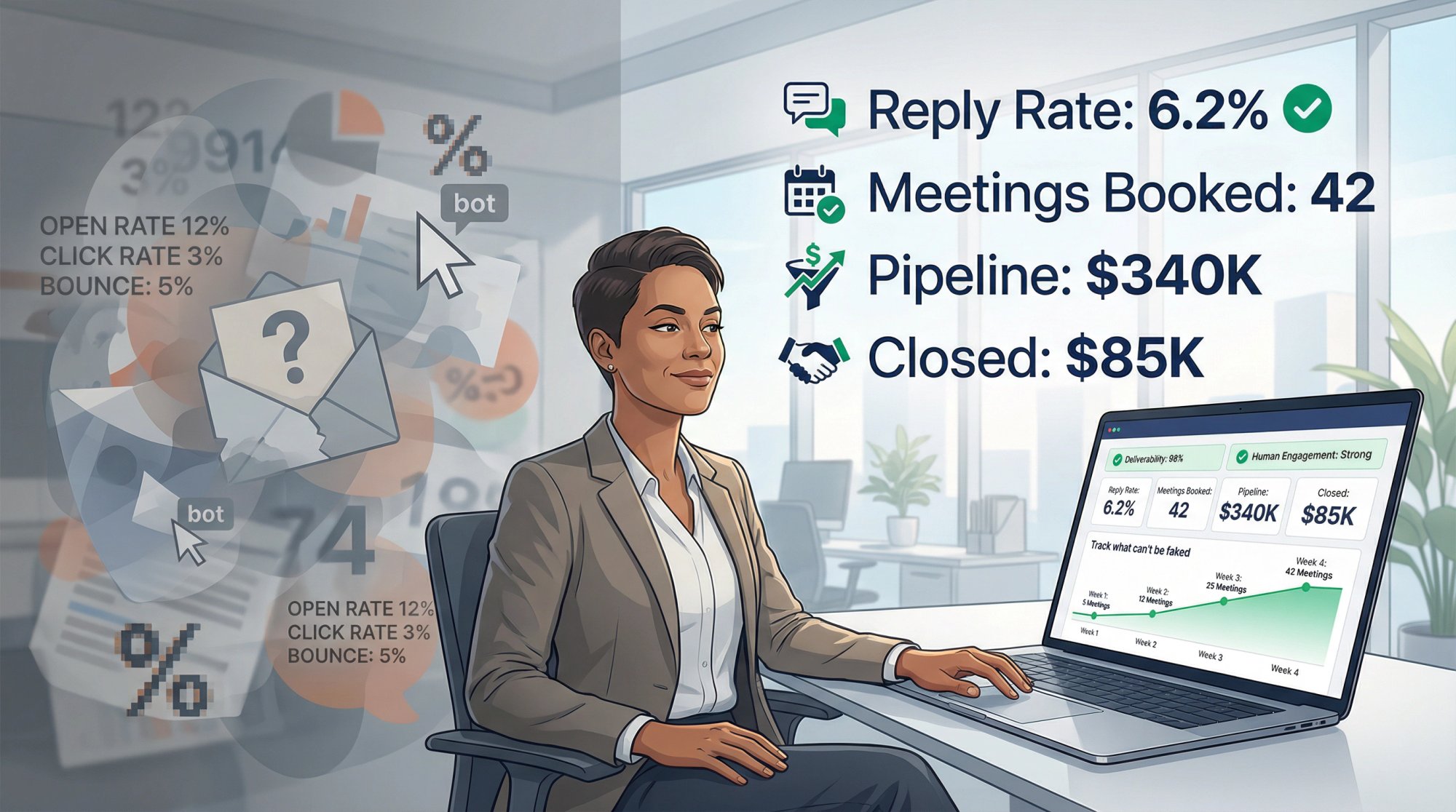
Cold email tracking changed completely with privacy features and security bots, but systematic tracking still works. You just need to focus on the right signals:
Track for diagnosis: Bounce rates, spam rates, authentication pass rates, open placement hints
Optimize for outcomes: Reply rates, positive reply rates, meetings booked, pipeline generated
Use attribution: UTMs, tracking IDs, CRM fields to connect outreach to revenue
The teams that win at cold email in 2026 are the ones who understand which metrics predict business outcomes and which ones are just noise. Opens and clicks didn't disappear, but they're no longer reliable primary indicators of success.
Build your tracking around what can't be faked: deliverability health, human replies, booked meetings, and closed revenue.
If you want help setting this up or would rather hand off the entire tracking and optimization process, talk to us at Outbound System. We've built this exact system for 600+ B2B companies and we can have you live in 14 days. Check out our case studies to see the results we've achieved for clients.