Cold email works for IT services. But most MSPs, IT consultants, and cybersecurity providers are doing it wrong.
You already know this if you've tried cold email strategies and saw:
• Emails landing in spam instead of inboxes
• Reply rates below 1% (or complete silence)
• "Not interested" responses from prospects who never read past the subject line
• Domain reputation tanking after sending 500 emails
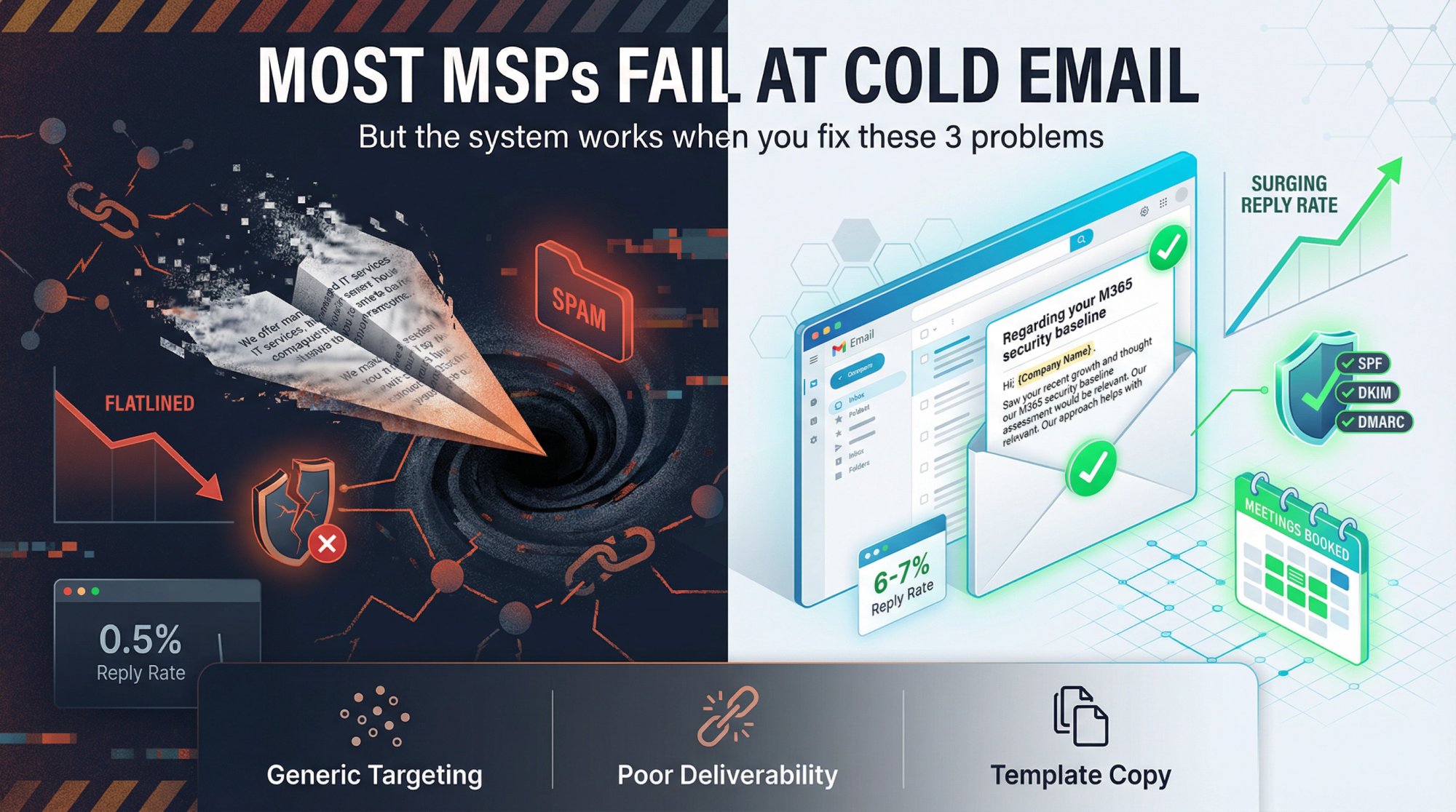
The problem isn't that cold email stopped working for IT services companies. The problem is that deliverability rules changed, buyer expectations evolved, and what worked in 2020 will get you blacklisted in 2026.
The screenshot above shows Outbound System's infrastructure - the same platform that handles deliverability, data verification, and multi-channel orchestration for 600+ B2B clients. When your MSP needs a repeatable system instead of guesswork, this is what that looks like.
This guide gives you the system: targeting that doesn't waste sends, deliverability tactics that land you in the inbox, copy that doesn't sound like every other MSP, and sequences that book meetings without burning your domain.
Why IT Companies Need Cold Email for Lead Generation
Word-of-mouth is great until you need predictable growth. Referrals are wonderful until your pipeline runs dry.
Cold email gives IT services companies something referrals can't: scalable, controlled outreach to decision-makers you'd never reach otherwise.
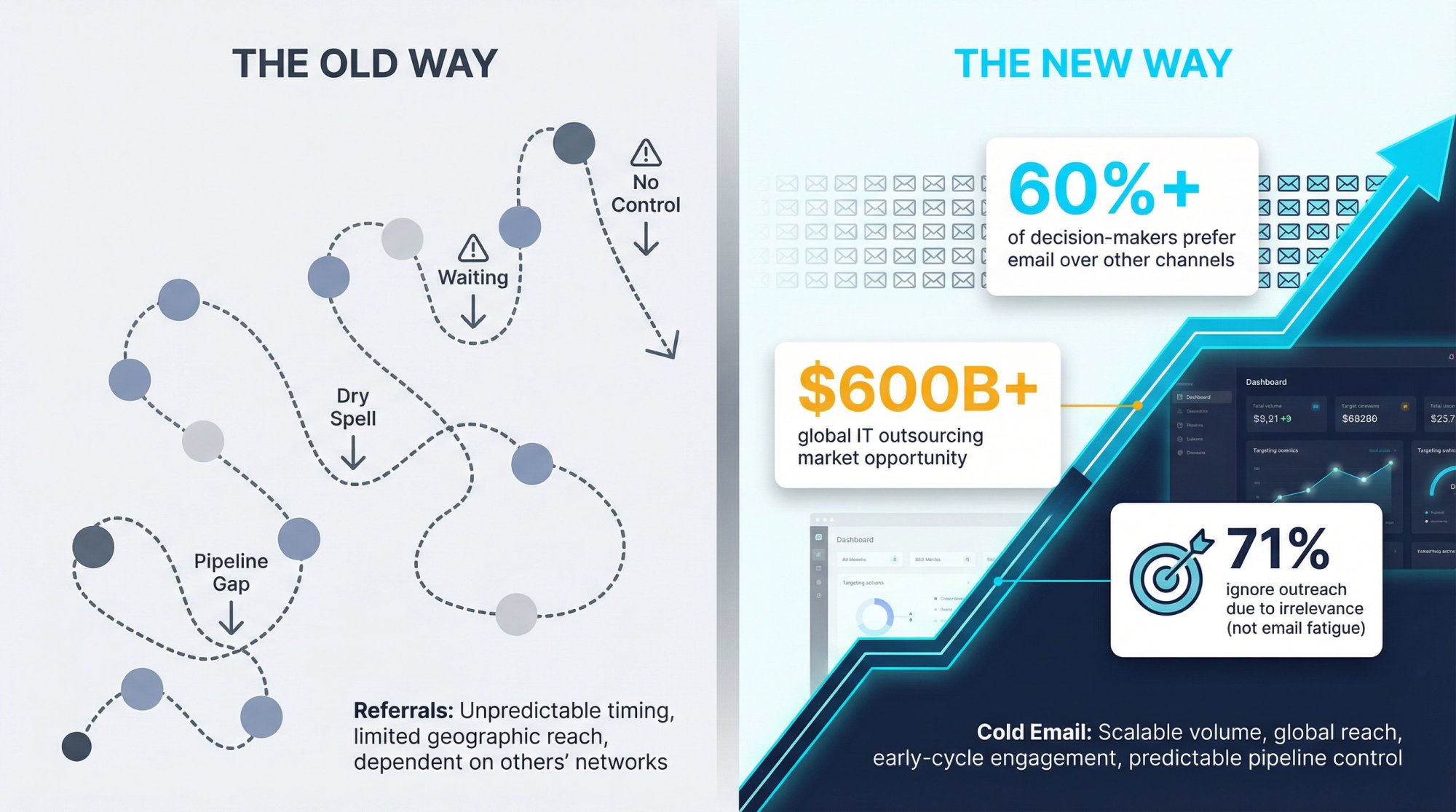
Here's the reality. Research from multiple sources shows that decision-makers still prefer email over LinkedIn messages and cold calls. Studies indicate that over 60% choose email as their preferred channel for initial business outreach.
But here's what else the data shows: the average reply rate is only 4.1%, and the biggest reason people ignore outreach is lack of relevance (71% cited this).
So you're not fighting email fatigue. You're fighting irrelevance.
For IT services specifically, cold email solves three problems:
You can reach global clients beyond your local market. If you're an MSP in Dallas targeting manufacturers in the Midwest, or a cybersecurity firm in New York prospecting healthcare companies nationwide, cold email opens doors that local networking never will. Industry data shows the global IT outsourcing market is valued over $600 billion, and most of those buyers aren't at your local Chamber of Commerce mixer.
You start conversations early in long sales cycles. IT services deals take months to close. Cold email plants the seed weeks or months before a deal finalizes. Without outbound, you're waiting for inbound leads that may never come. A systematic cold email approach keeps your pipeline consistently full.
You stand out when competitors won't. Most IT providers avoid cold email or do it so poorly that they give up after 100 sends. If you're the only MSP showing up in a prospect's inbox with a relevant offer and proof you're not spam, you've already differentiated yourself from every competitor who thinks cold calling is the only option.
Why Most MSPs Fail at Cold Email (And How to Fix It)
Most IT services cold emails fail because they ignore buyer psychology.
Switching MSPs feels dangerous. Even if a prospect is unhappy with their current provider, switching creates:
• Downtime risk during transition
• Security concerns with a new vendor accessing systems
• Time cost for internal IT teams who have to onboard a new provider
• Political risk if something breaks after the switch
So when your cold email says "We offer managed IT services," the buyer's brain calculates: low upside, high risk, high time cost.
They delete it.
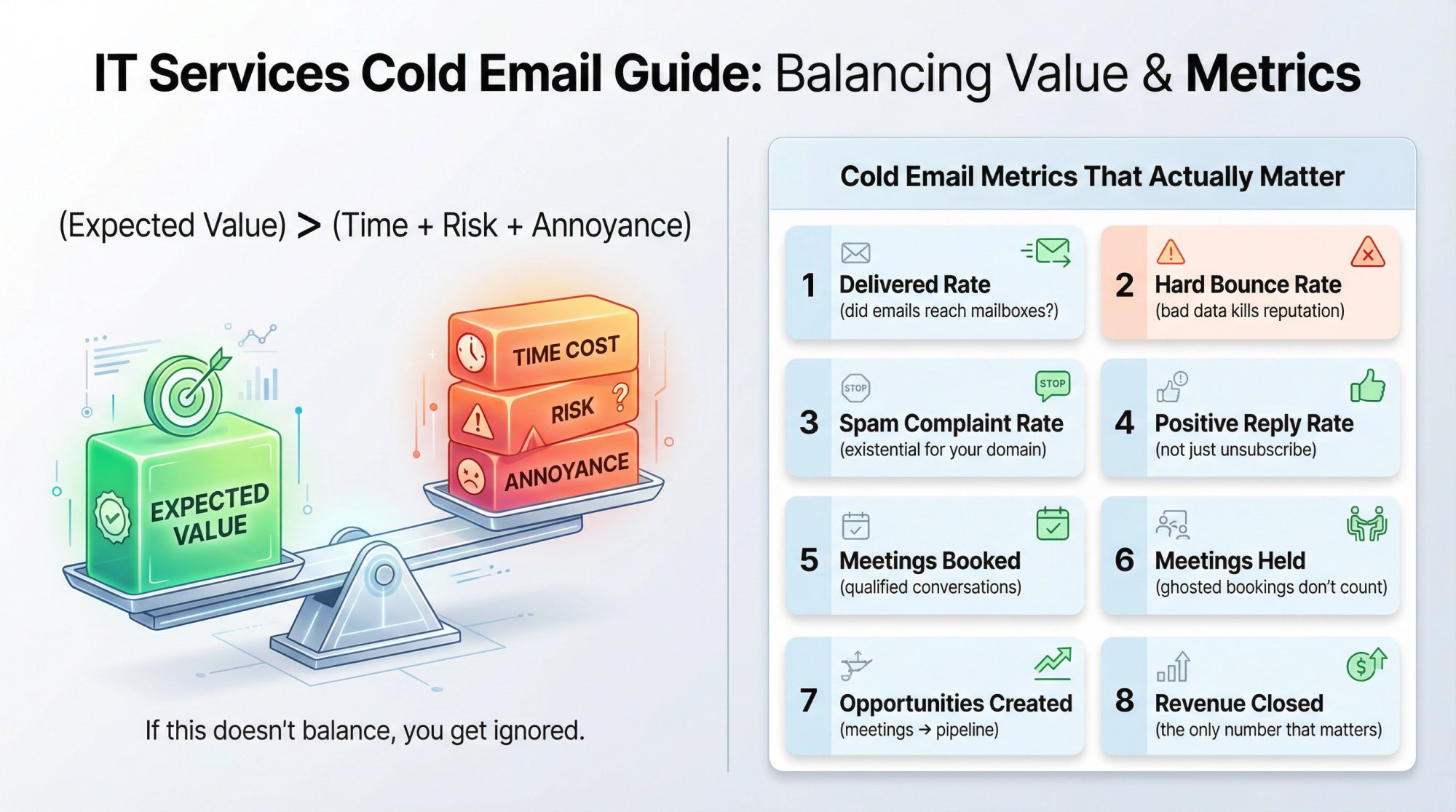
Your email message has to change that math. You need to increase expected value (make the offer specific and relevant), reduce risk (add credibility and proof), reduce time cost (make replying easy), and reduce annoyance (don't blast 10 people at the same company).
Think about reply probability like this:
(Expected value of replying) > (time + risk + annoyance)
If that equation doesn't balance in your favor, you get ignored.
Cold Email Metrics That Actually Matter for IT Services
Forget vanity metrics. Stop celebrating high open rates (which are inflated by Apple's Mail Privacy Protection anyway).
Your scoreboard should track:
1. Delivered rate (did emails reach mailboxes at all?)
2. Hard bounce rate (bad data kills sender reputation)
3. Spam complaint rate (this is existential for your domain)
4. Positive reply rate (not just "unsubscribe" or "stop")
5. Meetings booked
6. Meetings held (booked meetings that ghost don't count)
7. Opportunities created (meetings that turn into real pipeline)
8. Revenue closed (the only number that truly matters)
Open rates are misleading. Click-through rates on cold emails are irrelevant. What matters is: did a qualified prospect agree to a conversation?
3 Reasons IT Services Cold Email Campaigns Fail
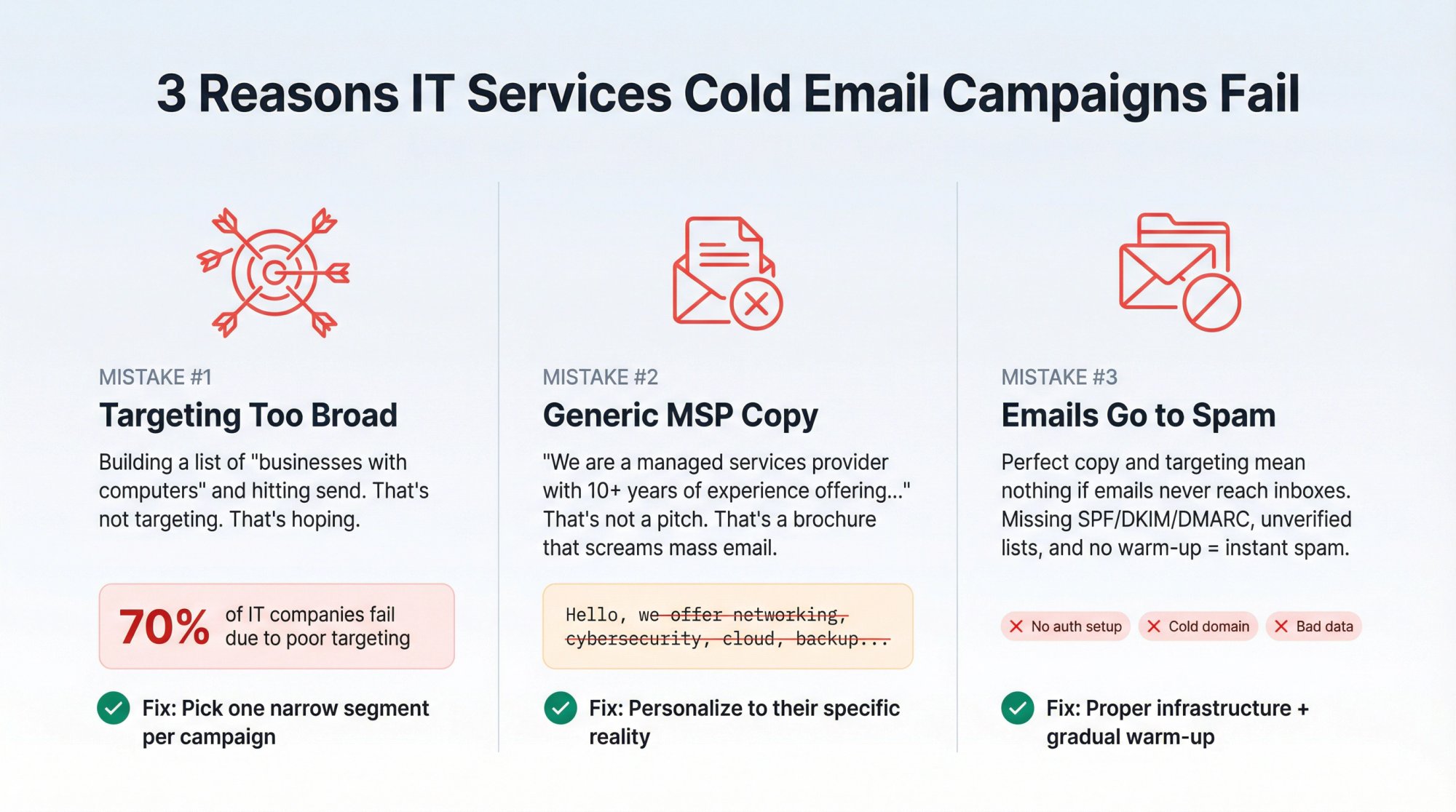
Mistake 1: Targeting Too Broad (Every Business with Computers)
Most IT companies build a list of "businesses with computers" and hit send.
That's not targeting. That's hoping.
A real ICP (Ideal Customer Profile) answers:
→ Who gets the most value from our services fastest?
→ Who has the authority to say yes?
→ Who has a trigger event creating urgency right now?
→ Who isn't locked into a 36-month contract with a national MSP?
Vague targeting creates vague messaging, which creates vague results (or no results).
Multiple outreach studies show that 70% of IT outsourcing companies fail to get consistent results from cold email, and poor targeting is the #1 culprit.
How to fix it: Pick one narrow segment for each campaign. Instead of "SMBs that need IT support," try "100-300 employee manufacturers in the Midwest with small internal IT teams who need helpdesk overflow and M365 security hardening."
The tighter your ICP, the easier it is to write copy that resonates. Generic targeting forces generic messaging, which gets ignored. Learn more about building targeted prospect lists that actually convert.
Mistake 2: Cold Email Copy That Sounds Like Every MSP
Most IT services cold emails read like this:
"Hello, we are a managed services provider with 10+ years of experience offering networking, cybersecurity, cloud, backup, helpdesk, compliance, and 24/7 support. We'd love to discuss how we can help your business."
That's not a pitch. That's a generic brochure that screams "mass email."
Buyers ignore generic outreach because it doesn't pass the "why should I care?" test. Studies show that generic messaging creates two problems: it blends into the noise of dozens of similar pitches, and it signals you didn't do any research.
How to fix it: Personalize based on their reality and focus on one specific problem you solve.
Instead of "We offer managed IT services," try:
"Noticed you're a 50-person accounting firm. If an hour of downtime during tax season costs you $5K+, preventing outages becomes critical. We helped another CPA firm achieve 99.99% uptime and avoid $22K in potential downtime costs last year. Worth a 10-minute call to see if we could do similar for you?"
That email references their industry, acknowledges a specific pain (tax season downtime), provides peer proof (another CPA firm), and quantifies the outcome ($22K saved).
Even small personalization details make a difference. Research shows that including a specific detail like the prospect's name, company, or relevant fact in the subject line or intro can increase open rates by up to 50% in B2B campaigns.
Mistake 3: How to Fix Cold Emails Going to Spam
You can write the perfect email, target the right buyers, and still fail if your emails land in spam.
Deliverability is not optional. It's the foundation.
Most IT firms make these technical errors:
Sending from a new domain with no warm-up. If you send 500 emails on day one from a fresh domain, spam filters flag you immediately. You need to start with 20-50 emails daily and gradually increase by 20-30% per week to build sender reputation.
Using a poor-quality email list. Unverified lists full of bad addresses create high bounce rates, which damage your sender reputation. Always verify emails before sending. Services can detect invalid addresses and protect your domain health.
Not configuring authentication. SPF, DKIM, and DMARC aren't optional anymore. Yahoo requires bulk senders to implement SPF and DKIM and publish DMARC (at least p=none). Microsoft announced mandatory SPF, DKIM, and DMARC for domains sending over 5,000 emails per day to Outlook. Gmail's requirements for high-volume senders include one-click unsubscribe and keeping spam complaint rates below 0.1%.
Above: the actual Gmail sender guidelines page. When you see requirements like "SPF and DKIM authentication" or "spam rate below 0.1%," this is the source. IT services companies can't afford to ignore these - one misconfigured DMARC policy can tank your entire cold email program.
Overloading one mailbox. Sending hundreds of emails daily from one Gmail or Outlook account triggers spam filters. Sophisticated cold email infrastructure distributes sends across multiple inboxes. At Outbound System, we use 350-700 Microsoft inboxes per client to keep each inbox's volume low and mimic natural human sending patterns.
How to fix it:
Use a dedicated sending domain separate from your primary business domain. Set up SPF, DKIM, and DMARC before sending anything. Warm up your domain gradually. Verify all email addresses. Distribute sends across multiple inboxes. Monitor bounce rates and spam complaints obsessively.
The boring technical work is what separates campaigns that land in inboxes from campaigns that disappear into spam folders. With proper deliverability setup, it's possible to achieve 98%+ inbox placement for cold emails.
This is where most MSPs lose before they even start.
How to Write Cold Emails That Get Replies for IT Services
Most cold email frameworks ignore that IT services is trust-heavy. Buyers aren't impulse-buying software. They're evaluating whether to trust you with their entire infrastructure.
Use this proven email structure:
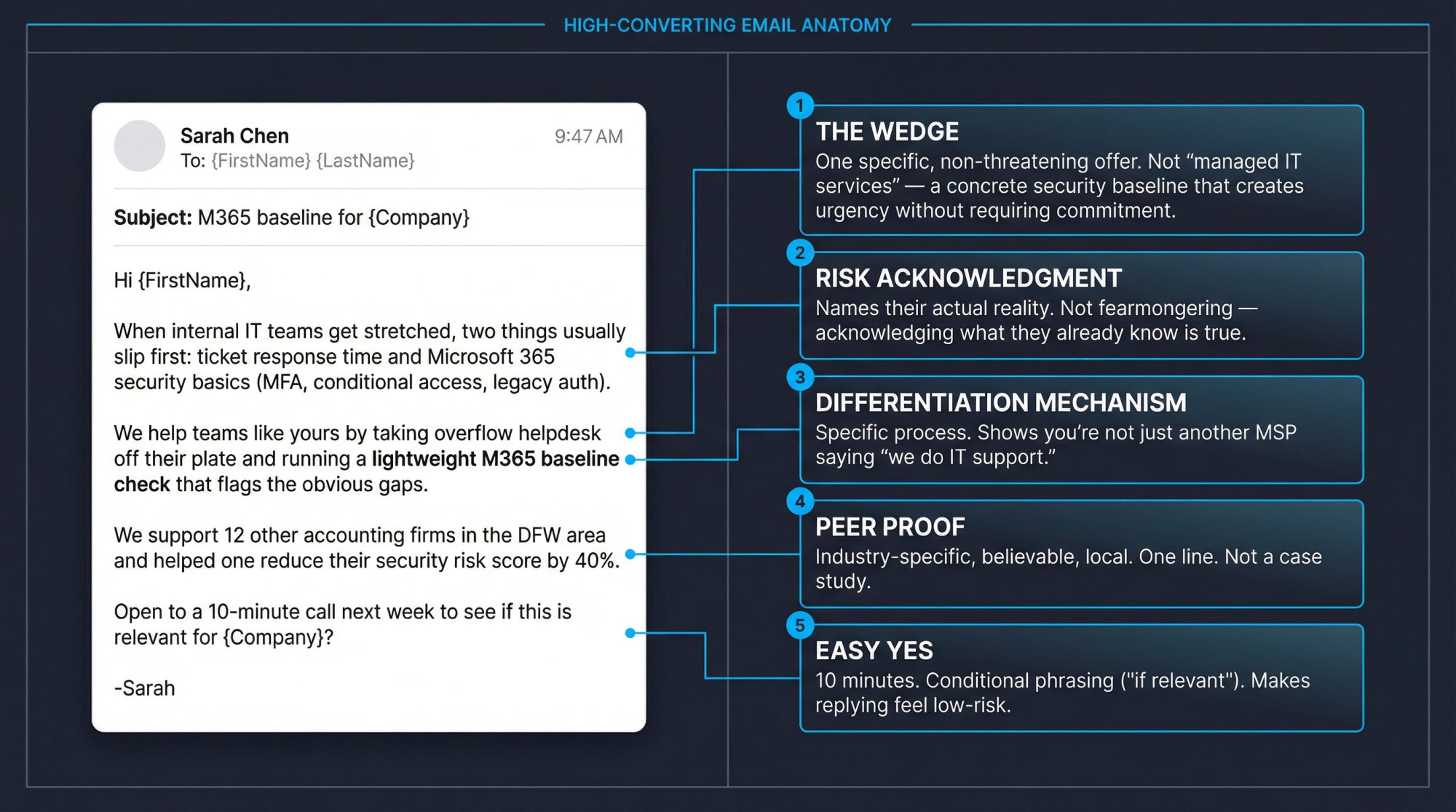
Pick One Wedge (Your "Why Talk Now" Offer)
Don't try to sell your entire service catalog in the first email.
Pick one specific offer that creates a reason to engage now. You can expand to the full relationship later.
Wedge Category | Specific Examples |
|---|---|
Security Wedges | • Microsoft 365 security baseline check (Conditional Access, MFA gaps, legacy auth) |
Operational Wedges | • Helpdesk overflow (rescue internal IT from ticket backlog) |
Cost Wedges | • M365 licensing cleanup (eliminate wasted licenses) |
The wedge isn't your full service. It's the conversation starter that leads to the bigger relationship.
Name the Risk They Actually Care About
Don't fearmonger. Just acknowledge reality.
Examples:
→ "MFA gaps in M365 are still common in companies your size"
→ "Backups that 'exist' but fail to restore create false confidence"
→ "Ticket backlogs often lead to shadow IT and security risks"
Show How You're Different
This is where you avoid "we do IT support too."
Be specific about your unique mechanism:
"We run a 20-minute M365 baseline scan and return a 1-page risk score"
"We do a controlled restore test, not just a backup success report"
"We take tier-1/2 tickets and after-hours so your internal team stops drowning"
Add Tiny, Believable Social Proof
One line. Make it credible.
Examples:
① "We support 12 other accounting firms in the DFW area"
② "We regularly co-manage with internal IT teams at 100-500 employee companies"
③ "We helped a similar manufacturer reduce downtime by 40%"
Check out how we showcase client results in our case studies for more examples of believable proof.
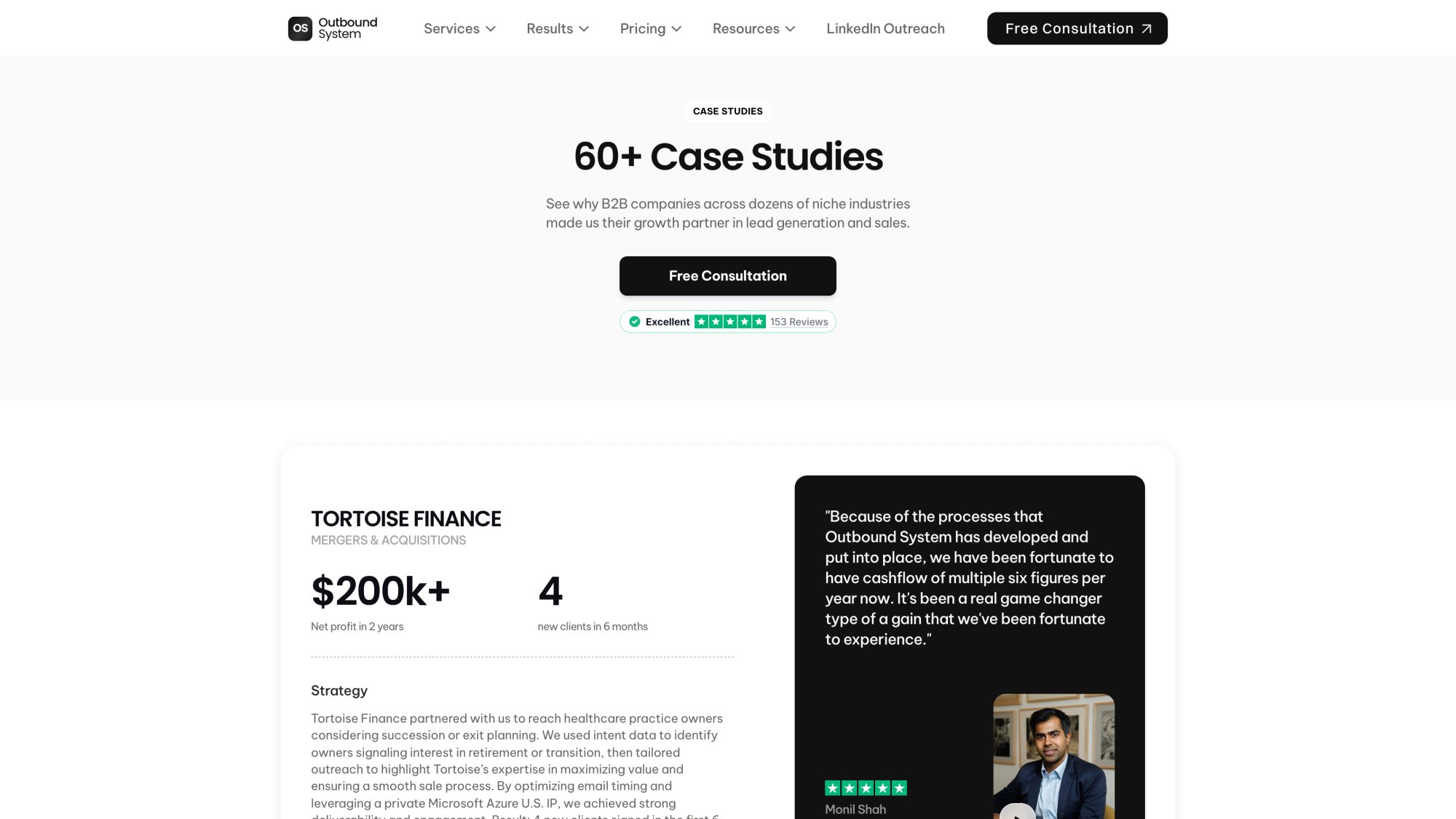
The case studies page above demonstrates exactly the kind of proof IT services buyers want to see - specific results, real client names, and quantified outcomes. When you reference results in cold emails, point prospects to pages like this.
End with a Low-Friction CTA
Don't ask for 45 minutes. Ask for something that feels easy.
Examples:
"Worth a 10-minute call to see if this is even relevant?"
"Want me to send the checklist?"
"Open to a quick second opinion?"
The entire email should be 100-150 words maximum. Busy executives don't read long emails from strangers.
Keep subject lines short and human. "Quick question," "M365 baseline," or "{Company} IT support?" work better than clever marketing subject lines.
Best Cold Email Sequences for IT Services (2026)
A single email rarely gets a response. Most replies come from follow-ups, not the initial message.
Internal research found that 65% of responses came from the 2nd or 3rd email in a sequence, not the first.
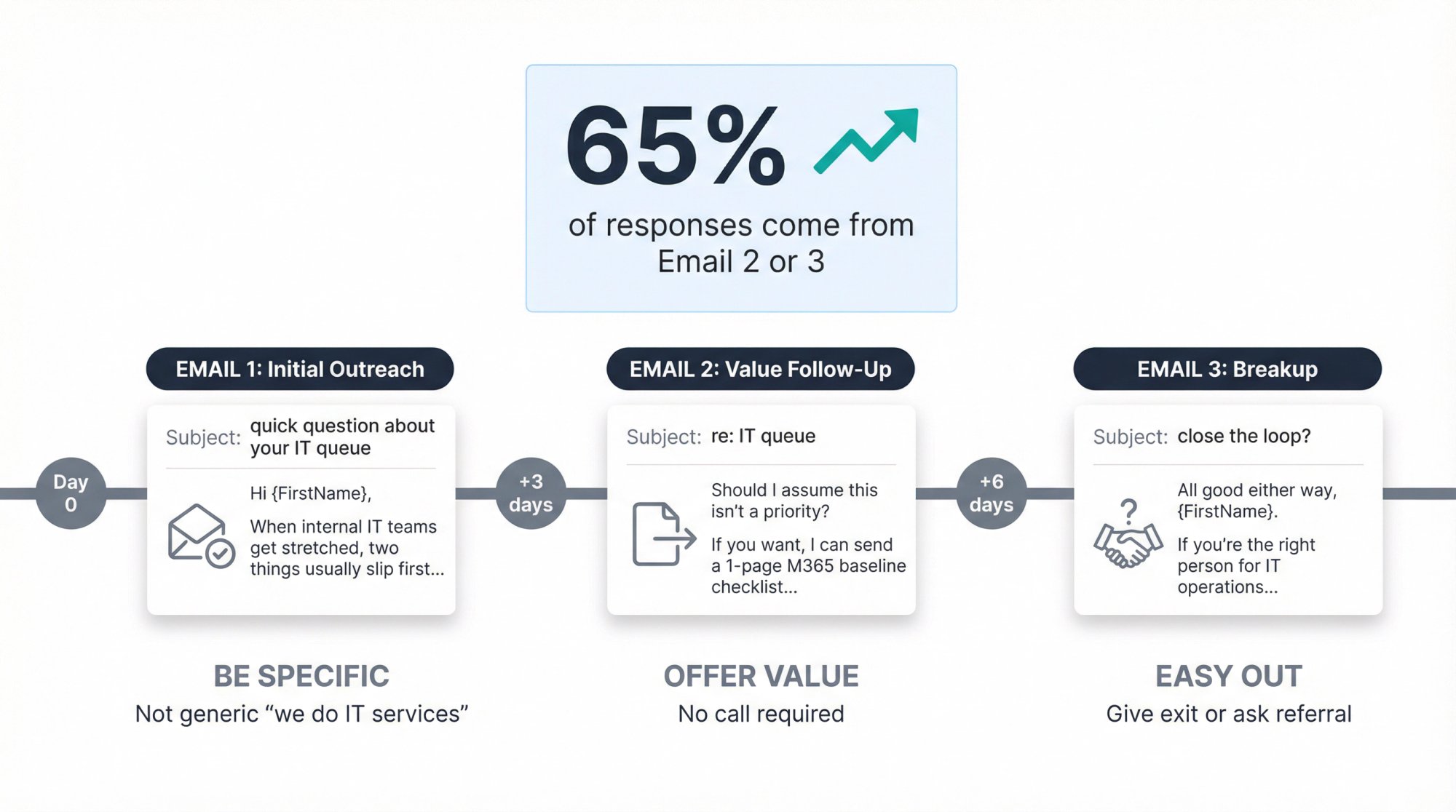
Here's a simple 3-email sequence you can adapt:
Email 1: The Initial Outreach
Subject: quick question about your IT queue
Hi {FirstName},
When internal IT teams get stretched, two things usually slip first: ticket response time and Microsoft 365 security basics (MFA, conditional access, legacy auth).
We help teams like yours by taking overflow helpdesk off their plate and running a lightweight M365 baseline check that flags the obvious gaps.
Open to a 10-minute call next week to see if this is relevant for {Company}?
-{YourName}
Email 2: The Value-Add Follow-Up (3 days later)
Subject: re: IT queue
Hi {FirstName},
Should I assume this isn't a priority right now?
If you want, I can send a 1-page "M365 baseline checklist" we use (no pitch).
Worth sending?
-{YourName}
Email 3: The Breakup (6 days later)
Subject: close the loop?
All good either way, {FirstName}.
If you're the right person for IT operations at {Company}, happy to share the checklist or walk through it.
If not, who owns IT support/security decisions?
-{YourName}
Notice the pattern:
• Email 1 is specific (not generic "we do IT services")
• Email 2 offers value without requiring a call
• Email 3 gives an easy out or asks for a referral
Space your follow-ups 3-7 days apart. Best practices suggest this timing keeps you on their radar without being annoying.
How to Handle Cold Email Replies (Where MSPs Lose Leads)
You'll get replies like:
"We already have a provider."
"Send info."
"Not interested."
"What do you charge?"
If you respond like a desperate salesperson, you lose. Here's how to respond like a calm operator:
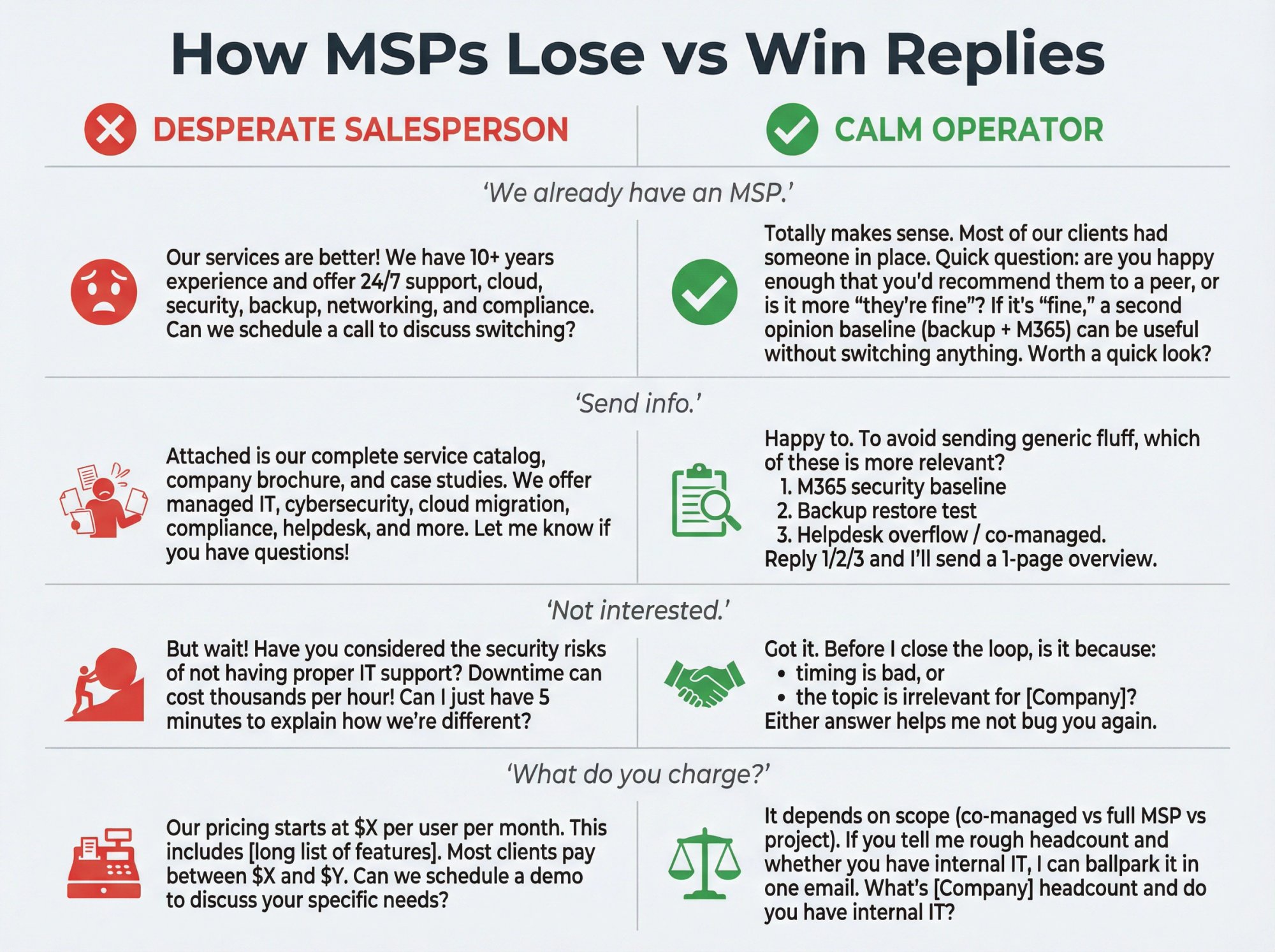
"We already have an MSP."
Reply:
Totally makes sense. Most of our clients had someone in place.
Quick question: are you happy enough that you'd recommend them to a peer, or is it more "they're fine"?
If it's "fine," a second opinion baseline (backup + M365) can be useful without switching anything. Worth a quick look?
This kills the objection by repositioning your offer as a second opinion, not a replacement pitch.
"Send info."
Reply:
Happy to. To avoid sending generic fluff, which of these is more relevant?
M365 security baseline
Backup restore test
Helpdesk overflow / co-managed
Reply 1/2/3 and I'll send a 1-page overview.
You're qualifying while appearing helpful. Generic "info" sends never convert.
"Not interested."
Reply:
Got it. Before I close the loop, is it because:
• timing is bad, or
• the topic is irrelevant for {Company}?Either answer helps me not bug you again.
Sometimes "not interested" means "not now." This uncovers whether it's timing or fit.
"What do you charge?"
Reply:
It depends on scope (co-managed vs full MSP vs project).
If you tell me rough headcount and whether you have internal IT, I can ballpark it in one email.
What's {Company} headcount and do you have internal IT?
You're qualifying before pricing. Pricing without context sets the wrong frame.
2026 Email Deliverability Rules You Cannot Ignore
Inbox providers tightened rules significantly since 2024. If you ignore these, your emails won't reach prospects no matter how good your copy is.
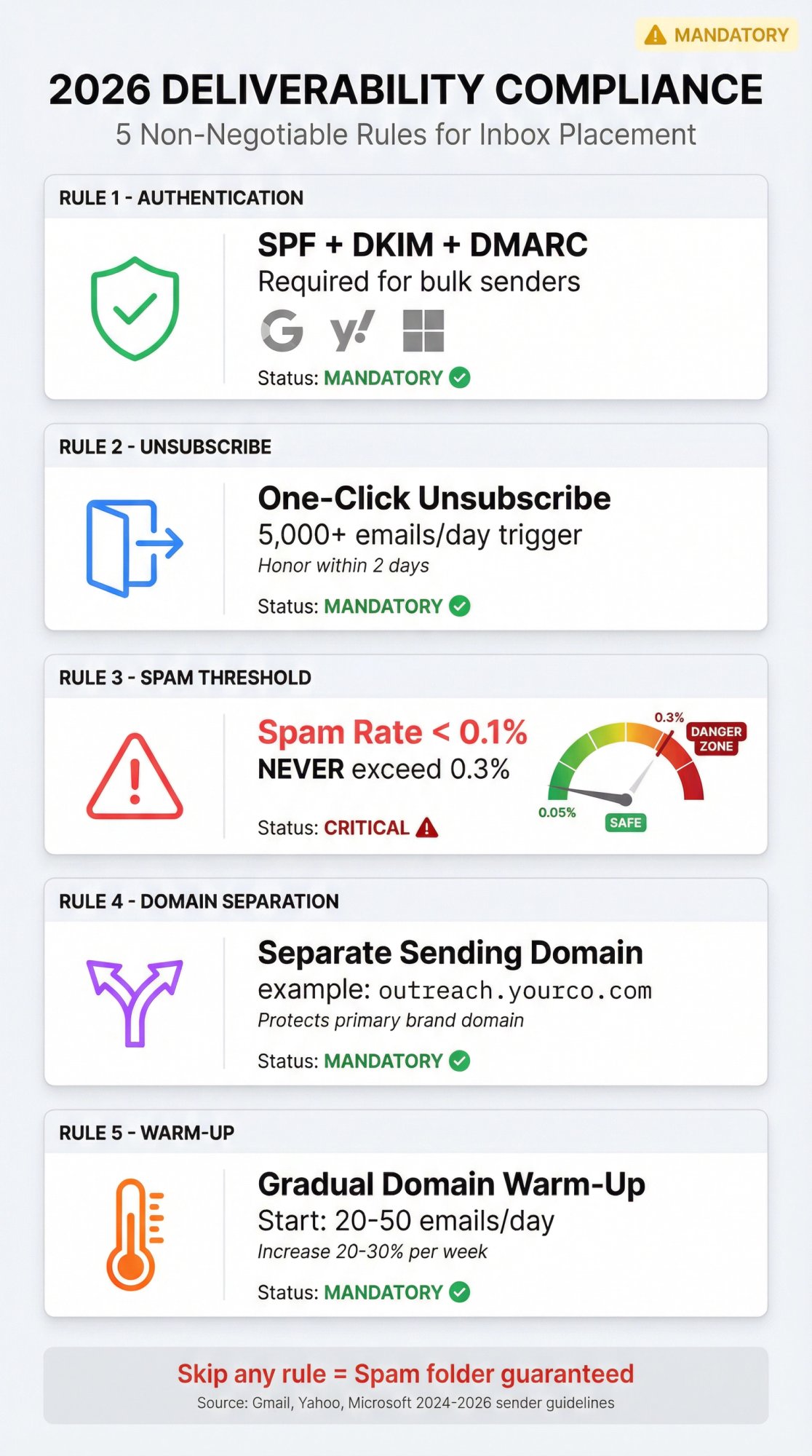
Mandatory: SPF, DKIM, and DMARC
Email authentication is now table stakes, not optional.
• Yahoo requires bulk senders to implement SPF and DKIM and publish DMARC (at least p=none)
• Microsoft requires SPF, DKIM, and DMARC for domains sending over 5,000 emails/day
• Gmail's sender guidelines require similar authentication for high-volume senders
If you're sending cold email without proper authentication, you're essentially asking to be filtered.
Mandatory: One-Click Unsubscribe
Even for cold outreach (not just newsletters), inbox providers increasingly expect easy opt-outs.
• Gmail requires one-click unsubscribe for marketing messages when sending 5,000+ per day
• Yahoo requires list-unsubscribe support and says to honor unsubscribes within 2 days
Make opting out easy. It protects your sender reputation and keeps spam complaint rates low.
Critical: Keep Spam Complaints Below 0.1%
Gmail's FAQ explicitly states: keep spam complaint rate below 0.1% and prevent it from ever reaching 0.3%.
If even a tiny percentage of recipients mark you as spam, inbox providers will throttle or block your domain.
This means:
• Target tightly (irrelevant emails get marked as spam)
• Make unsubscribing easy (frustrated recipients report spam instead of unsubscribing)
• Never send to old, unverified lists (outdated contacts are likelier to complain)
Use a Separate Sending Domain
Don't send cold outreach from your primary business domain (the one customers email you at).
Use a separate domain or subdomain for outreach. If your primary domain is yourcompany.com, send from outreach.yourcompany.com or yourcompany.co.
This protects your core brand if deliverability issues arise.
Gradual Warm-Up Is Non-Negotiable
Don't send 1,000 emails on day one from a new domain.
Start with 20-50 emails daily. Increase by 20-30% per week. Proper email warm-up allows you to build sender reputation gradually without triggering spam filters.
Skipping warm-up is the fastest way to land in spam permanently. Learn more about how to fix emails going to spam.
Why Multi-Channel Outreach Works Better for IT Services
Email alone isn't enough for trust-heavy sales like IT services.
Combine email with:
LinkedIn: Send a connection request a few days after your first email. Reference the email in your message or offer value independently. Our LinkedIn outreach strategies guide shows how to integrate both channels effectively.
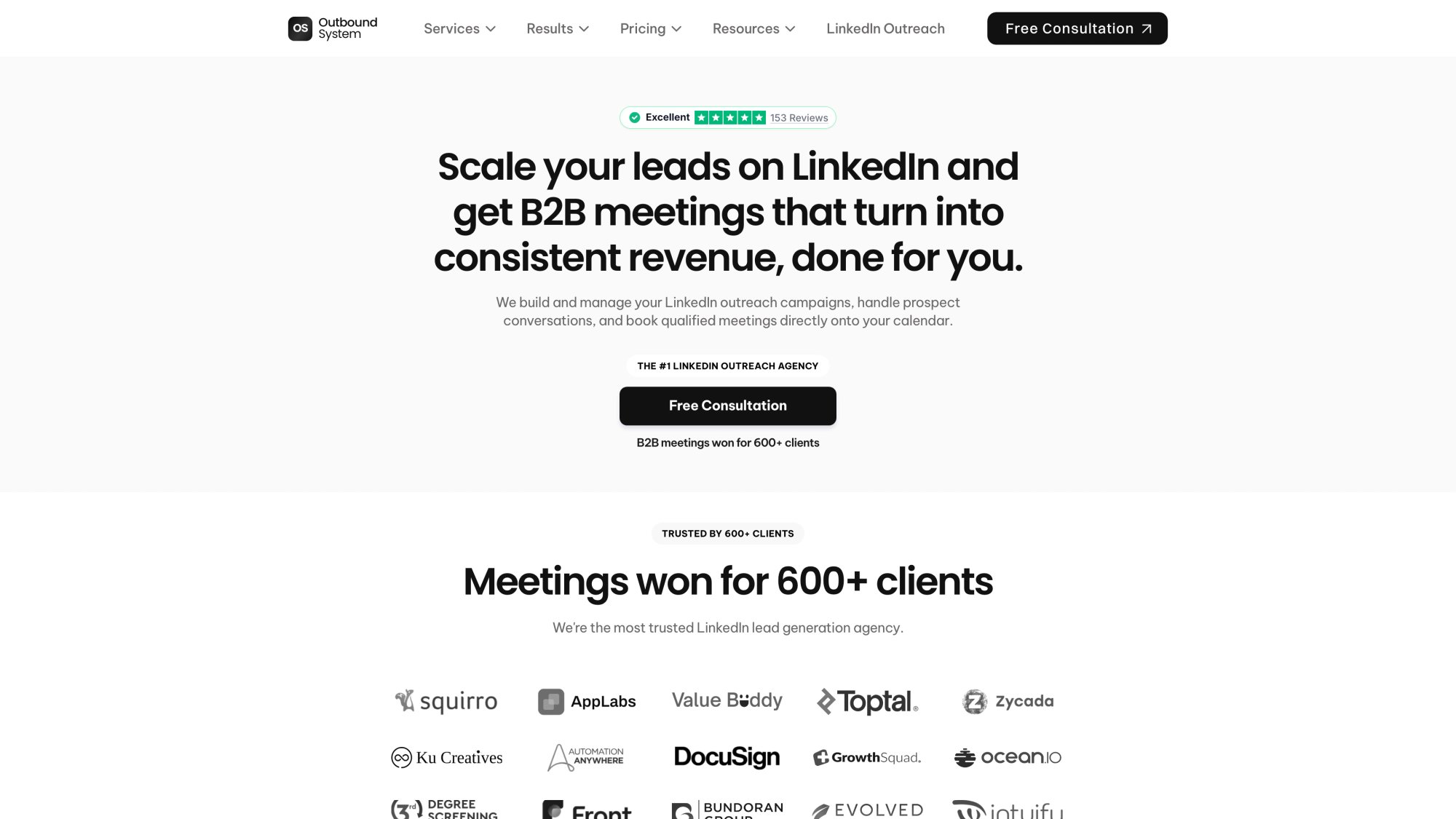
The LinkedIn lead generation service above demonstrates multi-channel orchestration - managing hundreds of profiles, message sequences, and coordinated email + LinkedIn campaigns simultaneously. IT services buyers respond better when they see your name across multiple touchpoints.
Phone: After 2-3 emails, leave a polite voicemail referencing your outreach. Executives often see your name in voicemail and dig up your email. Compare the effectiveness in our cold calling vs cold emailing analysis.
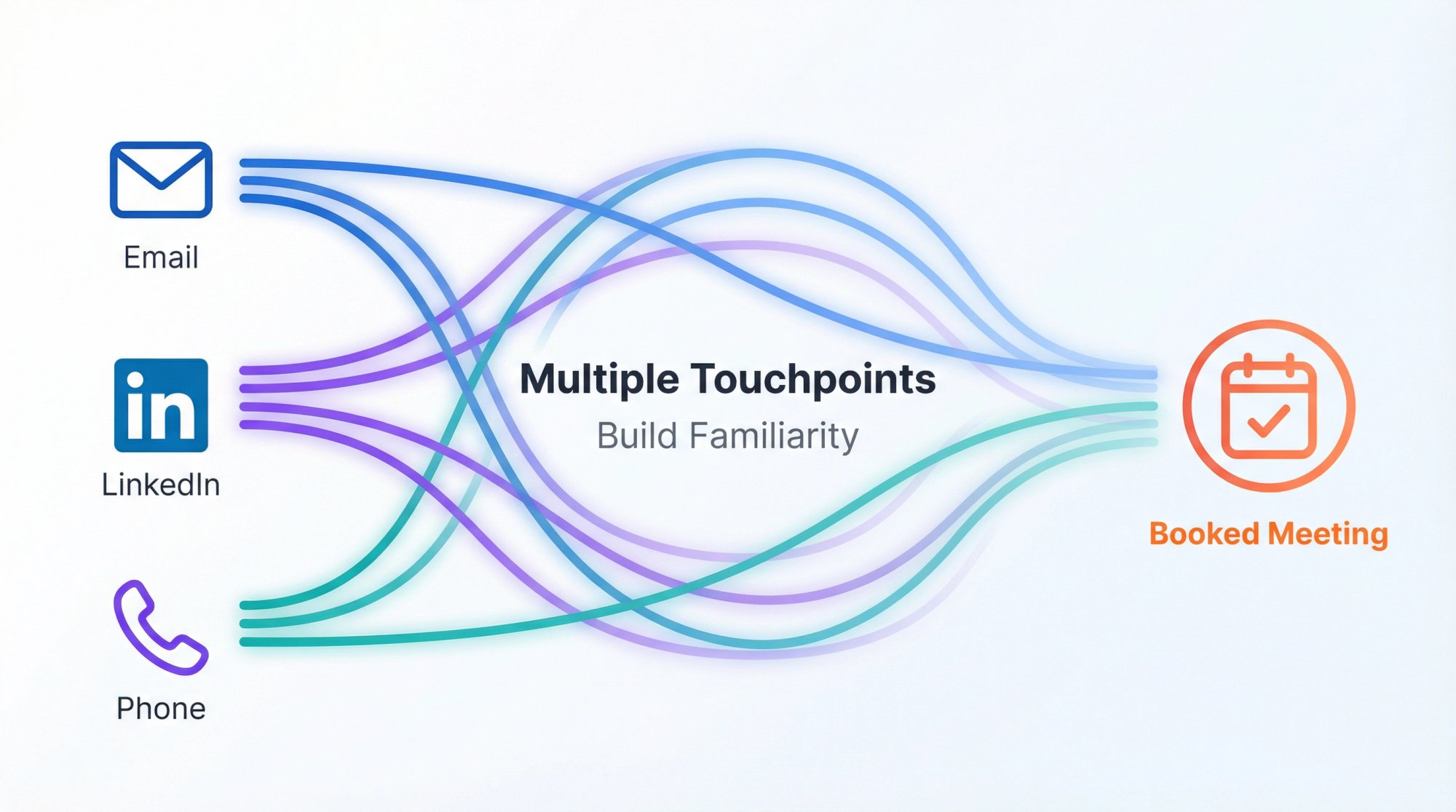
Multi-channel data: Research shows that combining LinkedIn messages with email can lead to 2-3X higher response rates than email alone.
IT services buyers need to see you multiple times across channels to build familiarity before they'll book a meeting. Consider adding LinkedIn lead generation to your outbound strategy.
When IT Services Should Hire a Cold Email Agency
Running a successful cold email operation requires strategy, copywriting, data management, technical infrastructure, and consistent execution.
If you're an MSP owner who's also managing client projects, hiring, and firefighting IT issues, cold email can fall through the cracks.
Consider getting help when:
You need to scale faster than you can personally manage. If proven cold email works but you can't send 1,000+ emails monthly yourself, external help adds capacity quickly.
Consistency has been your problem. Internal teams often pause outreach when business picks up, creating pipeline gaps months later. Data shows that stop-and-go outreach creates dangerous valleys in deal flow.
You lack specific expertise. Maybe you're great at explaining technical solutions but writing sales copy isn't your strength. Or you're not sure how to manage 50 sending inboxes without getting flagged.
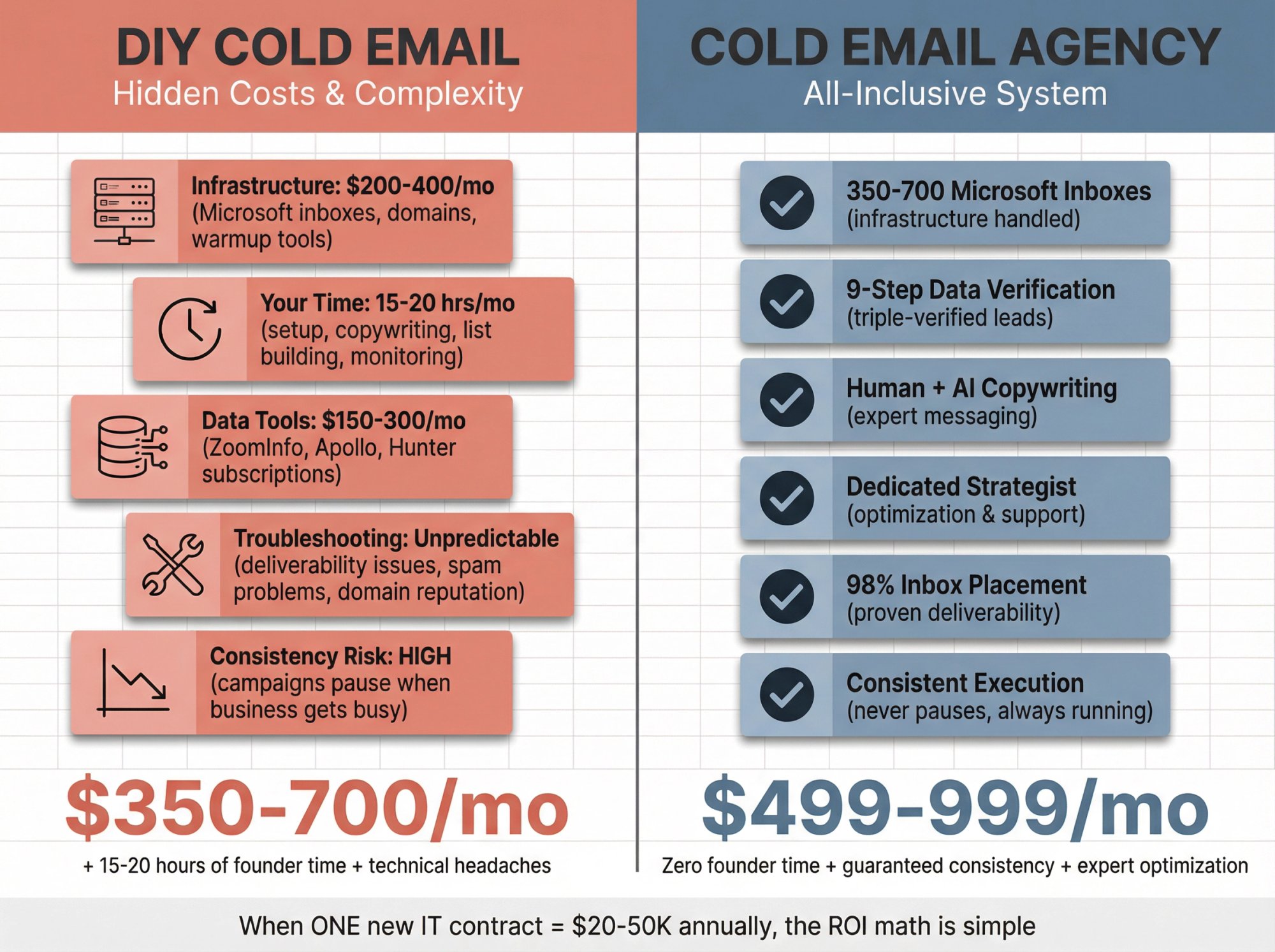
The ROI makes sense. If one new IT contract is worth $20K-$50K annually and an outbound specialist charges a few thousand per month, the math works favorably even if they only land a few clients. Compare the economics in our cold email agency vs in-house SDR guide.
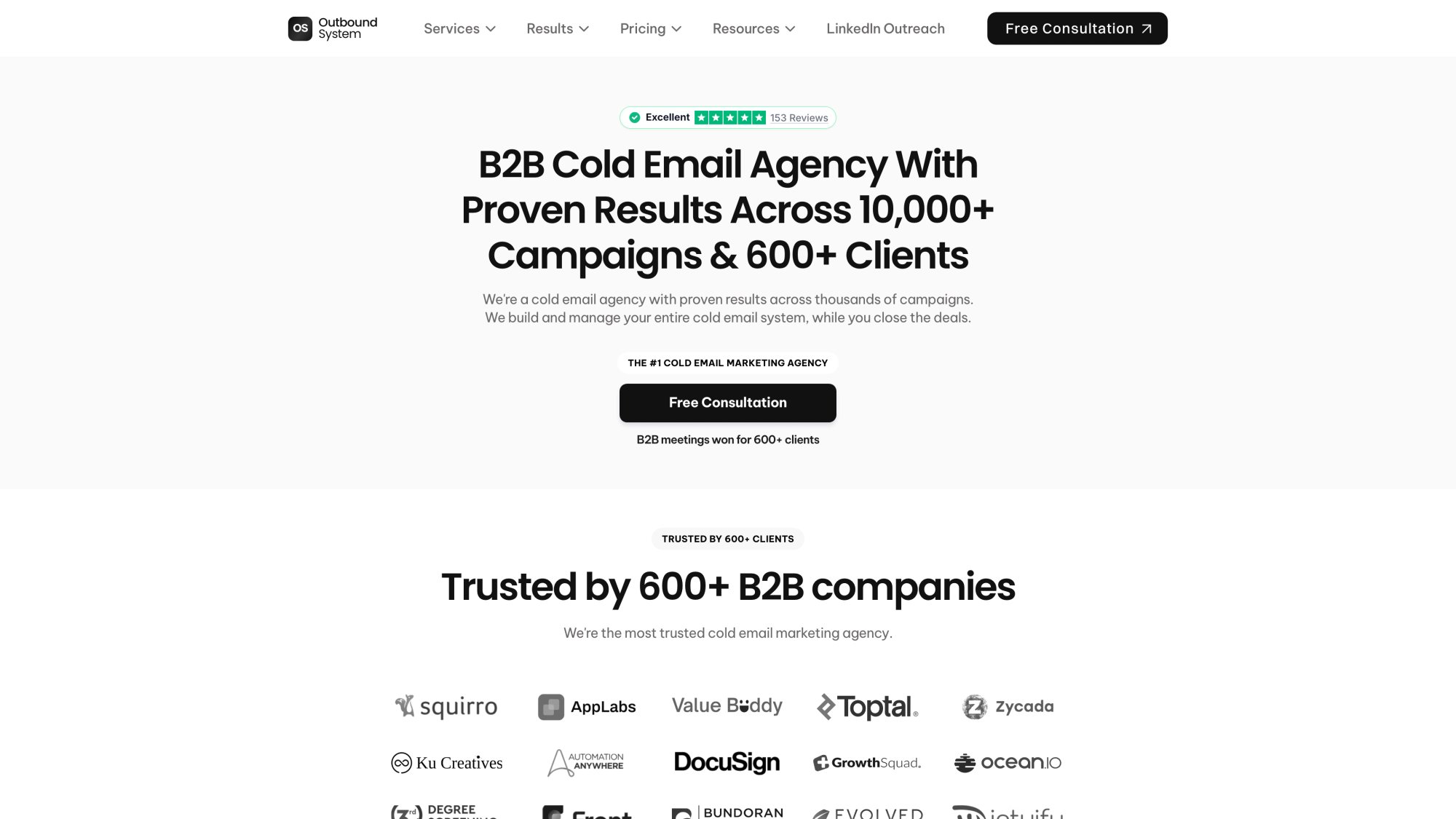
The cold email agency service shown above is what a fully managed system looks like - from Microsoft inbox infrastructure to AI personalization to meeting scheduling. When MSPs don't have bandwidth to manage deliverability and data quality internally, outsourcing to specialists who run this daily makes the math work.
At Outbound System, we handle the infrastructure (350-700 Microsoft inboxes, 9-step data verification, gradual warm-up), copywriting (human-written with AI personalization), and ongoing optimization so IT services companies can focus on closing deals instead of managing email systems.
We practice everything in this guide daily for 600+ B2B clients across industries, including IT service providers. Our infrastructure delivers 98% inbox placement and 6-7% response rates by following the exact deliverability and targeting principles covered here.
If you want to explore how a done-for-you system could accelerate your outbound results, book a 15-minute consultation or read client testimonials from companies like yours.
Frequently Asked Questions
Does cold email still work for MSPs in 2026?
Yes, but only if you treat it like a system. Research shows buyers still prefer email over other outreach channels, but reply rates are low when emails are irrelevant. Success requires tight targeting, proper deliverability setup, and messaging that resonates with buyer pain points.
What reply rate should IT services companies expect?
Benchmarks vary by list quality and relevance, but industry data reports an average campaign reply rate of 4.1%. Your goal isn't hitting industry averages. Your goal is creating a repeatable engine that generates positive replies, controlled spam complaints, and meetings that convert to pipeline.
Should MSPs email IT Directors or CEOs?
Both, but not with the same pitch. CEOs care about downtime risk, security exposure, and cost. IT Directors care about ticket load, tooling gaps, and security hardening. Segment your targeting and tailor messaging accordingly.
What's the best offer in a cold email for IT services?
The best offer is specific, low-risk, produces a tangible artifact (score, checklist, summary), and leads naturally into your core service. M365 security baselines and backup restore tests work well because they're concrete and non-threatening.
How do I avoid going to spam?
Do the basics extremely well: SPF/DKIM/DMARC alignment, one-click unsubscribe, verified email lists, gradual scaling, plain-text emails, and obsessive monitoring of spam complaint rates. Follow Gmail's sender guidelines, Yahoo's best practices, and Microsoft's requirements.
How many follow-ups should I send?
Start with 2-3 emails per sequence (initial email + 1 follow-up + breakup email). Then switch to another channel (LinkedIn, phone) instead of adding 6 more emails. Data shows that reply rates can decline with excessively long sequences, while the first follow-up often creates the biggest lift.
What time should I send cold emails?
Test your audience, but research suggests early morning (6-9 AM local time) and evenings (8-11 PM) often perform well for B2B outreach. Thursday is frequently cited as a strong day, while Monday can be weaker. Test two time windows for two weeks and keep what wins.
Can I send cold email from my regular Microsoft 365 account?
Not recommended for volume. Microsoft announced tenant-level outbound limits for Exchange Online based on license count. High-volume cold outreach from your everyday Microsoft tenant can trigger throttles, blocks, or reputation issues. Use a separate sending infrastructure for outbound campaigns.
Cold Email for IT Services: Final Thoughts
Cold email for IT services isn't magic. It's plumbing.
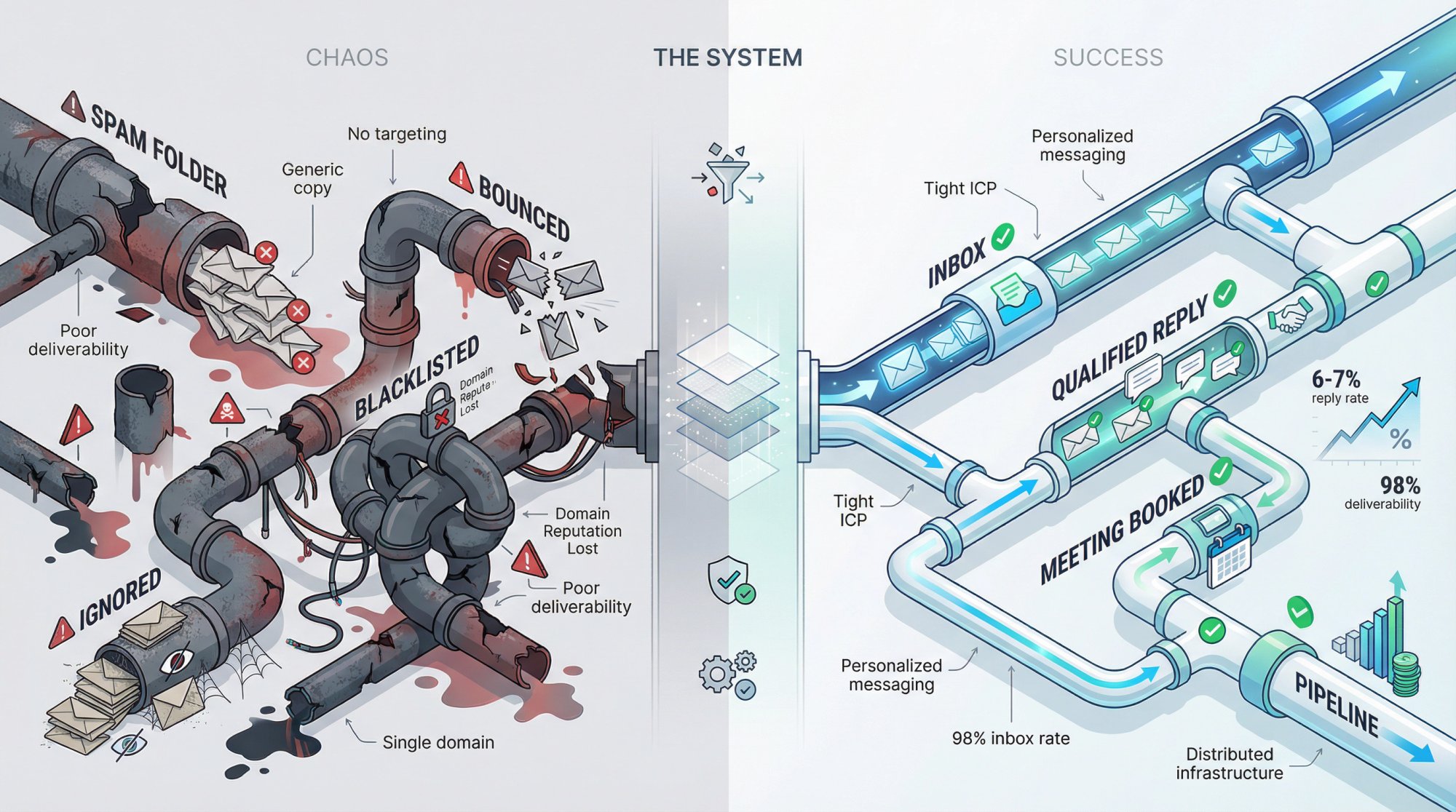
You need:
• Targeting that focuses on prospects who actually need your services
• Deliverability that gets you into inboxes instead of spam folders
• Copy that speaks to specific pain points instead of generic "we do IT"
• Sequences that follow up without being annoying
• Reply handling that qualifies instead of pitches
• Optimization that improves based on real data
Most IT service providers fail at cold email because they treat it like a one-off campaign instead of a system.
The companies that succeed build infrastructure, commit to consistency, and iterate based on results. They understand that one new client from cold email might generate $30K-$100K in annual revenue, which justifies the time and effort to do it properly.
If you implement the tactics in this guide, your cold email will outperform 70% of IT services companies who give up after sending generic blasts to unverified lists.
Start narrow. Pick one ICP, one wedge offer, and 200 verified contacts. Test, learn, and scale what works.
And if you want help building the system so you can focus on closing deals instead of managing email infrastructure, we're here. Outbound System handles everything from Microsoft inbox pools to data verification to AI-powered personalization, delivering 98% inbox placement and consistent meeting flow for IT services companies just like yours.