Finding a professional's work email shouldn't feel like detective work. But when you need to reach a specific decision-maker, partner, or prospect, having the right email address is everything.
In B2B sales and outreach, email remains the most welcome channel, with 73% of buyers preferring it for professional contact.
This guide will show you exactly how to find almost anyone's work email, from quick free methods to advanced strategies used by professional outbound teams. You'll learn techniques that work whether you need one email today or thousands every month.
What you'll discover:
• The 3-minute method for finding any individual's work email
• How to decode company email patterns and verify addresses without sending a single message
• Powerful Google search techniques that uncover hidden contact information
• The best email finder tools (free and paid) and when to use each one
• Creative methods that most people overlook completely
• Why email verification matters more than ever in 2026
We'll also cover the ethical side. Finding an email is one thing. Using it respectfully is what separates professional outreach from spam.
Why Email Privacy and Ethics Matter
You can find almost any professional email if you know where to look. That doesn't mean you should spam people.
Use these methods responsibly:
Always provide value. When you reach out cold, make it clear why you're contacting them and what's in it for them. A well-researched, personalized email gets responses. Mass blasts get blocked.
Respect privacy laws. CAN-SPAM applies to all commercial emails in the US, including B2B. In Europe, GDPR and PECR rules govern how you can contact people. Canada has CASL. Know the rules for your target market.
Quality over quantity. Ten well-researched prospects beat 100 random emails. Focus on reaching the right people, not the most people.
Learn more about building high-quality prospect lists that convert.
The methods below will help you find business emails that are often already publicly available. This isn't about invading privacy. It's about connecting professionally.
How to Find Work Email Addresses Using Free Methods
The simplest approach works more often than you'd think. Before diving into complex tools, check these places first.
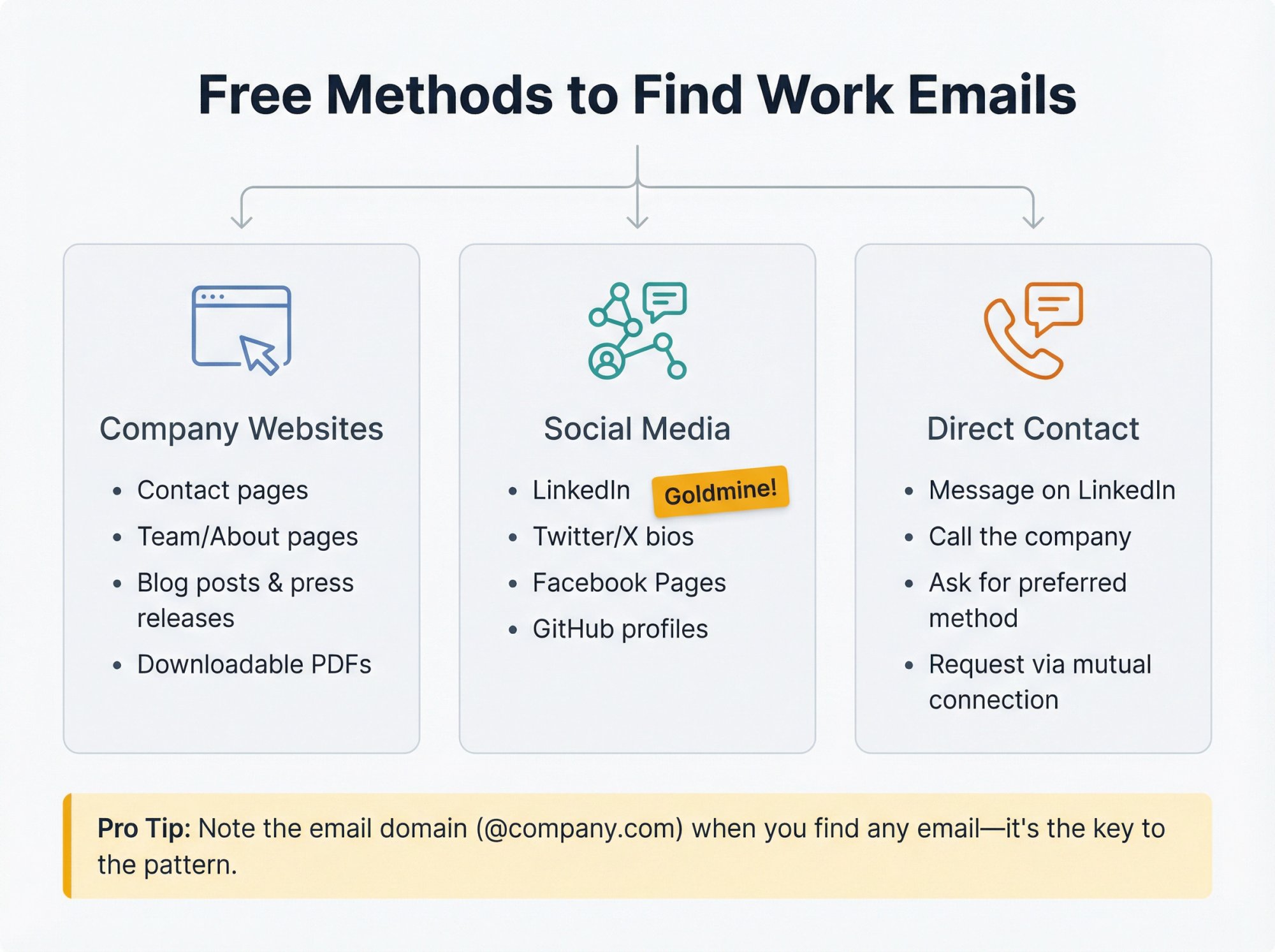
Check Company Websites for Contact Information
Visit the person's company website and look for:
Contact pages often list general emails like info@company.com or sales@company.com. Even if that's not your exact target, you now know the email domain and can use it to construct other addresses.
Team or About pages sometimes display individual emails, especially at smaller companies or professional services firms. Click through to individual bios when available.
Blog posts and press releases frequently include author contact information. If the person you're seeking has written content, check the byline. Press releases often list media contacts with full email addresses.
Downloadable resources like PDFs, whitepapers, and newsletters may contain contact information. Check event brochures, case studies, and any gated content.
Pro tip: While browsing the site, note the email domain (the part after @). Seeing even one email like contact@acme.com tells you the domain to use for all employee emails.
Find Professional Emails on Social Media
Many professionals share their email openly on social platforms:
LinkedIn is the goldmine for B2B contacts. Click "Contact Info" on their profile. If they made their email public, you'll see it immediately. Even if not, note any personal websites or Twitter handles that might lead to contact info elsewhere. LinkedIn is powerful for B2B lead generation when used strategically.
Twitter/X bios often include emails, sometimes written as "john [at] company.com" to avoid bots. Journalists, developers, and marketers commonly list contact information in their bio.
Facebook Pages (not personal profiles) usually show contact emails in the About section, especially for authors, speakers, and business owners.
GitHub profiles are useful for developers. Many include emails in their profile or in public commit logs.
If you find an email on any of these platforms, you're done. If not, you've gathered valuable clues like personal website URLs and name spellings to use next.
Ask Directly for Contact Information
Sometimes the direct approach wins. If you can message the person through LinkedIn, Twitter, or another platform, send a brief, respectful note:
"Hi [Name], I noticed your recent post about [topic]. I have a related question about [specific value]. What's the best email to reach you for a brief note? If email isn't ideal, happy to keep it here."
People appreciate being asked for their preferred contact method rather than having you dig it up without permission. Many professionals will respond with their work email if they're open to hearing more.
You can also call the company's main line and ask the receptionist: "Hello, I'm trying to reach [Name] in [Department] about [legitimate reason]. Could I get their business email?" Gatekeepers often help when you sound professional and specific.
How to Find Email Addresses by Decoding Company Patterns
Most companies use consistent email formats. Once you crack the pattern, you can construct almost any employee's email address.
This free method works incredibly well.
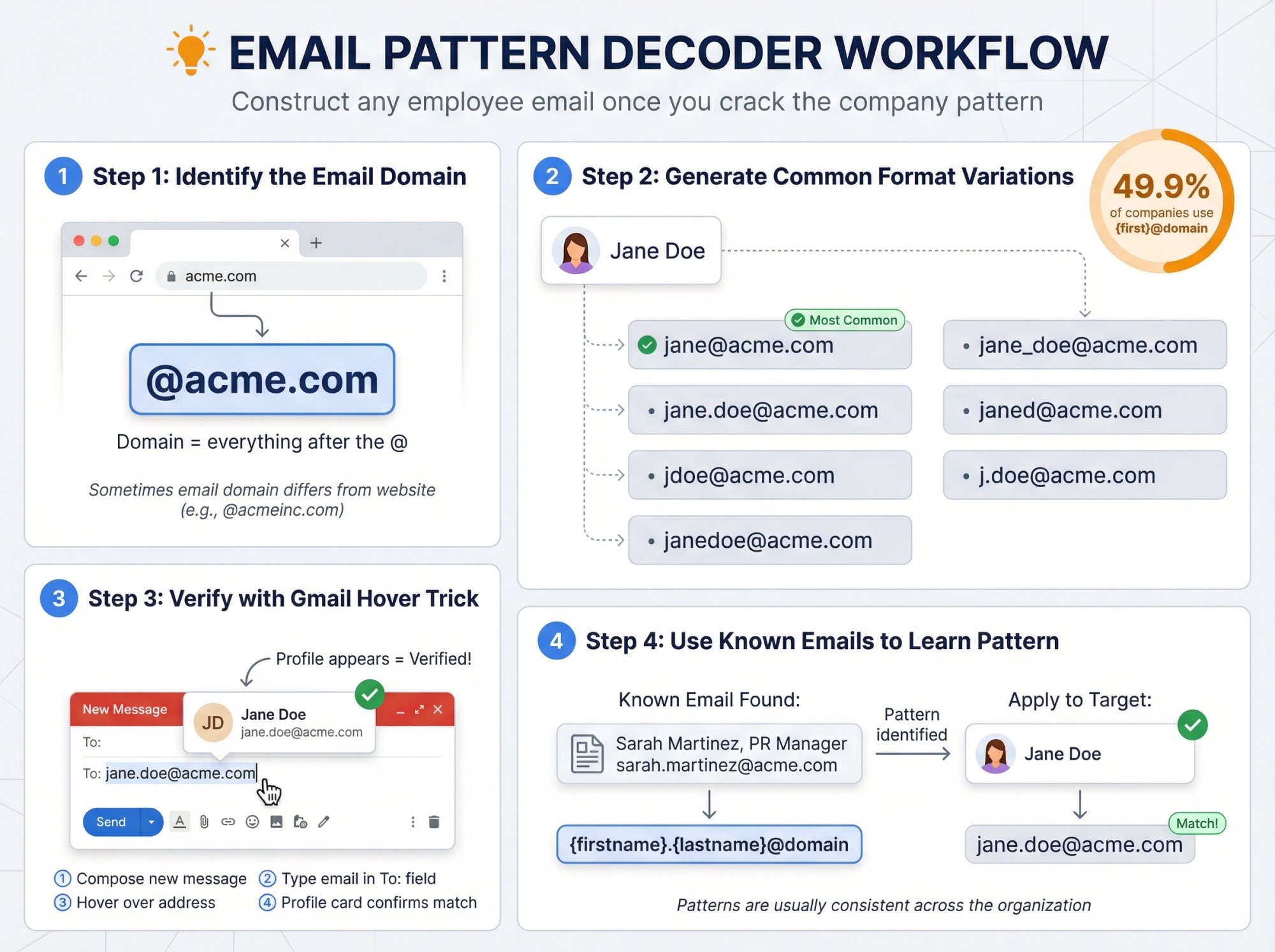
Identify the Email Domain
The domain is everything after the @. Usually this matches the company website. If the company is Acme Inc. and their site is acme.com, employee emails are likely @acme.com.
Sometimes companies use different domains for email (like @acmeinc.com even if the site is acme.com). Check any known emails from the company to confirm.
Generate Common Email Format Variations
Research analyzing millions of email addresses found that {first}@domain is the most common pattern at 49.9%.
For someone named Jane Doe at acme.com, generate these variations:
Create 5 to 10 permutations based on common patterns. Most companies use one of the first three formats.
Verify Email Addresses Without Sending Messages
The Gmail hover trick lets you verify an email without sending a message:
① Open Gmail and compose a new message
② Type your guessed email in the "To" field (don't send it)
③ Hover over the email address you typed
④ If a profile card appears with the person's name or photo, you found it
This works because many work emails connect to Google accounts. When a matching profile appears, that email is almost certainly correct.
Use Known Employee Emails to Learn the Pattern
If you find any employee email at the company, you've cracked the code.
For example, if you discover a press release quoting Sarah Martinez, PR Manager, sarah.martinez@acme.com, you know Acme uses firstname.lastname format. Apply the same pattern to Jane Doe: jane.doe@acme.com.
Patterns are usually consistent across the organization. Occasionally, common names get a number (john.smith2@) or middle initial, but most companies keep it simple.
Google Search Techniques for Finding Work Emails
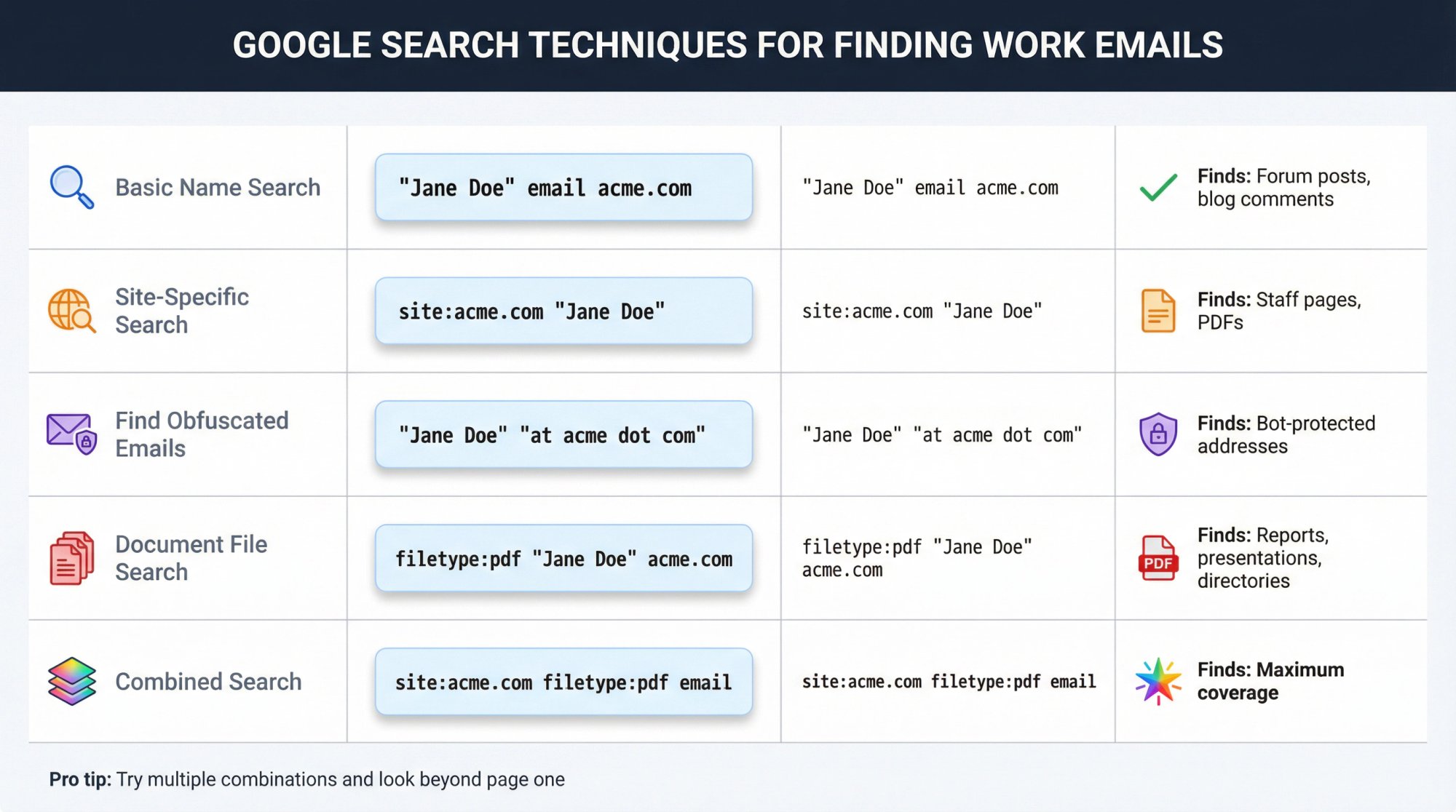
Google can surface emails hidden across the web if you know what to search for.
Basic Name and Email Searches
Start simple: "Jane Doe" email acme.com
If Jane posted her email on a forum, blog comment, or conference list, this might find it.
Site-Specific Searches for Contact Information
The site: operator searches within specific domains:
→ site:acme.com "Jane Doe" might find a staff page or PDF on the company site
→ site:linkedin.com "Jane Doe email" could lead to pages compiling LinkedIn data
Find Obfuscated Email Addresses
People often write emails as "jane [at] acme [dot] com" to avoid spam bots. Search for those patterns:
→ "Jane Doe" "at acme dot com" or "Jane Doe" (at) acme.com
This catches text written in human-readable but bot-unfriendly ways.
Search Document Files for Emails
Professionals' emails often appear in PDFs, PowerPoints, and spreadsheets. Use the filetype: operator:
→ filetype:pdf "Jane Doe" acme.com looks for PDFs containing Jane's name and the company domain (likely including an email)
→ filetype:ppt Jane Doe contact might find conference presentations with contact info
→ filetype:xls "Jane Doe" email sometimes turns up attendee lists or directories
Combine Google Search Techniques
For best results, mix these approaches. Try:
→ site:acme.com filetype:pdf email to find all PDFs with emails on the company site
→ "Jane Doe" "acme.com" -site:linkedin.com to exclude LinkedIn and focus on other sources
→ "Jane Doe" marketing director acme.com when the name is common
Google search is an art. Try multiple combinations and look beyond page one of results.
Best Email Finder Tools and Databases
When manual methods take too long, specialized tools can find verified emails in seconds.
Free Email Finder Tools
Email finder tools can accelerate your research, though many come with limitations. Here are some commonly mentioned options, though at Outbound System we recommend focusing on data quality over tool selection.
Hunter.io is a popular email finder. Search by domain to find emails at a company, or by name + company. The free tier includes 25 searches per month.
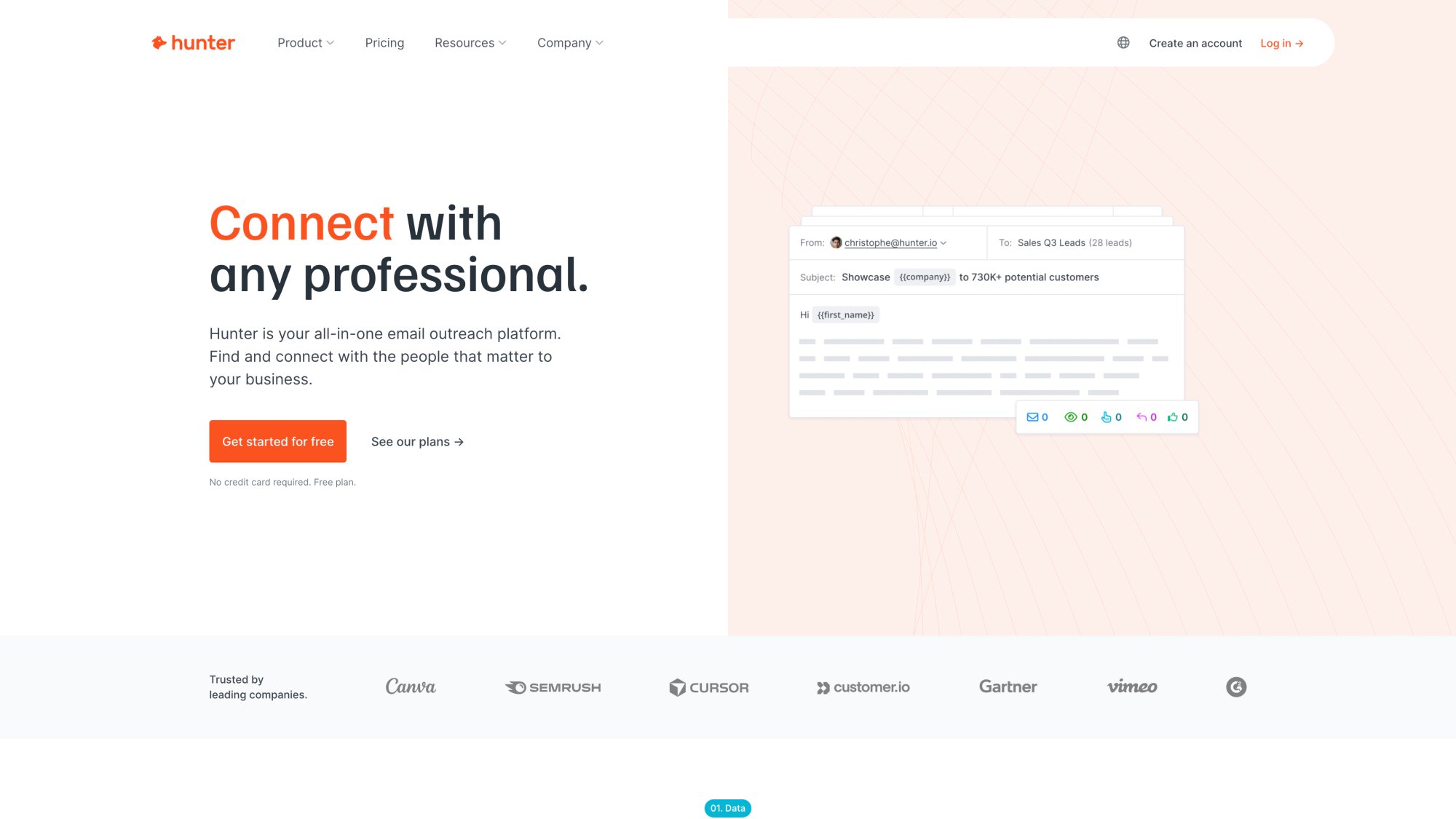
Hunter also shows the most common email format at each domain, which helps you make educated guesses.
ContactOut focuses on LinkedIn profiles. Their browser extension reveals emails and phone numbers. Free users get 40 lookups per month, which is generous for occasional use.
Snov.io offers email finding by domain and LinkedIn plugin, plus bulk search capabilities. They have a free tier with limited credits and built-in verification.
GetProspect is a Chrome extension that grabs emails from LinkedIn as you browse. Useful for building lists of prospects in specific roles.
Apollo.io provides a B2B contact database. However, Apollo made significant changes in 2025 to address data quality and privacy concerns. If you use Apollo, verify that the data is current, as their free data may be cached or outdated.
Voila Norbert has a simple interface: input name and domain, get an email with a confidence score. Limited free searches upon signup.
Tool | Free Plan | Best For | Key Feature |
|---|---|---|---|
Hunter.io | 25 searches/mo | Domain-wide searches | Shows email patterns |
ContactOut | 40 lookups/mo | LinkedIn-focused | Great for recruiters |
Snov.io | Limited credits | Bulk searches | Built-in verifier |
Apollo.io | 50 credits/mo* | B2B databases | Huge contact database |
GetProspect | Limited | LinkedIn scraping | Chrome extension |
*Note: Apollo's free tier data may be outdated as of 2025. Verify freshness before using.
Paid Email Database Services
For power users who need thousands of contacts, premium databases offer comprehensive coverage:
ZoomInfo is a heavyweight in B2B contact data. They provide verified emails and direct dials for millions of professionals with advanced filtering by industry, title, company size, and more. Pricing starts around $15,000/year, making it an enterprise solution for serious sales teams.
Clearbit offers enrichment APIs that take a domain or name and return verified emails plus firmographic data. Pricing is custom (often thousands annually), but some startups use their free "Clearbit Connect" Gmail plugin for limited searches.
LinkedIn Sales Navigator doesn't provide emails directly, but gives you InMail access and advanced people search. Combined with an email finder, it's powerful for B2B prospecting.
The Waterfall Email Enrichment Approach
Professional outbound teams don't rely on one tool. They use a waterfall enrichment process that queries multiple sources in sequence, with each step filling gaps the previous step missed.
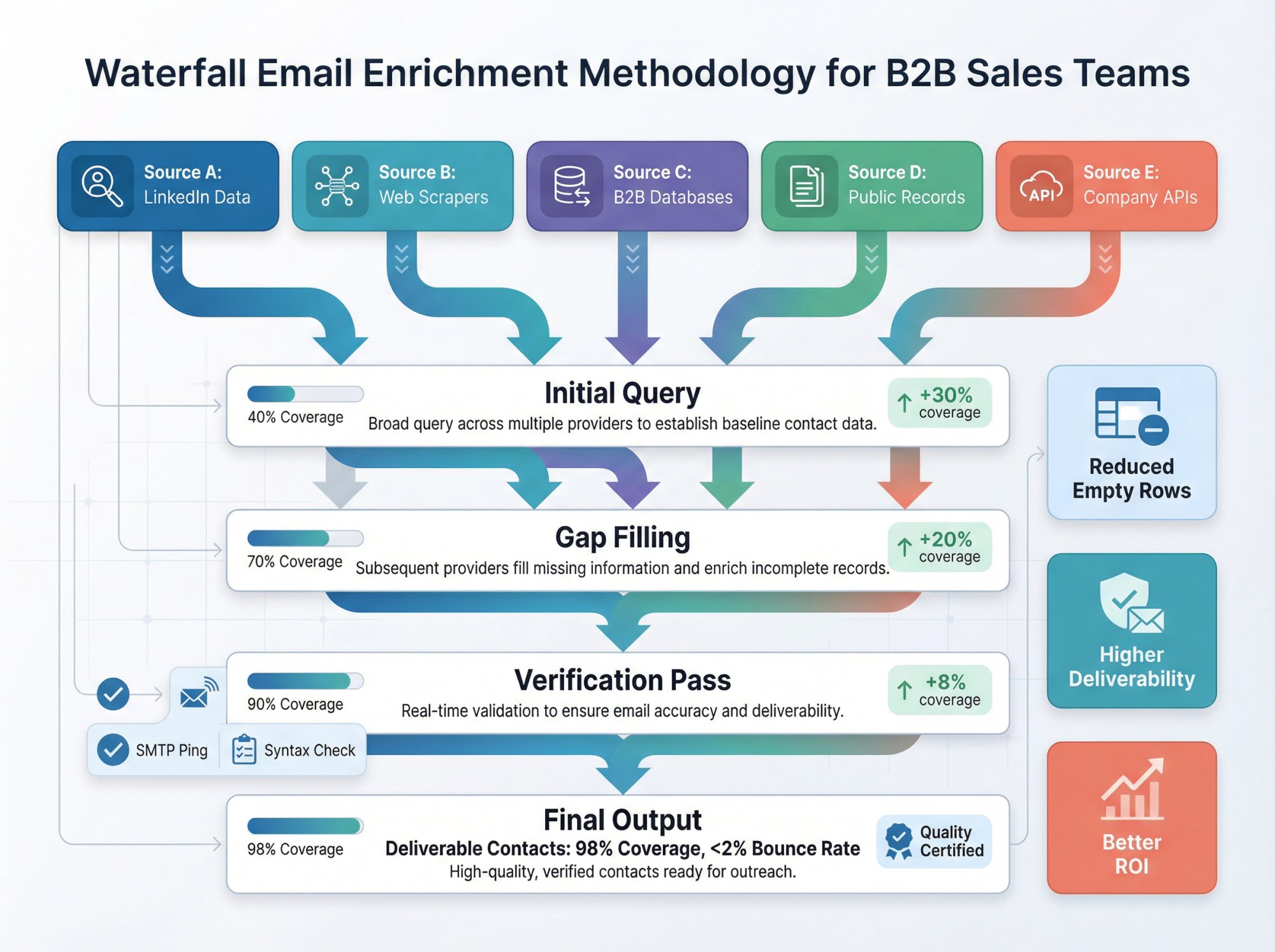
Outbound System uses a 9-step waterfall enrichment approach that combines multiple data vendors with verification at each stage. This maximizes coverage and data quality.
Why this works:
One provider might excel at US SaaS companies while another covers manufacturing better. One has better EMEA coverage, another has more direct dials. Combining sources reduces empty rows and improves deliverability.
You can adopt a simplified version: check one free tool, verify with another, then use a paid database for any remaining gaps.
Creative Methods Most People Miss
When standard methods fail, these unconventional tactics can surface hard-to-find emails.
Subscribe to newsletters. If the person writes a newsletter or their company sends one, sign up. Often newsletters come from recognizable addresses like jane.doe@company.com. Check the "From" field when you receive it.
Check GitHub for developers. Technical professionals often have public emails in their Git commits. Visit their GitHub profile, check repositories, and look at recent commit logs. The email tied to their Git config may appear.
WHOIS lookup for personal domains. If the person owns a website (like janedoe.com), look up the domain registration via a WHOIS service. Older domains or those without privacy protection sometimes show the owner's email. This is less reliable in 2026 due to GDPR masking, but worth a quick try.
Use "Forgot Password" (carefully). Go to a service like LinkedIn or Microsoft and enter the email you think is correct in the password reset field. The system might respond with "We sent a code to j***@acme.com," confirming the email exists. Never actually reset anything. You're just using the feedback to validate your guess.
Ask a mutual connection. If you share a LinkedIn connection with your target, ask that person if they're willing to forward your note or share the contact. Warm introductions work better than cold outreach.
Each of these methods can be the breakthrough you need. For example, subscribing to a CEO's newsletter once revealed that the company used first-name-only emails (jane@company.com), which solved the pattern instantly.
How to Verify Email Addresses Before Sending
You found an email. Excellent.
But don't send anything yet.
Why verification matters:
Bounces kill deliverability. If you send to an address that doesn't exist, it bounces. High bounce rates (above 2%) flag you as potentially spamming. Email providers then route your future messages to spam, even to valid addresses.
Industry research shows the average B2B email bounce rate is 2.33%. Staying under 2% is ideal for maintaining inbox placement. Learn how to reduce email bounce rates to protect your sender reputation.
First impressions count. A verified email ensures your carefully crafted message actually arrives. It would be a waste to write a perfect pitch only to have it never delivered.
Email Verification Services
Email verification services check if an address is deliverable without sending a message. Tools like ZeroBounce, NeverBounce, and Hunter's Email Verifier perform SMTP pings to see if the mailbox exists.
You input the email and get a result: "Valid," "Invalid," or "Risky." Many offer free credits or cost pennies per verification.
Built-in verification from finder tools often includes automatic verification. If you used Hunter, Snov.io, or Apollo and they gave you an email, check the confidence score or verification status. Green check marks mean "verified deliverable." Red X means "likely invalid."
The Gmail hover trick (from Method 2) also serves as basic verification. If Google surfaces a profile for that email, it exists.
Catch-all domains are tricky. Some companies accept mail for any address at their domain, even ones that don't exist. Email verification services warn that catch-all domains can't confirm specific mailbox existence the same way standard ones can.
If verification returns "catch-all/accept-all," treat it as "possible, not proven." Look for additional signals:
• Is the pattern consistent with other known employees?
• Is the person currently at that company?
• Did a finder tool locate public sources?
Send low volume first and watch for bounces.
Outbound System's Triple Verification Approach
At Outbound System, we employ triple verification as part of our 9-step enrichment process. This keeps bounce rates near zero and inbox placement above 98%.
We only send to verified, current addresses. That's why our cold email campaigns consistently deliver results.
You don't need an enterprise system to verify emails. Just use the readily available tools on your own lists before hitting send.
Why Email Deliverability Matters More in 2026
Finding emails is half the battle. Getting into the inbox is the other half.
Starting in February 2024, Google began enforcing stricter requirements for bulk senders (those sending 5,000+ messages daily to Gmail). Key requirements include:
• Authenticate email with SPF, DKIM, and DMARC
• Offer one-click unsubscribe
• Keep spam complaint rates below 0.3%
What this means for email finding:
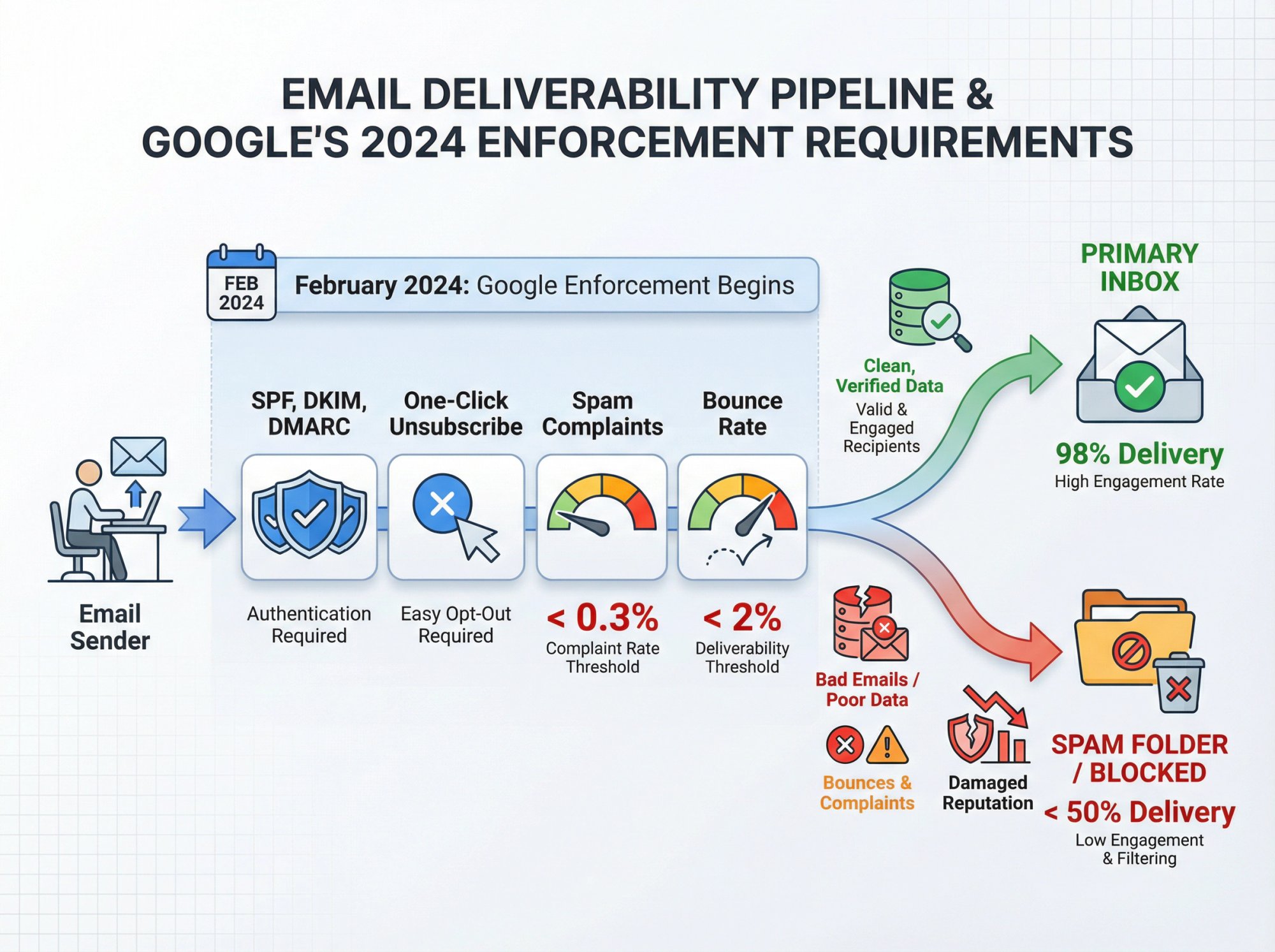
Bad emails lead to bounces and complaints, which damage your domain reputation. Better data hygiene is now a deliverability strategy, not just operations work. Understanding email deliverability best practices is crucial for 2026 and beyond.
Outbound System's guidance emphasizes keeping bounce rates under 2% to protect sender reputation. Clean, verified lists are essential in 2026.
Email Compliance Rules Explained Simply
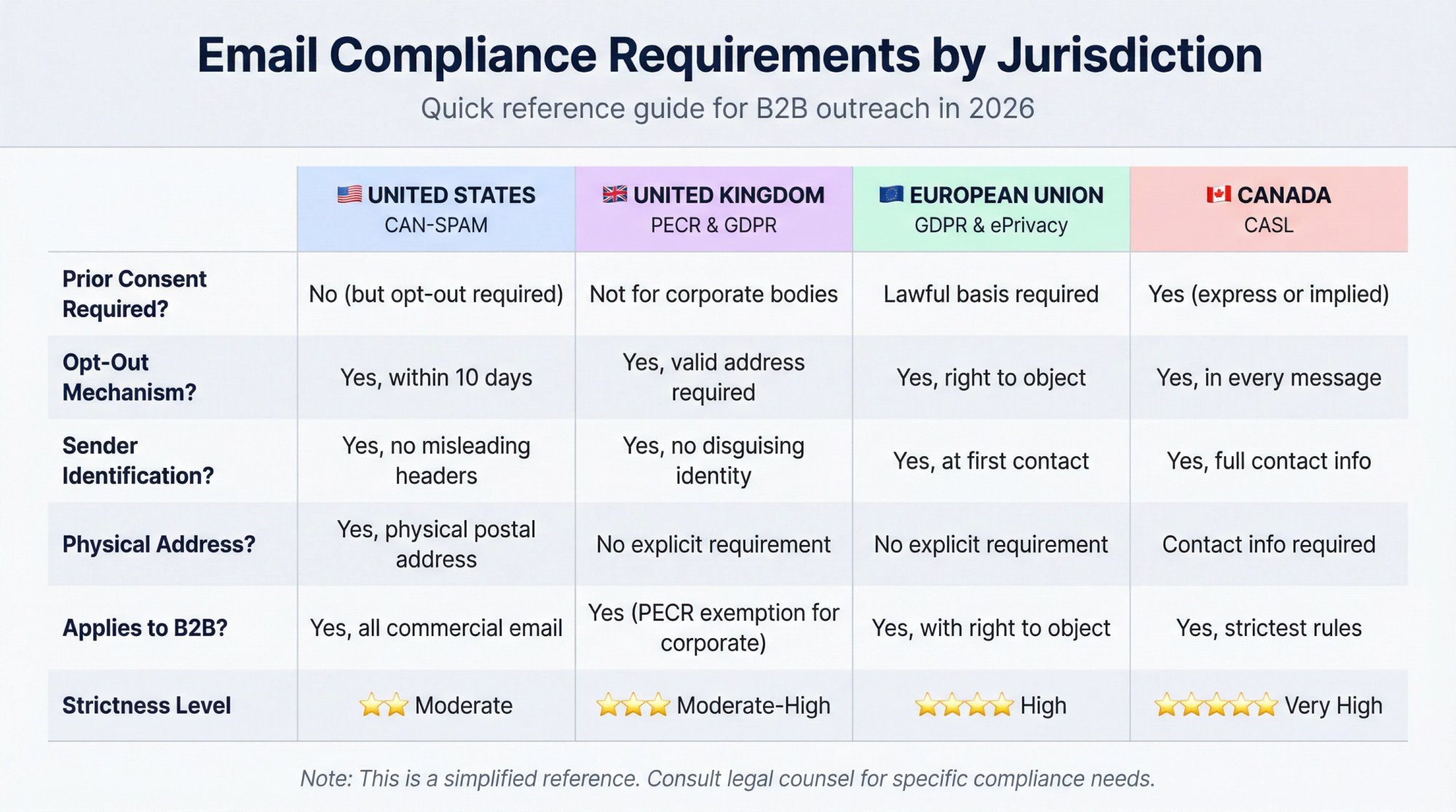
I'm not a lawyer, so this isn't legal advice. But here's the practical reality:
US CAN-SPAM Compliance
CAN-SPAM applies to all commercial emails, including B2B. You must:
• Not use misleading headers or deceptive subject lines
• Include a physical postal address
• Provide an opt-out method and honor opt-outs within 10 business days
Harvesting emails via dictionary attacks (randomly generating addresses) is considered an aggravated violation. Learn more about email outreach compliance.
UK PECR and GDPR Rules
The UK ICO explains that for corporate subscribers, PECR's consent rule doesn't apply the same way as for individuals. You can send B2B marketing emails to corporate bodies without prior consent under PECR.
You must:
• Not disguise your identity
• Provide a valid opt-out address
• Maintain "do not email" lists
If processing personal data (names, identifiable inboxes), UK GDPR applies, including the right to object.
EU GDPR and ePrivacy Directive
The European Commission's guidance highlights:
• You need a lawful basis and must ensure data was collected compliantly
• Keep lists current and don't contact people who object
• People have a right to object to direct marketing
• Inform individuals (at first contact) if you collected their data elsewhere
ePrivacy Directive implementation varies by EU country.
Canada CASL Requirements
Canadian rules are stricter than most. CRTC guidance emphasizes:
• Having consent (express or implied)
• Including identification and contact info
• Including an unsubscribe mechanism in each message
If you sell into Canada, treat CASL as its own playbook.
Complete Workflow for Finding Emails at Scale
Most guides give you random tricks. If you want repeatable accuracy, you need a system.
Production-grade workflow:
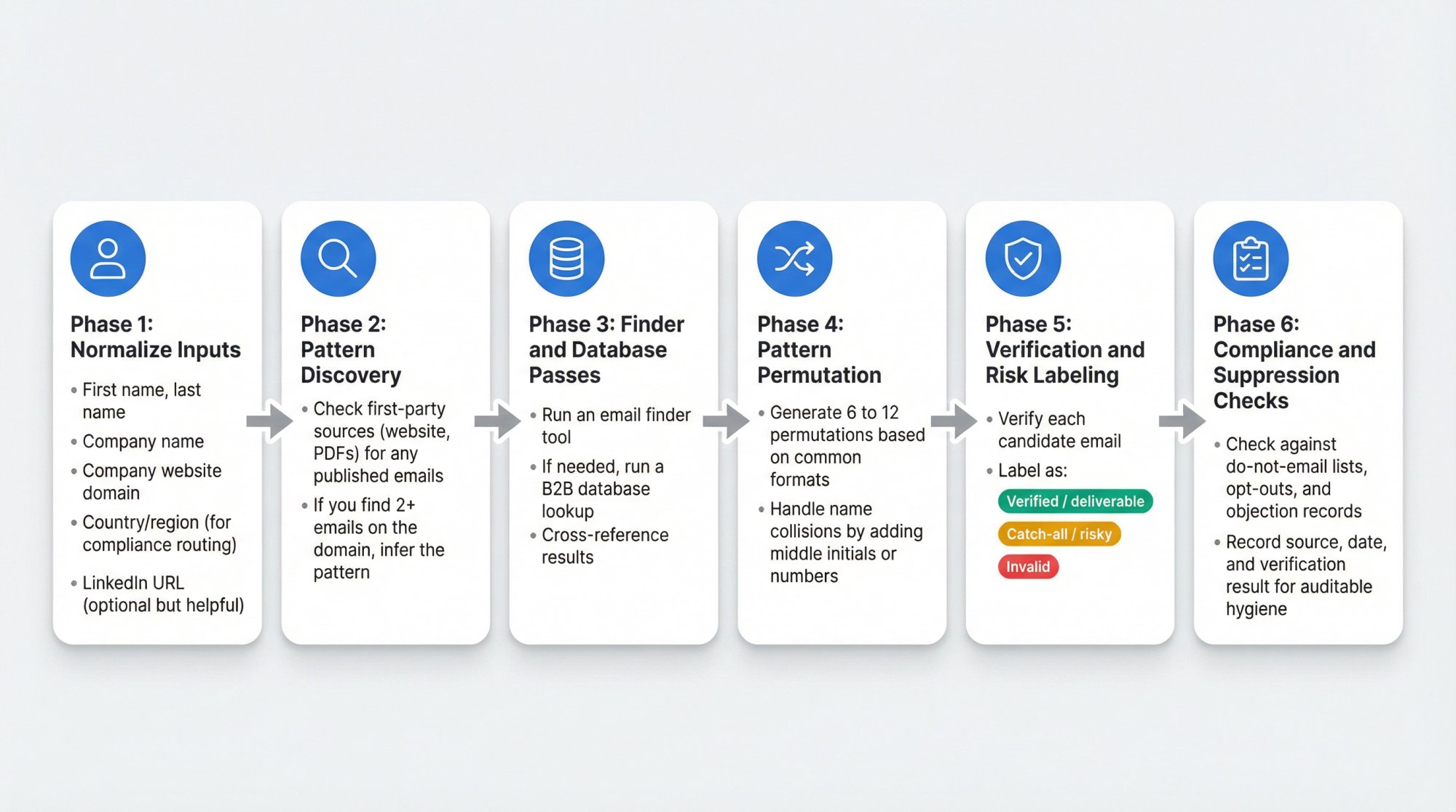
Phase 1: Normalize Inputs
For each prospect, gather:
• First name, last name
• Company name
• Company website domain
• Country/region (for compliance routing)
• LinkedIn URL (optional but helpful)
Phase 2: Pattern Discovery
Check first-party sources (website, PDFs) for any published emails. If you find 2+ emails on the domain, infer the pattern.
Phase 3: Finder and Database Passes
Run an email finder tool. If needed, run a B2B database lookup. Cross-reference results.
Phase 4: Pattern Permutation
Generate 6 to 12 permutations based on common formats. Handle name collisions by adding middle initials or numbers.
Phase 5: Verification and Risk Labeling
Verify each candidate email. Label as:
• Verified / deliverable
• Catch-all / risky
• Invalid
Email verification services explain how verification can fail silently with accept-all domains.
Phase 6: Compliance and Suppression Checks
Check against do-not-email lists, opt-outs, and objection records. Record source, date, and verification result for auditable hygiene.
If you want the done-for-you version, Outbound System's waterfall enrichment handles this entire multi-step process automatically.
Free Google Sheets Email Permutator
Create these columns:
• A: First Name
• B: Last Name
• C: Domain (just company.com, no www)
Then create formulas for permutations:
Formula | Result |
|---|---|
| first@domain |
| first.last@domain |
| firstlast@domain |
| flast@domain |
| first_last@domain |
| firstl@domain |
Run these through a verifier and keep only what passes (or label catch-all as risky).
How Outbound System Helps with Email Finding
Finding work emails at scale requires infrastructure, verification, waterfall enrichment, and constant list hygiene. If you're building lists and running outreach regularly, you need a system.
At Outbound System, we've built the complete infrastructure for B2B cold outreach:
9-step waterfall enrichment ensures we find accurate, verified emails from multiple sources
Triple verification keeps bounce rates near zero and inbox placement above 98%
350 to 700 Microsoft U.S. IP inboxes distribute sending to mimic natural patterns
Human-written copy with AI personalization creates prospect-specific messages that get responses
Complete meeting booking means we don't just send emails. We book qualified sales meetings directly into your calendar.
We've helped clients generate 127,000+ leads and $26 million in closed revenue through systematic outbound. It all starts with finding the right email addresses and treating them with the professionalism they deserve.
If you want this fully managed, from data enrichment to copywriting to meeting scheduling, book a free 15-minute consultation to see how we can help.
Final Takeaway
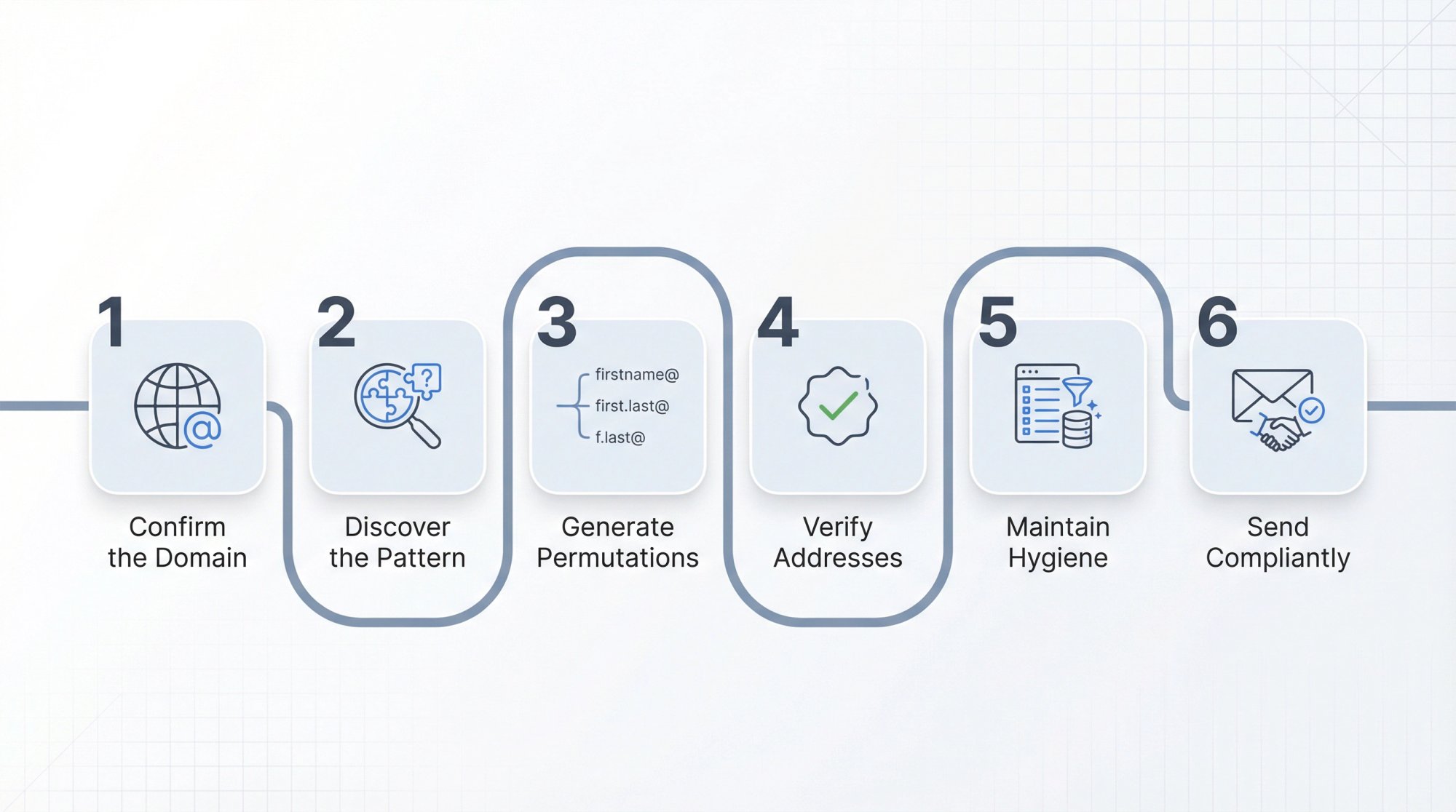
Finding someone's work email in 2026 doesn't require magic. You need a clear process:
1. Confirm the correct domain
2. Discover the company pattern
3. Generate permutations when needed
4. Verify (and handle catch-all correctly)
5. Maintain hygiene and suppression lists
6. Send compliant, professional emails
Start with free methods (company websites, social media, pattern guessing). If those don't work, use email finder tools. For scale, combine multiple sources in a waterfall approach.
Always verify before sending. Always comply with regulations. Always provide value when you reach out.
The difference between spamming and professional outreach is respect. Find the email, verify it's correct, and reach out with something genuinely valuable. Master cold email best practices to maximize your response rates.
When you do it right, email is still the most effective channel for B2B connection.
Frequently Asked Questions
Can I find someone's work email for free?
Yes. First-party sources like company websites, press releases, and social media profiles often reveal emails publicly. Industry research suggests that many company websites display contact information publicly.
Pattern inference (guessing based on known formats) also works surprisingly well. What you pay for with tools is speed, coverage, and verification at scale. Learn more about building prospect lists efficiently.
Is it legal to guess a work email?
Legality depends on jurisdiction and how you use the data. In the US, CAN-SPAM focuses on message requirements and opt-out handling (it applies to B2B).
In the UK/EU/Canada, requirements differ and can be stricter, especially around consent and privacy rights. (ICO guidance)
The act of finding a publicly available business email isn't typically illegal. How you use it for outreach is what matters.
What if every email I try is "catch-all"?
That's common in 2026. Treat catch-all as "cannot confirm specific mailbox." Look for pattern evidence from known employees and public sources.
Email verification services warn that catch-all domains accept mail regardless of mailbox existence, so send cautiously and watch bounce rates.
What if the company uses multiple domains?
Pick the domain that appears in:
• Employee email samples from public sources
• Marketing emails and newsletters
• PDFs, press releases, or public documents
Then verify. Sometimes companies use one domain for marketing (marketing@brand.com) and another for individual employees (@brandcorp.com).
How accurate are email finder tools?
Accuracy varies by provider and data freshness. No tool has 100% coverage. Tools like Hunter, ContactOut, and Apollo claim high accuracy but rely on public data sources and proprietary algorithms.
Data decays about 30% annually as people change jobs, so always verify and use multiple sources when possible.
What's the best way to verify an email?
Use dedicated verification services like ZeroBounce, NeverBounce, or Hunter's verifier. These perform SMTP checks without sending actual messages.
If the email finder tool you used includes verification (most do), trust their confidence scores. Green check marks typically mean verified deliverable.
Avoid sending test emails, as that creates a poor first impression and risks bounces. Read our guide on email warmup to protect your sender reputation.
How do I handle names with apostrophes or special characters?
Drop special characters in email addresses. Mary O'Brien becomes mobrien@ or mary.obrien@ (the apostrophe is removed).
For names with accents (José), use the unaccented version: jose@.
For hyphenated names (Mary-Jane Smith), try variations: maryjane.smith@, mary.smith@, maryj.smith@.
Generate multiple permutations and verify which one works.
Should I use personal emails or work emails?
Always use work emails for professional outreach. Personal Gmail/Yahoo addresses are for personal communication.
Work emails are:
• More appropriate for B2B outreach
• Expected channels for business communication
• Less likely to violate privacy expectations
Plus, most of the methods in this guide specifically find business addresses, not personal ones. Learn what is cold outreach and when to use it.
What if I can't find the email anywhere?
If all methods fail:
1. Use role-based emails: Try sales@company.com, partnerships@company.com, or marketing@company.com. Less precise but sometimes gets routed internally.
2. Call the company: Ask the receptionist for the best way to reach the person or request they forward your message.
3. Use LinkedIn InMail: If you have Sales Navigator or the person accepts InMails, that's a valid alternative. Learn about LinkedIn lead generation strategies.
4. Find mutual connections: Ask for an introduction through someone you both know.
Sometimes people are genuinely unreachable via email, especially in highly gated organizations. Explore alternative channels like cold calling or multi-channel outreach.
How many email permutations should I try?
Generate 6 to 12 variations based on common patterns. Prioritize:
Don't spray dozens of random guesses. Use verification tools to check each variation before sending anything.
Quality guesses based on known patterns beat quantity. Discover automated lead generation strategies that scale efficiently.