Skipping email warmup is like sending a stranger to pitch your biggest client without an introduction. It won't end well.
Your carefully crafted cold emails can be perfect in every way, but if you're sending from a fresh inbox with zero history, they're headed straight to spam. No exceptions. Gmail, Outlook, and Yahoo don't trust new senders, and in 2025, their filters are smarter and more ruthless than ever.
Email warmup services exist to solve this exact problem. They build your sender reputation gradually, proving to inbox providers that you're legit before you start reaching out to real prospects. Think of warmup as your insurance policy against spam folders.
This guide covers everything you need to know about email warmup for cold outreach. We'll explain what warmup services actually do, why Google's 2024 crackdown changed the game, which features matter most, and how to choose the right solution. Plus, we'll show you how Outbound System handles warmup at scale with our private Microsoft infrastructure.
Ready to get your emails into inboxes instead of spam? Let's break it down.
Why Email Warmup Matters for Cold Outreach
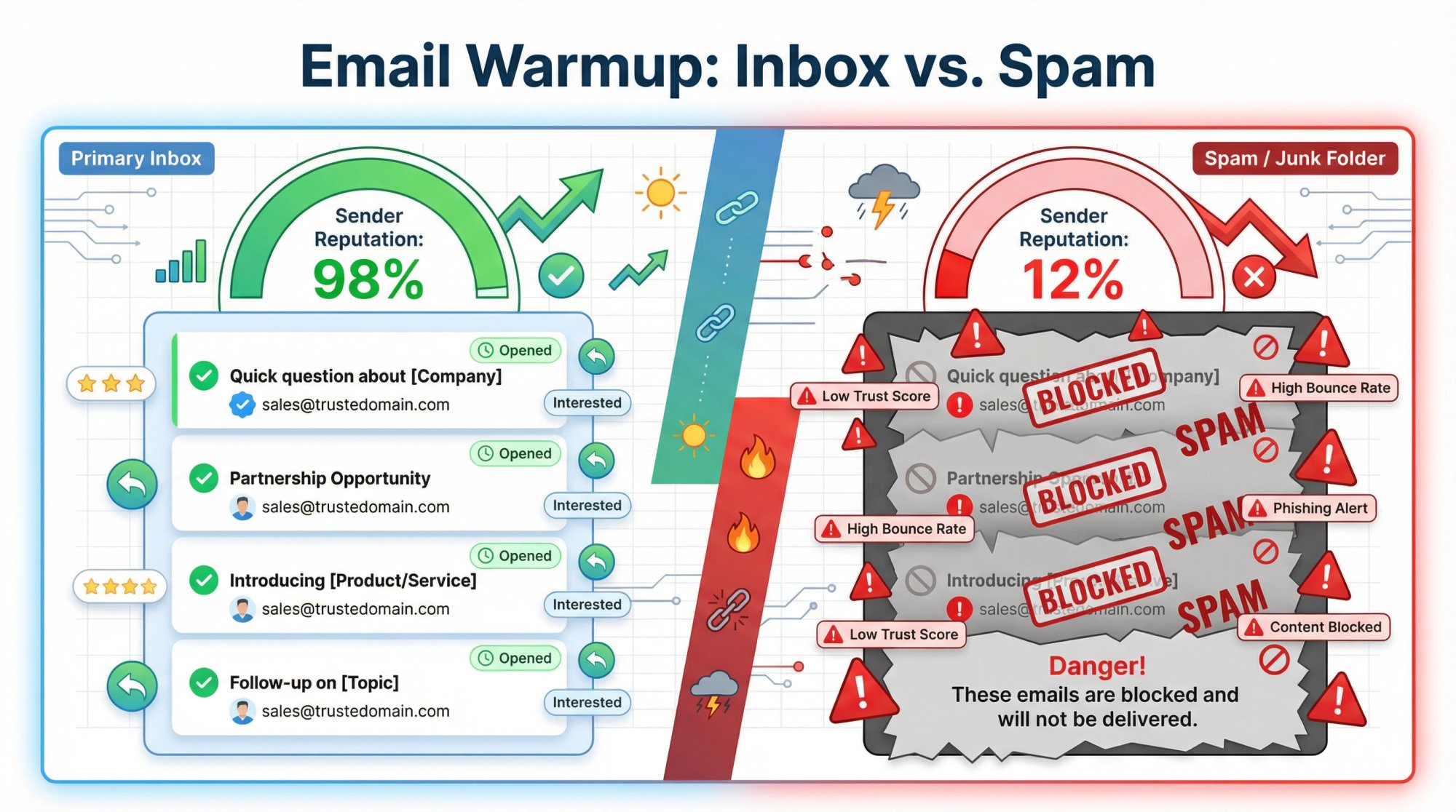
When you fire up a brand new domain or email account and immediately start blasting cold emails, you look exactly like a spammer to Gmail and Outlook. New sender? High volume? No engagement history? That's a one-way ticket to the spam folder.
Here's what actually happens when you skip warmup:
Immediate red flags for providers. Gmail treats new senders with zero history as suspicious by default. They assume you might be a botnet or spam operation until you prove otherwise. Start sending hundreds of emails on day one? You're getting throttled or blocked.
Your emails get quarantined. Even if they don't bounce outright, unwarmed emails often land in spam or the dreaded Promotions tab. Your prospects never see them. All that work on targeting, copywriting, and personalization goes to waste.
Permanent reputation damage. Once you tank your domain's reputation with aggressive sending, it's incredibly hard to recover. You might need to abandon that domain entirely and start over (this time with proper warmup).
The warmup process does the opposite. It gradually builds trust by:
→ Sending low volumes initially (maybe 10-20 emails per day)
→ Increasing volume slowly over 4-6 weeks
→ Generating positive engagement signals (opens, replies, "not spam" flags)
→ Creating a consistent sending pattern that looks human, not robotic
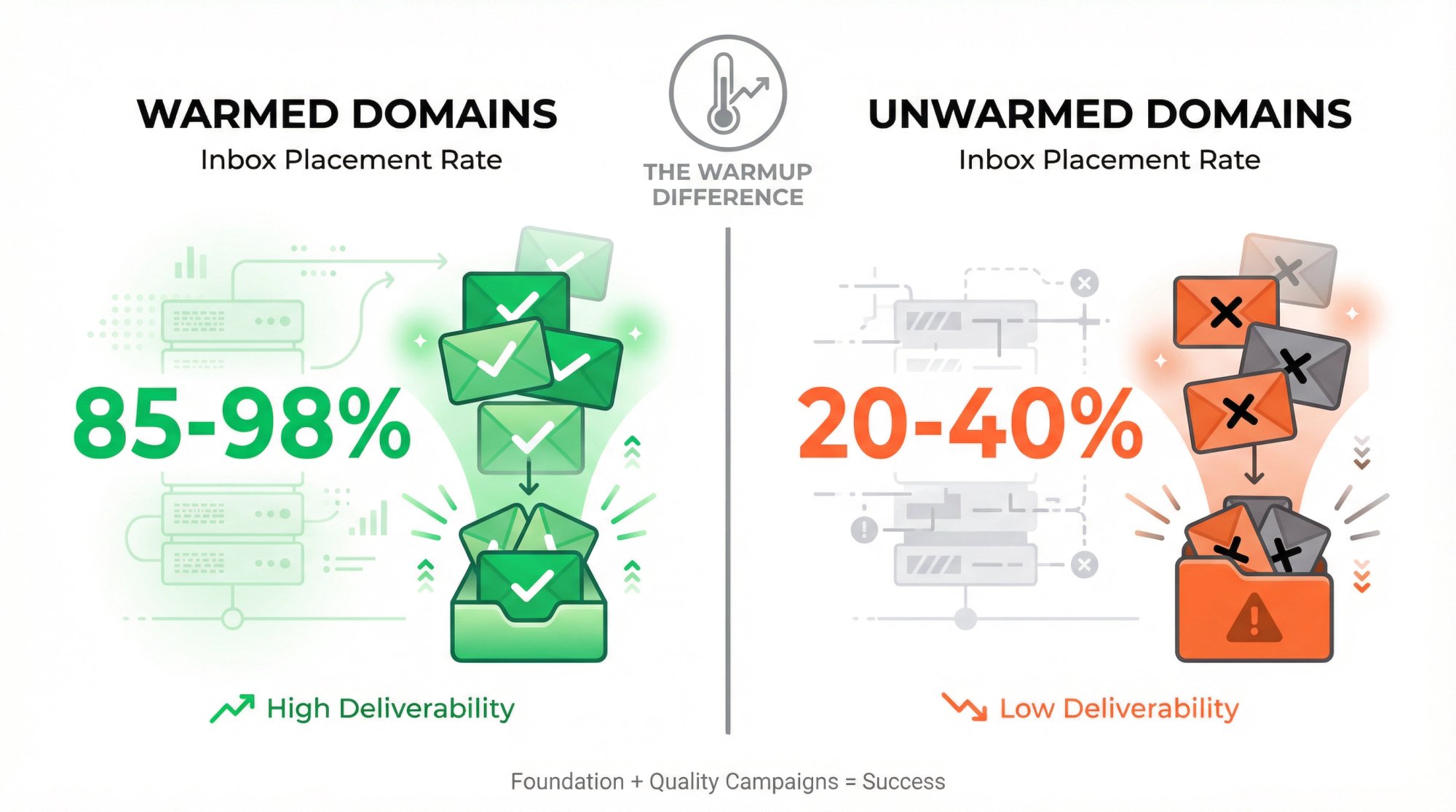
After a proper warmup period, providers lift their initial restrictions and your emails start landing in primary inboxes. The data backs this up: properly warmed domains can hit 98%+ inbox placement rates, while cold domains struggle to break 30%.
Bottom line: Warmup isn't a nice-to-have optimization. It's the foundation that determines whether your cold outreach even reaches its audience.
Industry experts agree on this fundamental principle: "Warm up your domain first. Skipping this step guarantees spam folder placement and kills your sender reputation before you even start."
You wouldn't launch a product without testing it first. Don't launch cold email campaigns without warming up your sending infrastructure.
What Do Email Warmup Services Actually Do?
Email warmup is the process of gradually increasing send volume from a new (or inactive) email account while maintaining high engagement and zero spam signals. The goal? Build sender reputation with Gmail, Outlook, and other providers before you start sending to real prospects.
You could do this manually. Send a few emails to friends on Monday, a few more to colleagues on Tuesday, slowly ramp up over weeks, make sure everyone opens and replies. But that's tedious, time-consuming, and nearly impossible to scale when you're managing multiple domains.
That's where warmup services come in. They automate the entire process, handling all the heavy lifting while you focus on campaign strategy.
How Automated Email Warmup Works
A quality warmup service connects to your email account and orchestrates a sophisticated dance of sending, engagement, and reputation building:
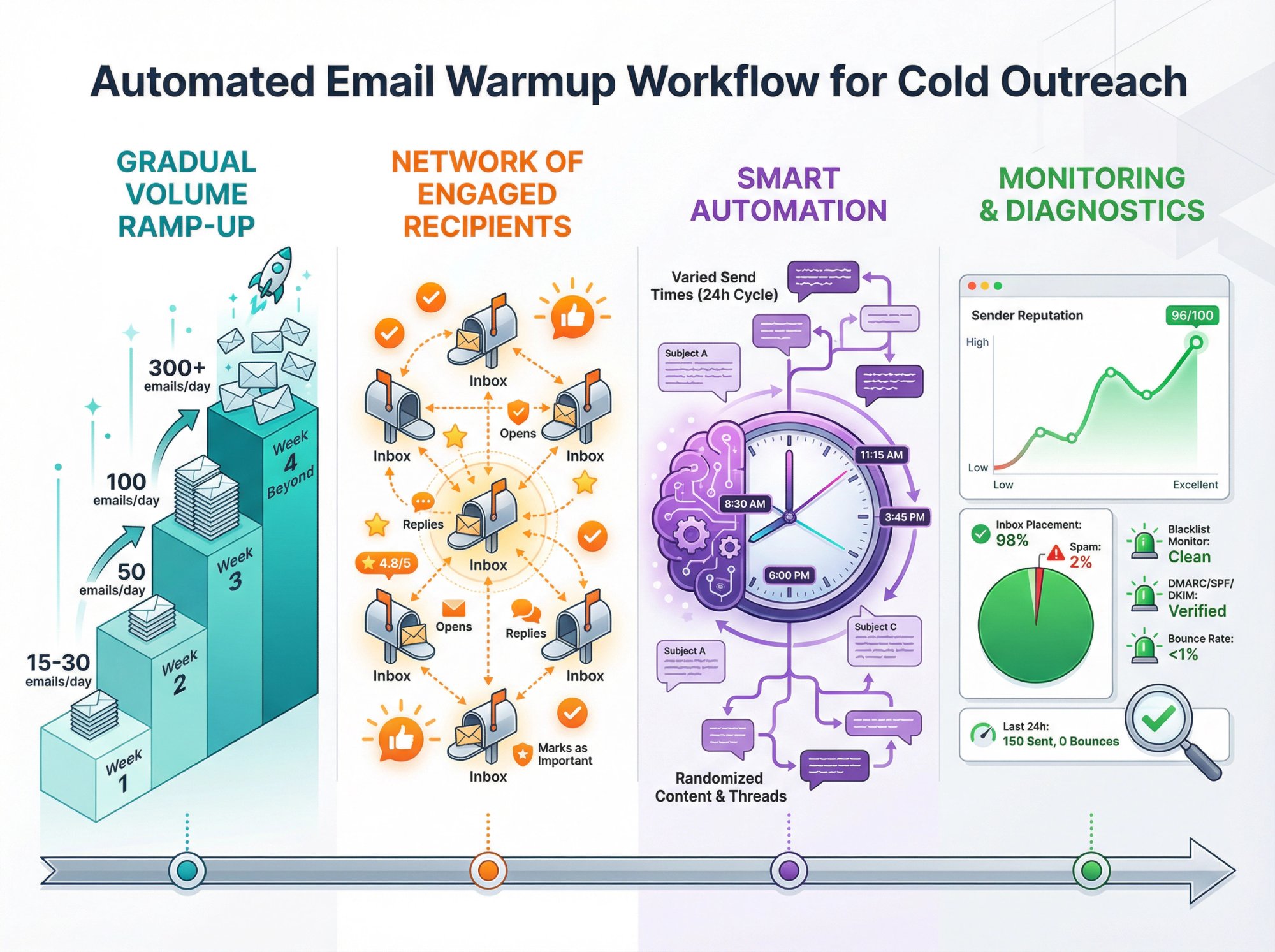
① Gradual volume ramp-up
The service starts small (maybe 15-30 emails per day in week one), then increases volume by roughly 2x each week if metrics look healthy. Week two might be 50 emails/day, week three hits 100, and so on. This slow, steady growth mimics natural human behavior and avoids sudden spikes that trigger spam filters.
② Network of engaged recipients
Your warmup emails go to a network of real inboxes (often other users of the same warmup service or dedicated accounts maintained by the provider). These recipient accounts are set up to automatically engage with your messages. They'll open emails, mark them important, move them to primary inbox, and reply with realistic responses.
The best services use AI to generate conversations that sound like actual human interactions, not robotic exchanges that Gmail can spot a mile away.
③ Smart automation that mimics reality
Quality warmup tools vary send times throughout the day, randomize subject lines and content, adjust reply timing, and create natural conversation threads. Everything is designed to look like genuine one-to-one business correspondence, not bulk email blasts.
Modern systems adapt in real time based on your domain's performance. If they detect any bounce or spam flag, they automatically slow down and adjust the approach.
④ Monitoring and diagnostics
Good warmup services don't just send emails blindly. They actively monitor your sender reputation, run inbox placement tests (sending test emails to see if they land in inbox vs. spam), check DNS configurations, and provide alerts if something goes wrong.
Some platforms offer spam diagnostics that explain exactly why an email landed in spam so you can fix the issue before it becomes a pattern.
What Happens After Email Warmup?
After 4-6 weeks of automated warmup, your email account has:
• A positive sending history with consistent volume
• Strong engagement metrics (high opens, replies, low bounces)
• Trust from major inbox providers
• The green light to start scaling real cold outreach
All of this happens in the background while you're building your prospect lists, writing campaigns, and preparing your strategy. When you're ready to launch, your infrastructure is already trusted and ready to deliver.
Example in action: You set up a new Gmail account for outreach on January 1st. You connect it to a warmup service that starts sending 20 emails daily to its network. All 20 get opened, 18 get replies, zero go to spam. By January 7th, it's sending 40/day with the same positive signals. By February 1st, you're at 200/day with a bulletproof sender reputation. On February 5th, when you send your first real cold email to an actual prospect, Gmail sees it as coming from a trusted sender with 6 weeks of clean history. Your email lands in their primary inbox.
That's the difference warmup makes.
Does Email Warmup Still Work After Google's 2024 Ban?
If you follow cold email news, you probably saw the headlines in early 2024: "Google bans email warmup services." Panic ensued. But here's what actually happened and what it means for you today.
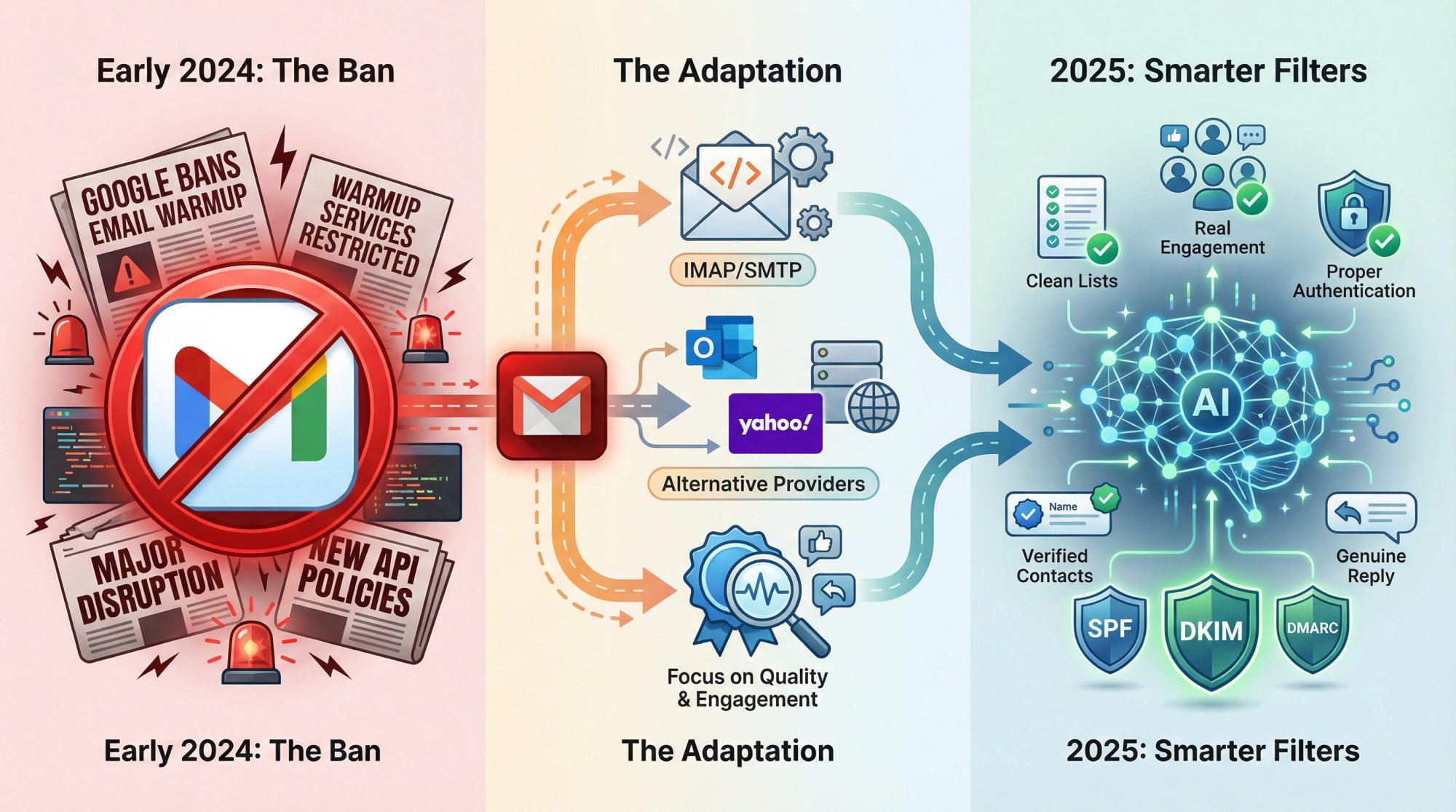
What Google Actually Changed
In early 2024, Google announced they would no longer allow third-party automated warmup services on Gmail accounts. The crackdown targeted warmup tools that used Gmail's API to log in and send staged emails. Google viewed this as a terms of service violation and a potential security risk.
They even asked some providers to shut down their Gmail warmup features entirely. The goal? Put "its foot down" on automation abuse and protect users from spam.
How Email Warmup Services Adapted
Warmup tools didn't disappear. They evolved.
IMAP/SMTP workarounds: Many services switched from Gmail API to IMAP/SMTP protocols for authentication. This is a more basic way to connect that doesn't trigger Google's API restrictions. It works, but it's slower and slightly more complex.
Alternative provider focus: Many tools encouraged users to warm up using Outlook, Yahoo, or custom SMTP providers instead of Gmail. These platforms don't have the same restrictions (at least not yet).
Quality over quantity: The best services doubled down on realistic, high-quality engagement patterns that Gmail's algorithms can't easily distinguish from real activity.
How Spam Filters Changed in 2025
Beyond policy bans, Gmail's filtering AI got significantly better at spotting fake warmup patterns. Recent analysis shows that if your only positive signals come from obviously coordinated warmup exchanges, Gmail may discount or ignore them.
Translation: You can't just warmup and coast. You also need:
• Clean, verified contact lists
• Good email content that doesn't trigger spam filters
• Proper authentication (SPF, DKIM, DMARC configured correctly)
• Real engagement from actual prospects as you scale
Does Email Warmup Still Work in 2025?
Absolutely yes. Here's why:
Reality Check | What This Means |
|---|---|
You still need to build sender reputation | That hasn't changed. Whether you do it manually or with a service, new domains must warm up gradually or they'll get crushed by spam filters. |
Quality warmup services still move the needle | The key is choosing tools that emphasize realism and quality over volume. High-quality networks of real Google Workspace and Office 365 accounts still carry weight with providers. |
It's a foundation, not a crutch | Think of warmup as getting you out of the "new sender penalty box." It proves you're not a spammer and gives you permission to send. From there, your campaign quality (targeting, messaging, engagement) determines long-term deliverability. |
The landscape evolved, but the fundamental goal remains: establish trust before you scale. Smart warmup services, used alongside good sending practices, are still one of the best ways to do that in 2025.
What to Look for in an Email Warmup Service
Not all warmup tools deliver the same results. Some just go through the motions with superficial activity. Others genuinely improve deliverability by building real trust with inbox providers.
When evaluating warmup services for cold outreach, here's what separates the winners from the pretenders:
✅ High-Quality Warmup Network
This is the foundation of everything.
The core of any warmup service is its network of participant inboxes. Ensure the tool uses real, reputable email accounts (preferably business-grade Google Workspace and Microsoft 365 addresses) in its network.
Why this matters: Gmail and Outlook give more weight to engagement from accounts that look like your actual recipients. If a warmup service uses disposable or low-quality dummy accounts, that engagement barely registers with the algorithms.
Red flag: A service that won't disclose what types of accounts it uses.
Green flag: Providers boasting tens of thousands of diverse, real business inboxes across multiple domains.
✅ Smart, Human-Like Automation
Avoid warmup services that send identical messages on a rigid schedule. Spam filters are trained to detect patterns.
Look for tools that mimic human behavior by:
• Varying send times throughout the day
• Randomizing message content and length
• Threading replies within conversations (not just standalone emails)
• Adjusting speed based on your domain's age and performance
The best systems adapt in real-time. If they detect a bounce or spam flag, they automatically slow down and investigate rather than blindly continuing.
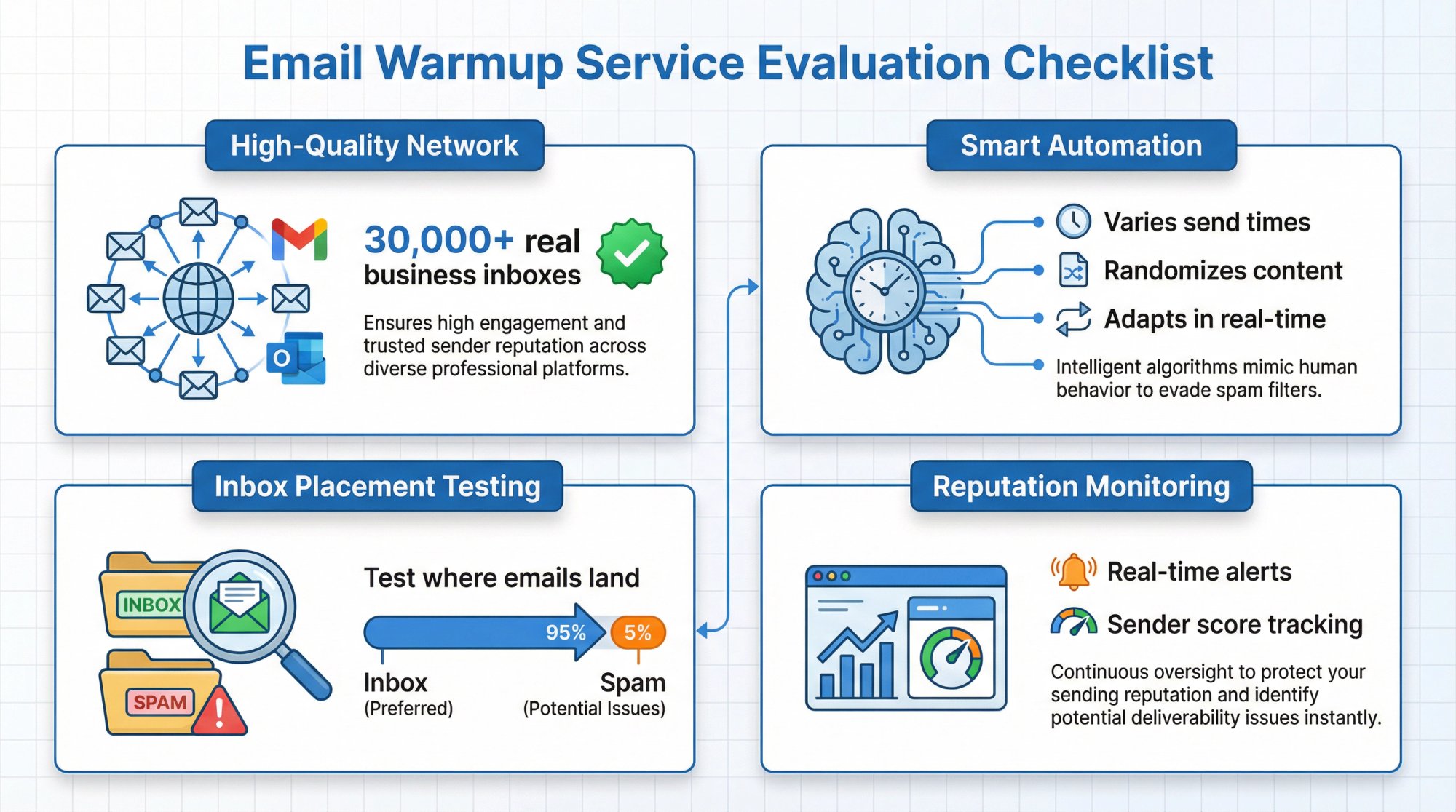
✅ Inbox Placement Testing & Diagnostics
It's not enough to just send warmup emails. You need to know if they're actually working.
Top services include features that test where your emails land (inbox vs. spam vs. promotions) across major providers. They'll send test messages to seed lists and report back on placement rates.
Bonus features:
Spam scoring for your content and links
Blacklist monitoring
DNS configuration checks (SPF, DKIM, DMARC validation)
These diagnostics help you catch and fix problems before you send to real prospects.
✅ Reputation Monitoring & Alerts
You need visibility into what's happening during warmup.
Good services provide:
Sender score tracking showing your domain's reputation health
Real-time alerts if reputation drops or spam placement increases
Engagement dashboards with opens, replies, and other metrics from warmup activity
Early warning systems let you intervene (pause sending, fix technical issues) before your domain gets spam-listed.
✅ Built for Cold Outreach (Not Mass Marketing)
This is subtle but important.
Some warmup tools are designed for bulk newsletter sending, which behaves differently than one-to-one B2B cold outreach. For sales prospecting, you want a service that mimics conversational email patterns, not promotional blasts.
What this looks like:
① Plain-text style messages (not HTML newsletters)
② Conversational tone and varying topics
③ Business-appropriate content
④ Volume strategies suited for multiple parallel inboxes
Choose a tool known for B2B cold email deliverability specifically.
In summary: The best warmup services create authentic-looking engagement through quality networks, smart automation, and continuous monitoring. If a service lacks any of these elements (especially the high-quality network), you're likely wasting money on theater that Gmail can see right through.
How to Choose the Right Email Warmup Solution
The warmup landscape includes standalone services, features within cold email platforms, and done-for-you agency solutions. Each approach has tradeoffs in cost, control, and complexity.
What to Consider When Comparing Warmup Tools
When comparing warmup options, think about these factors:
Factor | What to Look For |
|---|---|
Network Quality | Services using real Google Workspace and Microsoft 365 business accounts (30,000+ inboxes minimum). Disposable or low-quality accounts provide little value. |
Automation Intelligence | The best solutions vary send times, randomize content, thread conversations naturally, and adapt in real-time based on your domain's performance. |
Monitoring & Diagnostics | Essential features include inbox placement testing, sender reputation tracking, real-time alerts, spam scoring, and DNS configuration validation. |
B2B Focus | Choose tools designed for conversational cold outreach, not mass newsletter sending. Plain-text messages with business-appropriate content work best. |
Pricing Models | Standalone warmup tools typically range from $15-50 per inbox monthly. All-in-one platforms bundle warmup with campaign tools for $30-100/month. Premium consulting services start around $120+/month. |
The Done-For-You Alternative
Many businesses skip the complexity of managing warmup tools entirely by partnering with specialized cold email agencies that handle infrastructure, warmup, and ongoing deliverability management.
This approach eliminates:
Tool selection and setup headaches
Daily warmup monitoring and adjustments
Technical DNS and authentication configuration
Risk of choosing incompatible or outdated solutions
Outbound System provides pre-warmed infrastructure as part of our complete cold outreach service. Clients tap into 350-700 already-trusted Microsoft inboxes from day one, skipping the 4-6 week DIY warmup period entirely.
Important note: Whatever approach you choose, verify it's updated for 2025 Gmail/Yahoo requirements (IMAP compliance, proper send limits, unsubscribe handling, etc.).
DIY Email Warmup vs Automated Warmup Services
You could warm up your email manually without paying for a tool. But should you?
The DIY Approach
How it works: You'd need to find or create contacts (friends, colleagues, test accounts) to email each day. Make sure they engage with each message (open, reply, mark not spam). Gradually increase your sending count. Track metrics manually. Vary content yourself.
Reality check: Manually warming up a domain means you're essentially finding willing participants, coordinating daily sends, ensuring engagement, and tracking everything in spreadsheets. It's feasible for warming a single inbox if you've got the time and discipline.
The problem: It's tedious. It doesn't scale. If you're managing multiple domains or accounts (which most serious cold emailers do), manual warmup becomes a full-time job.
Plus, you'll struggle to generate the volume and variety of engagement that automated services can provide through their networks.
The Automated Approach
How it works: Connect your account to a warmup service. It handles everything (finding peers, sending messages, generating replies, tracking progress). You set it and forget it.
Benefits:
• Saves hours of manual work each week
• Scales effortlessly to multiple inboxes
• Generates more realistic, diverse engagement
• Provides monitoring and alerts you'd never track manually
• Lets you focus on campaign strategy instead of micromanaging warmup
Cost: Most warmup tools run $15-50/month per inbox. For the time saved and deliverability improvement, that's usually a no-brainer investment.
One Important Warning
If you do choose a warmup service, pick a reputable one. An inferior tool that sends fake-looking emails or requires risky account access can do more harm than good.
Stick to known providers with:
• Good reviews from actual users
• Transparent explanations of their network and methods
• Proper security practices
• Up-to-date compliance with Gmail/Outlook policies
And before starting warmup (manual or automated), verify your DNS records (SPF, DKIM, DMARC) are configured correctly. A good service will remind you or even check this automatically. Misconfigured authentication undermines all warmup efforts.
Pro tip: At Outbound System, we use AI-generated but human-like warmup content internally. Messages that read like a real person wrote them (even if generated by AI) are less likely to trigger spam filters and more likely to get replies. Many top services now use similar approaches to craft authentic-sounding warmup emails.
How Outbound System Handles Email Warmup
Most warmup services help you manage your own infrastructure. But what if you could skip the entire headache and just plug into infrastructure that's already warmed up and delivering at scale?
That's the Outbound System approach.
Since we run cold outreach campaigns for 600+ clients, we've built warmup and deliverability management into the core of our service. Here's how our system works (and why it's different from DIY warmup):
Pre-Warmed Microsoft Infrastructure
We operate hundreds of dedicated email inboxes on private Microsoft Azure servers. Each client's outreach is distributed across 350 to 700 individual inboxes (depending on the plan) that we own and keep continuously warmed.
What this means for you: When you start with us, you're not beginning from zero. You're tapping into established sender reputation from day one.
We distribute sends across many addresses, keeping each inbox's volume low and natural (typically under 20-30 emails per day per inbox). This mimics human sending patterns and avoids the volume spikes that alarm Gmail and Outlook.
Think of it like joining a gym with 700 different treadmills instead of trying to run a marathon on one machine.
Built-In Warmup Protocols
When we deploy new domains or inboxes, we run them through our proven warmup protocol:
• Low initial volume
• Gradual increases over 2-3 weeks
• Interaction with our network of warmed inboxes
We typically get a new client's domain inbox-ready in about 14 days by leveraging our existing warmed infrastructure. New sending addresses get "paired" with our veteran domains in campaigns, which accelerates trust-building.
This is much faster than solo DIY warmup (which can take 4-6 weeks) because we're not starting from scratch.
Triple-Verified, Pristine Data
A huge part of staying warm (not just warming up initially) is avoiding bad contacts that hurt your reputation.
We use a 9-step data verification and enrichment process on every single contact before emailing. This includes:
Syntax validation
SMTP ping verification
Historic bounce data checks
Engagement signal evaluation
Result: Virtually zero hard bounces and no spam traps. By keeping bounce rates near 0% during warmup and beyond, we protect sender reputation proactively.
Most warmup tools assume you're handling list hygiene yourself. We do it automatically for every campaign.
Engagement-Focused Content
Here's where we accelerate warmup beyond what artificial services can do alone:
We combine human copywriting with AI personalization to write cold emails that get real replies from actual prospects. Our approach yields 2.8x higher response rates than generic templates.
Why this matters for warmup: The real engagement from prospects (replies, especially) is the strongest possible signal you can send to inbox providers. Our emails often get genuine positive replies during the early ramp-up phase, which turbocharges sender reputation beyond what warmup-only tools can achieve.
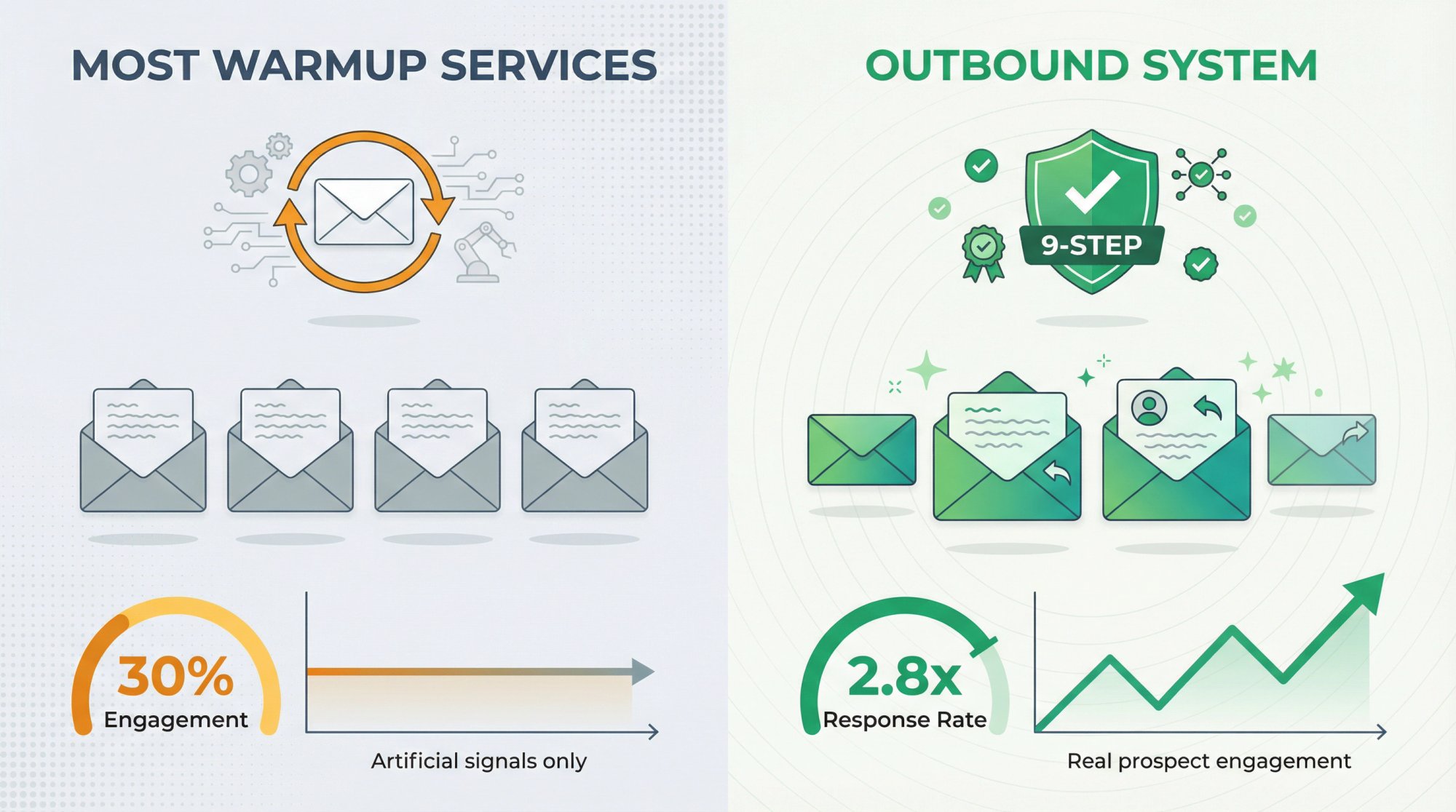
It's like having actual people vouch for you instead of just staged testimonials.
Continuous Monitoring & Adaptive Sending
Our deliverability engineers monitor metrics 24/7 via:
Microsoft SNDS
Internal dashboards tracking placement, engagement, bounces, complaints
If a domain's reputation even slightly dips or if any sign of spam foldering appears, we immediately pause or slow down sending on that domain and diagnose the issue.
We monitor deliverability metrics in real-time and adjust as we scale. We might route emails through a different domain, tweak content, or adjust volume. This level of hands-on optimization ensures warmup isn't a one-and-done event, but ongoing reputation maintenance.
Most small businesses can't practically do this. It's one advantage of partnering with an agency that lives and breathes deliverability.
The Bottom Line
Outbound System provides warmup as part of a complete cold outreach system. Our clients don't think about warmup at all. We handle:
• Technical setup (DNS, domains)
• Warming infrastructure
• Sending distribution
• Post-send monitoring and optimization
The result? 98%+ inbox placement rates and strong campaign performance from week one.
For teams without a dedicated deliverability expert, this approach eliminates the entire warmup headache. You skip straight to emails that land in inboxes and book meetings.
Book a free 15-minute consultation with us. We'll show you how we can get your cold email campaigns delivering to inboxes in as little as two weeks using our pre-warmed environment.
Best Practices to Maximize Email Warmup Results
Whether you use a warmup service or go DIY, following these best practices will maximize your deliverability and protect your sender reputation long-term:
1. Start Slow, Then Double Weekly
Patience wins the warmup game.
Start with just 10-20 emails per day in week one. If metrics look good (high engagement, zero bounces), roughly double your volume each week.
Example ramp-up:
Week | Daily Volume |
|---|---|
Week 1 | 20 emails/day |
Week 2 | 40 emails/day |
Week 3 | 80 emails/day |
Week 4 | 160 emails/day |
Week 5+ | 300+ emails/day |
Most domains hit full volume safely after 4-6 weeks. Resist the urge to rush. A slow warmup that inbox providers barely notice is exactly what you want.
2. Only Send to Engaged, Valid Contacts Early
The first emails from a new domain should go to people who will definitely interact positively.
During warmup, this might be:
Colleagues and friends
Yourself on other accounts
Contacts provided by your warmup network
Avoid:
Purchased lists
Unverified leads
Any questionable addresses
No bounced emails, period. Use verification tools to check addresses beforehand. A single spam complaint or spam-trap hit in week one can derail your entire warmup.
3. Mind Your Content and Formatting
Even during warmup, what you say matters.
Write emails that are:
Plain-text (not heavily HTML-formatted)
Conversational (like you're emailing a colleague)
Free of spam triggers (no ALL CAPS, multiple exclamation points, or marketing buzzwords like "FREE" or "ACT NOW")
Keep it simple and friendly. Something like: "Hi, just checking in. Let's connect soon!"
Once you start emailing cold contacts, include an unsubscribe or opt-out line. Gmail and Microsoft increasingly expect even cold emails to offer a way to opt out. Lacking it can hurt your reputation.
4. Continue Good Practices After Warmup
Warmup is not a one-time fix you can forget about.
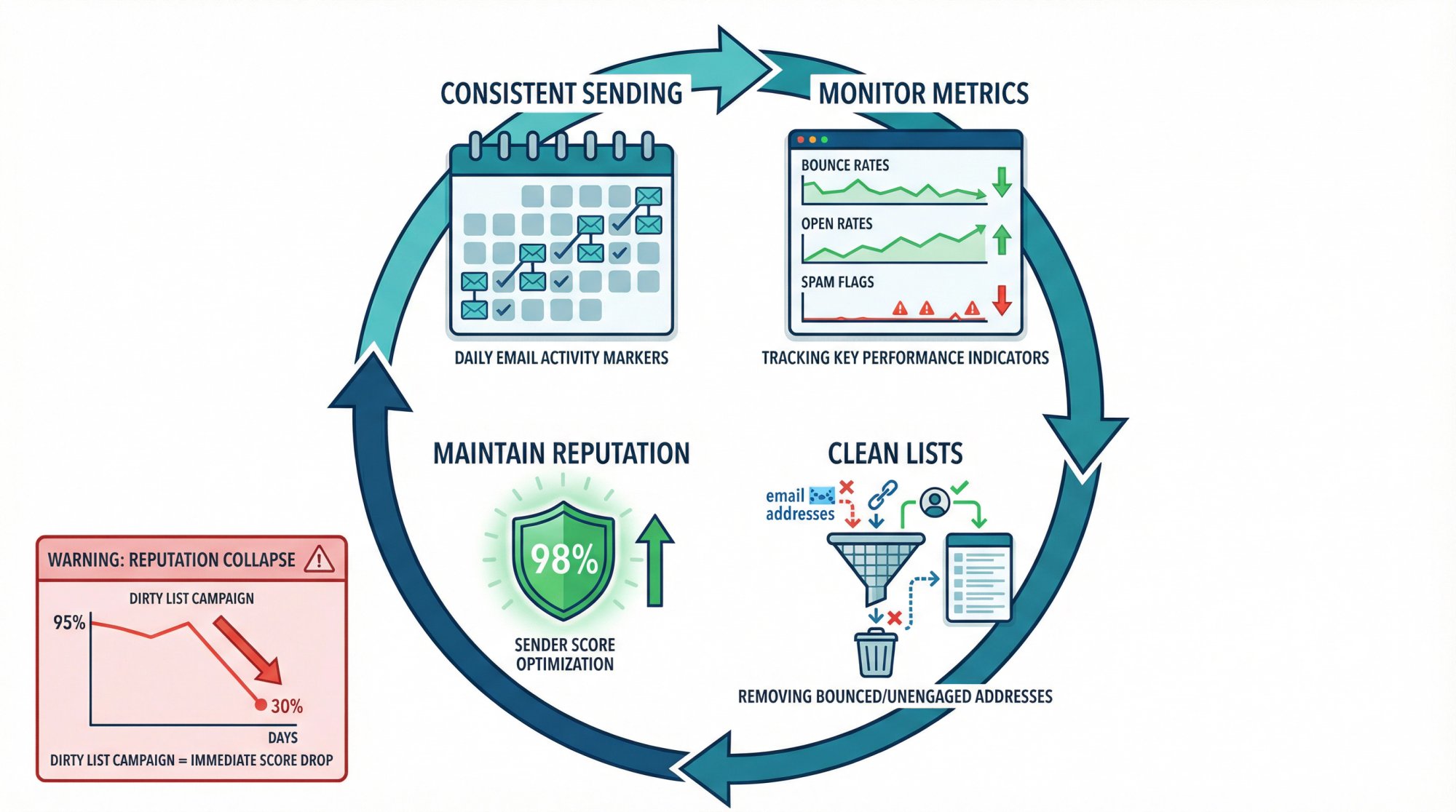
Everything you do in your ongoing campaigns feeds back into your sender reputation. Maintain the same discipline:
Keep sending consistent. Don't go from daily sends to radio silence for a month, then back to high volume. Inconsistent patterns look odd and can reset your reputation.
Monitor your metrics continually. Track bounces, open rates, spam flags. If you see a problem (sudden spike in bounces, drop in opens), address it immediately before it snowballs.
Clean your list regularly. After warmup, when you scale to thousands of contacts, still remove bounces and unengaged addresses. A single campaign with a dirty list can wreck a previously good reputation in days.
5. Scale Out Wisely
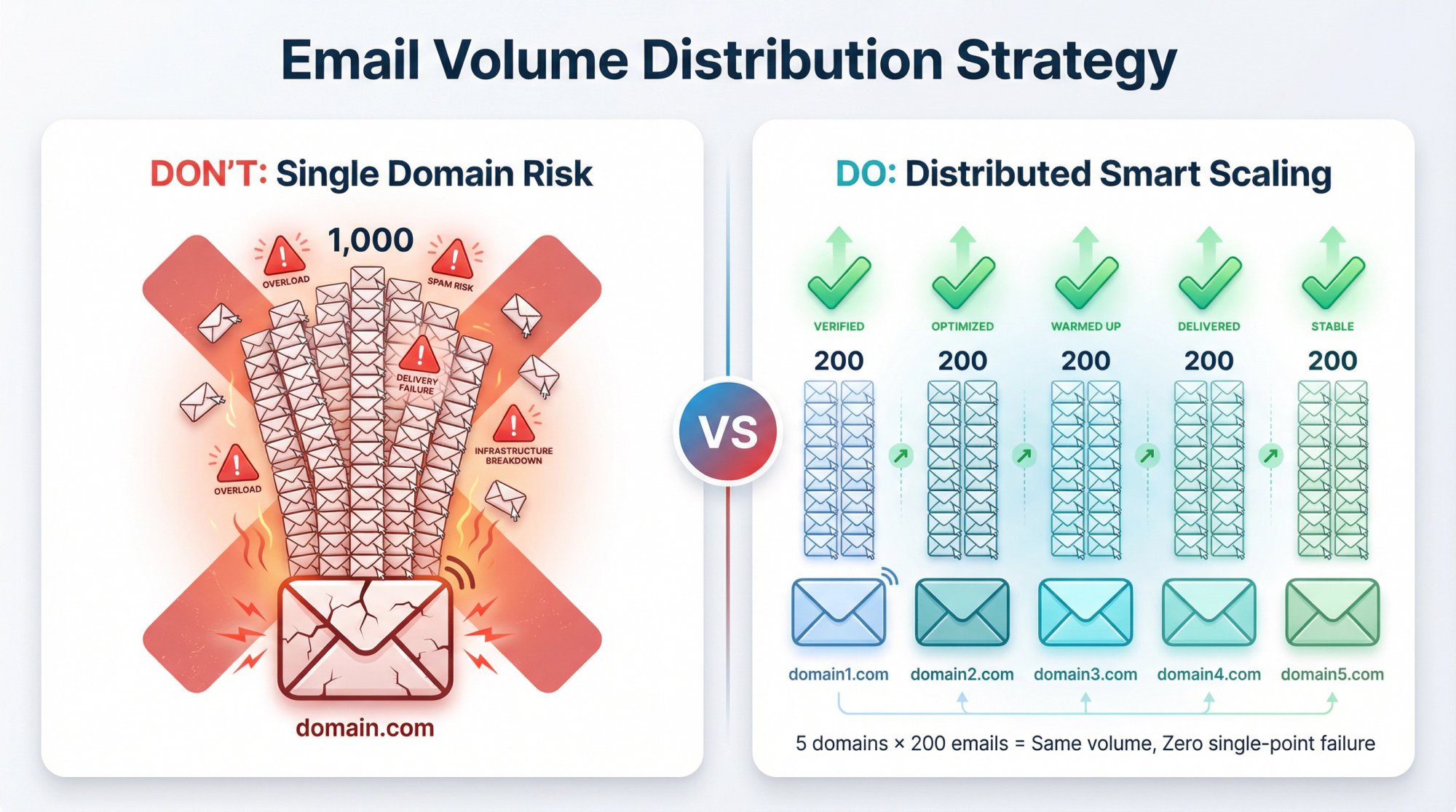
If you need to increase volume beyond what one domain can safely handle, add more domains and inboxes rather than pushing one to its limit.
Using multiple sender identities in parallel (each with its own warmup) is safer than maxing out a single domain. For example:
• Instead of one domain sending 1,000 emails/day
• Use 5 domains sending 200 emails/day each
This diversifies risk. If one domain has an issue, it doesn't tank your entire operation.
(Always warm each new sender domain/inbox before adding it to your rotation.)
6. Stay Current on Policy Changes
Email providers update rules constantly.
Keep an ear out for news like:
• Gmail's February 2024 update requiring easy unsubscribe links
• Yahoo's deliverability changes
• New Microsoft SNDS thresholds
Adapting quickly to changes protects your deliverability. What worked last year might need tweaking now, so staying informed matters.
By combining these best practices with a quality warmup service (or our done-for-you approach at Outbound System), you give your cold outreach the best possible chance of success.
Remember: Warmup gets you to the inbox. From there, it's up to your targeting and messaging to engage the reader and book meetings.
Conclusion: Why Email Warmup Is Essential in 2025
Cold emailing can drive incredible results, but only if your emails actually reach prospects' inboxes. Email warmup services exist to make sure they do.
Think of warmup as insurance for your sender reputation. A bit of effort and investment upfront can save your entire campaign from dying in spam folders later.
In 2025, with inbox providers more aggressive than ever, warmup isn't just best practice. It's essential practice. Gmail and Outlook demand to see trustworthy behavior and engagement before they fully let you in. Fortunately, by leveraging the right warmup tools or services, you can meet those demands and set yourself up for cold outreach success.
Key Takeaways
Always warm up new domains and inboxes for several weeks before heavy outreach.
Use an email warmup service to automate the process and generate positive engagement at scale. But choose one with a quality network and realistic approach that actually moves the needle on deliverability.
Stay within recommended volume limits and continually monitor your reputation. Warmup isn't a one-and-done task.
If managing all this feels overwhelming, consider partnering with experts who specialize in deliverability. At Outbound System, we handle everything from warmup to sending to optimization, using our private Microsoft infrastructure and proven processes.
With a properly warmed sender and a well-run campaign, your cold emails have a real shot at cutting through the noise.
Here's to your emails landing front and center in prospects' inboxes (and to the meetings and sales that follow).
Frequently Asked Questions About Email Warmup
How long does email warmup take before I can start sending cold emails?
Most domains need 4-6 weeks of warmup to safely reach full sending volume. You can start low-volume outreach (maybe 20-30 emails/day) after 2-3 weeks if metrics look good. The key is gradual increase. At Outbound System, we get clients inbox-ready in about 14 days by leveraging our pre-warmed infrastructure, but that's because we're distributing sends across hundreds of already-trusted inboxes.
Can I warm up a Gmail account after Google's 2024 ban on warmup services?
Yes, but the approach changed. Google banned warmup services that use their API, but tools adapted by using IMAP/SMTP protocols instead. Alternatively, many teams now warm up using Outlook or custom SMTP providers that don't have the same restrictions. The key is choosing a reputable warmup service that's updated its methods for 2025 compliance.
How much does email warmup cost?
Standalone warmup services typically range from $15 to $50 per inbox per month. Budget-friendly options like Warmup Inbox start around $15/inbox, mid-tier tools like MailReach and Lemwarm run $25-30/inbox, and premium services like Warmy.io are closer to $49/inbox. All-in-one platforms like Instantly bundle warmup with campaign tools for around $30/month total. If you're managing multiple inboxes, costs add up quickly.
What happens if I skip email warmup?
Your emails will likely land in spam or get blocked entirely. New domains with zero sending history get treated as suspicious by default. You'll see low open rates (because emails aren't reaching inboxes), high spam complaint rates, and potentially permanent reputation damage that's hard to recover from. Skipping warmup essentially wastes all the effort you put into targeting, copywriting, and list building.
How do I know if my email warmup is working?
Good warmup services provide dashboards showing engagement metrics (opens, replies, spam flags) and sender reputation scores. You should see gradual volume increases with consistently high engagement (ideally 80%+ open rates, 50%+ reply rates during warmup). Also run inbox placement tests to verify emails land in primary inbox, not spam. If you're seeing bounces, spam flags, or low engagement during warmup, pause and diagnose the issue before continuing.
Can I warm up multiple email accounts at the same time?
Absolutely. In fact, this is the standard approach for cold outreach at scale. Most warmup services let you connect and warm multiple inboxes simultaneously. Just remember each inbox needs its own gradual ramp-up and monitoring. At Outbound System, we warm and manage 350-700 inboxes per client in parallel across our private Microsoft infrastructure.
Do I need to keep using a warmup service after the initial warmup period?
Many users continue running warmup services at low levels even after the initial period as "maintenance warmup." This keeps positive engagement signals flowing during periods when you might not be sending many real campaigns. Once you're sending regular cold emails that get genuine engagement from prospects, that real-world interaction often provides enough positive signals on its own.
What's the difference between warming up a domain vs. warming up an inbox?
Domain warmup builds reputation for your sending domain (like yourcompany.com), while inbox warmup builds reputation for specific email addresses (like sales@yourcompany.com). Both matter, but they're related. When you warm up individual inboxes on a domain, you're also building that domain's overall reputation. Most warmup services handle both simultaneously.
Will email warmup guarantee my cold emails land in the inbox?
No service can guarantee 100% inbox placement, but proper warmup dramatically improves your odds. After a quality warmup, you should expect 85-98% inbox placement rates (compared to 20-40% for unwarmed domains). Final deliverability also depends on list quality, content, targeting, and ongoing sending practices. Think of warmup as necessary but not sufficient. It's the foundation, but you still need good campaigns on top of it.
Should I warm up with the same content I'll use for cold outreach?
Some services (like Lemwarm) let you warm up using your actual campaign templates, which can be beneficial because it trains filters on your real content. Most warmup services use generic conversational messages that just build general sender trust. Both approaches work. The key is that warmup messages should look natural and get positive engagement, regardless of whether they match your final campaign copy.