Figuring out how many cold emails you can send per day sounds simple enough. It's not.
Send too few and your pipeline dries up. Send too many and you're flagged as spam before your message ever hits an inbox.
And there's no universal magic number. Your safe daily volume depends on your email provider's limits, your domain's reputation, and how well you've warmed up your accounts. A brand-new domain might safely handle 20 emails a day while an established sender could push several hundred across multiple inboxes.
This guide breaks down the specific numbers, the warm-up process, and the infrastructure strategies that separate successful cold email programs from ones that crash and burn within weeks. By the end, you'll know exactly how to find your safe sending limit and scale from there.
Why Daily Cold Email Volume Affects Your Deliverability
Before getting into specific numbers, it helps to understand why limits exist in the first place. Email providers aren't trying to ruin your sales pipeline. They're protecting their users from abuse. And they've built multiple layers of defense against anyone who looks like a spammer.
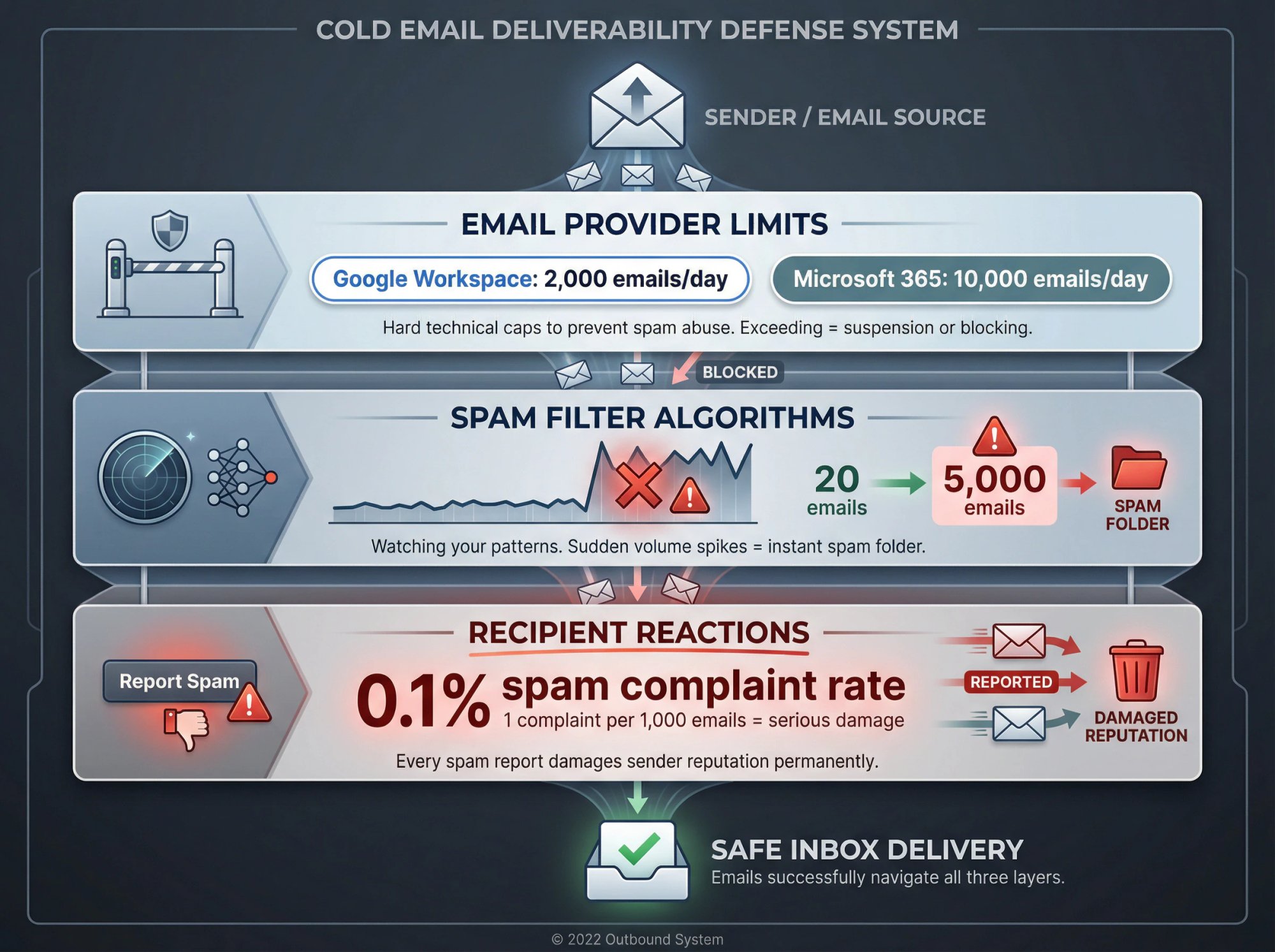
Three systems work against high-volume senders who haven't earned trust:
Email Provider Limits: Services like Google Workspace and Microsoft 365 set hard technical caps on how many emails a single account can send daily. According to Google Workspace documentation, paid accounts can send up to 2,000 emails per day. Microsoft 365 caps recipients at 10,000 daily per their Exchange Online limits. These limits exist to prevent obvious spam abuse, and exceeding them can get your account temporarily suspended or blocked entirely.
Spam Filter Algorithms: Even if you stay below technical limits, spam filters watch your patterns. A sudden spike in volume is a massive red flag. Jumping from 20 emails one day to 5,000 the next will almost certainly land you in spam folders, regardless of how good your content is. Understanding email outreach strategies helps you avoid these pitfalls. In 2025, filters care about consistent, human-like sending behavior above almost everything else.
Recipient Reactions: This is the one most senders underestimate. When recipients click "Report Spam," it sends a loud signal to email providers. And the threshold for damage is shockingly low.
The damage threshold is terrifyingly small.
According to Google's Email Sender Guidelines, a spam complaint rate of just 0.1% (one complaint per 1,000 emails) can seriously damage your sender reputation and trigger aggressive filtering.
This became even more critical after Google and Yahoo introduced new policies in 2024 requiring bulk senders to include one-click unsubscribe links and maintain extremely low complaint rates. Understanding email outreach compliance rules is essential for avoiding these pitfalls. The more people flag your emails, the harder it becomes for any of your messages to reach inboxes.
The right question isn't "how many can I send?"
It's "how many can I send while maintaining a healthy sender reputation?" That number is much lower than raw technical limits, especially when you're starting out. Our guide on top B2B lead generation methods shows how email fits into your broader strategy.
Email Provider Limits: Gmail, Microsoft 365, and More
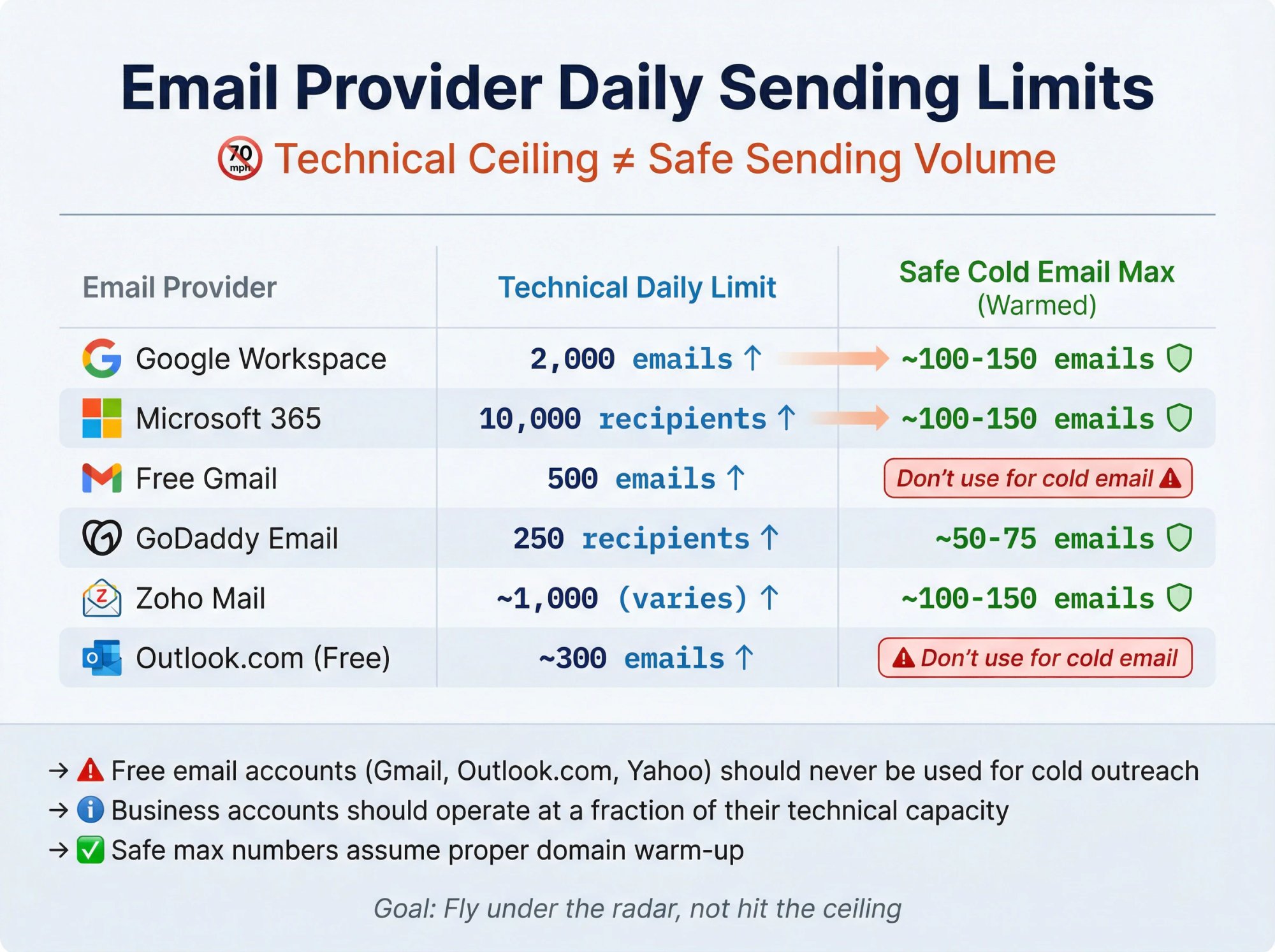
Every email service has published (or observable) daily sending limits. This is the absolute ceiling your account can technically send in 24 hours. But for cold outreach: hitting these limits isn't the goal. It's a sign you're pushing too hard.
Think of it like a speed limit on a highway. Just because the sign says 70 mph doesn't mean your 20-year-old car should be pushed to that speed. Similarly, a new email account can't jump to maximum capacity overnight without crashing deliverability. Those technical limits are upper bounds for established senders with clean reputations, not targets for cold email.
Provider | Technical Daily Limit | Safe Cold Email Max (Warmed) |
|---|---|---|
Google Workspace | 2,000 emails | ~100-150 emails |
Microsoft 365 | 10,000 recipients | ~100-150 emails |
Free Gmail | 500 emails | Don't use for cold email |
GoDaddy Email | 250 recipients | ~50-75 emails |
Zoho Mail | ~1,000 (varies by plan) | ~100-150 emails |
Outlook.com (Free) | ~300 emails | Don't use for cold email |
A few critical notes on this table:
→ Free email accounts (Gmail, Outlook.com, Yahoo) should never be used for cold outreach. They get flagged almost immediately and risk your ability to use those services for legitimate communication.
→ Even business accounts should operate at a fraction of their technical capacity when running outbound campaigns.
→ The "safe max" numbers assume you've properly warmed up your domain (more on that next).
The goal is to fly under the radar. Providers watch for patterns that look automated or spammy. By staying well below the technical ceiling, you signal that you're a legitimate sender, not someone trying to blast thousands of messages before getting caught.
How to Warm Up a New Email Domain for Cold Outreach
If you're using a new domain or fresh email address for cold outreach, you absolutely can't start at full volume. The process of gradually increasing your sending over time is called "warming up" your domain, and it's non-negotiable for email deliverability.
Think of it like exercising a new muscle. You don't walk into a gym and attempt a 300-pound lift on day one. You start light and build strength over time. According to industry best practices for domain warm-up, email domains work the same way.
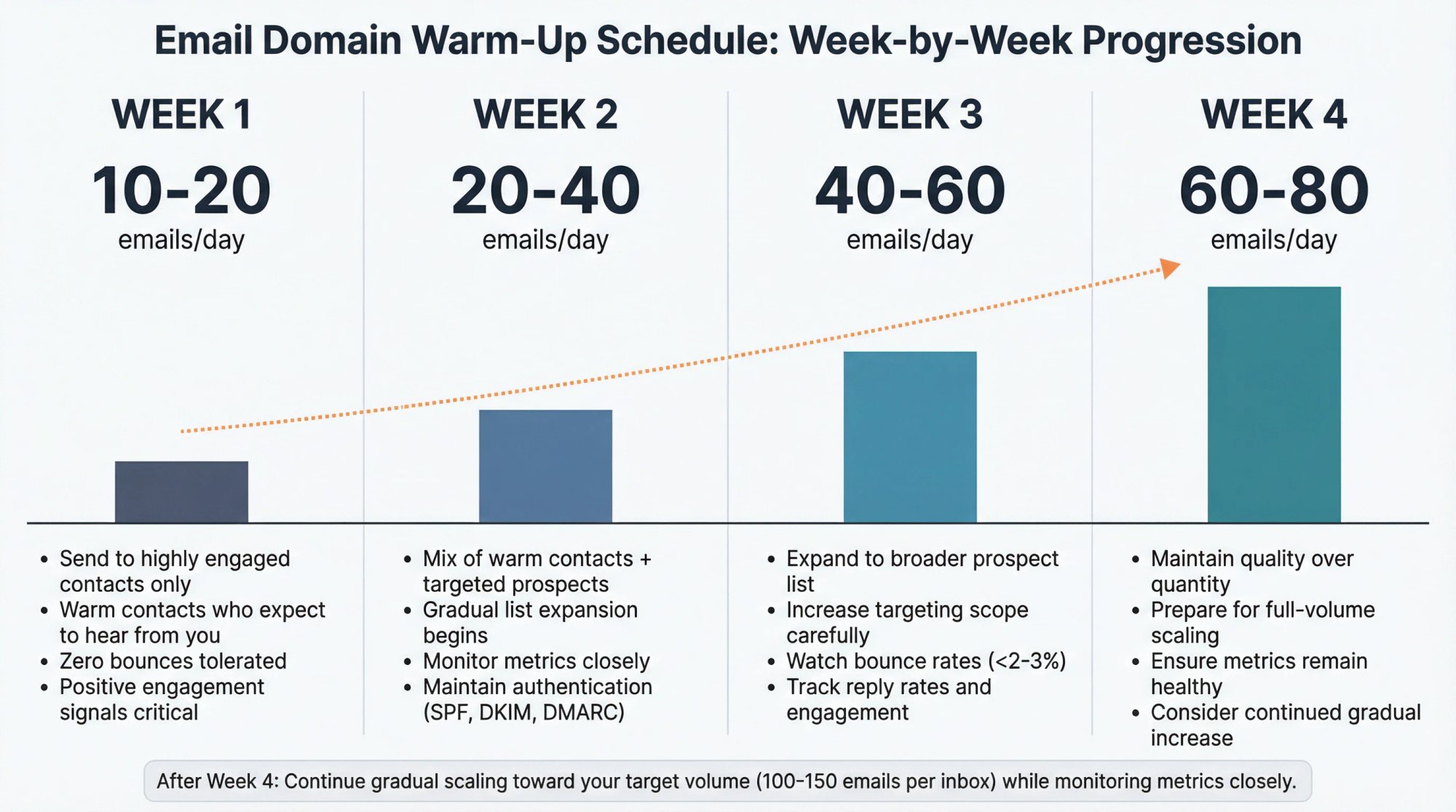
Week-by-week warm-up schedule:
Week | Daily Sending Volume | Focus |
|---|---|---|
Week 1 | 10-20 emails | Highly engaged contacts only |
Week 2 | 20-40 emails | Mix of warm contacts and targeted prospects |
Week 3 | 40-60 emails | Gradually expand to broader list |
Week 4 | 60-80 emails | Maintain quality, monitor metrics |
After week 4, if your metrics look healthy (more on that in a moment), you can continue scaling slowly toward your target volume. This gradual approach is essential for any outbound sales strategy.
What Email Warm-Up Looks Like in Practice
In the first week, send only to people likely to engage.
This means friends, colleagues, existing contacts, or anyone who will definitely open and possibly reply to your email. These positive engagement signals build trust with email providers. It's far better to start with 10 emails that all get opened than 100 that mostly get ignored.
Keep bounces and complaints at absolute zero.
During warm-up, every email must go to a verified, real address. Even a handful of bounces or a single spam complaint in week one can hurt your reputation immediately. This means no cold blasts to purchased lists yet. Stick to contacts who expect to hear from you. Learn how to reduce email bounce rates before scaling.
Set up authentication before you send anything.
SPF, DKIM, and DMARC records need to be configured on your domain. According to Google's authentication requirements, these protocols tell email providers you're who you say you are. As of 2025, Gmail and Microsoft require authenticated senders, and Microsoft expects a DMARC policy if you want to send more than 5,000 emails daily.
Monitor your metrics obsessively.
Watch open rates, reply rates, bounce rates, and spam reports throughout the warm-up process. Positive signals (especially replies) are gold. They boost your reputation faster than almost anything else. Negative signals like bounces above 2-3% or any spam complaints mean you should pause and fix the issue before continuing. Our guide on preventing cold outreach mistakes covers common pitfalls.
A concrete example:
Say you buy a new domain tomorrow. On day 1, you send 10 personalized emails to people you know. All get delivered, and a few replies come back. You slowly increase to 20 per day by end of week 1. In week 2, you send 30-40 daily, including some real prospects with careful targeting. By week 4, you're at 80 emails per day with solid metrics.
At that point, if everything looks good, you can start approaching your full planned volume (maybe a few hundred daily across multiple inboxes). By gradually building from 0 to 200+ over a month, you've signaled to Gmail and Outlook that you're a legitimate sender who sends wanted emails.
Pro tip: Consider using an email warming tool or service to automate the early ramp-up. These services send and engage with emails behind the scenes to boost your reputation. Even with automation, you should still follow sane volume limits when you begin real outreach.
Safe Daily Cold Email Limits After Warm-Up
Once you've successfully warmed up your domain, you've built some trust and can send at more significant scale. But what's the actual ongoing limit per inbox?
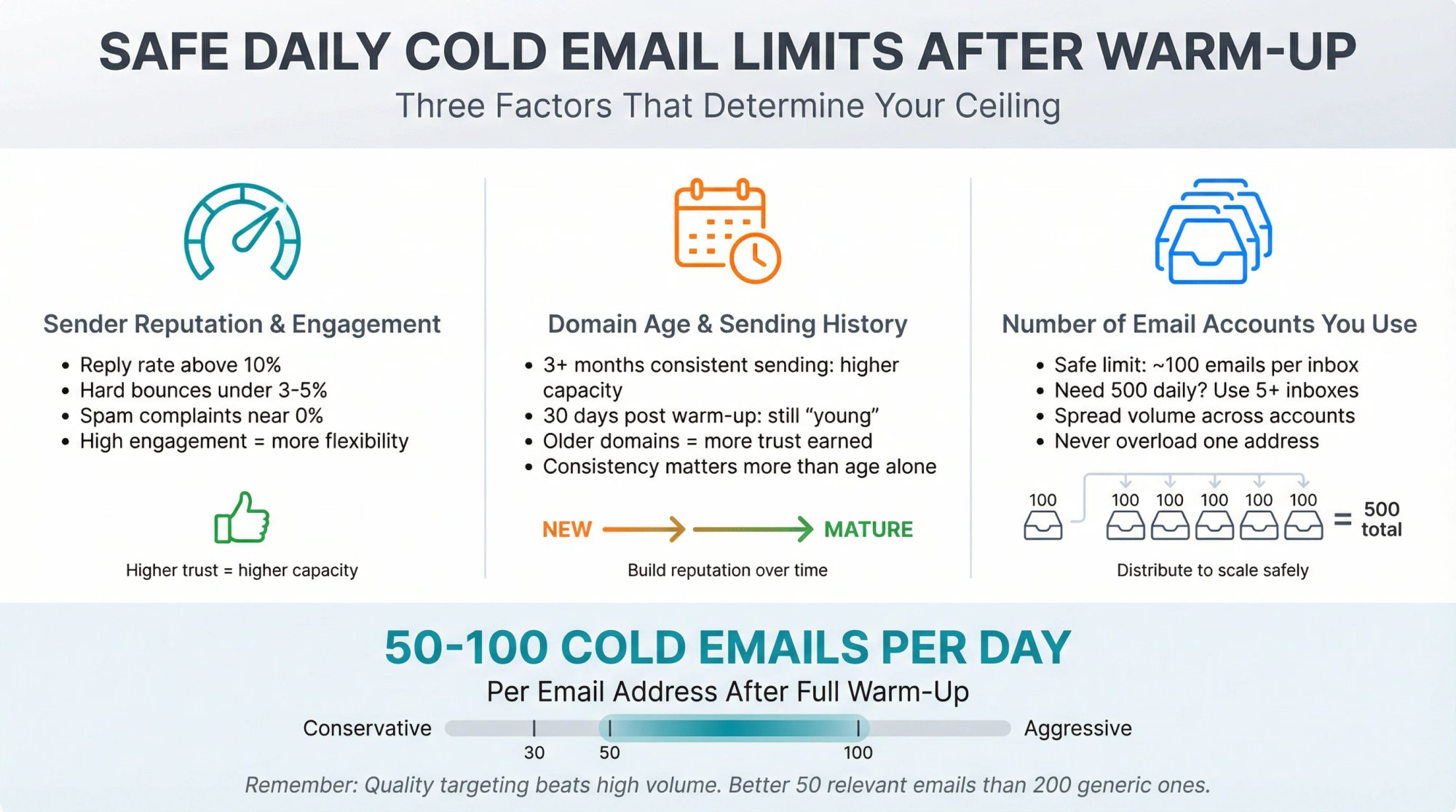
Three factors determine your ceiling:
Your sender reputation and engagement levels.
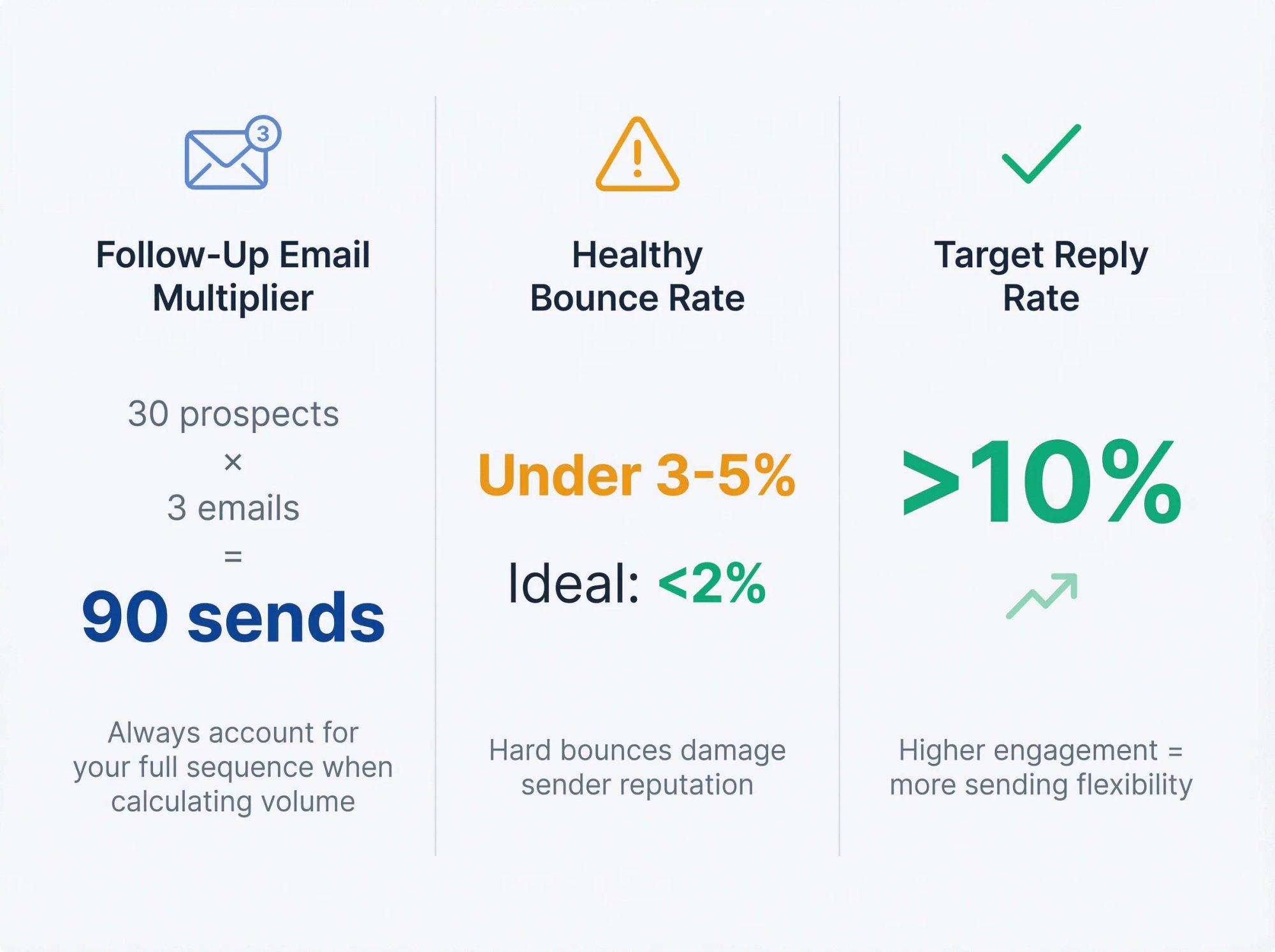
If you've maintained high reply rates and low bounce/complaint rates, you've earned more flexibility. Industry benchmarks from sales prospecting research suggest aiming for a reply rate above 10% on cold emails. Keep hard bounces under 3-5% (ideally below 2%), and spam complaints as close to 0% as possible. The healthier your metrics, the more you can safely send.
Domain age and sending history.
An older domain with 3+ months of consistent sending can handle more email than one that's only 30 days past warm-up. Even after a full month of ramping, your domain is still "young" in reputation terms.
Number of email accounts you use.
This is crucial. The safe limit per account might be around 100 emails daily. But if you need to send 500 emails, you should spread that across multiple mailboxes rather than pushing one to the edge.
The benchmark most experts agree on: 50-100 cold emails per day per email address.
Once fully warmed up, most industry sources recommend keeping each inbox to roughly 100 new outreach emails daily at most. Some teams play it more conservative (30-50 per day) to stay extra safe, especially if they rely heavily on that single account.
Do Follow-Up Emails Count Toward Your Daily Limit?
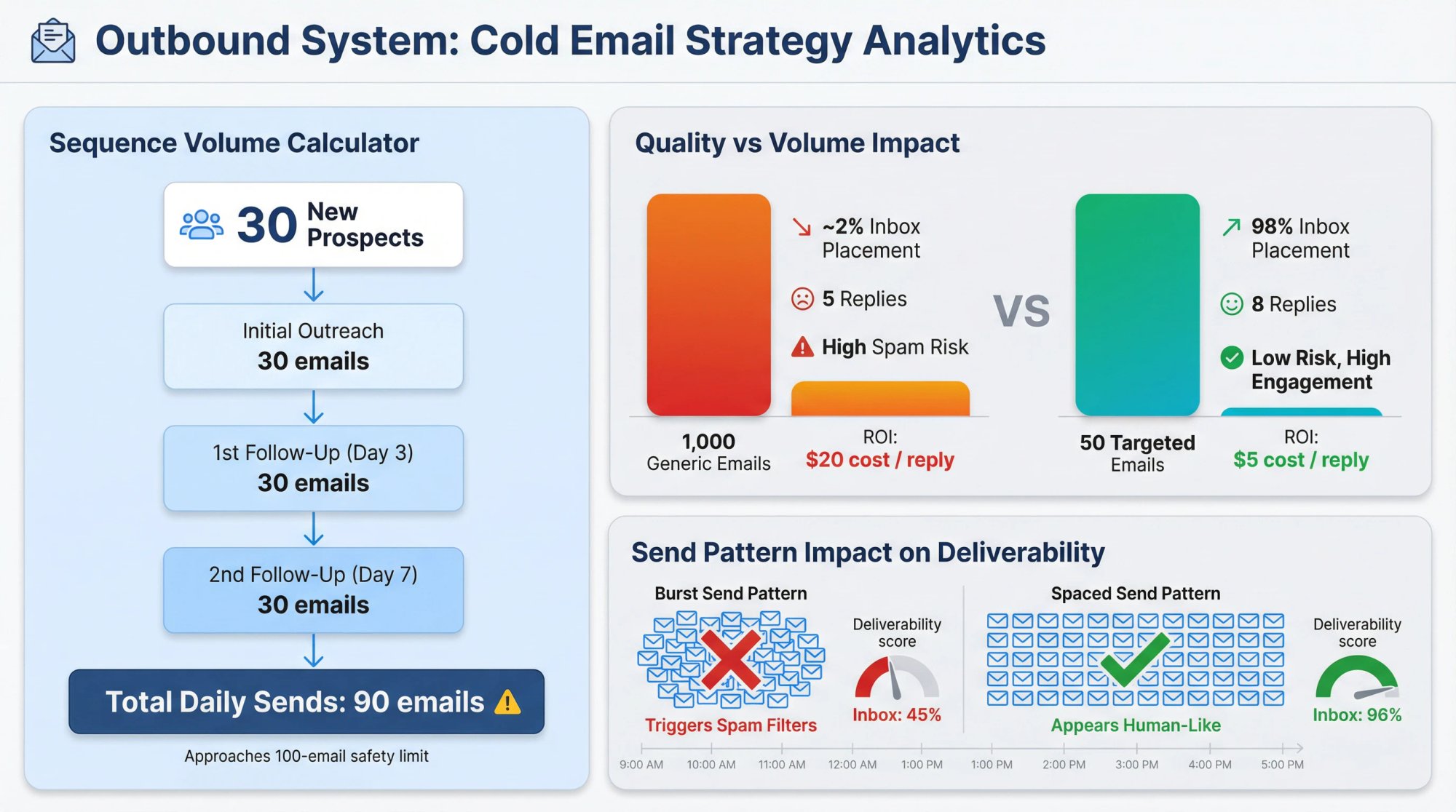
This catches a lot of people off guard. Your daily limit includes follow-up emails, not just initial outreach. If you send one initial email plus two follow-ups to each prospect, contacting 30 new people could generate nearly 90 sends (30 initial + 30 first follow-up + 30 second follow-up). That already approaches the 100 limit.
Always account for your entire sequence when calculating daily volume. It's easy to accidentally exceed safe limits by emailing 100 new prospects while auto-follow-ups fire to earlier contacts. Master the art of proven cold email follow-up tactics to maximize responses without overwhelming your sending capacity.
Why Spacing Out Cold Emails Improves Deliverability
Sending 100 emails at 9:00 AM sharp looks way more automated than sending 100 over several hours. Fast, large bursts trigger spam filters.
A better approach: Space out sends by at least 1-2 minutes each and let your automation tool randomize intervals. Roughly 5-10 emails per hour over an 8-hour workday appears much more human than 100 in one burst.
Timing matters beyond just spacing. Research on the best days to email B2B prospects shows that strategic scheduling can improve open and reply rates significantly.
Why Email Quality Beats Volume Every Time
It's tempting to maximize volume, but there are real diminishing returns. If you're cranking out 200 emails per inbox per day, how targeted and personalized can those messages actually be?
Data consistently shows that 1,000 generic cold emails landing in spam generate far fewer results than 50 highly relevant emails reaching inboxes. Better targeting keeps engagement high and complaint rates low, which actually enables you to maintain higher sending volumes safely over time. Focus on cold email copywriting techniques that drive engagement rather than just volume.
How to Send 500+ Cold Emails Per Day Using Multiple Inboxes
What if you need to reach significantly more people? Say 500 or 1,000+ cold emails per day?
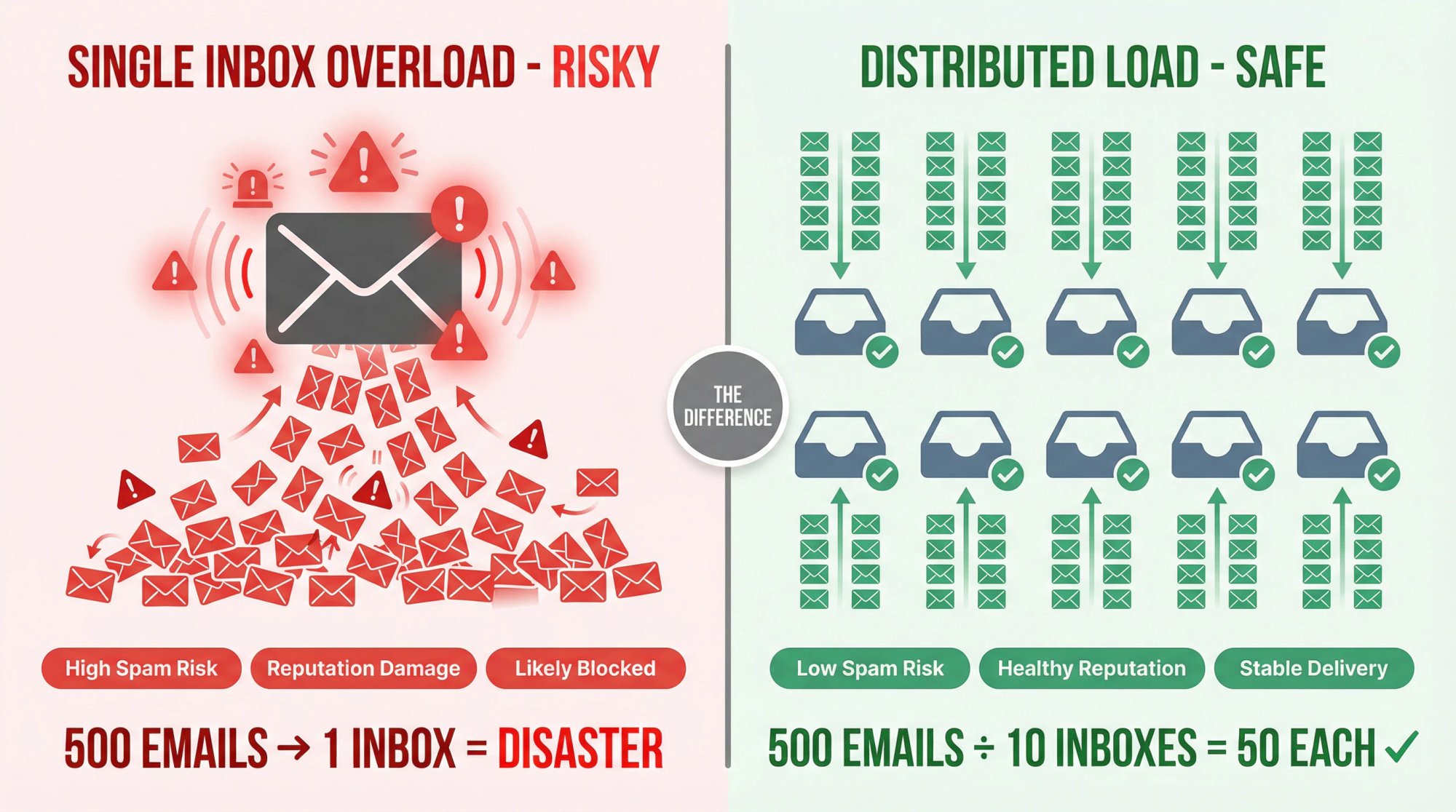
Sending that volume from one email address is out of the question. No individual inbox should ever handle that volume for cold outreach. It will get blocked or blacklisted quickly. The solution used by advanced outbound teams and agencies is to distribute sending across multiple domains and inboxes.
How Multi-Inbox Scaling Works
Use multiple domains or subdomains
Rather than sending everything from yourcompany.com, serious cold email operations often purchase additional domains specifically for outreach (like tryyourcompany.com or yourcompany.co). Each domain builds its own reputation. By spreading campaigns across 3-5 domains, you reduce the impact if any single domain hits a deliverability issue.
Example: Instead of 1 domain trying to send 500 emails daily, you might have 5 domains sending 100 each. This keeps each domain in a "low" volume range that appears safe to email providers. If you're wondering whether Cloudflare is a good domain registrar for cold email, we've covered that in depth.
Use multiple inboxes on each domain
You can create several email accounts under each domain. Each inbox might handle 50-100 emails daily, and combined they achieve your total target volume. The principle is the same: many senders at low individual volume beats one sender at dangerously high volume.
Keep per-inbox volume ultra-conservative for maximum deliverability
How low should you go? Some top-tier outbound operations take this to an extreme. At Outbound System, for example, we use hundreds of Microsoft Outlook inboxes, each sending only about 3 emails per day on average. By running 350+ inboxes at approximately 3 emails each, we can send thousands of emails daily while every individual inbox stays in a virtually negligible volume range.
This might seem like overkill, but it illustrates the point: the more you spread sending, the less any single account gets strained. Even setups with 30-90 inboxes sending 20+ emails each are considered riskier than 350 inboxes at just 3 each.
Warm up and monitor each inbox separately
With a multi-inbox setup, you can't skip the warm-up process for new accounts. Every inbox needs its own gradual ramp-up. Stagger them so you always have some accounts maturing while others operate at full volume. Also monitor each domain's reputation using tools like Google Postmaster Tools or Microsoft SNDS. If one domain shows issues, pause it and rely on others while you fix the problem.
Automation is essential at scale
Managing multiple domains and inboxes manually becomes a full-time job. Understanding automated lead generation can help you design systems that rotate through addresses, throttle automatically when they detect warning signs, and maintain consistent output. Whether you build this infrastructure yourself or work with a specialized partner, sending thousands of cold emails daily requires disciplined systems.
The math is simple: If 50 emails per inbox "won't cut it" for your pipeline goals, you need multiple inboxes. 500 daily requires 5+ inboxes (at 100 each) or ideally 10+ (at 50 each). Trying to blast 500 from one address is a guaranteed way to destroy your deliverability.
Cold Email Infrastructure at Scale: A Real-World Example
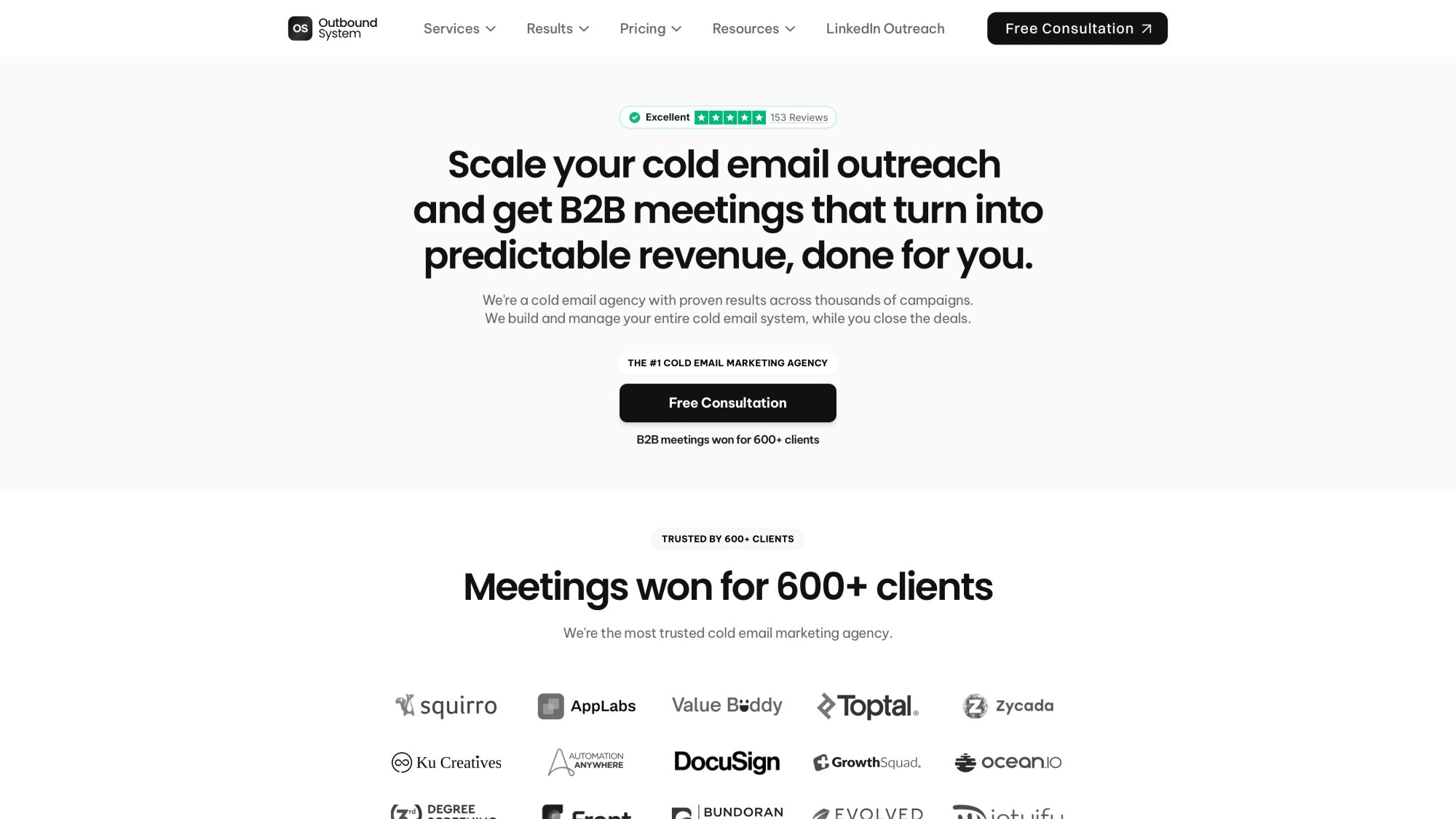
This is where we should talk about what we do at Outbound System. Managing cold email infrastructure at scale is genuinely complicated, and it's the core problem we solve for B2B companies.
Our infrastructure approach:
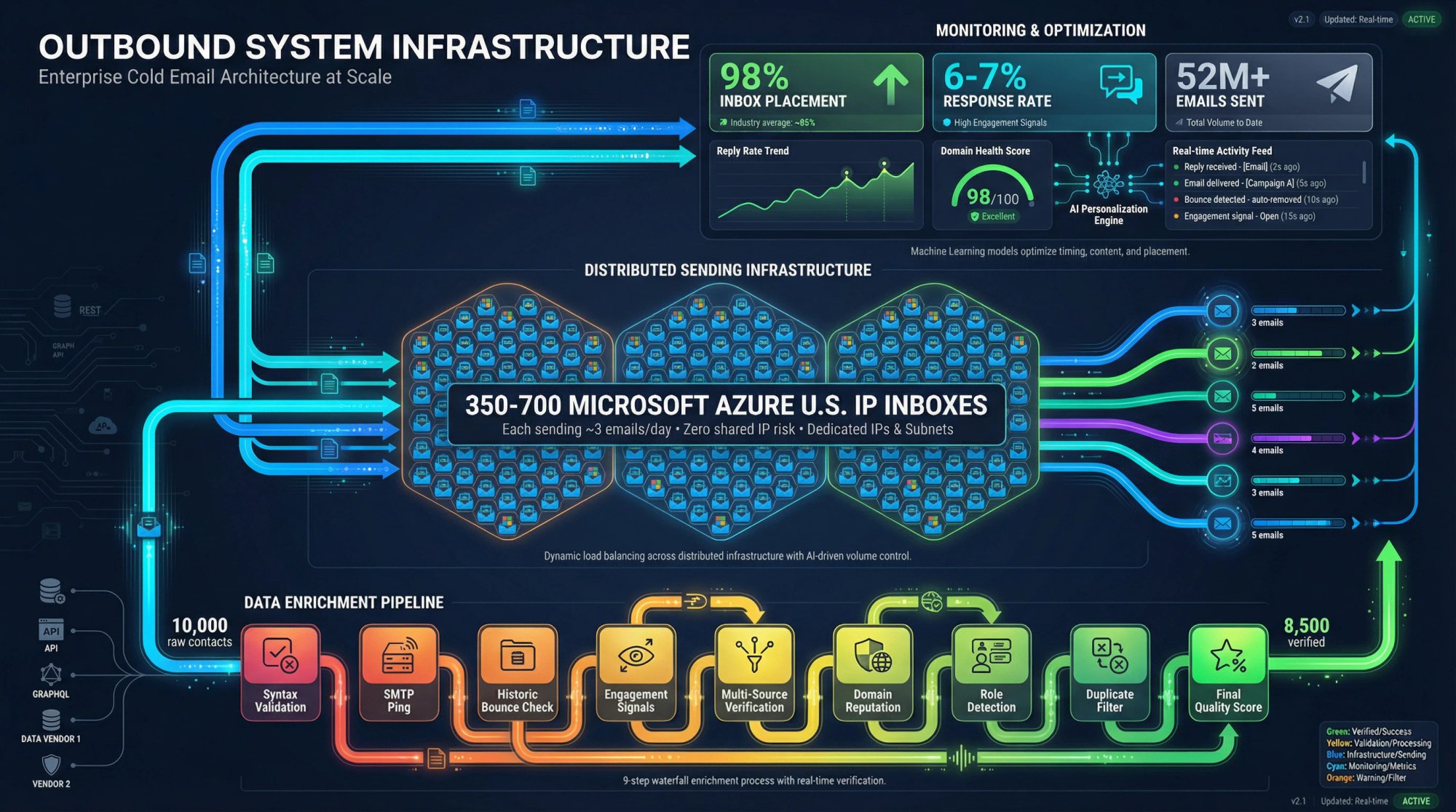
→ 350-700 Microsoft Azure U.S. IP inboxes depending on your plan. Each inbox sends only a few emails daily, keeping individual volume negligible while achieving high total throughput. Learn more about why Microsoft Azure servers are the secret to cold email deliverability.
→ Private Microsoft infrastructure means we control IP reputation directly. You're not sharing sending infrastructure with unknown senders whose behavior could affect your deliverability. Understanding the difference between ISPs vs ESPs helps explain why this matters.
→ 9-step waterfall enrichment to verify contact data before any email goes out. This includes syntax validation, SMTP pings, historic bounce analysis, and engagement signal evaluation. The goal is zero hard bounces that would damage sender reputation.
→ AI personalization combined with human copywriting. Human writers establish the value proposition and structure. AI generates personalized elements based on prospect data. This keeps emails feeling relevant without sacrificing volume. Explore our high-converting cold email templates for inspiration.
The results speak for themselves:
We've sent over 52 million cold emails with 98% inbox placement rates and 6-7% response rates across our client base. Check out our case studies for detailed client results, and see what 153 five-star reviews say about our work. That performance comes from disciplined infrastructure management that most companies simply don't have time to build internally.
Why this matters if you're reading this article:
If you're trying to figure out how many cold emails you can send per day, you're probably in one of two situations:
You want to scale outreach yourself and need to understand the infrastructure requirements. Everything in this guide applies. Build your warm-up process, establish multiple domains and inboxes, monitor metrics obsessively, and scale gradually.
You want results without managing the technical complexity. That's what we're here for. Our plans start at $1,499/month with month-to-month contracts and no long-term commitment. Book a free consultation if you want to discuss whether a done-for-you approach makes sense for your pipeline goals.
Either path works. The worst option is trying to scale volume without respecting the infrastructure requirements. That's how domains get blacklisted. Compare us to alternatives like Instantly to see the difference a managed approach makes.
Best Practices to Increase Your Cold Email Volume Safely
No matter how many emails you aim to send (20 or 2,000), deliverability is the ultimate limiting factor. If emails don't reach inboxes, volume becomes meaningless. These cold email best practices will help you push your safe daily ceiling higher by keeping sender reputation strong:
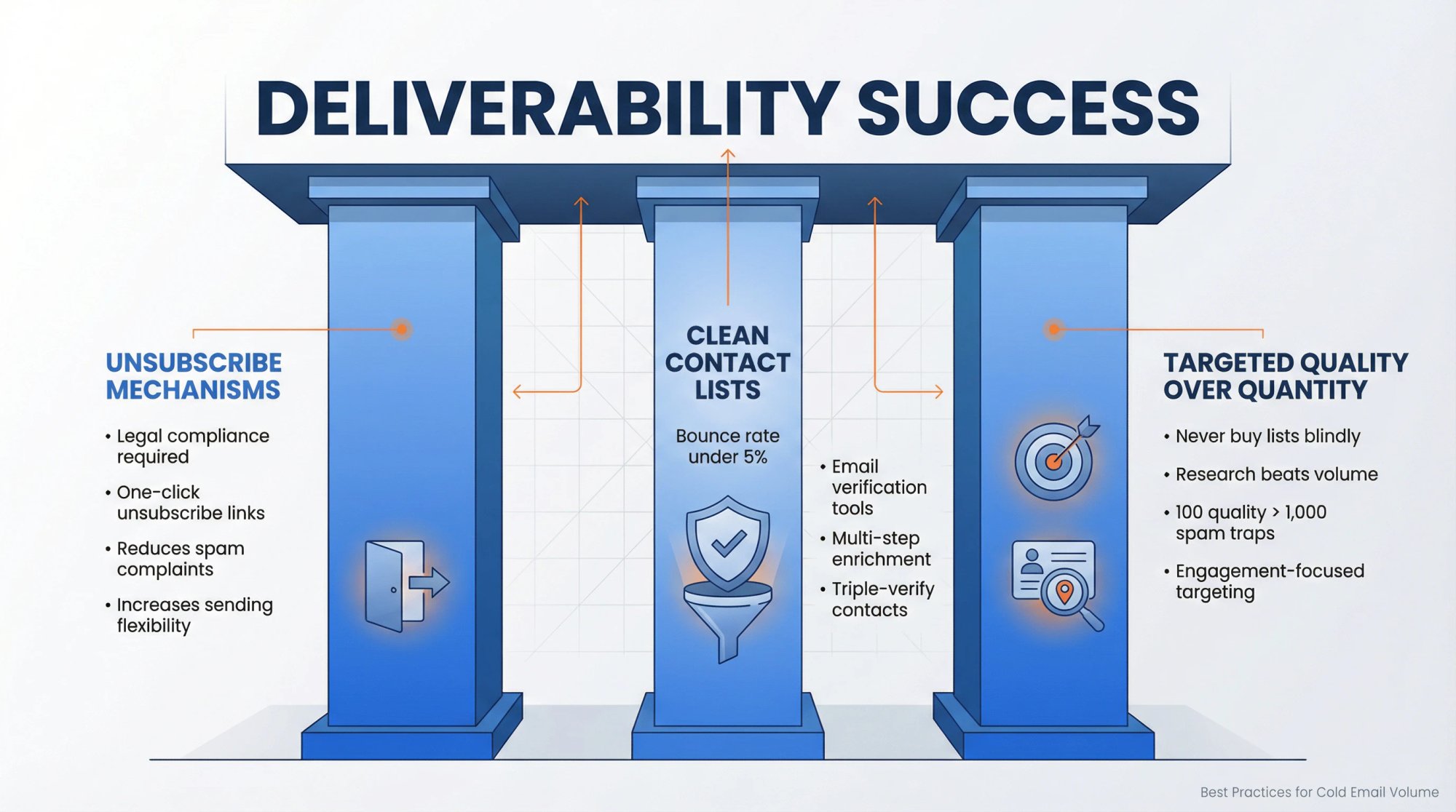
Include an easy way to unsubscribe
This is legally required in many jurisdictions (CAN-SPAM in the U.S. mandates an opt-out mechanism), and email providers now enforce it too. Google and Yahoo's 2024 updates push messages to spam if senders don't include a one-click unsubscribe link. Even for cold outreach, giving recipients a clear opt-out reduces spam complaints. Fewer complaints means more sending flexibility.
Keep your contact lists clean and targeted
High volume is only safe if list quality is high. Remove invalid addresses immediately. A bounce rate above 5% is a warning sign to clean up. Use email verification tools before sending, or implement multi-step enrichment to triple-verify contacts before they enter sequences. Learn the best strategies for building a prospect list and our comprehensive cold email list building guide.
Never buy giant lead lists blindly. They often contain spam traps or outdated emails that will wreck your reputation fast. Better to send 100 emails to a well-researched list than 1,000 to a crudely scraped database full of bad addresses. Our email list building strategies guide covers this in detail.
Watch engagement metrics continuously
Use data to know when you're pushing too hard. Sudden drops in open rates (more than 20% decline), spikes in bounces, or increases in "undeliverable" replies are all signals to pause and troubleshoot. If test emails start landing in spam, don't shrug it off. Pull back volume and fix the issue. Ignoring warning signs is like driving with the check-engine light on.
Never use your primary company domain for cold email
Never use your primary company domain for cold email
This is the cardinal sin of cold outreach. If yourcompany.com is also used for all regular business communication, don't risk it on thousands of cold emails. One mistake can get it blacklisted, disrupting all your legitimate communications.
Always use alternate domains you can afford to have issues with. Protect your main domain like gold.
Send at consistent times with some randomness
Consistency helps build a "normal" pattern in the eyes of filters. If you send zero emails one week and 1,000 the next, that inconsistency looks suspicious. Maintain a baseline frequency even during slow periods rather than going dark and then blasting a big campaign later.
At the same time, schedule emails with some natural randomness. Patterns that are too clockwork (every email at exactly the same minute each day) can seem bot-like. A healthy mix of consistency in daily volume and variability in specific timing works best.
Invest in sending infrastructure that supports scale
If you're planning high volume, make sure your underlying infrastructure (SMTP servers, IPs, DNS records) can handle it without sharing bad neighbors. Ensure SPF, DKIM, and DMARC are configured correctly, and use monitoring tools like Google Postmaster to watch reputation on each domain.
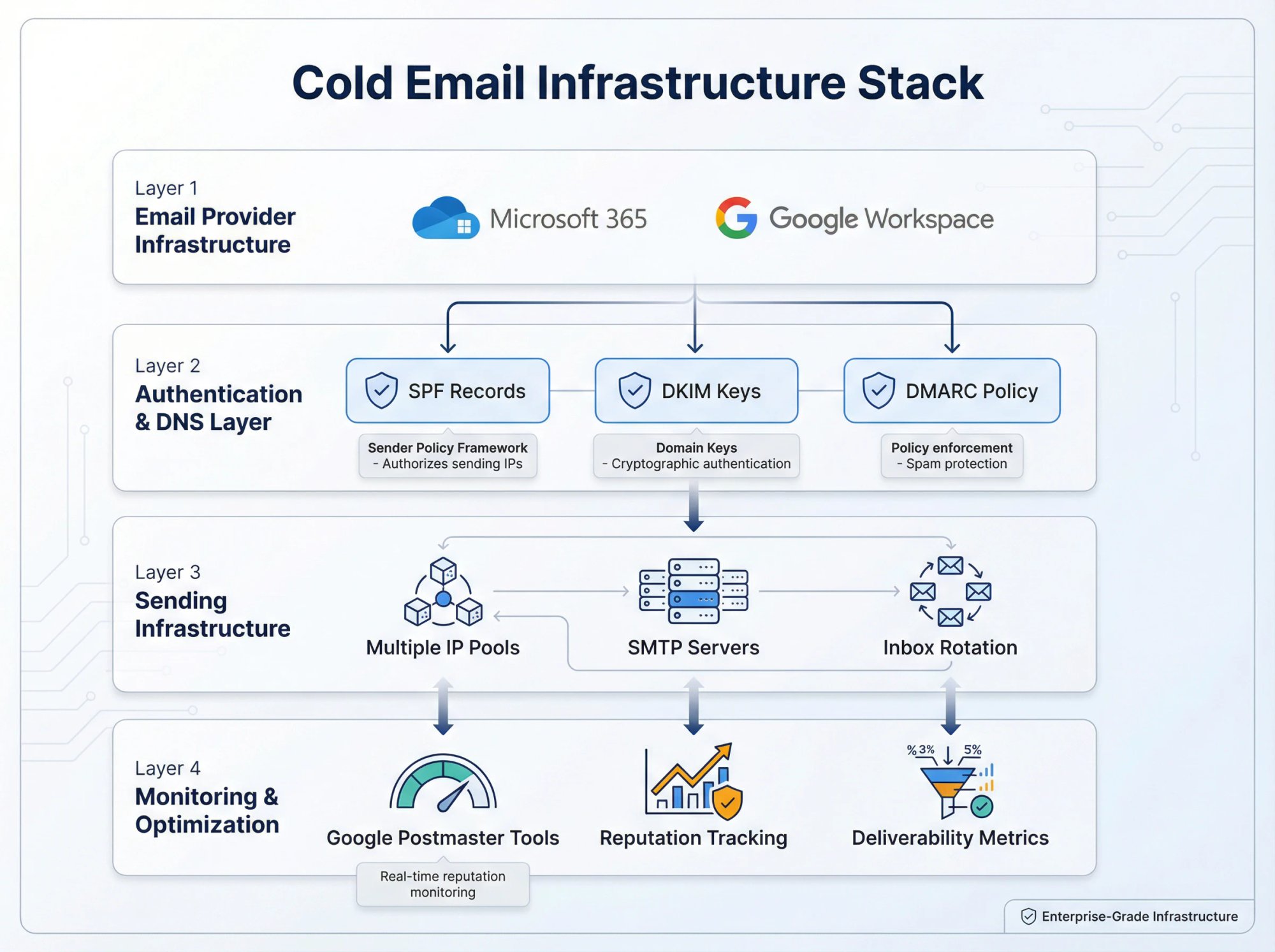
The more emails you send, the more seriously you need to treat infrastructure as mission-critical. For a deeper dive into scalable systems, explore our guide on sales outreach workflows for B2B.
Cold Email Volume FAQs
Can I send 1,000 cold emails a day?
Yes, but not from a single inbox. Sending 1,000 daily requires distributing volume across 10-20+ inboxes, each handling 50-100 emails maximum. You'll need multiple domains, proper warm-up for each account, and infrastructure to manage the rotation. Most companies that need this volume either build extensive internal systems or partner with specialized cold email agencies that already have the infrastructure.
How long does it take to warm up a new email domain?
A minimum of 2-4 weeks, though many experts recommend 8-12 weeks for best results. Start at 10-20 emails daily in week one and roughly double each week while monitoring metrics. The timeline can stretch longer if you encounter bounces or complaints that require you to pause and address issues.
What happens if I exceed my email provider's limits?
Providers may temporarily block further sends from your account, suspend your account entirely, or flag your domain for future scrutiny. The consequences vary by provider and severity, but repeatedly hitting limits is a fast path to deliverability problems that become hard to recover from.
Should I use my company's main domain for cold email?
Absolutely not. Always use separate domains purchased specifically for outreach. If something goes wrong and your outreach domain gets blacklisted, your primary business communications stay protected. Risking your main domain on cold email is one of the biggest mistakes senders make.
How do follow-up emails affect my daily limit?
They count toward your total. If you're running a 3-email sequence, contacting 30 new prospects could generate up to 90 sends as follow-ups fire over the coming days. Always calculate your full sequence volume when planning daily limits, not just initial outreach. Check out our guide on how to write effective follow-up emails for strategies that maximize responses.
What's a healthy bounce rate for cold email?
Keep hard bounces under 3-5%, and ideally below 2%. Anything higher indicates list quality issues that need addressing before you continue. During the warm-up phase, aim for zero bounces by sending only to verified, known contacts.
What reply rate should I aim for?
Industry benchmarks suggest targeting above 10% reply rate on cold emails. Higher engagement signals to email providers that your messages are wanted, which gives you more flexibility on volume. If reply rates drop significantly, it may be time to improve targeting or messaging rather than pushing more volume. Our guide on how to write sales emails covers techniques for improving response rates.
Quick Reference: Daily Cold Email Sending Limits
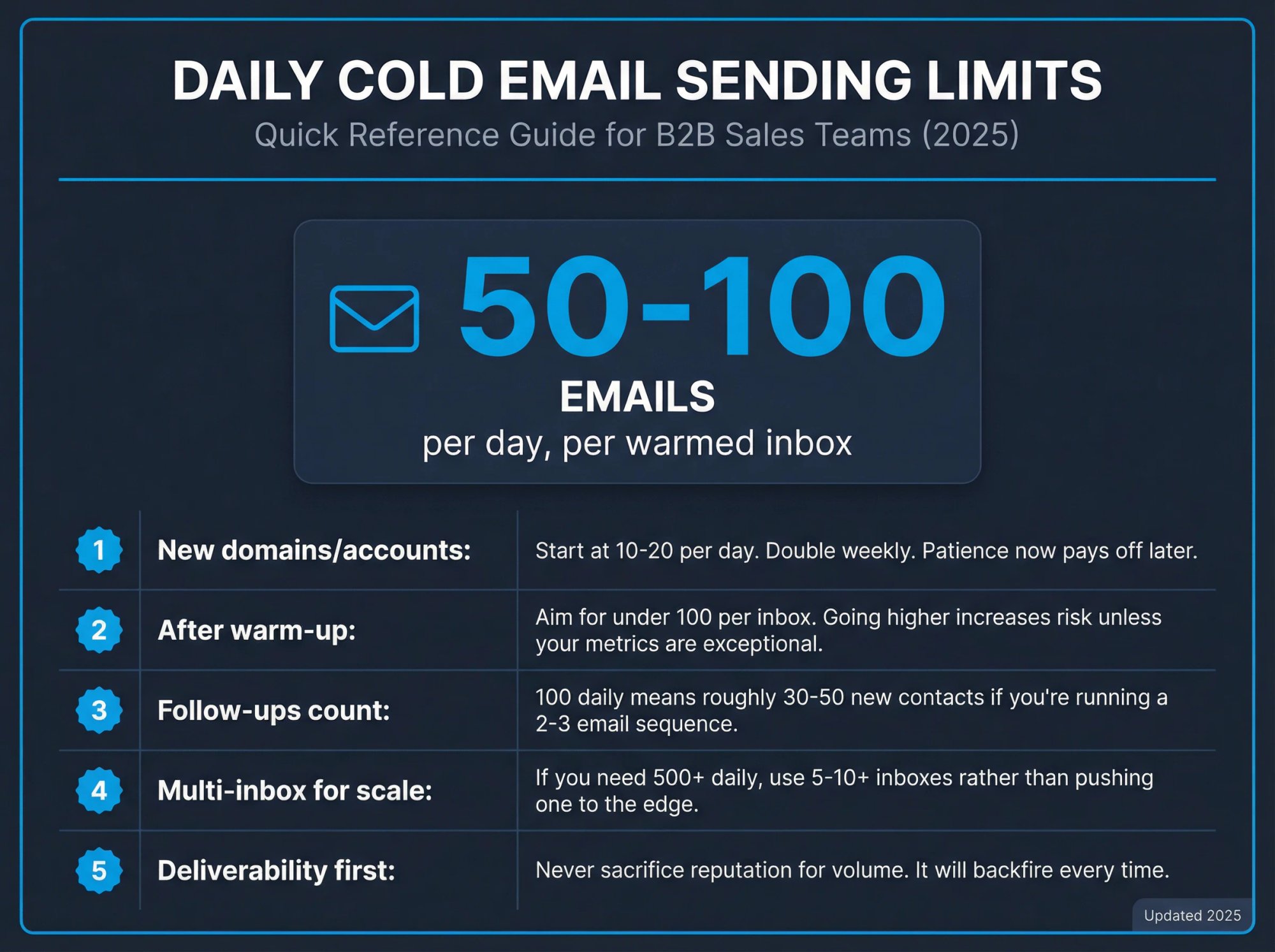
The short answer to "how many cold emails can you send per day":
A single well-warmed email account can safely send 50-100 cold emails daily. Brand-new accounts should start at 10-20 and take a month to reach that level. Scaling beyond 100 requires multiple inboxes, each contributing a portion of volume so none of them exceed safe thresholds.
Quick reference guidelines:
→ New domains/accounts: Start at 10-20 per day. Double weekly. Patience now pays off later.
→ After warm-up: Aim for under 100 per inbox. Going higher increases risk unless your metrics are exceptional.
→ Follow-ups count: 100 daily means roughly 30-50 new contacts if you're running a 2-3 email sequence.
→ Multi-inbox for scale: If you need 500+ daily, use 5-10+ inboxes rather than pushing one to the edge.
→ Deliverability first: Never sacrifice reputation for volume. It will backfire every time.
The senders who succeed at cold email in 2025 and beyond aren't the ones blasting the most messages. They're the ones who build systems that earn the right to send more emails over time through consistent quality and infrastructure discipline.
If you want to scale without managing all the technical complexity yourself, Outbound System handles the infrastructure, warm-up, data quality, and optimization. Our plans start at $1,499/month with month-to-month terms and include hundreds of warmed Microsoft inboxes ready to go. Use our cold email agency ROI calculator to see the potential return, or book a free 15-minute consultation to see if it makes sense for your pipeline goals.
Whether you build it yourself or work with a partner, the path forward is the same: earn trust, then scale. Respect the limits, follow best practices, and every email you send has the best chance of landing where it belongs.
Outbound System
We write the copy, build the lists and run the campaigns, month-to-month. Every decision is backed by data from 10,400+ campaigns.

Bruce Merrill is the co-founder of Outbound System and has been booking B2B meetings through LinkedIn since 2016. He built the outbound program at the property tech startup LeaseLock ahead of its Series A and writes about cold email, LinkedIn outreach and AI calling.
About Outbound System
Outbound System runs done-for-you cold email, LinkedIn outreach and AI calling for B2B companies. 1,000+ active clients and 10,400+ campaigns launched.
