Why Cold Email Infrastructure Matters in 2025
Setting up a cold email infrastructure is critical for any B2B company looking to scale outbound outreach. "Cold email infrastructure" refers to the technical system and processes that enable you to send large volumes of emails to prospects while maintaining high deliverability. In other words, it's everything that happens behind the scenes (domains, mailboxes, IPs, authentication, sending software) to ensure your cold emails actually land in inboxes, not spam folders, and reach your potential customers.
Why does this matter in 2025? Email service providers like Google and Microsoft have become incredibly sophisticated and strict about filtering spam. Gmail's filters now block over 99.9% of spam and use AI to judge email quality and engagement, not just sender reputation. This means even well-intentioned cold emails can get caught in filters if the infrastructure or sending practices aren't up to par. On the flip side, a well-built infrastructure gives you a fighting chance to reach prospects and generate leads via email, which remains one of the highest-ROI channels for B2B sales when done right.
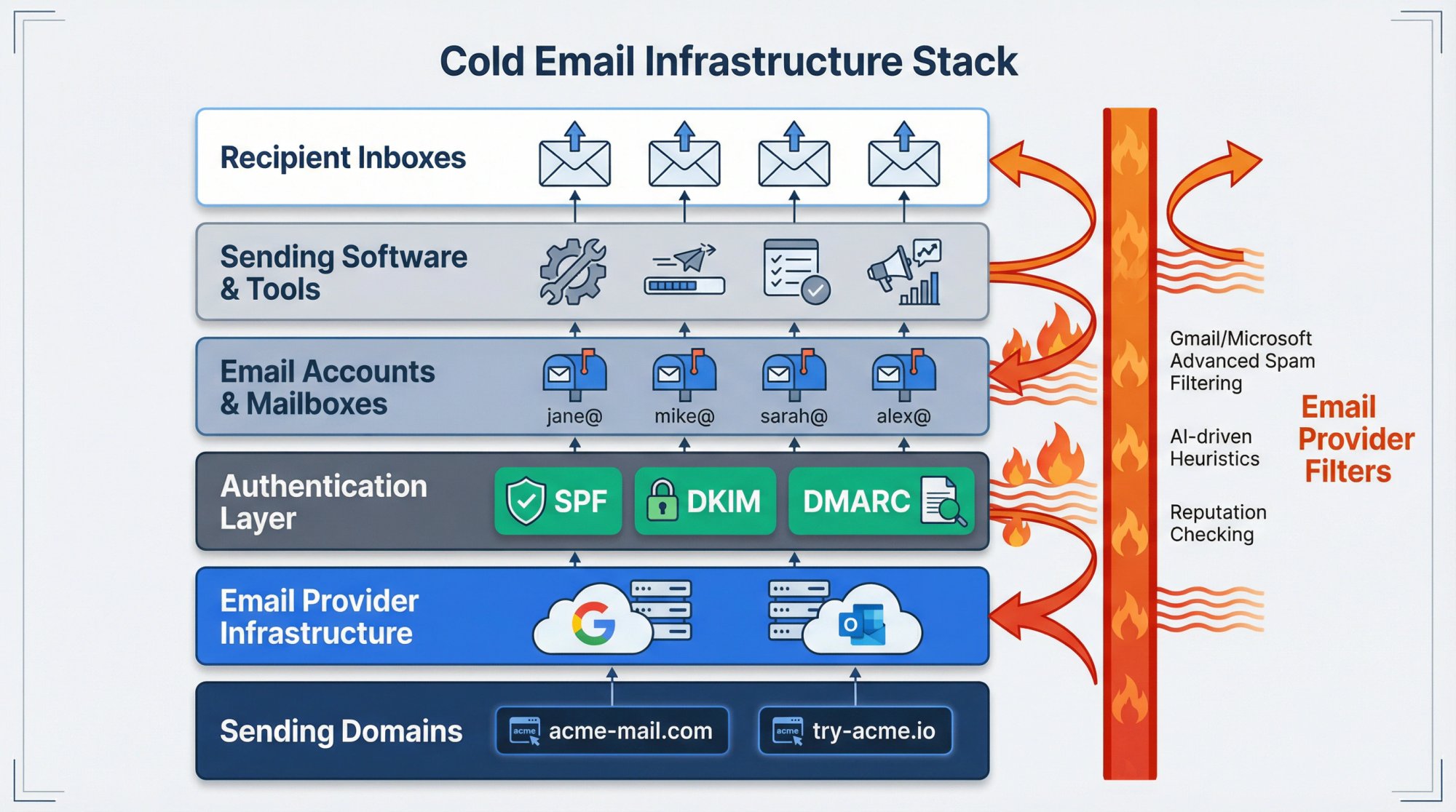
This guide will walk you through step-by-step how to set up a cold email system that can scale effectively. We'll cover selecting and configuring domains, setting up email accounts with proper authentication, warming up those accounts, managing sending volume, and the tools that can help automate these processes. We'll also touch on content and compliance best practices as they relate to infrastructure (because even the best technical setup can be derailed by bad practices like spamming unverified addresses). The aim is to make this a comprehensive resource, whether you're a founder sending your first cold emails or a growth engineer looking to overhaul your company's outbound email architecture.
By the end, you should understand not only what to do to build a robust cold email infrastructure, but why each piece matters.
How to Set Up Dedicated Sending Domains
The first rule of cold email infrastructure: do not send cold emails from your company's main domain. Instead, set up one or multiple separate domains that you use solely for outreach. This protects your primary domain's reputation.
Why separate domains? If your cold emails generate spam complaints or high bounce rates (common when emailing cold prospects), your sending domain can get blacklisted or earn a poor reputation with email providers. You absolutely do not want your main corporate domain (the one used for your website and employee emails) to be tainted. By using distinct "burner" domains for cold email, you ring-fence any damage. For example, if your company is Acme Corp and your main domain is acme.com, you might register acme-mail.com or tryacme.com for cold outreach. If that domain gets into trouble, it won't directly impact emails from acme.com.
Align with your brand (but not identical): Your cold email domains should still look professional and related to your business. Ideally, they include your company name or a close variant. This boosts credibility with recipients. For instance, Outbound System might use domains like outboundsys.com or outbound-system.com for outreach. Avoid using totally unrelated or random-looking domains. Prospects may find that suspicious. Common approaches are using a different TLD (e.g., .io, .co, .net if your main is .com) or adding a word to your name (get, team, try).
Protect your primary domain: By segregating cold email on a separate domain, you ensure that any issue (spam trap hit, block) only affects that domain. Your primary domain's ability to send normal business email (like to clients or vendors) remains safe. This separation is standard practice in cold outreach because even with good practices, cold emails inherently carry more risk (since recipients aren't already engaged with you).
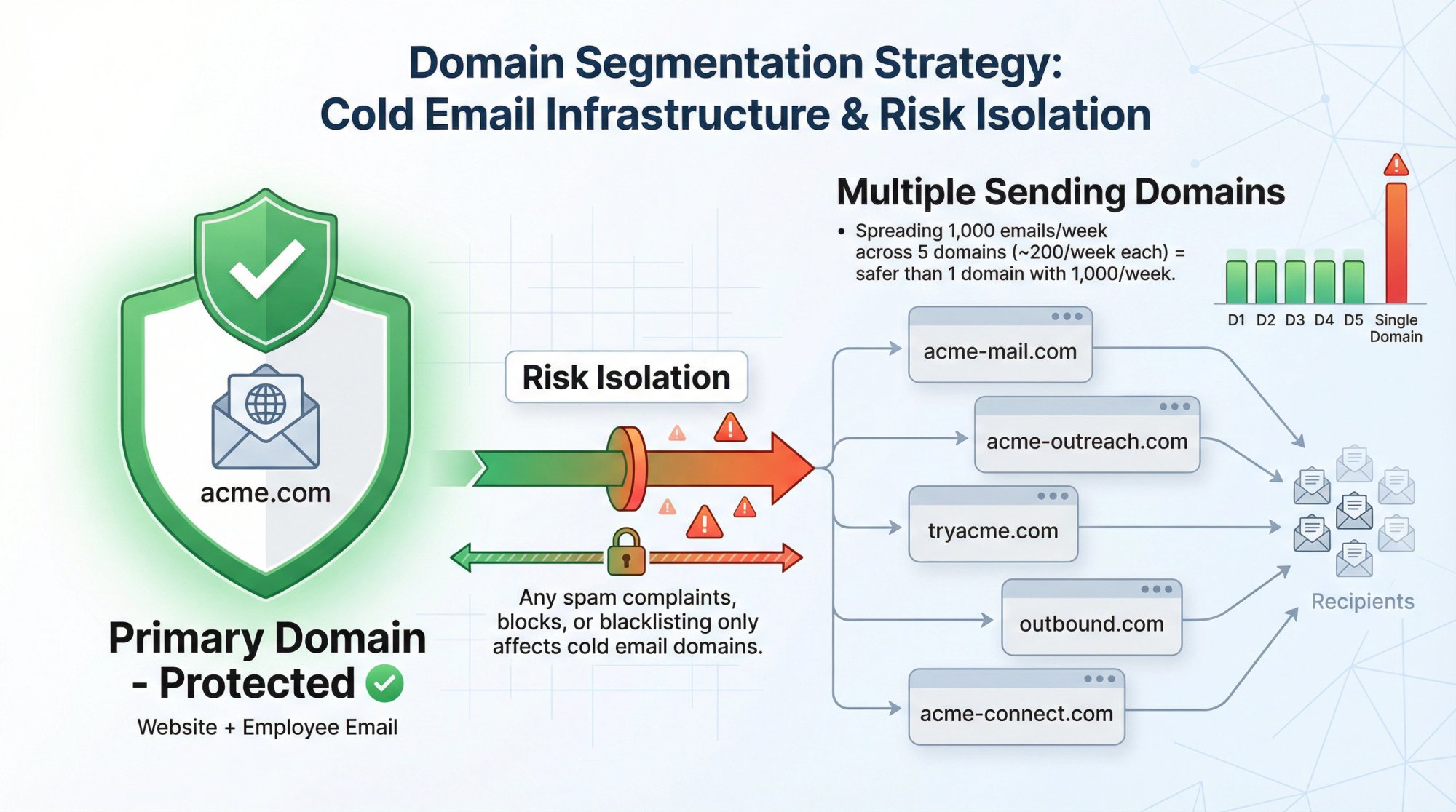
Critical insight: The choice between a single domain and multiple domains determines your sending capacity and risk distribution. The more domains you use, the safer your infrastructure.
Consider multiple domains for scale: If you plan to send a lot of cold email, don't put all your eggs in one domain basket. Many experts recommend using multiple domains in parallel to spread out sending volume and risk. For example, instead of sending 1,000 emails/week from one domain, you might send ~200/week from five different domains. This way, each domain stays "lighter" volume, which is safer. And if one domain gets a bad reputation, you can pause it while others keep operating. We'll discuss volume in more detail later, but as a rule: more domains with lower volume on each is better than one domain with massive volume.
Domain extensions and age: Whenever possible, use .com domains (or the primary TLD in your region/market). Experienced senders find .com addresses generally have the best deliverability and credibility with recipients. If those aren't available, other common TLDs like .io, .ai, .net can work, but avoid cheap-looking ones (.info, .biz can sometimes be seen as spammy). Also, note that brand-new domains might be treated with more scrutiny by email providers. There's anecdotal evidence that letting a domain "age" a few weeks before heavy use, and doing some mild activity on it, can help. In practice, once you set up a new domain, you will be warming it up (see section 5) which naturally ages it a bit. But just know that domain reputation builds over time. A domain with a history of good sending is gold.
Lastly, set up domain redirects from your cold domains to your main website. This is a small touch that boosts credibility: if a prospect manually checks your-outbound-domain.com and it redirects to your main site, it confirms you're legitimate. It's not strictly necessary for deliverability, but it's good practice. It also means any curious recipient or spam filter that looks up the domain sees a real web presence.
How to Configure Email Authentication (SPF, DKIM, DMARC)
Once you have your sending domains, you must configure email authentication in DNS. This is crucial for deliverability. An unauthenticated email domain is far more likely to be flagged or blocked by Gmail, Outlook, and others.
Non-negotiable foundation: Authentication is your passport through email filters. Without it, your emails will be rejected outright by modern providers.
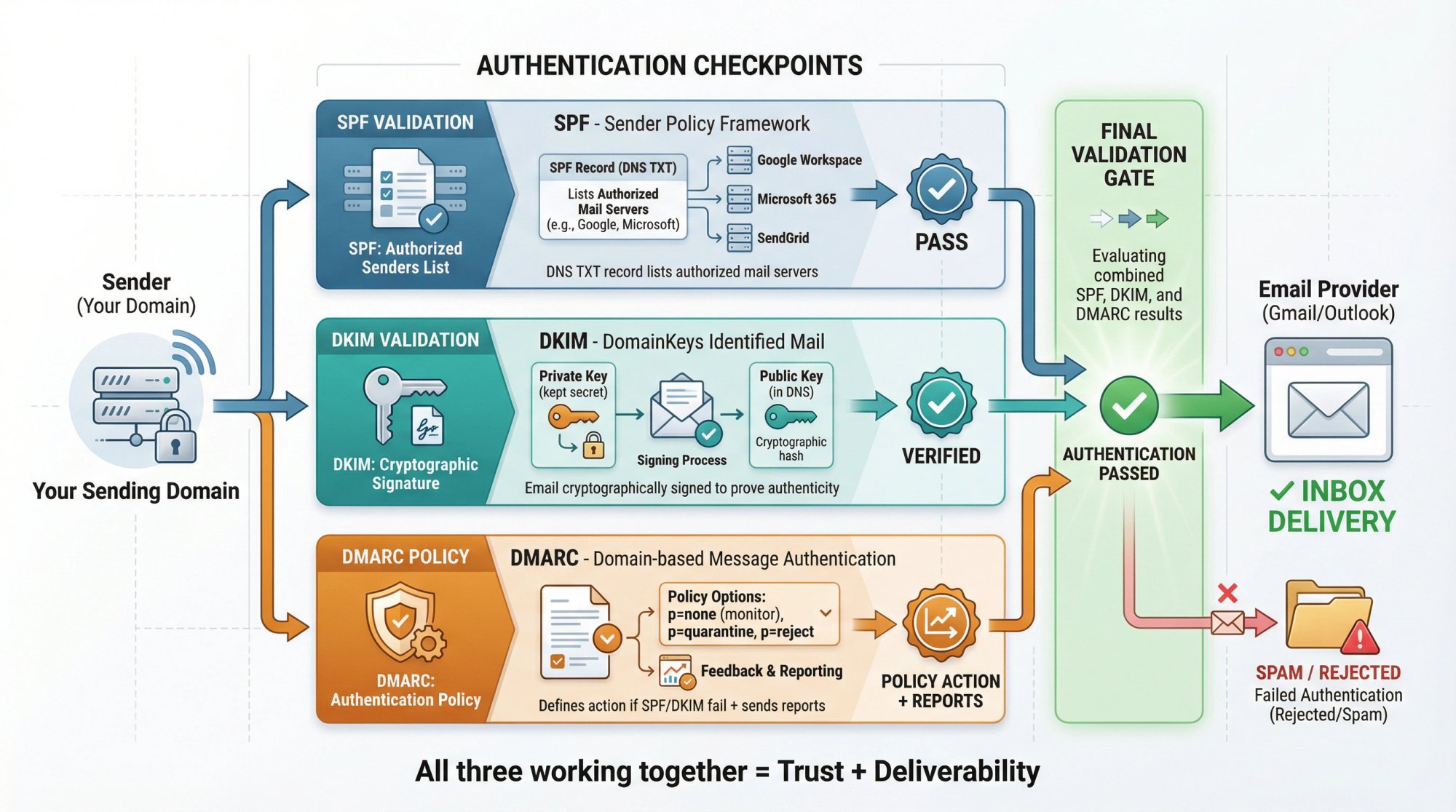
The three key DNS records to set up:
Record | Purpose | Key Action |
|---|---|---|
SPF | Lists which mail servers can send on behalf of your domain | Publish DNS TXT record including all sending services (Google, Microsoft, third-party tools) |
DKIM | Cryptographic signature proving emails are authentic and unaltered | Generate public/private key pair, publish public key in DNS, enable signing in email service |
DMARC | Tells receivers what to do if SPF/DKIM fail, provides feedback reports | Publish TXT record at _dmarc.yourdomain.com (start with p=none for monitoring) |
SPF (Sender Policy Framework): This is a TXT record that lists which mail servers are allowed to send email on behalf of your domain. For example, if you're using Google Workspace accounts, your SPF record will include Google's servers; if using Microsoft 365, it'll include Microsoft; if using a third-party service or an email tool's SMTP, those need to be included too. SPF helps prevent others from spoofing your domain and helps receivers trust that your emails are coming from you. Action: Publish a DNS TXT record for SPF that includes all services you'll use to send emails from the domain. Most providers give you the exact string to add. (Always ensure you have only one SPF record per domain. It can have multiple entries but one record.)
DKIM (DomainKeys Identified Mail): DKIM is a cryptographic signature added to your emails to prove they weren't tampered with and that they truly come from your domain. You'll generate a public/private key pair. The public key goes in your DNS as a TXT record, and your email sending service uses the private key to sign outgoing messages. Receivers check the DNS key to validate the signature. Action: Enable DKIM in your email provider or service (e.g., Google Workspace has an option to generate DKIM keys, as do most mailing platforms) and add the provided DNS records. Each sending domain/integration might have its own DKIM record (commonly under a subdomain like selector._domainkey.yourdomain.com). It's a one-time setup per domain.
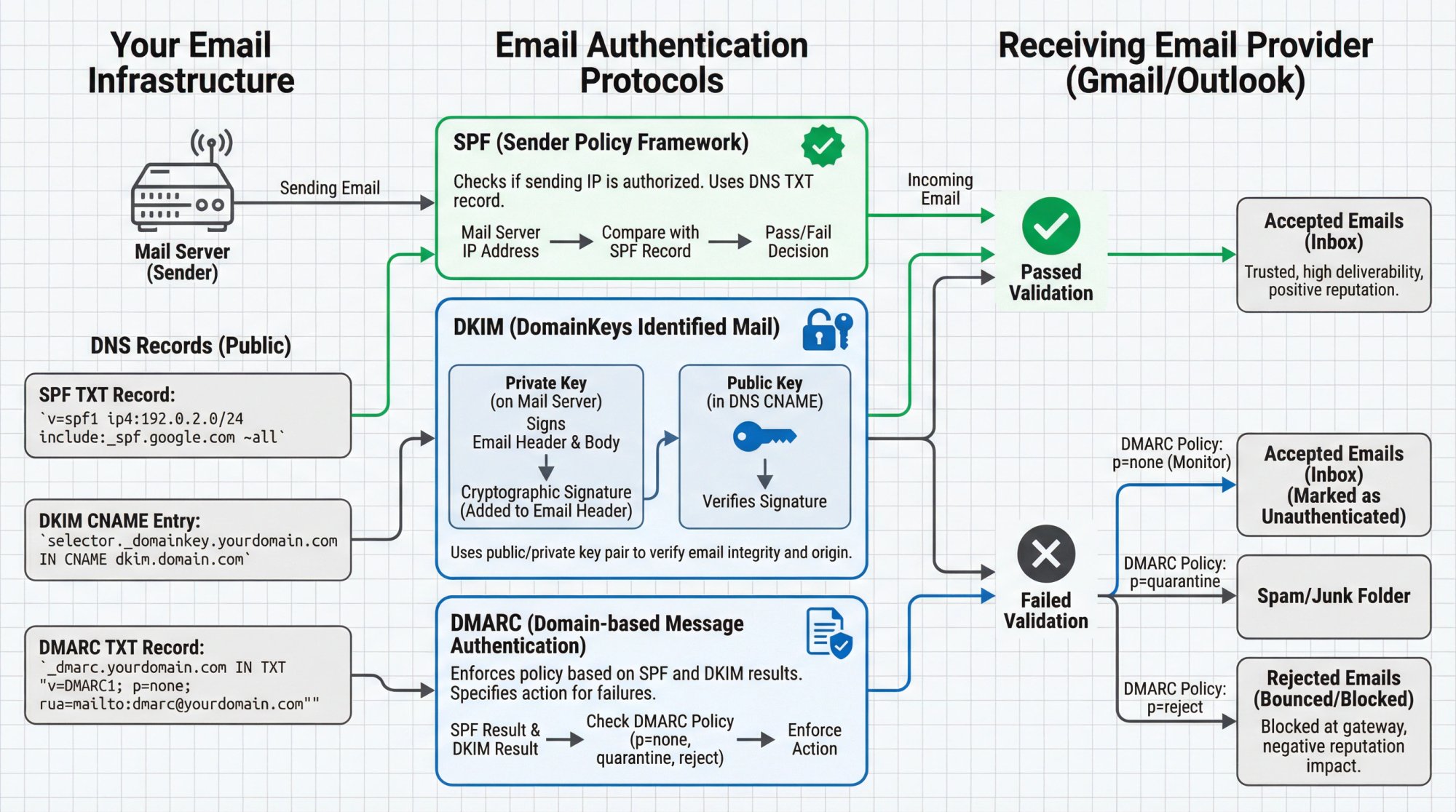
DMARC (Domain-based Message Authentication, Reporting & Conformance): This builds on SPF and DKIM. It's a DNS record that tells receivers what to do if an email fails SPF/DKIM checks and provides a way to get feedback. With DMARC, you can start with a monitoring policy (p=none) which doesn't affect delivery but asks providers to send you reports on SPF/DKIM alignment and failures. Eventually, you might set a stricter policy like quarantine or reject for emails that fail authentication. But many cold email senders keep DMARC at monitoring to avoid accidentally blocking some of their own messages. Action: Publish a DMARC TXT record at _dmarc.yourdomain.com. At minimum: v=DMARC1; p=none; rua=mailto:youremail@yourdomain.com; (plus possibly ruf for forensic reports). This says "don't enforce, just send aggregate reports to me". Ensuring SPF and DKIM are correct is usually enough; DMARC adds an extra layer of trust and visibility.
Configuring these might sound technical, but most email providers and tools have guides for this. It's usually copy-pasting some values into your domain host's DNS settings. Don't skip this step. Without proper SPF/DKIM, your emails may get blocked outright. Google, for instance, might flat-out reject unauthenticated messages or put up big warnings to users that "this email may not be from whom it appears".
Important: Google's 2025 updates make authentication even more critical. Gmail is now enforcing stricter checks. Domains without correct SPF/DKIM are at high risk of being junked. Microsoft and others similarly expect these in place. Think of authentication as your passport. You need it to be let through.
BIMI (optional): BIMI is an emerging standard that can display your brand's logo in supporting email clients if you have strong authentication and a good reputation. It requires a verified trademarked logo and DNS record. BIMI is not required for deliverability, and it's more of a nice-to-have branding element. If you have the resources, it could be something to explore once your program is mature, but it's not essential to getting emails delivered.
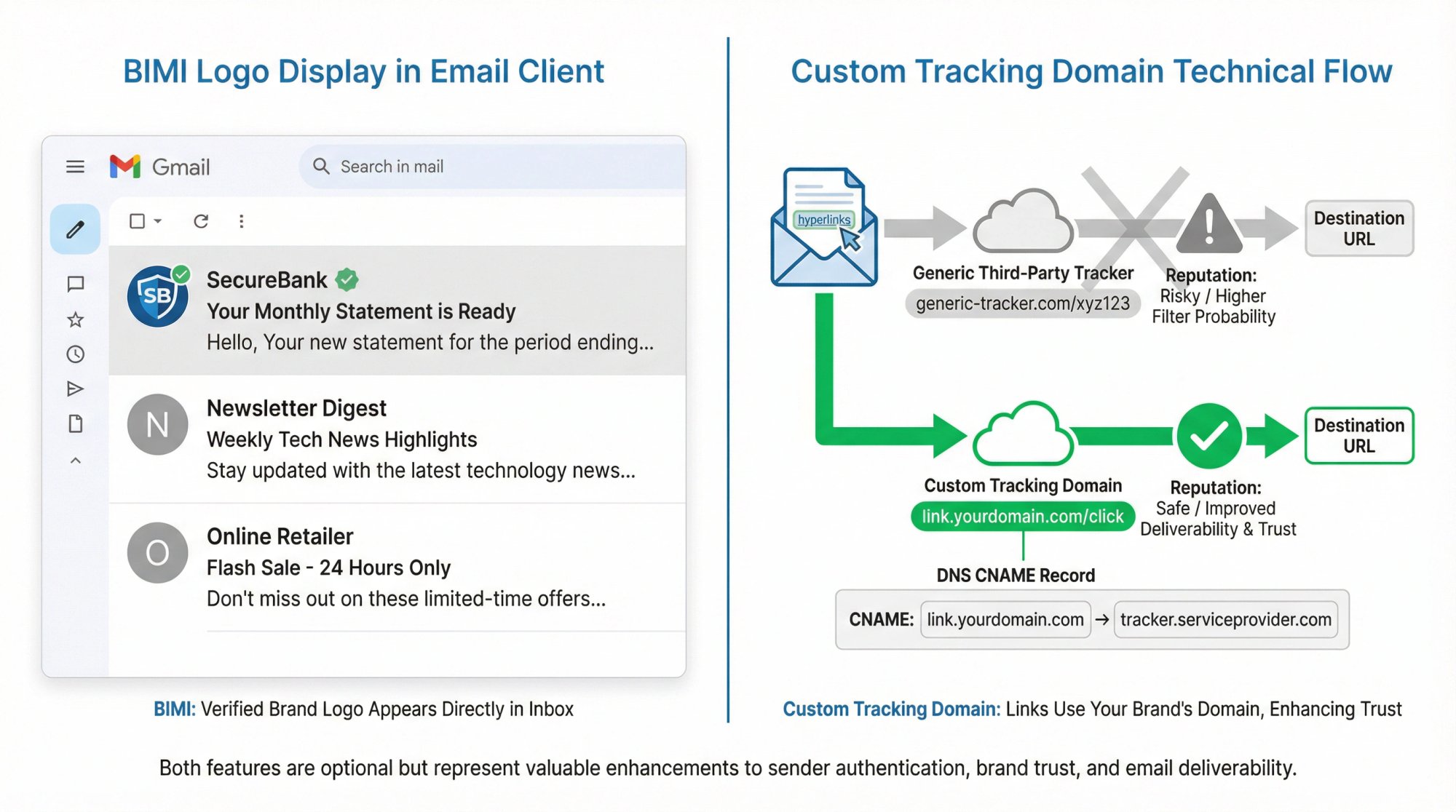
Custom Tracking Domain: If you use any link tracking or open tracking (many email tools do this by default), set up a custom tracking domain (CNAME). For example, if using an email platform, you might configure link.yourdomain.com or track.yourdomain.com to rewrite links through. This way, all links in your email go through a domain you control (which is authenticated) rather than a generic tracking domain that the tool provides. Using your own domain for tracking links can improve deliverability because it keeps things consistent and avoids the appearance of a third-party redirect. It also prevents the scenario of many users sharing one tracking domain that could get a bad rep. Most outbound tools allow a custom tracking domain setup. This typically involves adding a CNAME in DNS as instructed by the tool. Again, optional but recommended if you're doing anything beyond plain-text no-link emails.
This is foundational.
In summary, proper authentication is foundational to cold email infrastructure. It's one of the first things you should do after buying your domains. An authenticated domain says to providers, "I'm legit, these emails really come from my domain." It won't guarantee inbox placement, but without it you're almost guaranteed not to inbox.
Google Workspace vs Microsoft 365 vs Dedicated SMTP: Which to Choose
With domains and authentication set, you need to decide how you'll actually send emails. There are a few routes:
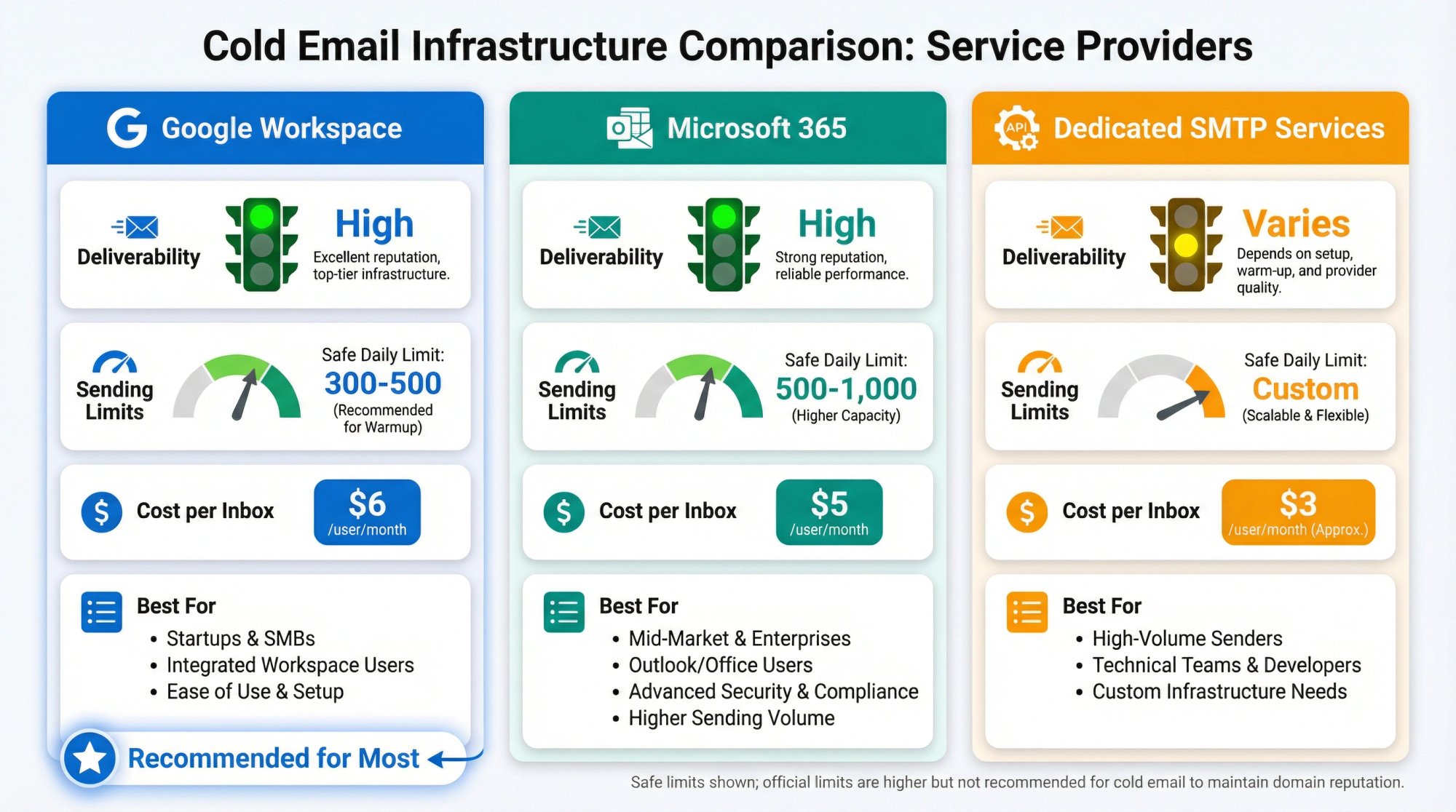
Provider Type | Deliverability | Sending Limits | Cost/Inbox | Best For |
|---|---|---|---|---|
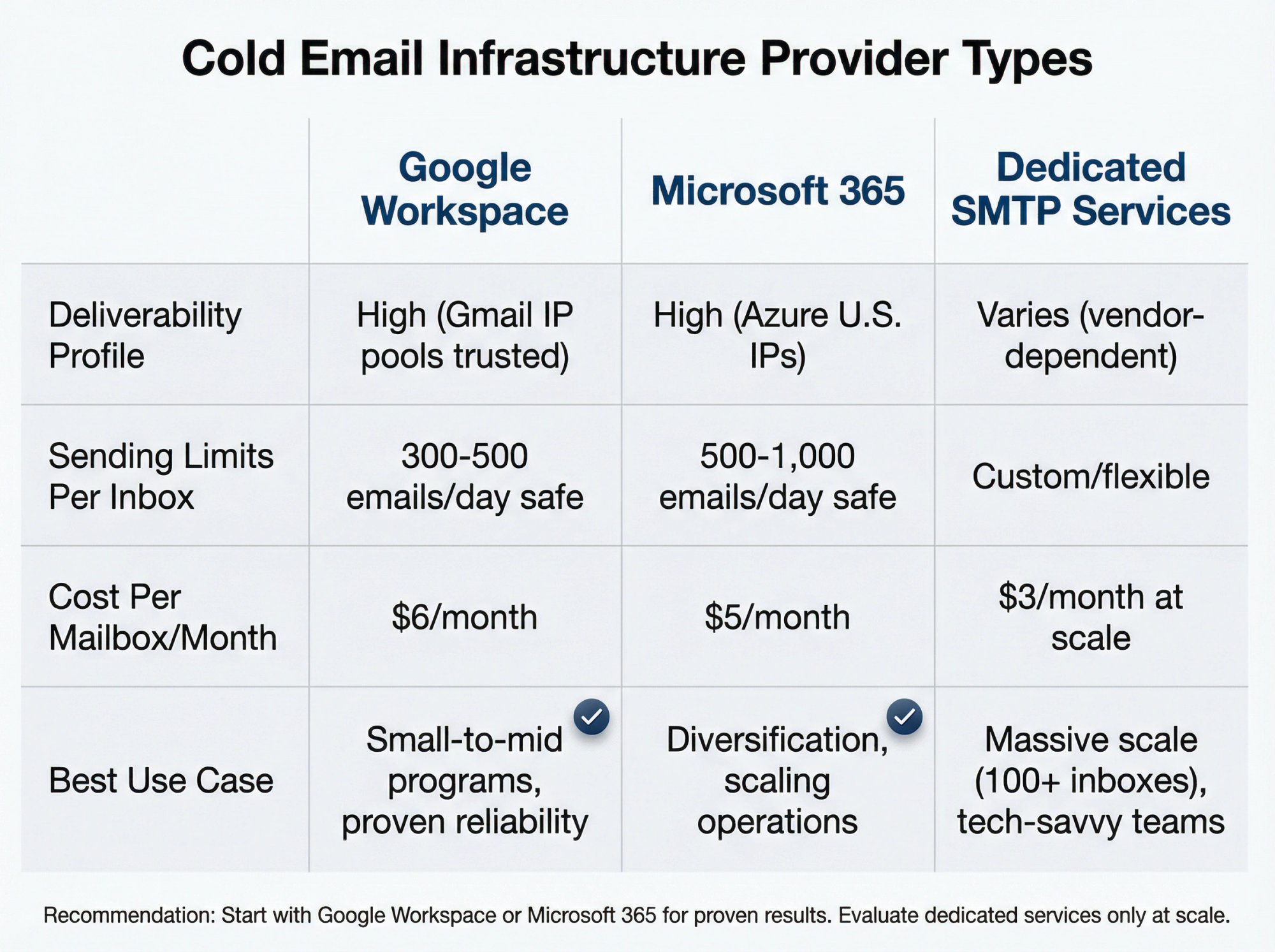
Google Workspace | High (trusted IP pools) | 2,000/day official (300-500/day safe) | ~$6/month | Most B2B cold email (proven, reliable) |
Microsoft 365 | High (Azure U.S. IPs) | 10,000/day official (500-1,000/day safe) | ~$5/month | Diversification, scale operations |
Dedicated SMTP Services | Varies (test required) | Custom (often lower per-inbox cost) | ~$3/month at scale | High-volume operations (100+ inboxes) |
(A) Standard email providers (recommended for most): This means using services like Google Workspace (Gmail) or Microsoft 365 (Outlook) to create mailboxes on your new domains. Each mailbox is essentially a full email account with an inbox that you own, and you'll connect these to your sending software.
Deliverability: Emails sent via Gmail or Outlook's infrastructure tend to have high deliverability out-of-the-box because you're riding on the reputations of huge, trusted platforms. For example, Google and Microsoft have thousands of IPs with good sending reputations; your cold emails will originate from those shared IP pools (or Microsoft's dedicated IPs in some cases) which ISPs generally trust as long as you don't send spammy content. In fact, Outbound System credits part of its success to using private Microsoft Azure U.S. IP infrastructure, essentially piggybacking on Microsoft's trusted sender network.
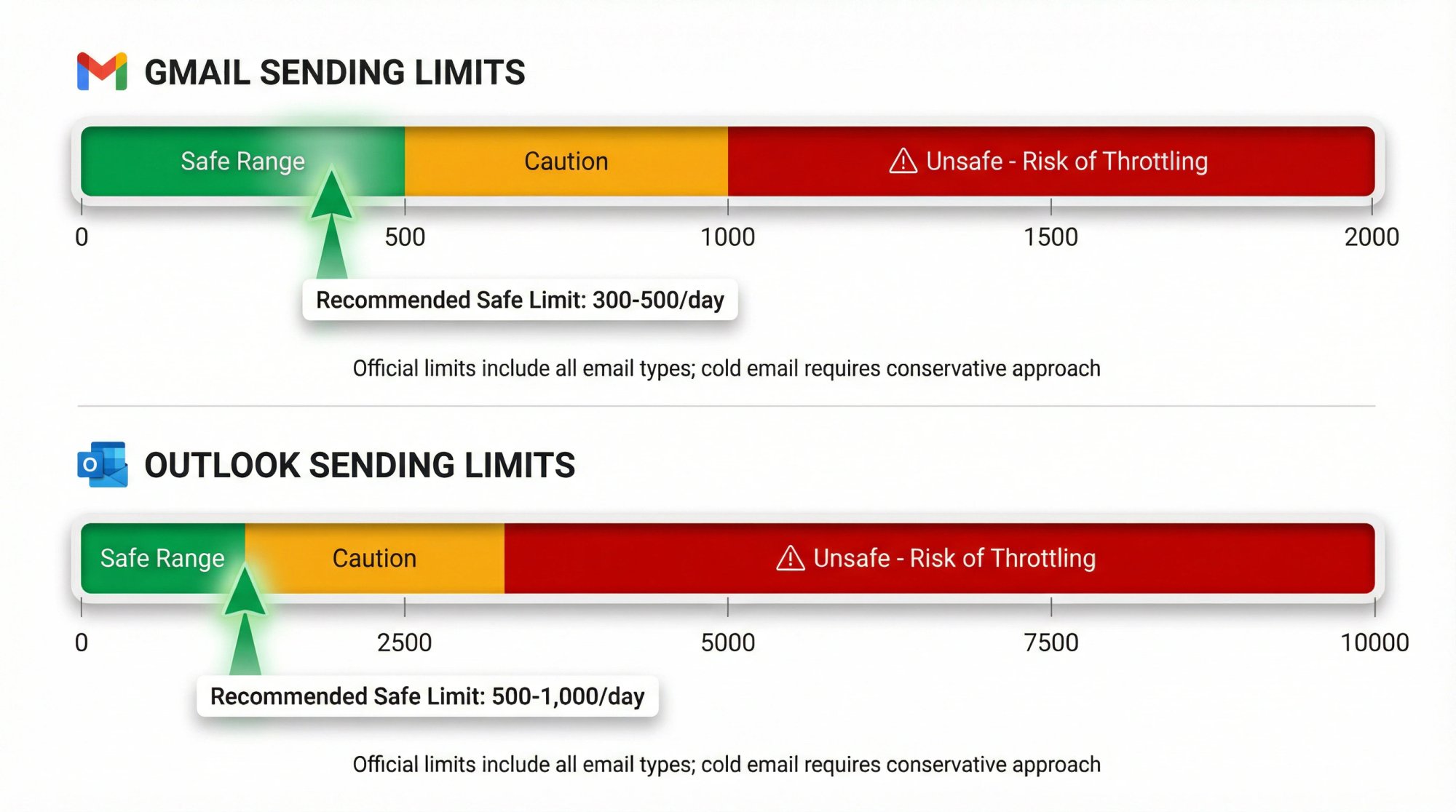
Sending limits: Google Workspace allows up to 2,000 emails/day per mailbox (for paid accounts) under ideal conditions. Microsoft 365 has an official limit of 10,000 recipients/day. However, those are upper bounds. You should not hit them in cold email. In reality, a warmed Gmail can safely send around 300-500 emails/day without issues, and a warmed Outlook maybe 500-1,000/day. Microsoft's high limit is a bit misleading because if you actually try sending 10k/day from a new Outlook account, you will almost certainly be throttled or blocked; their system will quietly start deferring messages if you go too high too fast. The key is, both platforms provide more than enough capacity per inbox if used wisely (and if you need more, you add inboxes). We'll discuss safe sending volumes later.
Ease of management: Both Gmail and Outlook can be managed through easy web interfaces, and both integrate with automation tools (through SMTP or API). Gmail might be slightly more user-friendly if you're already familiar with it, but it's really personal preference. One thing to note: if you go with Google Workspace, you might need multiple Workspace accounts if you use many domains. Google typically allows adding domains as aliases or additional domains under one org, but there are some limitations and you may prefer to keep things separate. Microsoft allows multiple domains in one tenant as well. Recent comparisons concluded there isn't a huge difference in deliverability between Gmail vs Outlook. Both are solid choices for cold email. Gmail had historically slightly higher reply rates but has seen declines recently, whereas Outlook is steady but a tad lower on average. Many experts suggest using both if you can, to diversify and not be reliant on one ecosystem. In practice, you might not notice a big difference, but if you plan to run a large operation, having some mix (say 50% of your inboxes Google, 50% Microsoft) can hedge against one provider's particular quirks or policy changes.
Cost: Google Workspace starts around $6 per user/month, Microsoft 365 around $5 for their basic plan. So very similar. Both give you full email capability and other apps (which you might not use for these secondary accounts). If you have, say, 10 inboxes, you're looking at $50-60/month in mailbox fees. This is often the biggest ongoing cost of DIY cold email infrastructure (besides any software tools). Later we'll compare this with other options.
(B) Dedicated SMTP or "cold inbox" services: In the last couple of years, a new breed of services has emerged that are essentially dedicated cold email infrastructure providers. These include things like Mailgun, SendGrid (traditional SMTPs) or newer ones like Maildoso, Mailforge/Infraforge, Mailscreen, Mission Inbox, Inframail. They allow you to create mailboxes on their servers or use their sending IPs specifically for cold email.
How they work: A cold infrastructure service is basically a private email server in the cloud. They handle the domain setup, provide you with SMTP sending capability or actual inboxes, and often have features like automatic DNS authentication and warm-up integrated. Essentially, they act as your ESP (Email Service Provider) but focused on cold outreach needs. Hands-on reviews of these services noted that they can simplify scaling: you can spin up lots of mailboxes and domains quickly, and send through their servers. The goal is improved deliverability by using their optimized IPs and automation.
Pros: Often cheaper when you need lots of inboxes. For instance, rather than paying $6 per Gmail, a service might charge a flat rate or a lower per-mailbox cost. Some quoted prices are on the order of $3 per mailbox/month for large volume. They also streamline setup. You click a few buttons to buy a domain and create accounts, instead of manually registering domains and creating users in Google/MS. They might also offer dedicated IP addresses for your exclusive use (for a fee) if you want more control over IP reputation. And they often include automated warm-up networks, monitoring dashboards.
Cons: They are newer and not as "universally trusted" as Google or Microsoft. You are somewhat betting that their sending IPs and infrastructure are clean. Some are excellent, but there is less transparency. You have to trust the provider's reputation or test them. Also, while they can be cheaper at scale, they add another vendor and complexity. If something breaks, you rely on their support. With Google/Microsoft, those rarely have outages, whereas a smaller provider might. That said, many cold emailers use these services successfully to manage hundreds of inboxes.
Use case: If you are very tech-savvy or have a massive scale (hundreds of inboxes) and find the cost of Google/MS too high, these are worth exploring. They can indeed save money and offer flexibility. For most small-to-mid programs, however, sticking to Gmail/Outlook is simpler and more proven. It might be wise to start with Gmail/Outlook, and only consider these specialized providers if you hit a ceiling or need specific features.
(C) Traditional Email Marketing Services (not suitable): Just to be clear, don't use services designed for opt-in marketing lists for cold email. Platforms explicitly forbid cold emailing (they are for opt-in lists, and your account will get banned). And raw SMTP services can technically send emails, but they require you to know exactly what you're doing with warming and list management. They're more suited for transactional emails or marketing to opted-in lists. Cold email has its own nuances that dedicated outreach tools handle better. This is why either regular mailbox providers (Gmail/Outlook) or the cold-email-specific services above are the go-to.
Recommendation: If in doubt, start with a handful of Google Workspace or Office365 mailboxes on your new domain(s). They're reliable, and as long as you respect sending limits, you can get great results. As evidence, a huge number of successful campaigns run on those. Data shows Gmail and Outlook are still the safest bets for B2B outreach. Diversify between them if possible. Only consider fancy infrastructure services down the line if you need to.
One more tip: keep your cold email mailboxes separate from your company's main email system. If your company uses Google Workspace for internal email on the main domain, do not just add your new cold email addresses to that same account/org. It's better to create a separate Google Workspace subscription for the cold domains, or separate Microsoft tenant. This avoids any chance of cross-contamination between your main org and the cold email org. It also makes it easier to shut down or swap out if something happens. Essentially, think of your cold email infrastructure as a parallel system, not intertwined with your internal comms.
How to Create and Configure Email Inboxes
By this stage, you have domains and you've chosen a service (e.g., Google Workspace or similar). Now you need to create the email accounts (mailboxes) that will actually send the emails.
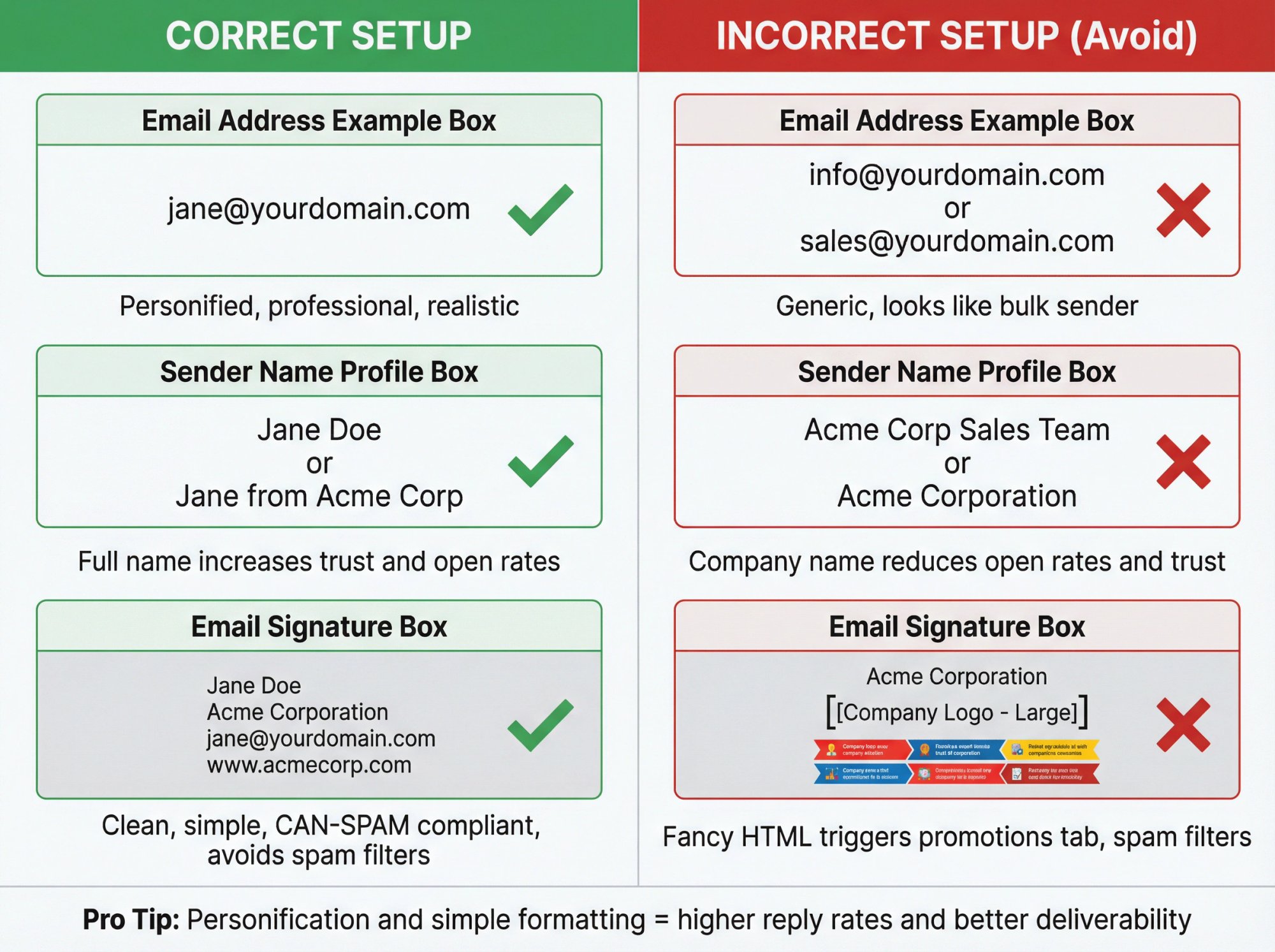
Mailbox naming: Use realistic, professional-looking addresses. Ideally, these should be personified. Cold emails tend to get better results when they come from an individual's name, not a generic company or role account. For example, use jane.doe@yourdomain.com or jane@yourdomain.com rather than info@ or sales@. People are more likely to trust and respond to an email from what looks like a single person. Plus, some spam filters downgrade obvious bulk-sender addresses (like newsletter@ or no-reply@). Choose names that could be real employees. They might be real people on your team or completely fictional. Prospects won't usually know. Many companies use a mix of real first names or common names (e.g., mike@, sarah@). If you use fictional senders, be prepared that someone might ask for them on a call; usually you can handle that by saying "X is an outreach coordinator on our team". Just keep it consistent within a campaign so it doesn't confuse prospects.
Profile settings: Once you create each mailbox, set up the profile (i.e., the sender name that will appear on emails). This should usually be a full name (e.g., Jane from Acme Corp or just Jane Doe with the company in the signature). Some people like to include the company in the sender name for clarity (e.g. "Jane at Acme"), which can improve open rates and credibility, but it's optional. Also, add a signature to each account with your company name, address (for CAN-SPAM compliance), perhaps a website link. Keep the signature fairly simple (no big logos or fancy html, which can trigger promotions tab or spam filters). A plain-text or lightly formatted signature works best for cold emails.
Mailbox limit per domain: Earlier we mentioned you might use several mailboxes per domain. How many exactly? There's no hard rule, but a common practice is around 2-5 mailboxes per domain to start. Some recommend 3 as a default. The idea is to not overload one domain with too many separate senders either, but you also don't want to buy an extreme number of domains unnecessarily. For most, 2-5 addresses per domain is a reasonable balance. If you have one domain, maybe create 3 senders on it (e.g., jane@, mike@, sarah@). If you have two domains, you could do 2-3 on each. Outbound experts often scale by adding more domains rather than adding, say, 50 mailboxes on one domain. Because if that one domain's reputation tanks, all 50 are affected. Spreading across domains gives resilience.
Keep in mind: if all your mailboxes are on one domain, they share the domain reputation (and any blacklisting will hit that domain). If they are on separate domains, they don't impact each other's domain reputation but they might share an IP reputation if using the same email provider (e.g., all Gmail accounts share Gmail's IP reputation, though Gmail also tracks domain reputation separately to some extent).
Initial password and security: When setting up accounts in bulk, ensure you store the logins securely (especially if using separate Google accounts). Turn off any settings that could interfere with sending: for example, Google by default might have some smart features or filters. Generally not an issue for sending, but make sure you can access each inbox to check if any warnings or emails (like auto-replies or manual replies from prospects) come in. With many inboxes, it's impractical to check each individually by hand every day; instead, you'll rely on your sending tool's unified interface (which we'll cover soon). But you should log into each account at least once initially to complete any setup steps (e.g., Google may require a phone verification for new accounts. You might need to use a phone number, although if you're using a Google Workspace with multiple users, admin can add without phone sometimes).
Email signature and footer: As noted, add a proper signature. Also consider adding an unsubscribe line or opt-out notice in the footer. Something simple like: "If you prefer not to receive emails from me, please let me know." This is important legally in many jurisdictions for cold B2B emails, and it's also a good practice to reduce spam complaints. It gives the recipient an easy out. Some tools can manage an actual unsubscribe link for you (tracking who clicked it and auto-suppressing them), which is even better. But if not, a manual sentence is okay. I usually put this in size 10 font at the bottom, prefaced by "PS" or a dash.
Test each account: Send a test email from each new mailbox to a personal email of yours (like a Gmail or Outlook not associated with these domains) to see if everything is working. Check that the from name, address, signature look right, and that the email doesn't directly land in spam. If it does land in spam at this point (which it shouldn't if domain and DNS are set and it's a plain "hello" email), something might be misconfigured. Better to troubleshoot now.
By now, you have fully functional email inboxes on your cold domains. Next, we need to warm them up before we start any big campaigns.
How to Warm Up Domains and Inboxes
Email warm-up is the process of gradually establishing a positive sending reputation for new email accounts (and domains) by starting with low volume and interacting in a normal, organic way. This step is absolutely essential in 2025 due to tight sending rules.
Think of a brand new email account like a new phone number. If you start blasting hundreds of messages on day one, it looks suspicious to the "phone company" (in this case, Google/Gmail or Microsoft/Outlook). They'll likely flag or restrict you. Warming up is like showing the email providers that "Hey, this is a real person/business who sends legitimate emails that people engage with."
Key aspects of warming up:
Start with very low volume: For a fresh inbox on a new domain, send only a handful of emails per day initially. A common guideline is <10 emails/day in the first few days, then slowly increase. For example, you might send 5 emails on day 1, 5 on day 2, 10 on day 3, 15 on day 4, and so on. A new domain itself should likely stay under 20/day for at least the first week. Recommendations suggest starting new domains at 20-50/day in the first month. If it's an aged domain (years old but unused for email), you still treat it as new to be safe.
Gradually ramp up: The warm-up period typically lasts 2-4 weeks before you reach full sending volume. One expert blueprint suggests warming up for 14 days before launching actual campaigns. During this time, increment your daily sends gradually. There is no prize for speeding. In fact, ramping too fast can set you back significantly (landing in spam and having to reset/wait).
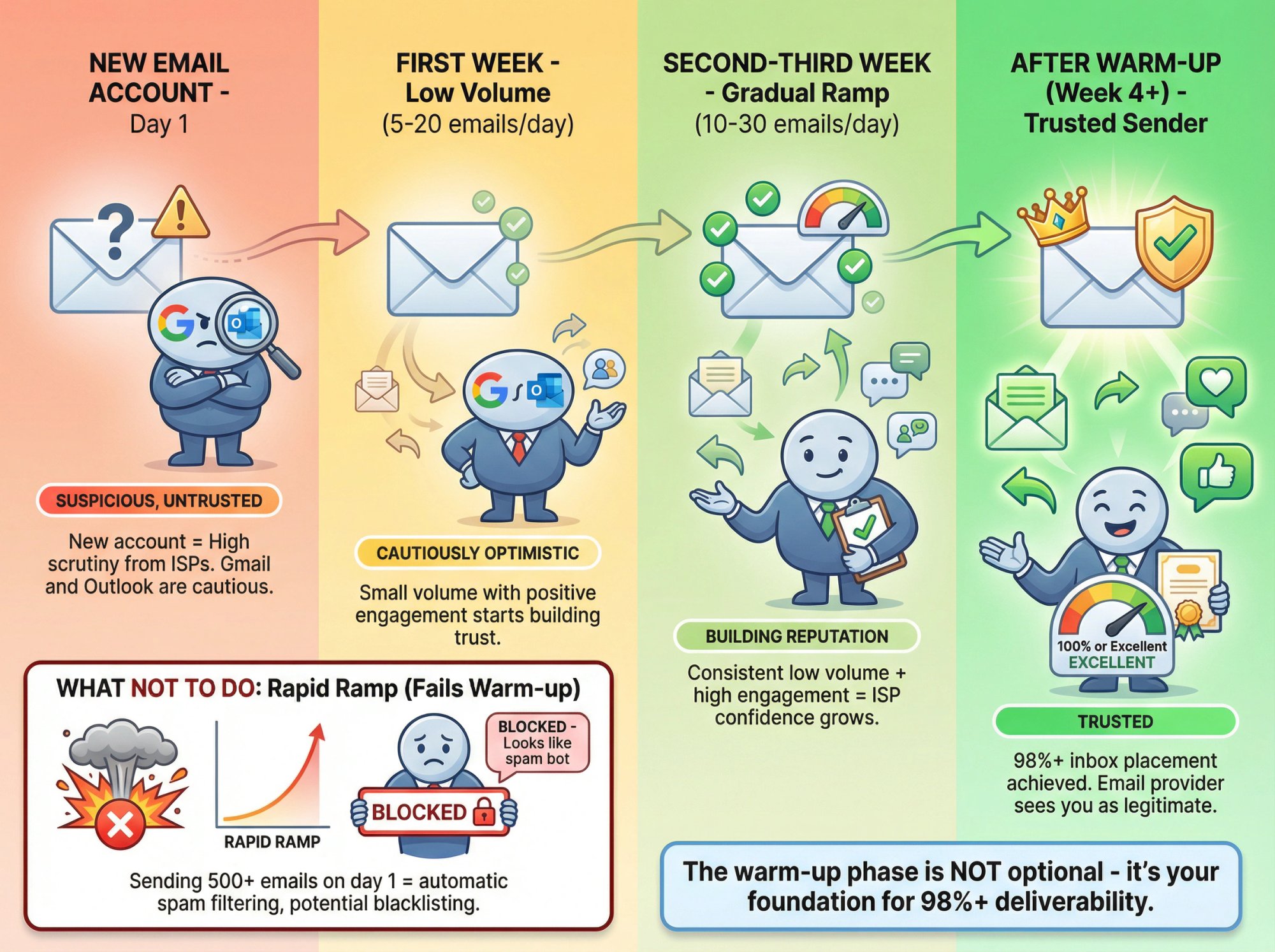
Focus on engagement: The whole point of warm-up is to generate positive engagement signals on your emails (opens, replies, markings as "not spam"). ISPs look at how recipients interact. During warm-up, you want as close to 100% positive engagement as possible. Obviously you can't get real prospects to do that (they might ignore you or mark spam), so warm-up often uses controlled contacts or automation to simulate it.
Leverage warm-up tools & pods: In 2025, the easiest way to warm up is to use an automated warm-up network (often called warm-up "pods" or services). These are built into many cold email tools or offered as standalone services. How they work: you connect your new inbox to the warm-up service, and it will start sending small emails to other participating inboxes in the network. Those inboxes will automatically reply to you, and even move your message out of spam if it landed there. By doing this daily, your account sends and receives emails that appear legitimate and get replies, which signals to Google/Microsoft that your account is behaving nicely. For example, popular platforms have warm-up pools of over 1 million emails exchanging messages. The size of the pool can matter; larger pool = more diverse interactions. Many services achieve a similar effect.
Using these tools, you might configure something like "send 5 warm-up emails and receive 5 warm-up emails per day" initially, and they will automatically raise that number as days go by (up to, say, 20-30 a day). The content of these warm-up emails is usually random gibberish or generic text. You don't care, they're just fodder for engagement. It's separate from your actual sales emails.
Consistency: Warm-up is most effective when done every day, including weekends (since email algorithms track daily patterns). The automated tools handle this for you. Typically, you leave the warm-up running continuously, even after you start sending cold emails, until the account is very seasoned. It doesn't interfere with your normal sending; it's in parallel. Some services will slow down warm-up once you start sending normal campaigns heavily, to not exceed safe limits. Usually they smartly balance it.
Monitor results: Many warm-up tools will give you a "health dashboard" for your inboxes (e.g., showing what percentage of warm-up emails landed in Inbox vs Spam, if any were marked spam). If during warm-up you see issues (like many warm-up emails from you landing in spam), that's a red flag to address before you send to real prospects. Ideally, you want near 100% of warm-up correspondence hitting inbox (those tools often pull them out of spam to correct it). Some tools even give an "inbox reputation score". For example, hitting a 100% inbox placement during warm-up is the goal. It is indeed possible. The networks ensure any strays are marked not-spam, boosting you.
Critical success metric: With proper warm-up and domain prep, you can achieve 98%+ primary inbox placement. This level of performance only comes from patiently warming and nurturing sender reputation.
Manual warm-up (if not using a tool): If for some reason you cannot use a warm-up service, you'd need to mimic this manually. That could mean sending emails to colleagues or friends who will reply and not mark you as spam. For instance, send a personal note to 5 friends asking if they got your email, have them reply. Then next week 10 emails. This is cumbersome, hence the popularity of automated warm-up services.
Warm-up content: When warming up, do not use your sales pitch emails. Use either the dummy content from a tool or very simple hello/how-are-you emails if doing manually. The idea is to come across as regular correspondence. Also, avoid links or attachments during the early warm-up days entirely. Those can trip filters more easily. Some warm-up tools even auto-generate different message content to simulate randomness.
Domain warm-up vs inbox warm-up: Warming up an inbox inherently warms the domain too, since it's the domain that receivers see. If you create 5 new mailboxes on one domain, each sending 5/day, the domain overall is sending 25/day. That's also part of warm-up. So you might add one mailbox first, warm it a few days, then add the next, to gradually introduce volume on the domain. Some prefer to stagger onboarding of multiple inboxes on the same domain. If you bring on many at once, just ensure the combined volume ramp is reasonable.
So, plan for a warm-up phase in your project timeline. It's frustrating to wait when you're eager to send campaigns, but it pays off hugely in the form of better deliverability and more replies once you do launch.
Recap of a simple warm-up schedule (example):
① Day 1-2: Send 5 emails, receive 5 (via warm-up network) per day. No cold emails to prospects yet.
② Day 3-4: Send 10, receive 10 warm-ups.
③ Day 5-7: Send 15 warm-ups/day.
④ Day 8-10: Increase to 20 warm-ups/day. Possibly send a few (like 5) test cold emails to a very small segment of prospects to gauge if they deliver. But only if warm-up results have been good.
⑤ Day 11-14: Warm-up to 30/day. Now your inboxes have sent maybe ~200 emails each in total with great engagement, which is a decent foundation.
⑥ After 2 weeks: Begin sending to prospects at a low volume (maybe 10-20/day initially per inbox), and keep warm-up running. Gradually shift the ratio from mostly warm-up traffic to mostly real emails over the next couple weeks.
Every provider and tool is a bit different in their guidance, but the above is a reasonable path. The key is not to rush or skip.
How to Scale Cold Email Volume Safely
Now we get to the crux of infrastructure: How much can you send per inbox, and how do you scale up to reach large numbers of prospects while staying under the radar?
The mantra: slow and low, scale by adding.
The mantra for 2025 and beyond is: slow and low per inbox, scale by adding. In practice, that means you limit the number of emails each inbox sends daily to a relatively low figure, and if you need to send more total emails, you use more inboxes (and domains).
Safe email limits per inbox: There is some debate on this, but trends indicate people are sending fewer emails per account than they used to, to prioritize deliverability. A few years ago, you might hear of 50-100 cold emails/day per inbox as acceptable after warm-up. Today, many outreach experts advise staying around 20-50/day at most for cold emails, even on warmed accounts. Some are even more conservative, suggesting ~30/day as a good upper limit. Why so low? Because the lower the volume from an identity, the more it mimics normal human email behavior. Sending 30 genuine emails a day is normal for a businessperson; sending 300 starts to smell like mass marketing. Remember, Google's AI is looking not just at raw numbers but engagement rates. If you send 30 highly targeted emails and get 3-5 replies, that's a 10-15% reply rate (great engagement). If you blast 300 and get 3 replies (1%), not only do you have more potential complaints, but also a low engagement, which Gmail's algorithms may interpret as your emails not being wanted.
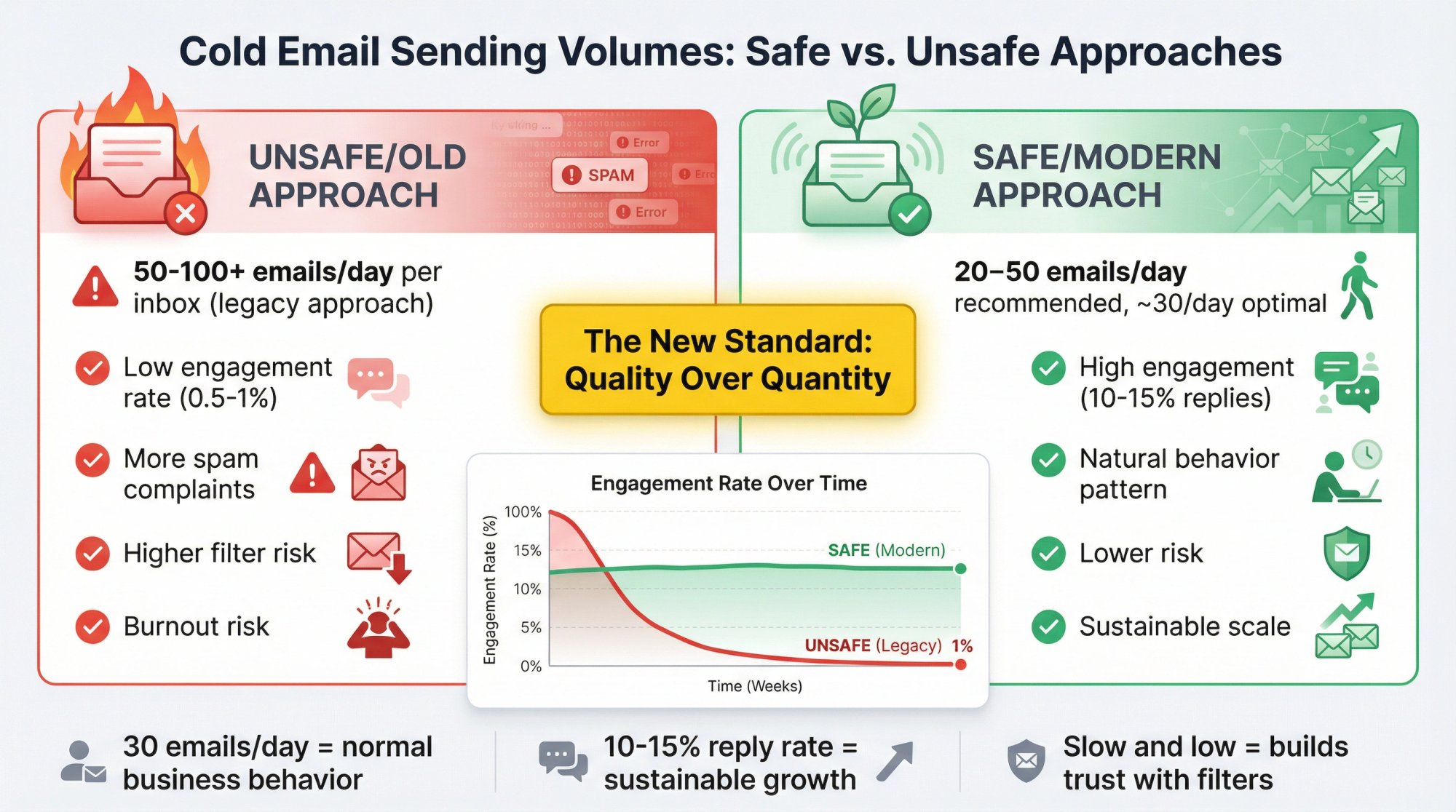
Evidence of extreme deliverability approach: To illustrate how low-volume can go, consider Outbound System's approach: they operate with 350 inboxes sending just ~3 emails per inbox per day. That is incredibly low per inbox, but it virtually guarantees those emails appear highly personalized and rare (and thus unlikely to be flagged as spam). While you likely don't need to go to that extreme for your own program, it highlights the principle: fewer emails per sender = higher deliverability per email. If you only send a couple of emails a day from an inbox, it will almost never be rate-limited by Google or draw suspicion by volume alone. The trade-off is you need a lot of inboxes to send at scale.
So how many is right? For most, a reasonable balance is somewhere between 20 and 50 cold emails per inbox per day, once fully ramped. Err closer to 20-30 if you can afford to use more accounts; you'll likely stay well within the safe zone. Pushing up to 50 can work if your content and targeting are solid (lots of replies, few complaints), but beyond 50 you are pushing luck unless you really know what you're doing. Note: These numbers refer to cold emails (initial touch). If you have automated follow-ups, those count too. Many tools count each follow-up email toward your daily send total. For example, if you send 30 new emails and each has 2 follow-up steps, that could become up to 90 emails/day from that inbox when the sequence fully plays out. Typically not all leads will get all follow-ups (some reply or bounce), but account for that in limits.
Plan based on leads and sequences: Think in terms of leads contacted per inbox per day. If one inbox sends 30 emails/day and you use a sequence of 3 emails (1 initial + 2 follow-ups), that inbox can start roughly 10 new leads per day (because those 10 leads eventually generate 30 sends across the sequence). A simple formula from cold email consultants: 1 inbox = approx 30 emails/day = approx 10 new leads contacted per day (assuming 3 emails per lead). Using that, if you want to contact 100 new leads per day, you'd need about 10 inboxes. If you want 1,000 leads/day, ~100 inboxes, and so forth. This aligns with how people scale: more leads = more inboxes/domains.
One example shows: 1 domain with 3 inboxes @ 30 emails/day each = 90 emails/day = ~30 leads/day. Need 150 leads/week? Use 1 domain for ~30 leads/day (which is ~150 leads/week). Need 600 leads/week? Use 4 domains (12 inboxes) in that model. Extrapolation to very high numbers like 27 domains for 100k leads over 6 months is possible.
Multiple domains vs more inboxes on one: If you find one domain with a few inboxes isn't enough volume, do you add more inboxes to that domain or add another domain? Generally, add another domain once you have ~3-5 inboxes on one. Spreading sending across domains further distributes risk. Also, some domain providers might have subtle sending limits per domain/org as well (especially if all inboxes are under one Workspace account). By having a second domain, possibly under a separate Google Workspace, you get a fresh slate and additional bandwidth. Pricing scenarios explicitly assume using 5 separate Google Workspace accounts to host 10 domains and 50 inboxes. That suggests they didn't cram all domains into one account, partly to not put all eggs in one basket and also to abide by any account-level limits.
Avoid sudden spikes: Even after warm-up, be consistent. If you've been sending ~20 per day and tomorrow you send 100 from an inbox, that spike can trigger filters (even if 100 is below the official cap). Gradual changes are key. If you need to significantly raise output, do it in steps (e.g., +5 emails per day each week). Or better, bring a new inbox into rotation and share the load.
Volume vs. engagement trade-off: It's tempting to crank volume to get more leads, but remember: cold email is a game of quality as much as quantity now. 50 highly targeted emails that get a 10% reply rate will beat 500 generic blasts that get 0.5%. The former yields 5 engaged prospects and likely minimal complaints; the latter yields 2-3 engaged but possibly a lot more annoyed people. The ISP algorithms will notice the difference. So in scaling, always try to maintain or improve targeting and personalization so that as you add volume, your rates of positive engagement stay healthy. If you see your reply rate or open rate (for what it's worth post-MPP) dramatically dropping as you scale up, that's a warning sign you might be going too broad or getting spammy.
Parallel sending & scheduling: If you have multiple inboxes, your sending tool will usually distribute sends among them. For example, if you schedule 100 emails to go out today and you have 5 inboxes, a tool might send ~20 from each. This is ideal. It's like having 5 people each sending 20 emails (much safer than 1 person sending 100). Ensure your software is set up to rotate through inboxes for bulk campaigns. Most are, but double-check any sending limits you need to configure per inbox.
Monitoring volume by provider: Keep track of how close you run to limits. Gmail can send 2k/day but you should never hit that in cold email. If you are hitting even 500/day on Gmail, that single account is carrying a lot. Outlook's 10k/day is similarly not to be fully used in cold email. If you see any throttling (e.g., campaigns slowing down or sending errors), that's a sign you need to ease off. Also note that free Gmail accounts (non-Workspace) have much lower limits (~500/day) and are not recommended for this; always use business accounts.
Sequence spacing: This is related to volume (how you schedule follow-ups). Best practice is to space follow-up emails a few days apart (e.g., 3-7 days after the previous email). This not only is better from a sales perspective (not bombarding daily), but also spreads the send volume. If you dump 3 emails on a lead on the same day, that's 3 sends at once. By spacing, you ensure your daily volume stays more consistent.
In short, determine your target outreach volume (leads per day or per month) and then figure out how many domains/inboxes you need to support that at the per-inbox rates that keep deliverability high. It's often more than people assume. For example, someone might say "I want to send 10,000 cold emails a month." If we assume ~20 business days in a month, that's 500 emails/day. If we cap at ~30 emails/inbox/day, that's about 17 inboxes needed. If each domain has 3 inboxes, that's 6 domains. Those are the kind of numbers you plan for. Which surprises some, but that's what it takes to do it safely. Could you do 10k/month from 2 domains and 4 inboxes blasting 125 each per day? You could try, but you'd be pushing very hard and likely burning those domains fast. It's a classic tortoise vs hare scenario: slow-and-steady (with more infrastructure) wins in deliverability.
To reinforce: a 2025 comparison noted one provider's "unsafe" setup was 30-90 inboxes sending 20+ each, which led to frequent collapses, whereas the "safe" approach was 350 inboxes at 3 each. While you probably won't go to that extreme, it underscores that in cold email, the more thinly you can spread out your sending, the better your results will be. This is why building this infrastructure might seem like overkill (until you see the impact on responses and revenue).
Best Cold Email Tools for Campaign Management
Handling a few emails manually is easy; handling thousands a month across many accounts is impossible without software. Part of your infrastructure setup is choosing and configuring the right cold email campaign tool to automate sending, track engagement, and manage multiple inboxes efficiently.
Here's what to look for and some recommendations:
Multi-inbox support and rotation: Your platform must allow connecting multiple email accounts and send from all of them. It should automatically rotate sends among them to distribute volume. For example, if you have 10 connected inboxes and you upload a campaign of 1,000 contacts, the tool should send about 100 from each (not 1,000 from one then 1,000 from the next). Most modern cold email tools do this. Among these, some platforms are particularly known for excellent multi-inbox management (they were built for it). Ensure whichever you choose, it can handle the number of inboxes you plan (some have different tiers allowing X inboxes).
Sending scheduling & throttling: The tool should send emails in a staggered, human-like schedule rather than all at once. For instance, maybe each inbox sends 1 email every couple of minutes, randomly varying, during set hours. Good tools have settings for daily send limits per inbox, hour of day windows, random delays. This helps mimic normal email patterns (no human sends 100 emails in one minute and then none for hours). Platforms have algorithms to mimic realistic sending patterns (waiting a bit between sends, spreading follow-ups appropriately). These features are important for evading algorithmic detection.
Warm-up integration: As discussed, many tools have built-in warm-up. It's convenient to have one platform where you both warm the inboxes and run campaigns, because it can manage the interplay. For instance, it can ensure warm-up emails don't cause you to exceed your daily send cap, and pause warm-ups once you start blasting real emails. Many platforms recently added warm-up capabilities. If your tool of choice doesn't have warm-up, you can use a separate service, but having it integrated is nice.
Personalization and templates: The tool should allow you to create templates with merge fields (for name, company) and ideally even conditional logic or liquid syntax for more advanced personalization. Most do. Some newer ones also support adding images or dynamic fields. For deliverability, simpler is usually better (plain text), but you still want to personalize each email. This isn't unique to infrastructure, but worth noting.
Sequence logic: You'll likely run sequences (follow-ups if no reply). The tool should manage sending those subsequent emails automatically, stopping the sequence when someone replies. This saves enormous time and also helps avoid mistakes (like accidentally emailing someone who already replied, a quick way to get a spam complaint or angry response).
Reply handling: When someone replies, how will you or your team see it and respond? If you have dozens of inboxes, you do not want to log in to each Gmail to read replies. A good cold email platform provides a unified inbox or at least a way to have replies forwarded to one place. Some have a dashboard where you can see all replies from all campaigns and even reply from within the app (via the correct inbox). Others might allow an auto-forward of replies to your main email. Figure out a workflow so that when leads respond, you can manage those conversations. This is more of an operational thing, but it's part of infrastructure because it determines how you configure inboxes (e.g., setting up forwarding rules if needed, or training your team on the platform's inbox).
Analytics and tracking: The platform should track key metrics per inbox and campaign (sends, delivery, opens (with caveat of MPP), replies, bounces). Particularly useful is bounce tracking. It should automatically mark bounces and ideally not resend to them (and maybe even remove them from future sends). It should also track unsubscribes if you use a link for that. Some advanced tools track which inbox sent which email and how each inbox is performing (like if one is getting a lot of bounces or low open rate, indicating a problem with that inbox).
Integrations: Nice to have but not critical to starting (integration with your CRM or other tools). For example, pushing replies or interested leads into Salesforce, or pausing outreach if a lead is already in CRM as a customer. If you're just starting, this can be done manually, but as you grow, integration can save time and prevent embarrassing mistakes (e.g., emailing a person who is already in talks with your colleague).
Popular choices in 2025:
Tool | Best For | Key Features | Price Range |
|---|---|---|---|
Cold Email Platforms | Multi-inbox at scale | Warm-up, rotation, affordable | $37-97/mo |
Advanced Tools | Deliverability focus | Advanced features, good warmup | Similar range |
Auto-rotation Tools | Safety & health monitoring | Inbox health monitoring, partnerships | Mid-range |
Gmail-native | Gmail-native sending | Works within Gmail UI, simple setup | Varies |
Team-focused | User-friendly teams | Team features, recent warm-up addition | Mid-range |
Visual personalization | Images/GIFs | Visual elements, reputation systems | Mid-high range |
The bottom line: choose one that fits your budget and need, but ensure it can manage multiple inboxes and scale safely. These tools become the command center of your cold email infrastructure. You'll connect all your inboxes (with SMTP/IMAP or API credentials) to it. You'll design your campaigns and sequences in it. And you'll press send (or schedule) and let it orchestrate all those emails going out according to the rules you set.
Before blasting a huge campaign, test your setup with a small batch. Maybe send 10-20 emails to a test list or even just to colleagues, making sure the emails send correctly from all the different addresses, merge fields work, tracking links (if any) work, and that the sending pattern seems right. This also helps verify that your tool is rotating among inboxes properly. Many a time, people forget to configure something and end up sending all from one account (which can hurt that account's reputation). So testing is your friend.
A quick note on innovations: Some high-end setups in 2025 use AI to manage inboxes (e.g., automatically pausing an inbox that shows signs of trouble (lots of bounces or spam placements) and activating a fresh one from a pre-warmed pool). Inbox Rotation and Deliverability AI can swap out underperforming addresses to maintain overall performance. These are great if you have that capability, but even without, a diligent human can monitor and replace inboxes (with some downtime). Just know the trend is toward more automation to manage large fleets of inboxes.
Lastly, ensure the tool is not doing things that conflict with deliverability best practices unless you explicitly want them. For instance, some tools by default track opens using pixel images (which can help you see opens but also might contribute to spam filtering (because of the tracking pixel)). Some allow turning off open tracking pixel to reduce the "spammyness". Given Apple MPP, open data is unreliable anyway, so you might choose to disable open tracking and focus on replies and clicks only. Similarly, some tools track clicks by redirecting through their domain; set up your custom tracking domain as mentioned if so. Using your own domain for tracking links can improve deliverability because it keeps things consistent and avoids the appearance of a third-party redirect. All these little settings can add up to better deliverability.
In sum, invest in a good sending platform. It's as important as the quality of your email list or content. A good platform enforces the sending discipline (volume, timing) that keeps your infrastructure humming. Think of it as the brain coordinating all the "muscles" (domains and inboxes) you've prepared.
How to Monitor and Maintain Email Deliverability
Congratulations. Suppose you've now launched some cold email campaigns using your shiny new infrastructure. The work isn't over. In fact, maintaining a healthy cold email infrastructure is an ongoing effort. You need to monitor performance and do regular maintenance to keep deliverability high. Here's how:
Track your core metrics:
Metric | Target | Action if Outside Range |
|---|---|---|
Bounce rate | <2% | Verify list, pause domain, re-clean contacts |
Spam complaint rate | <0.1% | Review targeting, improve opt-out visibility |
Reply rate | >1% (ideally 5%+) | Improve personalization, check inbox placement |
Inbox placement | 90%+ | Test seeds, check Postmaster, adjust content |
Domain reputation | High/Medium | If Low/Bad: pause sending, analyze issues |
Key indicators of deliverability include:
Bounce rate: What % of emails are bouncing (invalid addresses)? This should be as low as possible. If it's above a few percent, it's a problem. High bounces (especially "user not found" hard bounces) strongly hurt your sender reputation. Always use an email verification tool to clean your list before uploading new leads. As discussed, use these services to achieve <2% bounce rates. If you see unexpected bounces, maybe a data source degraded. Pause and re-verify.
Spam complaint rate: If your tool or feedback loops can show it, track how many recipients mark your email as spam. Gmail doesn't directly tell you per se (except via Postmaster reports), but you might infer it if you see a sudden drop in Gmail inbox placement or if using Outlook accounts, Outlook's SNDS/JMRP can send reports. This rate needs to be incredibly low (<0.1%). Even a single spam complaint can impact you. One tactic: include an easy opt-out as mentioned, so people use that instead of spam button. Another: keep your targeting tight; don't email people who are likely to be irritated by your message.
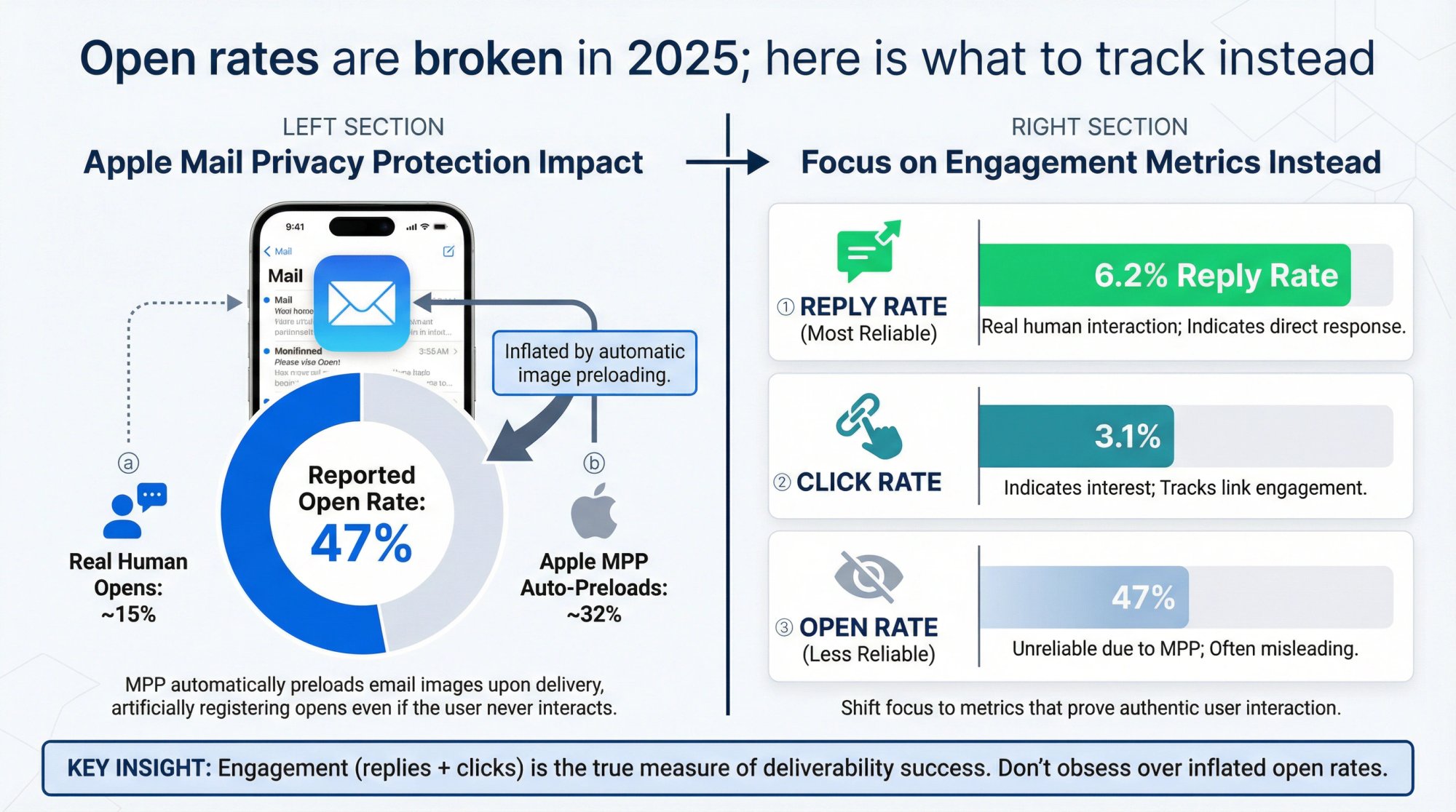
Open rate: Historically a measure, but with Apple MPP (Mail Privacy Protection) since iOS 15, a lot of Apple device opens are false positives (they preload images). So open rates are inflated and unreliable for cold email. They can still be directionally useful (e.g., if you see 5% open rate it probably means something's wrong (maybe landing in spam), whereas a 50% open might mean real opens plus some Apple opens). But don't obsess over opens. Instead, focus on...
Reply rate: The true gold metric. Reply rate (positive replies ideally) tells you how engaging your content is and whether real humans are seeing it. If your reply rate plummets or trends toward zero, likely your emails are not being seen (or your content is off-target). A healthy cold campaign might see anywhere from 1% to 10%+ reply rate depending on how targeted and personalized it is. Aim for >1% at minimum. Anything above 5% is usually a well-targeted campaign. High reply rates also indicate to email providers that your emails are wanted (especially if those replies are long or positive in nature).
Inbox placement: This is harder to measure but tools or your warm-up network can give hints. If possible, do a regular inbox placement test: send your email to a seed list (addresses on Gmail, Outlook, Yahoo) and see where it lands (inbox, spam, promotions). Some cold email tools have this built-in or you can use third-party. If you see a pattern like "all my Gmail seeds went to spam", you need to intervene (maybe your domain got flagged, or content triggered a filter). Tracking internally aims for 96-98% inbox placement. If it drops below ~90%, pause and fix issues.
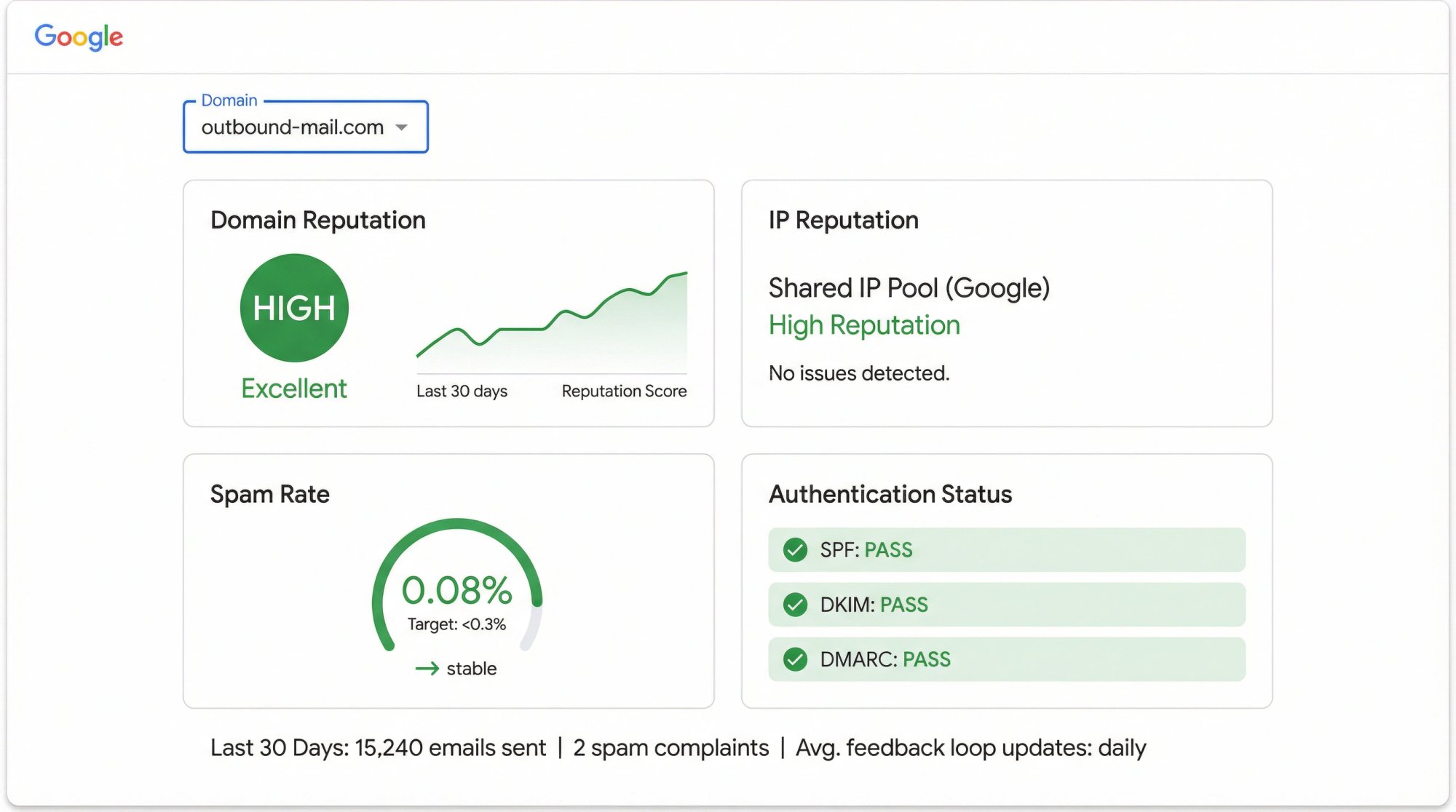
Domain/IP reputation: Google Postmaster Tools (for Gmail) can show your domain reputation as "High", "Medium", "Low", or "Bad". You want High or at least Medium. If you see it drop to Low/Bad, you likely need to stop sending from that domain for a while and fix whatever caused it (could be high spam complaints or bounce rate). For Microsoft, they don't have an exact equivalent, but if using a dedicated IP anywhere, you can check its status on blacklists (there are blacklist checkers, and SNDS for Outlook if applicable).
Use Postmaster and SNDS: Set up Google Postmaster Tools for each of your sending domains (requires a DNS verification). This will give you dashboards of spam rate (the % of your emails that resulted in user spam complaints. Critical data), IP reputation, domain reputation, feedback loop. It updates daily. It's arguably the best way to know if Gmail is happy with you. If you see red flags there (like high spam rate or bad domain rep), take action immediately. Possibly rest the domain (no sends) for a week, or warm it more, or adjust content. Microsoft SNDS is more for if you send from static IPs (with Outlook, you're on their shared IP so SNDS won't show your specific data unless you have a dedicated range). But Microsoft's Exchange might notify your sending addresses if too many emails are not delivered.
Keep warming and aging: Don't stop warm-up activities completely even after ramp-up. Many keep a baseline of warm-up emails running continuously to maintain engagement history. Also, as your accounts age and continue to send good mail, their reputation solidifies. The older (in good standing) an account or domain, the more forgiving filters might be. So your first month might be fragile, but by month 3 or 6, if all goes well, you can operate more confidently (though never recklessly).
Gradually increase volume if needed: After a few months, if you need more volume per inbox, you could try to increase slightly (like going from 30 to 40/day). But monitor carefully if that impacts placement. Alternatively, stick to the conservative approach and just add more inboxes if you need to scale up. The latter, while more work, is often safer.
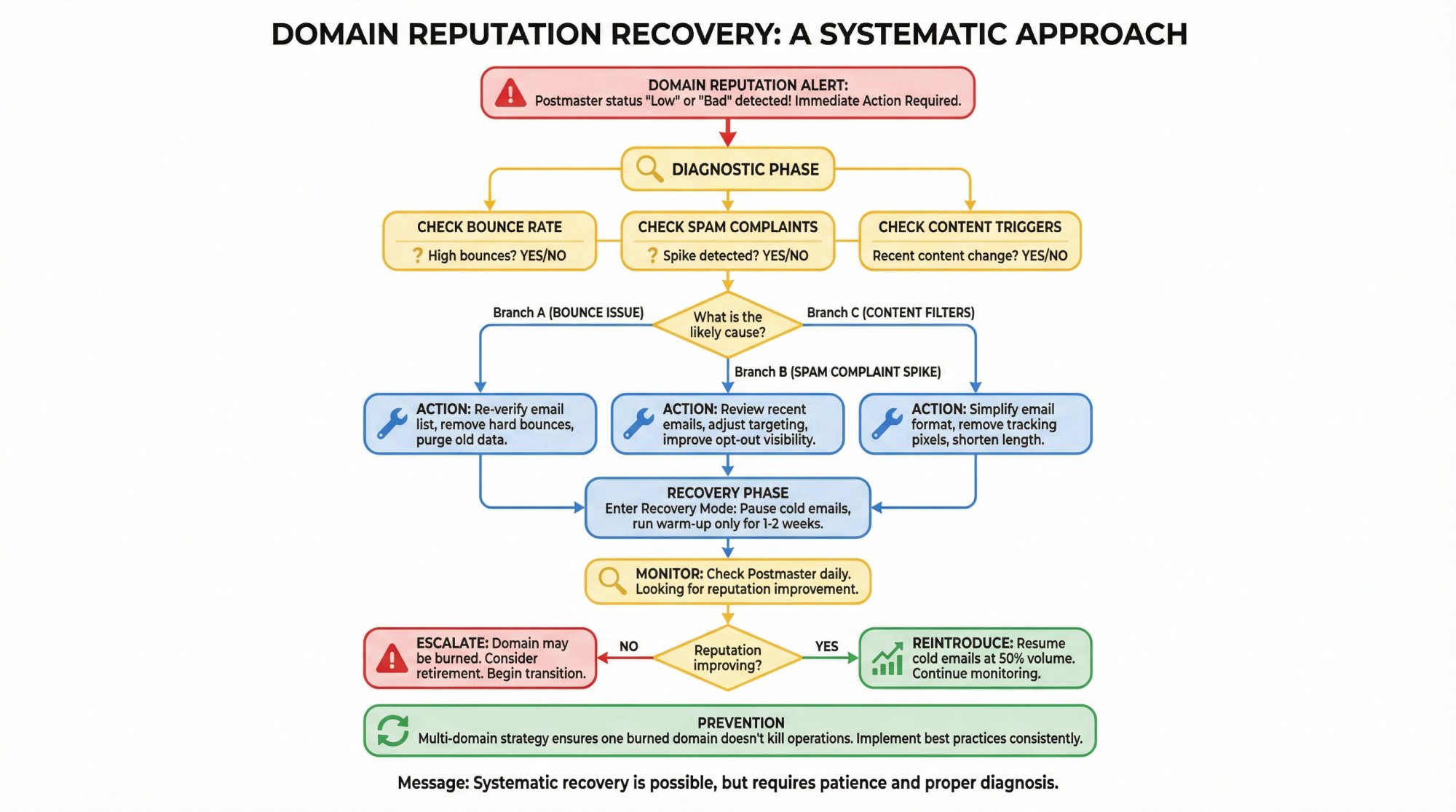
Watch for individual inbox issues: Sometimes one inbox on a domain might get spam-filtered more than another (perhaps due to its specific sending pattern or content). If you identify an underperforming inbox (e.g., its emails always seem to go to promotions or spam when others get through), you can retire and replace that inbox. It could be that that address got flagged (maybe a user hit "block sender" or something). Rather than fighting it, it's often easier to create a new address, warm it up, swap it into your campaigns. Having a "reserve bench" of a few extra pre-warmed inboxes is a pro move. Some people always warm, say, 10% more inboxes than they need, so replacements are ready to go. AI rotation does this automatically by swapping in ready inboxes.
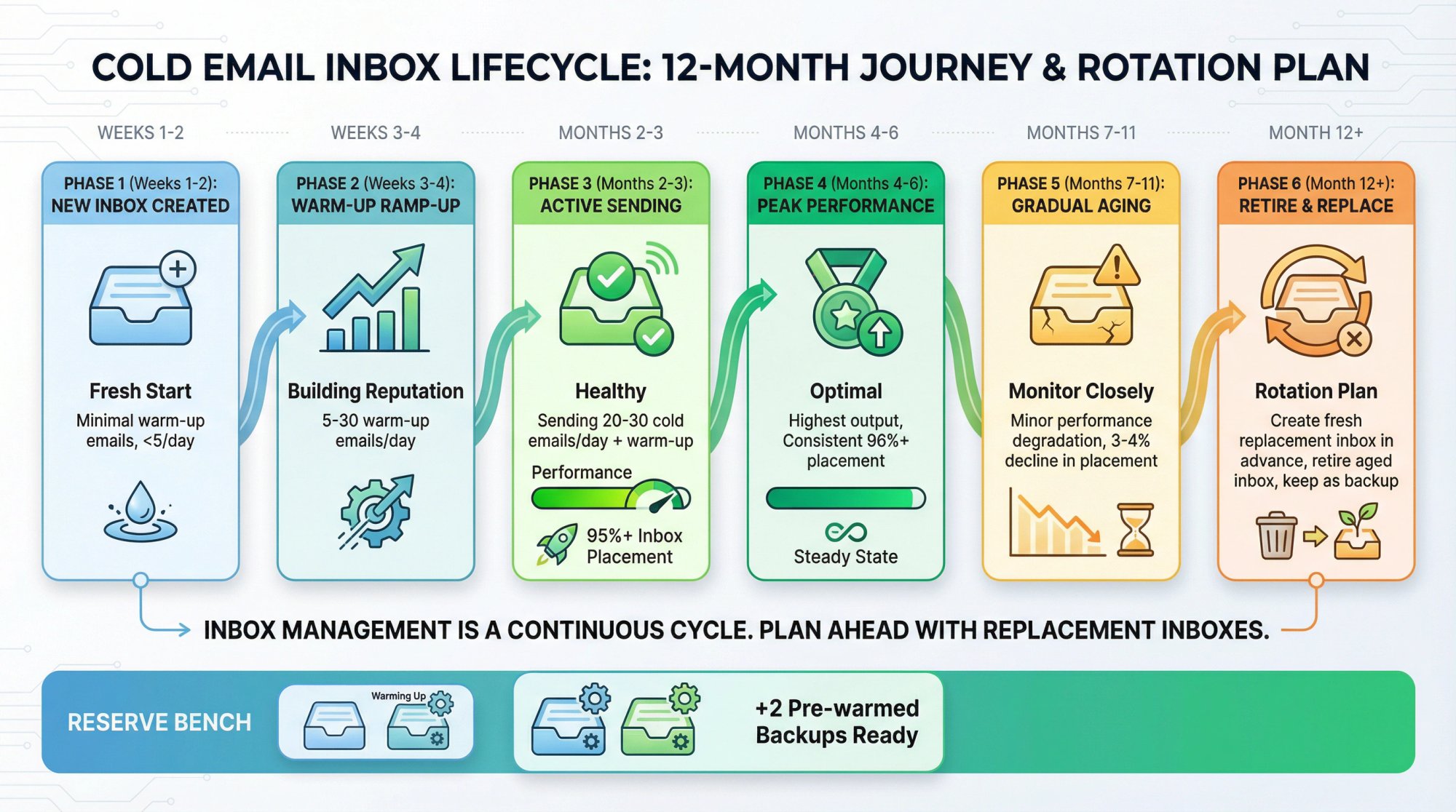
Domain reputation recovery: If a domain shows signs of trouble (e.g., Postmaster says "Bad"), stop using it for new cold emails and focus on rehabilitation:
→ Check for obvious issues: were there a lot of bounces recently (clean list and fix that)? Did you hit a spamtrap (harder to know, but consider the source of data)?
→ You can use that domain to send only warm-up emails for a while, no cold outbound. Let the warm-up network try to repair the rep with positive engagement.
→ After a few weeks, if it improves, you can cautiously reintroduce it. If not, it may be burned.
→ In worst case, you might need to drop that domain from your rotation for a long period or permanently. This is why we use multiple domains. One can be sacrificed without killing the whole operation.
→ Don't rush to kill a domain at the first sign of trouble, but also don't be too stubborn to let go if it's clearly become a liability.
Feedback and adjustments: Continuously tweak your sending based on results. For example, if one email template in your sequence is getting marked spam or has zero engagement, rewrite it or remove it. If certain days of week have worse engagement, focus sends on better days (some swear by Tues-Thurs as prime days). If you notice prospects from certain industries replying more, maybe segment and focus there for better results (less about deliverability, more about efficiency). The beauty of having this infrastructure is you can A/B test and iterate: test different email copy, different subject lines, while keeping the technical sending consistent. If deliverability issues arise, you know to look at the technical factors independently of the copy factors (though copy can affect deliverability. E.g., overt spammy phrases or too many links can hurt).
Stay updated on changes: Email providers tweak their algorithms. For instance, Gmail in 2023 started showing blue question mark icons on emails that aren't authenticated or look sketchy. In 2025, they may introduce new signals. It's wise to follow communities or blogs of experts for any notable shifts. For example, earlier we referenced that Gmail's filters in 2025 place more weight on engagement, and lowered tolerance for spam complaints. Being aware of such changes helps you adapt (e.g., after mid-2023, many senders started removing links from their first cold email to appear more plain-text and get past Gmail's content filters that flag heavy HTML or tracking).
Legal compliance checks: Make sure you're honoring unsubscribes. If someone replies "remove me" or clicks your unsubscribe link, your system should stop emailing them. Most tools auto-honor this (and have an opt-out list). Failing to do so not only risks legal trouble but also almost guarantees a spam complaint from that person eventually. Also ensure you aren't accidentally emailing people twice from two different inboxes (e.g., if two sales reps both uploaded the same contact). Good CRM hygiene or de-duplication processes are needed as you scale, or a master suppression list loaded into your email tool.
Ongoing enrichment: Out of scope of "infrastructure", but keep your data quality high. If you continually feed verified, targeted leads (with updated emails) into your system, you'll avoid spikes in bounces or complaints. Outbound System emphasizes their 9-step data verification to keep bounce rates extremely low. You should aim for that too with whatever tools at your disposal (email verifiers, human research).
Pro tip: Consider a rolling infrastructure expansion plan. For example, each month, add 1 new domain and 3 new inboxes while retiring your oldest or poorest-performing ones. This way, you always have fresh assets coming in and old ones cycling out before they cause issues. Domains can "wear out" over time if they accumulate minor hits. Proactively rotating can avoid a catastrophe. Some outreach teams replace domains after 6-12 months of heavy use even if not blacklisted, just to be extra safe, and let them sit idle to recuperate. It might be overkill for moderate volume, but at high scale, it's part of the strategy.
In summary, treat your cold email infrastructure as an ongoing project, not a one-time setup. Regularly check the vitals (bounces, complaints, reply rates). Keep logs or reports (for instance, Postmaster report summaries weekly). The sooner you catch an issue, the less damage it does. If you do all this, you can sustain cold email campaigns for the long haul, generating consistent leads without burning out your system.
Content Quality and Compliance Best Practices
While this guide is focused on infrastructure, it's worth re-emphasizing that how you use the infrastructure (your email content and practices) significantly impacts its success. By 2025, spam filters are not just looking at technical senders. They're reading your email content and gauging recipient engagement heavily. A few pointers to ensure your sending infrastructure isn't undermined by what you're sending:
Highly Personalized, Relevant Emails: The days of one-size-fits-all templated spam are (or should be) over. Google's algorithms can tell if an email is likely a mass blast versus a personal note, based on factors like: are a bunch of copies of this same text being sent to many people? Does it contain generic marketing language? Is the user's name in it? The more you can make each email feel unique and tailored to the recipient, the better your chance of passing content filters and getting a response. Use merge fields smartly (not just "Hi __," but referencing their company or a recent trigger). If possible, incorporate a custom sentence or two about the prospect (this is what some call "icebreakers" or "first liners"). Many organizations use AI to help generate a line about each prospect (e.g., referencing a LinkedIn post they made). Just ensure it reads naturally and is true. Outbound System combines human-written copy with AI personalization to make each email specific and credible. This can boost reply rates and, as a side effect, deliverability (because a personalized email is less likely to trigger spam and more likely to elicit engagement).
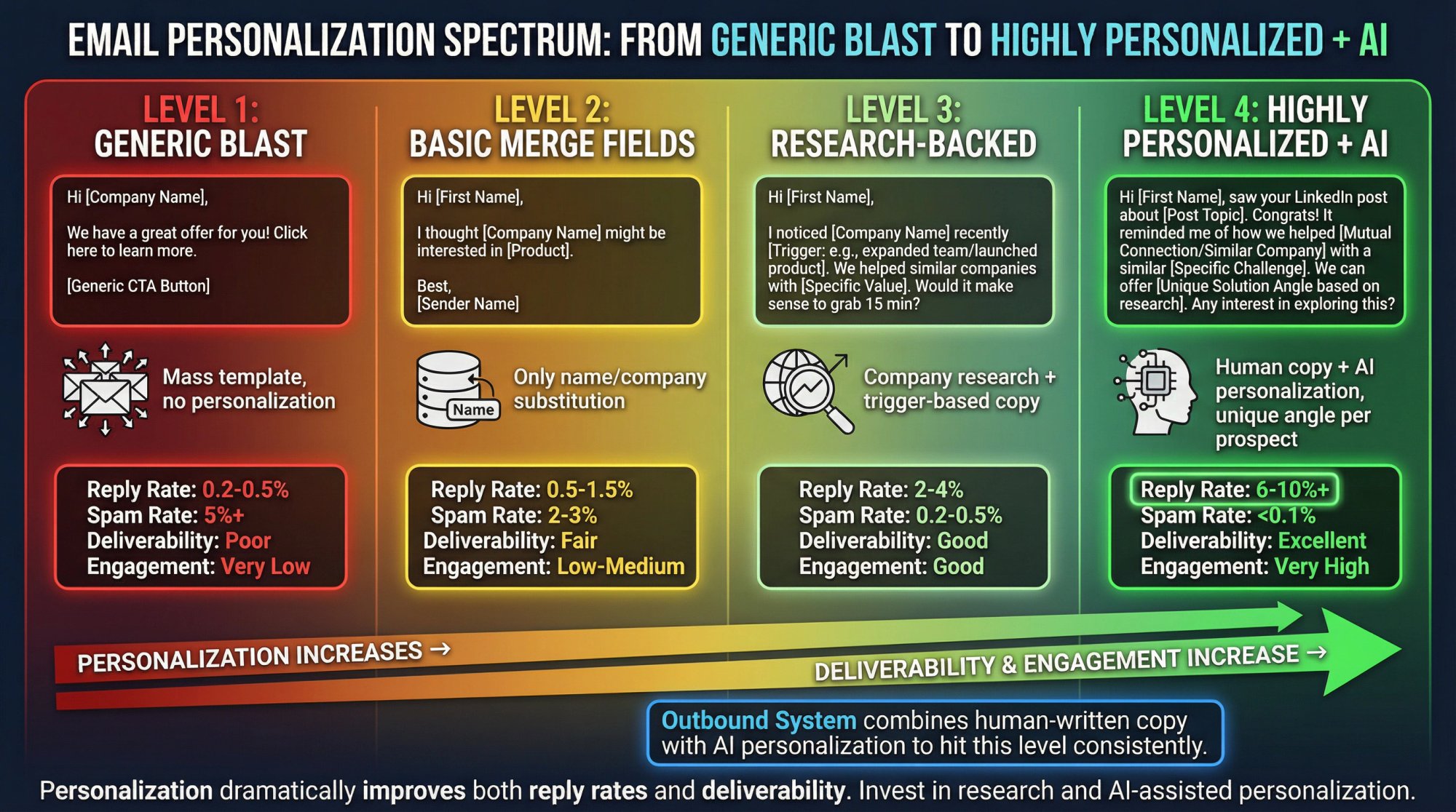
Content quality principle: Engagement is the best predictor of deliverability success. High engagement comes from good content and targeting. Quality over quantity always wins.
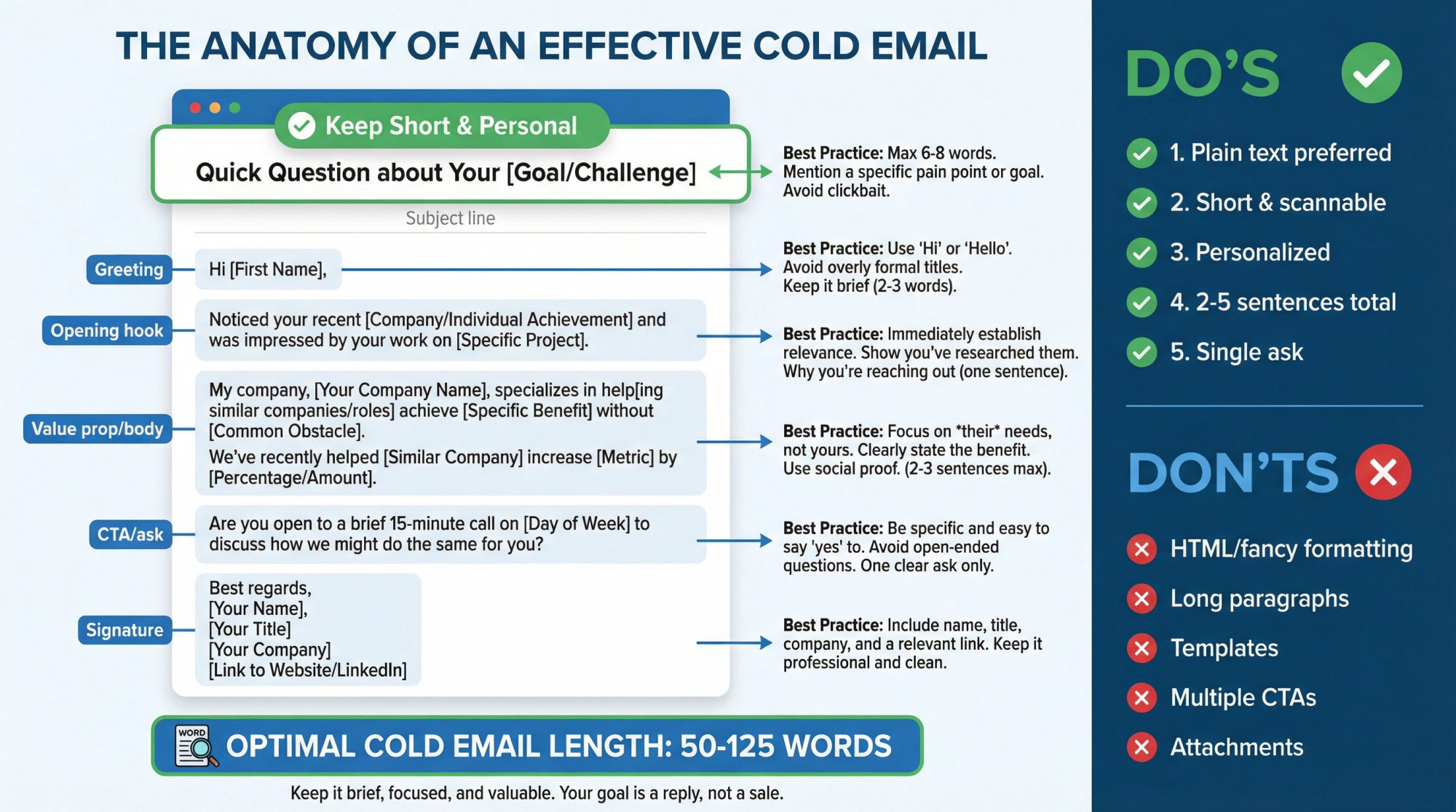
Avoid Spam Trigger Words and Formatting: Certain words or phrases can trip spam filters (especially in combination or excessive use). These include things like "free money", "guarantee", "click here", especially if used in subject lines or all-caps. Also, writing in ALL CAPS or lots of exclamation marks, using overly salesy language can hurt. There's no secret list you must memorize (and filters have gotten more context-aware than simple word lists), but a good rule is: write like you would to a colleague, not like an ad. Some tools have spam-score checkers. Use them if available. But if you keep your emails short, conversational, and genuine, you should be fine. For example, "Hi __, I noticed __ and thought we could help with __. Would it make sense to ...?" is a lot safer than "ATTN: Increase YOUR REVENUE 10X!!! Act Now!!!". Seems obvious, but worth stating.
Limit Links and Images, especially early on: A cold email should ideally have 1 or 0 links, especially the first email. Many practitioners now send no link in the first email, to avoid any chance of being classified as promotional. Instead of including a hyperlink to your website or case study, they might just textually mention the company name or say "available upon request". Or they only include a link in a subtle way (like a hyperlink on a generic word which is less likely to be flagged than a full URL). If you do include a link, make sure it's a custom-tracked domain or directly to a reputable domain (e.g., your company site). Don't use URL shorteners. Those are big red flags in emails, as spammers often hide links behind them. Images are generally unnecessary in a cold sales email and can increase spam probability (images are fine in marketing newsletters but for cold outreach they stand out as template-y). If you need to show something, consider linking to it instead or sending it as an attachment only when asked. Definitely don't attach large files in a cold email; that's a filter trigger and also likely to get ignored by the prospect.
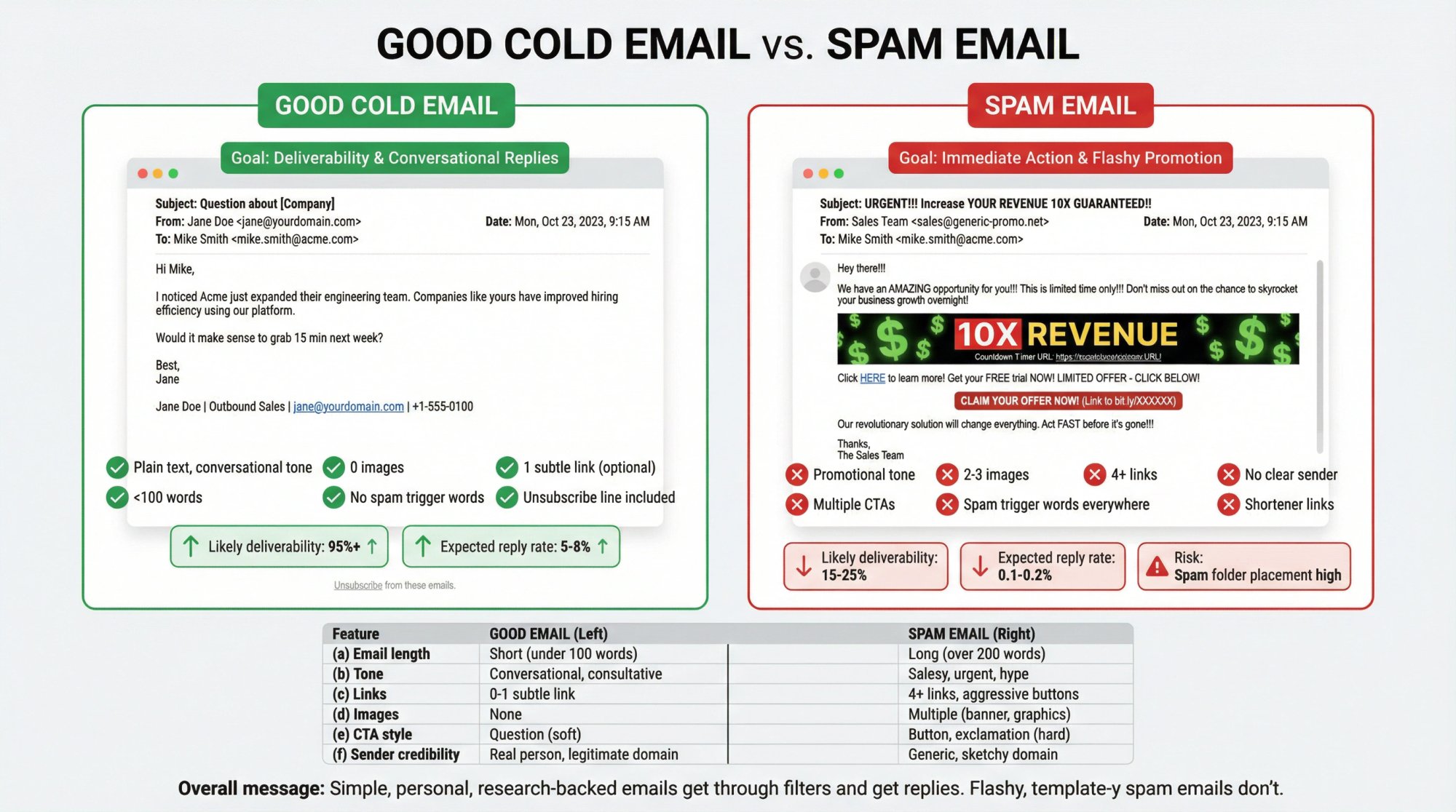
Subject lines: Keep them short and personal-sounding. Avoid spammy subjects like "Quick money for [Company]" or "$$$". Good cold email subject lines often include the prospect's name or company, or something contextually relevant. E.g. "Question about [prospect's company]" or "[Prospect's Company] <> [Your Company]" or "Idea for you". One approach is to lowercase subject lines to look more casual (e.g., "intro question" instead of "Intro Question"). The goal is to not look like a mass marketing email at first glance. Also, don't use deceptive subjects (don't RE: faking a reply when it's not). Not only can that irritate prospects, but Google actually penalizes some of those tactics if detected.
Compliance (CAN-SPAM/GDPR):
• If you're emailing in the U.S. or many countries, it's legal to email a business contact without prior opt-in, but you must follow certain rules. The CAN-SPAM Act (USA) requires: don't use false info, identify the email as an ad if it is (this is loosely interpreted in B2B), include your valid physical postal address, and honor opt-outs promptly. We covered adding an address (usually in your signature footer) and an opt-out. Do those consistently.
• GDPR (Europe) and related laws (like Canada's CASL) are stricter. GDPR technically requires a lawful basis to process personal data (which includes emailing someone). Some interpret that a "legitimate interest" can apply for B2B cold email if it's relevant and not excessive. Others err on the side of requiring at least a prior opt-in or a pre-existing relationship. Additionally, some European countries have specific laws (like Germany's UWG which is very strict against cold email). If Europe is part of your market, research each region's stance or consult legal advice. One safe approach: ensure your emails are highly targeted, clearly benefit the recipient, and always include an easy opt-out. And absolutely avoid emailing individuals (consumers). Stick to business addresses and roles. Some companies maintain separate sending domains for EU and apply more caution.
• Unsubscribe handling: Your tool should mark anyone who clicked "unsubscribe" (if you use a link) as do-not-contact. If someone replies "please remove me", do it manually. Add them to a suppression list. Typically, as long as you do that and they don't get mailed again, you're fine. Not honoring opt-outs is what can lead to complaints or even legal fines.
• Also, do not harvest emails in sneaky ways (like scraping indiscriminately without some filtering). That can lead to spam trap hits. A spam trap is an email address that is not used by a real person, only to catch spammers (like an old address published online but not for actual use. Only a scraper would get it). Hitting one can seriously hurt your domain. To avoid them: use reputable data sources, verify emails, and don't send to addresses that look suspicious (e.g., admin@info@ unless you know it's needed). Many verifiers will flag known traps or inactive addresses.
Keep emails short and plain initially: Typically, a first cold email should be a few sentences (2-5 sentences). Enough to say who you are, why you're reaching out (value prop), and ask a light question or CTA. This not only respects busy readers, but also in deliverability terms, short plaintext emails with one ask look like a normal personal email. Contrast that with a long HTML newsletter (totally different vibe). There's evidence that Gmail's filters favor shorter, simpler emails for primary inbox (whereas long HTML might go to Promotions). Outbound System advocates an "anti-template" approach focusing on relevance and brevity.
Be careful with follow-up content: Follow-ups should ideally reference the previous email subtly (to thread them, depending on your tool). They should provide additional value or context, not just "bumping this to top". Maybe share a quick case study or a one-liner insight in follow-ups. But also keep them short. Each follow-up is another chance to either win them over or annoy them, so tread lightly. Space them out and have a logical reason to follow up (new info, a reminder of the benefit). Limit the number of follow-ups. 2 to 3 is common. More than that and you might really risk irritation (unless you see signs of engagement like opens or clicks, some tools let you conditional-follow-up only those).
Engage positively with replies: When someone does reply, especially if it's a negative or "not interested", handle it gracefully. Thank them and remove them. This prevents a frustrated prospect from later marking you spam out of annoyance. If someone is interested, great. You've achieved your goal! Make sure to respond promptly, since all this infrastructure work is wasted if hot leads go cold due to slow follow-up.
In essence, good sending practices amplify your infrastructure and protect it. Many of the worst deliverability problems happen when senders get greedy (blast too many, too generic emails) or sloppy (don't verify lists, don't remove opt-outs). If you have a thoughtful approach (targeting the right people with something genuinely relevant), you'll not only get better results, but you'll also have far fewer deliverability issues. Engagement is the best predictor of deliverability success. High engagement comes from good content and targeting. So prioritize quality over quantity in your messaging.
DIY Infrastructure vs Outsourcing to Cold Email Agencies
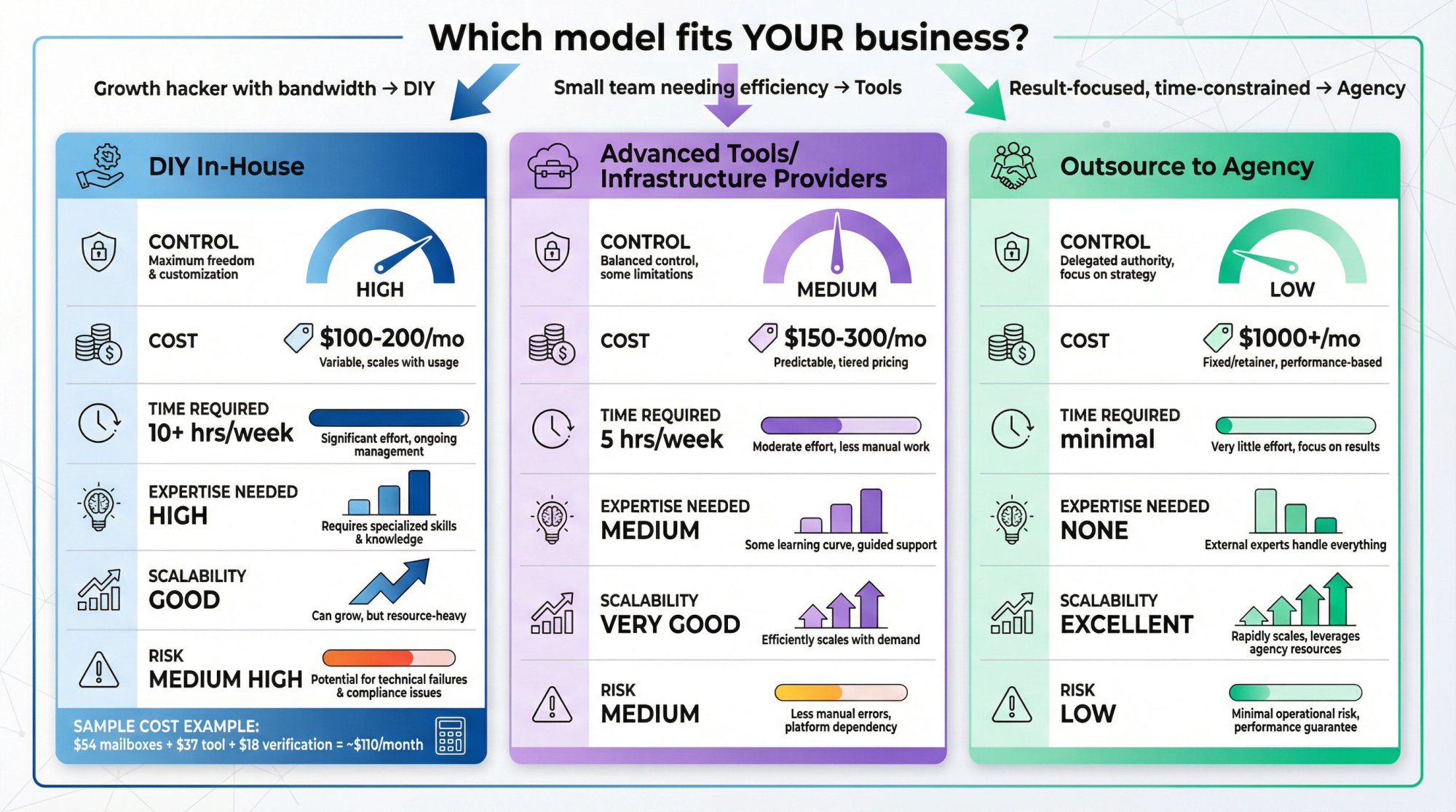
As you've gathered by now, setting up cold email infrastructure is complex and time-consuming. There's a reason many companies choose to outsource this function to specialized agencies or use advanced tools that do much of the heavy lifting. It's worth evaluating what approach makes sense for your situation:
Doing It In-House (DIY): The main benefit is control and potentially cost savings. You can directly oversee every aspect (choosing your domains, crafting the strategy). The tangible costs (domains, mailboxes, software) can be modest. For example, one could run a setup of ~9 inboxes sending ~5,000 emails/month for around $100-$200 in direct costs (mailbox fees $54, tool $37, verifier credits $18, as an example scenario). Even a larger scale of 60 inboxes and 20 domains might be a few hundred dollars a month in hard costs. Compared to hiring an agency, DIY appears cheaper. However, there's also the cost of your time and expertise. If you or someone on your team spends hours per week maintaining this, that is an internal cost. If things go wrong (sudden blocks, needing to buy new domains), you bear the burden.
You should do it in-house if you have a person who can dedicate focus to it (like a growth hacker, SDR, or marketing ops person) and if your sending volume or needs justify that investment. The learning curve can be steep but rewarding. Once you get it right, you essentially own a "machine" that produces leads.
Using Advanced Tools (Infrastructure Providers): We touched on tools which automate domain and inbox setup. These are kind of in-between DIY and outsourcing. They simplify DIY by handling technical tasks. For instance, some advertise setting up domains, SPF/DKIM, inboxes, and warm-up in under 10 minutes. The trade-off: you pay them for that convenience, and you trust their system. If you're a small team without IT support, these platforms can save you from dealing with DNS and multiple platform accounts. They often come with support too. Cost-wise, they claim to be cheaper than paying for Google accounts (e.g., 50 mailboxes for $150/month (which is $3 each)). That's half the price of Google mailboxes. But then again, you might still need to pay for a sending tool on top (though some have combined solutions).
This route is good for those who are somewhat technical but want to expedite setup and possibly reduce recurring costs at higher scale. Just do your due diligence on the provider's reputation. If they had a bunch of bad actors, their IPs might be tainted. Reviews rated some of these providers on deliverability (for example, one service offered a deliverability guarantee, another offered dedicated IPs). Read up on current reviews before selecting.
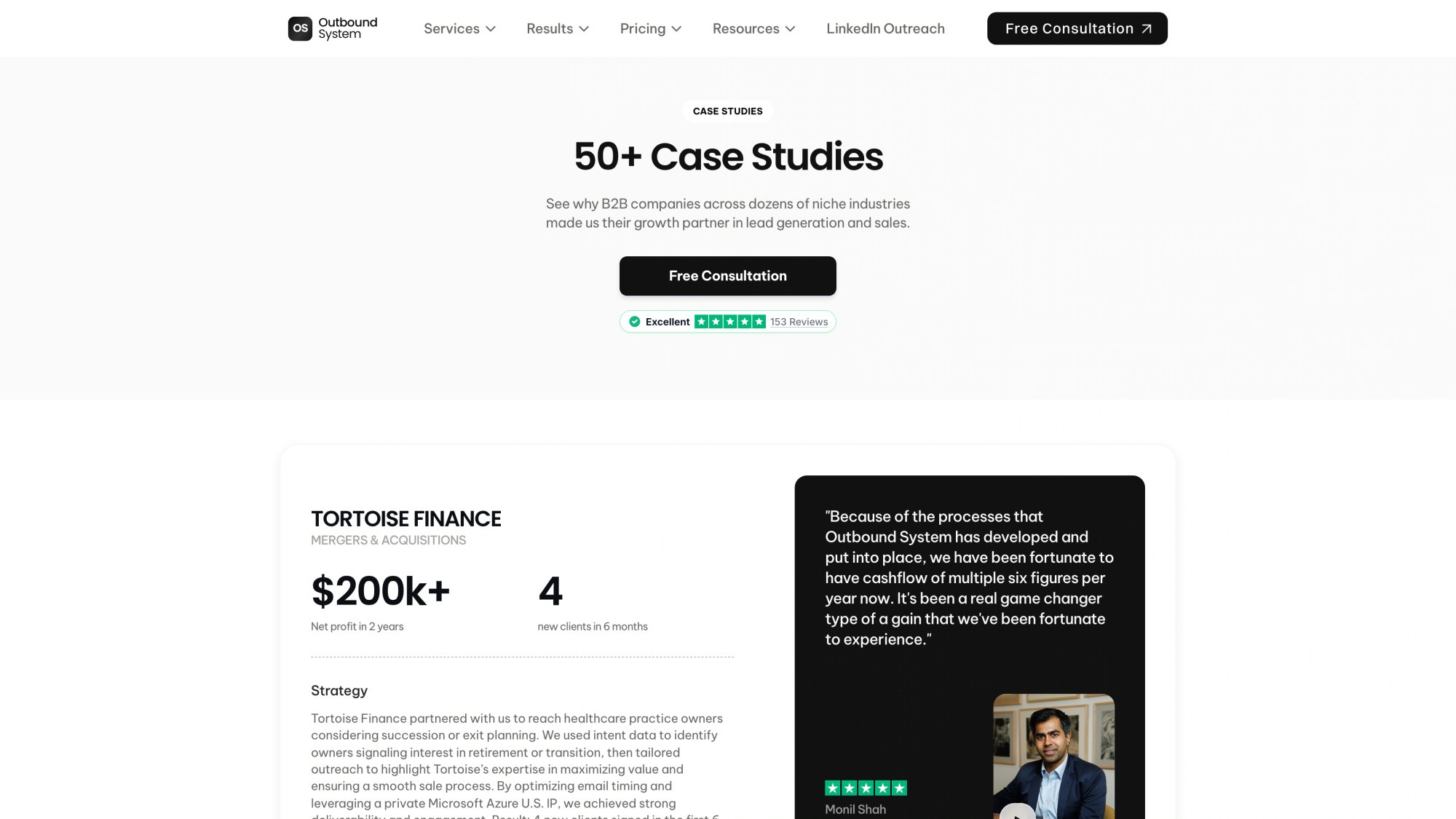
Hiring a Cold Email Agency / Lead Gen Service: This is the fully outsourced approach. Agencies like Outbound System specialize in doing everything for you: they provide the infrastructure (their pool of domains and inboxes), write the copy, obtain the leads, and manage the campaigns. Essentially, you pay for results (meetings or leads) and they handle the grunt work. The obvious benefit is you don't need to learn or manage any of this. You focus on closing the leads that come in. Also, agencies often have expertise and established infrastructure that might outperform a novice DIY setup. For instance, Outbound System leverages an enterprise-grade infrastructure with hundreds of inboxes and a team of deliverability engineers optimizing it. They've solved problems you might not even anticipate. They also tend to include other services like copywriting expertise, A/B testing, which can boost performance beyond what a simple DIY might achieve.
The downside is cost and control. Agencies typically charge a setup fee plus a monthly fee. That's not cheap in absolute terms, but consider it includes a lot (inboxes, domains, data, content, software, and the manpower to manage it). For many companies, the time saved and the immediate expertise is worth it (especially if each meeting or deal is valuable). Another downside is transparency. With some agencies you might not see all the details of what they're doing. You have to trust their process and reporting. A good agency will be transparent about campaigns and give you insights; a bad one might just say "we're working on it" without detail. So choose a reputable one if you outsource.
Hybrid approach: Some firms start by outsourcing to learn the ropes or validate the channel, then bring it in-house later (or vice versa). There's no rule that you must stick to one forever. You could even have an agency run one segment of your outbound (say enterprise accounts) while your internal team handles another (like SMB outreach), to compare and learn.
If you enjoy growth hacking and have budget constraints, DIY with the help of good tools is very viable (as this guide hopefully shows). If you have more budget than time, outsourcing can shortcut to results, as long as you vet the provider.
One more angle: deliverability support services. There are consultants who can audit your cold email setup and help if you get in a bind (like if all your emails start going to spam and you don't know why). Even if you do it in-house, occasionally engaging an expert can save your campaigns. So that's a middle ground: you run it, but you have an expert on call.
At the end of the day, success is measured in leads and meetings booked. If your internally built system is generating those consistently and the cost (time + money) is lower than the value of the deals, keep doing it. If not, consider other options.
Fun fact / cautionary tale: Many companies try DIY cold email, run into deliverability issues or lackluster results, and conclude "cold email doesn't work." Often, the issue was not that cold email as a strategy failed. It was the infrastructure or execution was not up to par. By reading this guide, you're making sure that won't be the reason your campaign fails! But be patient and methodical. Cold email is both an art and a science; nailing the technical infrastructure is the science part, crafting compelling messages is the art part. It can take some tweaking to get both right. When it all clicks, it's like having a revenue engine you can dial up.
Whether you build or buy, the knowledge of how it works (which you now have) is valuable. Even if you outsource, you can hold the agency accountable with the right questions and understanding.
Key Takeaways for Cold Email Infrastructure Success
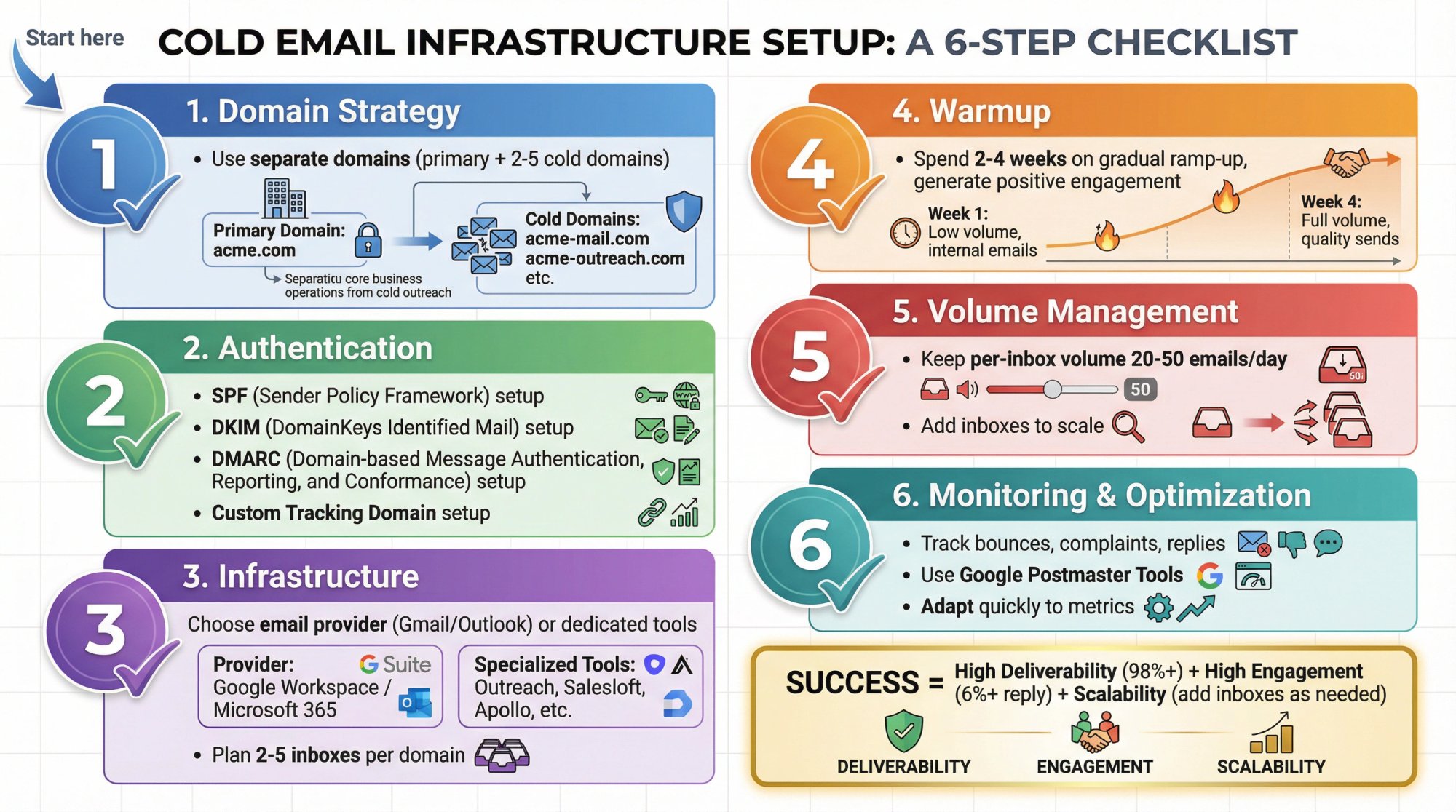
Building a cold email infrastructure in 2025 is no small feat. It's a bit like setting up a mini email marketing platform specifically tailored for outbound, and doing so in a way that evades ever-more-sensitive spam filters. But with the right approach, it is absolutely doable and can yield tremendous results for your business. Let's recap the key steps and takeaways from this guide:
Use separate domains for cold outreach to protect your primary domain's reputation. Often, use multiple domains to distribute sending volume and risk.
Authenticate everything (SPF, DKIM, DMARC) in DNS. This is a non-negotiable for getting your emails accepted by receivers. Also set up custom tracking domains if using open/click tracking.
Choose reliable email providers for your inboxes. Google Workspace and Office 365 are top choices with strong deliverability when used correctly. Use a mix of both if you can to diversify. Alternatively, explore specialized cold email infrastructure services if scaling big and looking to save costs, but vet them.
Create professional email accounts (realistic names, proper signatures) on those domains. Plan to have multiple inboxes (generally 2-5 per domain), especially as you scale. No goofy emails; keep it businesslike and credible.
Warm up your domains and inboxes patiently. Spend 2-4 weeks gradually ramping up send volumes and generating positive engagement through warm-up networks. This step cannot be skipped. It's essential for establishing sender reputation.
Keep per-inbox sending volumes low even after warm-up. Aim for perhaps 20-50 emails/day per inbox (the lower, the safer). Add more inboxes to increase total sending capacity rather than pushing any single inbox too hard. This "safety in numbers" approach is key to hitting high deliverability rates.
Use a robust sending platform to manage all this. The tool will send emails in a controlled manner across your inboxes, track results, and automate follow-ups. Pick one that supports your scale and has features like warm-up, scheduling, rotation, and reply tracking. Test your campaigns and settings thoroughly in small batches first.
Monitor your performance and health metrics continuously: bounces, complaints, reply rates. Use Google Postmaster for domain reputation insight. If you see any alarming signs (e.g., spike in bounces or drop in replies), intervene quickly. Clean your list, tweak content, or pause to diagnose. Maintaining good list hygiene and prompt opt-out handling will keep you out of trouble.
Focus on email quality and relevance. Engaging content not only yields more replies (which is the goal) but also pleases the algorithms that now prioritize engagement signals. Personalize your emails, avoid spammy elements, and make it easy for uninterested prospects to decline gracefully (opt-out). Remember, 98% inbox placement won't help if your message is irrelevant. You need both deliverability and resonance to succeed.
Adapt and scale carefully. As you grow your outreach, do it in stages. Perhaps start with one domain and a few inboxes to get your process right. Then add more domains/inboxes to increase volume once you have proven templates and know-how. Each addition should go through warm-up and integration. It's like adding new engines to a machine. Don't overload all at once. And be ready to rotate out assets (inboxes or domains) if they degrade. This modular approach ensures you always have some capacity even if one part hits a snag.
Decide on DIY vs outsource based on your resources. If you implement this guide, you essentially become your own outbound email "agency." That's powerful, but requires dedication. If you find it overwhelming, you can leverage agencies or tools to shoulder the burden, now armed with the knowledge of what needs to be done (so you can verify they're doing it right!).
The fact that mastering cold email can be worth far more than theoretical value in generated business is real. Companies have closed six- and seven-figure deals from cold outreach that started with a single well-placed email. But those emails wouldn't have landed without the kind of infrastructure and strategy we've discussed.
As a final note on data currency: All the guidance here is based on 2024-2025 best practices and the current email landscape. Things like Apple's MPP, Gmail's AI filters, and the rise of warm-up services are relatively new and part of today's reality. If you're reading this significantly later, be sure to check for any newer developments (for example, if Yahoo/AOL or other providers have changed something, or new regulations). However, the fundamental principles of reputation, gradual ramp-up, authentication, and engagement are likely to remain key for the foreseeable future.
By following this guide, you equip yourself with an outbound system that can reliably turn cold contacts into warm leads at scale. It's a lot of setup, yes. But once the machine is running, it's a competitive advantage that can fill your pipeline consistently. And when your competitors wonder how your emails are always hitting inboxes while theirs languish in spam, you'll know the secrets.
Now, the ball is in your court to implement and iterate. Happy emailing, and may your open rates be high and your spam folder presence be zero!
Common Cold Email Infrastructure Questions Answered
Q: How long does it take to set up cold email infrastructure from scratch?
A: Plan for 3-4 weeks minimum. Domain registration and DNS setup takes a few days, email accounts can be created in hours, but the warm-up period is what takes time (2-4 weeks minimum). During this period you're gradually ramping up sending to establish reputation. Some infrastructure elements can be done in parallel (like buying domains while warming other accounts), but rushing the warm-up will hurt deliverability.
Q: What's the minimum budget needed to start sending cold emails?
A: For a basic DIY setup with 3 domains and 9 inboxes (capable of sending ~5,000 emails/month), expect around $150-250/month: domain registration ($30-40), Google Workspace or Microsoft 365 mailboxes ($54-60), cold email platform ($37-97), and email verification service ($20). Initial setup costs may add ~$100-200 for tools and learning. This is significantly less expensive than outsourcing to an agency, but requires your time investment.
Q: How many domains do I need?
A: Start with 1-2 domains minimum to protect your primary domain. For serious volume (10,000+ emails/month), plan on 5-10 domains. A common rule: one domain per 2-5 inboxes, with each inbox sending 20-30 emails/day maximum. If you need 30,000 emails/month across 20 business days (1,500/day), and cap at 30/inbox/day, you need ~50 inboxes, which translates to roughly 10-15 domains. More domains = better risk distribution.
Q: Can I use my personal Gmail account for cold email?
A: No. Never use a personal or free Gmail account for cold email outreach. You need business accounts (Google Workspace or Microsoft 365) on domains you control. Free Gmail has strict limits, will quickly flag you as spam, and could get your personal account banned. Always use professional business accounts on dedicated sending domains separate from your main company domain.
Q: What's the difference between warming up an inbox and warming up a domain?
A: They're interconnected. When you warm up an inbox, you're simultaneously warming the domain it's on. The inbox warm-up focuses on that specific email address's sending reputation, while domain warm-up refers to the overall reputation of yourdomain.com. If you add 5 inboxes to one domain, the domain's total sending volume is the sum of all 5 inboxes. Best practice: stagger new inbox creation on the same domain (add one, warm for a week, add another) rather than launching all 5 simultaneously.
Q: How quickly can I scale from 100 to 10,000 emails per month?
A: Plan for 2-3 months minimum. You can't jump from low to high volume without risking your infrastructure. A safe scaling path: Month 1 (weeks 1-2 warm-up, weeks 3-4 send 100 emails/week = 400/month), Month 2 (2,000 emails/month while monitoring metrics), Month 3 (~5,000-7,000/month), Month 4 (10,000+). Each jump requires adding more warmed inboxes and domains. Trying to scale faster usually results in spam folder placement and wasted effort.
Q: What should I do if my emails suddenly start going to spam?
A: Immediate actions:
① Pause all sending from affected inboxes/domains immediately.
② Check Google Postmaster Tools for reputation alerts.
③ Review recent campaigns for content issues (spam trigger words, broken links, high bounce rates).
④ Verify your email list quality (run it through an email verifier).
⑤ Check if you hit a spam trap or got blacklisted.
⑥ Resume sending only warm-up emails (no cold outreach) for 1-2 weeks to rebuild reputation. Don't panic and abandon the domain immediately, but if issues persist after 2-3 weeks of rehabilitation, it may be burned.
Q: Should I use the same infrastructure for follow-up sequences as initial cold emails?
A: Yes, but manage volume carefully. Your cold email tool should manage sequences from the same inboxes that sent the initial emails. However, remember that follow-ups count toward your daily sending limits. If you send 30 initial emails/day with a 3-email sequence (1 initial + 2 follow-ups), that inbox could be sending up to 90 emails/day when sequences fully deploy. Plan your initial volume accordingly, and space follow-ups 3-7 days apart to spread the load.
Q: How do I know if my warm-up is working?
A: Good warm-up tools provide a dashboard showing: ① Inbox placement rate (aim for 95-100%), ② Spam folder rate (should be near 0%), ③ Daily sending/receiving volume (should gradually increase), ④ Engagement rate (replies to warm-up emails). If your warm-up emails are consistently landing in spam or bounce rates are high, something's wrong with your authentication setup. Test by sending emails to personal accounts on different providers (Gmail, Outlook, Yahoo) to see where they land. Only start cold outreach once you're consistently hitting inbox during warm-up.
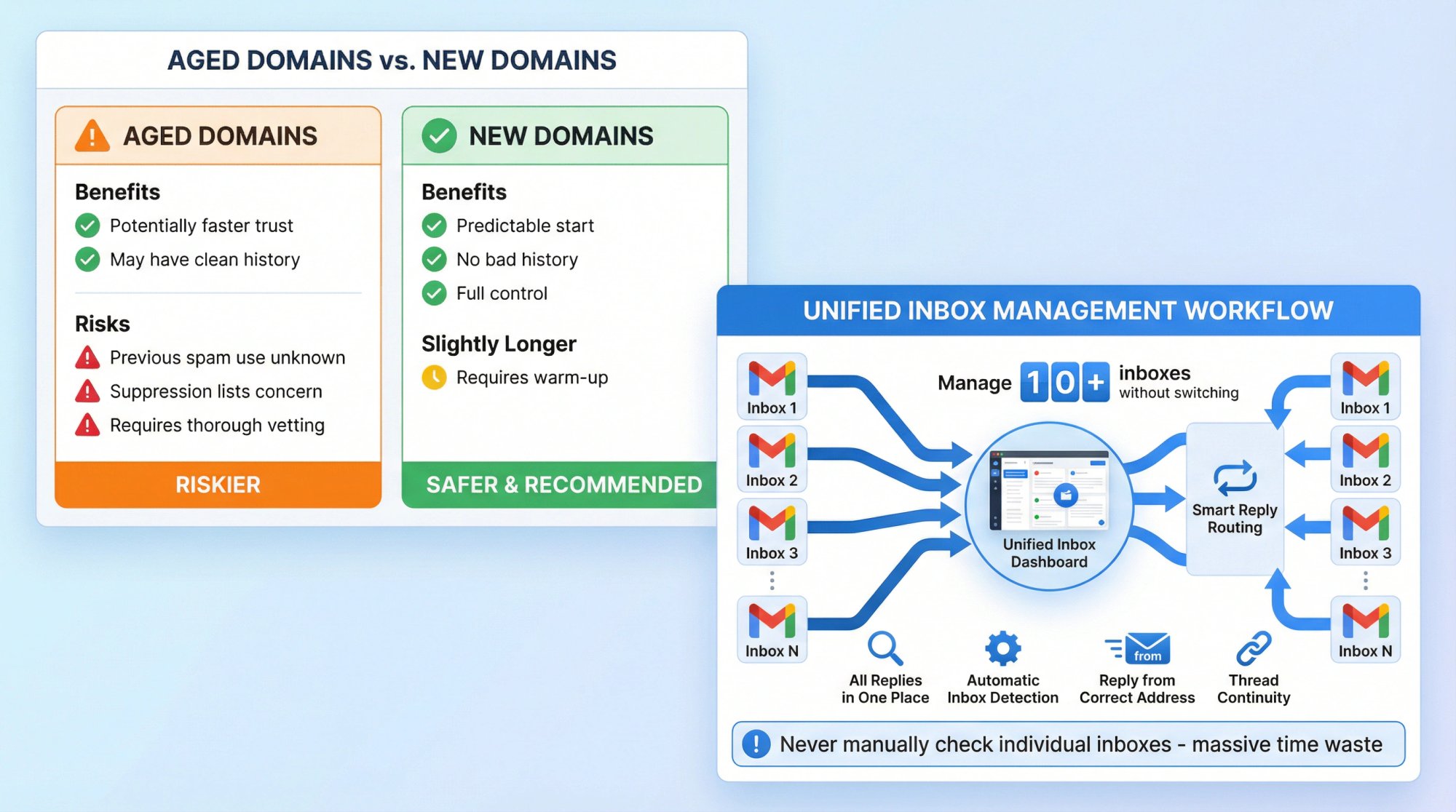
Q: Can I buy aged domains instead of registering new ones?
A: It's possible but risky. Aged domains (previously registered and used) might have existing reputation (good or bad). Benefits: potentially faster trust if domain has clean history. Risks: previous owner may have used it for spam (check domain history and blacklist checkers), or it might be on suppression lists you can't see. If buying aged domains, thoroughly vet them. For most people, buying brand-new domains and warming them properly is safer and more predictable. If you do buy aged, treat them as new for warm-up purposes anyway.
Q: What's the best way to handle replies from multiple inboxes?
A: Use your cold email platform's unified inbox feature. Most modern tools provide a dashboard where all replies from all connected inboxes appear in one place. You can respond directly from the platform, and it sends from the correct inbox automatically. Alternatively, set up email forwarding rules to funnel all inbox replies to your main email. However, when you reply, make sure it comes from the original sending address (not your main email) to maintain consistency and thread continuity. Never manually check 10+ Gmail inboxes individually (huge time waste).
Q: Do I need different content for different domains/inboxes?
A: Not necessarily. You can send the same campaigns from multiple inboxes/domains. The infrastructure (which inbox/domain sends) is separate from the content (what you say). However, good practice: rotate subject lines and slightly vary email copy between different sending identities to avoid pattern recognition by spam filters. If you send identical emails from 10 different inboxes to the same company (targeting different people), that might look suspicious. Personalization and slight variations help. But you don't need 10 completely different campaigns.
Q: How often should I rotate or replace domains/inboxes?
A: For inboxes: monitor performance monthly. If an inbox shows declining metrics (higher spam rate, lower open/reply rates) for 2+ weeks despite good list quality, consider retiring it and replacing with a fresh warmed inbox. For domains: if well-maintained, domains can last 12-24 months or longer. However, high-volume senders often rotate domains every 6-12 months as preventive maintenance. Budget for this: if you start with 5 domains, plan to add 1-2 new ones every quarter and retire the oldest ones. This keeps your infrastructure fresh and resilient. Think of it like rotating car tires.
Q: Is it worth investing in a dedicated IP address?
A: For most cold email operations (under 100,000 emails/month), no. Shared IPs from Gmail/Outlook or reputable infrastructure providers are fine and often better (they have established good reputations). Dedicated IPs make sense if: ① You send 100,000+ emails/month consistently, ② You want complete control over IP reputation, ③ You have expertise to maintain and warm the IP properly. Downside of dedicated IPs: you start from zero reputation, they're expensive, and if you make mistakes, there's no shared pool to cushion you. For most B2B cold email, domain reputation matters more than IP reputation in 2025.
Q: Should I send emails during specific times of day or days of week?
A: Yes, timing affects open and reply rates. Best practices: Send Tuesday-Thursday between 8-11am or 2-4pm in the recipient's timezone. Avoid Mondays (inbox overload) and Fridays (people mentally checked out). Don't send evenings/weekends unless you have data showing your audience engages then. However, for deliverability, consistent daily sending (even weekends at low volume) during warm-up helps establish patterns. Most tools let you set sending windows (e.g., only send 9am-5pm ET). Use timezone awareness if targeting multiple regions. And always space sends throughout the day (not all at 9am) to look natural.
Want expert help implementing your cold email infrastructure? Book a 15-minute consultation with Outbound System to explore done-for-you cold email infrastructure, copywriting, and campaign management that generates qualified meetings for your business.
Outbound System
We write the copy, build the lists and run the campaigns, month-to-month. Every decision is backed by data from 10,400+ campaigns.

Bruce Merrill is the co-founder of Outbound System and has been booking B2B meetings through LinkedIn since 2016. He built the outbound program at the property tech startup LeaseLock ahead of its Series A and writes about cold email, LinkedIn outreach and AI calling.
About Outbound System
Outbound System runs done-for-you cold email, LinkedIn outreach and AI calling for B2B companies. 1,000+ active clients and 10,400+ campaigns launched.
