What Is Email Warm-Up and Why Does It Matter?
Email warm-up is the process of gradually increasing the number of emails you send from a new or cold email account or domain. The goal is to build trust and sender reputation with email providers over time. Without warm-up, a sudden blast of emails from a new sender looks suspicious. If you create a new email and send hundreds on day one, providers like Gmail will likely route those emails to spam.
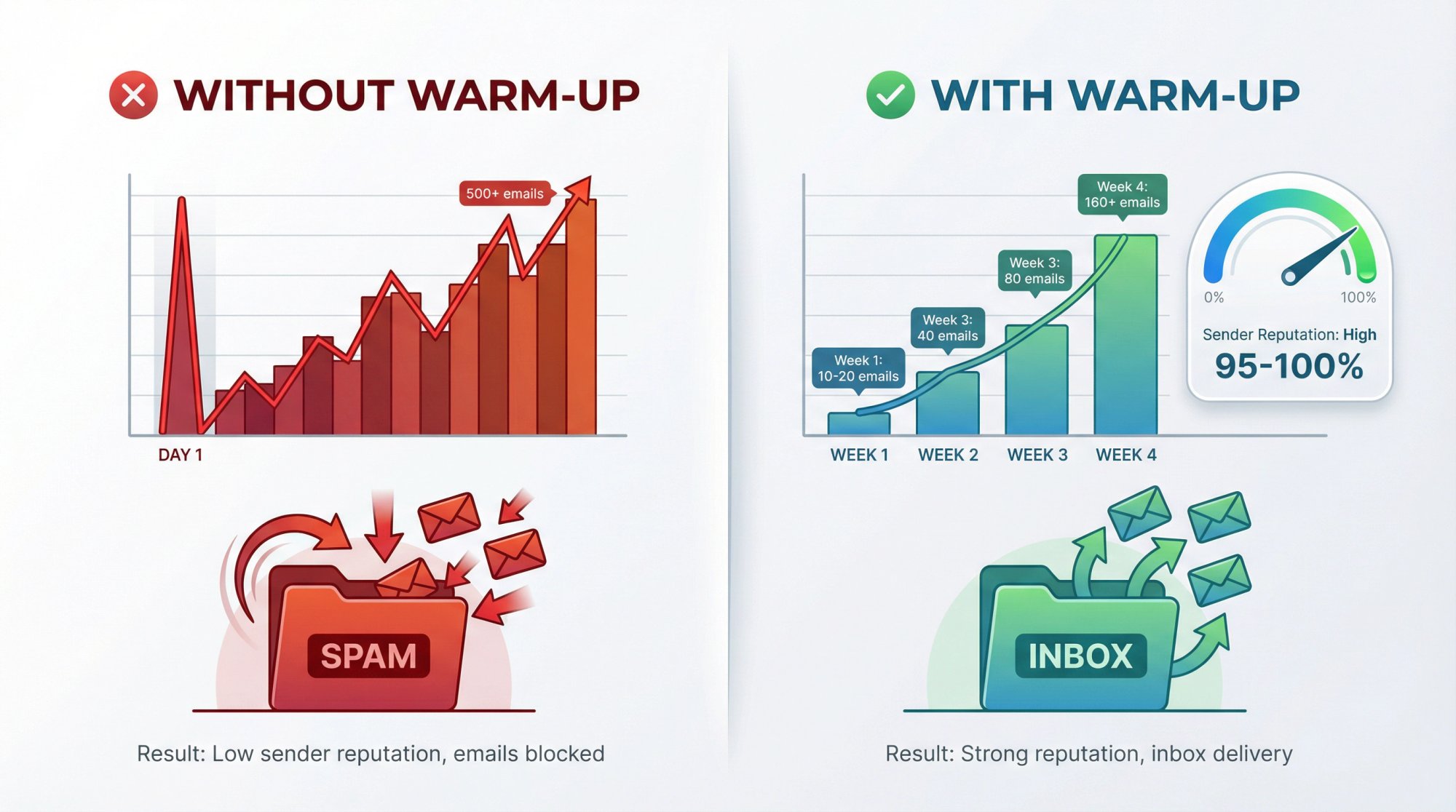
Warm-up is all about building trust with email providers. Gradually sending messages and earning positive engagement (like replies) helps prove you're a legitimate sender, so your emails avoid spam folders.
When done right, warming up establishes a good reputation so that future high-volume campaigns reach inboxes. Achieving a high inbox reputation score (e.g., 100%) through proper warm-up significantly reduces spam placement risk, since providers see a history of good engagement. Warm-up tools or networks often simulate positive interactions (auto-replies, marking messages as important, etc.) to accelerate this trust-building.
But what if you've been warming up and it doesn't seem to be working? Below, we break down the likely reasons and how to address each one.
How to Tell If Your Warm-Up Isn't Working
How do you know if your email warm-up is failing? Watch for these red flags:
→ Emails Still Hitting Spam Even after weeks of warm-up, your test emails or initial outreach are landing in spam folders instead of the inbox.
→ Low Open or Reply Rates During warm-up, you expect high opens and replies (since you should be emailing friendly contacts or using warm-up networks). If hardly anyone is opening or responding, it's a sign the warm-up isn't improving engagement.
→ Poor Sender Reputation Scores Services like Google Postmaster Tools still show a low reputation, or spam filter tests indicate bad or neutral status, despite warm-up efforts.
→ High Bounce or Complaint Rates You see bounce notifications or spam complaints during warm-up. Even a few can undermine the entire process.
If you recognize these issues, something in the warm-up process is off. Here are the most common causes for a warm-up not delivering results, and how to fix each one.
1. How to Fix Missing Email Authentication (SPF, DKIM, DMARC)
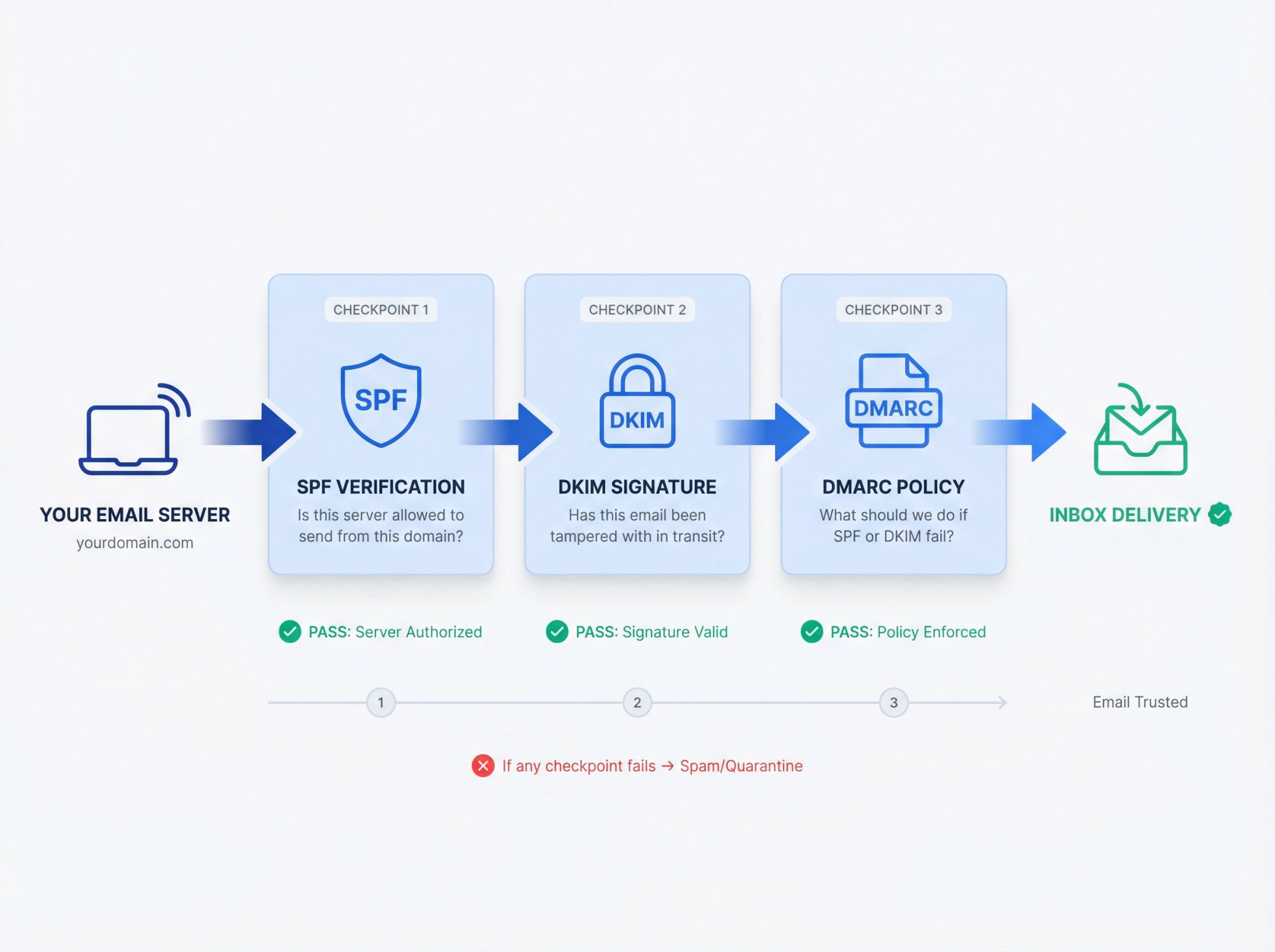
One of the biggest warm-up killers is a lack of proper email authentication. Email providers won't trust emails from your domain if you haven't set SPF, DKIM, and DMARC records correctly. These DNS records prove that your messages are authorized and not forged.
If they're missing or configured wrong, providers may flag your emails as suspicious or spam by default. No matter how slowly you ramp up sending.
Critical foundation: Without proper authentication, no amount of gradual sending will save your deliverability. Email providers require proof that you're authorized to send from your domain before they'll trust your messages.
Check that you have:
DNS Record | Purpose | What It Does |
|---|---|---|
SPF | Sender authorization | Lists all servers allowed to send email on behalf of your domain |
DKIM | Message integrity | Signs emails with your domain's private key to verify they weren't tampered with |
DMARC | Policy enforcement | Tells providers what to do if SPF/DKIM fail and provides detailed reports |
How to Verify Authentication Before Sending
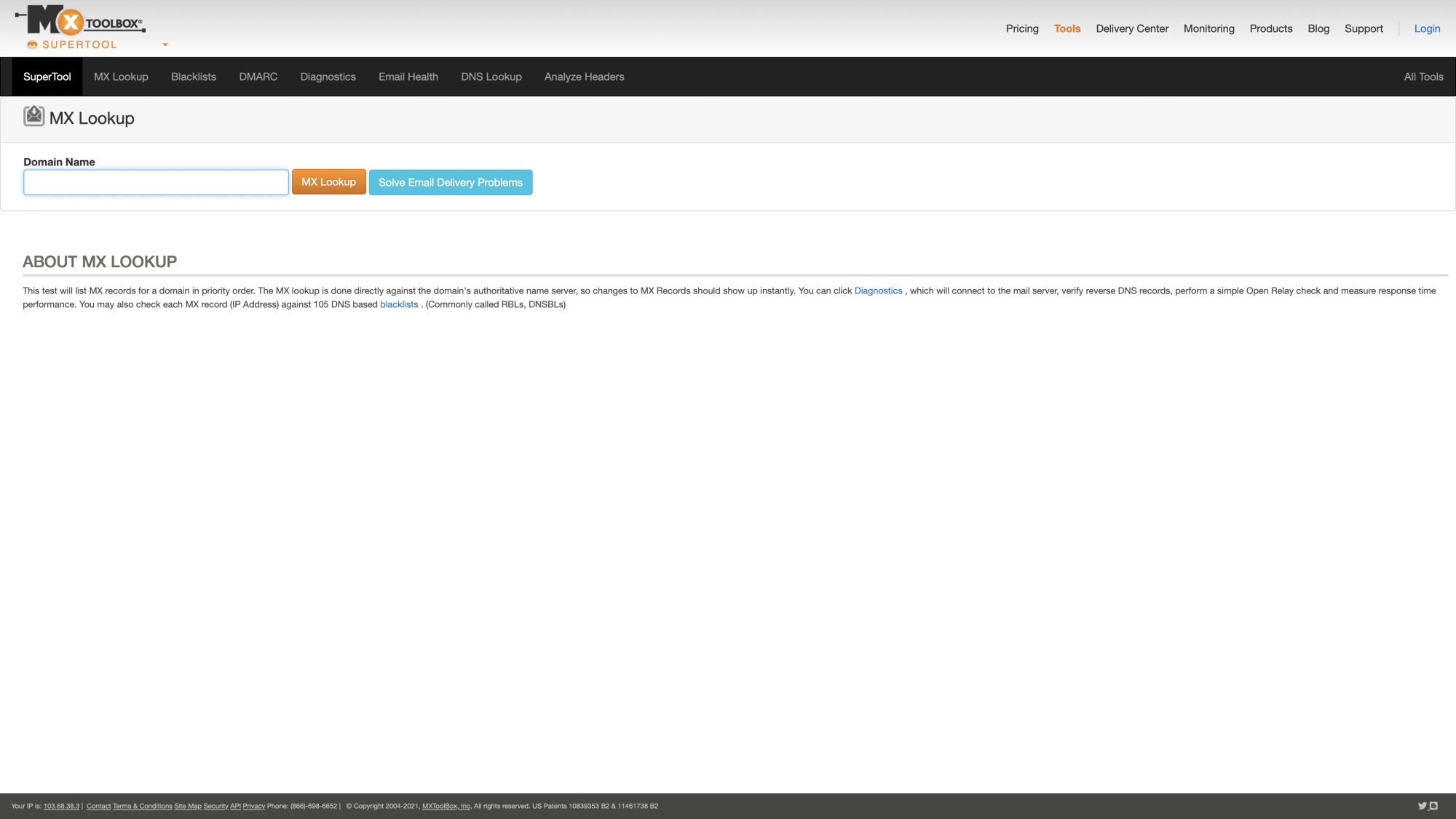
Use tools like MXToolbox or your email service's guidelines to set up SPF and DKIM for any new domain before sending a single email. Ensure the records are error-free and aligned with the sender (e.g., your cold email platform or SMTP). Also publish a DMARC record (start with a monitoring policy if you're new).
By correctly authenticating your domain, you build instant credibility. Warm-up emails from an authenticated domain are far more likely to be accepted rather than junked. This is foundational: if authentication isn't in place, no amount of gradual sending will help.
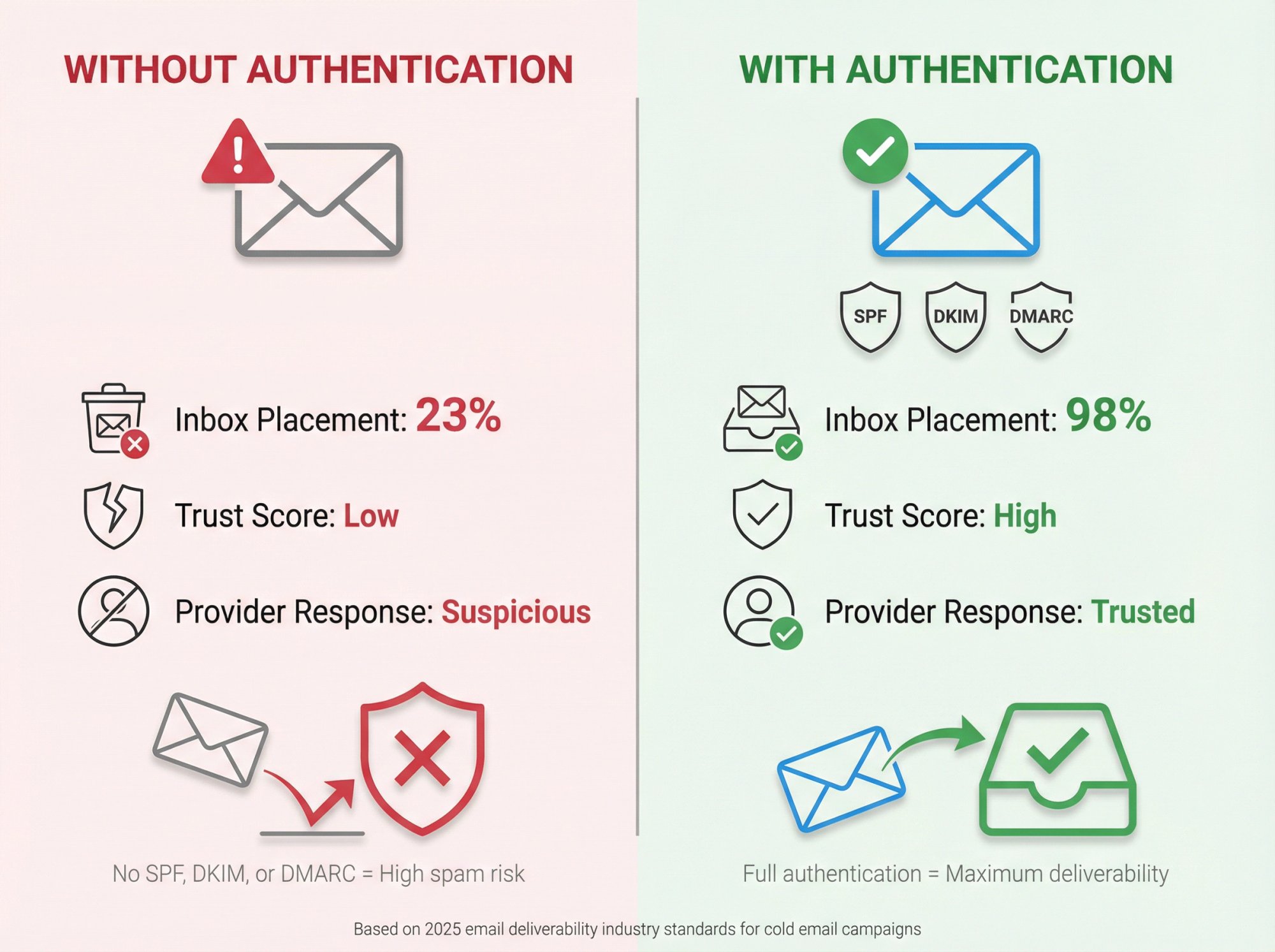
Google and Microsoft now require authentication for bulk senders, and Microsoft expects a proper DMARC policy if you send more than 5,000 emails per day.
2. How to Slow Down Your Sending Volume (Avoid Spam Triggers)
Another common mistake is ramping up your sending volume too quickly. Warm-up is all about patience.
A new domain or address should not go from 0 to thousands of emails overnight. If you increase volume aggressively, you'll trigger spam filters that monitor sending patterns.
Email providers watch for sudden spikes, and if they see one during your warm-up period, they'll assume you're a spammer and start filtering or throttling your emails.
Jumping from 10 emails one day to 500 the next is a huge red flag. Even a jump from 50 per day to 200 per day too fast can hurt. Consistency and gradual growth are key.
How to Adopt a Slow, Steady Sending Schedule
In the first week of warm-up, send only a handful of emails per day. For instance, start with 10-20 emails per day in week 1. If things go well (no spam issues), increase to maybe 40 per day in week 2, 80 per day in week 3, and so on.
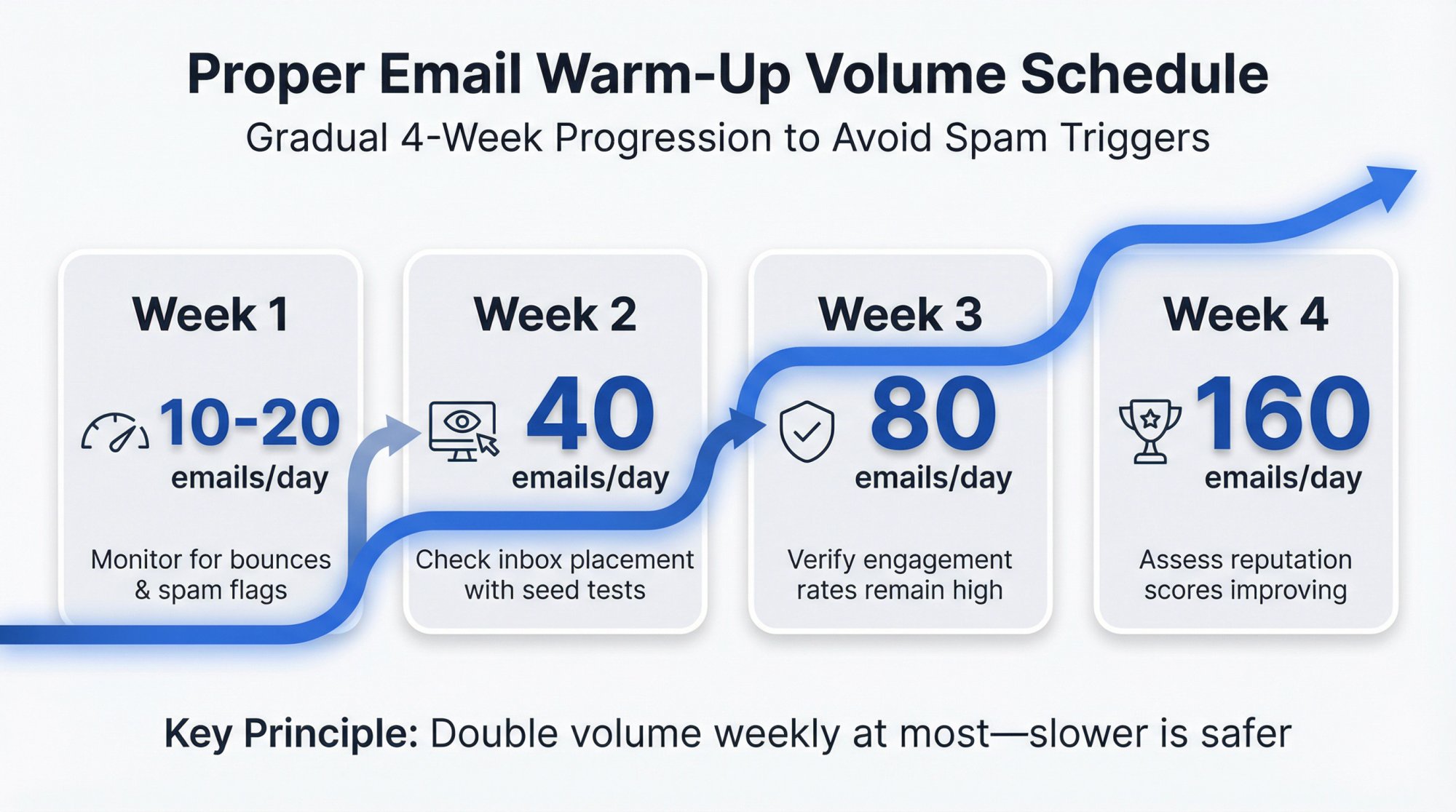
Week | Daily Volume | Status Check |
|---|---|---|
Week 1 | 10-20 emails | Monitor for any bounces or spam flags |
Week 2 | 40 emails | Check inbox placement with seed tests |
Week 3 | 80 emails | Verify engagement rates remain high |
Week 4 | 160 emails | Assess reputation scores improving |
A common rule of thumb is to double your volume each week at most, and even slower increases are fine. Some experts suggest adding 5-10 emails per day and growing 10-20% per day over several weeks. The exact numbers vary, but the principle is universal: avoid any abrupt spikes in sending.
Also, spread out your sends within each day (don't send all emails at 8:00 AM; use random intervals or your tool's scheduling to mimic natural sending times). This helps make the pattern look organic.
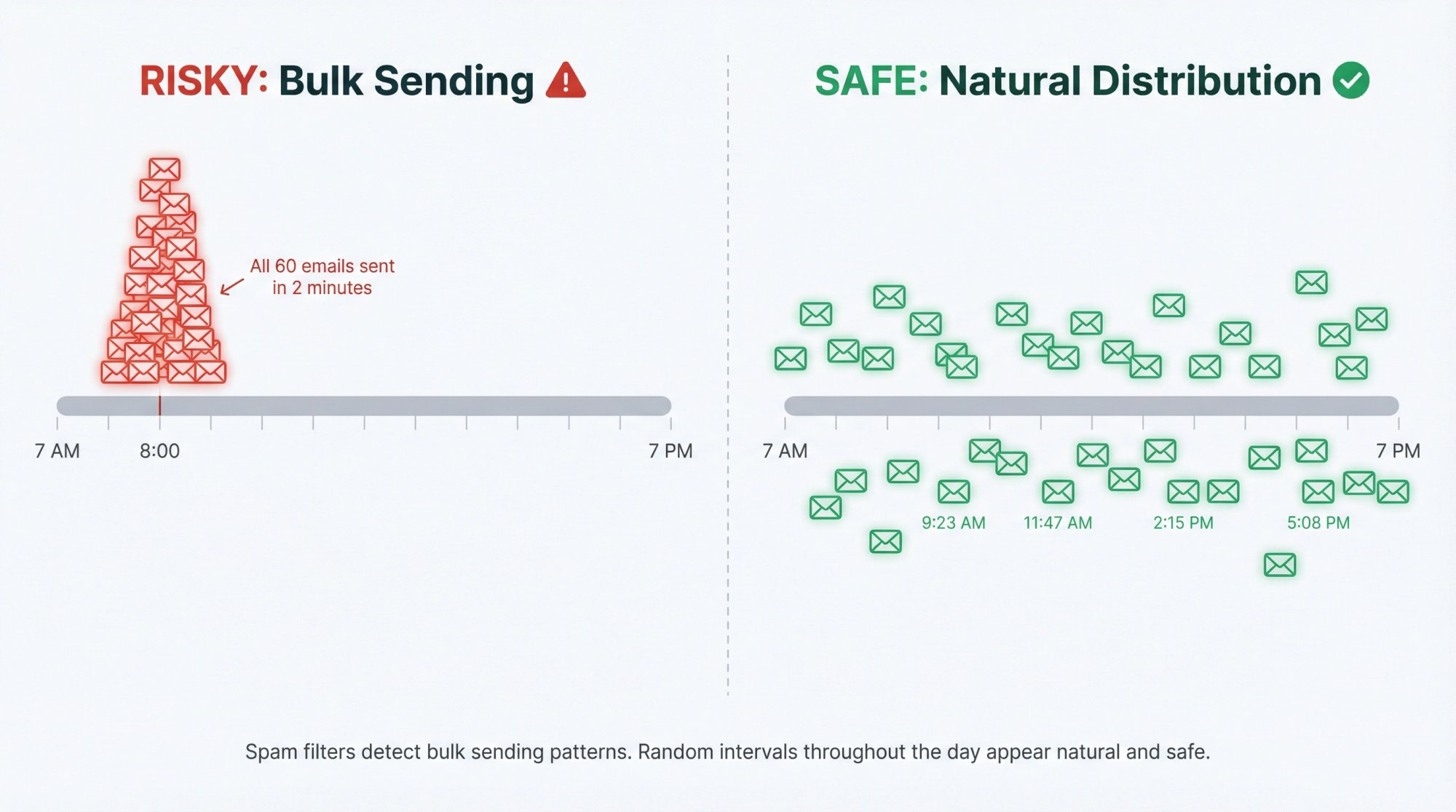
If you ever see warning signs (e.g., a rise in bounces or a few emails going to spam), pause or slow down the ramp-up. It's better to extend the warm-up timeline than to push too fast and get blocked.
3. How to Reduce Bounce Rates with Quality Email Lists
Warm-up only works if you're sending to addresses that actually exist and ideally will engage. Sending to bad addresses during warm-up is a recipe for failure.
A high bounce rate (many emails bouncing back as undeliverable) will tank your sender reputation quickly. Similarly, if you accidentally include spam traps or old, inactive emails that never open your message, it generates bad signals.
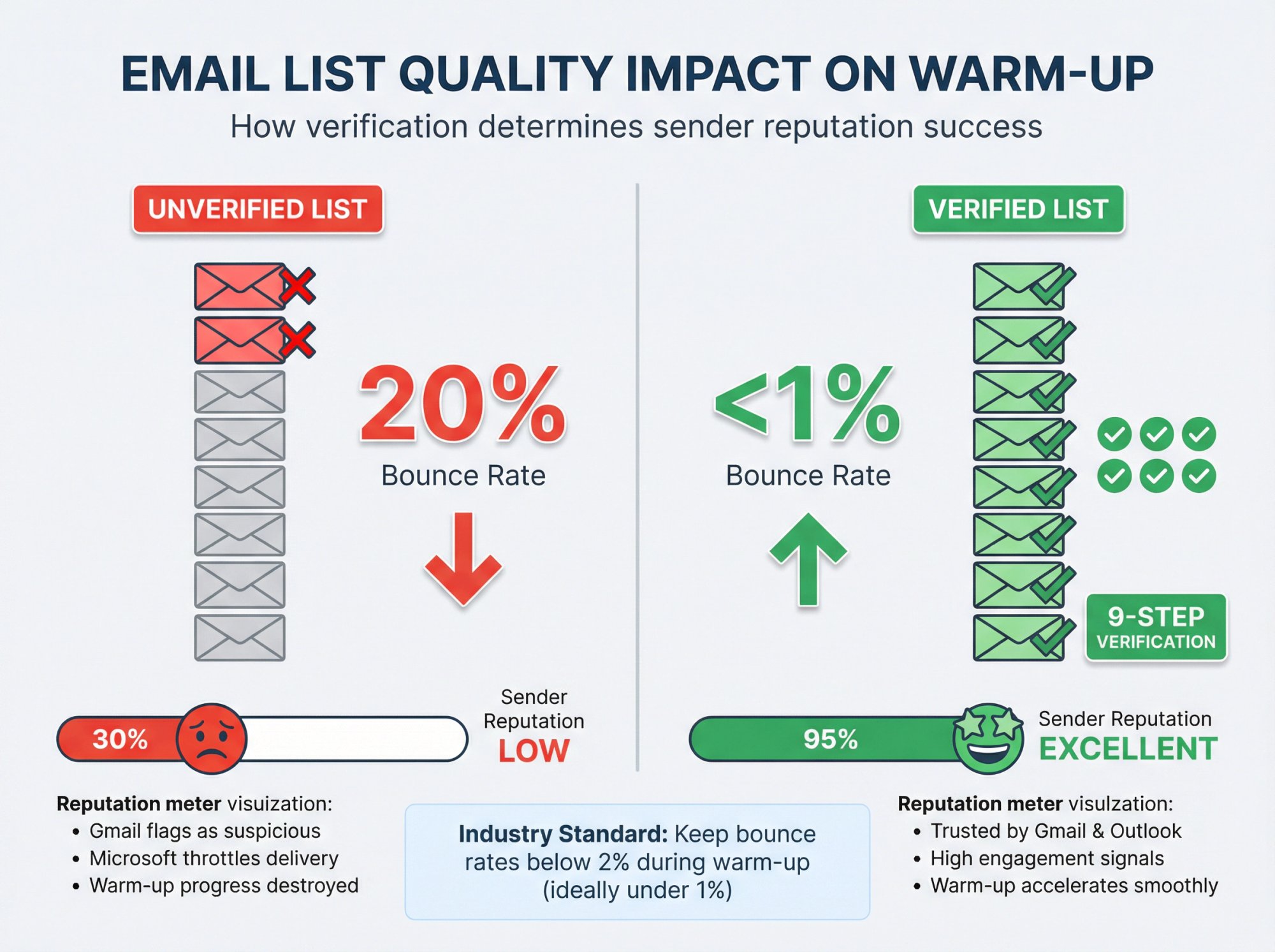
Imagine you load up an old list of leads that hasn't been cleaned, and 20% of them bounce. That tells Gmail and Microsoft that you're not a responsible sender, and it can derail your warm-up progress. Even a bounce rate over 2-3% in warm-up is problematic.
Industry standard: Keep hard bounce rates below 2% at all times (ideally under 1%). During warm-up, you need near-perfect delivery to build trust with email providers.
How to Use Only High-Quality, Verified Contacts
In the first days of warming up a domain, you should ideally hand-pick recipients who are very likely to open and respond. Many senders start with colleagues, friends, or their own secondary addresses (basically any emails you know won't bounce and might reply). Absolutely avoid uploading a cold prospect list at this stage.
If you must use prospect data, run it through verification tools first (services that check if emails are valid). Outbound System, for example, uses a 9-step verification and enrichment process on every contact to ensure near-zero bounces.
During warm-up, every email should deliver and preferably get some engagement.
Take the time to clean your list before and during warm-up. Remove any address that shows up as invalid. If you see any unexpected bounce, investigate it immediately. By keeping bounce rates low (again, aim for less than 2%), you preserve your reputation while you scale up.
Quality over quantity at this stage is crucial.
4. How to Generate Positive Engagement (Make Emails Look Wanted)
Even if your emails are getting delivered during warm-up, you need positive engagement signals to truly boost your reputation. Email providers not only look at how many you send and if they bounce; they also care about how recipients interact.
If no one opens or replies to your warm-up emails, that's a weak signal. And if a few recipients delete them without reading or mark them as spam, that's a very negative signal.
Research shows that a lack of genuine engagement essentially means your warm-up messages aren't generating the opens or responses needed to look legitimate.
How to Make Sure Your Warm-Up Emails Prompt Engagement
If you're doing manual warm-up, send very personal, simple emails to people who will reply. For example, a short "Hello, just testing my new email, please let me know you got this!" to a colleague can get a quick response. Each reply or at least an open is gold for your sender reputation.
If you're using an automated warm-up tool or service, ensure it's one that simulates realistic interactions (opens, replies, even moving your messages out of spam if they land there). Many modern warm-up services connect your account to a pool that will auto-reply to your emails and mark them as important. These positive interactions strengthen your reputation during warm-up.
On the flip side, avoid any warm-up content that could discourage engagement. Don't send overt sales pitches or bulk-looking emails in the warm-up phase. Warm-up emails should feel like one-to-one messages, so recipients are inclined to read them rather than ignore them. Keep them text-based, short, and friendly.
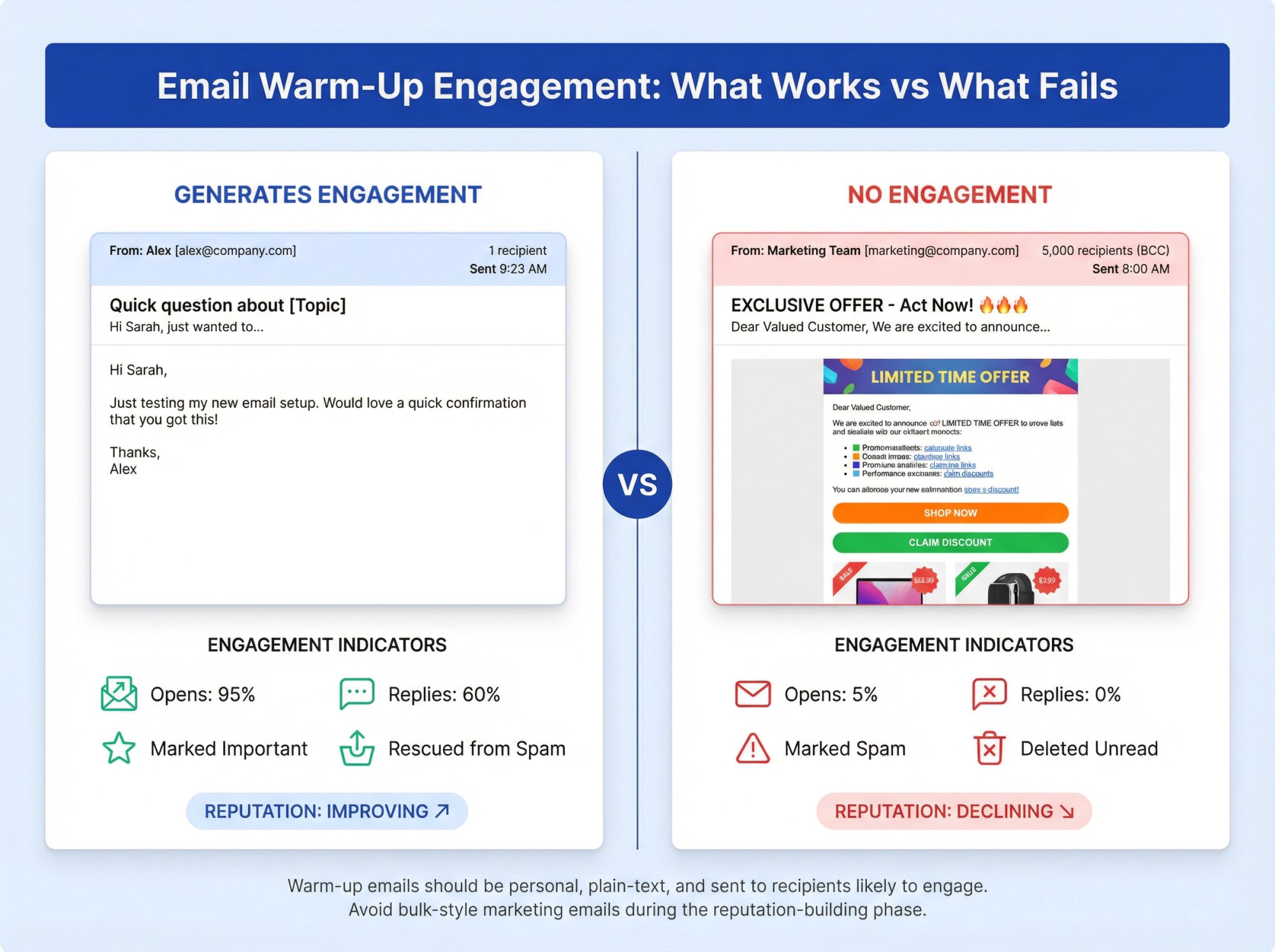
The more your warm-up emails look like something a person wants to interact with, the better your results.
5. How to Choose the Right Warm-Up Tools (Avoid Provider Flags)
Tools can automate and turbo-charge your warm-up, but using the wrong tool or method can backfire badly. By "wrong," we mean overly artificial warm-up services or ones that violate big providers' policies.
A key example: Google's crackdown on warm-up pools. In 2022-2023, Google explicitly banned the use of automated warm-up on Gmail accounts, considering it a violation of their terms of service. They even forced some providers (like GMass) to shut down warm-up features on Gmail.
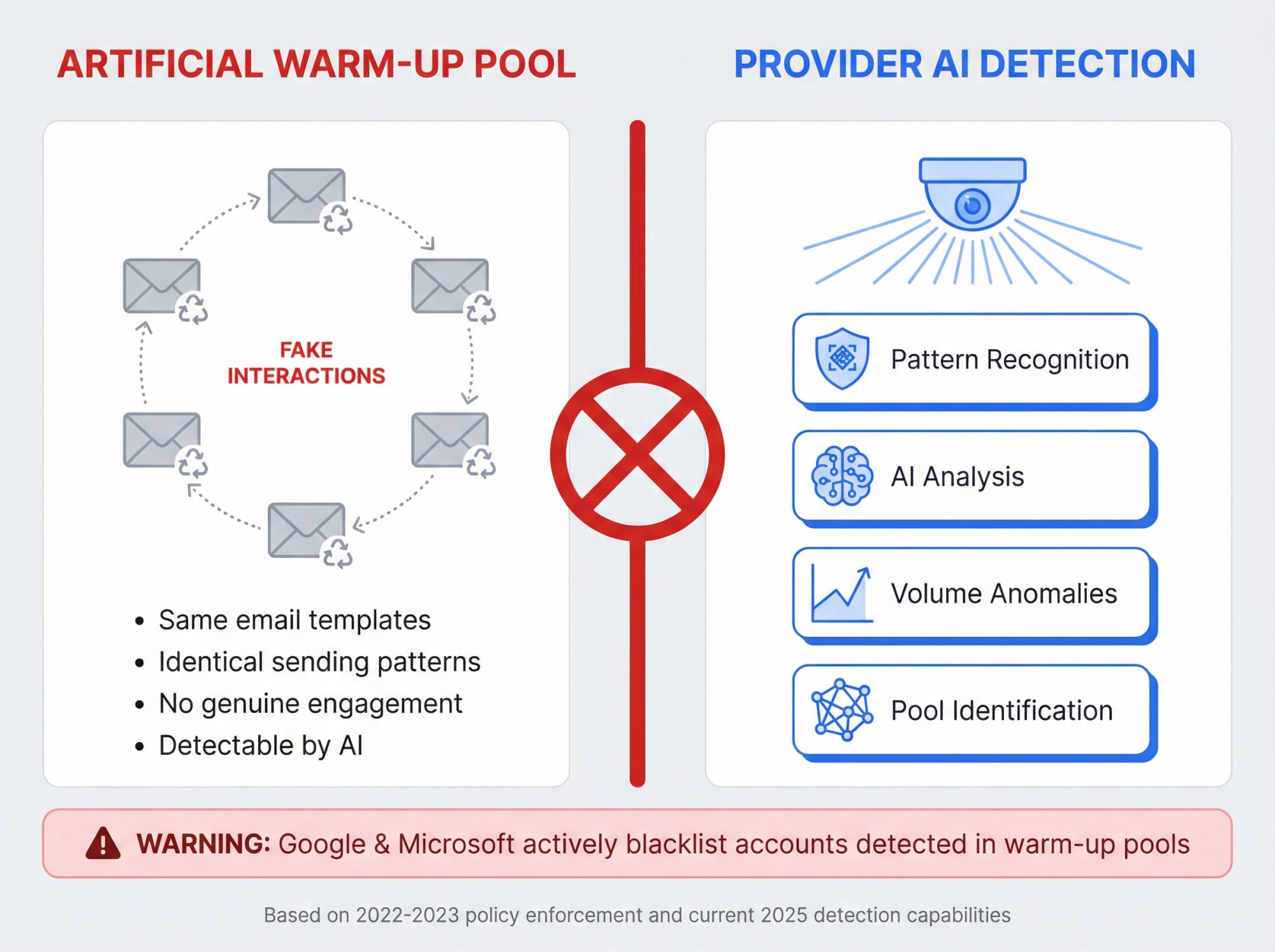
Provider warning: If you're trying to warm up a Gmail or Google Workspace address using a third-party warm-up tool, it may not work. Worse, it could get your account blacklisted by Google. Email providers have become remarkably adept at detecting warm-up pools and penalizing accounts that attempt to game the system.
Even outside of Gmail, email providers have become adept at detecting warm-up pools. These are networks of accounts that just send fake emails to each other to boost engagement. Providers like Gmail and Outlook have advanced algorithms and AI that can spot the patterns of warm-up emails. When they detect this, it signals an attempt to game the system, and the provider may penalize you.
As one email deliverability expert notes, the moment Google or Microsoft realize you're in a warm-up pool, they can blacklist your accounts and domains immediately.
How to Choose Reputable, Safe Warm-Up Solutions
If you use a warm-up tool, do some research on whether it's still allowed for your email provider. For Gmail addresses, many warm-up services have shifted to using IMAP/SMTP instead of the API to comply with Google's rules (since Google doesn't allow API-based warm-up).
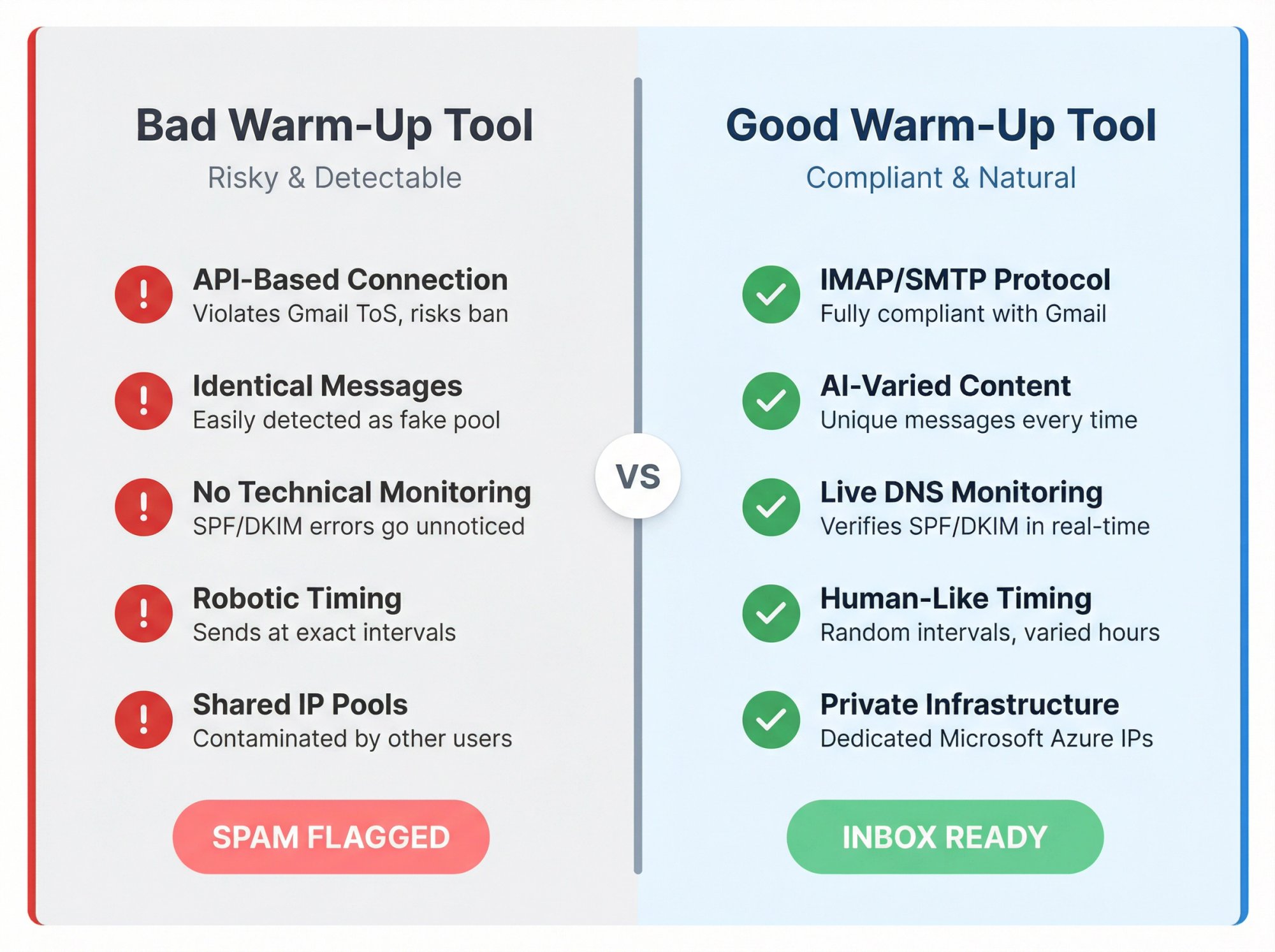
Make sure any tool you use mimics human behavior well. It should send realistic, varied content and generate varied replies, not the exact same message every time. The best services use techniques like random text snippets or AI-generated replies to seem more natural.
Also, verify that your warm-up tool monitors technical settings. A quality warm-up platform will check that your SPF and DKIM are correct and watch your deliverability metrics as it goes. If it's just blasting meaningless emails without oversight, that's a red flag.
It's worth noting that warm-up isn't absolutely required in every scenario. Some experienced senders have tested going without automated warm-up and saw no drop (even an improvement) in reply rates. Those cases typically involve very careful manual warm-up or other deliverability optimizations in place.
The takeaway isn't necessarily to skip warm-up, but rather that a bad warm-up tool can be worse than none. If you suspect your warm-up service is ineffective or causing issues, try turning it off or switching to another method and see if things improve.
6. How to Warm Up Long Enough (Don't Stop Too Early)
Email warm-up is not a one-day or even one-week task. A very common reason people see poor results is that they didn't warm up for long enough, yet started blasting out emails.
Building sender reputation takes time, often 4 to 6 weeks for a new domain to fully gain trust. If you cut warm-up short, you might not have built sufficient reputation, so your later emails go to spam despite the initial effort.
Maybe you warmed up gradually for 5 days and saw a few emails hit inboxes, then assumed "I'm good to go" and sent a large campaign on day 6. That big send can undo the limited reputation you built, because the providers weren't ready to see volume yet.
Timeline principle: Warm-up is an investment, not an expense. That month you spend building reputation will save you countless hours fixing deliverability issues later. Rushing the process only guarantees you'll end up starting over.
Research shows that premature warmup termination is a key pitfall. Ending the process after just a few days or one week will weaken your reputation and increase spam placement risk in subsequent sends.
How to Be Patient and Follow Through the Entire Warm-Up Period
As a rule of thumb, warm up for at least 2-4 weeks before approaching your full sending volume. Most experts recommend around 4 weeks of gradually increasing sending for a brand-new domain. In many cases 6-8 weeks is even better (especially for higher volumes).
Yes, this means delaying your big cold email outreach for a month or more, but it's worth it. Consider it an investment in deliverability. Rushing only leads to getting emails blocked, which wastes more time in the end.
If you're warming up an email address on an established domain (say your company's main domain which has been sending regular email, but you're starting cold outreach from it), you might get away with a shorter warm-up since the domain itself has some reputation. But even then, if that address has never sent cold emails, treat it like a warm-up for at least a couple of weeks of light sending.
Don't quit warm-up too soon. Even after you reach your target volume, continue warm-up practices until you're confident in deliverability. Some warm-up tools keep running indefinitely in the background (sending a few interactions each day) to maintain reputation. That's not a bad idea, as it continually reinforces your sender credibility.
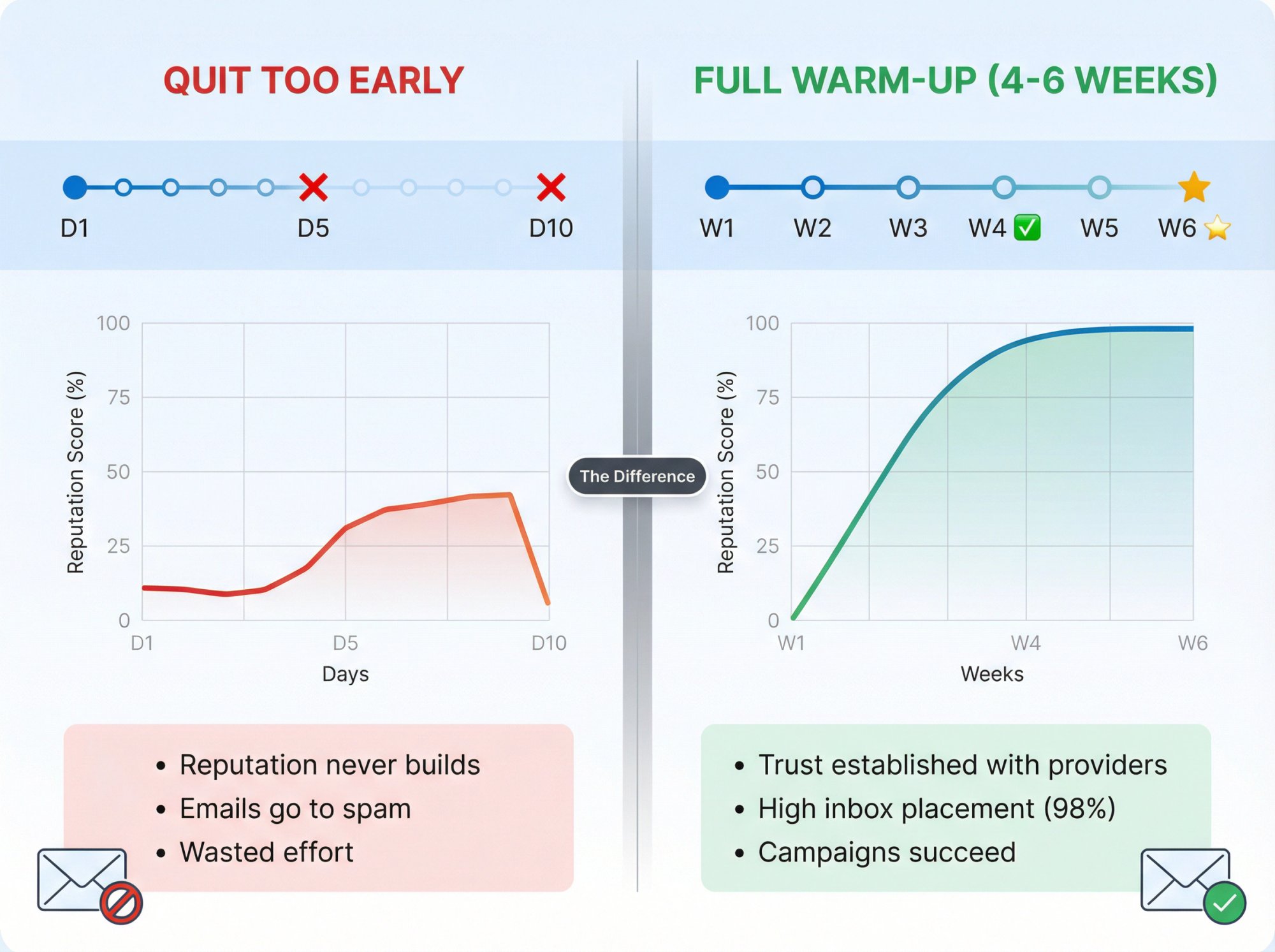
At minimum, stick to the warm-up plan for the full duration you initially set (e.g., 4 weeks). Stopping at day 5 or 10 is just too early to reap the benefits.
7. How to Avoid Spammy Content in Warm-Up Emails
Believe it or not, what you say in your warm-up emails can also make or break deliverability. Warm-up emails should look innocuous and personal. If you use "spammy" language or templates even during warm-up, you risk getting filtered.
For example, using all-caps, lots of exclamation points, or phrases common in spam ("Free $$$", "Act Now", etc.) can trigger content-based spam filters. Heavy HTML design, images, or links in warm-up emails is another mistake. Those are typical marketing email traits, not personal notes.
Warm-Up Email Element | Good Practice | Bad Practice |
|---|---|---|
Content | Plain text, personal tone | HTML newsletter, marketing pitch |
Language | Natural, friendly | Spam trigger words, all-caps |
Links | None or minimal | Multiple links, attachments |
Formatting | Simple, clean | Heavy images, excessive formatting |
Industry research shows that neglecting content quality can hinder the process, even with a good sending pace. In other words, you might be doing everything technically right, but if your warm-up messages look like spam, you'll still end up in spam.
How to Keep Warm-Up Emails Simple, Plain, and Human-Like
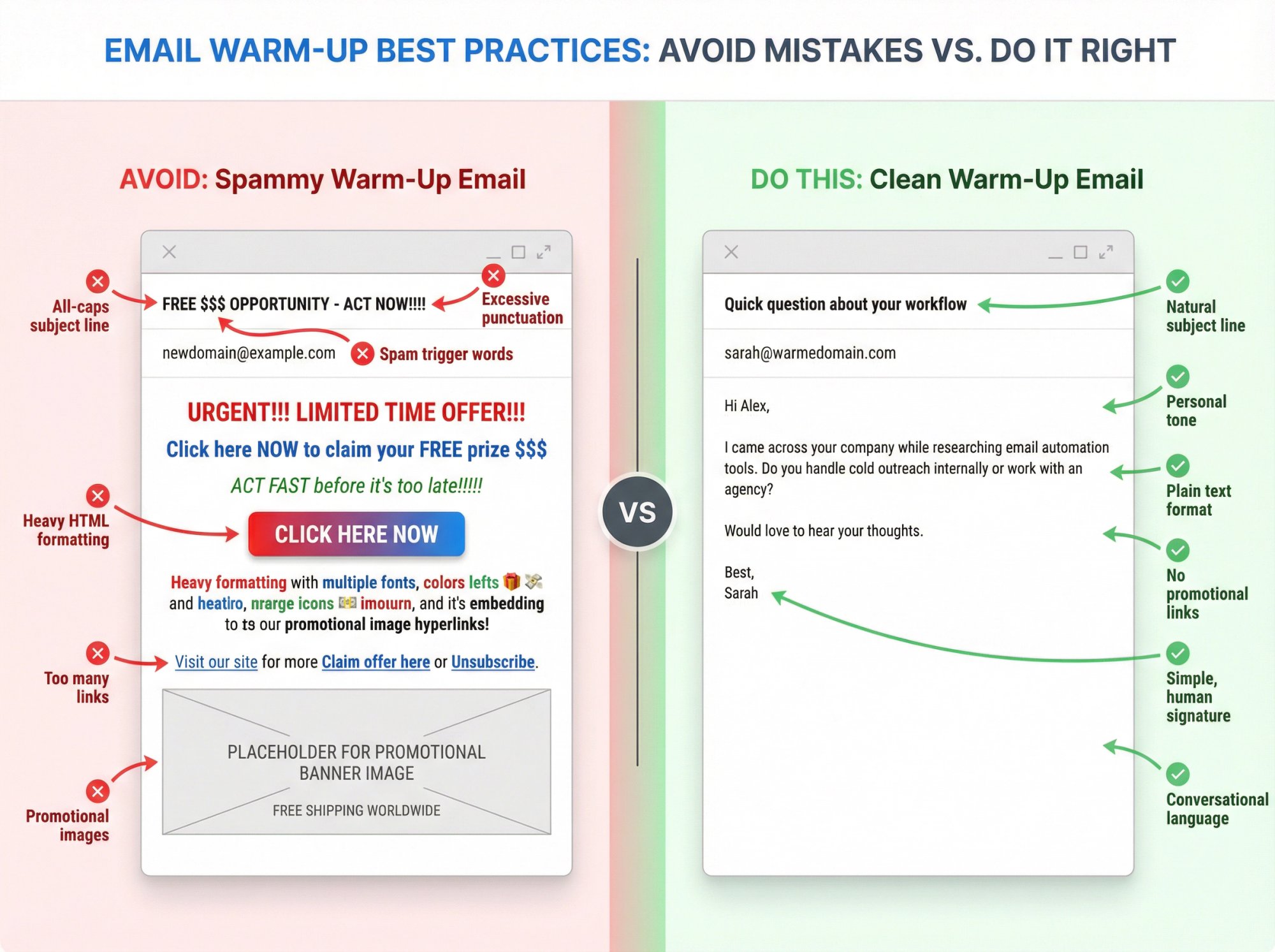
The warm-up phase is not the time for your HTML newsletter or a full sales pitch. Use plain text or very simple formatting. Write a line or two as if you were emailing a friend or colleague. Avoid any common spam trigger words (no "$$$", no "unsubscribe link", since these are not bulk marketing sends anyway).
Also, ideally tailor the content to the recipient (e.g., use their name, reference a personal detail) so it doesn't look mass-sent. This helps ensure if a spam filter is analyzing the text, it finds nothing objectionable.
Plus, be mindful of attachments or links during warm-up. Best practice is not to include attachments on early emails, and if you include a link, make sure it's a trustworthy domain (or better yet, hold off on links until your domain is warmed). Attachments, in particular, can trigger security filters or seem phishy coming from a new sender.
Make your warm-up emails as "un-marketing" as possible. Think of them as polite hello messages, not advertisements. By doing so, you remove content-based reasons for spam filtering, allowing your gradual sending and engagement signals to shine through.
8. How to Use Quality Sending Infrastructure (Avoid Shared IPs)
This issue is a bit more technical, but it can impact warm-up success: the sending IP address or domain you're using might already have a bad reputation (or be shared with spammers).
If you're warming up via an email service that uses a shared IP, your deliverability could be affected by other users on that IP. For instance, some cheaper email automation tools send all their users' emails through a few shared servers. If one user spammed, the IP's reputation drops for everyone.
In such cases, no matter how well you warm up, your emails may still go to spam because the IP is tainted.
Similarly, if you're warming up a domain that was used before and got blacklisted, you'll have an uphill battle. A previously burned domain (perhaps it sent spam or got on a deny list) might never recover fully through simple warm-up alone.
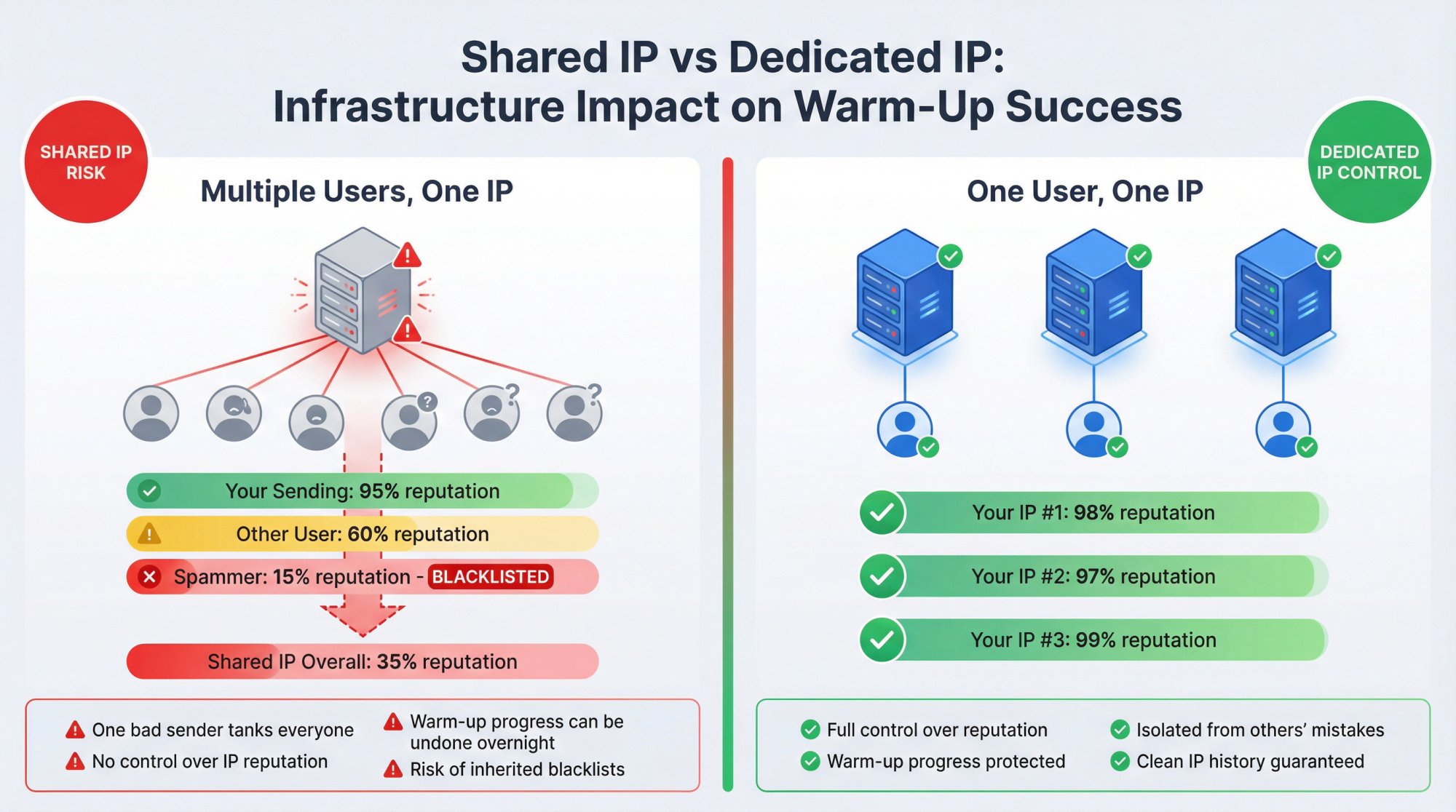
How to Use Dedicated, Reputable Infrastructure for Sending
Whenever possible, use dedicated, reputable infrastructure for sending. If you manage your own sending (e.g., via Google Workspace or Microsoft 365 mailboxes), you're generally using their IPs which are high-quality, but make sure your domain isn't on any blacklists before you start. You can use tools like MXToolbox or UltraTools to check if your domain or IP is blacklisted.
If it is, you'll need to resolve that (by delisting and proving the issue is fixed) or consider using a different domain.
If you're using a campaign platform, prefer one that gives you a dedicated IP or a very well-managed shared pool. Avoid platforms known for getting their IPs spam-listed.
Outbound System, for example, uses hundreds of private IP addresses on Microsoft Azure infrastructure for its clients' cold emails, precisely to maintain control over reputation. This means each client isn't affected by others' sending, and each IP and domain is warmed and monitored.
Your warm-up will work best when you're not dragged down by others' bad practices. If you suspect your chosen sending service's infrastructure is the issue (e.g., you did everything right, but their IP is on a blacklist), talk to their support or migrate to a more reputable service.
In some cases, warm up a completely fresh domain that you own, rather than one that might have a bad history.
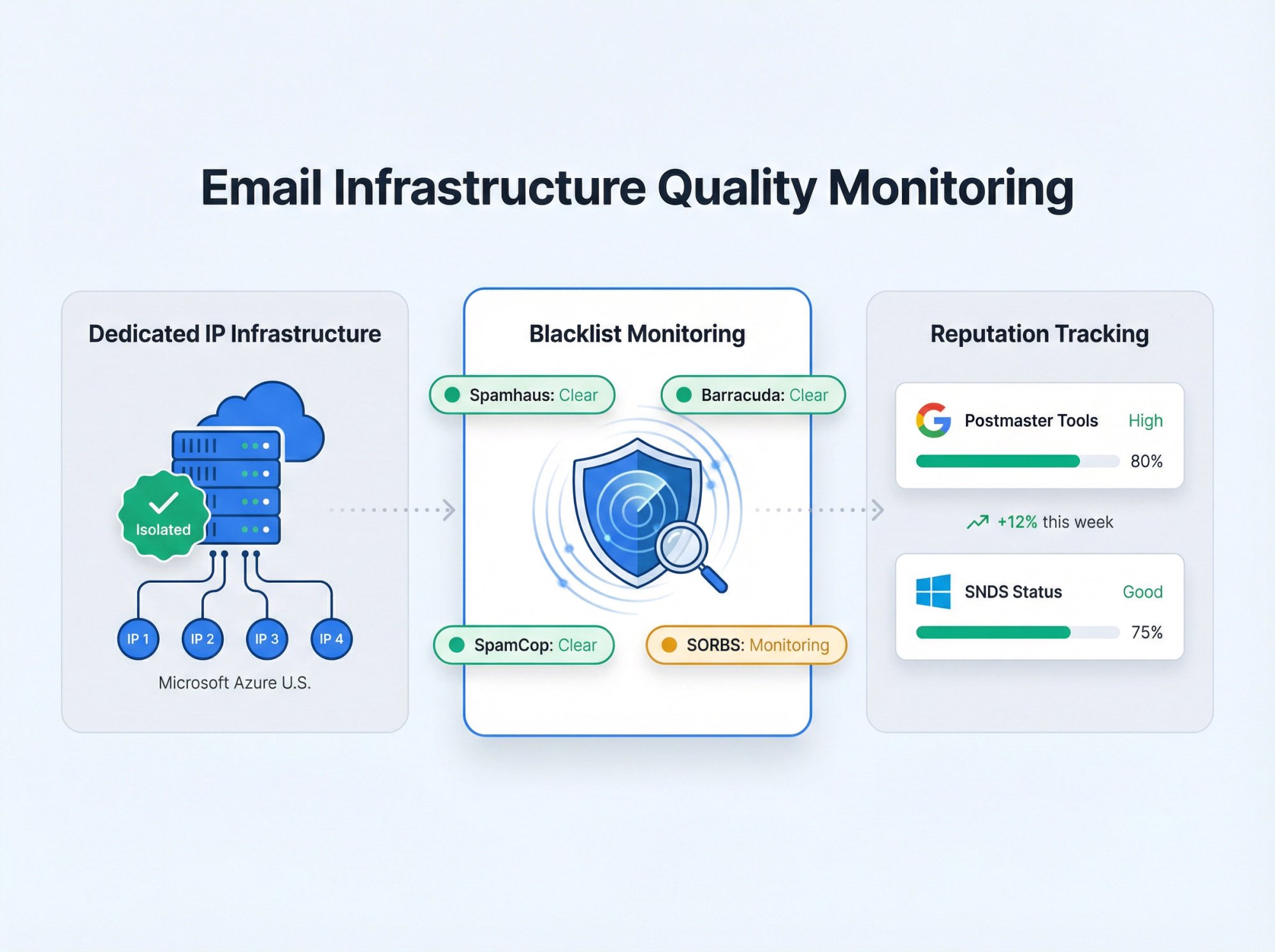
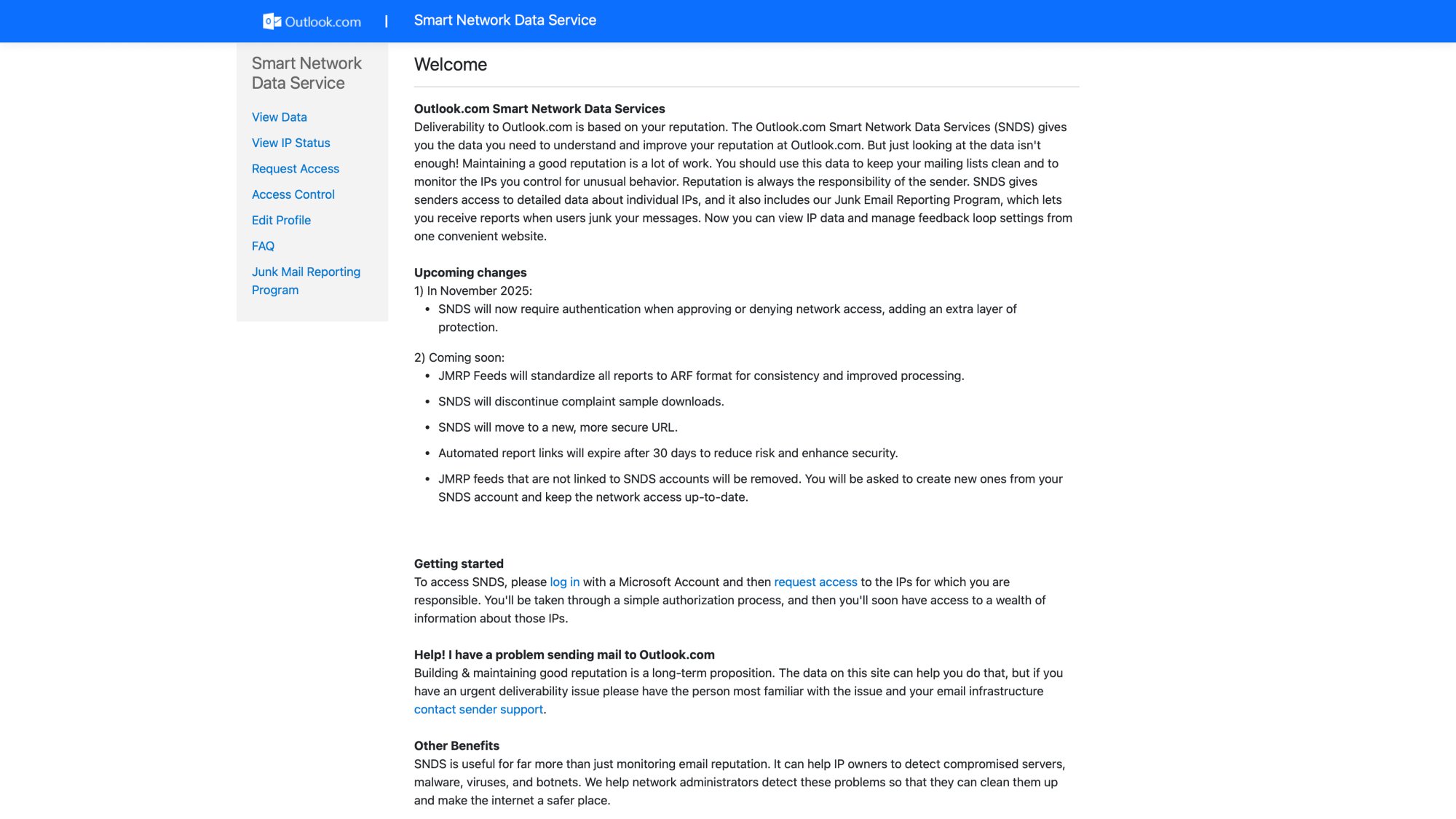
Lastly, monitor your sender reputation throughout warm-up. Use Google Postmaster Tools (for Gmail delivery) and Microsoft SNDS (for Outlook delivery) to see if your domain and IP reputation is improving. If you see it stuck on "poor" despite good practices, infrastructure issues might be at play.
How to Fix Your Email Warm-Up: 2025 Troubleshooting Checklist
If you've identified some of the issues above, here's a step-by-step game plan to get your warm-up back on track. This checklist assumes you're starting to troubleshoot why warm-up isn't working, and it incorporates the latest best practices (as of 2025):
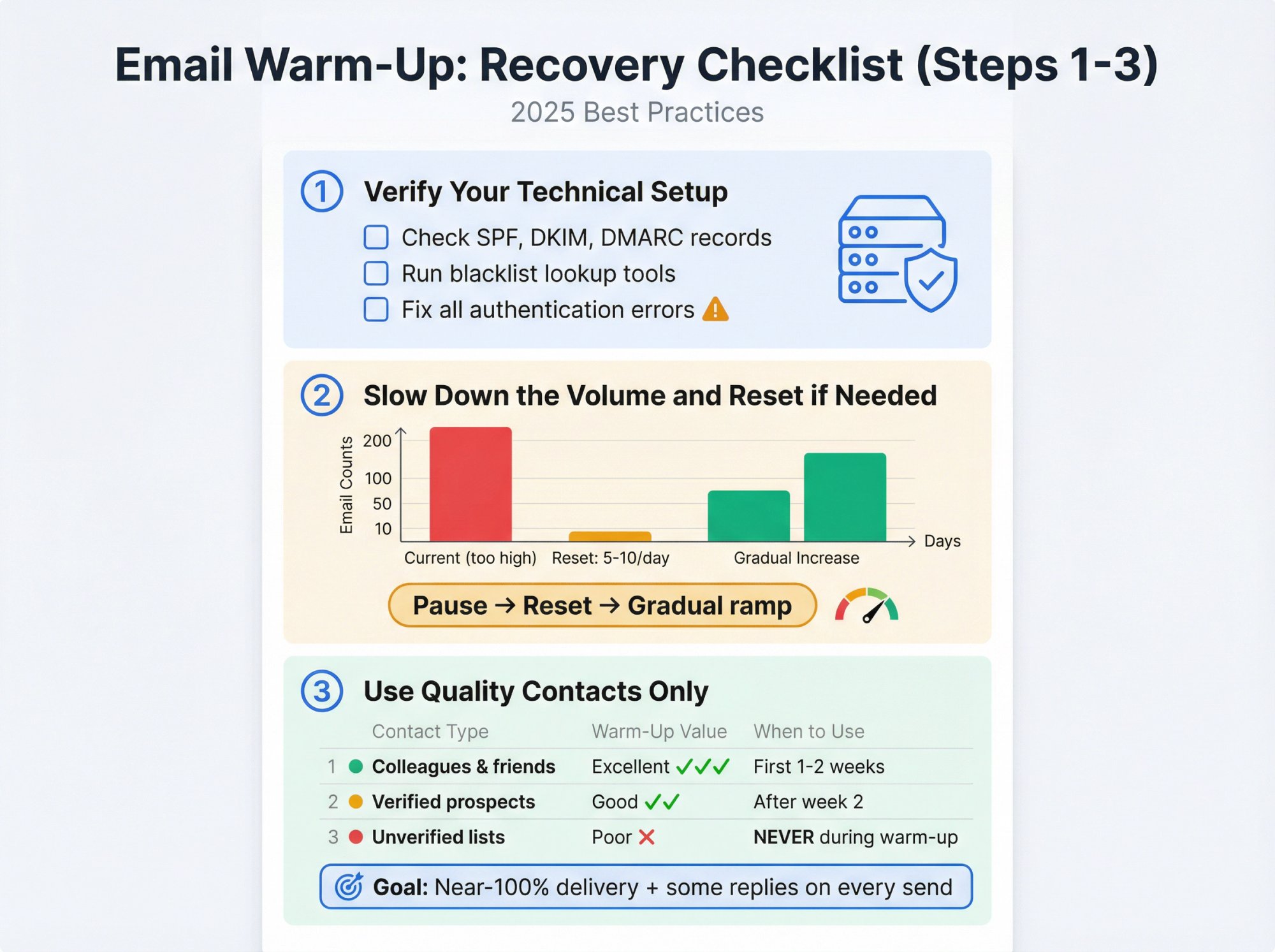
① Verify Your Technical Setup
Double-check SPF, DKIM, and DMARC records for your domain (fix any errors). Also ensure you're not on any major blacklists (use lookup tools). No warm-up can succeed if the foundational technical signals are wrong.
② Slow Down the Volume and Reset if Needed
If you ramped up too fast, pause and possibly roll back. Give your domain a rest if it's been flagged, then resume at a much lower volume that's clearly safe (even just 5-10 emails per day) and build up slowly. It's okay to extend your warm-up timeline, better than burning your reputation.
③ Use Quality Contacts Only
Purge any risky emails from your warm-up list. Remove addresses that bounced or showed no engagement.
Contact Type | Warm-Up Value | When to Use |
|---|---|---|
Colleagues & friends | Excellent (guaranteed delivery + replies) | First 1-2 weeks |
Verified prospects | Good (if triple-verified) | After week 2 |
Unverified lists | Poor (high bounce risk) | Never during warm-up |
Replace problematic contacts with known good ones (colleagues, friends, or use a warm-up network of reliable inboxes). The goal is to achieve near-100% delivery and some interaction on every warm-up send.
④ Improve Email Content
Rewrite your warm-up emails to be extremely simple, personal, and non-spammy. If you suspect certain words or formats triggered spam filters, eliminate them. For example, if you included links or images, try sending warm-up emails that are plain text only. Make the emails sound like a real person wrote them for one recipient.
⑤ Increase Engagement Signals
Actively seek engagement. If doing manual warm-up, ask recipients to reply to you ("Would love a quick confirmation that you got this"). If using a tool, ensure it's marking messages as important, rescuing from spam, and generating replies. This step can dramatically boost inbox placement.
⑥ Segment by Provider if Necessary
Check if your emails fail primarily with one provider (e.g., all your Yahoo recipients go to spam). You might temporarily focus warm-up emails on that provider's addresses in smaller batches to improve your standing there. For instance, send fewer emails to Gmail addresses for a while if Gmail is junking you, until your engagement with Gmail users improves. Each ISP has its own spam filters, so you may need to adapt your warm-up to each.
⑦ Monitor Metrics Daily
Watch your key metrics like acceptance rate (should be 98%+ during warm-up), bounce rate (less than 2%), spam complaint rate (less than 0.1%). If something even minor goes wrong (a bounce, a spam flag), address it immediately. This might mean pausing sends to figure out what caused it (bad address? content issue? specific domain issue?). Rapid response helps prevent small issues from snowballing.
⑧ Use Deliverability Tools
Use testing tools to see where your emails land. For example, send test emails to seed accounts (Gmail, Outlook, etc.) using a tool like Mail-Tester or GlockApps to check spam vs inbox placement. These can give clues if you're still going to spam and why (perhaps a spam filter rule). Also consider setting up feedback loops (for ISPs that offer them) to get notified of any spam complaints.
⑨ Be Ready to Pivot if Needed
If, despite all fixes, your domain got heavily flagged (e.g., it hit a spam trap and got on a major blacklist, and your warm-up is utterly stalled), you may need to start fresh with a new domain. It's a last resort, but sometimes a new domain (with all lessons learned applied from day one) is easier than digging out of a deep hole with the current one. Before you do that, make sure to fix the root cause (whether it was your list or content) so you don't repeat the issue.
By following the above steps, you'll address both the technical factors and behavioral factors that determine warm-up success.
Email deliverability in 2025 is stricter than ever. Gmail, Outlook, and others have tightened the rules, but they are willing to reward good behavior. If you show them consistent sending, proper authentication, low bounces, and positive engagement, you will see your emails increasingly land in the inbox.
How Outbound System Handles Email Warm-Up and Deliverability
At this point, you might be thinking: "This is a lot to manage." You're right. Email warm-up and deliverability require constant attention, technical expertise, and systematic processes. That's exactly why we built Outbound System the way we did.
We provide clients with pre-warmed sending pools leveraging 350 to 700 seasoned email inboxes on private Microsoft infrastructure. This means you're not starting from zero reputation when you launch a campaign with us. Our infrastructure is already warmed, monitored, and optimized for high inbox placement.
Here's how we handle the challenges outlined in this guide:
✓ Authentication Done Right
We set up and verify SPF, DKIM, and DMARC for every client domain before sending a single email. This foundational step is non-negotiable in our process.
✓ Gradual Volume Scaling
Our systems automatically manage volume ramps across hundreds of inboxes, ensuring no single mailbox triggers spam filters with sudden spikes. We distribute volume intelligently to mimic natural sending patterns.
✓ Zero Bounce Guarantee
Our 9-step waterfall enrichment and triple verification process ensures that every contact in your campaigns is validated before outreach. We combine syntax checks, SMTP pings, historic bounce data, and engagement signals to minimize bounces (we aim for less than 1% bounce rates, far below the industry standard).
✓ High Engagement Signals
We use AI personalization combined with human-written copy to create messages that recipients actually want to engage with. Our campaigns consistently achieve 6-7% response rates, which is multiple times higher than industry averages.
✓ Private Microsoft Infrastructure
We don't use shared IP pools that can be contaminated by other senders. Instead, we use hundreds of private IP addresses on Microsoft Azure U.S. infrastructure, giving us complete control over sender reputation. Each client benefits from clean, dedicated sending resources.
✓ Continuous Monitoring
Our team monitors deliverability metrics in real-time. If we spot any issues (a slight increase in bounces, a dip in inbox placement), we adjust immediately. You don't need to become a deliverability expert; we handle it for you.
✓ Proven Results
We've sent 52M+ cold emails for 1,000+ B2B clients, generating 127K+ leads and $26M in closed revenue. Our infrastructure consistently achieves 98% inbox placement. These aren't theoretical numbers; they're the result of systematic deliverability management at scale. See our case studies for detailed examples.
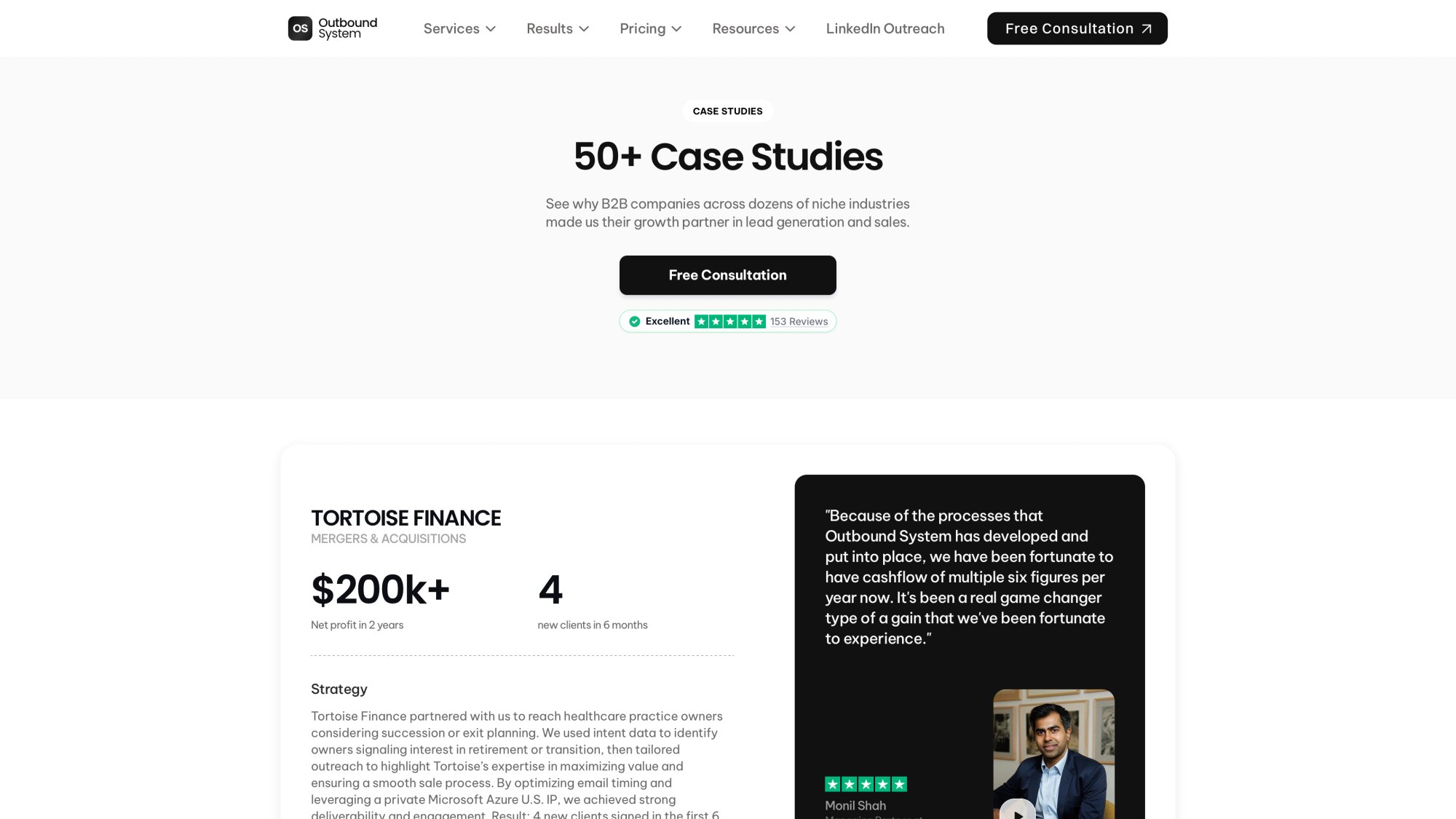
The System Advantage
Instead of juggling warm-up tools, verification services, copywriting, infrastructure management, and optimization yourself, you get a complete system that handles all of it. We call ourselves Outbound System because we provide exactly that: a full-stack solution for cold email at scale.
Our pricing starts at $1,499/month with month-to-month contracts (no long-term commitments). For that, you get:
✓ Hundreds of dedicated Microsoft U.S. IP inboxes
✓ 9-step verification and enrichment on every contact
✓ AI personalization with human-written copy
✓ Unlimited campaigns and A/B testing
✓ Unified inbox and real-time metrics
✓ Dedicated account strategist
✓ Direct CRM integrations
Most importantly, you get peace of mind. You don't need to worry about whether your warm-up is working, whether your authentication is configured correctly, or whether your reputation is tanking. We handle all of it, and we've done it successfully for hundreds of clients across SaaS, financial services, manufacturing, and professional services. Read what our clients say in their testimonials.
If you're tired of troubleshooting warm-up issues and want to focus on closing deals instead of managing infrastructure, book a free 15-minute consultation with our team. We'll show you exactly how our system can replace your entire cold email stack with something that actually works.
Conclusion: Make Warm-Up Work for You
Email warm-up remains a critical prerequisite for successful cold email campaigns. When it's not working, it usually boils down to one (or several) of the issues we've covered, and the good news is, each can be fixed with a careful, methodical approach.
In 2025 and beyond, you simply won't reach the inbox consistently without doing warm-up the right way. The key takeaways:
→ Take it slow (no volume spikes)
→ Sweat the details (DNS, content, data quality)
→ Focus on engagement and reputation signals
→ Use reputable infrastructure
→ Monitor constantly and adjust quickly
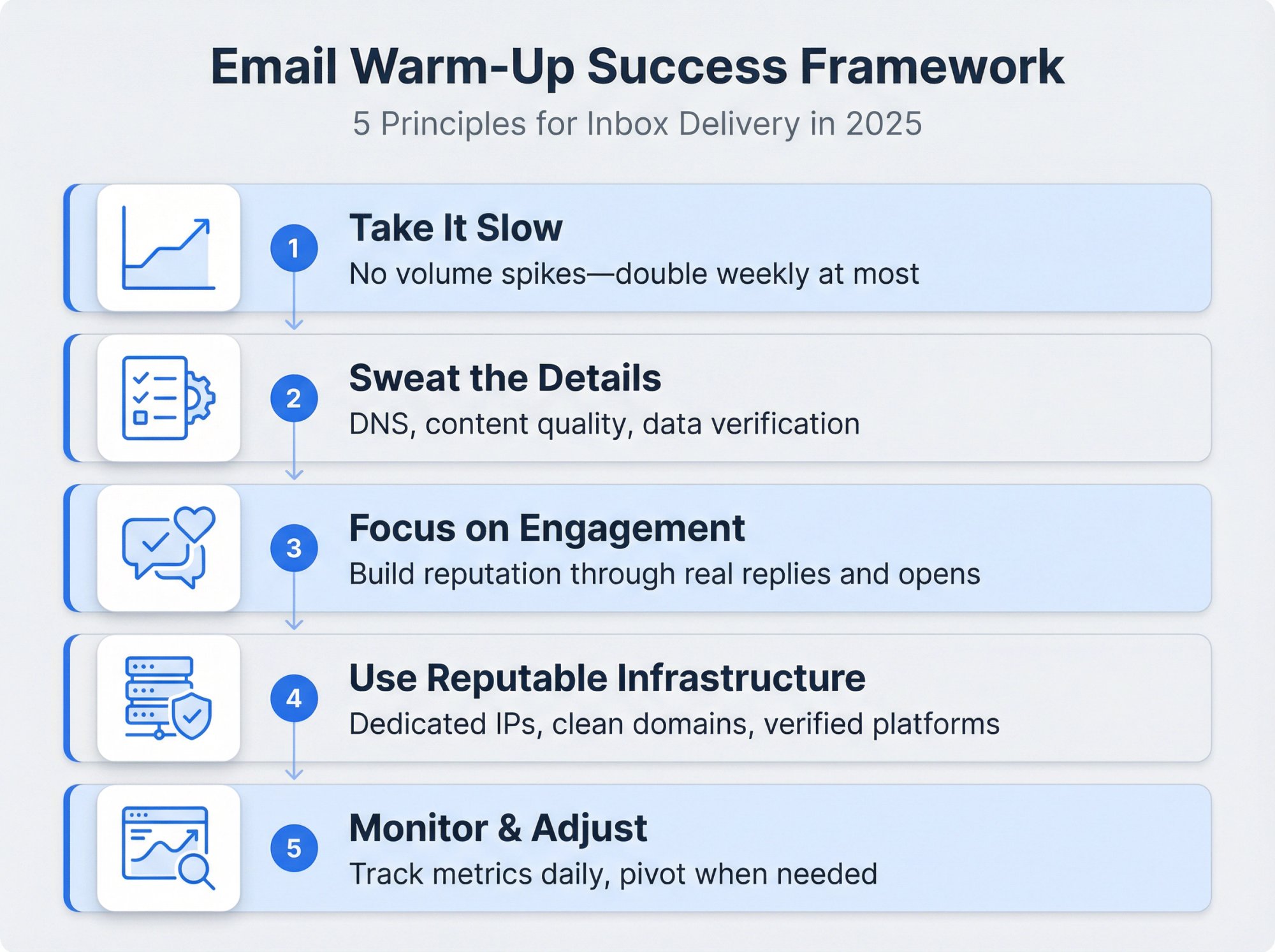
Warm-up is as much an art as a science, blending technical setup with human-like sending behavior.
If you've tried to troubleshoot and still feel stuck, or if managing all this sounds overwhelming, consider getting help. Deliverability specialists or services can handle warm-up for you using established infrastructure.
Whether you do it in-house or partner with an expert, mastering email warm-up is achievable with the right strategy. Follow the guidance in this article, and you'll greatly increase your chances of warming up your email domain successfully, so your cold emails get seen by prospects, not lost in spam.
Frequently Asked Questions
Q: How long should I warm up a new email domain?
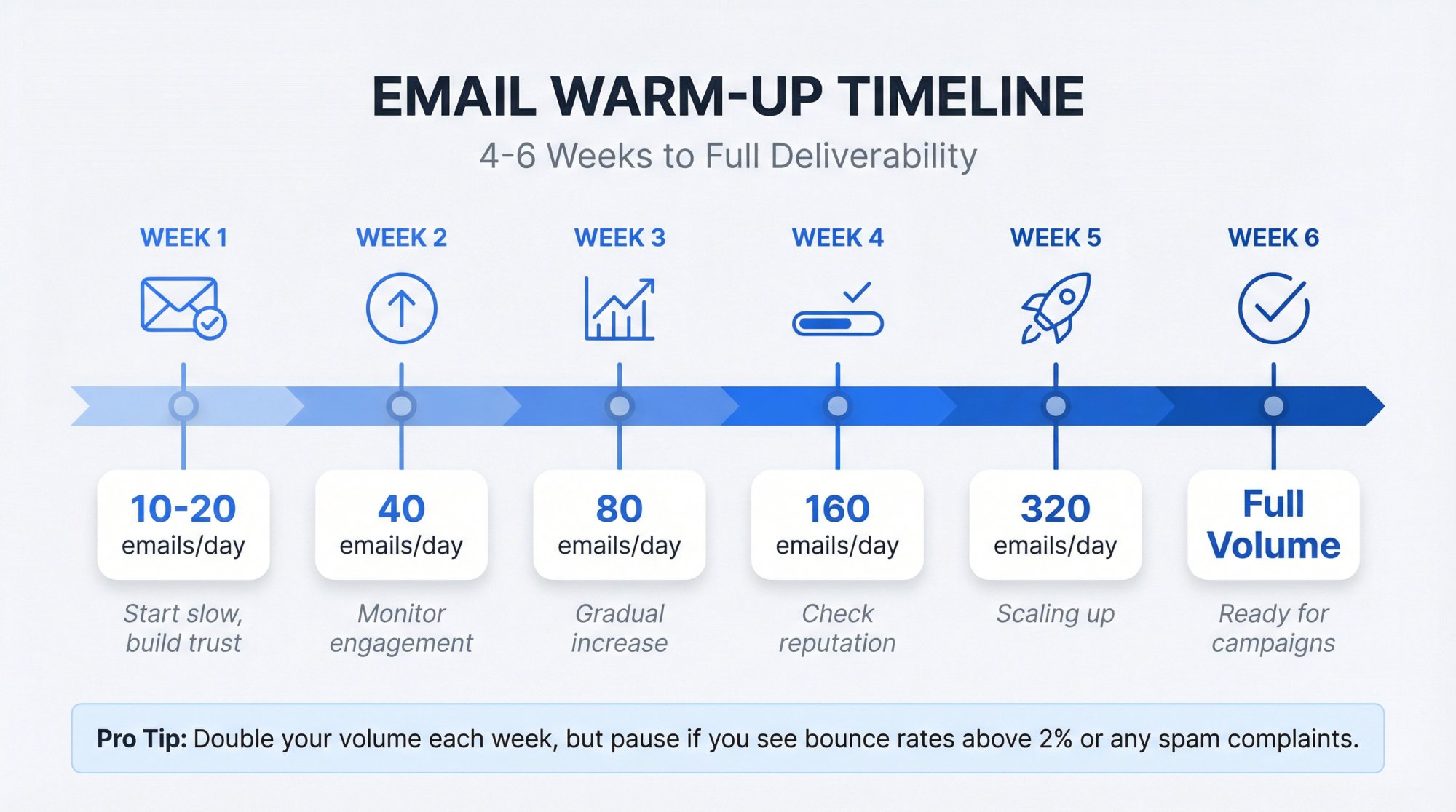
A: Most experts recommend 4 to 6 weeks for a brand-new domain to fully build trust with email providers. You should start with 10-20 emails per day in week 1 and gradually double your volume each week. If you're warming up an address on an established domain, 2-4 weeks may be sufficient, but don't rush it. The key is patience and consistency. For detailed guidance, see our email warm-up guide.
Q: Can I warm up multiple domains at the same time?
A: Yes, you can warm up multiple domains simultaneously, but each domain needs its own independent warm-up process. Don't share warm-up contacts across domains, and ensure each domain has proper authentication (SPF, DKIM, DMARC) configured before starting.
If you're managing multiple domains, consider using a service that can handle parallel warm-ups systematically.
Q: What's the ideal bounce rate during warm-up?
Metric | Target | Critical Threshold |
|---|---|---|
Bounce rate | Under 1% (ideal) | Never exceed 2% |
Spam complaints | Under 0.1% | Never exceed 0.3% |
Engagement rate | 30%+ opens | Minimum 15% |
You should aim for a bounce rate below 2% during warm-up (ideally under 1%). Even a few bounces can damage your sender reputation when you're building trust. Use verified email lists only, and if you see any bounces, immediately remove those addresses and investigate whether there's a pattern that needs fixing.
Q: Should I use a warm-up tool or do it manually?
A: It depends on your provider and scale. For Gmail accounts, many automated warm-up tools are now banned by Google's terms of service. Manual warm-up (sending to colleagues and known contacts) is safer but more time-consuming.
For other providers, reputable warm-up tools that mimic human behavior can be effective. The key is to avoid cheap, obvious warm-up pools that providers can easily detect. Learn more about proper warm-up techniques.
Q: What's better: shared IP or dedicated IP for warm-up?
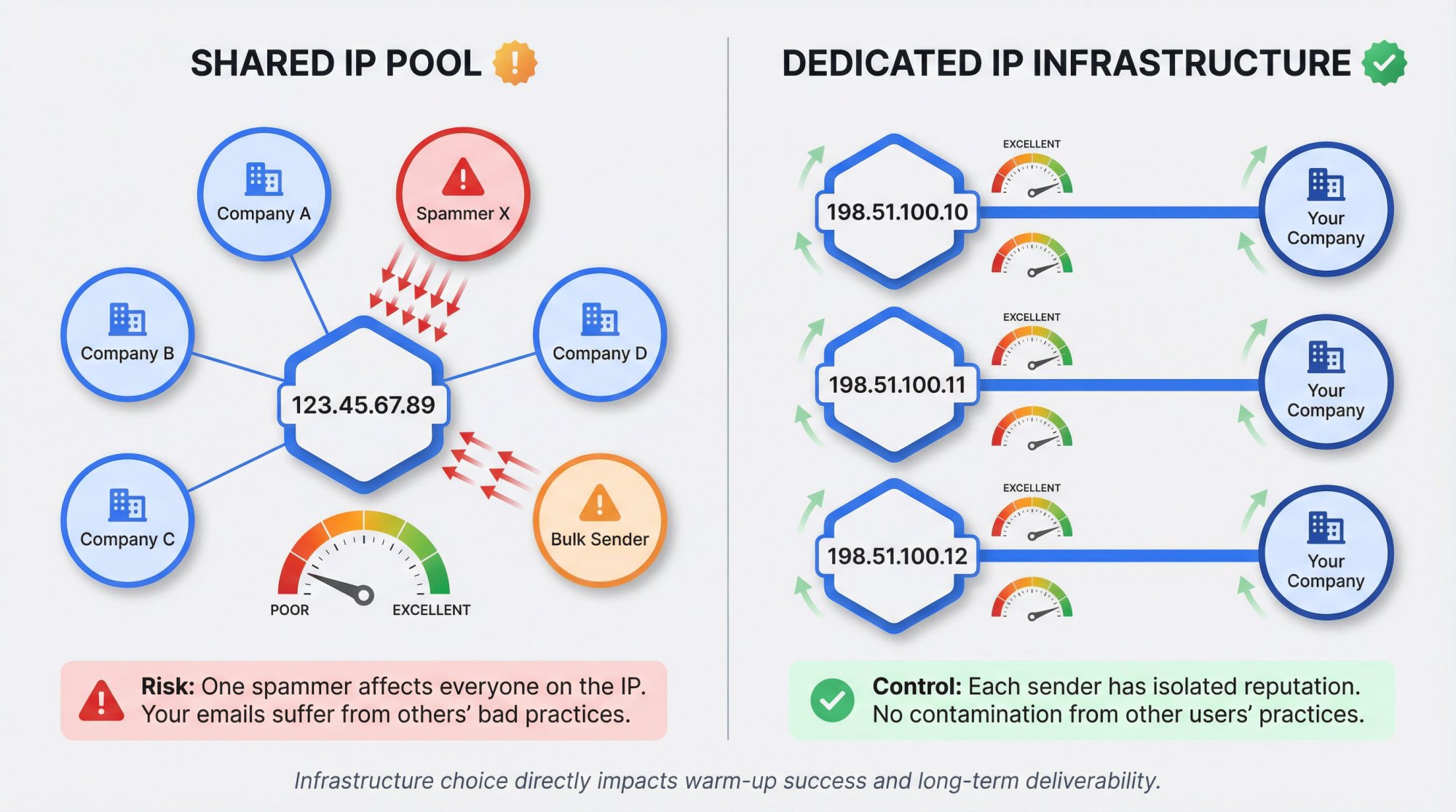
A: Dedicated IPs or well-managed private pools are generally better because you're not affected by other senders' bad practices. Shared IPs can work if the provider maintains high sending standards, but there's always risk that another user's spam can taint the IP reputation.
If possible, use infrastructure with dedicated resources or a carefully controlled pool (like Outbound System's private Microsoft infrastructure).
Q: My warm-up was working, but now emails are going to spam again. What happened?
A: Several things could cause a regression:
You increased volume too quickly after warm-up
Your content became more "salesy" and triggered filters
You hit a spam trap or got complaints
Your data quality dropped
Check your recent sends for bounces, complaints, and engagement drops. You may need to pause and do a mini warm-up reset at lower volume while you diagnose the issue. Review our email deliverability best practices for troubleshooting tips.
Q: Do I need to warm up for every email campaign I send?
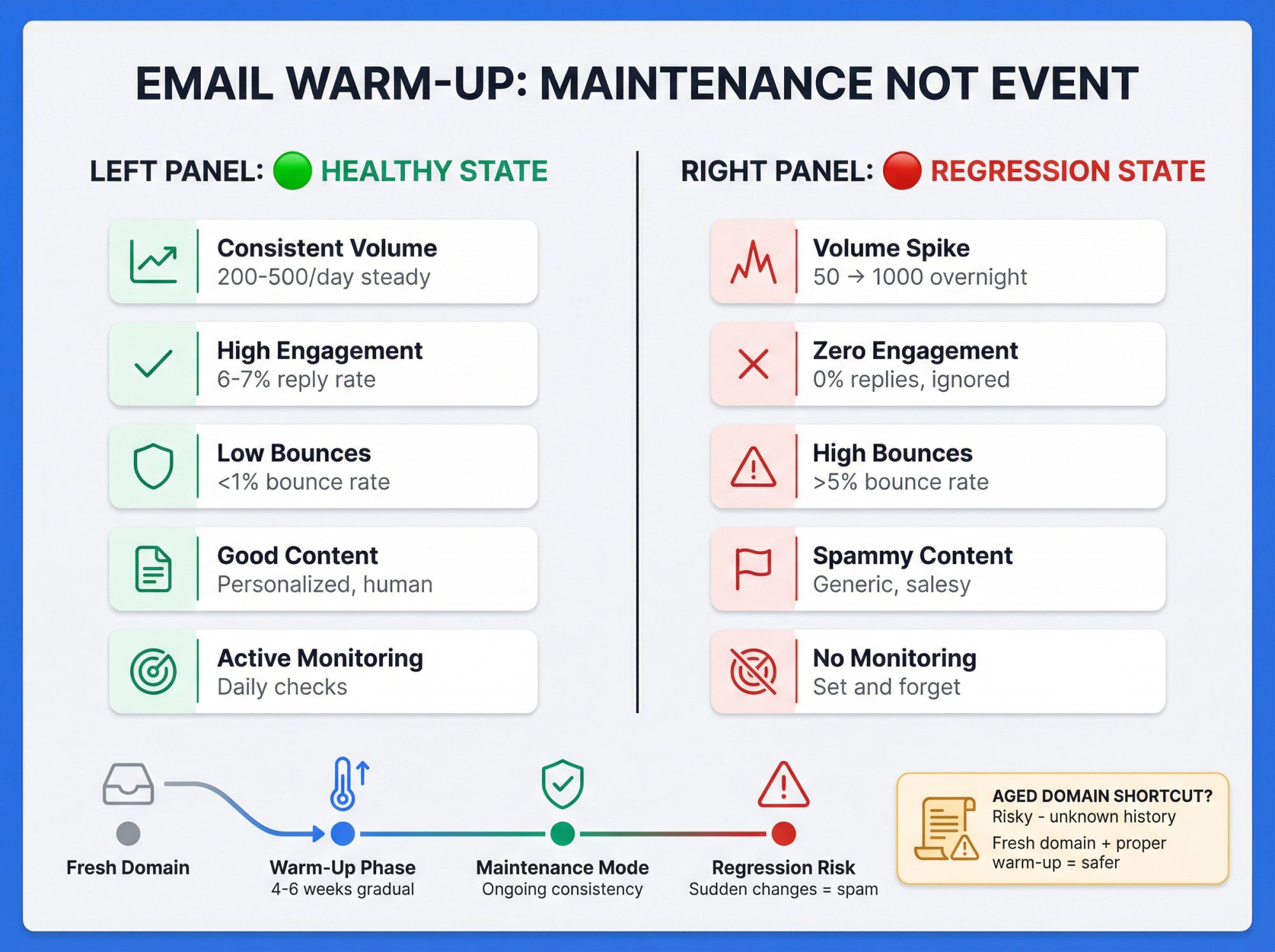
A: No. Once your domain is properly warmed (typically 4-6 weeks of gradual increases), you can maintain that reputation by continuing to send at consistent volumes with good engagement. Some services run "maintenance warm-up" indefinitely in the background to keep reinforcing reputation.
The key is not to suddenly blast volume after being dormant, or you'll need to warm up again.
Q: Can I speed up warm-up by buying an aged domain with existing reputation?
A: Possibly, but it's risky. If the aged domain has a clean history with no spam or blacklists, it may start with some baseline trust. But many aged domains for sale have problematic histories. Always check the domain's reputation (Google Postmaster Tools, blacklist checkers) before buying.
In many cases, starting fresh with a new domain and proper warm-up is safer than gambling on an aged domain's unknown past.
Q: What's the difference between domain warm-up and IP warm-up?
A: Domain warm-up focuses on building reputation for your sending domain (e.g., yourcompany.com). IP warm-up focuses on the IP address sending the emails.
If you're using your own SMTP or dedicated IP, you need both. If you're using a service like Gmail or a managed platform, the IP is usually already established, so you focus primarily on domain warm-up. Both follow similar principles: start slow, build engagement, scale gradually. Learn more about infrastructure and deliverability.
Q: How do I know if my warm-up is actually working?
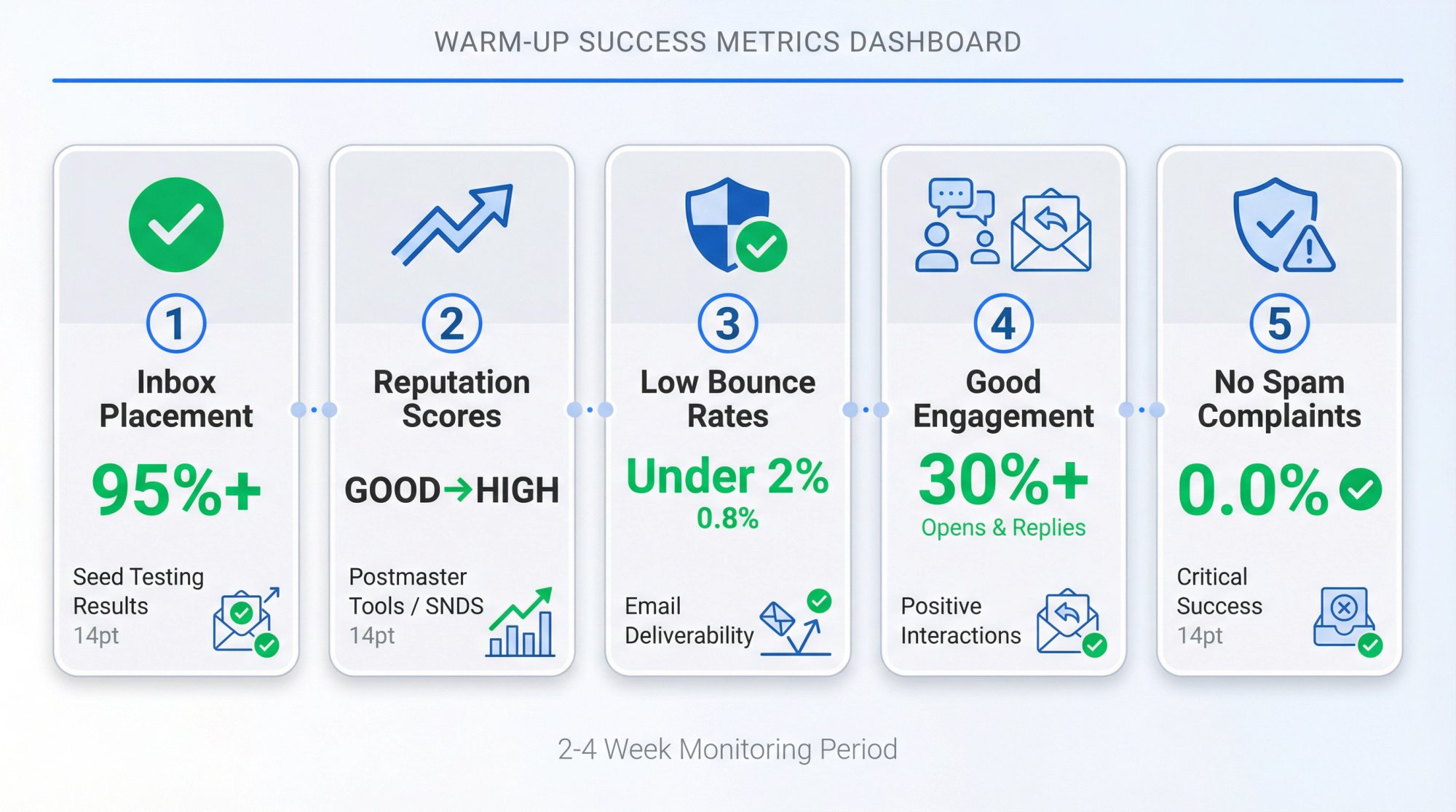
A: Monitor these key indicators:
Q: How do I know if my warm-up is actually working?
A: Monitor these key indicators:
① Inbox placement - Use seed testing tools to check spam vs inbox
② Google Postmaster Tools or Microsoft SNDS showing improving reputation scores
③ Low bounce rates - Under 2%
④ Good engagement - Opens and replies during warm-up
⑤ No spam complaints - Critical success indicator
If all these metrics are trending positively over 2-4 weeks, your warm-up is working.
Outbound System
We write the copy, build the lists and run the campaigns, month-to-month. Every decision is backed by data from 10,400+ campaigns.

Bruce Merrill is the co-founder of Outbound System and has been booking B2B meetings through LinkedIn since 2016. He built the outbound program at the property tech startup LeaseLock ahead of its Series A and writes about cold email, LinkedIn outreach and AI calling.
About Outbound System
Outbound System runs done-for-you cold email, LinkedIn outreach and AI calling for B2B companies. 1,000+ active clients and 10,400+ campaigns launched.
