If you're comparing LinkedIn Premium vs Sales Navigator, you're probably not wondering which has more features.
You're asking:
Which subscription helps me find the right people faster?
Which one turns conversations into meetings that close deals?
Which plan is worth the money given my team size, outreach volume, and ideal customer profile?
Am I missing anything critical by staying on Premium instead of upgrading to Sales Navigator?
Why do solo consultants say Premium is "good enough" while top outbound sales teams won't touch anything except Sales Nav?
This guide answers those questions with current pricing, real feature differences, and workflows you can implement this week. We'll show you exactly what each platform does, when each makes sense, and how to choose based on your specific sales motion.
Quick navigation note: We've researched pricing as of December 2025. LinkedIn changes packaging and prices frequently, so we'll show you how to verify exact numbers in your account when the time comes.
The decision isn't complicated once you understand what each tool actually does.
What's the Real Difference Between LinkedIn Premium and Sales Navigator?
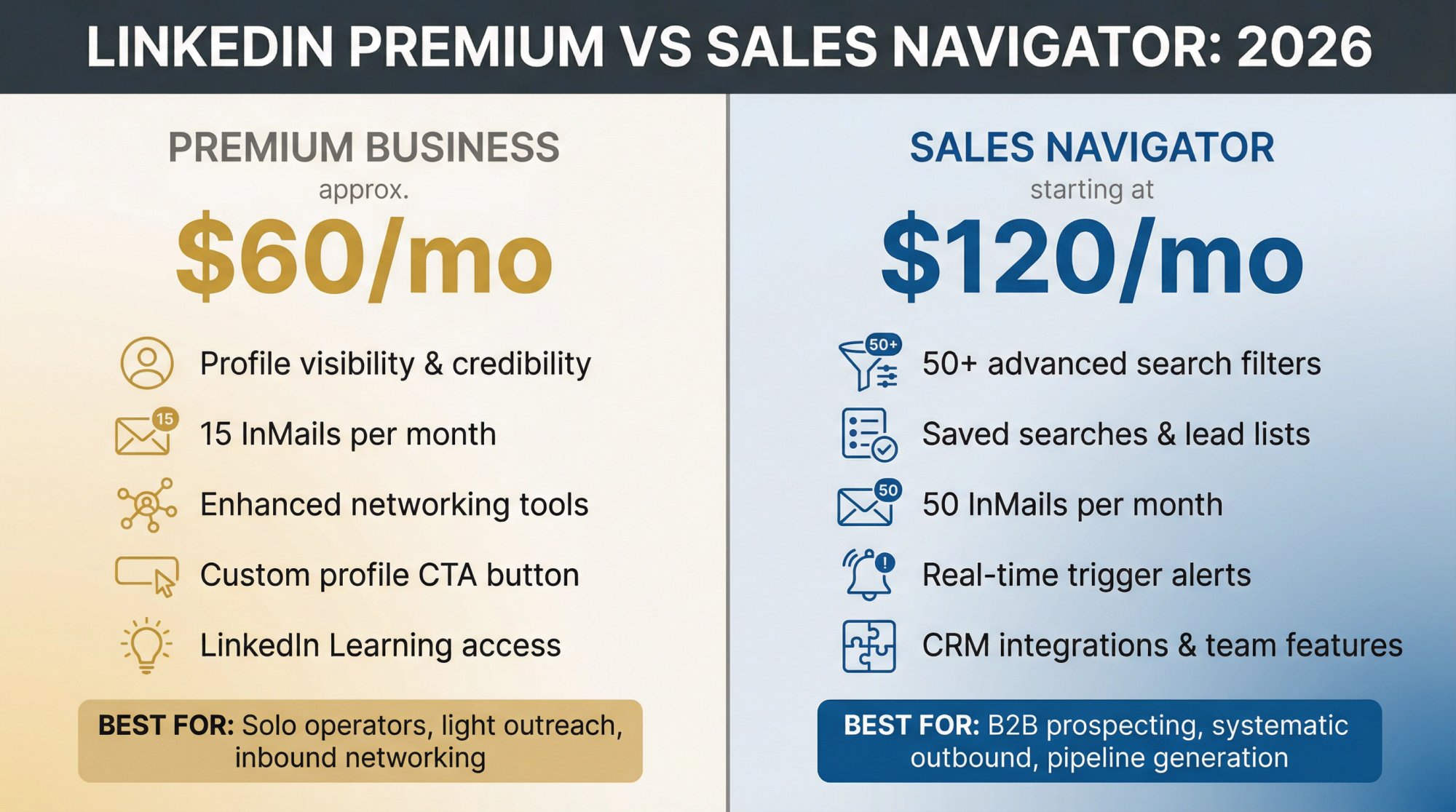
Premium Business helps you be more credible and message outside your network. Sales Navigator helps you build repeatable prospecting lists and workflows that drive pipeline.
That's the core truth. Everything else is detail work.
Who Should Use LinkedIn Premium vs Sales Navigator?
LinkedIn Premium Business is designed for:
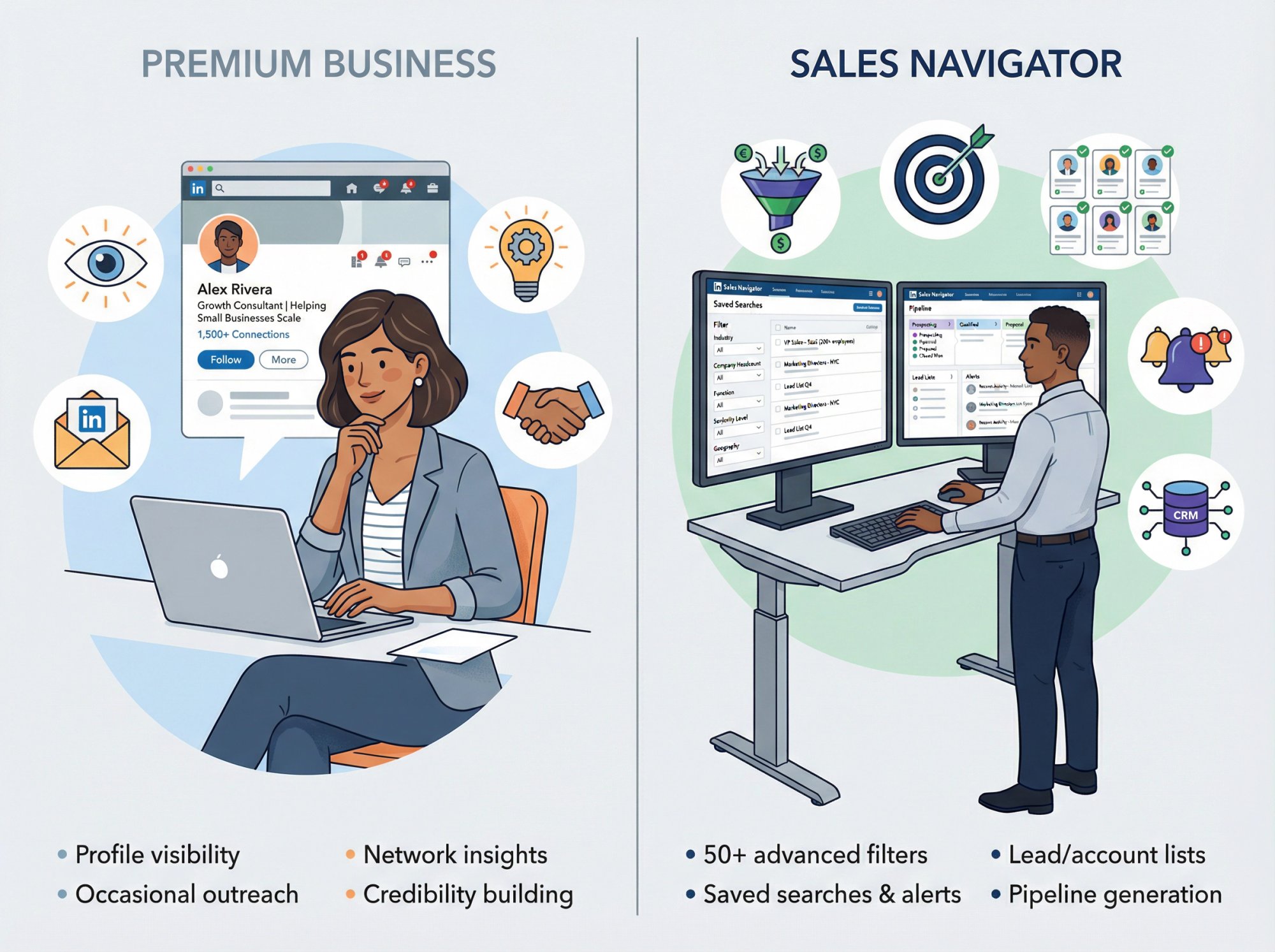
Founders, consultants, operators, and small business owners who want profile visibility, occasional outreach capability, and network insights.
LinkedIn positions Premium as helping small businesses "showcase credibility, find and message the right people, and gain insights" according to their Premium Business page.
You're using it for:
→ More visibility into who's viewing your profile
→ The ability to message people outside your network via InMail
→ Better conversion features like CTA buttons and learning access
→ General networking and credibility building
LinkedIn Sales Navigator is built for:
SDRs, BDRs, account executives, founders doing systematic outbound, and revenue teams who need structured prospecting workflows.
LinkedIn explicitly frames Sales Navigator as a B2B sales tool to find buyers and grow pipeline, according to their Sales Solutions page.
You're using it for:
→ Lead and account searches designed specifically for prospecting
→ 50+ advanced filters and saved searches
→ Lead/account lists, real-time alerts, CRM integration, and team features
→ Systematic pipeline generation (not occasional networking)
The positioning tells you everything. Premium enhances LinkedIn usage. Sales Nav creates a prospecting engine.
How Much Do LinkedIn Premium and Sales Navigator Actually Cost?
Sales Navigator Pricing
LinkedIn's official compare plans page shows these numbers as of December 2025 (per month, billed annually):
Plan | Monthly Price | Who It's For |
|---|---|---|
Sales Navigator Core | Starting at $119.99/month | Individual sellers |
Sales Navigator Advanced | Starting at $159.99/month | Teams of 2+ sellers |
Sales Navigator Advanced Plus | Custom pricing | Teams of 10+ sellers |
Why this matters: Many articles still cite $99.99 or $149.99 pricing from older LinkedIn pages. Those numbers are outdated. Always verify against LinkedIn's current pricing page when budgeting.
Premium Business Pricing
LinkedIn's Premium Business landing pages emphasize features but don't always display fixed pricing without checkout, according to their Premium page.
Industry sources commonly report Premium Business in the U.S. at ~$59.99/month monthly or ~$575/year annually (effective ~$47-$48/month). Treat this as an estimate and verify in your LinkedIn billing screen.
How to verify your exact price
Pricing varies by:
→ Region, currency, and taxes
→ Monthly vs annual billing
→ Promotions and trial offers
→ Seat count for team plans
→ Enterprise agreement terms
The only reliable number is what LinkedIn shows in your Admin Center subscription details when you select the plan. LinkedIn documents plan switching in their help documentation.
Bottom line: Sales Navigator costs roughly double Premium Business on a monthly basis. The question isn't whether it's more expensive. The question is whether the additional capabilities justify the cost for your specific sales motion.
Which Features Actually Matter for B2B Pipeline Generation?
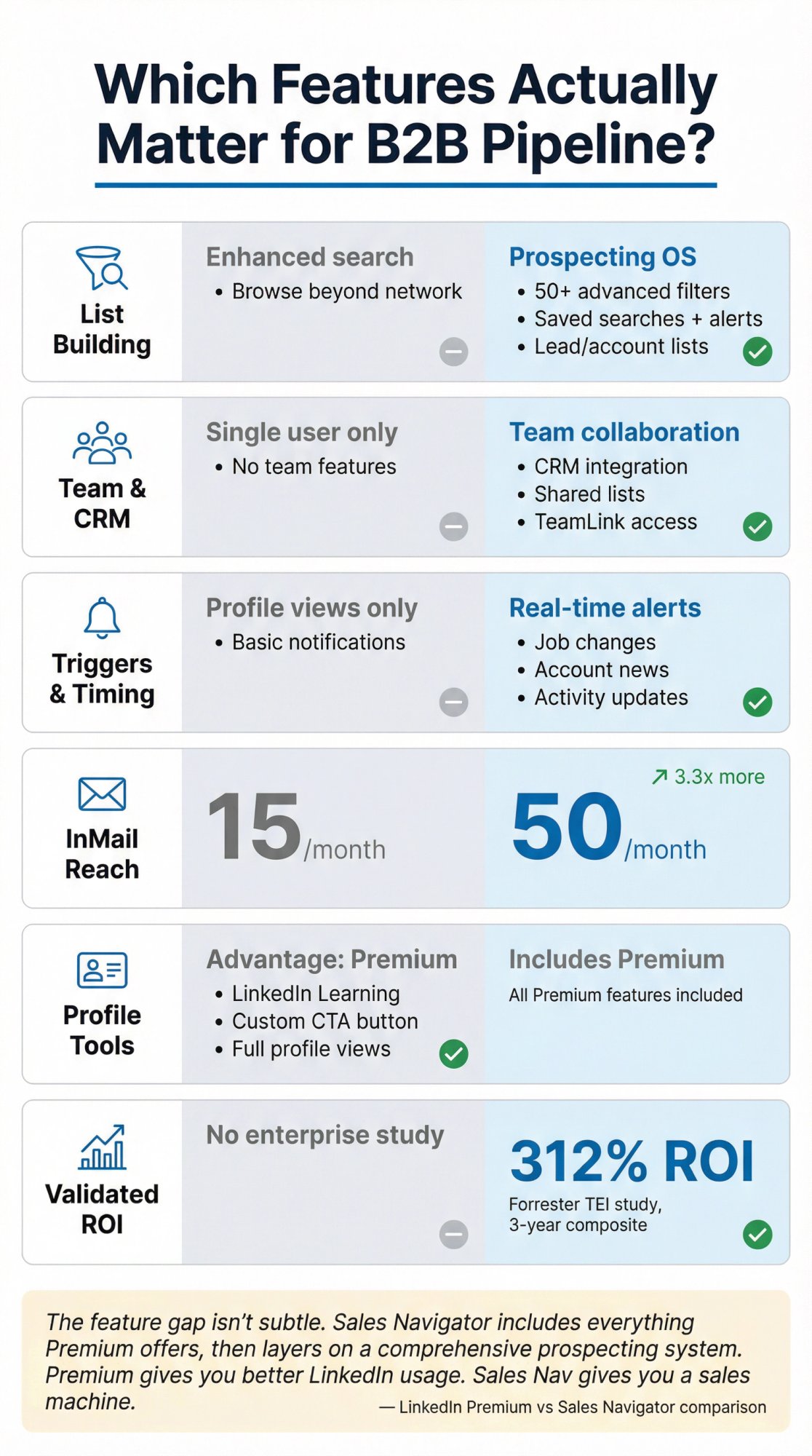
Most comparisons obsess over profile badges and learning libraries. If your goal is booked meetings and closed deals, the relevant differences fall into six categories:
1) Prospect list building (Sales Nav dominance)
Sales Navigator is architected around:
Capability | What It Enables |
|---|---|
Lead search and account search | 50+ filters for precise targeting |
Saved lists and saved searches | Alerts for ongoing monitoring |
Lead and account recommendations | AI-based suggestions from your activity |
Advanced filter combinations | Combine criteria normal search can't match |
Premium Business lets you search and browse beyond your network, but it's not designed as a full prospecting workflow tool. It's enhanced LinkedIn search, not a prospecting operating system.
The filter depth matters more than most people realize. Sales Nav lets you combine criteria like:
Current job title + seniority level + years in role
Company headcount range + industry + HQ location
Recent job change + posted on LinkedIn in past 30 days
Technologies used + hiring trends + funding events
That granularity is what separates casual networking from systematic B2B lead generation.
2) Team workflows and CRM integration
Sales Navigator's higher tiers unlock:
→ Deeper CRM integration with Salesforce and Dynamics (Advanced Plus)
→ Team collaboration via shared lists and admin oversight
→ TeamLink to leverage colleague connections
Premium Business is strictly a single-user subscription with no team coordination features.
3) Trigger-based selling
Sales Navigator emphasizes real-time alerts: job changes, activity updates, account news. This lets you reach out when something actually happened instead of cold messaging randomly.
Premium Business shows you who viewed your profile, but it won't proactively notify you when your target prospect got promoted or their company raised funding.
4) InMail volume
Both include InMail credits. Sales Nav gives substantially more.
According to LinkedIn's Help Center:
Plan | InMails/Month | Multiplier |
|---|---|---|
Premium Business | 15 | Baseline |
Sales Navigator Core | 50 | 3.3x more |
If your outreach strategy relies on LinkedIn messaging, that 3x difference determines your reach.
5) Profile conversion features (Premium advantage)
Premium Business includes features that Sales Nav doesn't emphasize:
LinkedIn Learning access for skill development
Full "who viewed your profile" history
Custom CTA button on your profile
AI writing assistant features
If you're using LinkedIn primarily as an inbound channel where people discover you, Premium Business provides the conversion tools you need.
6) ROI evidence
LinkedIn commissioned a Forrester TEI study for Sales Navigator showing 312% ROI over 3 years in a composite enterprise scenario.
There isn't an equivalent ROI study typically cited for Premium Business with the same enterprise validation.
The feature gap isn't subtle. Sales Navigator includes everything Premium offers, then layers on a comprehensive prospecting system. Premium gives you better LinkedIn usage. Sales Nav gives you a sales machine.
How Many InMails Do You Actually Get? (And the Hidden Rules)
If your strategy depends on "I'll just InMail everyone," you'll hit limits fast even on Sales Navigator.
Monthly InMail allotment
LinkedIn's official documentation states:
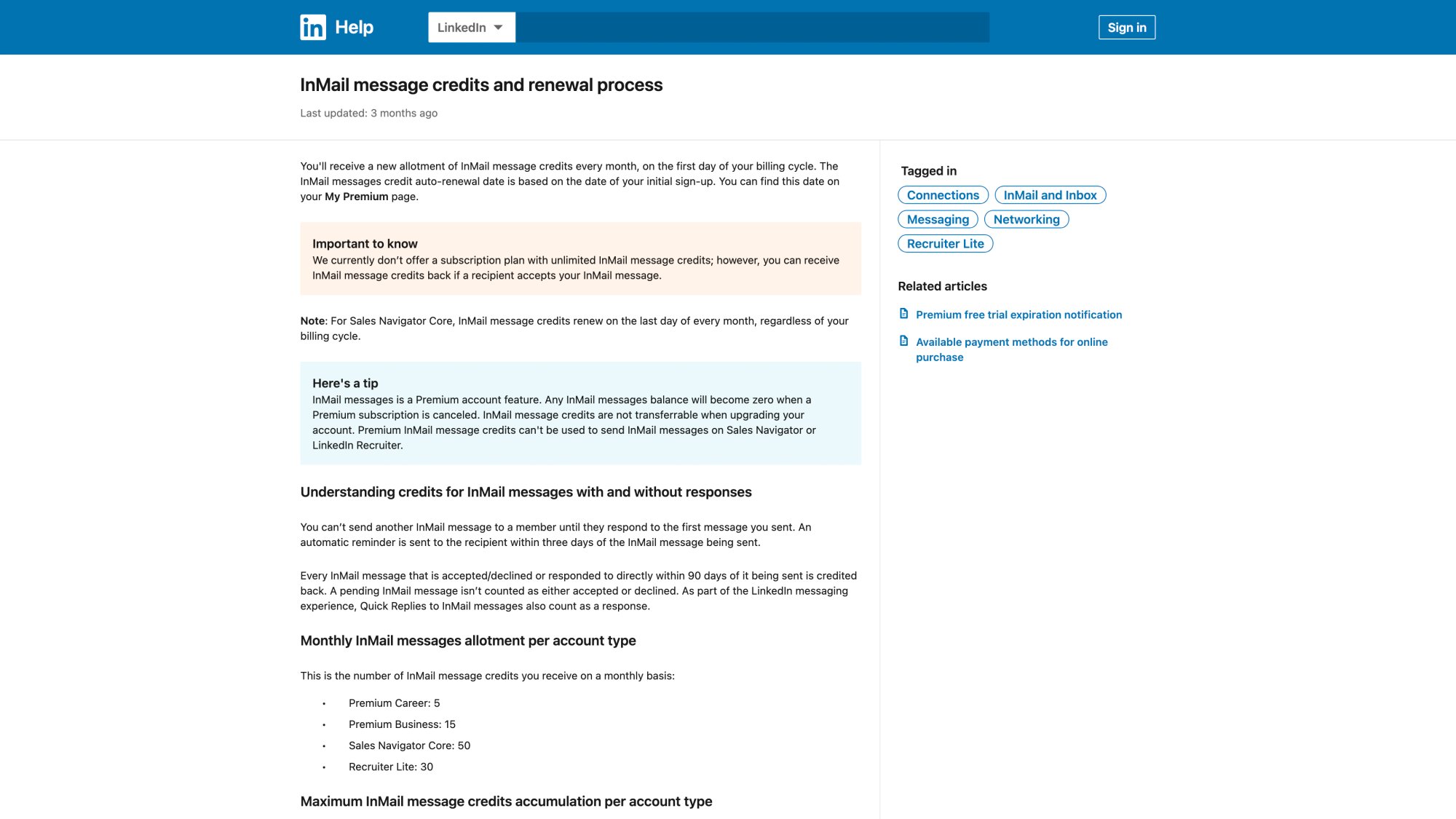
Plan | Credits/Month |
|---|---|
Premium Business | 15 credits |
Sales Navigator Core | 50 credits |
LinkedIn explicitly states it does not offer unlimited InMail credits on any plan.
Credits get refunded (this is huge)
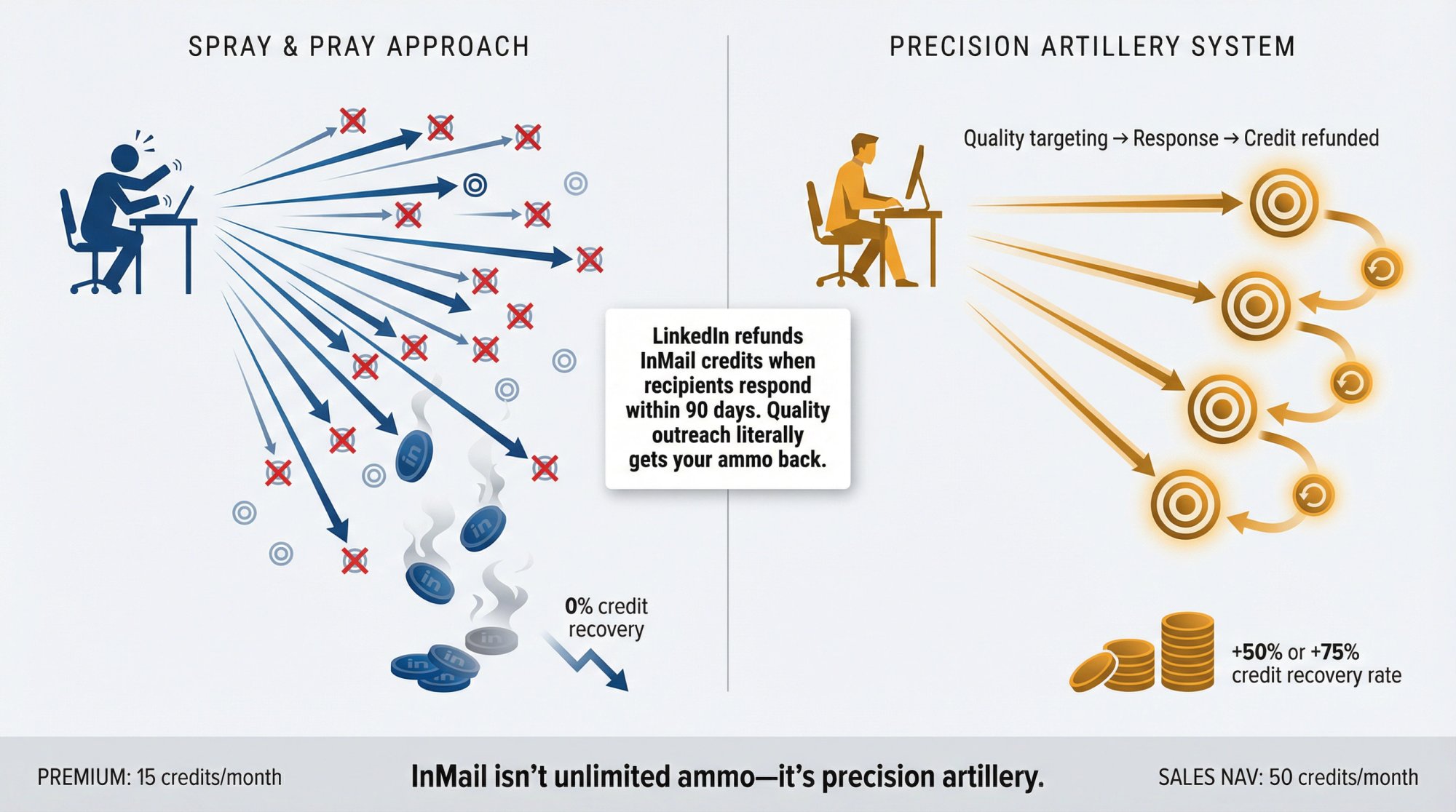
LinkedIn refunds your InMail credit if the recipient accepts, declines, or responds within 90 days. Quick Replies count as responses.
This mechanic rewards quality outreach. Good targeting and messaging literally get your credits back.
You can't spam the same person
LinkedIn won't let you send another InMail to the same member until they respond to the first one.
This forces better list hygiene and prevents the spray-and-pray approach that ruins deliverability.
Credit accumulation caps
Maximum accumulated credits according to LinkedIn's help docs:
Premium Business: up to 45 total
Sales Navigator: up to 150 total
Unused credits roll over, but you can't stockpile infinitely.
Renewal timing
For Sales Navigator Core, credits renew on the last day of every month, regardless of your billing cycle.
The strategic takeaway
Elite outbound teams use InMail for:
① High-value targets they must reach (executives, decision-makers)
② Prospects unlikely to accept connection requests
③ Re-engagement when trigger events occur
They use connection requests and standard messages for volume, and they use Sales Navigator's filters and alerts to make messaging contextual enough that replies credit back InMails.
InMail isn't unlimited ammo. It's precision artillery. Use it accordingly.
Why Sales Navigator Search Powers Better B2B Prospecting
LinkedIn Sales Navigator advertises "50+ filters" to search across "1+ billion members" according to their Sales Solutions page.
But the real value is how those filters map to outbound reality.
The filter groups that drive reply rates
LinkedIn's Sales Navigator help documentation lists lead filters like:
→ Current/past job title and seniority level
→ Company headcount, type, and headquarters location
→ Years in current company and years in current position
→ Connection degree and TeamLink availability
→ Posted on LinkedIn in past 30 days
→ Changed jobs in last 90 days
These filters answer the questions that determine whether someone replies:
"Is this person actually my buyer?"
"Are they new enough in role to be evaluating vendors?"
"Is their company big enough to afford this?"
"Do we have a warm introduction path?"
"Is there a reason to reach out this week instead of next quarter?"
The trigger filters most people underuse
LinkedIn's Sales blog highlights filters that function as built-in timing signals, per their search filters article:
Posted on LinkedIn in the past 30 days (active users reply more)
Changed jobs in last 90 days (new role = new budget cycles)
Viewed your profile recently (warm-ish connection already exists)
These filters transform cold outreach into relevant outreach.
The difference between "VP of Sales at any company" and "VP of Sales who joined their company in the last 6 months at a Series B SaaS company with 100-500 employees in California who posted on LinkedIn this week" is everything for reply rates.
Why Premium Business can't replace this
Premium Business makes LinkedIn stronger, but it doesn't give you the Sales Navigator operating system of structured account lists, lead lists, saved searches with alerts, and the full sales workflow architecture.
Premium is enhanced search. Sales Nav is systematic prospecting.
For teams doing serious outbound, that distinction is worth the price difference.
What Is the Commercial Use Limit and How to Avoid It?
If you prospect seriously on a free or Premium account, you'll eventually see: "You're approaching the commercial use limit."
LinkedIn's Help Center explains:
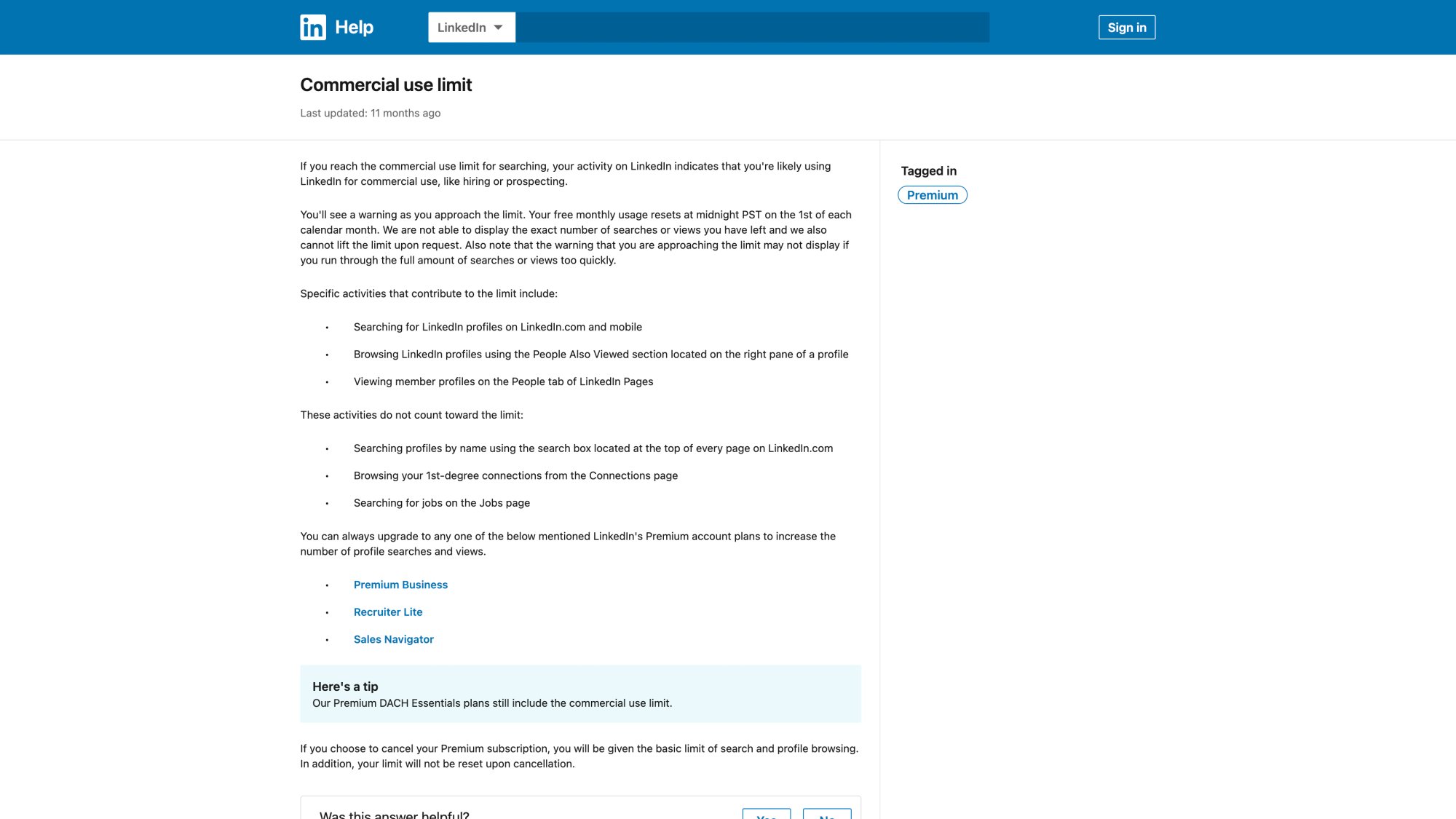
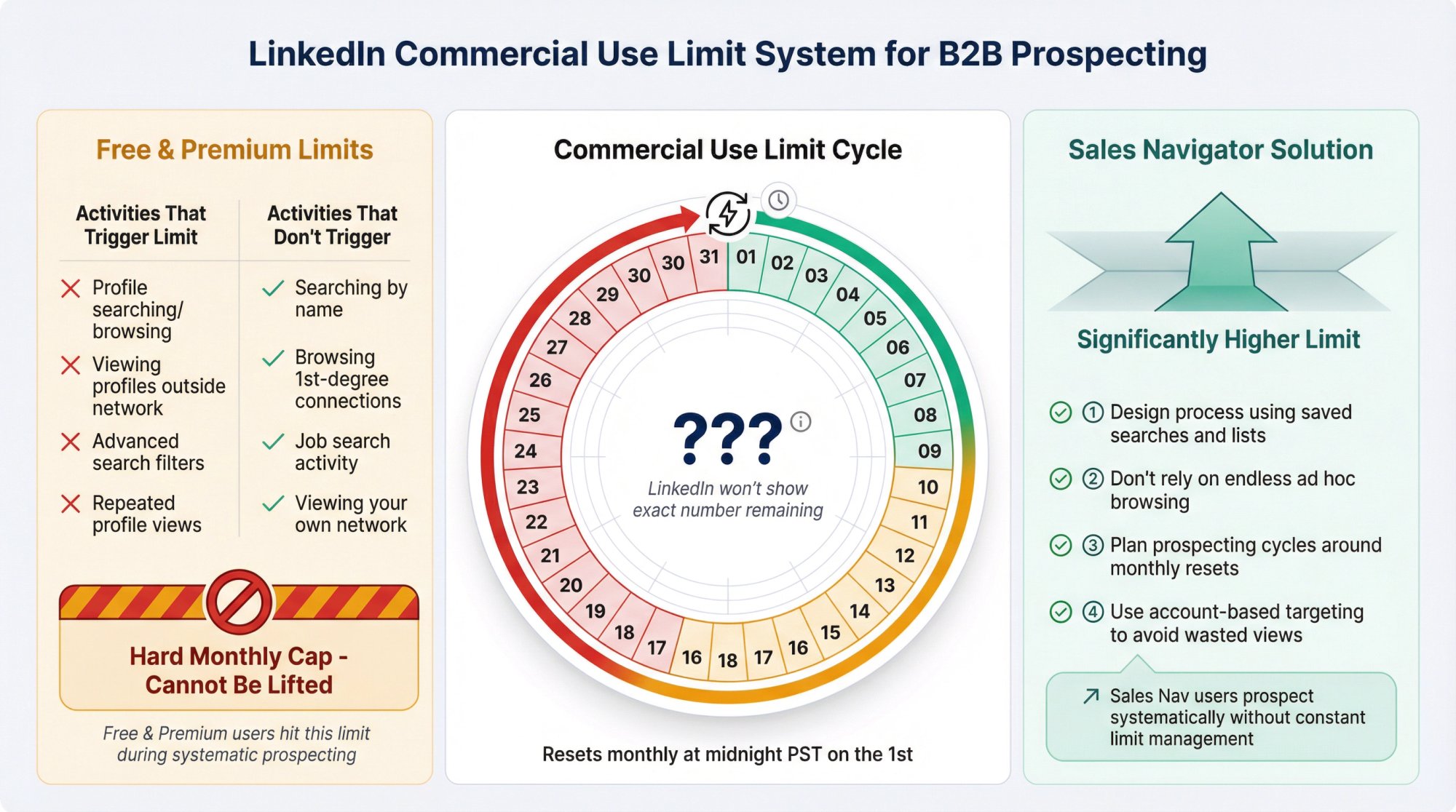
The limit triggers when LinkedIn detects usage consistent with hiring or prospecting
It resets monthly at midnight PST on the 1st
LinkedIn won't show the exact number remaining and can't lift it on request
Certain activities contribute (profile searching/browsing) and some don't (searching by name, browsing 1st-degree connections, job search)
LinkedIn states you can upgrade to Premium Business, Recruiter Lite, or Sales Navigator to increase the number of searches and views allowed.
The tactical reality
If you're building pipeline from LinkedIn:
① Design a process using saved searches and lists (Sales Nav strength)
② Don't rely on endless ad hoc browsing (inefficient and hits limits)
③ Plan prospecting cycles around monthly resets if you're on Premium
④ Use account-based targeting to avoid wasted profile views
This is one of the hidden reasons Sales Navigator becomes table stakes for real outbound teams. You're not constantly managing artificial constraints. You're prospecting.
How to Choose the Right Plan in 2 Minutes
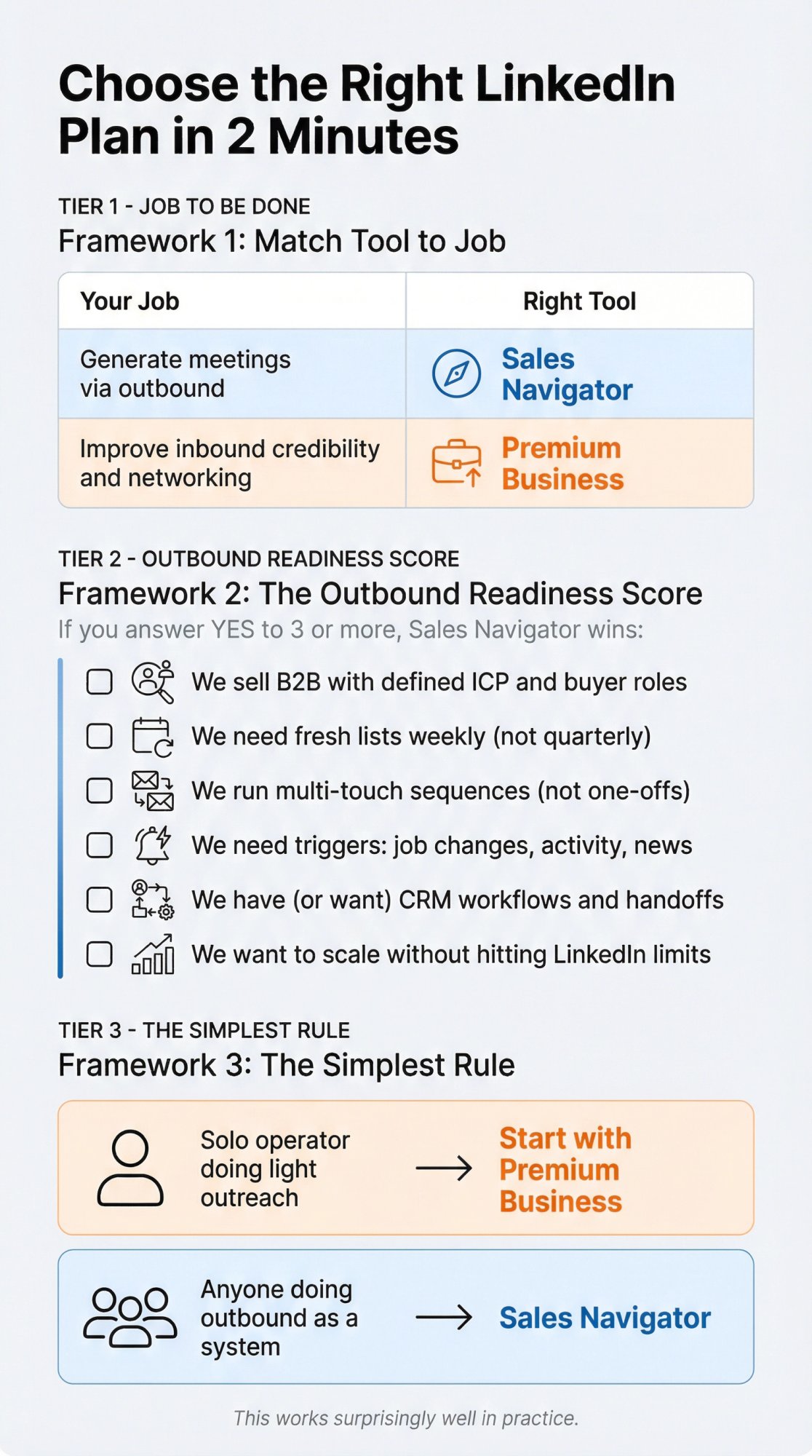
Decision framework 1: job to be done
Match the tool to the job:
Your Job | Right Tool |
|---|---|
"Generate meetings via outbound" | Sales Navigator |
"Improve inbound credibility and networking" | Premium Business |
Simple. Direct. Accurate.
Decision framework 2: the outbound readiness score
If you answer "yes" to 3 or more, Sales Navigator is usually the better investment:
We sell B2B with a defined ICP and specific buyer roles
We need fresh lists weekly (not once a quarter)
We run multi-touch sequences (not one-off messages)
We need triggers like job changes, activity, and company news
We have (or want) CRM workflows and clean lead handoffs
We want to scale prospecting without constantly hitting LinkedIn limits
If you answer "no" to most and mainly want profile insights, occasional InMail, and general networking perks, Premium Business covers you.
Decision framework 3: the simplest rule
Solo operator doing light outreach: Start with Premium Business
Anyone doing outbound as a system: Sales Navigator
This works surprisingly well in practice.
Step-by-Step Workflows You Can Start This Week
Most comparison articles don't give you implementation paths. Here are two you can start using immediately.
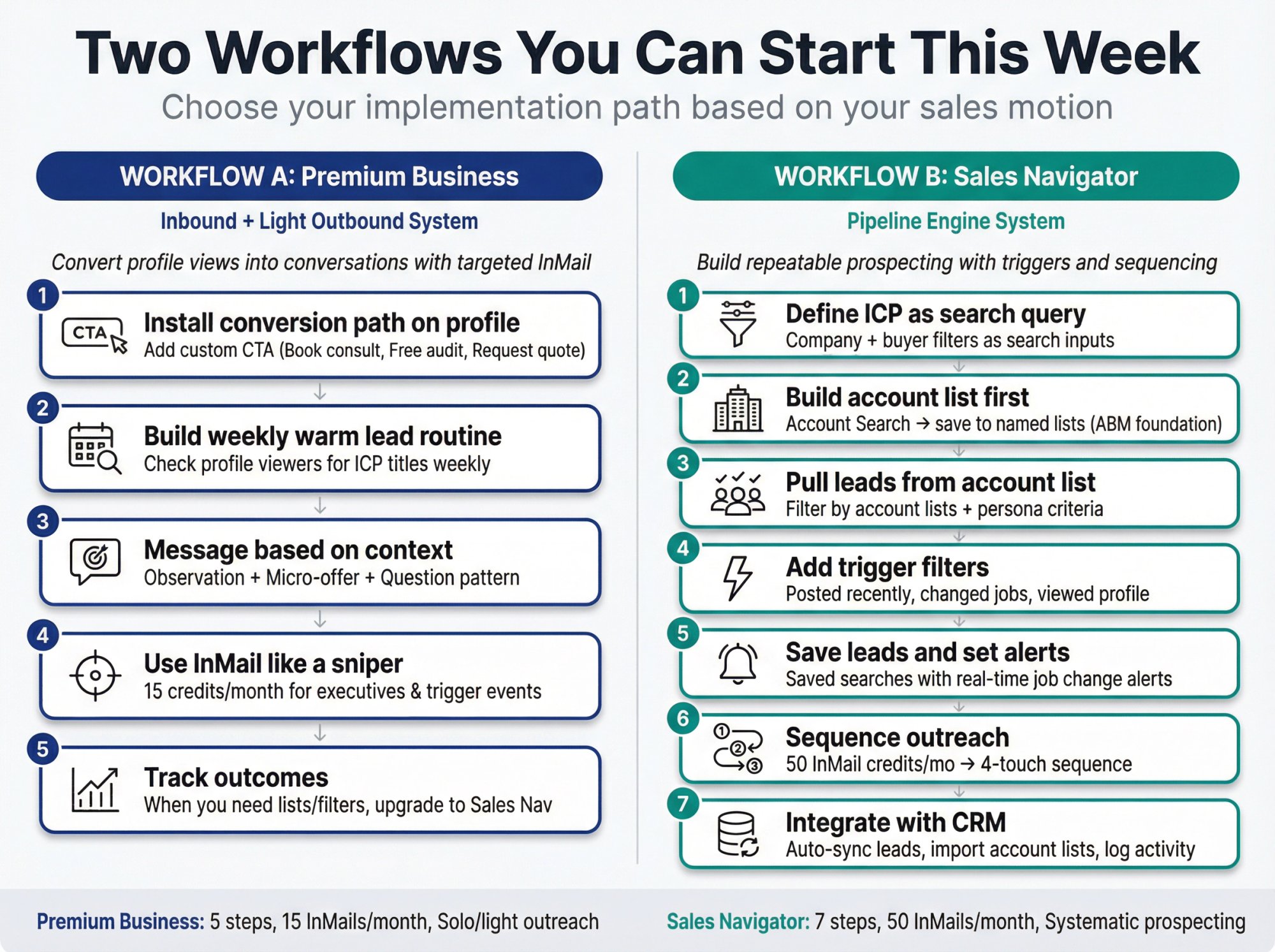
Workflow A: Premium Business "inbound + light outbound" system
Goal: Convert profile views and warm network activity into conversations while sending targeted InMails strategically
① Install a conversion path on your profile
Premium Business supports custom CTAs and service buttons.
Your CTA should be one of:
"Book a 15-min consult"
"Get a free audit"
"Request a quote"
Make it specific and low-friction.
② Build a weekly "warm lead" routine
Check who viewed your profile weekly. Look for:
Your ICP titles and industries
Buyers at target accounts
People with immediate relevance to your offer
Premium emphasizes these profile insights and visibility features.
③ Message based on context
Skip "Thanks for viewing my profile" templates.
Use this pattern instead:
Observation (real and specific to them)
Micro-offer (helpful and small)
Question (easy to answer)
Example: "Saw you're building out the sales team at [Company]. We just published a hiring playbook for scaling SDR teams that might be useful. Would you want the PDF?"
④ Use InMail like a sniper
You have 15 credits/month. Use them for:
Executives outside your network
People who repeatedly view your profile
Prospects with immediate trigger events (funding, new role, posted relevant content)
Don't waste credits on cold, generic outreach. Make every InMail count.
⑤ Track outcomes
Premium Business can help you start conversations. But if you're not turning it into a repeatable list-building process, you'll hit a ceiling.
When you start thinking "I wish I could save these people into lists" or "I need better search filters," that's the signal to upgrade to Sales Nav.
Workflow B: Sales Navigator "pipeline engine" system
Goal: Build a repeatable system for prospecting, targeting, triggers, and sequencing
① Define your ICP as a search query
Write your ideal customer profile as filter inputs:
Company filters:
Industry (e.g., SaaS, Financial Services)
Headcount range (e.g., 50-500 employees)
HQ region (e.g., United States, Western Europe)
Company type (e.g., Private, Public)
Buyer filters:
Title (e.g., VP Sales, Director of Marketing)
Function and seniority level
Years in role (e.g., less than 2 years = newer to role)
Sales Navigator supports these criteria directly via advanced lead filters.
② Build an account list first
Don't start with people. Start with companies.
Run Account Search with your company criteria
Save qualifying accounts into a named list (e.g., "Series B SaaS 200-1,000 HC")
This creates your ABM foundation
Sales Nav is designed for this account-based workflow.
③ Pull leads from your account list
Sales Navigator lets you filter search results by account lists inside current/past company filters.
Apply your persona filters:
Job title and seniority
Function and department
Years in role and years at company
Now you have leads at your target accounts who match your buyer profile.
④ Add trigger filters to increase reply rates
Layer in timing signals:
Posted recently (more likely active on LinkedIn)
Changed jobs recently (more likely evaluating new vendors)
Viewed your profile recently (warm connection exists)
These are documented in LinkedIn's Sales blog on search filters.
⑤ Save leads and set alerts
This is where Sales Nav becomes a workflow, not just a search engine:
Save leads to lists for organization
Save searches for ongoing monitoring
Enable alerts to get notified when leads change roles, companies post news, or accounts hit milestones
LinkedIn documents sharing lead searches and alert functionality.
⑥ Sequence outreach
Sales Navigator gives you 50 InMail credits/month on Core tier.
A practical outreach sequence:
Engage with a recent post (optional but powerful for warming)
Send connection request with a reason (no pitch)
Short message after they accept connection
Follow-up anchored to a trigger (job change, new post, company news)
The alerts from Step 5 feed this sequence with perfect timing.
⑦ Integrate with CRM if you're serious
Higher Sales Navigator tiers offer CRM integration features, especially Advanced Plus.
This enables:
Automatic syncing of leads and activities
Importing CRM account lists into Sales Nav
Logging InMail activity in your CRM automatically
Without CRM discipline, you'll "do work" without compounding learnings across the team. Integration multiplies the value.
This workflow is how systematic outbound teams use Sales Navigator. It's not magic. It's a repeatable process that generates qualified pipeline consistently.
What ROI Can You Expect from Sales Navigator?
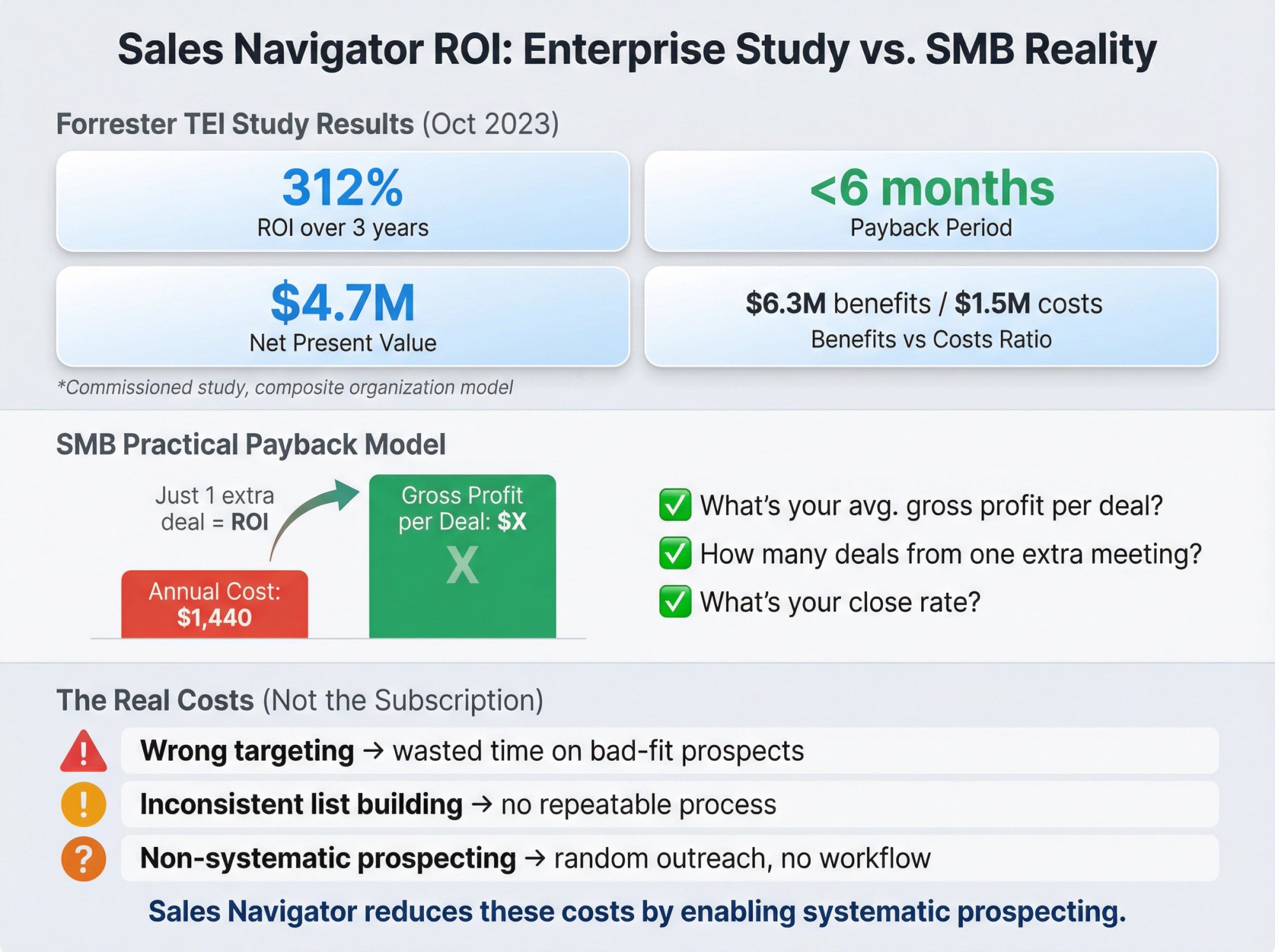
LinkedIn commissioned Forrester Consulting to run a Total Economic Impact™ study on Sales Navigator, published October 2023.
Key findings from the composite organization model:
312% ROI over 3 years
Payback in less than 6 months
$4.7M net present value (NPV)
Benefits vs costs: approximately $6.3M benefits vs $1.5M costs
The study also references ~15 minutes/day per user savings from reduced tool switching and better integration.
Important context: This is a commissioned study. The "composite org" is not your company. Use it as directional evidence, not a guarantee. Forrester explicitly notes it's not meant as competitive analysis and advises using your own estimates.
A practical payback model for SMB outbound
You don't need fancy ROI calculators.
Annual cost of Sales Navigator Core (based on $119.99/month billed annually):
$119.99 × 12 = $1,439.88/year
Now ask yourself:
What's your average gross profit per deal?
How many deals does one extra meeting generate?
What's your close rate?
If Sales Nav helps you source one extra deal that exceeds ~$1,440 in profit, you're already ahead.
The hard truth: The subscription cost is rarely the problem.
The real costs are:
Wrong targeting (wasting time on bad-fit prospects)
Inconsistent list building (no repeatable process)
Non-systematic prospecting (random outreach with no workflow)
Sales Navigator reduces those costs by giving you the infrastructure to prospect systematically.
For most B2B teams, the question isn't "Can we afford Sales Nav?" The question is "Can we afford not to have it if our competitors are using it to build pipeline more efficiently?"
How Outbound System uses LinkedIn for client pipeline
We run multi-channel outbound campaigns for 1,000+ B2B clients, and LinkedIn is a critical component of our lead generation system.
Our LinkedIn lead generation service manages 600+ profiles and has generated 127K+ leads with $26M in closed revenue across our client base.
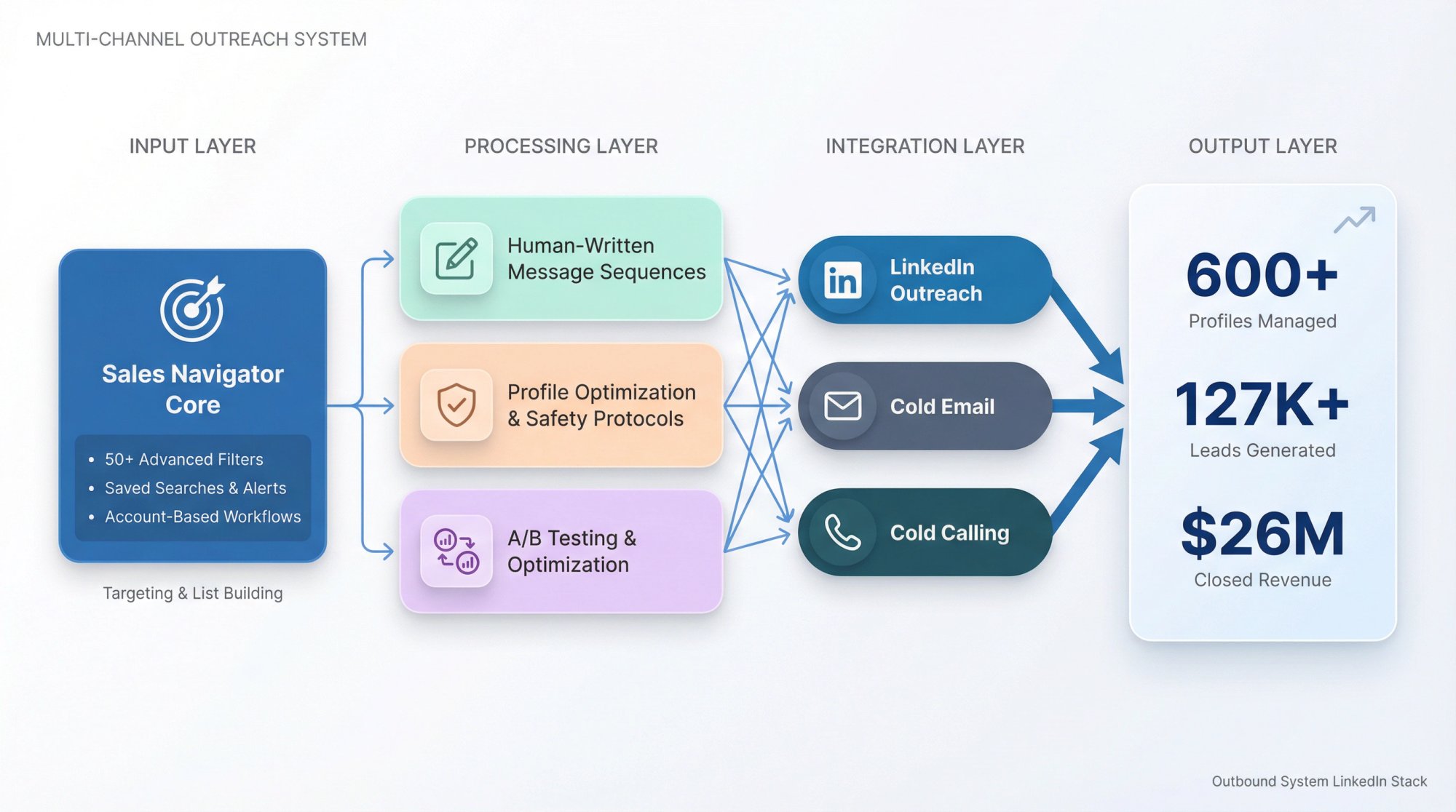
Our LinkedIn outreach stack
We combine:
Sales Navigator for targeting and list building
50+ advanced filters to find exact buyer profiles
Saved searches with alerts for trigger-based outreach
Account-based workflows that align with client ICPs
Human-written message sequences
No templates or generic pitches
Contextual messaging based on triggers and research
A/B testing to optimize reply rates
Profile optimization and safety protocols
Careful throttling to avoid platform flags
Human-like pacing and engagement patterns
5-day setup vs 14+ days with other providers
Integration with cold email and cold calling
Multi-channel sequences that increase contact rates
Unified inbox and real-time metrics
CRM integrations for clean lead handoffs
The point: Sales Navigator is a tool, not a solution.
You still need:
Clear targeting (knowing exactly who to reach)
Quality messaging (giving them a reason to reply)
Systematic follow-up (persistence with context, not spam)
Multi-channel coordination (LinkedIn + email + calling)
If you're doing LinkedIn outreach in-house and it's working well, keep doing it. If you're hitting constraints (time, expertise, deliverability), that's where a done-for-you service like Outbound System adds value.
We handle the infrastructure, copywriting, list building, and meeting scheduling so your team can focus on closing deals instead of managing prospecting operations.
Want to see how we'd build your LinkedIn pipeline? Book a 15-minute consultation to discuss your ICP, target volume, and campaign strategy.
Frequently Asked Questions:
Does Sales Navigator include Premium?
Yes. LinkedIn's documentation states that when you purchase Sales Navigator, your profile automatically upgrades to a Premium Profile by default.
You get all Premium Business features plus the Sales Navigator layer.
Can I have Premium Business and Sales Navigator at the same time?
LinkedIn treats these as subscription plans you switch between, not stack. Official upgrade instructions guide you through upgrading from Premium to Sales Navigator via Admin Center.
For most users, you're choosing one primary plan.
How often can I do a free trial?
LinkedIn states Sales Navigator free trials are available only if:
You're not currently on any paid LinkedIn subscription
You haven't used a LinkedIn free trial in the past 365 days
LinkedIn also notes both Premium Business and Sales Navigator offer trial periods, but only one free trial per 365 days across all products.
How many InMail credits do I actually get?
According to LinkedIn's Help Center:
Premium Business: 15/month
Sales Navigator Core: 50/month
Credits roll over up to a maximum (45 for Premium, 150 for Sales Nav) and get refunded when recipients respond.
Is there unlimited InMail on any plan?
No. LinkedIn explicitly states there is no plan with unlimited InMail credits.
Even the highest enterprise tiers have limits.
Why did I hit the commercial use limit?
LinkedIn's documentation explains:
It triggers based on usage patterns consistent with hiring or prospecting
It resets monthly on the 1st at midnight PST
LinkedIn won't show exact remaining searches/views
Upgrading to Premium Business or Sales Navigator increases the limit
The limit is designed to push heavy users toward paid plans that support commercial activity.
Which plan is better for cold outreach at scale?
Sales Navigator without question.
You get:
50 InMail credits/month (vs 15 on Premium)
Advanced filters to build highly targeted lists
Saved searches and alerts for trigger-based outreach
No commercial use limit restrictions
CRM integration for tracking and scaling
Premium Business works for occasional outreach. Sales Navigator is built for systematic cold outreach campaigns.
Can I export leads from Sales Navigator?
Yes, but it depends on your tier.
Sales Navigator Core: Limited export capabilities (you can copy/paste data)
Sales Navigator Advanced/Advanced Plus: Better export features and CRM integration for automatic syncing
Most teams use Sales Nav as their prospecting layer and sync qualified leads into their CRM for pipeline management.
How long does it take to see ROI from Sales Navigator?
Forrester's commissioned study showed payback in less than 6 months for their composite enterprise scenario.
For SMB teams, it depends on:
How quickly you build quality lists (usually 1-2 weeks to get good at it)
Your outreach volume and reply rates (improve with practice)
Your sales cycle length (B2B can be 30-180+ days)
Most teams see increased meeting volume within 30-60 days if they use Sales Nav consistently. Closed revenue follows based on your typical sales cycle.
Do I need Sales Navigator if I have a small team?
Not necessarily. If you're a solo founder doing occasional outreach, Premium Business might suffice.
But if you're:
Doing outbound systematically (weekly prospecting)
Building lists regularly
Running multi-touch sequences
Targeting specific buyer personas
Then Sales Navigator becomes worth it even for small teams because it makes prospecting dramatically more efficient.
The cost is $1,440/year. If that helps you close even one additional deal, it pays for itself.
What if I can't afford Sales Navigator right now?
Start with Premium Business to get familiar with LinkedIn's paid features.
Or consider a done-for-you service like Outbound System where we handle:
Sales Navigator licenses and expertise
List building and targeting
Message copywriting and sequencing
Profile management and safety
Meeting scheduling and CRM integration
Our LinkedIn lead generation service starts at $499/month and includes everything you need for systematic LinkedIn outreach without managing it in-house.
Many clients find this more cost-effective than buying Sales Navigator licenses for their team plus spending internal time learning and executing.
Can I switch from Premium to Sales Navigator mid-subscription?
Yes. LinkedIn's help documentation walks through upgrading from Premium to Sales Navigator via Admin Center.
When you upgrade, LinkedIn typically pro-rates the remaining Premium subscription toward your new Sales Nav subscription.
You won't lose access to Premium features since Sales Nav includes them.
Final Recommendation: Which Plan Should You Choose?
If you're doing serious B2B outbound, Sales Navigator is almost always the better investment.
It creates a repeatable, operational prospecting system rather than just "better LinkedIn usage."
According to LinkedIn's Sales Solutions positioning, Sales Navigator is purpose-built for finding buyers and growing pipeline.
Choose Sales Navigator if:
You sell B2B with defined ICPs and buyer roles
You need fresh targeted lists weekly or monthly
You run systematic outreach (not occasional networking)
You want trigger-based outreach (job changes, company news)
You have (or want) CRM workflows and team collaboration
You're serious about making LinkedIn a core pipeline channel
The investment is roughly $1,440/year per seat. For most B2B teams, that's less than the gross profit from one additional closed deal.
Choose Premium Business if:
You're a solo operator doing light, occasional outreach
Your strategy is primarily inbound and networking
You mainly want profile insights and credibility features
You send fewer than 15 InMails per month
You're not ready to commit to systematic LinkedIn prospecting
You want to test LinkedIn's paid features before going all-in
Premium Business is half the cost and works well for general professional use.
Or consider a done-for-you approach:
If you want LinkedIn pipeline without the internal lift, Outbound System provides:
Fully managed LinkedIn outreach with Sales Navigator expertise
Human-written messaging that gets replies
Profile optimization and safety protocols to avoid platform flags
Multi-channel integration with cold email and cold calling
Meeting scheduling directly into your calendar
We've generated 127K+ leads and $26M in closed revenue across 1,000+ clients using systematic LinkedIn outreach.
Book a free 15-minute consultation to discuss your ICP, target volume, and campaign strategy.
Additional resources for LinkedIn outreach
If you're implementing LinkedIn prospecting in-house, these guides will help:
What is LinkedIn Sales Navigator? 2026 Guide for B2B – Complete breakdown of Sales Nav features and workflows
LinkedIn Outreach Strategies for B2B Sales Teams in 2026 – Advanced tactics for reply rates and meeting conversion
LinkedIn Connection Request Limit Guide – How to avoid restrictions and scale safely
LinkedIn Advanced Search Tactics – Master the 50+ filters for precision targeting
LinkedIn Lead Gen vs Cold Email – When to use each channel and how to combine them
How to Generate B2B Leads on LinkedIn – Proven strategies for systematic lead generation
B2B Marketing on LinkedIn – Strategic framework for LinkedIn marketing campaigns
How to Use AI for Sales Prospecting – Leverage AI tools to enhance your LinkedIn workflows
The bottom line
LinkedIn Premium vs Sales Navigator isn't really about features or price.
It's about whether you're doing LinkedIn casually or systematically.
Premium Business enhances your LinkedIn experience for networking and credibility.
Sales Navigator transforms LinkedIn into a prospecting machine for pipeline generation.
For most B2B sales teams in 2026, Sales Navigator is the right choice because it creates the infrastructure for repeatable outbound success.
But tools are only part of the equation.
You still need:
Clear targeting (knowing exactly who to reach)
Quality messaging (giving them a reason to reply)
Systematic follow-up (persistence with context)
Multi-channel coordination (LinkedIn + email + calling)
If you're building this in-house, Sales Navigator gives you the platform to execute.
If you want it done for you, Outbound System provides the complete stack with proven results.
Ready to build systematic LinkedIn pipeline?
Book a free consultation to discuss your outbound strategy, target accounts, and growth goals.
We'll show you exactly how we'd build your LinkedIn lead generation system and what results you can expect in the first 90 days.