When you're searching for the "best time to send cold emails," you're not really asking about timestamps.
You're asking when your prospect will actually see your message, when they're most likely to reply (not just open), and how you can stop wasting sends and start booking real meetings.
This guide gives you both: the best default send windows based on the most current research we've analyzed, plus a repeatable system to discover the optimal timing for your specific audience.
Why Cold Email Timing Affects Reply Rates
Think about your own email habits for a second. You probably scan your inbox at certain times and completely ignore it at others. Your prospects behave the exact same way.
Hitting their inbox at the right moment improves the odds that:
Your email sits at the top of the inbox. Emails sent when recipients are actively checking (like the start of their workday) appear near the top, not buried under a pile of newer messages. This prime inbox real estate dramatically increases visibility.
Your message gets read while it's fresh. If a prospect sees your email as it arrives, they can respond while your offer is top of mind. Delay by a few hours, and they might never scroll down far enough to find it.
You avoid the purge. Many professionals have habits like morning inbox triage or end-of-day cleanups. Send your email during the wrong window, and it might get cleared out with newsletters without a glance.
Critical insight: Studies show that 75% of cold email opens happen within the first hour of sending. If your email arrives when your prospect is checking their inbox, you have a much higher chance of engagement.
On the flip side, poor timing can hurt your results or even damage your reputation. An email sent at 11 PM on Sunday might annoy a prospect, or a Friday 4 PM email might be forgotten by Monday morning.
Apple Mail Privacy Protection: Why Open Rates Are Misleading in 2026
Open Rates Are Less Trustworthy Than Ever
Many guides still optimize for opens.
That's a problem.
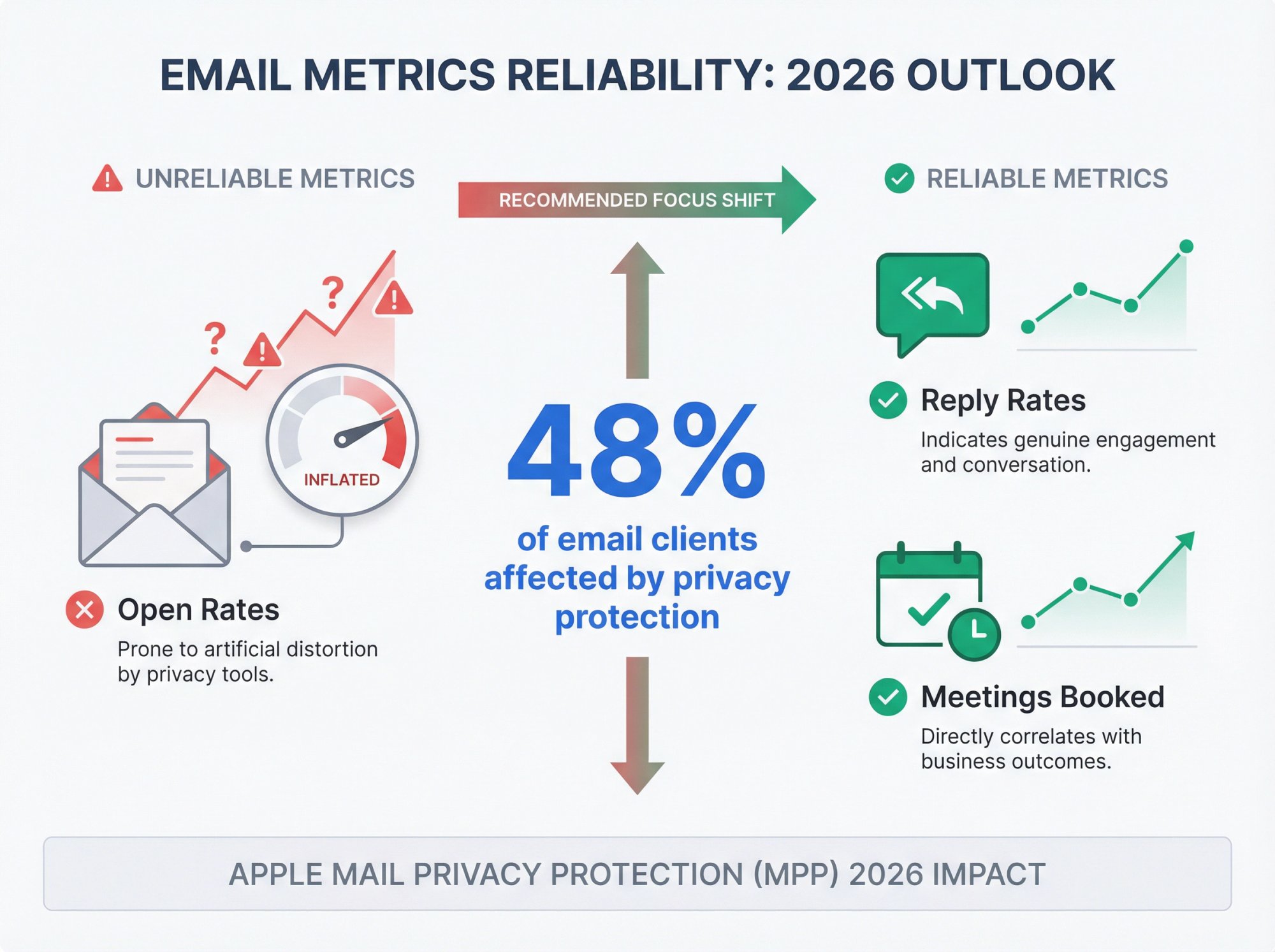
Apple's Mail Privacy Protection (MPP) and related privacy changes mean opens can be inflated or misleading. Twilio SendGrid's guidance on email privacy protection explicitly notes that open tracking remains unreliable due to Apple MPP and other privacy changes, with nearly 48% of email clients affected.
We've published specifically on why open rates can be unreliable and why teams should focus on replies and meetings instead.
In this guide, "best time" means: best time to generate replies and meetings.
What Research Shows: 16.5 Million Cold Emails Analyzed
We've analyzed two major datasets to give you the most accurate timing recommendations:
Study 1: Industry Analysis (16.5 Million Cold Emails)
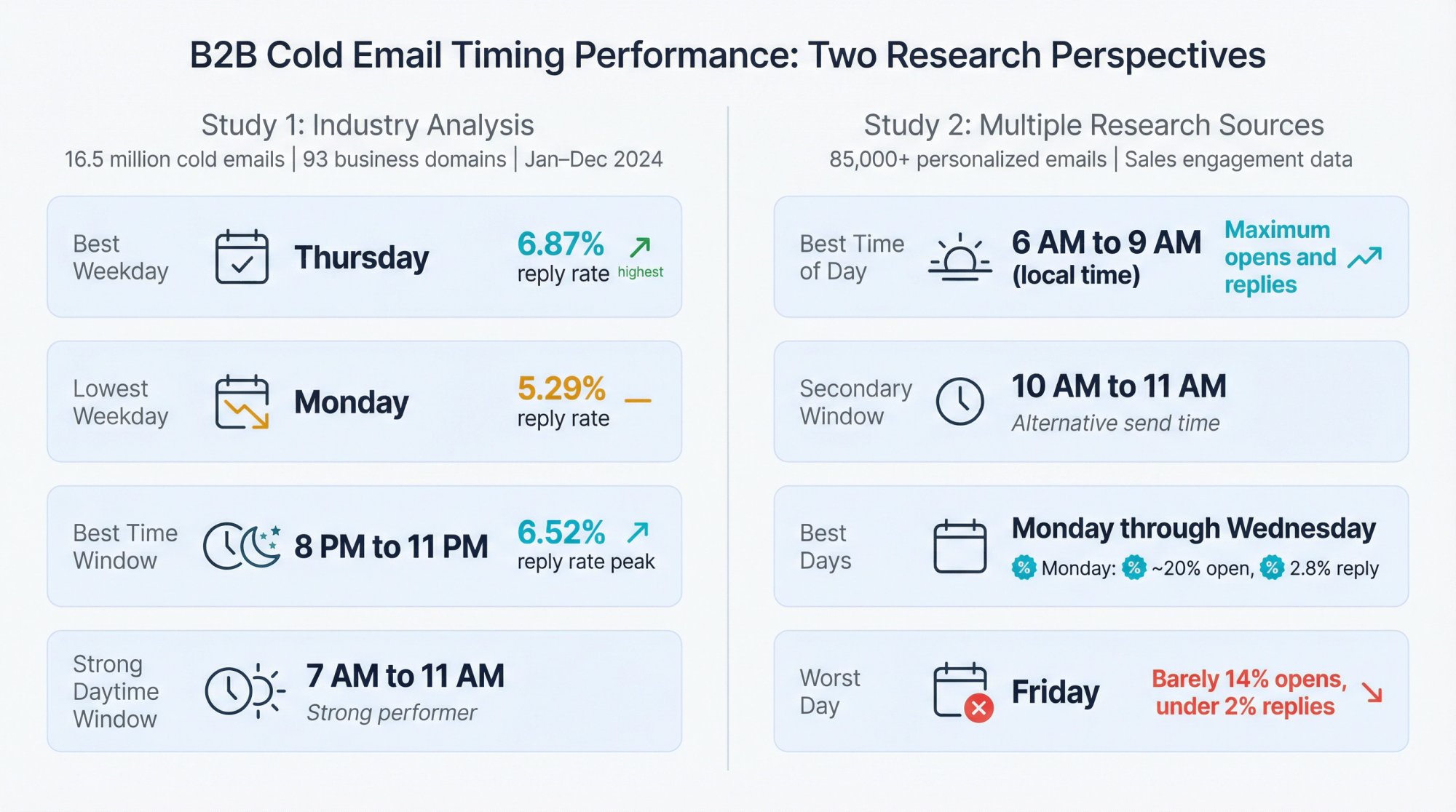
Research analyzing 16.5 million cold emails across 93 business domains covering January through December 2024 reveals compelling timing insights.
Timing Factor | Performance | Key Finding |
|---|---|---|
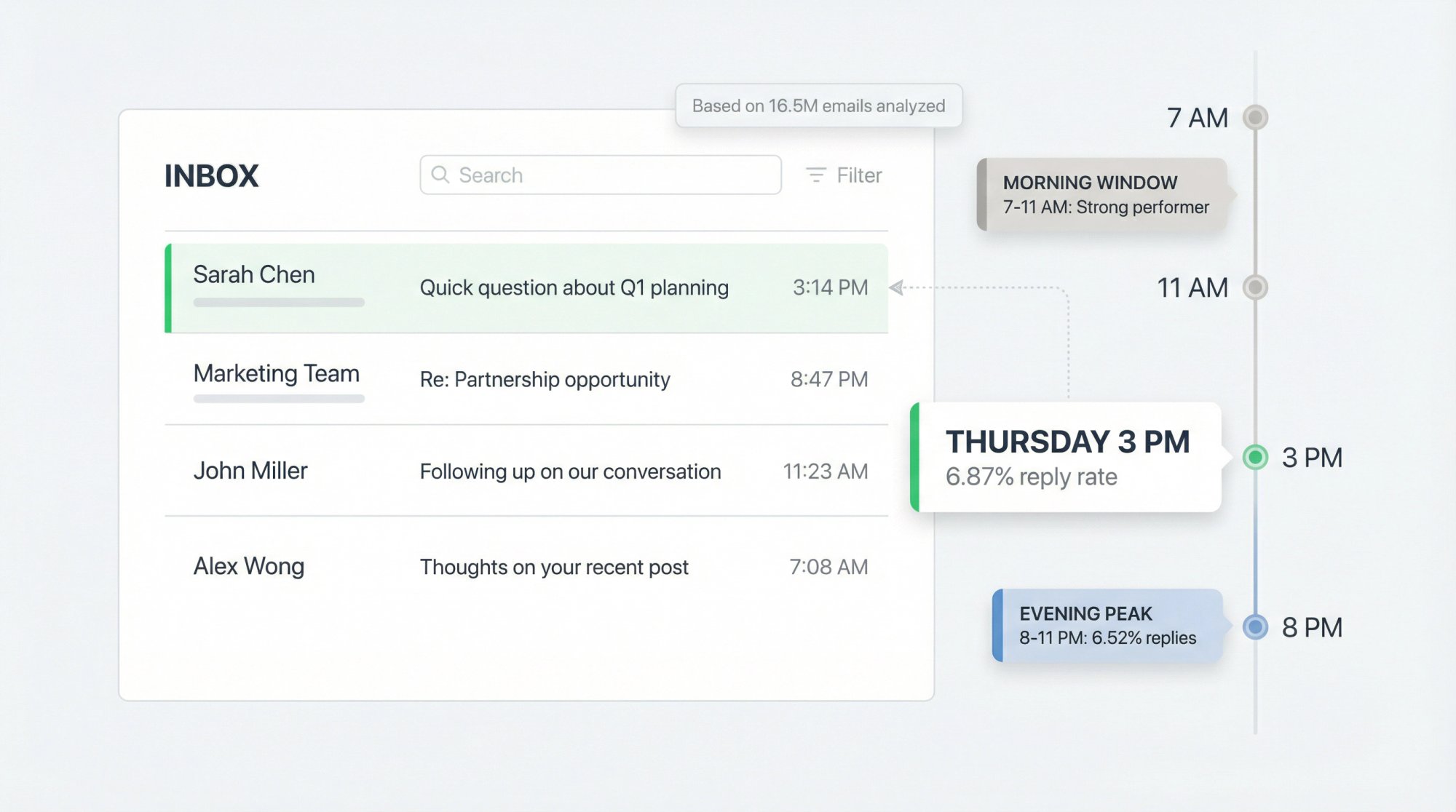
Best Weekday | Thursday | 6.87% reply rate (highest) |
Lowest Weekday | Monday | 5.29% reply rate |
Best Time Window | 8 PM to 11 PM | 6.52% reply rate peak |
Strong Daytime | 7 AM to 11 AM | Described as strong performer |
Study 2: Multiple Research Sources (85,000+ Emails)
Analysis of 85,000+ personalized outreach emails and sales engagement data reveals:
Timing Element | Recommendation | Performance |
|---|---|---|
Best time of day | 6 AM to 9 AM (local time) | Maximum opens and replies |
Secondary window | 10 AM to 11 AM | Alternative send time |
Best days | Monday through Wednesday | Monday: ~20% open, 2.8% reply |
Worst day | Friday | Barely 14% opens, under 2% replies |
When To Send Cold Emails: Quick Answer for B2B
If you want a strong default that works for most B2B outbound:
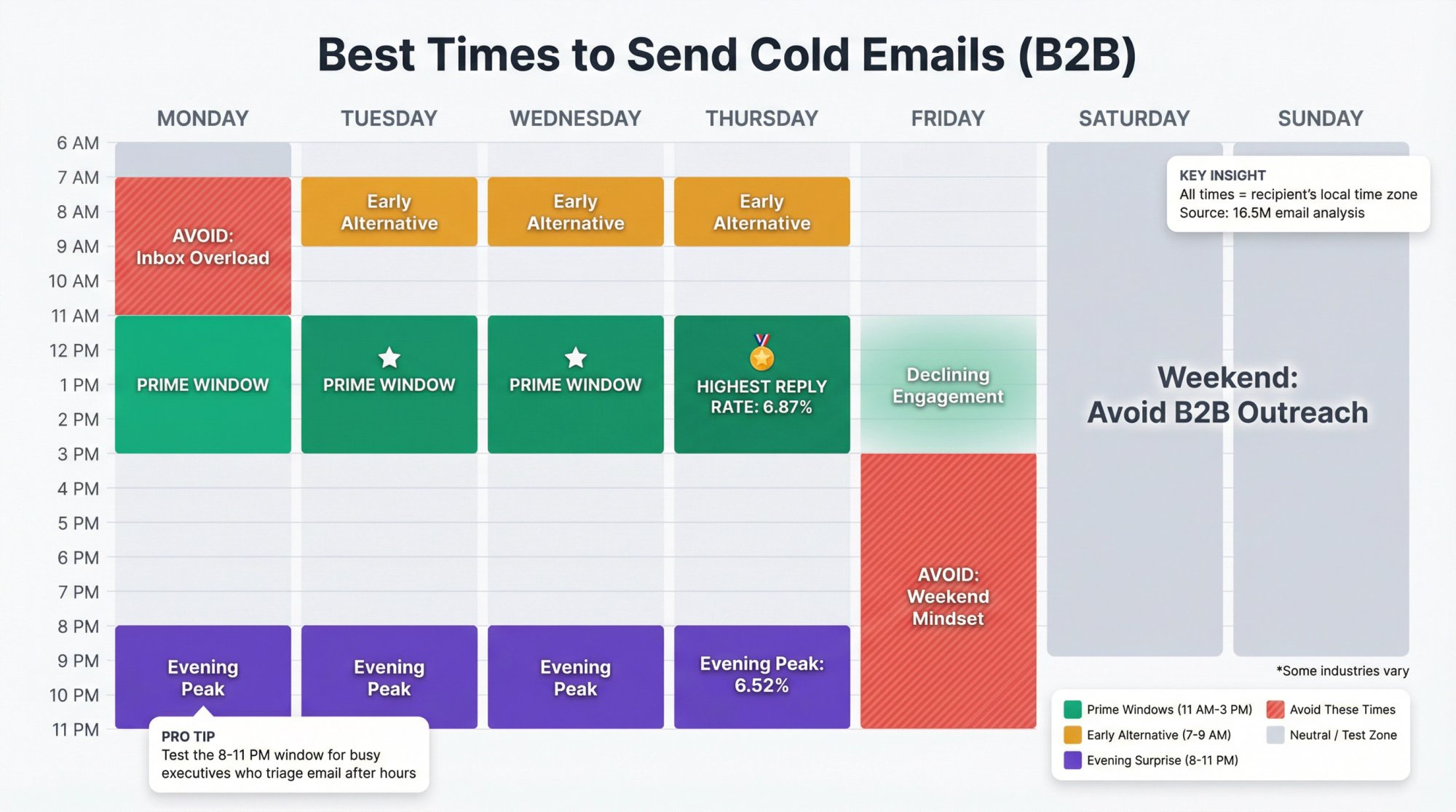
Factor | Recommendation |
|---|---|
Best days | Tuesday through Thursday, with Thursday often performing best |
Best daytime window | 11:00 AM to 3:00 PM (recipient's local time) |
Alternative window | 7:00 AM to 9:00 AM (early morning) |
Surprise high-performer | 8:00 PM to 11:00 PM (evening sends) |
Avoid | Monday mornings and Friday late afternoons |
Why these windows?
Because recent cold email benchmarks point toward midday and afternoon as top-performing for replies, plus there's a strong evening reply peak that most guides don't mention.
But (and this is critical): timing won't fix bad fundamentals.
Read This Before You Obsess Over Send Time
Why Timing Won't Fix Bad Deliverability or Wrong Targeting
Send time is a multiplier, not a miracle.
If your emails are landing in spam, getting filtered, or going to the wrong people, the perfect timing won't matter much.
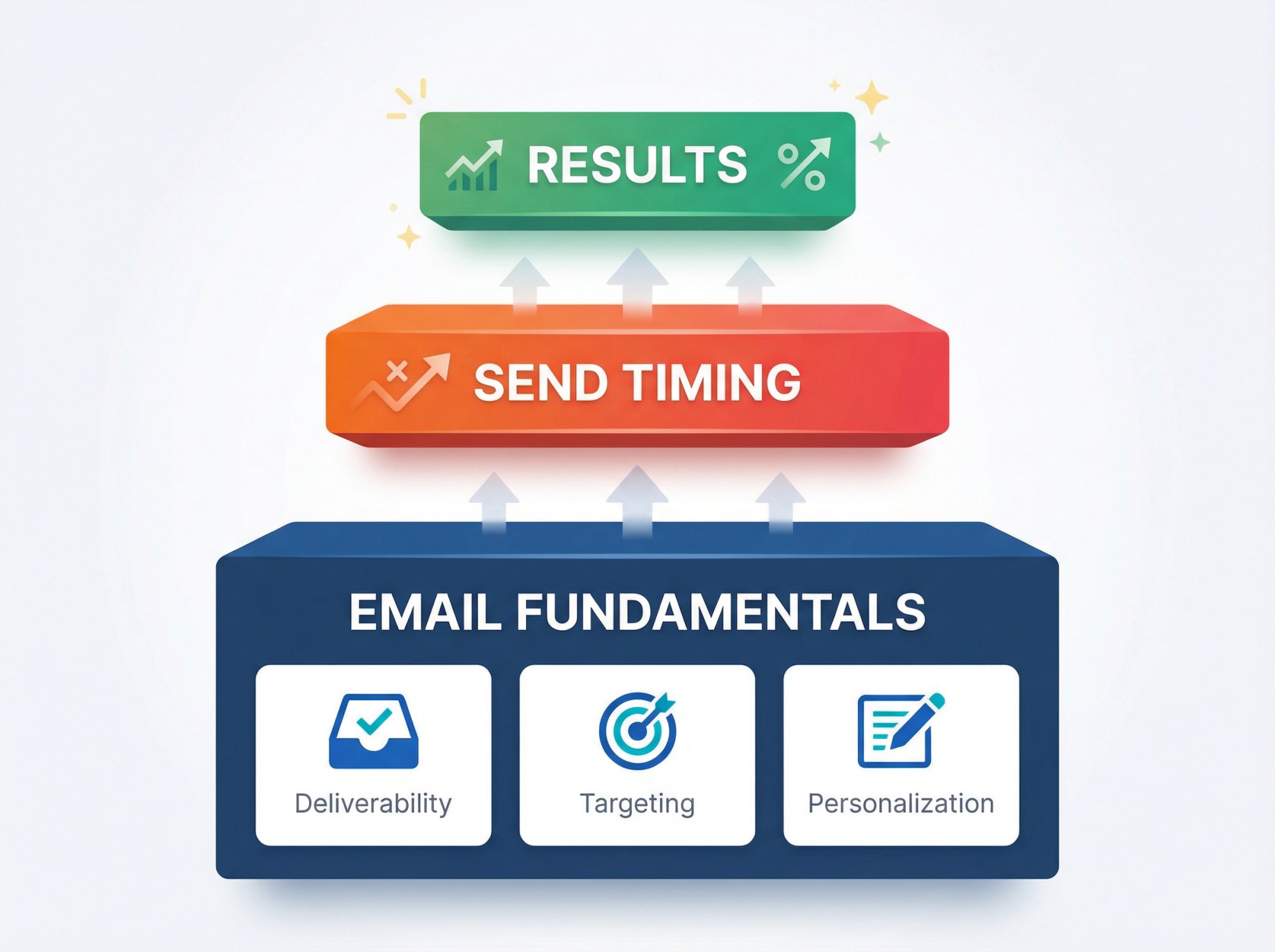
At Outbound System, our positioning is based on the idea that outbound results come from a system (deliverability plus list quality plus personalization plus iteration), not a single tactic like send time.
That said: once your fundamentals are solid, send timing can deliver meaningful lift, especially when you're operating at scale and competing for attention at the top of the inbox.
Best Time Of Day To Send Cold Emails
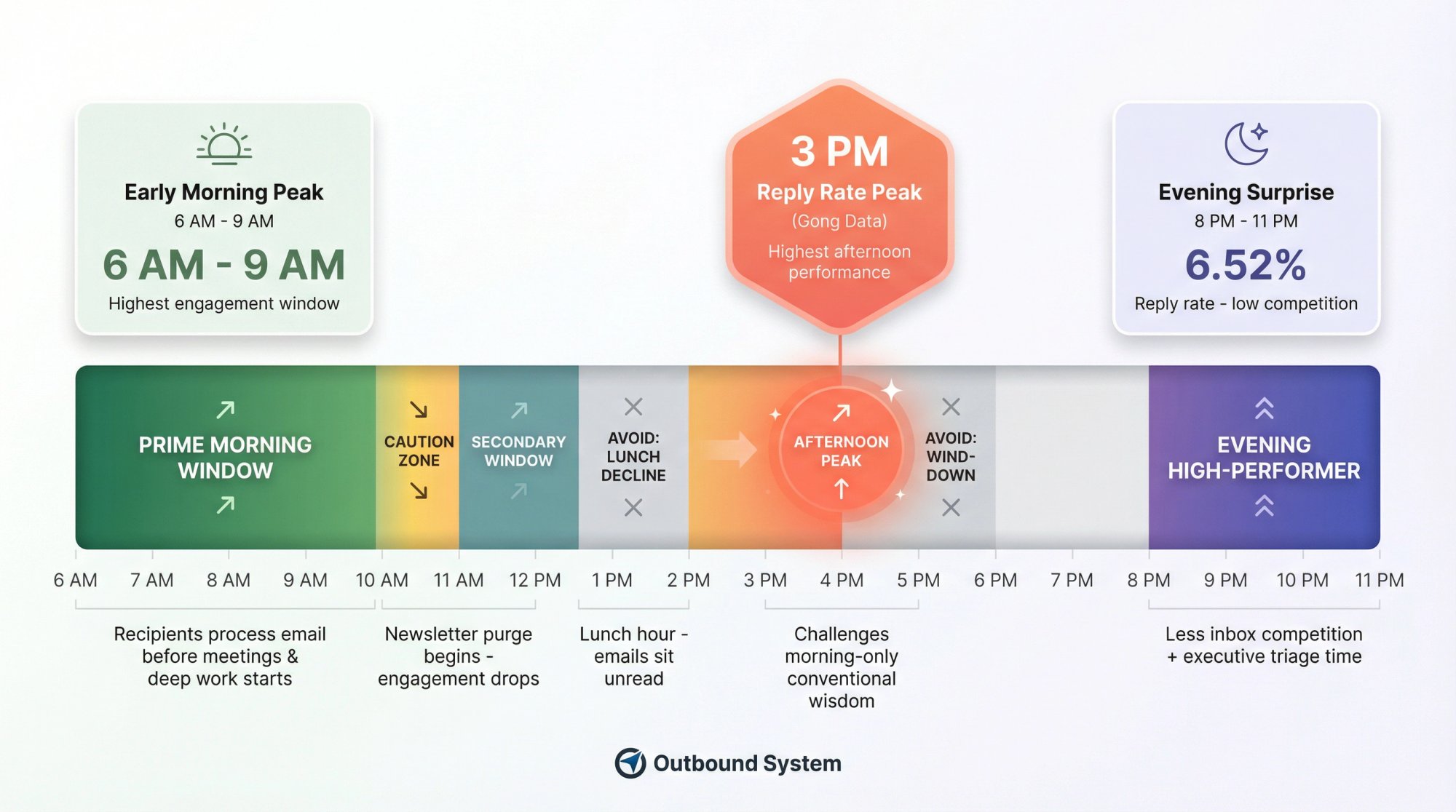
Early morning is king when it comes to cold email timing.
Multiple data-driven studies consistently find that the highest engagement occurs during the first few hours of the workday. The best time to send cold emails is between 6 AM and 9 AM in the recipient's local time.
In practical terms, that means hitting inboxes right around the time people arrive at work and check email as part of their morning routine.
Why 6 AM to 9 AM Works Best for Cold Emails
Recipients tend to process email before diving into meetings or deep work. Your message stands a greater chance of being read when it arrives during that morning email scan.
After about 10 AM to 11 AM, attention shifts to tasks and meetings, and emails become more of a distraction. In fact, research found a noticeable drop in engagement around 10 AM, likely because by then people start clearing out less important emails (newsletters, promos) from their inbox.
The takeaway: you want your cold email to land before that mid-morning purge happens.
Optimal Send Window: The Specifics
Aim to have your email delivered in the 7:00 AM to 9:00 AM range in your prospect's time zone.
If you can schedule emails, consider timing them just before the hour so they appear near the top when the person checks their inbox at the start of the hour. For instance, scheduling emails for around 7:45 AM to 8:00 AM local time can position your message right at the top of the inbox during the 8 AM to 9 AM peak checking period.
Late Morning (10 AM to 11 AM) As A Secondary Window
If early morning isn't feasible, the next best time block is usually around 10:00 AM to 11:00 AM.
During this late-morning period, many professionals have settled into work and often take a short breather, maybe checking email again before lunch. Some data even indicates a slight bump in replies around 11 AM or even early afternoon (1 PM).
However, results can be mixed. While one dataset showed strong reply counts at 1 PM, others saw a significant dip at 10 AM due to the newsletter purge effect. Treat late morning as an alternative send time to test, but be cautious.
The Afternoon Surprise: 3 PM Peak
Here's something interesting: Gong's sales engagement benchmarks report that emails sent in the afternoon have the highest reply rates, with 3 PM cited as the optimal time.
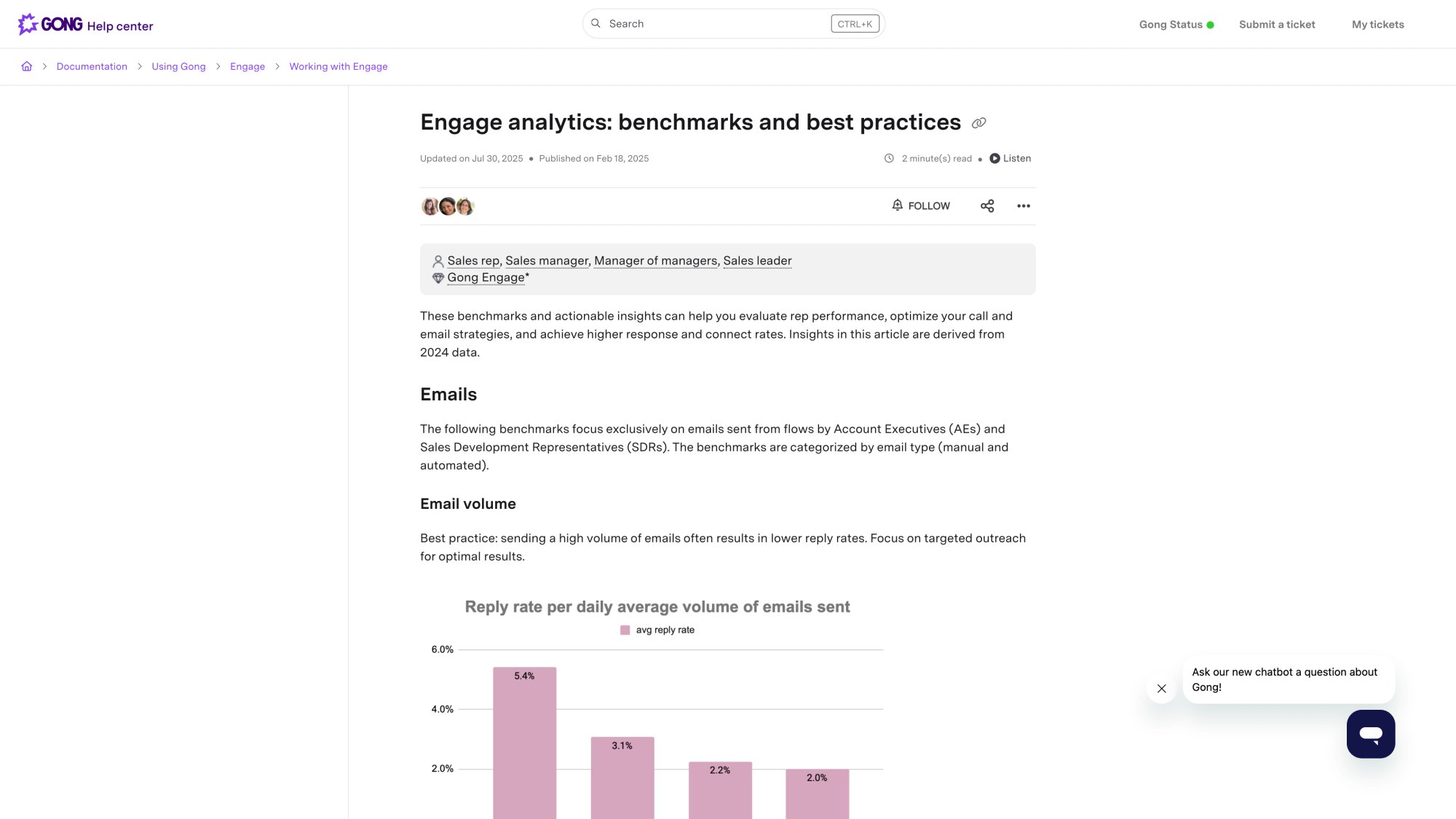
If you can't send at 3 PM, the next best times are 11 AM and 1 PM.
This challenges the conventional "early morning only" wisdom. A simple "reply-optimized" schedule often outperforms the classic "early morning top of inbox" approach.
Should You Send Cold Emails in the Evening? (8 PM to 11 PM)
This is where it gets counterintuitive.
Research shows that 8 PM to 11 PM produces surprisingly high reply rates, peaking at 6.52%.
Why would evening sends work?
→ Less inbox competition. Fewer senders use this window, meaning your email stands out.
→ Executive inbox habits. Many decision-makers triage email after hours when they have focused time.
→ Fresh start effect. Your email is one of the first things they see the next morning.
Just make sure you're sending in the recipient's local time zone, so you're not hitting someone at 2 AM.
Times To Avoid During The Day
Just as important as the best times are the worst times:
Time Window | Why Avoid |
|---|---|
Before 6 AM | Email gets buried by morning; looks overly automated |
Lunch hour (12 PM to 1 PM) | People step away; emails sit unread and get buried |
Late afternoon (after 3 PM) | People wrapping up, in meetings, mentally checking out |
Evening/night (except 8-11 PM test) | Won't see until next morning; mixed with overnight spam |
Best Day Of The Week To Send Cold Emails
Picking the right day is just as crucial as picking the right time.
Thursday: The Surprising Winner
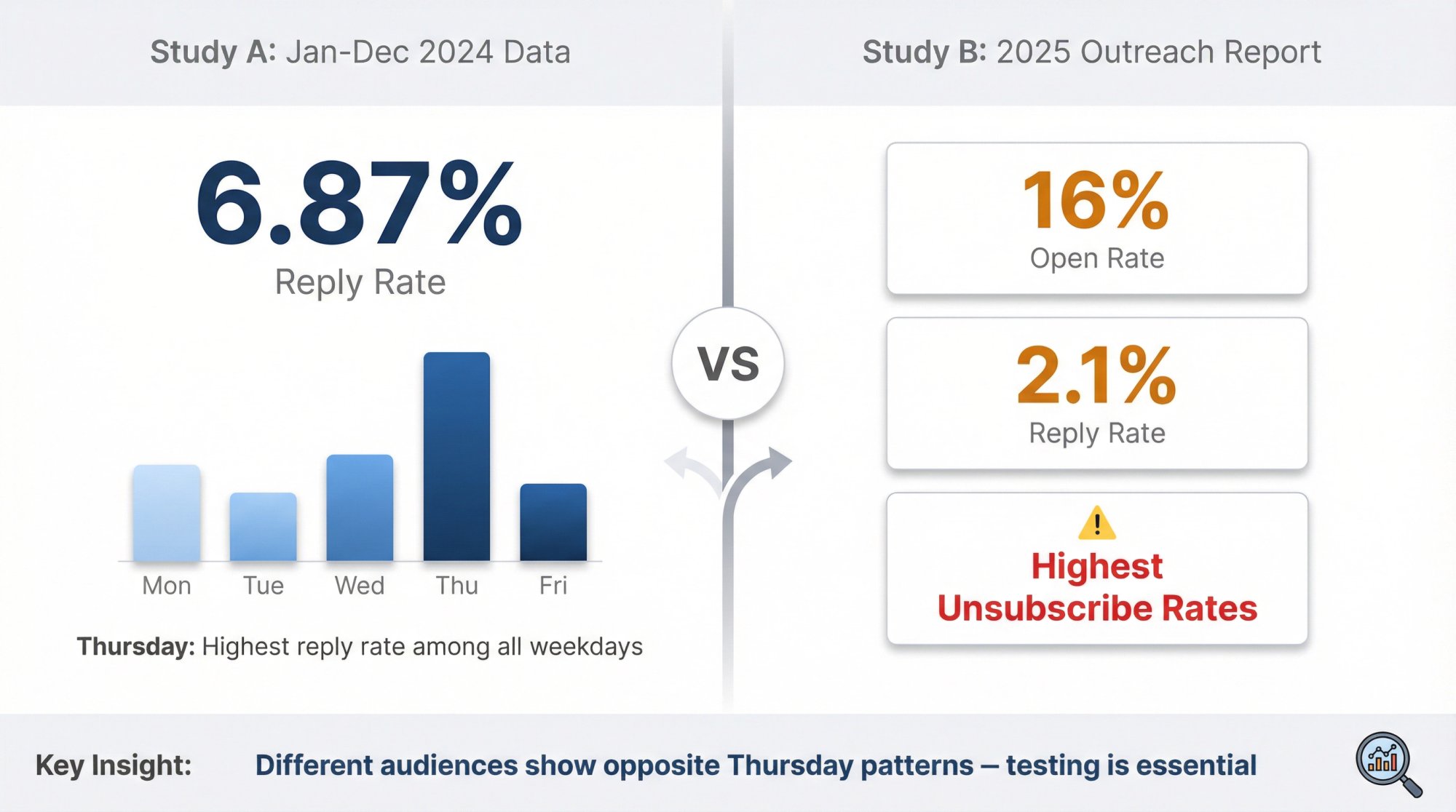
In recent research (based on Jan to Dec 2024 data), Thursday produced the highest reply rate among weekdays at 6.87%, while Monday lagged at 5.29%.
By Thursday, people are in the groove of the week. Initial Monday/Tuesday chaos has settled, and many are more willing to engage in conversations by mid-week. For salespeople focused on replies or conversions (not just opens), Thursday is a prime day.
It's also typically a good day for scheduling calls or meetings, so a cold email that lands Thursday might catch a prospect in a planning mindset before their calendar fills up with end-of-week meetings.
Learn more about the best days to email B2B prospects.
Monday: The Fresh Start Psychology
Contrary to the notion that people hate Monday emails, recent data finds Monday can yield strong results.
One study reported an average open rate around 20% on Mondays, with a 2.8% reply rate, the highest reply rate of any day.
Why would Monday perform well?
The "fresh start" psychology. After the weekend, professionals often come in on Monday ready to organize their week. They tend to scan through communications with an open mind toward new opportunities.
Additionally, since many salespeople avoid Mondays (fearing prospects are too busy catching up), a well-timed Monday morning email can actually encounter less competition in the inbox.
Tip: Focus on Monday morning for your most important cold emails. The first morning of the week, around 7 AM to 9 AM Monday, combines the advantageous timing with the fresh-start mindset. (Do avoid Monday late afternoon, though. That's when fatigue sets in and emails get ignored.)
Tuesday: Historically Strong
Tuesday has long been a favorite for email marketers, and it remains a high-performing day for cold outreach.
Open rates on Tuesday are typically in the high-teens (around 18%) with reply rates roughly 2.5%. Tuesday benefits from the momentum of the workweek. People have cleared out Monday's backlog and are actively working on projects, making them receptive to relevant pitches.
In fact, over half of "best time to email" studies in past years have identified Tuesday as the top day. You won't go wrong sending on Tuesday, especially mid-morning Tuesday which often sees good engagement.
Just be aware that because Tuesday is popular, prospect inboxes might also be a bit more crowded (everyone else heard Tuesday is best, too). So ensure your content stands out with strong cold email copywriting.
Wednesday: The Reply Rate Sweet Spot
Wednesday is interesting. Some data shows its open rates a tad lower than Tuesday's, but reply rates on Wednesday can rival Monday's.
In one 12-month analysis, Wednesday emails had about a 17% open rate but a 2.6% reply rate, nearly matching Monday's 2.8%.
Consider making Wednesday sends part of your follow-up cadence if you initially emailed on Monday. It's a second chance while still in a high-engagement window.
Thursday: Diminishing Returns
By Thursday, the week's intensity often peaks.
Email stats show a decline in engagement on Thursdays (around a 16% open rate and roughly 2.1% replies in one dataset). Prospects may start to defer non-urgent discussions ("let's deal with this next week"), and inboxes get saturated with webinars, newsletters, and late-week pushes.
Notably, one 2025 outreach report found Thursday emails had the highest unsubscribe rates of any weekday. This suggests recipients might be growing weary of unsolicited pitches by Thursday and quicker to opt out.
Wait, didn't we just say Thursday is the winner?
Yes. This shows why your mileage may vary based on your audience. Different datasets show Thursday fatigue for some audiences and Thursday strength for others. That's exactly why testing is crucial.
Friday: The Worst Day For Cold Email
Nearly every analysis agrees: Friday is the poorest day for cold emails.
Opens drop to the low teens (circa 14%) and replies to around 1.5% to 1.8%, the lowest of the week.
Think of Friday mindset: people are finishing work, traveling, or mentally tuning out. The "weekend effect" kicks in strongly. Very few prospects want to start a new conversation on a Friday, especially in the afternoon.
Often, a cold email sent on Friday will get shelved ("I'll deal with this Monday") and then promptly forgotten when Monday brings a new deluge.
Unless you have no other choice, avoid sending cold emails on Friday, particularly after lunchtime Friday.
The only mildly defensible slot is Friday morning (when some are still in work mode), but even those tend to underperform other weekdays.
Day-of-Week Performance Summary
Here's a quick reference table based on the research:
Day | Open Rate | Reply Rate | Notes |
|---|---|---|---|
Monday | ~20% | 2.8% | Fresh start effect; less competition |
Tuesday | ~18% | 2.5% | Historically strong; high inbox competition |
Wednesday | ~17% | 2.6% | Reply rate sweet spot |
Thursday | ~16% | 2.1% to 6.87% | Mixed results; test for your audience |
Friday | ~14% | 1.5% to 1.8% | Worst performer; avoid late afternoon |
Should You Send Cold Emails On Weekends?
In most cases, weekends are a no-go for cold email outreach.
Business contacts generally treat their Saturdays and Sundays as off-limits for work emails. Any unsolicited email you send then might not just be ignored, but could even create a negative impression.
Here's why you should usually avoid weekends for B2B cold emails:
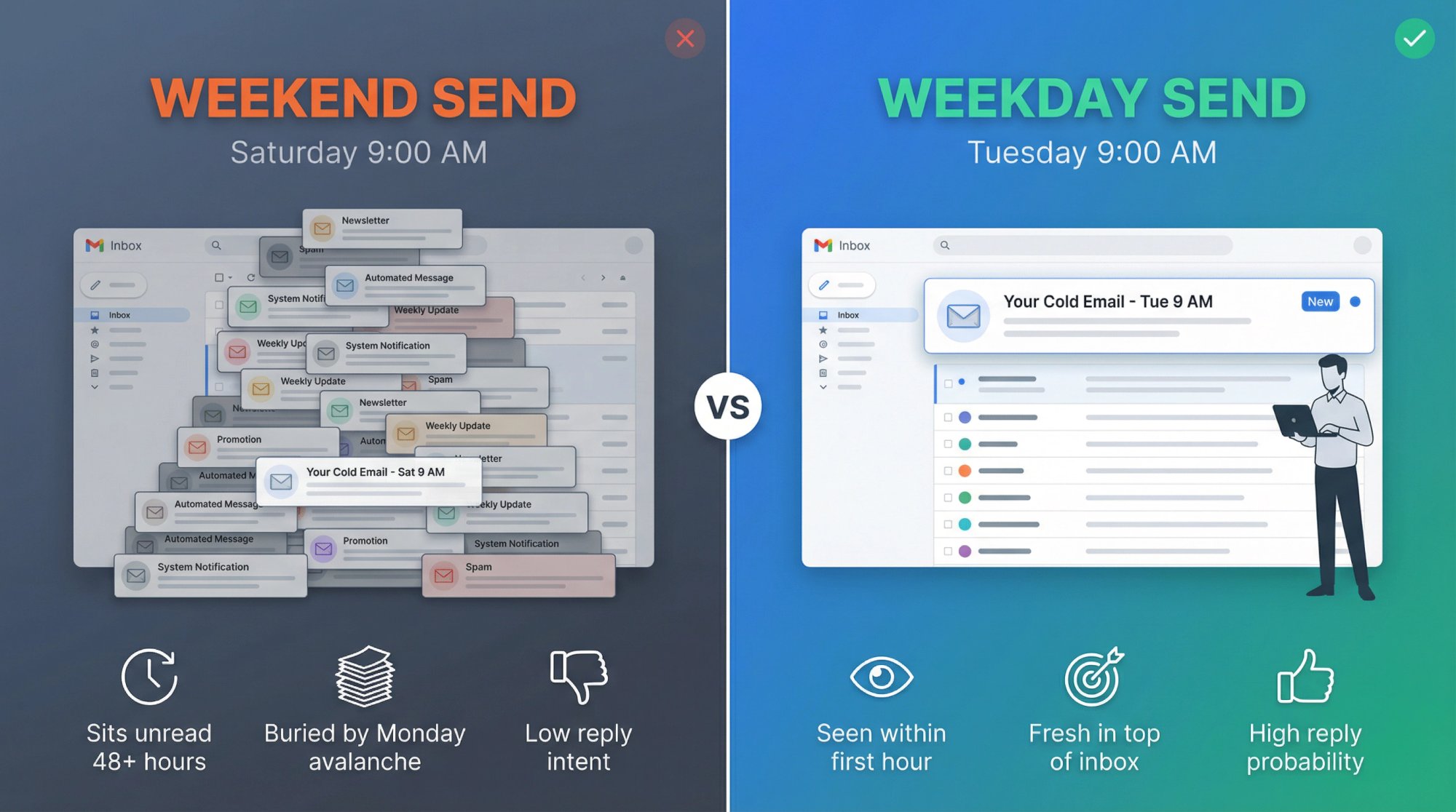
Low attention and buried emails. Few professionals spend their weekends checking work email diligently. An email that arrives on Saturday might sit unopened until Monday morning. By then, it's buried under two days' worth of other emails (the "Monday morning avalanche").
Your cold email is likely to be skipped as people wade through their backlog. In essence, a weekend email often just becomes Monday's unread news.
Work-life boundaries. Many decision-makers use weekends to unplug. Receiving a sales pitch on their day off can be seen as intrusive or tone-deaf. You don't want to come across as not respecting their personal time.
In some cases, emailing on a Sunday could even be interpreted as desperation or overly aggressive outreach (not a tone you want to set).
Lower reply intent. Even if someone does open a work-related email over the weekend, they are less inclined to reply immediately because they assume a conversation will happen during workdays. By the time Monday comes, that initial interest may have fizzled or been replaced by more urgent tasks.
The Monday Overflow Effect
One hidden downside of weekend sends is how they add to Monday congestion.
If you email a prospect on Saturday or Sunday and they don't see it until Monday, your message is now part of the overwhelming pile they must process at the start of the week.
Far from giving you a head start, this can actually put you at a disadvantage. It's better to time your email to land fresh on Monday morning (ahead of the clutter) than to have it languish in the inbox since Saturday.
Exceptions: When Weekend Emails Might Work
There are a few scenarios where sending on a weekend could be acceptable or even beneficial:
International time zones. If you're in a different country from your prospects, be mindful of calendar differences. Your Saturday afternoon might be your prospect's Monday morning in another region. Always consider the recipient's local calendar.
Industries that work weekends. Certain sectors don't follow a Monday to Friday schedule. For example, hospitality, restaurants, retail, event management often have peak times on weekends. A cold email to a hotel manager might actually get more attention on a Saturday when they're at work, versus Monday when they're taking a break after a busy weekend.
Similarly, real estate agents or small business owners often catch up on emails during weekends.
Entrepreneurs and workaholics. Founders of startups or executives in high-pressure roles sometimes use weekends for "deep work", catching up on reading and emails they ignored during the week. If you know your prospect profile is the type to be on email Saturday morning with a coffee, there's a chance a weekend email could stand out (since few others are sending then).
One advantage here is reduced competition in the inbox. Fewer cold emails arrive on weekends, so yours might be more visible.
Best Practices If You Do Send On A Weekend
If you decide there's a good reason to try a weekend send, follow these guidelines:
Prefer Saturday morning. Among weekend times, early Saturday (around 8 AM to 10 AM) is arguably the "safest." The workweek is freshly over, and some people do check emails Saturday morning out of habit. Avoid Saturday night or Sunday unless targeting regions where that's a workday.
Acknowledge the timing. A clever tactic is to reference the fact it's the weekend in your copy, showing the prospect you recognize they might see it later. Example: "I know it's the weekend, so no rush. Just wanted to share this now so you have it first thing Monday." This demonstrates respect and can soften any negative reaction.
Be concise and value-focused. People have even less patience for fluff on weekends. A short, ultra-relevant email is crucial if you expect any engagement outside work hours.
Have follow-ups ready. If you send on a weekend and get no response by mid-week, consider a well-timed follow-up email on Wednesday or Thursday acknowledging they might have missed your earlier note.
Overall, the general rule is to avoid weekends for cold email unless you have specific insight or data suggesting it works for your niche. For the vast majority of B2B outreach, Monday through Thursday during business hours reign supreme.
How To Send Cold Emails Across Different Time Zones
One often overlooked aspect of "best time to send" is which time zone you're targeting.
If your prospect list is geographically diverse, the ideal send time for one contact could be terrible for another.
The rule to live by is simple: schedule cold emails according to each recipient's local time zone, not your own.
Why Time Zone Targeting Matters
Let's say you're based in New York and you blast out an email at 9 AM EST to everyone.
Great for East Coast prospects (they get it at 9 AM). But your West Coast leads just got an email at 6 AM Pacific Time (when they're likely still asleep or not checking work email). By the time it's 9 AM for them, your email is three hours old and potentially buried by newer messages.
Likewise, European prospects would have received it mid-afternoon their time (not awful, but not the peak morning window either).
Clearly, a one-time-fits-all approach can't maximize engagement across regions.
Segment Your Send Times By Region
Break down your list by major time zones or regions and schedule separate sends.
For example:
U.S. East Coast (ET): Schedule emails for ~7:00 AM to 8:30 AM Eastern Time for contacts in New York, Boston, Atlanta, etc. That hits the 7 AM to 9 AM sweet spot in EST.
U.S. Central: Schedule a second wave for ~7:00 AM to 8:30 AM Central Time (which is an hour after your Eastern sends). This covers Chicago, Dallas, etc., aligning with their 7 AM to 9 AM local window.
U.S. West Coast: Send to California, Seattle, etc. around 7:00 AM to 8:30 AM Pacific Time. This might be 3 hours after your Eastern batch. By staggering in this way, each group gets your email at roughly the start of their day.
UK/Europe: If you have European prospects, consider scheduling emails for 8 AM to 10 AM GMT/BST for the UK, and 8 AM to 10 AM CET for Western Europe. Note that if you're in the U.S., this may mean sending in the middle of your night (but you can automate it).
Other Regions: Apply the same logic globally. For example, for India (IST), 8 AM to 9 AM IST is ideal; for Australia, 8 AM to 9 AM AEST, and so on, adjusting for work culture differences.
Learn more about email outreach segmentation strategies.
Regional Send Time Reference
Region | Optimal Send Time | Local Business Opening |
|---|---|---|
U.S. East Coast | 7:00 AM to 9:00 AM EST | Peak morning check |
U.S. West Coast | 7:00 AM to 9:00 AM PST | Peak morning check |
UK | 8:00 AM to 10:00 AM GMT | Business opening |
Western Europe | 8:00 AM to 10:00 AM CET | Business opening |
Many outbound email platforms have features to "send by time zone", where you compose one campaign and the system delivers to each recipient at a set local time.
If you're doing it manually or via a simpler mail merge, you might have to segment lists and schedule send times manually. It's extra work, but worthwhile for engagement.
Stagger Sends To Avoid Server Overload
An added benefit of splitting by time zone is that you naturally spread out your sending volume, which can help avoid throttling or spam flags.
Rather than 1,000 emails blasting at once, you might have 250 go out at 8 AM ET, another 250 at 9 AM CT, another at 8 AM PT, etc.
This staggered approach keeps your sending volume per hour at a moderate level and looks more organic to email providers.
For instance:
• 8:00 AM Eastern: send batch to East Coast (100 emails)
• 9:00 AM Eastern: send next batch to Central (100 emails)
• 11:30 AM Eastern: send next batch to West Coast (that's 8:30 AM Pacific, 100 emails)
• Later in the day, perhaps a batch to Europe/Asia timed for their morning the next day
This way, you're not dumping a huge load at once. Fast, large bursts can trigger spam filters, so time-zone staggering has deliverability benefits too.
Tools and Tips
→ Use the prospect's address or phone area code to guess time zone if not explicitly given. Some sales engagement tools auto-detect time zone from country or area code data.
→ If you lack any time zone info, at least segment by region (North America vs Europe vs APAC) by using country or state fields.
→ Mind daylight savings changes if you're scheduling far ahead. An automated tool handles this best.
→ For international campaigns, double-check local holidays. Sending an email Monday 8 AM in the US is great, unless that Monday is a public holiday in your prospect's country (when they won't be in office). Adjust accordingly.
By respecting time zones, you ensure each prospect gets your email at a time they're likely receptive, maximizing the impact of the "best time of day" principles we discussed.
How Send Timing Affects Cold Email Deliverability
We've focused on human readers so far, but there's another audience watching your send times: email algorithms and spam filters.
How you time and batch your cold emails can either raise red flags or build a healthy sender reputation.
So while choosing the right hour and day improves engagement, how you structure your sending schedule affects deliverability.
Here are critical best practices to ensure timing strategies don't backfire:
Avoid Sending Huge Batches All At Once
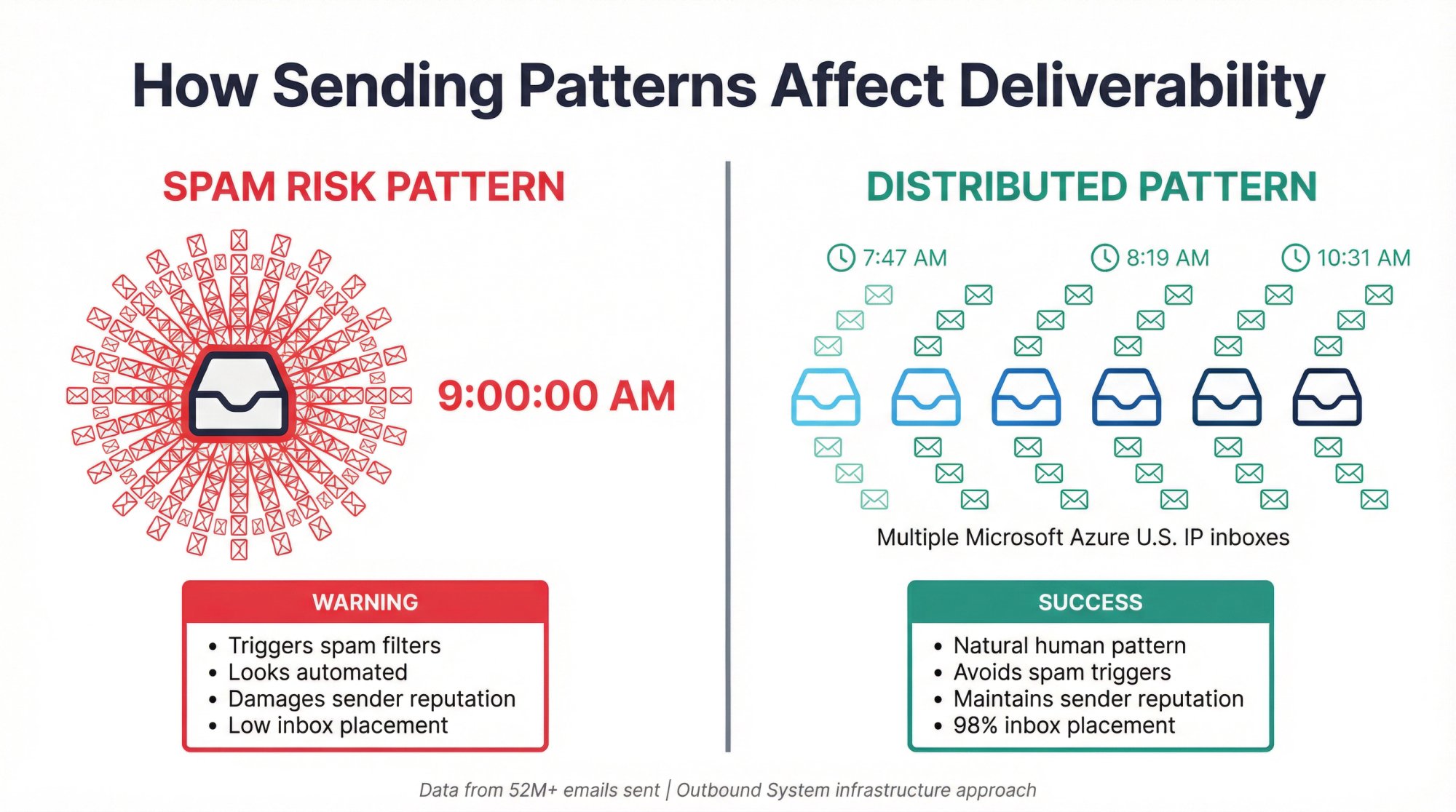
As mentioned, blasting a large number of emails at the exact same time (say, 500 emails all hitting at 9:00:00 AM) is a quick way to get flagged.
Real humans don't send emails that way. Spam filters notice sudden volume spikes from one sender.
It's far safer to send emails in smaller chunks with delays in between. For example, instead of 100 emails in one minute, send those 100 over the course of an hour or two.
Many outreach tools let you set a throttle (like "send 10 emails per hour") or randomize send times within a window.
Learn more about email deliverability best practices.
Use Multiple Inboxes Or Domains To Spread Volume
Professional outbound teams often distribute campaigns across multiple sending accounts to keep per-account volume low.
For instance, our infrastructure at Outbound System uses 350 to 700 email inboxes on dedicated Microsoft IPs for clients, with each inbox only sending a few emails per day.
This way, no single address sends unnaturally high volume, but collectively we achieve the needed scale.
If you're sending at scale yourself, consider using 5 to 10 different sender addresses (on your own domains or subdomains) and splitting your send schedule among them. Each inbox might send only 20 emails in the 8 AM to 10 AM window, for example, instead of one inbox sending 200.
This keeps your "per inbox" send rate human-like, dramatically reducing spam detection.
Discover how Microsoft Azure infrastructure improves deliverability.
Maintain A Consistent Sending Pattern
Consistency over time also matters.
If you email 0 prospects one week and 1,000 the next, that inconsistency looks suspicious. It's better to gradually increase volume and then stick to a steady daily/weekly volume (with normal variance).
If you plan to send daily, try to send emails every day (or every workday) around the same general times. ISPs notice if you suddenly ramp up or have erratic behavior.
But Add Randomness To Exact Timing
While you want consistency in volume, you don't want to email at the exact same timestamp every day. That's a pattern a bot uses.
Introduce a bit of randomness to when each email goes out. For example, instead of all emails going at 8:00 AM sharp, have them go at random times between 7:45 and 8:30.
Many tools have a "± X minutes randomness" setting for send times. Use it.
A healthy mix of predictability (like ~50 emails each morning) and unpredictability (the specific minute each is sent varies) looks most natural.
Space Out Sequences And Follow-Ups
If you send follow-up emails as part of your cadence, remember that those add to your daily send count.
For instance, sending one new email and two follow-ups to 50 prospects in a day is actually 150 emails sent. This matters for both results and reputation.
It's wise to space follow-up emails a few days apart (commonly 3 to 7 days after the previous email), not only to give prospects a chance to respond, but also to avoid big clusters of emails hitting the same addresses back-to-back.
Schedule follow-ups at similar optimal times (if you first emailed John on Monday 8 AM, send the follow-up on Thursday 8 AM). Keeping follow-up timing consistent per prospect can improve chances they see it while also preventing all your follow-ups from going out en masse at one random time.
Monitor Sending Limits And Thresholds
Large email providers like Gmail and Microsoft have bulk sender guidelines. For example, Google considers >5,000 messages/day to Gmail addresses as bulk sending, which triggers additional scrutiny.
If you approach these volumes, be extra careful with timing and infrastructure (SPF, DKIM, etc., must be perfect).
But even at smaller scale, watch metrics like bounce rate and spam complaints closely. High bounces or complaints can lead to throttling, and often these issues are exacerbated by poor timing (sending too fast, or sending to stale lists at once).
Maintain <5% bounce rates and minimal complaints to keep your sending reputation clean.
Warm Up New Sending Schedules
If you're changing your timing or ramping volume, do it gradually.
For instance, if you've never sent emails at 7 AM before, ease into it with smaller batches to see how it impacts open/reply rates and deliverability.
Likewise, if you add a new inbox or domain to send more emails, warm it up slowly (start with 10/day, then 20, etc., over a few weeks) before unleashing large morning sends.
This prevents sudden anomalies in your sending pattern that might trigger spam filters.
Learn about email warmup strategies.
How We Handle This At Outbound System
At Outbound System, we've sent over 52 million cold emails and generated 127,000+ leads for clients.
Our approach:
• 350 to 700 Microsoft Azure U.S. IP inboxes per client (depending on tier)
• Each inbox sends only a few emails daily (mimicking natural human patterns)
• Distributed sending across time zones
• Randomized send times within optimal windows
• 9-step waterfall enrichment to keep bounce rates below 2%
The results: 98% inbox placement and 6% to 7% response rates.
In short, sending at the "best time" must be balanced with sending in the "best way". A perfectly timed email blast that gets caught in spam helps no one.
But if you follow best practices (pacing your sends, using multiple send points, and keeping things human-like), you can land in the inbox and be there at the ideal moment.
How To Test And Optimize Your Cold Email Send Times
All the benchmarks and recommendations we've covered provide a solid starting point. However, the truly best time for your cold emails can depend on your unique audience, industry, and even the nature of your offer.
Smart outbound teams treat timing as an area for continual testing and refinement, rather than a one-and-done decision.
Here's how to take a data-driven approach to optimize send times:
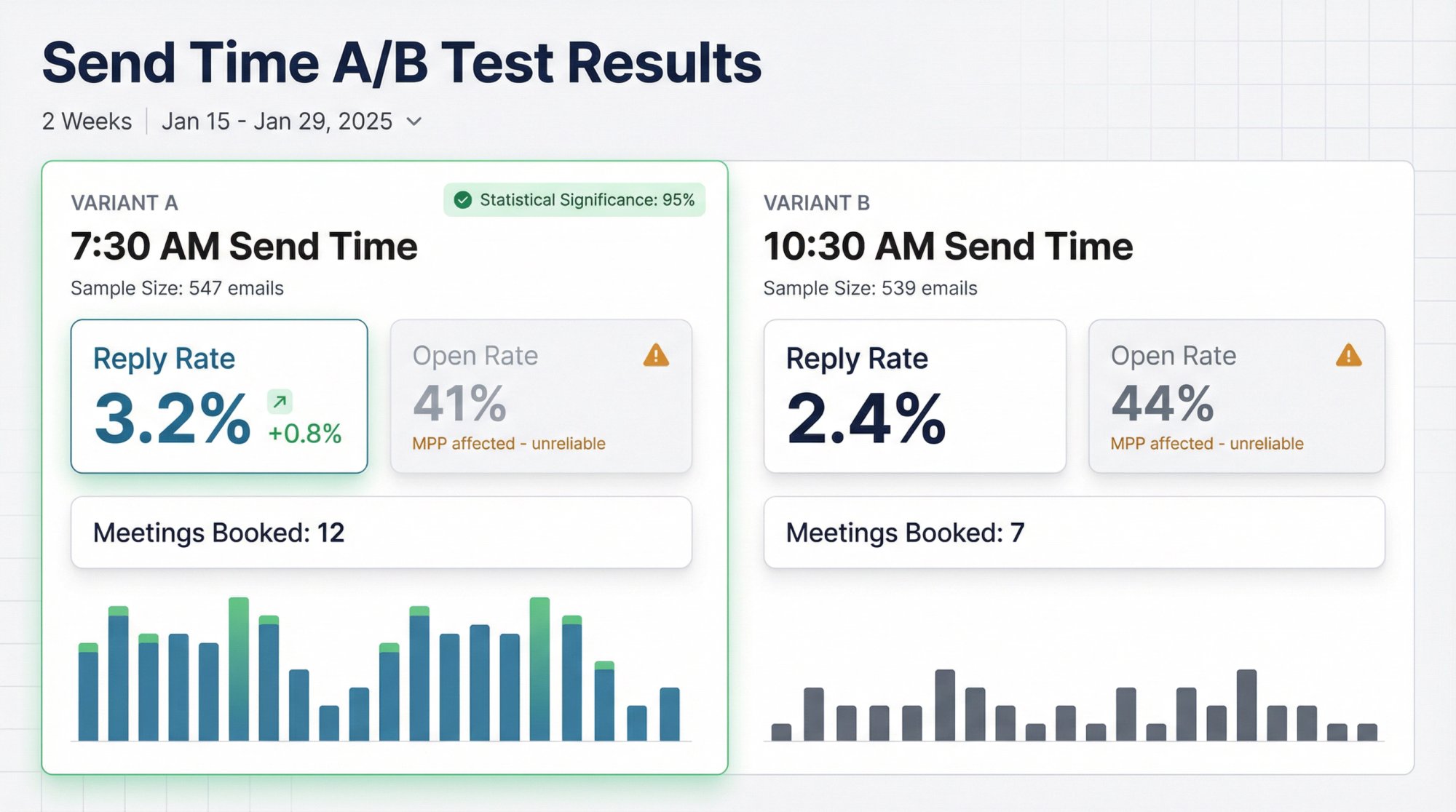
1. Use A/B Tests (And Even A/B/C Tests) For Send Time
Create experiments to compare different send timings while holding other factors constant.
For example, split your prospect list randomly and send half an email at 7:30 AM and the other half the same email at 10:30 AM, on the same day. Or test Monday 8 AM versus Tuesday 8 AM for two similar groups.
After a sufficient sample, see which timing yielded a higher reply or meeting rate.
It's important to isolate only the send time variable. Everything else (email copy, subject, audience type) should be the same, so you get clean data on timing impact.
If you have enough volume, you can even do A/B/C (three groups getting 7 AM, 10 AM, and 1 PM sends) to pinpoint the best among three options. Just ensure you have a large enough sample in each to see a reliable difference.
2. Focus On The Right Success Metrics
In the post-2021 world of email privacy, open rates have become an unreliable metric for judging success.
Apple's Mail Privacy Protection (MPP) feature on iOS and Mac now pre-loads email images (including tracking pixels), generating "false opens" even if the user never read your email.
With nearly half of email clients affected by MPP, you might see an open rate of 50% at 6 AM versus 40% at 9 AM and think "6 AM is better," when in reality those opens could be artificial.
Don't fall into the trap of optimizing for opens alone. Instead, track reply rates, click-through rates, and conversion rates (meetings booked). These metrics aren't skewed by MPP. A reply is a real person engaging, and a click is a strong sign of interest.
As a rule, ignore minor fluctuations in open rates when comparing times. Look at which slot produced more replies or positive responses.
For instance, if emails sent at 8 AM got 3% replies versus 1.5% at 4 PM, that's a meaningful difference. If the 8 AM emails also show higher opens, that's nice but take it with a grain of salt.
Reply rate is king for cold email success.
3. Run Tests Over A Sufficient Timeframe
Timing can be sensitive to random weekly variability (holidays, weather, news cycles, etc.), so don't draw conclusions from just one or two days of testing.
Run your A/B test for at least a couple of weeks, alternating send times across different days to account for day-of-week effects.
For example, send batch A at 7 AM on Mon of Week 1 and at 10 AM on Tue of Week 2; send batch B at 10 AM on Mon of Week 1 and 7 AM on Tue of Week 2. This rotation helps ensure any "Monday vs Tuesday" bias is evened out.
The more data, the better. Aim for a few hundred sends per variant at minimum before you judge a winner.
Given cold email reply rates are often only 1% to 5%, small sample sizes can be misleading. You might need thousands of emails in a test to detect a statistically significant lift. (As a rough guide, to be fairly confident in a +1% reply rate improvement, you'd want on the order of 1,000+ emails in each test group.)
4. Segment Your Analysis By Persona/Industry
You may discover that different segments respond to different timing.
For instance, you might find that CTOs of tech companies are more likely to reply late at night or very early (perhaps checking email before the day's meetings), whereas HR managers respond best mid-morning.
In fact, one sales team found C-level execs often picked up cold calls after 5 PM, while mid-level managers answered more in the mornings. A similar principle could apply to email replies.
Consider splitting your data by key groups (job role, company size, industry) to see if any pattern emerges. If you have enough volume in each category, you can then optimize send times per segment.
For example, you might schedule emails to engineers earlier or later in the day, but emails to on-the-go professionals (sales, real estate, etc.) at a consistent early-morning time.
5. Continuously Iterate And Adapt
The optimal timing can shift over time.
Changes in work patterns (more remote work, flexible schedules) or external factors (daylight savings shifts, economic cycles) might influence when people engage with email.
Use a cadence of analyzing your timing metrics every quarter or so. If you notice response rates slipping, consider re-testing timing as one variable.
Additionally, watch how your reply rates on different days are trending. Perhaps you'll notice your Monday response rate fell and Tuesday picked up. Investigate why (did you saturate Monday? did something change with your audience?).
By treating timing optimization as an ongoing process, you'll stay ahead of the curve.
Remember, your own data is the best guide. The recommendations in this guide are a starting framework, but there will always be exceptions.
Maybe your audience of physicians opens emails at 9 PM after clinic hours, or your fintech executive targets are swamped Monday and respond better Thursday morning. Be open to those discoveries.
Test, measure, and let the results inform your strategy. When you find a timing sweet spot that consistently yields above-average engagement, double down on it.
Finally, keep timing in perspective: it can boost a good campaign's performance, but it won't save a bad pitch. The content of your cold email (the relevance, the value prop, the quality of your list) has to be solid.
Timing optimizes deliverability and attention; it doesn't create desire out of thin air. So use timing to amplify strong messaging, and you'll see the best outcomes.
How To Integrate Multi-Channel Outreach Timing
In today's sales environment, relying on cold email alone is leaving opportunities on the table.
The highest performing outbound strategies orchestrate multiple channels (typically email, LinkedIn, and phone calls) to reach prospects in different ways.
If you're using a multi-channel approach (which we highly recommend), you should coordinate timing across these channels for maximum impact.
Essentially, you want each touch to feel like part of a thoughtful sequence, not random spam.
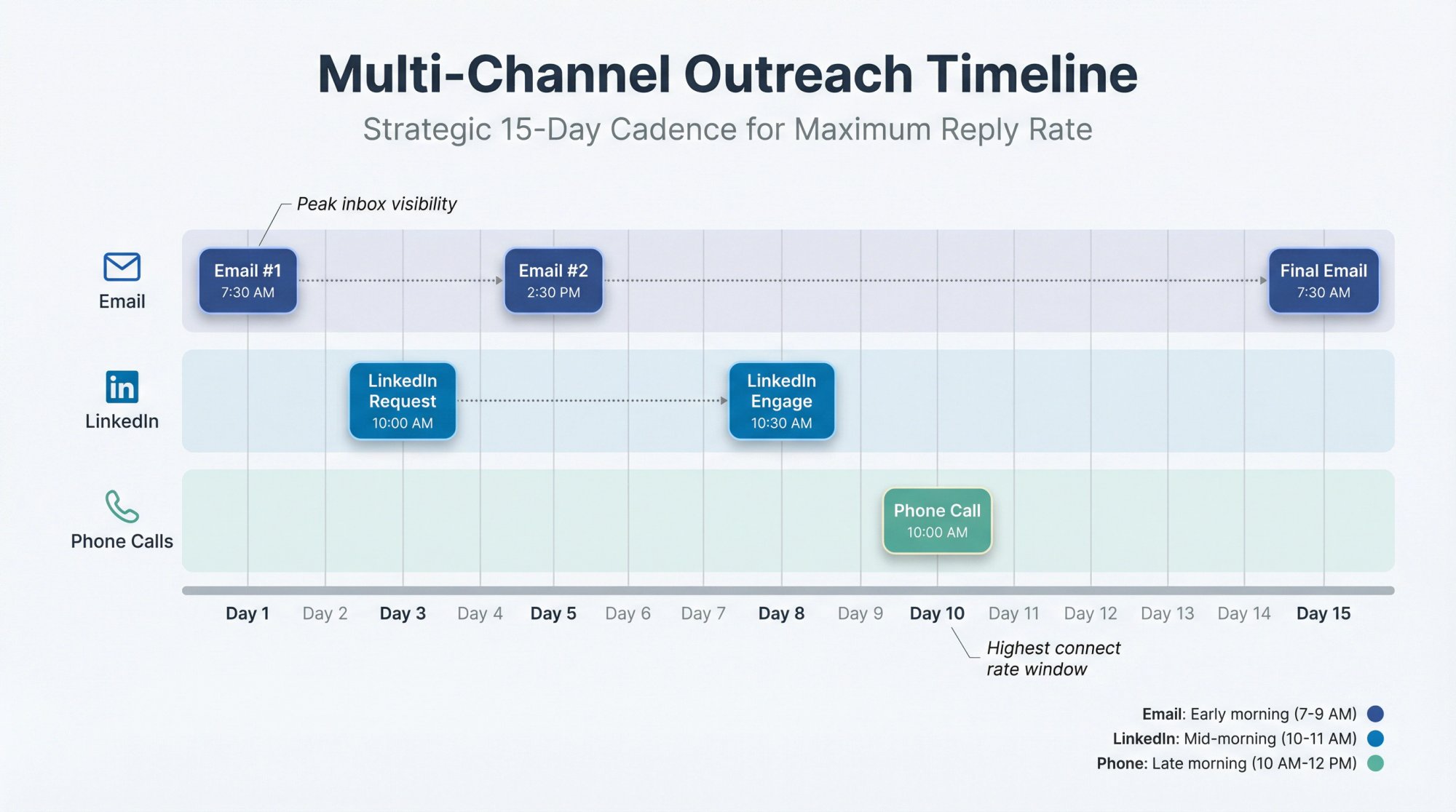
Here's how timing plays into a multi-channel outreach cadence:
Start With Email During Optimal Hours
Cold email often serves as the first touch. As we've covered, send that initial email in the early morning window when the prospect is most likely to see it (7 AM to 9 AM local time). This introduces you and your value proposition.
Follow Up On LinkedIn A Day Or Two Later
A common play is to send a LinkedIn connection request or message a day or two after your email.
Time this for mid-morning or midday when professionals often browse LinkedIn (say, 10 AM to 11 AM).
For example, Day 1 morning email, Day 2 or 3 mid-morning: LinkedIn connect with a note referencing the email ("Hi, I sent you an email yesterday about [pain point]...").
People are more likely to accept and notice your LinkedIn outreach late morning, which complements your early email touch.
Learn more about LinkedIn outreach strategies for B2B.
Phone Calls At Strategic Times
If calls are in your sequence, plan them for traditional high-connect times like late morning (10 AM to 12 PM) or early afternoon (2 PM to 4 PM) local time.
Avoid calling at awkward times (early morning before coffee, lunch hour, after 5 PM when folks are commuting).
For instance, Day 5 or Day 7 of your cadence, you might call around 10:30 AM and mention your email ("Just following up on the email I sent...").
Research indicates phone connect rates are highest on Tuesdays through Thursdays during those mid-morning or mid-afternoon slots, so you might time your calls on those days even if your initial email went out Monday.
Explore our cold calling services and learn about cold calling vs cold emailing.
Sample Omni-Channel Cadence
A sample multi-channel cadence could be:
Day 1: Send initial cold email at 7:30 AM
Day 3: Send a LinkedIn connection request or InMail around 10 AM
Day 5: Send a follow-up email (Email #2) in the early afternoon (2 PM to 3 PM) to hit a different time of day. Perhaps the prospect missed the morning email, but has a lull after lunch.
Day 8: If connected on LinkedIn, comment or like a post of theirs or send a short value message. Timing isn't as critical here, but generally non-intrusive hours (mid-morning) work.
Day 10: Make a phone call attempt around 10 AM
Day 15: Final follow-up email at the classic morning sweet spot again (7 AM to 8 AM) as a last touch
This is just an example. The key is spacing touches a few days apart and varying times of day, so you're consistently present but not hitting the same channel at the same exact time repeatedly.
Check out our guide to sales outreach workflows.
Leverage Channel-Specific Timing Habits
Each channel has its own timing nuances.
People tend to check LinkedIn during work breaks or just before/after work, whereas emails are first-thing and ongoing, and phone calls get answered more in midweek mid-days.
Align with those:
LinkedIn: best mid-morning for connection requests, early afternoon for InMail (when folks procrastinate with a LinkedIn scroll)
Voice calls: avoid Monday mornings and Friday afternoons, aim Tue-Thu late morning or mid-afternoon when they're at their desk
Dramatically Higher Results
When timed correctly, multi-channel outreach can massively outperform a single channel.
Studies have found combining email plus LinkedIn plus phone can boost outreach success by 200% to 300% compared to email alone.
We've seen this at Outbound System as well. Some prospects who ignore emails will respond on LinkedIn, and others who never check LinkedIn will engage on email, etc.
By timing a sequence of touches, you increase the odds of catching them at the right moment on at least one channel.
One source noted that orchestrated multi-channel cadences led to a 287% higher reply/meeting rate than email-only sequences. The improvement is huge.
Be Mindful, Not Spammy
The flip side of multi-channel is to not overdo it.
Don't, for example, send an email, LinkedIn message, and call all in the same morning. That can feel like an ambush.
Use each channel to complement the others, and give some breathing room. Each touch should add value or context, not just repeat the same "did you see my email?" without any gap.
By spacing a few days apart and varying times, you make the outreach feel organic and respectful.
In summary, integrating channels with smart timing can significantly lift your conversion rates. It's not just when to send a cold email, but when and how to follow it up on other platforms.
Prospects are more likely to respond when they've seen your name in multiple places over a week (it builds familiarity). Just ensure that each interaction is timed for when they're active on that channel and that the message on each channel is consistent and relevant.
When done right, your early-morning email, mid-week call, and well-timed LinkedIn touch will all reinforce each other, increasing the likelihood of a positive reply.
At Outbound System, our approach coordinates email and LinkedIn lead generation (and even cold calls) so that they support one another. This systematic timing yields far better results than isolated efforts.
3 Cold Email Sending Strategies To Choose From
Most teams accidentally pick a strategy. You should choose deliberately.
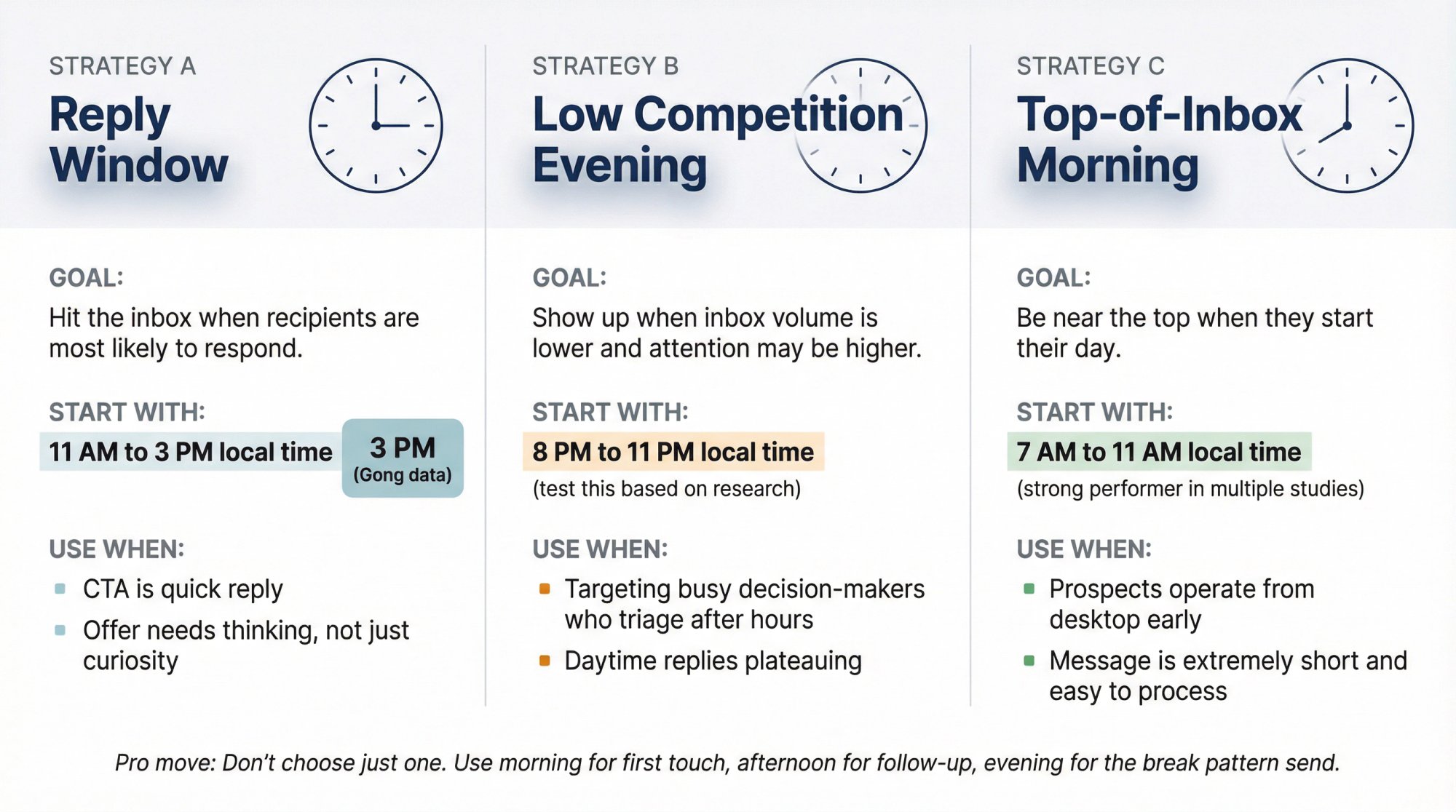
Strategy A: The "Reply Window" Strategy
Goal: hit the inbox when recipients are most likely to respond.
Start with:
• 11 AM to 3 PM local time
• Prioritize 3 PM (based on Gong's sales engagement data)
Use when:
• Your CTA is a quick "Worth exploring?" or "Open to a 10 to 15 min chat?"
• Your offer needs a little thinking, not just curiosity
Strategy B: The "Low Competition Evening" Strategy
Goal: show up when inbox volume is lower and attention may be higher.
Start with:
• 8 PM to 11 PM local time (test this based on research)
Use when:
• You're targeting busy decision-makers who triage email after hours
• Your daytime replies are plateauing and you need a new lever
Strategy C: The "Top-of-Inbox Morning" Strategy
Goal: be near the top when they start their day.
Start with:
• 7 AM to 11 AM local time (strong performer in multiple studies)
Use when:
• Your prospects tend to operate from desktop email early
• Your message is extremely short and easy to process
Pro move: Don't choose just one.
Use morning for the first touch, afternoon for follow-up, evening for the "break pattern" send. That's how you catch different inbox behaviors without relying on a single window.
Learn more about proven cold email follow-up tactics.
A High-Performing Default Schedule You Can Steal
If you want one plug-and-play schedule for B2B cold email (and you'll test from there):
All times in recipient local time
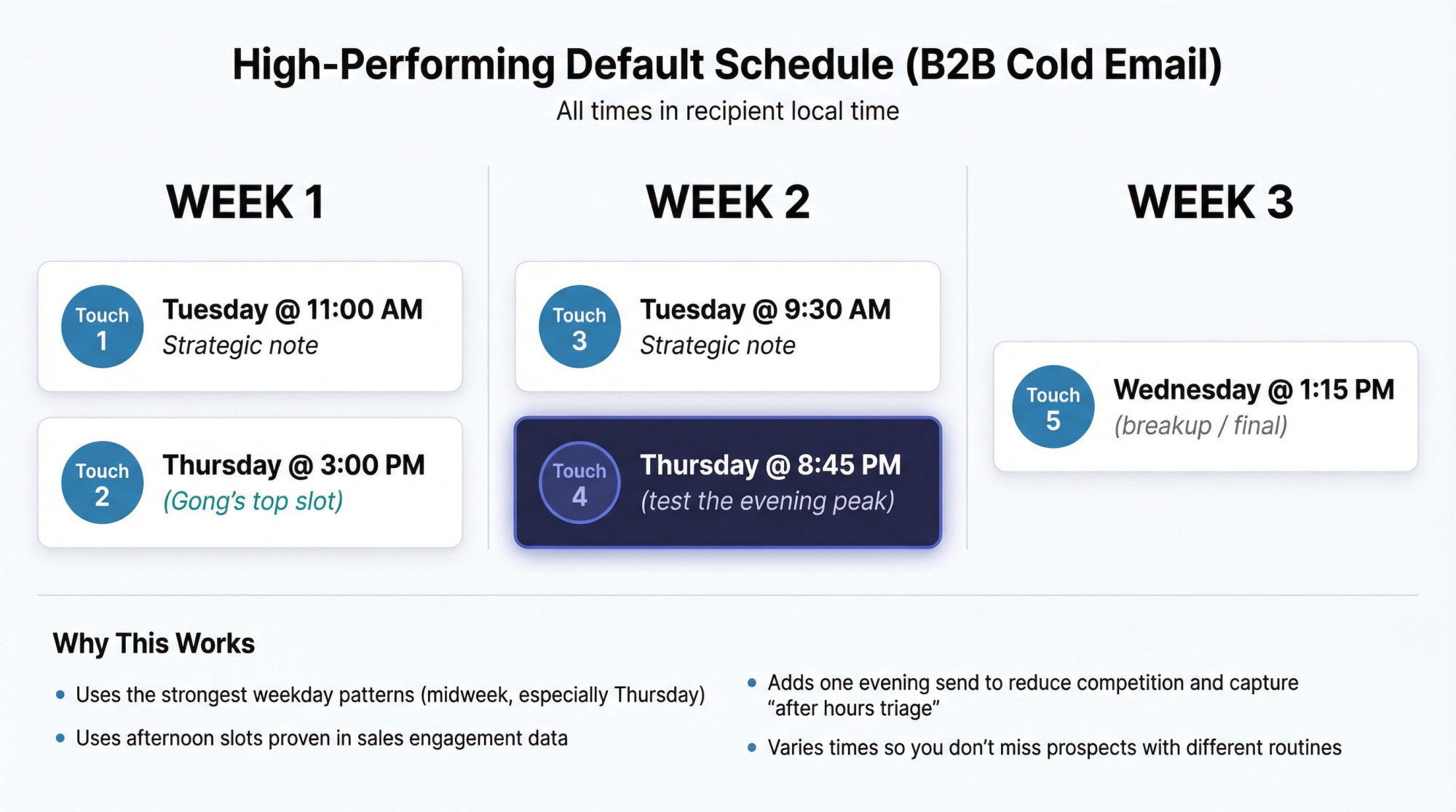
Week 1
Touch 1: Tuesday @ 11:00 AM
Touch 2: Thursday @ 3:00 PM (Gong's top slot)
Week 2
Touch 3: Tuesday @ 9:30 AM
Touch 4: Thursday @ 8:45 PM (test the evening peak)
Week 3
Touch 5 (breakup / final): Wednesday @ 1:15 PM
Why This Works
• Uses the strongest weekday patterns (midweek, especially Thursday)
• Uses afternoon slots proven in sales engagement data
• Adds one evening send to reduce competition and capture "after hours triage"
• Varies times so you don't miss prospects with different routines
Learn about how to write effective follow-up emails.
What NOT To Do (Even If A "Guru" Says So)
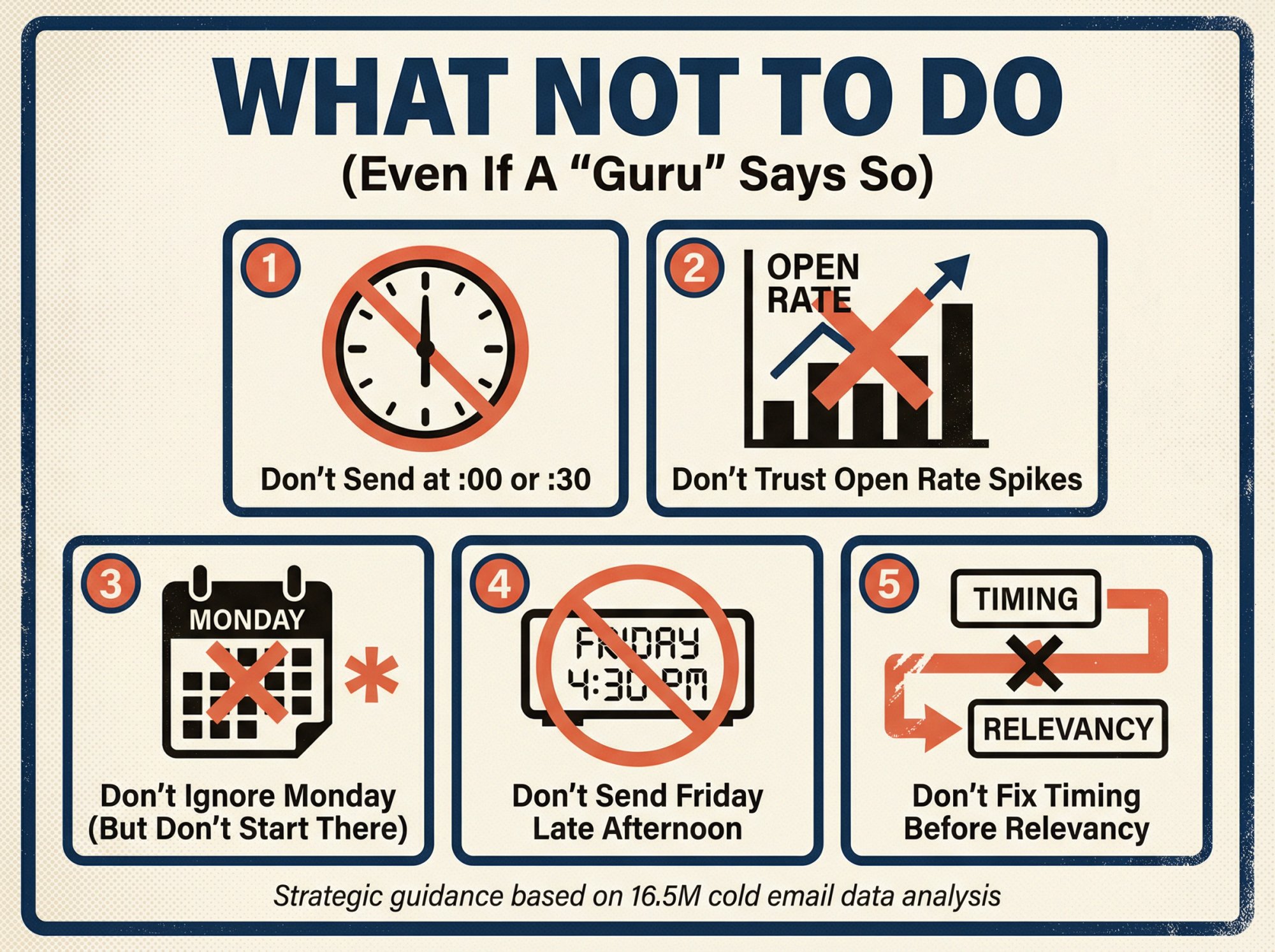
1. Don't Schedule Every Send At :00 Or :30
If your entire campaign hits at exactly 9:00, you look automated.
Stagger sends with:
→ Random minutes (9:07, 9:19, 9:41)
→ Natural gaps
→ Small daily variance
2. Don't Declare Victory From Open Rate Spikes
Open tracking remains unreliable. It's not a stable optimization signal.
3. Don't Ignore Monday Entirely (But Don't Start There)
Research shows Monday underperforming Thursday for replies (5.29% vs 6.87%).
That doesn't mean "never Monday." It means Monday is not your default.
4. Don't Send Friday At 4:30 PM And Expect Magic
Friday late afternoon is where attention goes to die.
If you send Friday, keep it earlier and keep it short.
5. Don't "Fix" Timing Before Fixing Relevancy
Timing tweaks are incremental.
Relevancy is existential.
Learn about common cold outreach mistakes to avoid.
Key Takeaways For Timing Your Cold Emails
We've covered a lot of ground. Here's a quick recap of the most important insights to remember when scheduling your cold email campaigns:
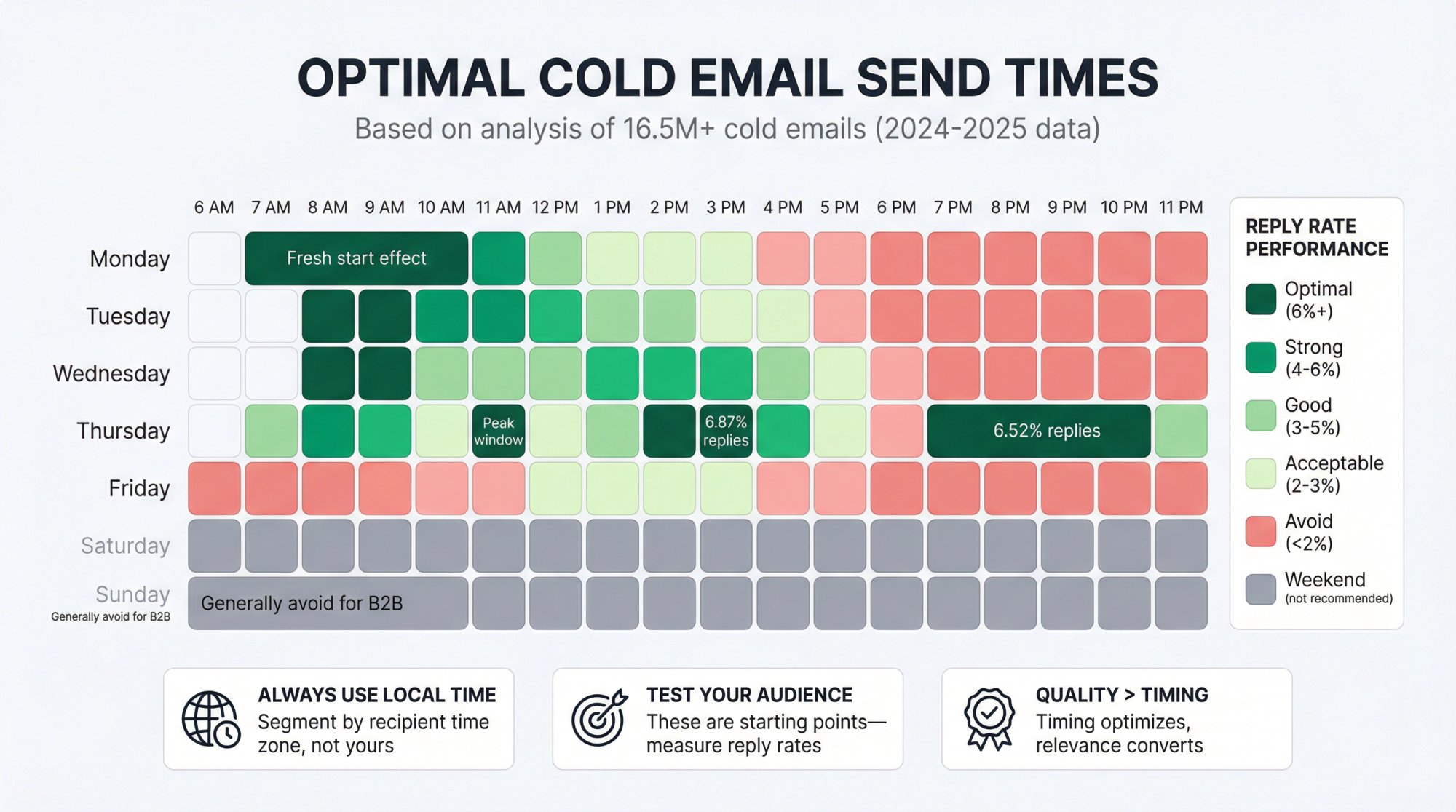
Send emails in the early morning for maximum impact. Aim for roughly 6 AM to 9 AM in the recipient's local time zone, or to land in their inbox right before the workday starts. This is when open rates and reply rates peak, as professionals tackle email first thing in the morning. If not early morning, late morning (10 AM to 11 AM) is a secondary option. But avoid afternoons and evenings for initial outreach (except when testing the 8 PM to 11 PM evening window).
Best days are early in the week, with Thursday as the surprise winner. Thursday emails led in reply rates at 6.87% in recent research, while Monday emails tend to see high opens (~20%) and replies (around 2.5% to 3%), likely due to the fresh-start effect. Tuesday and Wednesday are also strong performers (with Wednesday slightly better for replies in some cases). Thursday begins to see engagement fall off in some datasets but performs best in others (test for your audience). Friday is consistently the worst day to send cold emails (people are checked out).
Avoid weekends for most B2B emails. Unless you have a specific reason (your prospects actively work weekends or you're reaching across time zones), do not send cold emails on Saturday or Sunday. They'll likely be ignored and buried by Monday. Save your ammo for weekday mornings when prospects are receptive. Respecting work-life boundaries can also preserve your brand reputation.
Always send based on recipient time zone, and stagger your sends. If you're emailing nationally or globally, segment your list so that everyone gets your email at a reasonable local hour (7 AM to 9 AM in their time). Don't send to a Pacific contact on East Coast time. Use tools or scheduling to time-zone optimize, and stagger batches (East coast send, then Central, then West, etc.) to avoid a massive simultaneous blast. This not only improves engagement but also helps avoid spam triggers by smoothing out your volume.
Timing isn't just about the prospect. It's about deliverability. Sending 100 emails at 8:00:00 AM looks automated and can hurt inbox placement. Build in randomness and send in waves. For example, schedule 5 to 10 emails to go out per minute over an hour, rather than 500 at once. If you're scaling up, use multiple email accounts or domains so no single account sends too much. Consistency in daily sending, with variability in exact timing, creates a "natural" pattern that email providers trust.
Test and learn. Your mileage may vary. Use A/B testing to validate the best times and days for your particular audience. Try different slots (8 AM vs 11 AM, or Mon vs Tue) and measure reply rates or meetings booked. Don't over-index on open rates, which can be misleading due to privacy tech. Instead, see when you get the most responses. Over time, refine your approach. You might discover, for example, that your prospects respond great on Tuesday afternoons, then you can double down there. Continually optimize as conditions change.
Consider your audience's habits and segment accordingly. There's no one-size-fits-all. Executives might have different email routines than managers or technical folks. Adjust timing for sub-groups if needed (targeting restaurant owners in mid-afternoon downtime, or developers late at night if data supports it). Also be aware of cultural differences. Some countries may take longer lunch breaks or have different weekend norms.
Coordinate timing in multi-touch sequences. If you're following up via email, LinkedIn, or phone, integrate those touches thoughtfully. A first email Monday 8 AM, a LinkedIn message Tuesday 10 AM, a follow-up email Wednesday 8 AM, for instance, keeps you in front of the prospect without overloading them. Multi-channel outreach, timed correctly, can dramatically improve results (on the order of 2X to 3X higher response rates). Use each channel at its optimal time (emails in morning, LinkedIn mid-day, calls mid-morning), and each successive touch will reinforce the last.
Quality and relevance still reign. No timing trick can compensate for a poorly targeted or written email. Make sure your messaging and value are strong. Timing optimizes delivery and visibility, but once the email is opened, it's the content that converts. So, yes, send at the best time, but also focus on writing a compelling email and ensuring you're contacting the right prospects. High-quality, relevant outreach sent at a great time is an unstoppable combination.
How Outbound System Handles Timing At Scale
At Outbound System, we've built timing into our infrastructure from day one.
Here's how we do it:
Time zone segmentation across all campaigns. Every prospect gets emails timed to their local business hours, not ours.
350 to 700 Microsoft Azure U.S. IP inboxes per client. Each inbox sends only a few emails daily, mimicking natural human patterns. This keeps spam filters happy while maintaining high volume.
Randomized send times within optimal windows. We don't blast at 9:00 AM sharp. Sends are distributed across the 7 AM to 11 AM window with natural variation.
Multi-channel coordination. Our campaigns orchestrate email, LinkedIn, and cold calling with precise timing across each channel.
9-step waterfall enrichment. Clean data means fewer bounces, which protects sender reputation and ensures emails land when they should.
Real-time optimization. We track reply rates (not just opens) and continuously adjust send times based on what's working for each client's audience.
The results speak for themselves:
→ 98% inbox placement
→ 6% to 7% response rates
→ 52 million+ cold emails sent
→ 127,000+ leads generated
→ $26 million in closed revenue
Want to see how we could optimize timing for your outreach? Book a free 15-minute consultation with our team.
View our case studies and client testimonials to see real results.
FAQ: Best Time To Send Cold Emails
Is Thursday really the best day to send cold emails?
In recent benchmarking (based on Jan to Dec 2024 data), Thursday produced the highest reply rate among weekdays at 6.87%, while Monday lagged at 5.29%.
That's strong evidence to prioritize Thursday. But you should still test on your ICP, since different audiences behave differently.
Is it weird to send cold emails at night?
It can feel counterintuitive, but research found 8 PM to 11 PM produced the highest reply rate, peaking at 6.52%.
The key is to:
• send in the recipient's local time
• avoid blasting everyone at once
• and ensure your copy reads like a real human email
What about sending at 6 AM?
Some outreach datasets suggest early morning can work in certain contexts.
But in cold email benchmarks, the strongest emphasis was on evenings and solid performance in 7 AM to 11 AM, not "pre-dawn."
If you test early morning, do it as a bucket. Don't assume it's best.
Should I use send-time optimization tools?
They can help for newsletters and lifecycle marketing, but for cold outbound you'll usually get more value from:
• local-time segmentation
• a few well-chosen test buckets
• and optimizing for replies/meetings, not opens
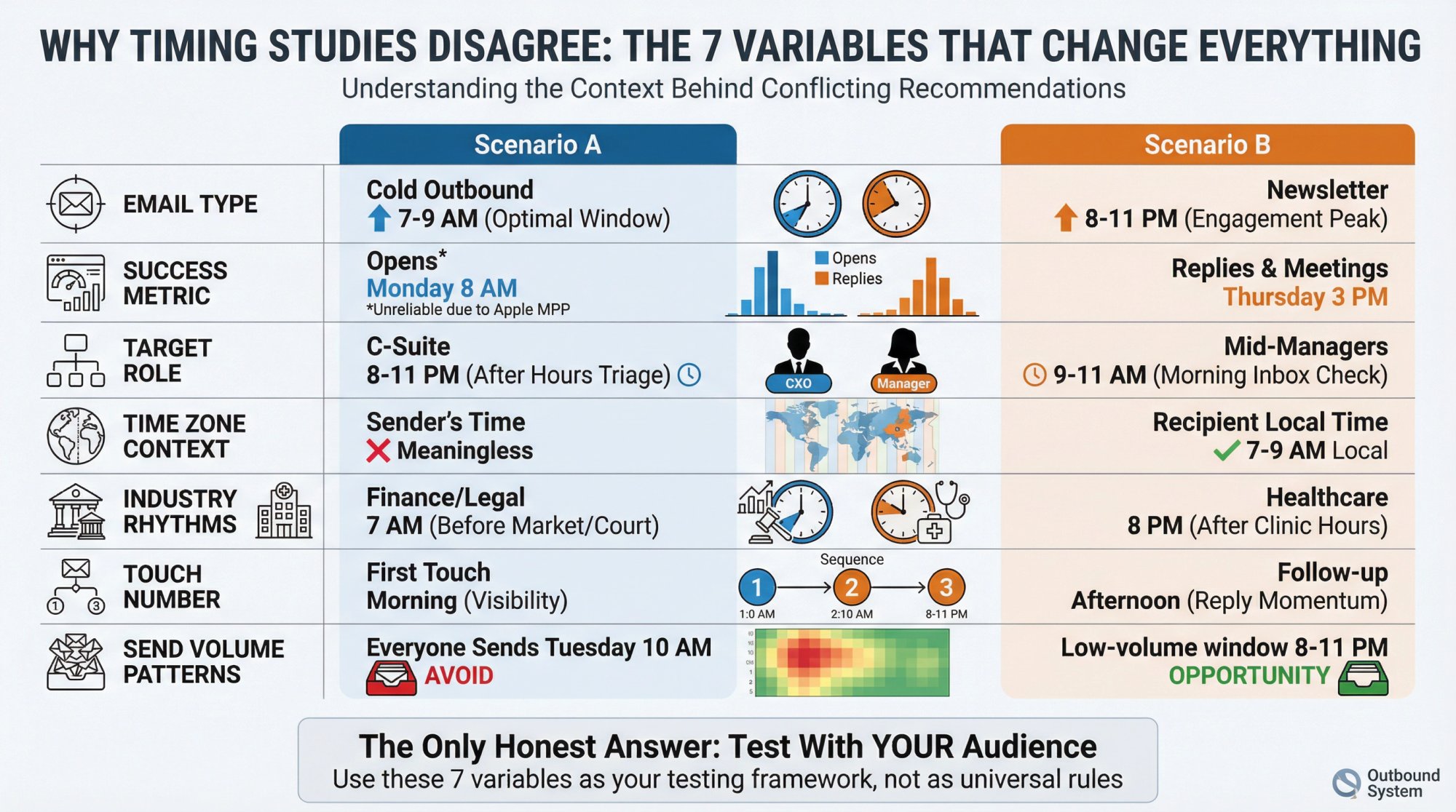
Why do different studies disagree on the best time?
Because they're often measuring different things.
Here are the variables that change the answer:
1. Cold vs newsletter vs lifecycle email. Marketing email behavior is not the same as cold outbound behavior.
2. Metric used. Opens vs clicks vs replies vs meetings. Opens are especially noisy now.
3. Audience role and seniority. C-suite inbox habits differ from managers and individual contributors.
4. Region and time zones. A "best time" that doesn't specify recipient local time is basically unusable.
5. Industry seasonality. Finance, manufacturing, SaaS, agencies each have different meeting rhythms.
6. Your sequence design. First-touch emails behave differently than follow-ups.
7. Inbox competition. If everyone sends Tuesday at 10 AM, that's exactly when you're fighting the hardest.
That's why the only honest answer is: there are best starting points, and then there's the best time for your list.
How many cold emails should I send per day?
This depends on your infrastructure and sender reputation.
For a single inbox, we recommend:
• Starting: 10 to 20 emails/day
• Warmed up: 30 to 50 emails/day maximum
• Professional infrastructure: 100+ emails/day (using multiple inboxes)
At Outbound System, we use 350 to 700 inboxes per client, with each sending only a few emails daily. This keeps per-inbox volume natural while achieving scale.
The key is to never exceed your infrastructure's capacity. High volume from a single inbox triggers spam filters.
Want to learn more about scaling cold email volume safely? Check out our guide on how many cold emails you can send per day.
Should I send follow-up emails at the same time as the first email?
Not necessarily.
Best practice: vary the time of day for follow-ups to catch prospects at different moments.
For example:
• Email 1: Monday, 8:00 AM
• Email 2: Thursday, 3:00 PM
• Email 3: Tuesday, 9:30 AM
This increases the chance that at least one email hits them when they're checking.
Does timing matter for LinkedIn InMail?
Yes, but the optimal windows are different from email.
For LinkedIn:
• Best for connection requests: 10 AM to 11 AM (mid-morning LinkedIn browsing)
• Best for InMail: Early afternoon (1 PM to 3 PM) when people procrastinate with social browsing
• Avoid: Early morning (people are in email, not LinkedIn) and late evening
Learn more about LinkedIn lead generation strategies.
What time should I send cold emails to executives vs managers?
Research suggests different roles have different email habits:
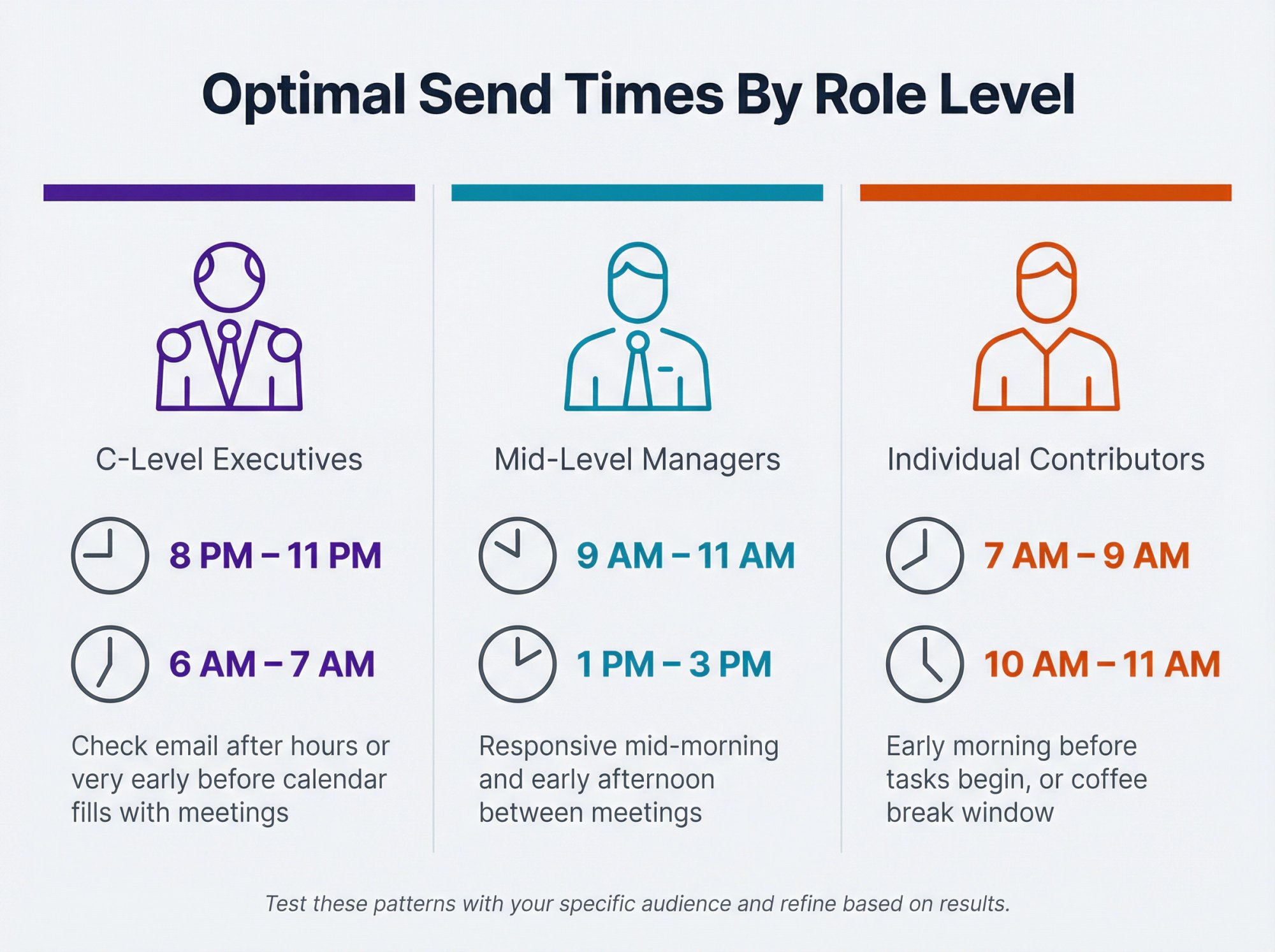
Role Level | Best Send Times | Why |
|---|---|---|
C-level executives | 8 PM to 11 PM, or 6 AM to 7 AM | Often check after hours or very early before calendar fills |
Mid-level managers | 9 AM to 11 AM, or 1 PM to 3 PM | Responsive mid-morning and early afternoon |
Individual contributors | 7 AM to 9 AM, or 10 AM to 11 AM | Early morning before tasks, or coffee break time |
Test these patterns with your specific audience and refine based on results.
How long should I wait between follow-up emails?
Best practice: 3 to 7 days between touches.
Here's a common cadence:
• Day 1: Initial email
• Day 4: First follow-up
• Day 9: Second follow-up
• Day 16: Final follow-up
This gives prospects time to see your email and respond, while keeping you top of mind.
Don't: send follow-ups every day. That's spammy and hurts deliverability.
Should I send emails on holidays?
Generally, no.
Even if it's not a holiday in your country, check if it's a holiday in your prospect's region.
Major holidays to avoid:
• U.S.: New Year's Day, Memorial Day, Independence Day, Thanksgiving, Christmas
• UK: Boxing Day, Bank Holidays
• Global: Check local calendars for each region
Exception: Some B2C industries (retail, hospitality) are more active during holidays. Know your audience.
What's the best time to send cold emails in different industries?
Industry | Best Days | Best Times |
|---|---|---|
SaaS/Tech | Tuesday to Thursday | 9 AM to 11 AM, or 3 PM |
Finance/Legal | Tuesday to Wednesday | 7 AM to 9 AM (before market/court) |
Manufacturing | Wednesday to Thursday | 10 AM to 12 PM |
Healthcare | Tuesday to Thursday | 8 PM to 10 PM (after clinic hours) |
Marketing/Agencies | Monday to Tuesday | 9 AM to 10 AM |
These are starting points. Always test for your specific audience.
How do I know if my timing is working?
Track these metrics:
Primary:
• Reply rate (positive replies / emails delivered)
• Meeting booking rate (meetings booked / emails delivered)
Secondary:
• Time to first reply (how long after send do people respond?)
• Reply rate by time bucket (compare 8 AM vs 12 PM vs 3 PM, etc.)
Don't rely on:
• Open rate (unreliable due to Apple MPP)
Run your timing analysis monthly or quarterly to catch shifts in behavior.
What if my prospects are in multiple time zones?
Must-do: Segment your list by time zone and schedule separate sends.
Minimum:
• Americas
• EMEA
• APAC
Better:
• U.S. East Coast (ET)
• U.S. Central (CT)
• U.S. Mountain (MT)
• U.S. West Coast (PT)
• UK (GMT)
• Western Europe (CET)
• Each APAC country separately
Use your prospect's:
• City/state (best)
• Company HQ location (good)
• Phone area code (last resort)
Most modern sales engagement platforms have "send by time zone" features built in.
Can I automate send time optimization?
Yes, but with caveats.
What works:
• Scheduling by recipient time zone (automate this)
• Randomizing exact send minutes within a window (automate this)
• A/B testing different time buckets (semi-automated)
What doesn't work well:
• "AI send time optimization" tools that try to predict the perfect moment for each individual. These often rely on open rate data (which is unreliable) and can actually hurt performance by sending at weird times.
Our recommendation: Use automation for time zone segmentation and randomization, but use human judgment and testing for choosing the optimal windows.
Should I adjust timing for different stages of my funnel?
Yes, timing can vary by funnel stage:
Top of funnel (cold outreach):
• Optimize for visibility (early morning, 7 AM to 9 AM)
• Or test low competition windows (evening, 8 PM to 11 PM)
Middle of funnel (engaged prospects):
• Optimize for reply momentum (afternoon, 1 PM to 3 PM)
• These prospects are actively considering, so catch them during decision-making hours
Bottom of funnel (closing):
• Send when your champion is likely planning (Tuesday to Thursday, 10 AM to 2 PM)
• Avoid Monday (too chaotic) and Friday (people defer decisions)
How does send time affect deliverability?
Good timing habits improve deliverability:
• Staggered sends (not all at 9:00 AM sharp) look more human
• Consistent daily volume (not 0 one day, 1000 the next) builds sender reputation
• Time zone distribution naturally spreads volume, avoiding spam triggers
Bad timing habits hurt deliverability:
• Large batches at exact timestamps look automated
• Erratic volume patterns trigger spam filters
• Sending outside business hours to business addresses increases spam complaints
At Outbound System, our 350 to 700 inbox infrastructure ensures natural sending patterns, which is why we achieve 98% inbox placement.
Learn more about email deliverability explained.
What's the difference between "best time to send" for cold email vs marketing emails?
Cold email (B2B prospecting):
• Optimize for reply rate and meetings
• Target decision-makers checking email at work
• Focus on business hours in recipient's time zone
• Open rates are less reliable due to small sample sizes and privacy changes
Marketing email (newsletters, promotions):
• Optimize for open rate and click rate
• Target subscribers who opted in
• Can test evening and weekend sends (people read newsletters off-hours)
• Larger sample sizes make optimization more reliable
The strategies overlap but are not identical. Don't apply newsletter best practices directly to cold outreach.
How often should I re-test my optimal send time?
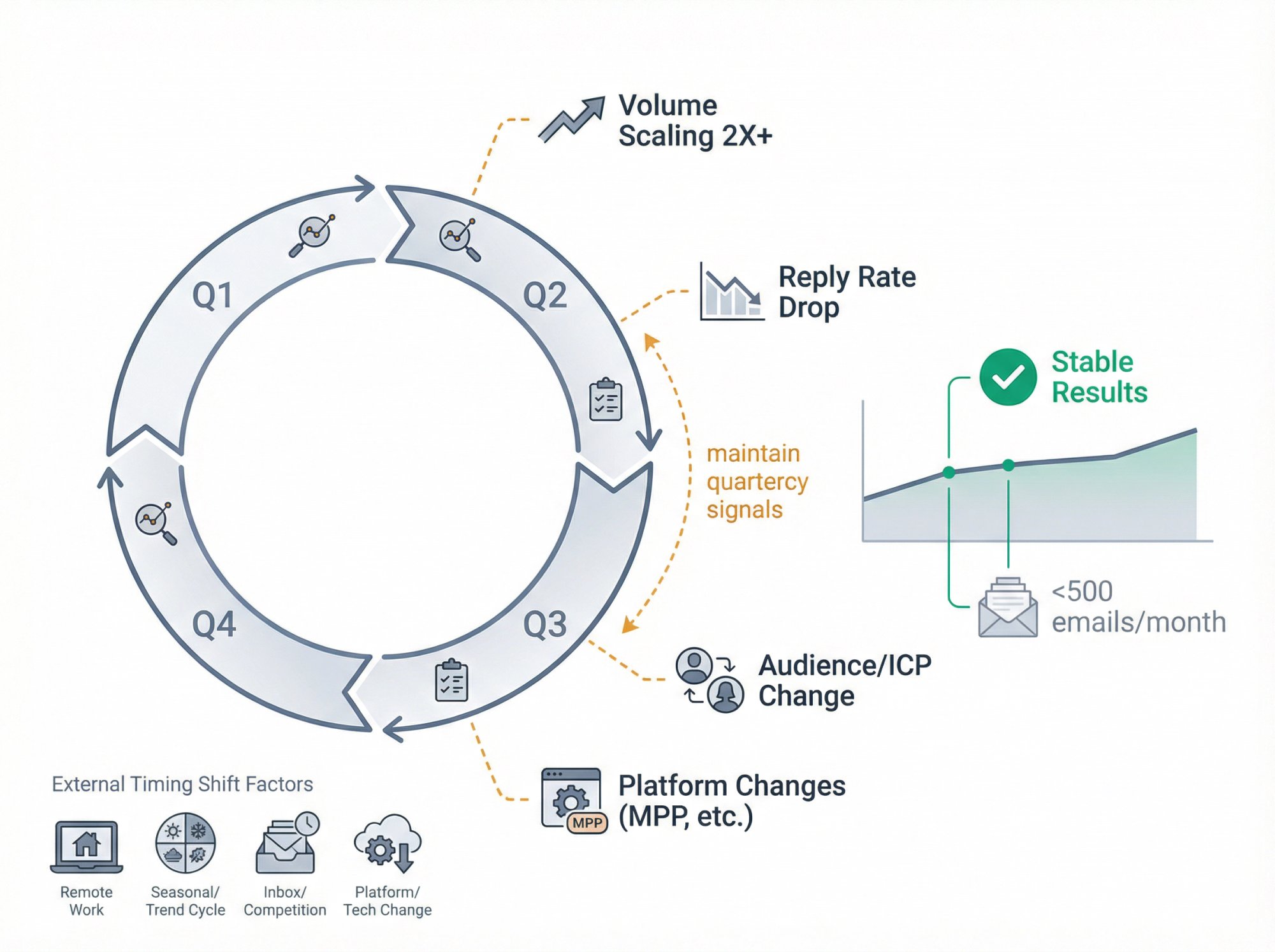
Quarterly is a good cadence for most teams.
Test more frequently if:
• You're scaling volume significantly (2X+ growth)
• Your audience or ICP is changing
• You notice a drop in reply rates
• There are major changes to email clients or privacy policies
• You're entering a new market or industry
Test less frequently if:
• Your volume is low (<500 emails/month)
• Results are consistently strong
• Your audience is very stable
Remember: timing patterns can shift with:
→ Work-from-home trends
→ Seasonal business cycles
→ Competitive inbox congestion
→ Platform changes (like Apple MPP)
Stay alert and keep testing.
The Bottom Line
If you want the "best time" answer that actually helps you book meetings:
1. Start with data-backed defaults:
• Thursday is a priority day (research-backed)
• 3 PM is a priority hour (Gong sales engagement data)
• 8 PM to 11 PM is a high-upside test window most teams ignore
2. Send in the recipient's local time zone (non-negotiable)
3. Optimize for replies and meetings, not opens, because open tracking is unreliable in 2025+ privacy reality
4. Run a structured timing test using 4 buckets, lock the winner, and re-test quarterly
Now, with this timing blueprint in hand, go ahead and schedule those campaigns. Get your outreach calendar optimized, and watch your metrics improve.
And if this seems daunting, remember that we specialize in managing this entire process at Outbound System. From optimizing send times across 350+ inboxes to writing the emails and following up across channels, we handle it all.
Whether you do it yourself or partner with experts, one thing is clear: when you send can be just as important as what you send.
Nail both, and your cold email program will become a revenue-generating machine.
Want help implementing these timing strategies? Book a free consultation with our team to see how we can optimize your cold email agency needs.