Recruiting agencies live and die by connections. You need hiring managers who trust you with their critical roles. You need talented candidates who'll consider your opportunities. Cold email gives you direct access to both.
Here's what makes recruiting different from typical B2B sales: it's a trust and timing business. The hiring manager who ignores you today might desperately need you in 30 days when a key hire falls through. Your job isn't to pitch recruiting services. It's to prove specific relevance and offer something useful right now.
This guide covers everything a recruiting agency needs to master cold email in 2026. Technical requirements that actually matter. Targeting strategies that work. Copywriting that converts. Proven templates you can adapt immediately.
We'll show you how to approach both client acquisition (winning job orders) and candidate outreach (sourcing talent), with specific strategies for each scenario.
Why Recruiting Agencies Still Need Cold Email
Your competitors are getting lazy with LinkedIn automation and generic InMails. Cold email, done right, cuts through that noise.
The numbers tell the story:
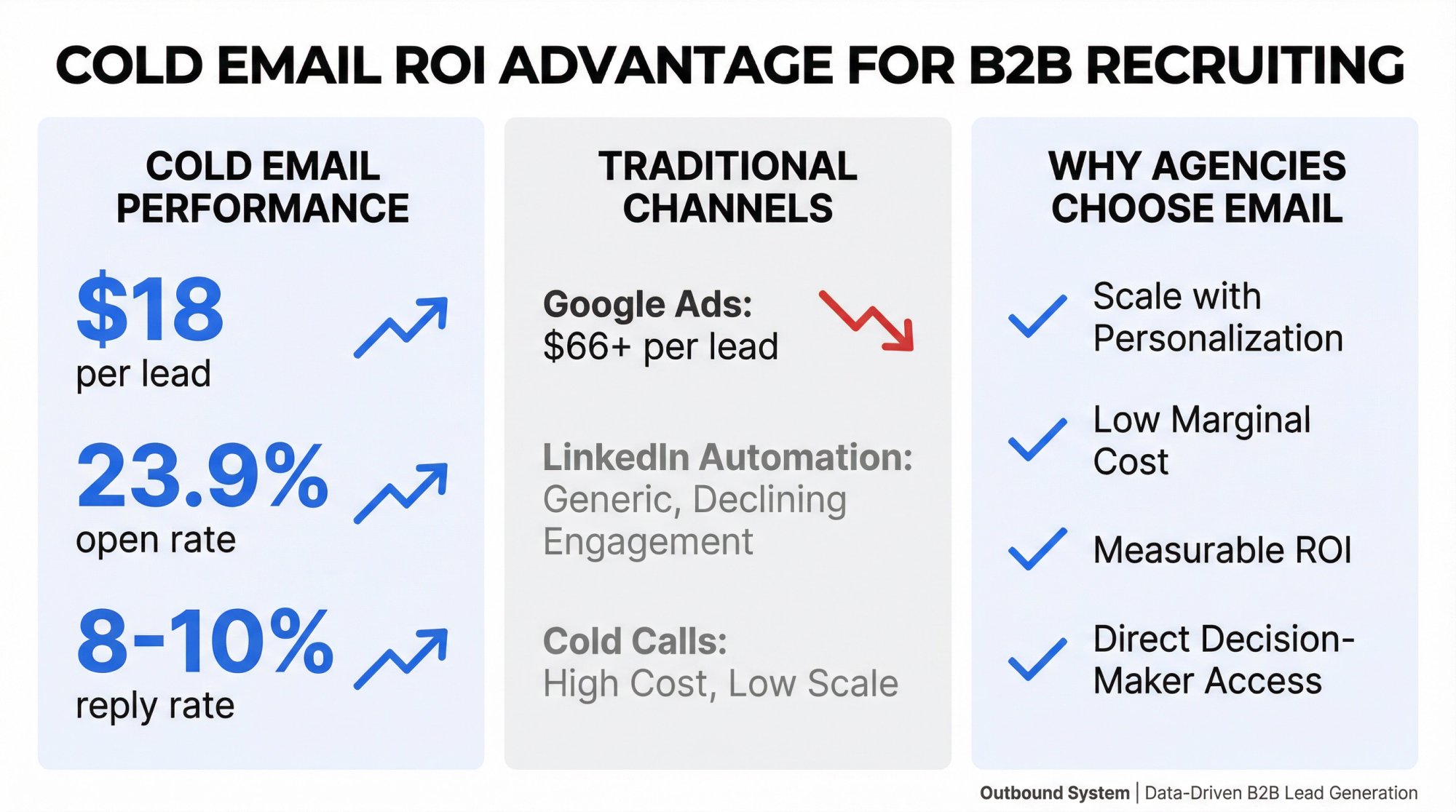
Studies show cold emails achieve roughly a 23.9% open rate across industries. While the average professional receives around 121 emails daily, your message can still get seen if you craft it right.
Cost per lead matters too. Research indicates cold email campaigns generate leads at around $18 per lead, compared to $66+ for Google Ads. Once your infrastructure is set up, sending emails costs almost nothing.
The real advantage? Scale with personalization. You can reach hundreds of prospects weekly with relevant, targeted messages. Top-performing agencies see 8-10%+ reply rates, and highly personalized campaigns can hit 15-20% response rates.
Over 80% of B2B organizations use outbound prospecting as part of their sales strategy. Recruiting agencies are essentially in B2B sales (you're selling your services to employers), which means cold email absolutely belongs in your toolkit.
What Makes Cold Email Work for Recruiting
Most agencies waste months "testing copy" when the real problem is targeting or infrastructure. Think of recruiting cold email as an equation:
Right account + Right trigger + Right offer + Low-friction ask + Clean deliverability = Replies
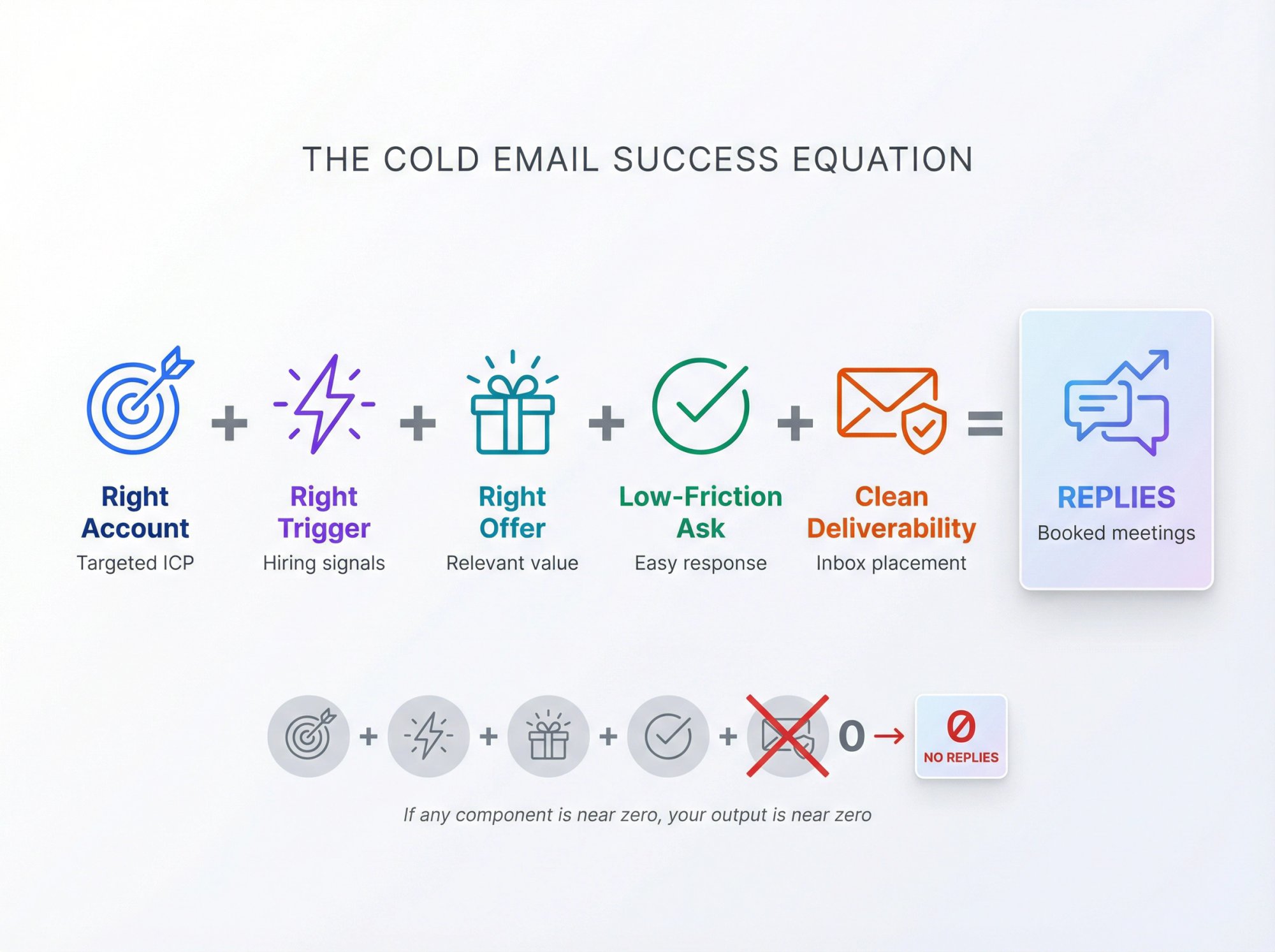
If any term is near zero, your output is near zero.
Your targeting might be perfect. But if your emails land in spam, it doesn't matter. Your deliverability might be flawless. But if you're emailing companies that aren't hiring, you're wasting time.
Keep this equation in mind as you implement the strategies below.
Client Outreach vs Candidate Sourcing: Key Differences
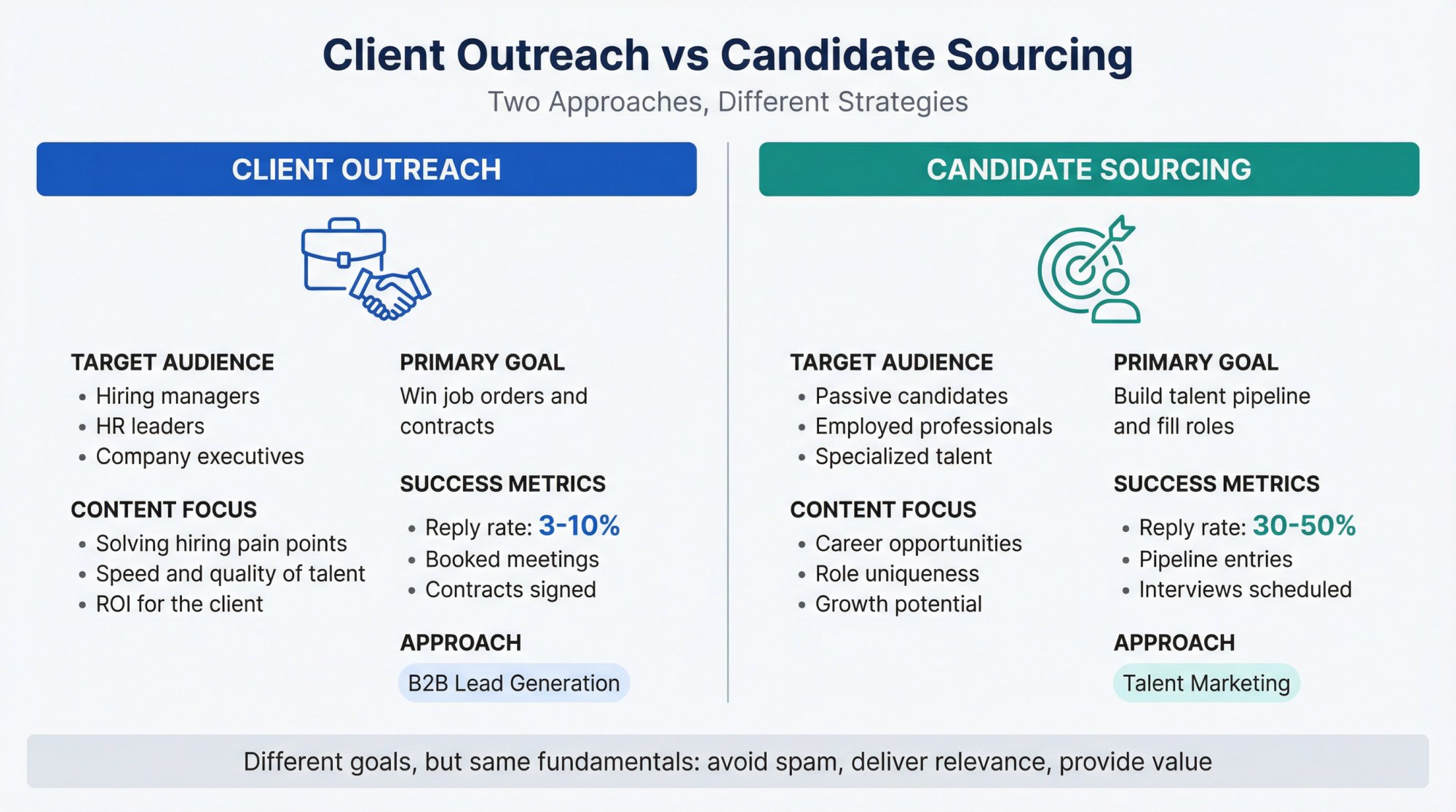
Recruiters send two types of cold emails. It's crucial to understand the difference:
How to Win New Clients with Cold Email
These emails target hiring managers, HR leaders, or executives at companies that could become your clients. The goal? Introduce your staffing services and get them to discuss hiring needs.
This is classic B2B lead generation. Your content should focus on their pain points (difficulty hiring specialized talent, high time-to-fill, lost productivity from open positions) and how you solve them.
Success metrics: Reply rate, booked meetings, contracts signed
Benchmarks: Well-targeted cold emails can achieve around 3-10% reply rates, with top performers exceeding 10%. Generic sends see only 1-2%.
How to Source Candidates with Cold Email
These emails target individuals who might fit job openings you're working on. Often these are passive candidates (employed professionals not actively applying to jobs, but open to the right opportunity).
Your goal? Spark their interest in a role or at least start a conversation about their career. This is more like marketing a job opportunity than selling a service.
Success metrics: Reply rate, candidates entering your pipeline, interviews scheduled
Benchmarks: Cold recruiting emails can achieve surprisingly strong engagement when done right. Top recruiters report average reply rates of 30-50% from passive candidates in successful outreach sequences. Many agencies still see only 15-20% response rates, which means there's massive room for improvement.
Important context: With 73% of talent being passive (not actively job-hunting), mastering cold outreach is essential to engage those high-value candidates who won't see your job ads.
Despite these differences, the fundamentals overlap. In both scenarios, you need to avoid spam, deliver immediate relevance, and provide value to the recipient.
2026 Email Deliverability Requirements for Recruiters
If you want this guide to pay for itself, read this section twice.
All your effort writing amazing messages will be wasted if they never reach the inbox. Before you send a single cold email, you need to set up proper deliverability infrastructure.
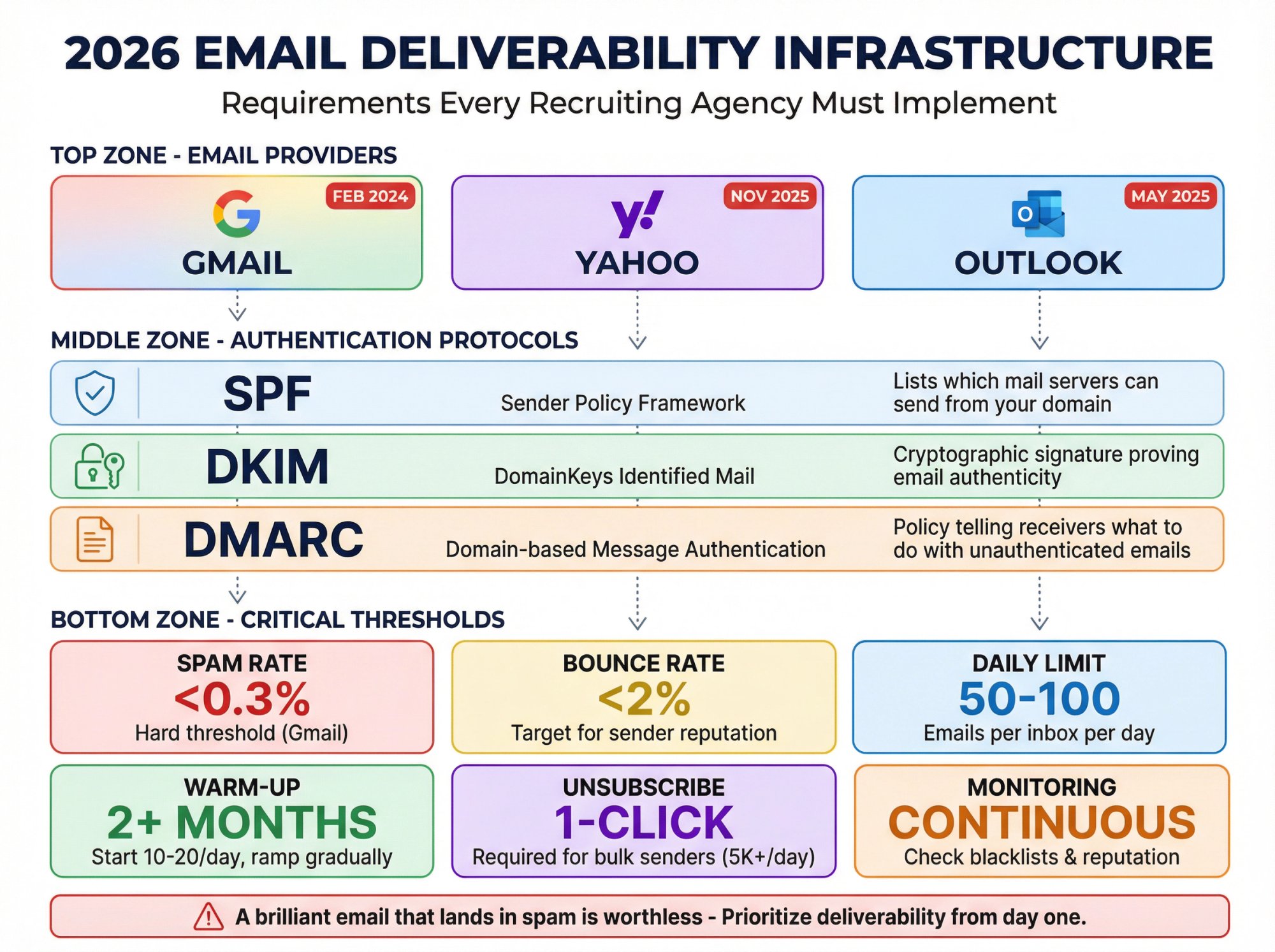
In 2024-2025, mailbox providers tightened sender requirements significantly. Enforcement has continued ramping into 2026.
What Changed in 2026: Gmail, Yahoo, and Outlook
Gmail Requirements (Personal @gmail.com accounts)
Google's sender guidelines for personal Gmail accounts include:
• SPF or DKIM for all senders, and SPF + DKIM + DMARC for bulk senders (5,000+ messages/day)
• Keep spam rates below 0.3% (as reported in Postmaster Tools). This is a hard threshold.
• Marketing messages must support one-click unsubscribe for bulk senders, using List-Unsubscribe headers
• Enforcement ramp: Google began ramping enforcement in February 2024, with further increases starting November 2025 for non-compliant traffic
Important nuance: These guidelines apply specifically to personal Gmail accounts (addresses ending in @gmail.com). Best practice? Follow them for all your sending.
Yahoo Requirements
Yahoo's sender guidance emphasizes authentication and low complaint rates, with tight expectations around unsubscribe handling. Yahoo has historically been aggressive about filtering, so proper setup is non-negotiable.
Microsoft Outlook.com Requirements
Microsoft announced that from May 5, 2025, high-volume senders (5,000+ emails/day) to Outlook.com must have SPF, DKIM, and DMARC. Non-compliant mail may be rejected.
What Recruiting Agencies Must Do in 2026
Even if you're not sending 5,000/day to Gmail, these rules signal the direction of travel: authentication, unsubscribe hygiene, and complaint rates matter more each year.
Ignore this at your peril. Your perfect template never hits the inbox if your infrastructure is broken.
Email Infrastructure Setup Checklist
Before you send real volume:
① Use a Separate (Warmed-Up) Email Domain
Don't send cold outreach from your main company email domain. Too risky. If that domain gets flagged as spam, it hurts all your communications (client updates, candidate follow-ups, internal emails).
Purchase one or more alternative domains that look similar to your primary domain. If your site is BestRecruiters.com, you might register BestRecruiters.co or BestRecruitersHiring.com. Set up email addresses on these domains for outreach.
Crucially, warm up these new inboxes before heavy sending. Don't jump from 0 to 100 emails/day. Build gradually. Experts recommend a warming period of a few weeks where you slowly increase send volume. Start with 10-20 emails per day and ramp up over 2+ months.
Warming services can automate this process.
② Authenticate Your Email (SPF, DKIM, DMARC)
Set up proper email authentication records for your sending domain:
Protocol | What It Does |
|---|---|
SPF (Sender Policy Framework) | Lists which mail servers can send from your domain |
DKIM (DomainKeys Identified Mail) | Cryptographic signature proving email authenticity |
DMARC (Domain-based Message Authentication) | Policy telling receivers what to do with unauthenticated emails |
These protocols prove to recipient servers that your emails are legitimate and not forged. Ensure your SPF includes all the services you'll send from (GSuite, mailing tools, etc.) and generate a DKIM key for your domain.
This setup only needs to be done once per domain and will significantly improve deliverability.
③ Verify and "Triple-Check" Your Contact Lists
One major cause of spam issues? A high bounce rate (sending to invalid emails). Always run your prospect lists through an email verification tool before mailing.
Services like ZeroBounce, NeverBounce, and others will catch syntax errors, dead domains, and known bad addresses.
Ideally, integrate a multi-step verification process: check syntax, ping the mail server, and use data from past bounces. The goal is to keep your bounce rate under 2%.
At Outbound System, we keep bounce rates around 1% by triple-verifying every contact with a 9-step waterfall enrichment process. Low bounces protect your sender reputation.
④ Mind Your Sending Volume and Limits
Be aware of how many emails you send per day from each inbox. If you use Google Workspace, the limit is around 2,000 emails per day per account. For Office365 it's similar (often 1,000+ recipients/day).
Stay well below those limits for cold outreach. Better to spread sends across multiple inboxes than blast thousands from one account.
Sophisticated cold email programs use 5, 10, or even 50 separate email accounts to distribute the sending load. This allows high volume while each inbox only sends 50-100 emails/day.
Pace yourself. Rapid spikes in volume trigger filters. Grow gradually.
⑤ Set Up Proper Unsubscribe Handling
Your unsubscribe process must be:
→ Real and functional
→ Simple (one-click preferred for bulk sending)
→ Honored quickly (within 10 business days per CAN-SPAM, but best practice is immediately)
Include clear unsubscribe language in your signature: "If you're not the right person or prefer not to be contacted, let me know and I won't reach out again."
⑥ Monitor Sender Reputation
Periodically check if your domain or IPs appear on any blacklists and monitor metrics like spam complaint rates. Some warm-up and sending tools include reputation monitoring.
If you notice deliverability dipping (open rates plummet, reply rates tank), pause and troubleshoot immediately.
One cold email maxim puts it perfectly: A brilliant email that lands in spam is worthless.
Prioritize deliverability from day one.
How to Target the Right Prospects and Candidates
Successful cold email is about sending the right message to the right person. One of the biggest reasons cold outreach campaigns fail? Poor targeting (emailing people who have no need or interest in your offering).
Recruiting agencies have a massive advantage that most B2B sellers don't: you can target based on public hiring intent.
3-Tier Targeting Model for Winning Clients
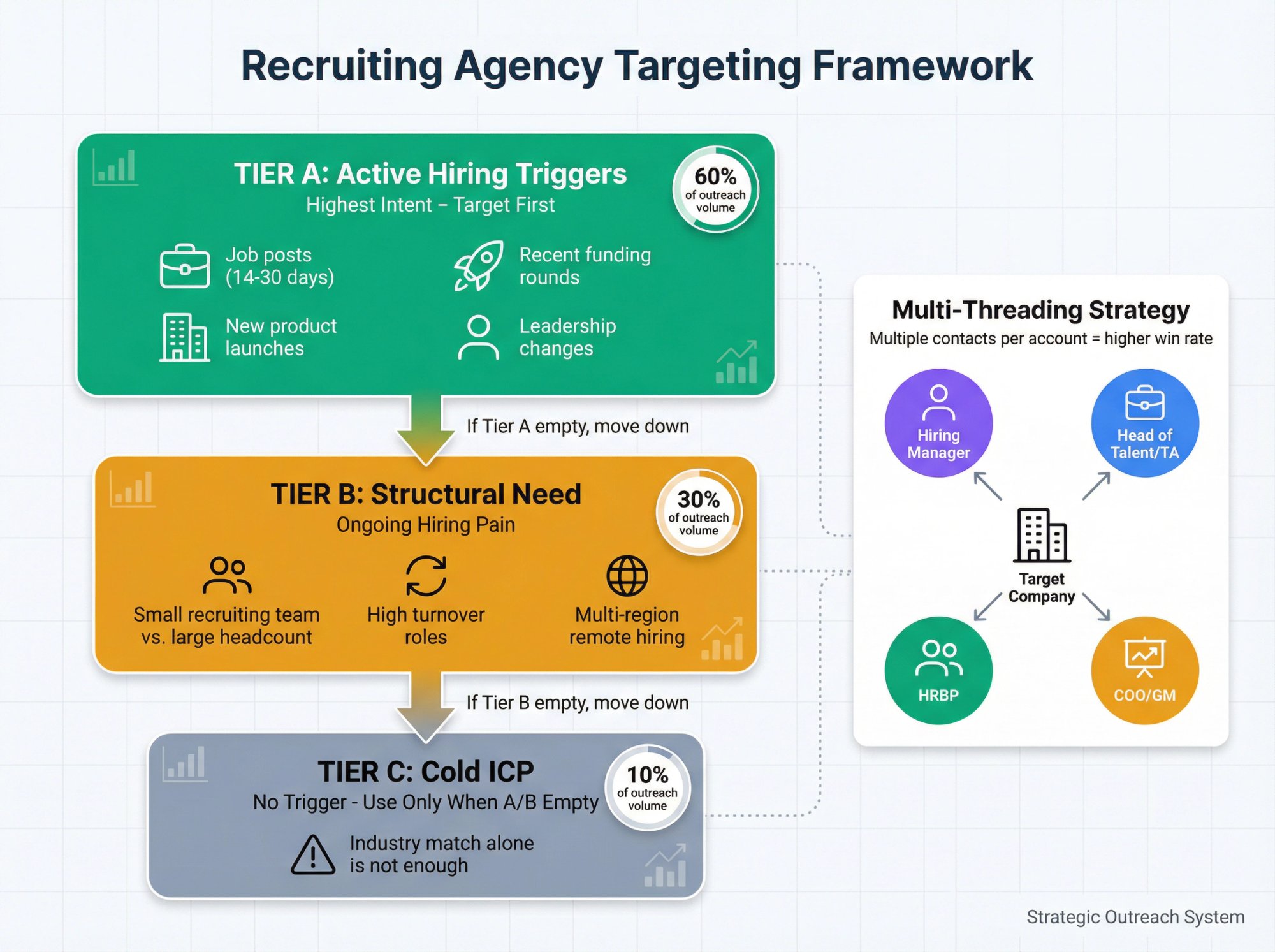
Build lists in tiers, from highest intent to lowest:
Tier | Trigger Type | Examples |
|---|---|---|
Tier A | Active Hiring Trigger | Company hiring for your niche role (job posts in last 14-30 days) |
Tier B | Structural Need | Small internal recruiting team for large headcount |
Tier C | Cold ICP (No Trigger) | "They're in my industry" is not enough |
How to Define Your Ideal Client Profile (ICP)
Not every company is a fit for your services. Analyze your best current clients:
• What industry are they in?
• What size (employee count or revenue)?
• Which titles do you typically work with (HR Manager, CTO, Founder)?
• Are there certain niches you specialize in (recruiting for fintech startups, or for healthcare roles)?
Use those criteria to focus your outreach list. Quality beats quantity: a carefully curated list of 200 high-potential companies will outperform a mass list of 5,000 random businesses.
If your emails are highly relevant to the recipient's needs, they won't feel "cold" at all.
Multi-Threading: Why You Need Multiple Contacts Per Company
In recruiting, a single contact is fragile because:
Hiring manager feels the pain
HR/TA controls process and vendor lists
Finance cares about spend
So multi-thread per account:
① Hiring manager for the role family
② Head of Talent / TA leader
③ HRBP supporting the department
④ Sometimes: COO / GM for smaller companies
Keep the same core offer, but adjust the "pain lens" per persona.
How to Find Hiring Triggers That Signal Need
Recent news like funding rounds, expansion to new markets, launching a new product, or executive changes can signal that a company is (or soon will be) hiring aggressively.
Use that intel to prioritize and personalize your outreach. For example: "Congrats on your Series B funding. I imagine growing the engineering team is a priority now…"
How to Target Passive Candidates Effectively
Your "targeting" here means finding individuals who perfectly match the role you're trying to fill. This often involves advanced boolean searches on LinkedIn, using niche talent databases, or AI sourcing tools.
The key? Refine your search criteria so you aren't blasting every software developer in the world. Instead, perhaps you target "DevOps engineers in Seattle with AWS and CI/CD experience at mid-stage startups."
Ensure you have their personal email addresses (not work emails). Many tools can find personal emails once you input the name and domain or use LinkedIn integration. Always verify these emails as well, to avoid bounces.
Also, segment your outreach. Make separate campaigns for Frontend Developers vs Backend Developers if you're hiring both, rather than one generic blast.
Why Niche Specialization Wins More Clients
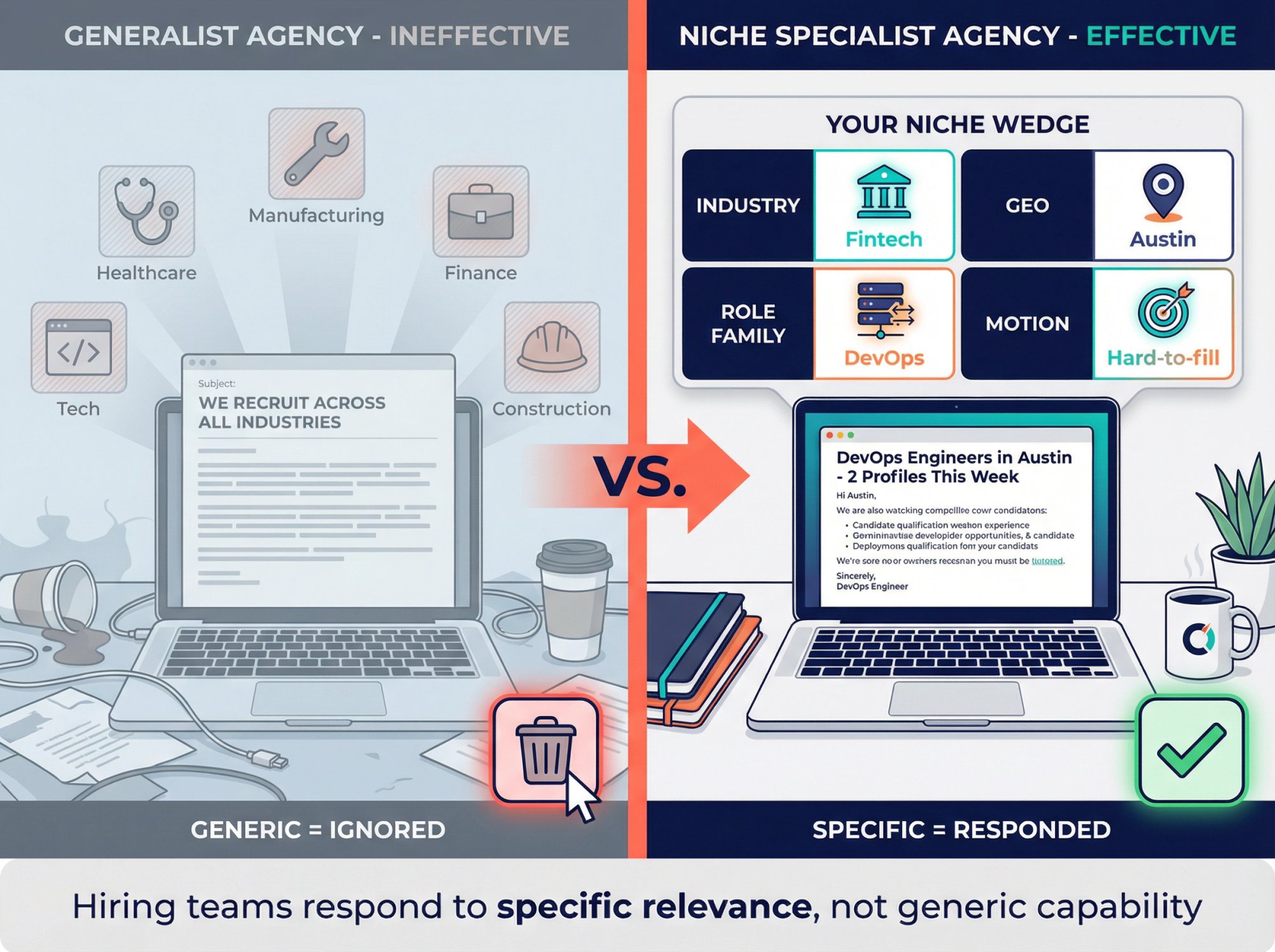
The Trap: "We Recruit Across Industries"
That reads like: "We're not special."
Hiring teams don't respond to cold email because you exist. They respond because you're specifically useful for a current problem.
How to Choose Your Recruiting Niche
Pick 1 from each column:
Category | Examples |
|---|---|
Industry | Fintech, manufacturing, logistics, construction, healthcare |
Role Family | SDR/AE, DevOps, CNC machinists, plant managers, nurses |
Geo/Time Zone | US West, DACH, London, Toronto |
Hiring Motion | High volume, hard-to-fill, executive retained, contract staffing |
Even if you can do more, your outbound should lead with one wedge.
What Offers Actually Get Responses
Your offer should either:
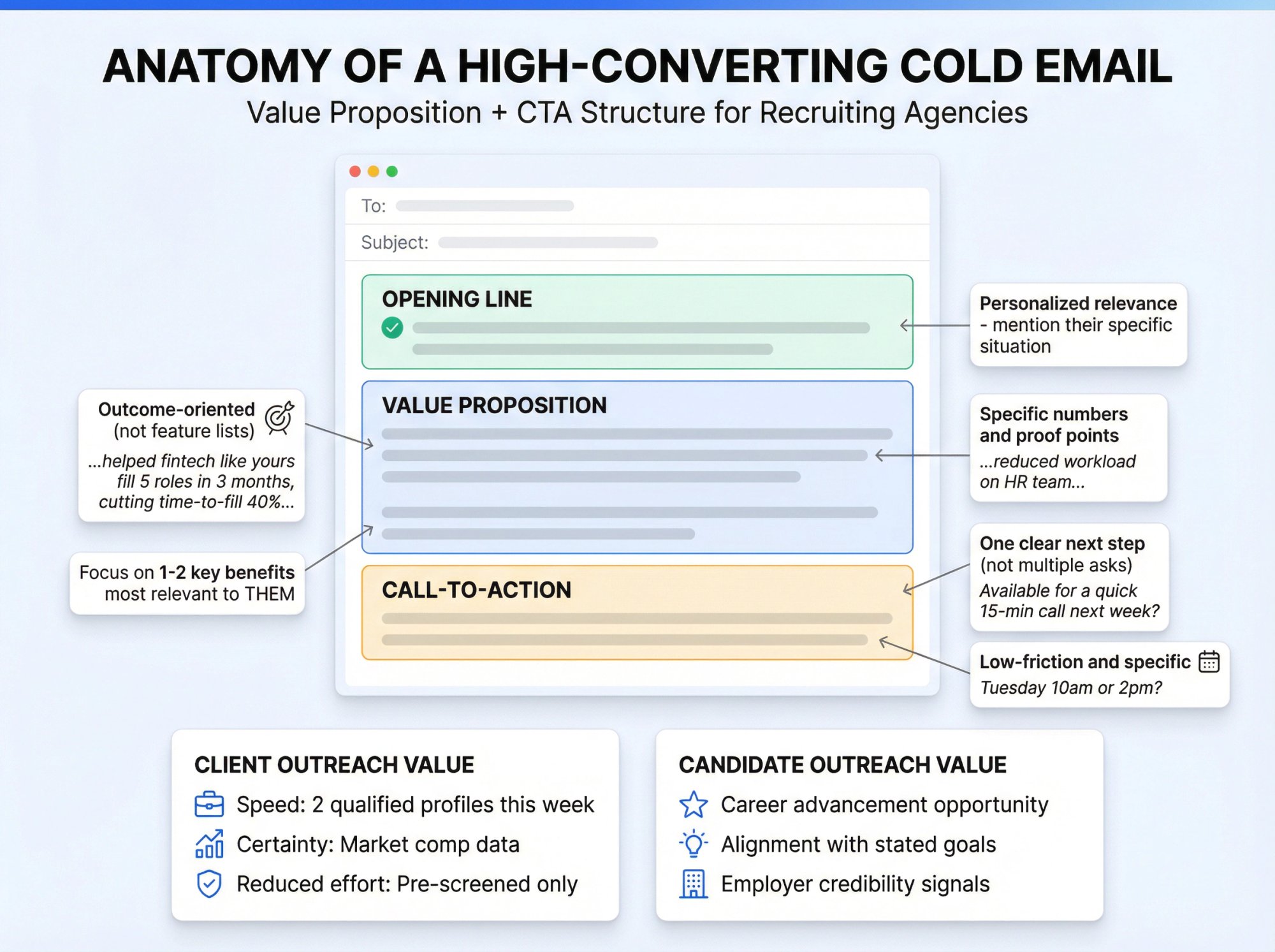
Reduce time: "I can put 2 qualified profiles in front of you this week"
Reduce uncertainty: "I can map the market and show comp ranges so you can hire confidently"
Reduce effort: "I'll pre-screen and only send candidates that match your must-haves"
Examples that convert well in cold email:
• "2 anonymized candidate snapshots" relevant to an open role (no personal data, no resumes without consent)
• "15-minute role calibration" to sanity-check must-haves, comp, and where hiring usually fails
• "Candidate availability pulse" for a niche: "Here's what I'm seeing in the market this month"
• "Speed trial": "If I can't send 2 qualified profiles in 7 days, we stop"
Notice: none of these are "Would you like to learn about our agency?"
How to Write Cold Emails That Get Responses
Writing a cold email for a recruiting agency is a balancing act. You need to be concise but engaging, personalized but scalable, and persuasive without being pushy.
What Every Cold Email Must Do
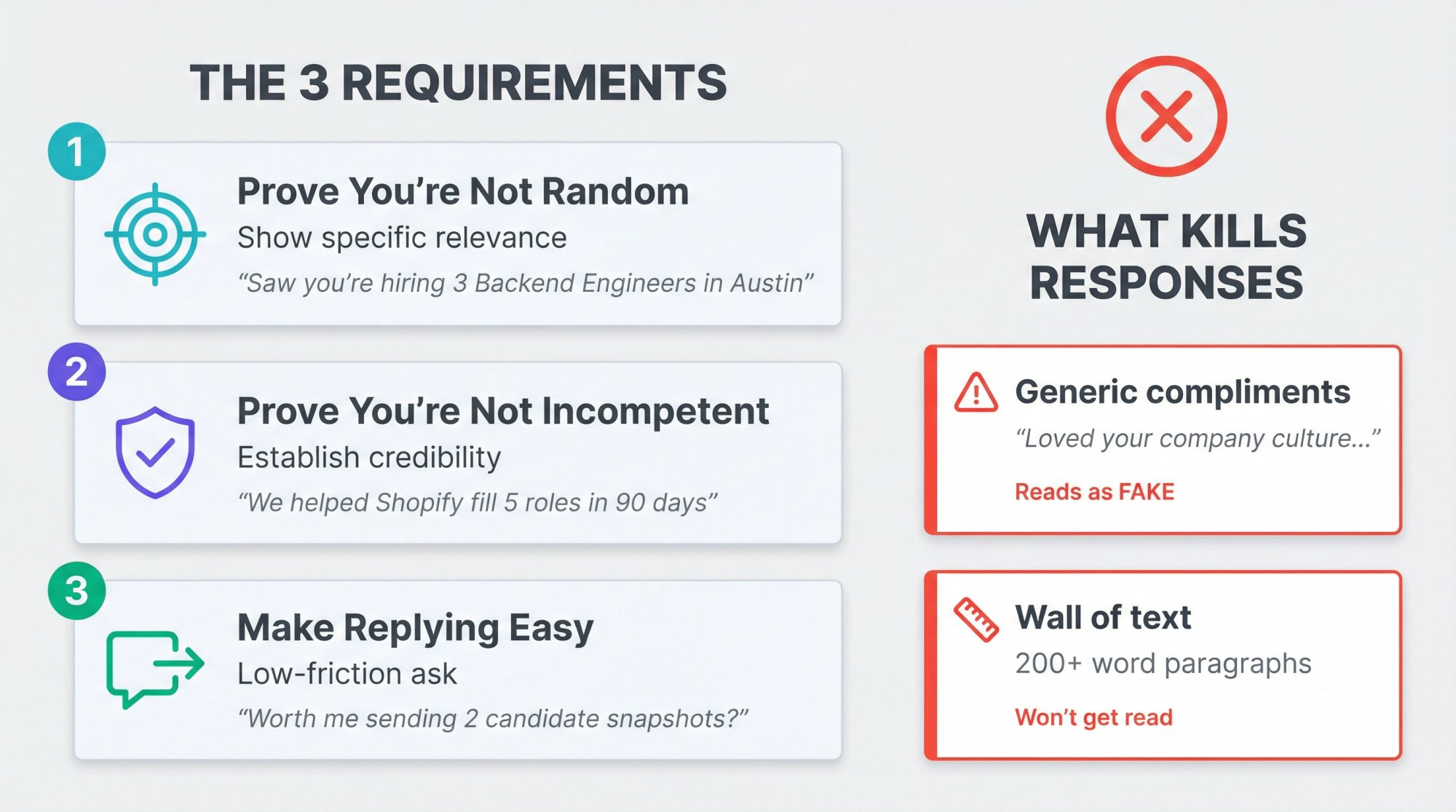
① Prove you're not random (relevance)
② Prove you're not incompetent (credibility)
③ Make replying easy (low-friction ask)
What's the Ideal Cold Email Length in 2026?
Benchmark research suggests top-performing campaigns keep first-touch emails under 80 words and keep the CTA simple.
That's not a magic number. It's a forcing function: you must be clear.
A good cold email is usually 100-200 words total in length for the main message. That might only be 2-3 short paragraphs. Chunk your content using line breaks or bullet points if listing a couple of quick facts.
Big walls of text won't get read by busy professionals.
Cold Email Subject Lines That Get Opens
Your subject line is the make-or-break moment. Research shows that one-third to two-thirds of recipients decide whether to open an email based on the subject line alone.
Keep it Short and Specific
Research recommends no more than 9 words (about 60 characters) for best results. Many people check email on mobile, where long subjects get cut off. Aim for 6-8 words or ~40 characters.
Examples:
✓ "Need data scientists? We can help"
✗ "Staffing services available for all your hiring needs!!!"
Personalize or Localize If Possible
Including the recipient's name, company, or something relevant to them can make the email feel less like spam:
• "John – ready to fix Acme Corp's hiring backlog?"
• "Congrats on the expansion – need engineers?"
Only personalize if it's truly relevant. Don't slap someone's name on a generic pitch.
Convey Value or Benefit
Hint at a pain point you solve or a benefit to be gained:
• For clients: "Struggling to fill dev roles? Let's chat" or "Cut time-to-hire by 50% – an idea for you"
• For candidates: "Lead Designer role at [Well-Known Company]?" or "Your next career move – VP of Marketing?"
Spark Curiosity (but avoid clickbait)
Questions often work well ("Ready for a better recruiting partner?" or "Are you open to a new opportunity in fintech?").
What you shouldn't do? Use fake reply chains ("Re: Following up" when it's actually the first email), excessive urgency ("URGENT"), or anything spammy like all-caps or too many exclamation marks.
Why "Recruiter Compliments" Kill Response Rates
This is the most common mistake:
"Loved your company's mission and culture…"
Hiring teams smell this as fake because it usually is.
Use operational relevance instead:
✓ "Saw you're hiring 3 Senior Backend Engineers in Austin."
✓ "Noticed your AE team doubled since last quarter."
✓ "Looks like you're opening a new plant in Phoenix."
How to Personalize Your Opening Line
Once they open the email, the first sentence or two determines if they keep reading or hit delete. Your opening line should immediately connect to the recipient and show that your email isn't a mass blast.
Research indicates that 76% of recipients get frustrated by generic emails that make no attempt to acknowledge their situation.
Start with Something About Them, Not You
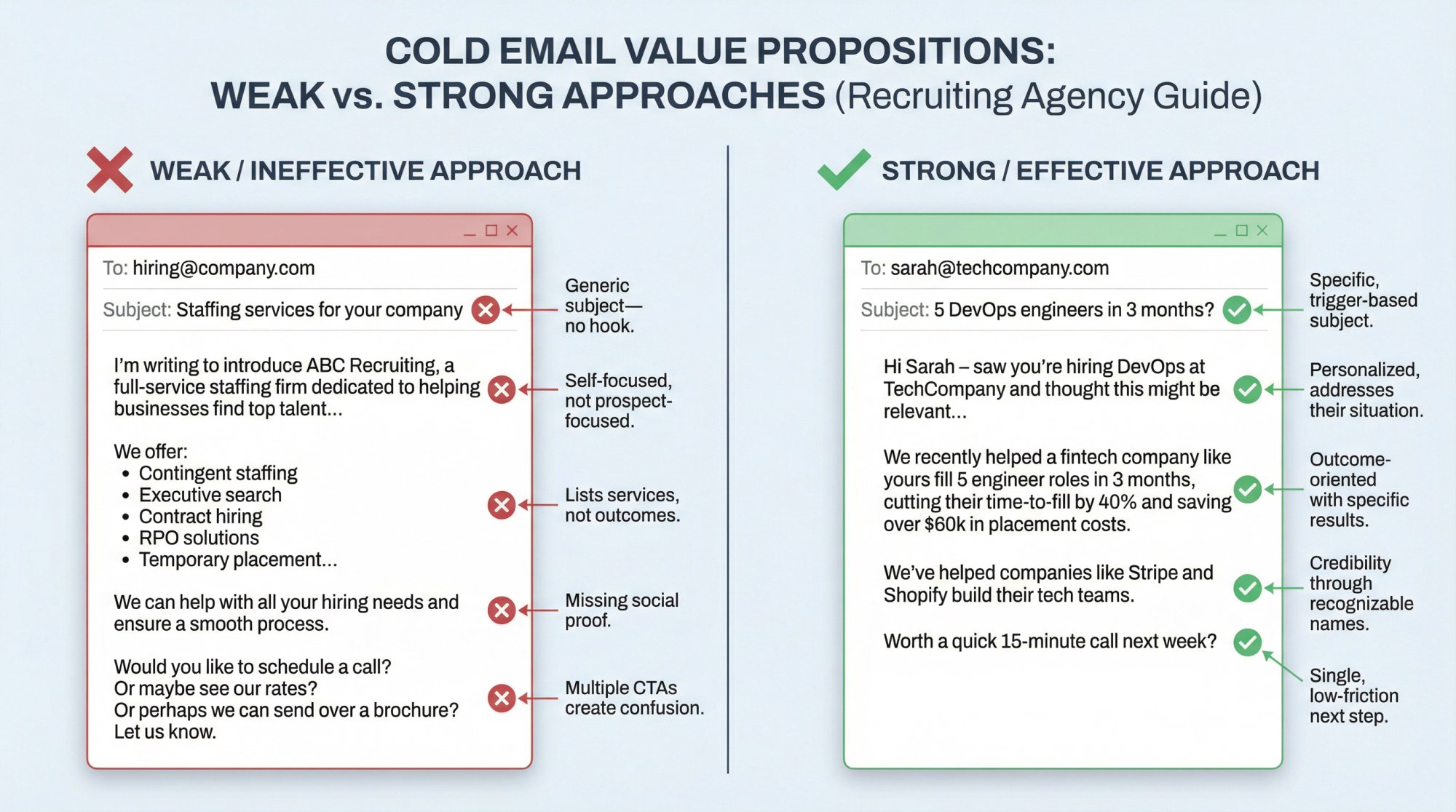
A classic mistake? Beginning with "I'm writing to introduce our agency…" or "My name is ___ and we do XYZ." In a cold context, the reader doesn't care who you are yet (they care about their needs).
Instead, lead with something directly relevant to them:
• For clients: "I saw on LinkedIn that you're expanding your sales team. I imagine filling those roles quickly is a priority."
• "Noticed your job posting for a Data Analyst has been up for 60 days. That's a tough role to fill in this market."
• For candidates: "I came across your profile and noticed you have a background in cybersecurity. Our client, a SaaS company, is building a security team and your experience with XYZ stood out."
Use Specifics and Details
Mention the prospect's company name, a product of theirs, a mutual connection, or a piece of content they posted:
• "Congrats on the recent funding round. Exciting to see a biotech firm in Chicago growing like that!"
• "I read your interview in TechCrunch about the challenges in scaling operations."
• For candidates: "I noticed you contributed to an open-source AI project on GitHub. Love to see that."
These details show it's not a robot or lazy spammer writing. It's someone who genuinely is interested in them.
Keep the Tone Friendly and Human
Avoid overly formal or stiff language. Use first names and a conversational tone:
"Hi Maria – I'll cut right to it: I saw your post about struggling to hire devs fast enough. We should talk, because I specialize in exactly that…"
Compare that to: "Dear Maria, I am reaching out to introduce ABC Staffing, a premier provider of recruitment solutions." The latter might as well be a brochure.
Avoid Empty Pleasantries and Filler
Phrases like "I hope you are doing well" or "Happy Monday!" only take up precious space. Don't start with "I'm just reaching out because…". Skip to the substance.
How to Show Value That Gets Meetings Booked
After the intro, the body of your email needs to answer: "What's in it for me?". This is where you present your value proposition.
For Client Outreach
Your value prop is typically how your recruiting service will make their life easier or their business more successful. Be specific and outcome-oriented:
"Our agency recently helped a fintech company like yours fill 5 engineer roles in 3 months, cutting their average time-to-fill by 40%. We did this by tapping into niche talent pools and running a streamlined screening process. I believe we can achieve similar results for you, reducing the workload on your HR team and saving you lost productivity from open positions."
Focus on one or two key benefits most relevant to that client. It might be speed, quality of candidates, specialized expertise, reduced turnover, etc. Don't list every service you offer or drown them in details.
For Candidate Outreach
The "value" is the job opportunity itself and how it aligns with the candidate's aspirations. Highlight what makes the role attractive or unique:
"This role would be a step up to Lead Engineer where you'd build a team from scratch. Something I noticed you mentioned wanting to do on your blog."
Or: "It's a chance to work on solving climate change with cutting-edge AI. Given your past work in renewable energy, I thought it might resonate."
How to Add Credibility with Social Proof
People are more likely to trust and respond if you provide evidence that you're legitimate and effective.
For client emails, mention a notable past or current client: "We've helped companies like Shopify and Stripe build out their tech teams."
Another approach? Cite a statistic or result: "On average, our clients see a 50% faster fill rate compared to their prior methods."
For candidates, social proof might be the employer's credibility: "The company's leadership includes a former Google AI director and a Tesla engineer."
What Call-to-Action Gets the Most Replies
Every cold email needs a simple and logical next step. Don't leave it ambiguous.
For client outreach, a strong CTA is usually to schedule a call or meeting:
• "Are you available for a quick 15-minute call next week to discuss your hiring needs?"
• "I'd love to set up a call to learn about your talent goals for this year. How does Tuesday at 10am or 2pm look?"
• "Interested in seeing a few candidate profiles to gauge the quality we can provide?"
For candidate emails, the CTA might be to reply to learn more:
• "If you're interested, I'd love to set up a brief call to tell you more about the role and answer any questions."
• "Interested in hearing more details?" (low-friction)
• "If it piques your interest, I can send over the full job description or answer any questions via email."
Make sure your CTA is one per email. Don't ask for multiple things (that creates decision paralysis).
After the CTA sentence, a polite sign-off is good: "Looking forward to hearing your thoughts," or "Hope to connect," followed by your name and signature.
Include your full name, title, company, and contact info in a compact signature block. Also, include a way to opt-out.
Cold Email Follow-Up Sequences That Book Meetings
Why Follow-Ups Are Critical for Recruiting
Most cold emails will not get a reply on the first send. That's why following up is absolutely essential.
Industry data shows that 80% of sales require five or more follow-ups after the initial contact. While you may not always need five follow-ups for a recruiting email, the principle holds.
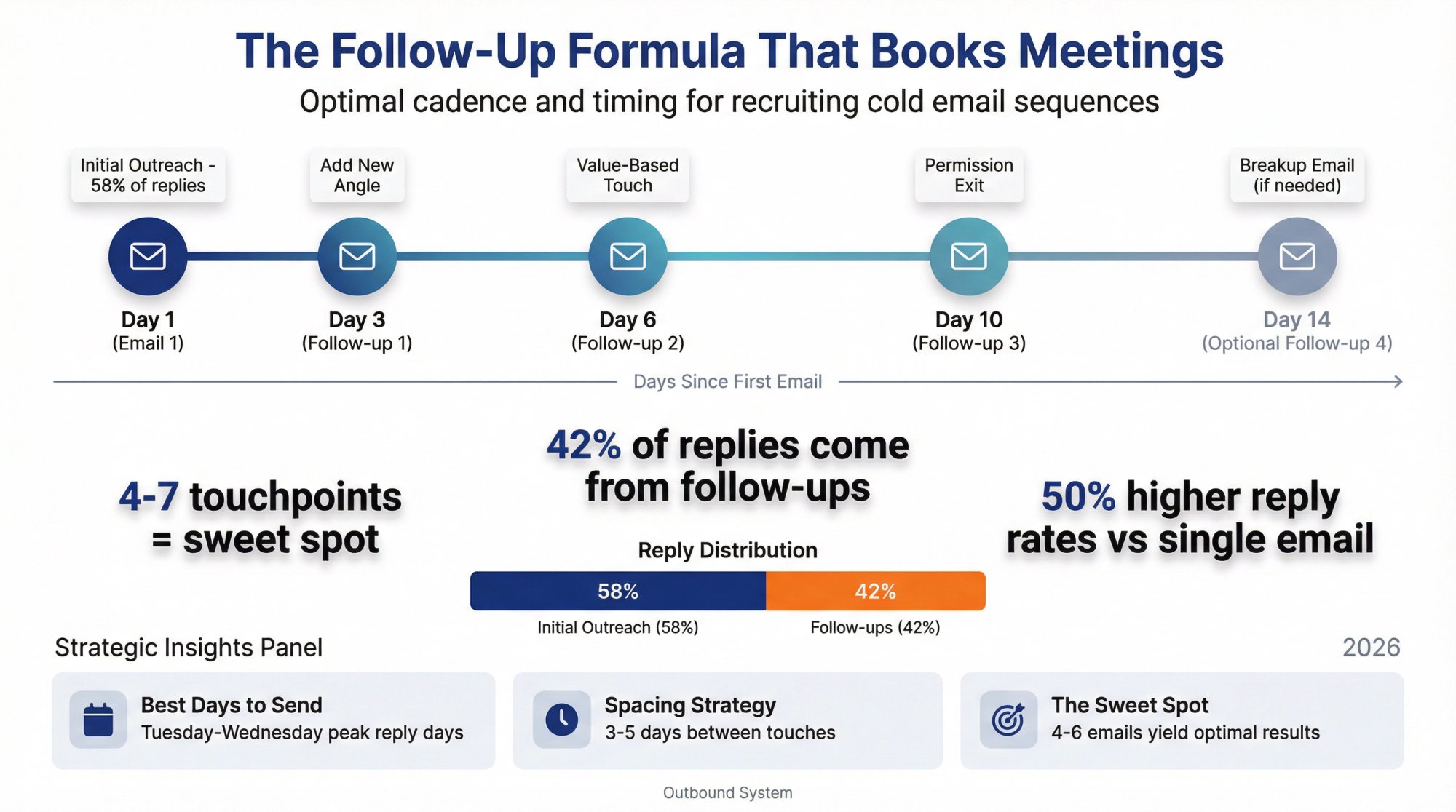
Recent benchmark data suggests 42% of replies come from follow-ups, with 58% coming from the first email. They describe a "sweet spot" of roughly 4-7 touchpoints, where too few gives up early and too many has diminishing returns.
At Outbound System, our data indicates that sequences of 4-6 emails can yield 50% higher reply rates than a single email send.
Best Cadence for Follow-Up Emails
• Day 1: Email 1
• Day 3: Email 2 (first follow-up)
• Day 6: Email 3 (second follow-up)
• Day 10: Email 4 (third follow-up)
• Optional Day 14: Email 5 (only if you add real value)
Timing research suggests Tuesday and Wednesday are peak reply days. Use that as a nudge, not a religion.
Client Outreach Template: Job Posting Trigger
Subject: quick question about your [Role] hire
Hi [FirstName] – saw you're hiring for [Role] at [Company] (the [Location/Team] posting).
We place [RoleFamily] in [Industry/Niche]. If helpful, I can send 2 anonymized candidate snapshots this week that match your must-haves (comp range + availability).
Worth me sending those over, or are you already covered for this hire?
[YourName]
[Title], [Agency]
Why it works: It's specific, low effort to respond, and doesn't force a meeting.
Client Outreach Template: Market Insights
Subject: [Role] hiring in [City] (quick data point)
Hi [FirstName] – I work with [industry] teams hiring [RoleFamily] in [City/Region].
I'm putting together a short "availability + comp pulse" for [Role] this month (what candidates are actually asking for and how fast they're moving).
Want me to send it when it's done?
[YourName]
Why it works: You offer something useful even if they aren't actively hiring today.
Client Outreach Template: Executive Search
Subject: shortlist for [Role]?
Hi [FirstName] – are you the right person for [Role] hiring at [Company]?
I run retained searches for [RoleFamily] in [Industry], usually when teams need a tight shortlist without weeks of noise.
If you share the top 3 must-haves (and 1 deal-breaker), I can tell you:
• whether the market has it right now
• what comp bands are clearing
• and how fast we can put a shortlist together
Open to a 10-min calibration call next week?
[YourName]
Note: This is the rare case where "call" is fine, because retained buyers expect a consultative motion.
Follow-Up Templates That Get Responses
Follow-up 1 (new angle, not "checking in")
Subject: Re: [Role] hire
Hi [FirstName] – quick add: for [Role] in [City], we're seeing [one real market constraint].
If you want, I can send 2 anonymized profiles that fit [constraint] so you can sanity-check what "good" looks like.
Should I send them?
Follow-up 2 (permission-based exit)
Subject: should I close this?
Hi [FirstName] – totally fine if timing is off.
Should I:
send a couple candidate snapshots for [RoleFamily], or
close the loop?
Either reply is helpful.
Why this works: It gives them an easy way to say "no" without feeling trapped.
The "Breakup Email" That Gets Responses
If you've sent several emails with no response, it can be effective to send a last email that acknowledges the non-response and graciously lets them go:
"Hi [Name], I realize you may not have time or interest in this right now. This will be my last email. If now isn't a fit, no worries at all. If things change, I'd be happy to reconnect in the future. Thanks for your time, and best of luck!"
This kind of email sometimes generates a response where others didn't (either because the prospect feels polite enough to finally reply, or because the timing is now right).
How to Handle Replies and Convert Interest
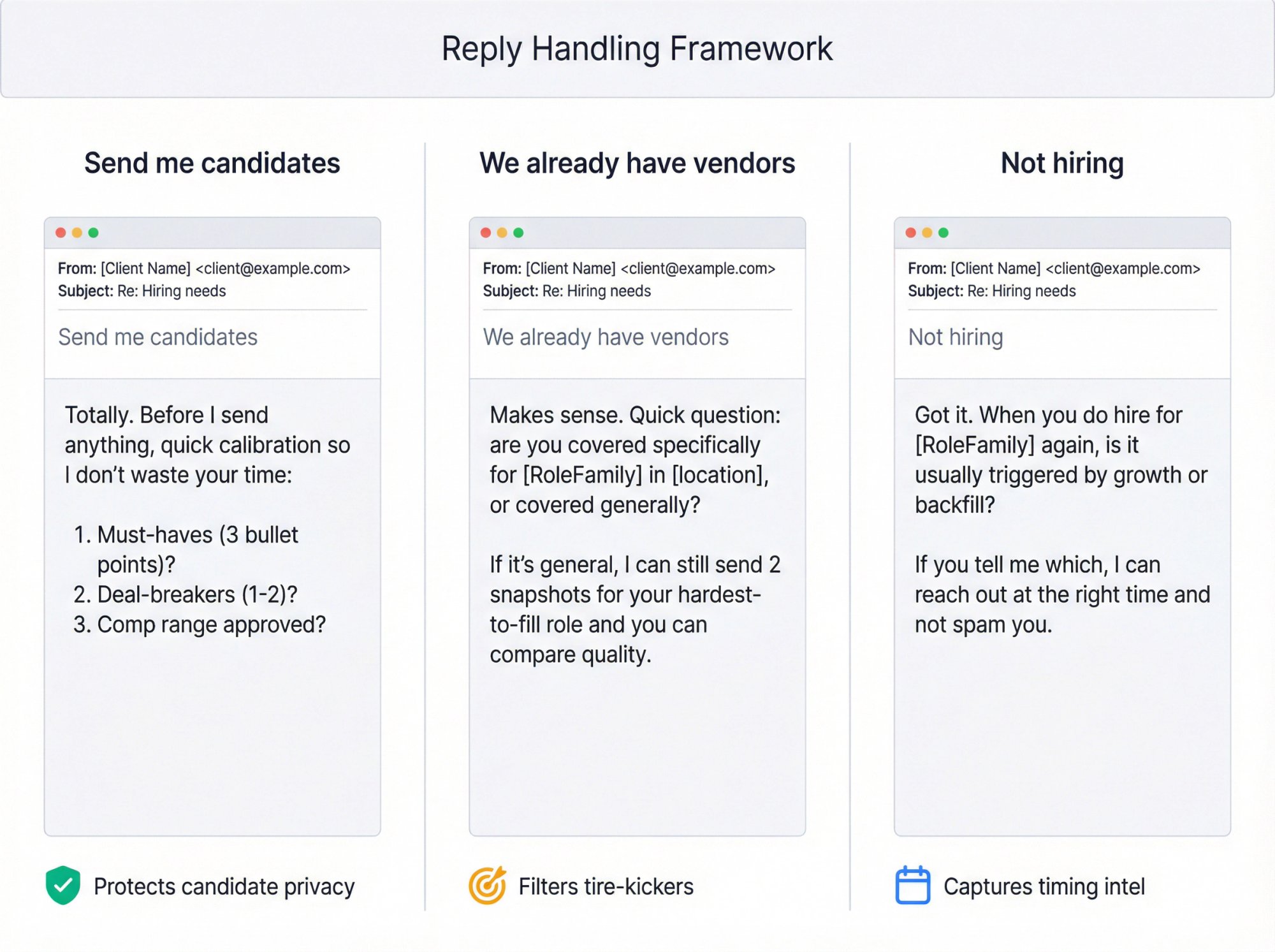
You'll get these replies constantly:
"Send me candidates"
Do not dump resumes.
Reply:
Totally. Before I send anything, quick calibration so I don't waste your time:
1. Must-haves (3 bullet points)?
2. Deal-breakers (1-2)?
3. Comp range approved?
If you reply with those, I'll send 2 anonymized snapshots first (availability + range), then full profiles if there's interest.
Why: You protect candidate privacy and filter tire-kickers.
"We already have vendors"
Reply:
Makes sense. Quick question: are you covered specifically for [RoleFamily] in [location], or covered generally?
If it's general, I can still send 2 snapshots for your hardest-to-fill role and you can compare quality.
"Not hiring"
Reply:
Got it. When you do hire for [RoleFamily] again, is it usually triggered by growth or backfill?
If you tell me which, I can reach out at the right time and not spam you.
This turns a dead end into timing intel.
How to Measure Cold Email Success
Why Open Rates Don't Matter Anymore
Apple's Mail Privacy Protection makes it harder for senders to learn about email activity, hides IP addresses, and prevents senders from seeing whether an email was opened.
So treat opens as "maybe," not truth. Read more about why you shouldn't always track cold email open rates.
What Metrics Actually Matter for Recruiting
Delivery rate (bounces, blocks)
Reply rate (total and positive)
Meetings booked per 1,000 delivered
Complaint rate (especially if you send meaningful volume to Gmail)
Downstream: job orders created, placements, revenue per meeting
What Good Reply Rates Look Like in 2026
Recent benchmark data reports an average reply rate around 3.43%, with top performers exceeding 10%.
Other research notes reply rates often range widely depending on audience and industry, with averages that can sit in the low single digits.
Your goal is not "high reply rate." It's high positive reply rate from the right accounts.
How to Diagnose What's Broken
Symptom | Likely Problem |
|---|---|
Low replies + lots of negative sentiment | Targeting and offer are wrong |
Low replies + neutral sentiment | Copy is unclear or too long, ask is too big |
High bounce / blocks | List quality or authentication issue |
Some replies but no meetings | Your follow-up and qualification process is weak |
How to Run Effective A/B Tests
Testing different variants of your emails can yield insights. You can A/B test subject lines easily (send half your list Subject A and half Subject B, compare open rates).
Also test different email body approaches or calls-to-action. Maybe one version emphasizes speed, another emphasizes quality. Over a large enough sample, see which gets more replies.
When to Send Cold Emails for Best Results
Pay attention to which days of week and times of day get better response for your audience. Research often shows mid-week, mid-morning are sweet spots for B2B outreach, while some data suggests early morning can also be very effective.
What Rejections Tell You About Your Strategy
If someone replies "Not interested" or "We handle this in-house," that's still data. Why not interested? Are they truly not a fit (which means your targeting might have been off)? Or did they already have a recruiting partner?
Use that intel to refine your targeting and messaging.
Multi-Channel Outreach: Email + LinkedIn + Phone
The best recruiting outreach strategies today are multi-channel. That means coordinating email with LinkedIn outreach, phone, even text or other media, to increase your contact rate.
Why use multiple channels? Different people respond better to different media. Multiple touches across channels reinforce your message.
One touch pattern might be:
Email #1 → LinkedIn connection request → Email #2 → LinkedIn DM referencing your email → Phone call → Email #3
...over a span of a few weeks.
How to Combine Email and LinkedIn Outreach
Use LinkedIn especially for business development prospects: comment on their posts, engage a bit, then mention that in your email or vice versa.
For candidates, if you have their number and it's appropriate, a text or call after an email can sometimes be welcome.
When to Use Cold Calling with Email
Phone calls can be powerful for client prospects after a couple of emails. A polite cold call to the office like:
"Hi, this is [Name] following up on an email I sent to [Prospect] regarding helping with their hiring. Could I have 5 minutes to discuss it?"
For high-value targets, don't shy away from a call.
How to Stay Consistent Across Channels
Maintain consistency in your messaging across channels and don't overdo it. If you connect on LinkedIn and immediately drop a 300-word pitch there, it could backfire.
Instead, perhaps connect with a note: "Hi, I sent an email last week. Wanted to connect here as well in case that's easier for you."
Studies show multi-channel outreach can increase response rates by 3-4X compared to single-channel.
It's beyond the scope of this guide to dive deeper, but keep this multi-channel mindset in your strategy toolkit.
How to Cold Email Passive Candidates
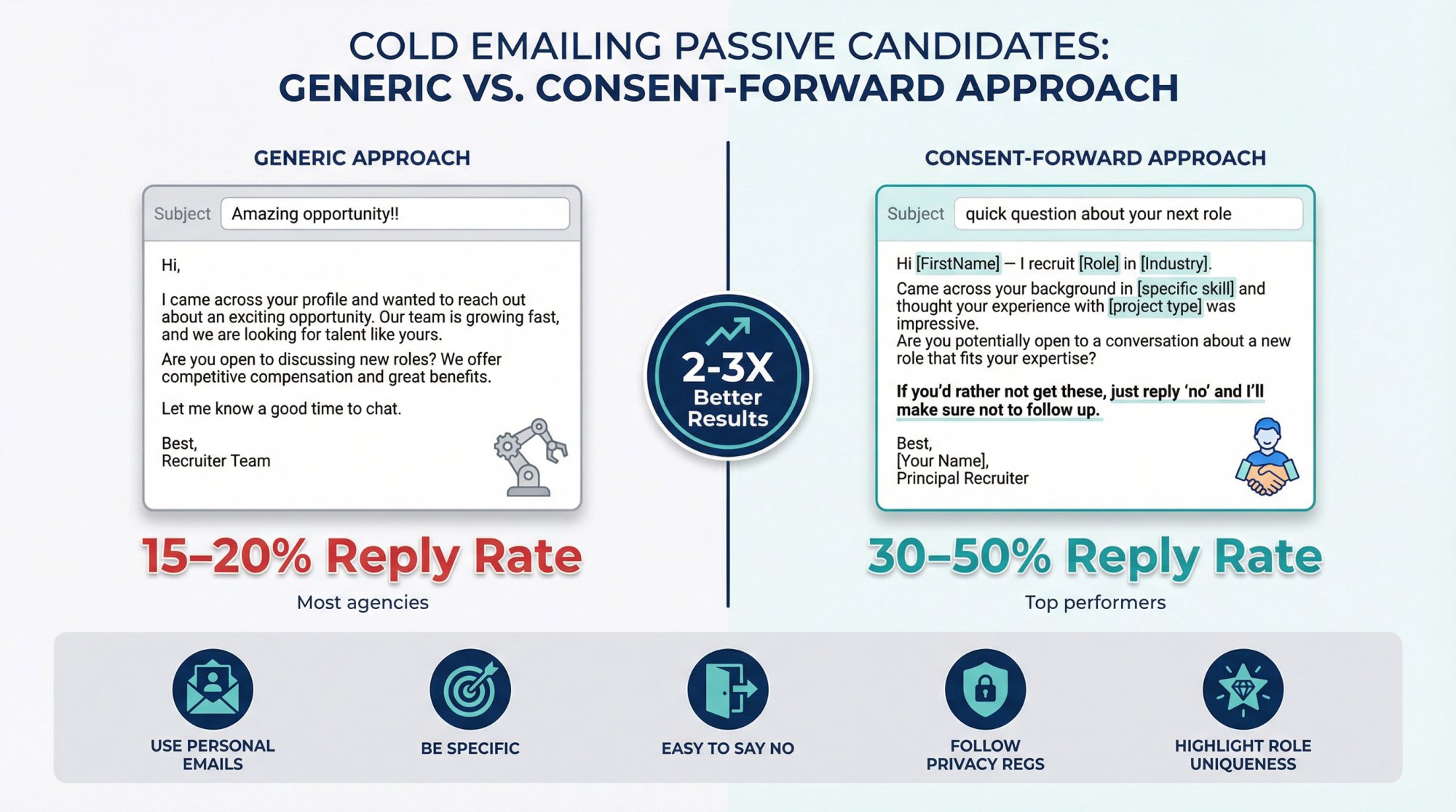
Candidate outreach is a different game:
More personal
Higher reputational risk
Stronger privacy expectations
Keep it consent-forward.
Candidate Cold Email Template
Subject: quick question about your next role
Hi [FirstName] – I recruit [Role] in [Industry]. Came across your background in [specific skill] and wanted to sanity-check interest.
Open to hearing about a [Role] at a [type of company] in [location/range], or should I leave you alone?
If you'd rather not get these, just reply "no" and I won't follow up.
This is short, respectful, and reduces complaints.
Best Practices for Recruiting Candidates
Use personal email addresses (not work emails)
Be highly specific about why you reached out to them
Highlight what makes the role unique (tech stack, company mission, compensation, growth opportunity)
Make it easy to say no
Follow privacy regulations (GDPR, CCPA, etc.)
Top recruiters report average reply rates of 30-50% from passive candidates in successful outreach sequences, while many agencies see only 15-20%. The difference? Personalization and relevance.
14-Day Cold Email Launch Plan
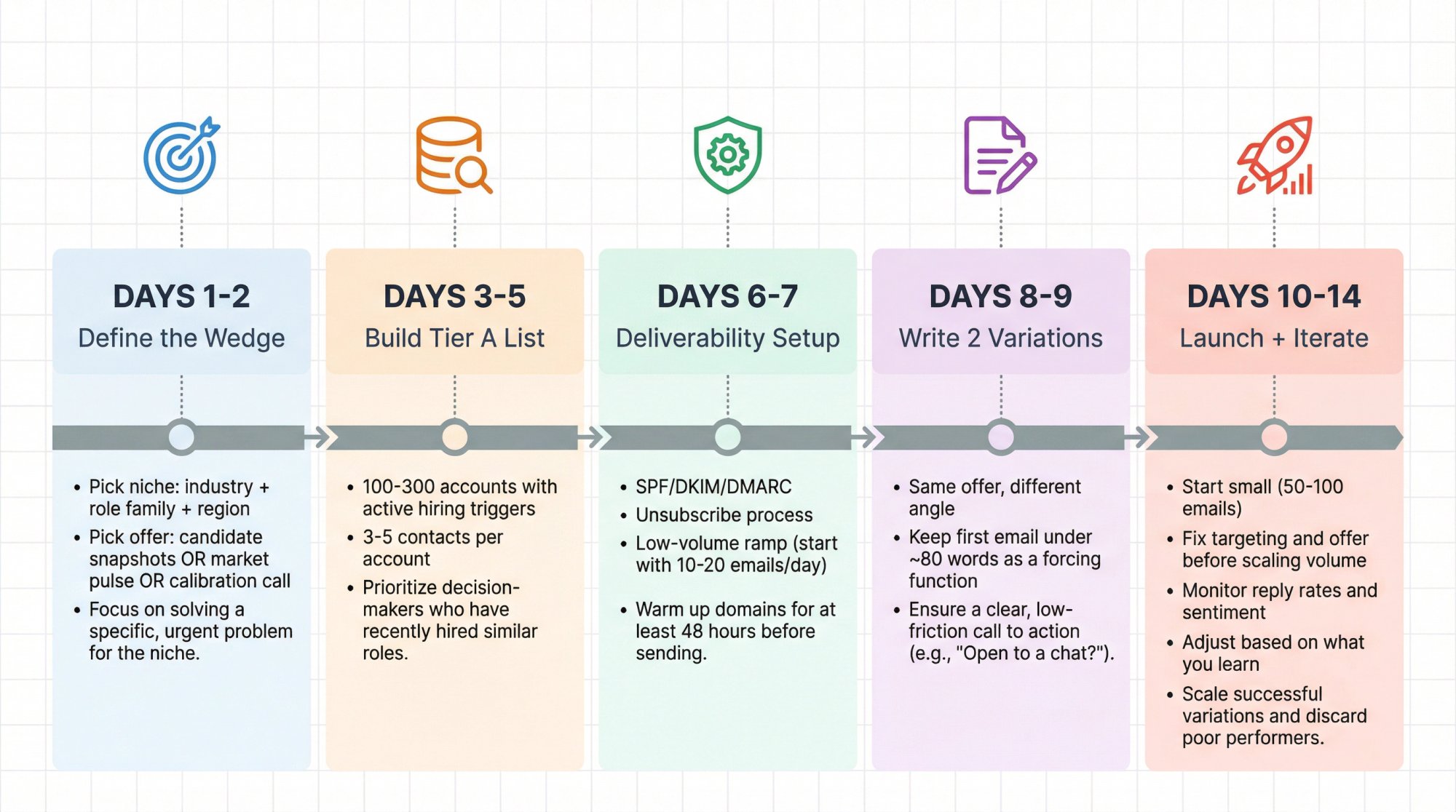
Days 1-2: Define the wedge
• Pick niche: industry + role family + region
• Pick offer: candidate snapshots OR market pulse OR calibration call
Days 3-5: Build Tier A list
• 100-300 accounts with active hiring triggers
• 3-5 contacts per account
Days 6-7: Deliverability setup
• SPF/DKIM/DMARC
• Unsubscribe process
• Low-volume ramp (start with 10-20 emails/day)
Days 8-9: Write 2 variations
• Same offer, different angle
• Keep first email under ~80 words as a forcing function
Days 10-14: Launch + iterate
• Start small (50-100 emails)
• Fix targeting and offer before scaling volume
• Monitor reply rates and sentiment
• Adjust based on what you learn
How Outbound System Helps Recruiting Agencies
If you want to run this internally, you can. This guide gives you the complete strategy.
If you want it done-for-you, Outbound System provides the full outbound system: infrastructure, list building, enrichment, copywriting, sending, and optimization.
This matters because most recruiting agencies lose weeks fighting deliverability and list quality instead of booking meetings. Outbound System handles:
Technical infrastructure: Multi-domain setup, warming, authentication
List building and verification: Triple-verified contacts with <1% bounce rates
Campaign creation: Templates and sequences optimized for recruiting
Deliverability monitoring: Maintaining 98%+ inbox placement
Performance optimization: A/B testing and continuous improvement
Our platform is built on 350-700 Microsoft U.S. IP inboxes (depending on tier), with 9-step waterfall enrichment for data quality and AI-powered personalization combined with human copywriting.
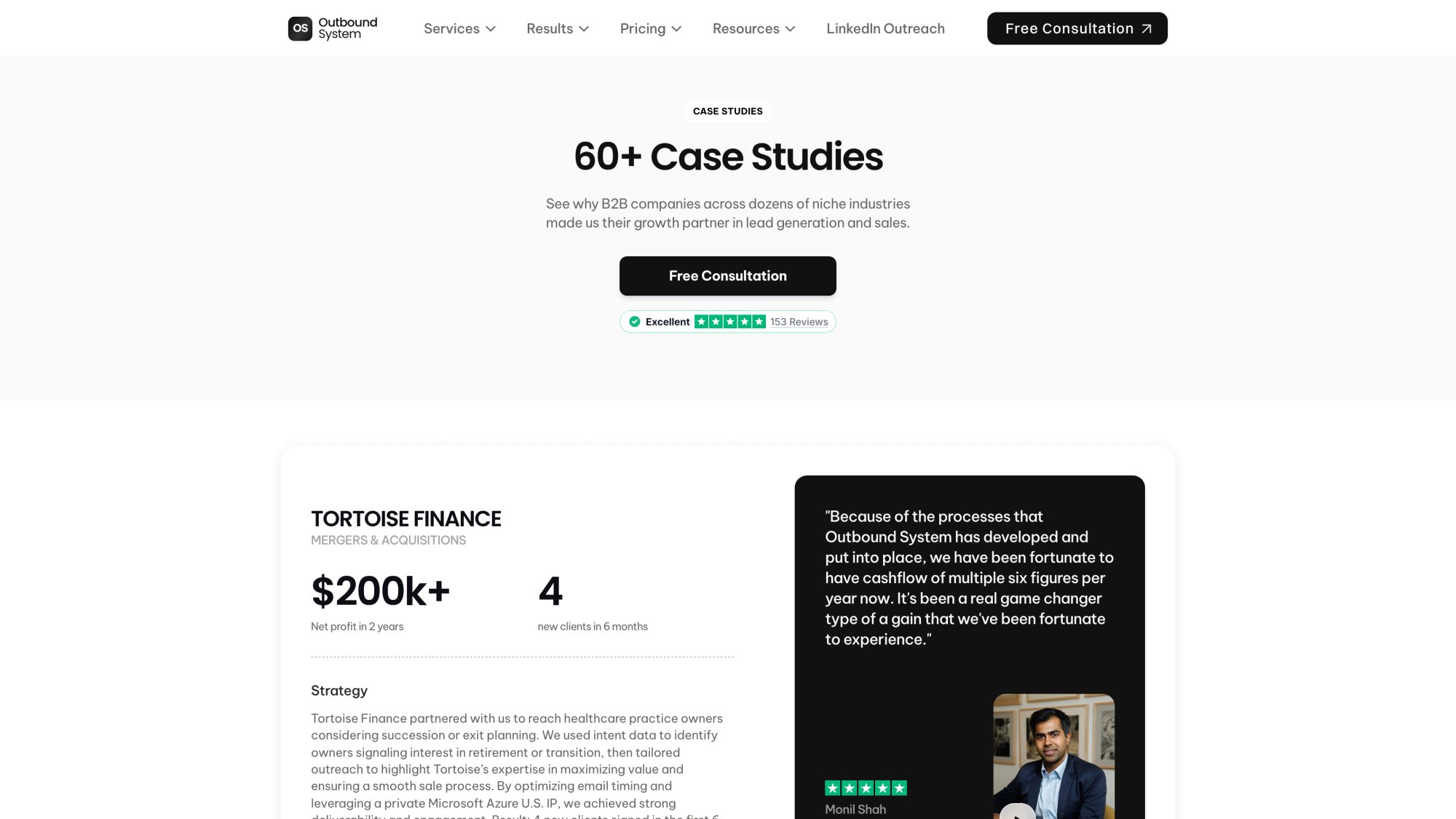
We've sent 52M+ cold emails, generated 127K+ leads, and helped clients close $26M in revenue through systematic outbound.
For recruiting agencies specifically, we can handle both client acquisition campaigns and candidate sourcing at scale, with proper compliance and deliverability infrastructure.
For more on how Outbound System approaches cold email mechanics, visit outboundsystem.com or check out these resources:
• DMARC, DKIM, SPF Cold Email Setup Guide
• CAN-SPAM Cold Email Requirements
• Cold Email List Building Guide
• How to Find Someone's Work Email
• Cold Email vs LinkedIn Outreach
Common Questions About Cold Email for Recruiting
What's a good reply rate for recruiting cold email?
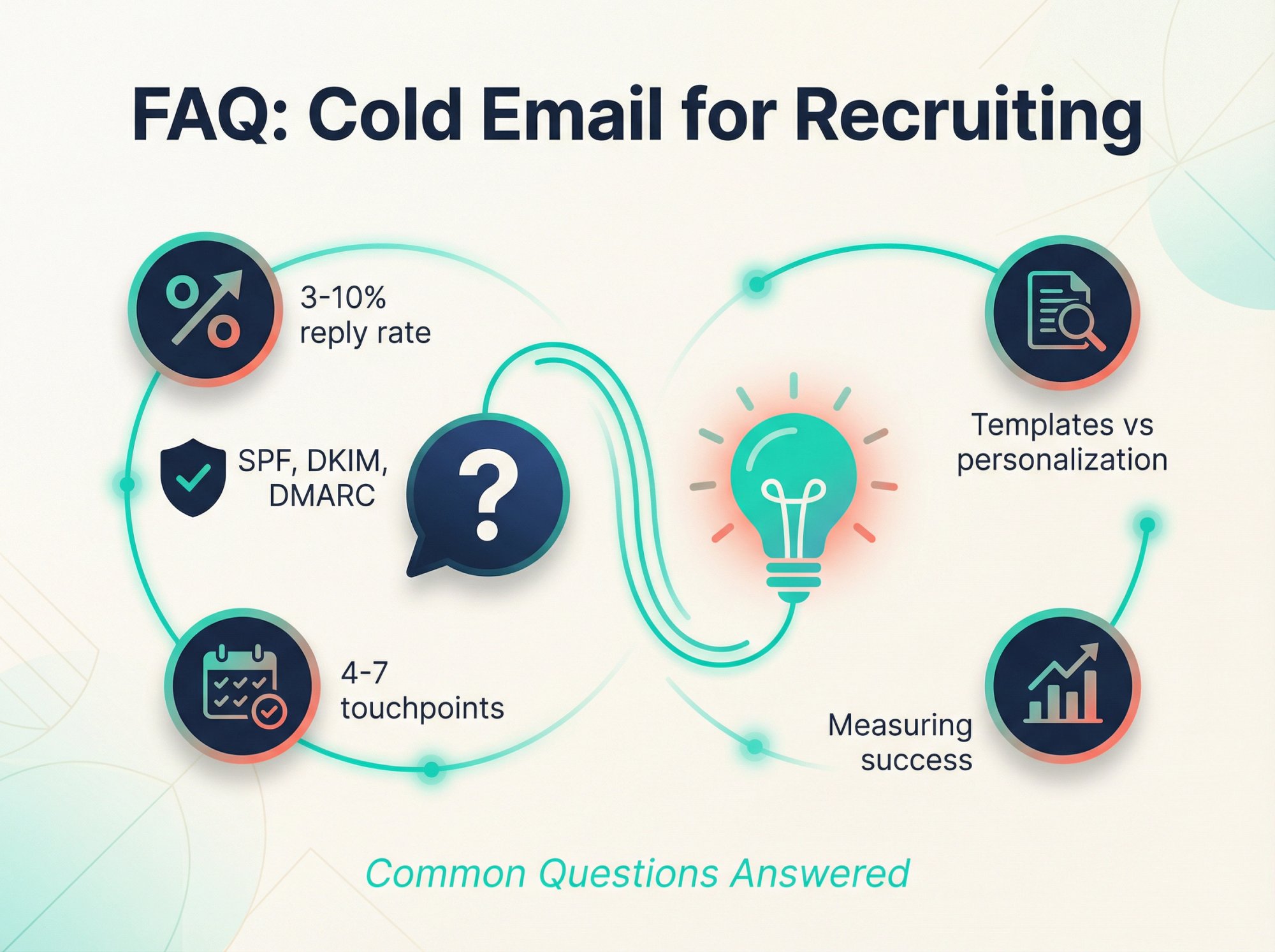
For client acquisition, 3-10% is realistic (with top performers above 10%). For candidate outreach, 15-50% depending on how targeted and personalized your approach is.
Focus on positive reply rate from right-fit prospects rather than just volume. A 5% reply rate from perfectly targeted accounts is far more valuable than a 10% reply rate from random contacts.
How many follow-ups should I send?
The sweet spot is 4-7 touchpoints total (including the initial email). Data shows that 42% of replies come from follow-ups, so don't give up after one send.
Space them 3-7 days apart to avoid being annoying while staying persistent.
Should I use templates or write every email from scratch?
Use templates as a foundation, but customize key elements for each prospect: opening line, trigger/pain point, and specific details about their company or background.
Think "templated structure with personalized content." You can't write 100% custom emails at scale, but you can't send 100% generic emails and expect results either.
How do I avoid spam filters in 2026?
Three critical things:
① Technical setup: SPF, DKIM, DMARC authentication
② List quality: Keep bounce rates under 2%
③ Targeting: Only email people likely to be interested (keeps complaint rates low)
If you skip any of these, your emails land in spam no matter how good your copy is.
Can I send cold emails from my main company domain?
No. Use a separate domain similar to your main one (if your site is BestRecruiters.com, use BestRecruiters.co or BestRecruitersHiring.com).
This protects your main domain's reputation. If your cold email domain gets flagged, it won't hurt your normal business communications.
What's the best time to send recruiting cold emails?
Mid-week (Tuesday-Wednesday) and mid-morning (9am-12pm) tend to perform best. Early morning can also work well as your email is near the top when they start work.
Ultimately, test what works for your specific audience. Different industries and personas have different email habits.
How do I handle "we already have vendors" objections?
Ask if they're covered specifically for your niche (role family + location) or just generally.
Then offer: "If it's general, I can still send 2 snapshots for your hardest-to-fill role so you can compare quality."
This often gets you in the door because you're offering value, not just pitching.
What should I do if someone replies negatively or asks to be removed?
Honor it immediately and thank them politely. Add them to your suppression list and never contact them again.
This is both ethical and legally required in most jurisdictions. Plus, respecting opt-outs protects your sender reputation.
How many emails should I send per day per inbox?
Start with 10-20 emails/day and ramp up gradually over weeks. For warmed inboxes, stay under 50-100 emails/day per inbox.
If you need to send more, spread volume across multiple inboxes. Sophisticated operations use 10-50 separate inboxes to distribute load.
Should I include my pricing in the first email?
Generally no. The goal of the first email is to start a conversation, not close a deal.
Save pricing for when they've expressed interest and you've qualified them. The first email should focus on value and a low-friction next step.
How do I measure success beyond reply rates?
Track the full funnel:
Delivery rate (measure bounces/blocks)
Positive reply rate
Meetings booked per 1,000 delivered
Job orders created
Placements made
Revenue per meeting
The ultimate metric is revenue, not just replies. A 3% reply rate that generates 10 placements is better than a 10% reply rate that generates 2 placements.
What's the difference between cold email for recruiting vs other B2B sales?
Recruiting is a trust and timing business. Buyers may not need you today but might desperately need you in 30 days.
Your goal is to prove specific relevance and offer low-friction value (like candidate snapshots or market insights) rather than just pitching your services. You're starting a relationship, not closing a transaction.
Can I use AI to personalize my emails at scale?
Yes, but carefully. AI can help you research prospects and generate personalized opening lines, but make sure the output is accurate and genuinely relevant.
Generic AI-generated compliments are worse than no personalization. Always review before sending. At Outbound System, we combine AI personalization with human copywriting to maintain quality at scale.
How do I know if my targeting or my messaging is the problem?
Look at reply sentiment:
Low replies + negative sentiment = targeting is wrong (you're emailing people who don't need you)
Low replies + neutral/no sentiment = messaging is the problem (your copy isn't clear or compelling)
If people are saying "not interested" or "wrong person," that's a targeting issue. If they're just not replying at all, that's usually a messaging or deliverability issue.
Is it legal to cold email in my country/region?
Generally yes for B2B in most regions (US, Canada, EU, UK), but you must:
• Have a legitimate business interest
• Include clear opt-out mechanisms
• Honor opt-outs quickly
• Follow specific rules (CAN-SPAM in US, CASL in Canada, GDPR in EU)
For candidates (B2C), be more cautious and ensure you have a legal basis. Consult a lawyer for your specific situation. Privacy laws are evolving, so stay informed. Learn more about email outreach compliance rules.
What if my emails are getting opened but not replied to?
This usually means one of three things:
① Your offer isn't compelling enough (they read it but don't care)
② Your CTA is unclear or too big of an ask
③ The timing is off (they're interested but not now)
Try testing different offers, making your CTA smaller and easier, or adding a permission-based exit email that lets them opt in for future contact.
Also, remember that Apple's Mail Privacy Protection makes open rates unreliable. Don't obsess over opens. Focus on replies.
How long should I wait before following up?
Wait 3-5 days between follow-ups for most B2B prospects. This gives them time to see and process your email without feeling spammed.
For very senior executives, you might wait 5-7 days. For more urgent hiring needs (they posted the job yesterday), you might follow up after 2-3 days.
Adjust based on the context and urgency of their situation.
Final Thoughts
Cold email for recruiting agencies isn't just about writing a clever line or two. It's about building a systematic engine for outreach that consistently generates conversations with the right clients and candidates.
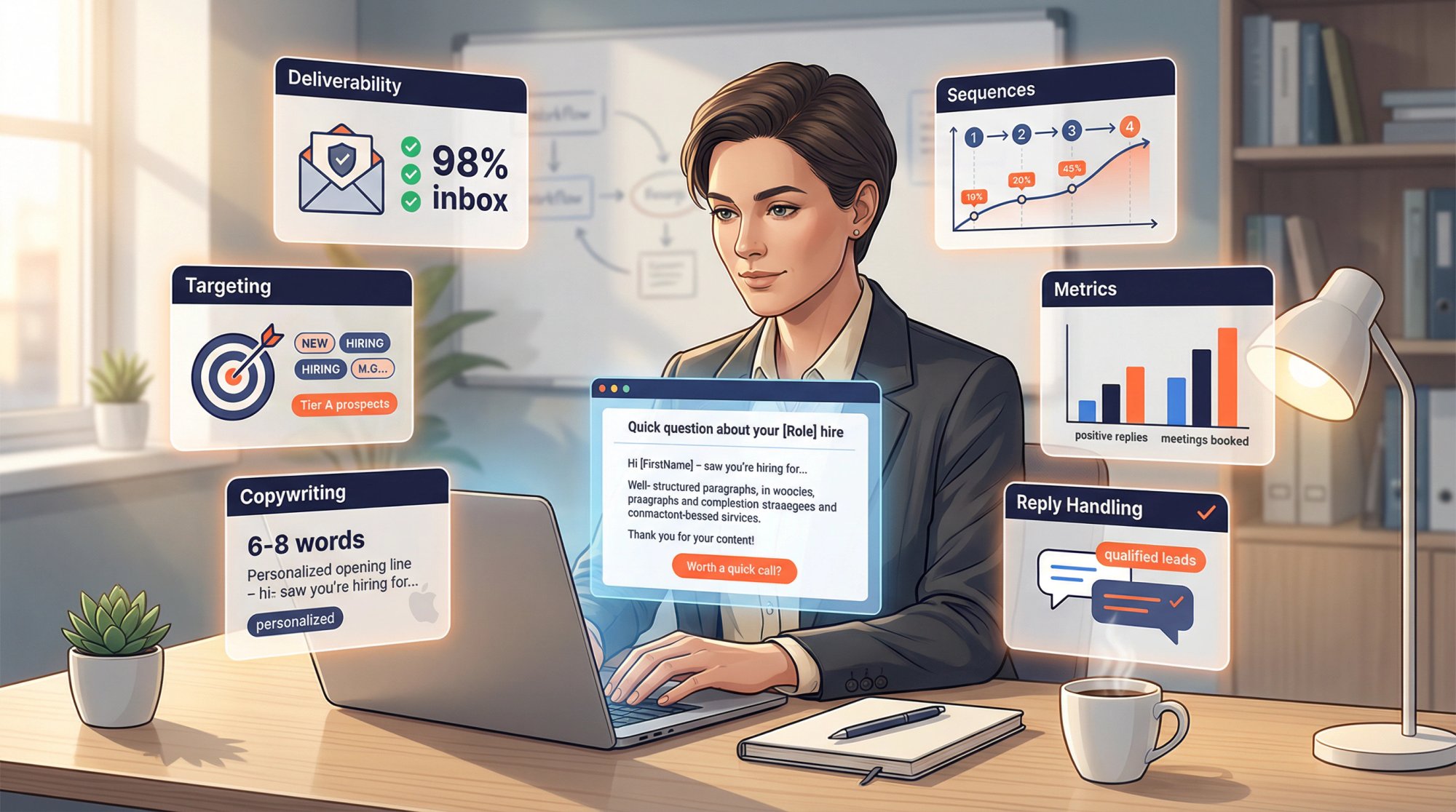
In this guide, we've covered:
Why cold email remains valuable: Cost-effective, scalable, and proven to work when done right
The core success equation: Right account + right trigger + right offer + low-friction ask + clean deliverability
2026 deliverability requirements: Critical technical setup that most agencies skip (and why they fail)
Targeting and list building: Using public hiring signals to reach the right people at the right time
Copywriting that converts: From subject lines to CTAs, every element optimized for responses
Proven sequences and templates: 4-7 touch cadences with examples you can adapt
Reply handling: How to convert interest into meetings and job orders
Measurement and optimization: Tracking the right metrics and fixing what's broken
The techniques in this guide aren't static rules. They're starting points. The landscape will continue to evolve (new tools, changing email algorithms, shifting expectations), so keep learning and adapting.
But the principles of relevance, value, and respect for the recipient will never go out of style.
Now it's your turn.
Take these insights and apply them to your next cold email campaign. Start with a solid plan, write that first batch of personalized emails, and hit send.
There's a company out there that desperately needs the superstar hire you can deliver. An email in their inbox could be the first step to making it happen. There's a talented person out there whose dream job might land in their lap because you emailed them at just the right time.
Cold email is the bridge. You now have the blueprint to build it.
Ready to get started? Begin with your 14-day implementation plan and take it one step at a time. Or if you'd prefer to have experts handle it, book a consultation with Outbound System to discuss a done-for-you cold email solution.