If you landed on this page, you probably need to know exactly how many cold emails you can send from Google Workspace without getting blocked, suspended, or spam-foldered. Maybe you've already hit that dreaded "you have reached a limit for sending email" error and you're trying to figure out when you can send again. Or maybe you're planning your outbound program and need to do the math on how many inboxes you'll need to hit your target volume.
This isn't another surface-level article that stops at "2,000 emails per day." We're going deeper. You'll get the official Google limits (the hard caps that trigger actual blocks), the practical "safe" limits for cold outreach (the numbers that keep you deliverable), and the operational playbook that lets you scale without getting shut down.
Quick context on why this matters in 2026: Google rolled out stricter sender requirements starting in February 2024 and ramped up enforcement through November 2025. If you're sending cold emails to personal Gmail addresses at any kind of volume, you need to know these rules. They're not optional anymore.
All limits and enforcement details in this guide are based on Google's official documentation accessed January 30, 2026, plus real-world deliverability insights from our operations at Outbound System, where we've sent over 52 million cold emails across 1,000+ client accounts.
Quick Answer: How Many Cold Emails Can You Send?
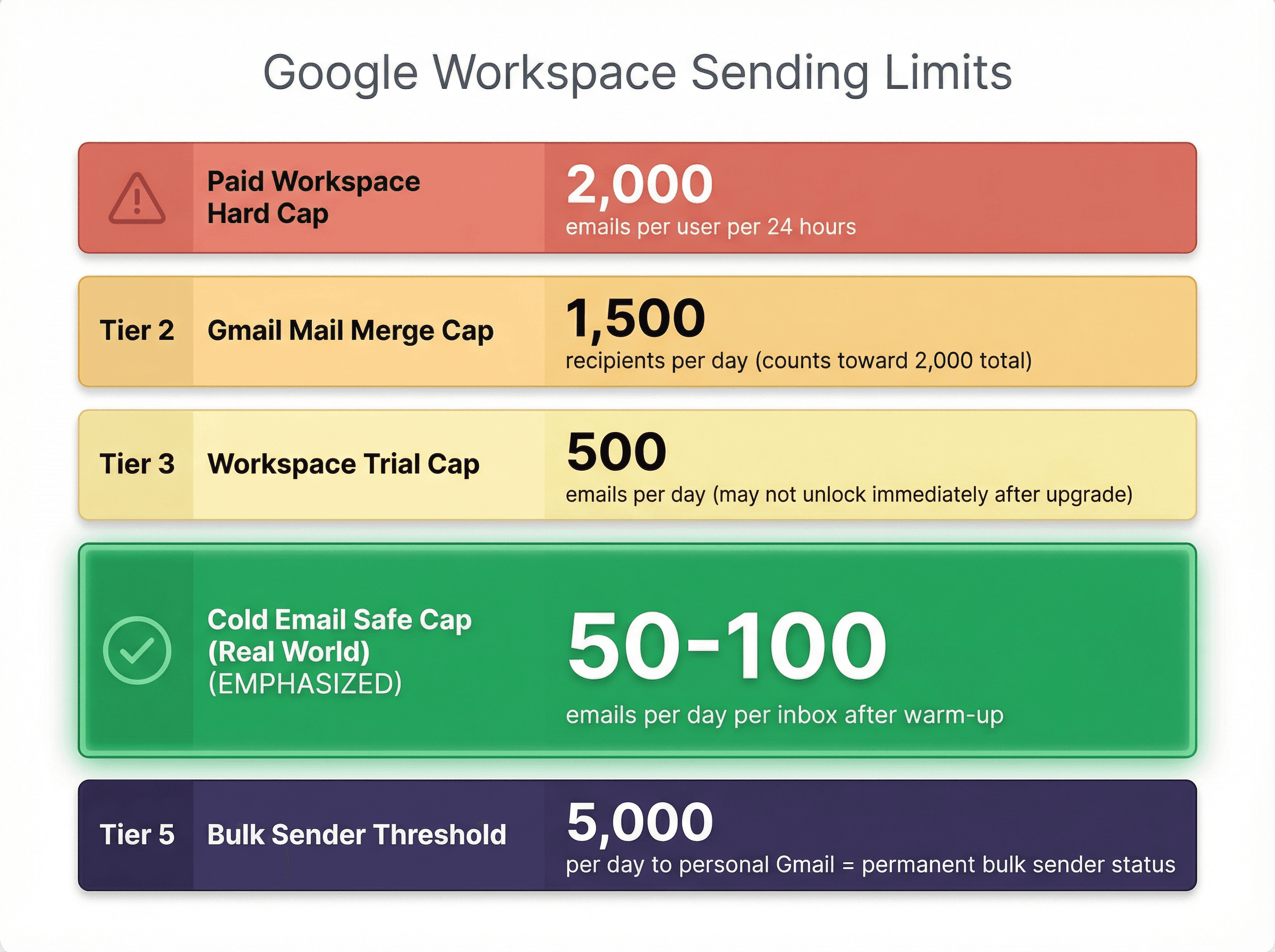
Paid Google Workspace hard cap: 2,000 outgoing messages per user per rolling 24 hours
Gmail Mail Merge cap: 1,500 recipients per day, and mail merge sends count inside your overall 2,000/day limit
Workspace trial cap: 500 emails per day, and your limit might not fully unlock right after upgrading (more on this below)
Cold email "safe" cap (real world): Treat 2,000/day as a cliff edge. For actual cold outreach, most teams stay around 50-100 cold emails per day per inbox after warm-up, starting at 10-20/day on new inboxes
Bulk sender threshold: If you send 5,000+ emails per day to personal Gmail addresses (@gmail.com/@googlemail.com), you're permanently classified as a "bulk sender" and must meet additional requirements including SPF+DKIM+DMARC, one-click unsubscribe, and keeping spam rates below 0.3%
Understanding Google Workspace Email Sending Limits
When people say "limits," they're usually talking about one thing. But Google actually has three separate mechanisms that can stop you from sending:
Daily Sending Quotas Per Mailbox
These are the official Workspace Gmail caps. Exceed them and you'll get blocked for up to 24 hours. The counter runs on a rolling 24-hour basis, not midnight to midnight.
Gmail Bulk Sender Policy Requirements
If you send high volumes to personal Gmail recipients, you need to meet Gmail's sender requirements or expect rate limits and rejections. Google started ramping enforcement in November 2025.
Deliverability and Spam Rate Limits
Even if you're under quota, poor engagement or rising spam complaints will land you in spam folders and trigger throttles. Google explicitly tells bulk senders to keep spam rates below 0.1% daily and never let it hit 0.3%.
Critical insight: This is why "2,000/day" is a dangerous goal for cold email. It's the maximum mechanical throughput, not what's safe for deliverability.
Google Workspace Gmail Sending Limits Explained
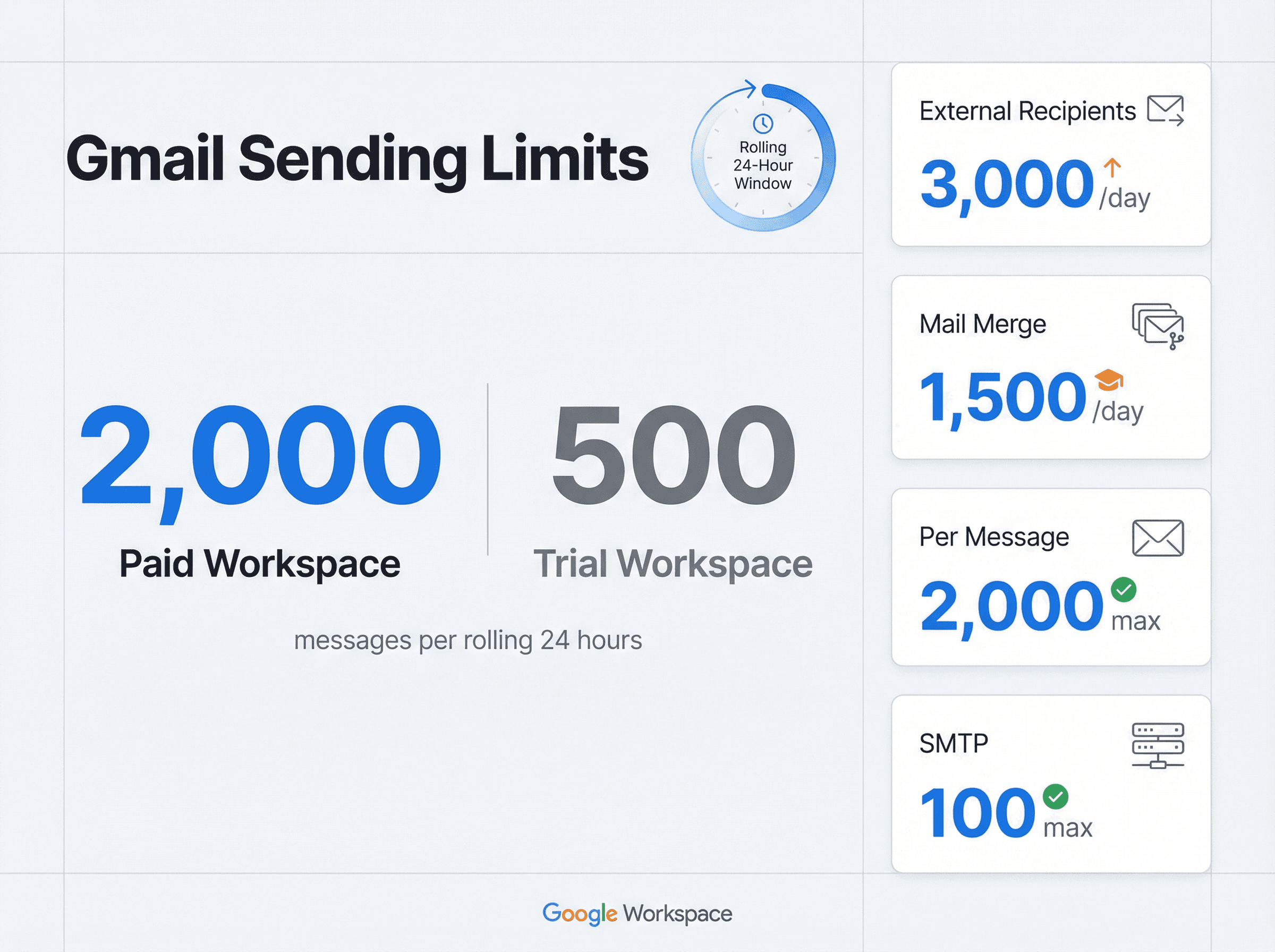
These are Google's published limits for Gmail in Google Workspace. They apply over a rolling 24-hour period, not calendar days.
Workspace Sending Limits Table
Limit Type | Paid Workspace | Trial Workspace | Why It Matters for Cold Email |
|---|---|---|---|
Daily sending limit per user | 2,000 messages/24h | 500 | Absolute ceiling; hitting it locks sending for up to 24h |
Gmail Mail Merge limit | 1,500 | 500 (effectively) | Built-in bulk send is capped lower than regular sending |
Total recipients per day | 10,000 | (lower) | If you send multi-recipient emails, this becomes the counter |
External recipients per day | 3,000 | (lower) | Cold email is mostly external; this matters fast |
Unique recipients per day | 3,000 (2,000 external) | 500 external | For 1:1 cold emails, messages/day and unique external/day bind together |
Recipients per message (To/CC/BCC) | 2,000 total (max 500 external) | n/a | Protects against blasting one email to thousands |
Recipients per message via SMTP | 100 | n/a | Relevant if your tool uses SMTP in a way that triggers this cap |
Recipients per message via Gmail API | 500 | n/a | Relevant if you send multi-recipient via API |
Source: Google Workspace Admin Help - Gmail sending limits
Google's official documentation page breaks down every limit in detail. Here's what the actual help article looks like, where they document the 2,000/day cap for paid accounts and all the nuances around recipients, SMTP, and API sending:
What Counts Toward Daily Sending Limits?
Google explicitly states that the following also count toward your daily limits:
Messages sent from a user's alternate address or alias
Messages sent by delegated users
Messages sent by Gmail vacation responder
Translation: Aliases don't give you extra capacity. They're the same mailbox from Google's perspective.
Trial to Paid Upgrade: Why Limits Don't Increase Immediately
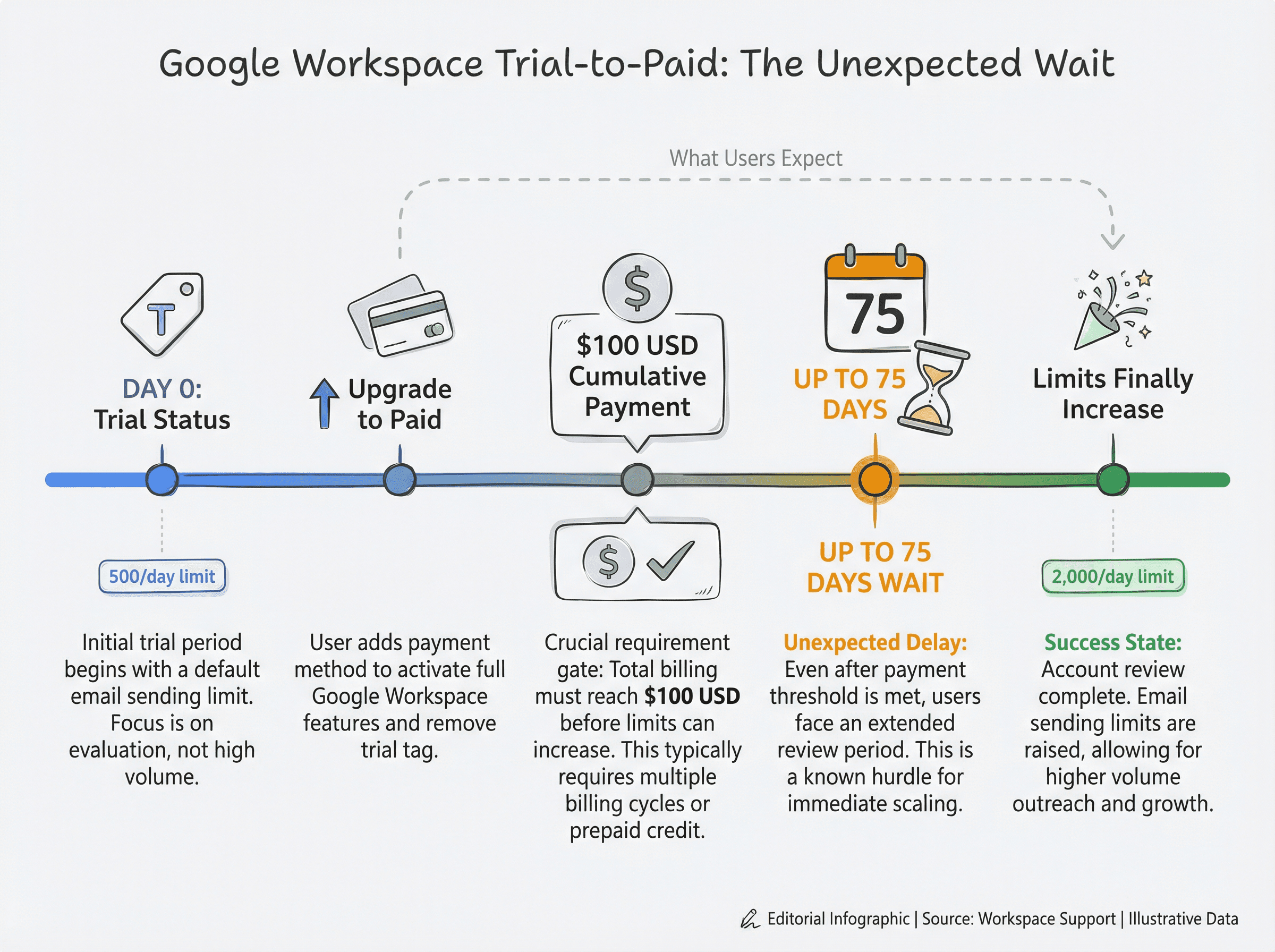
This catches people by surprise constantly. When you convert from trial to paid, limits increase only after your domain has cumulatively paid at least $100 USD, and it can take up to 75 days after meeting that threshold for limits to increase.
So yes, you can upgrade today and still be stuck with trial-level sending for weeks. This is huge if you're spinning up Workspace inboxes for outbound.
Google also notes that Google Groups may behave differently during trial periods (for example, group email might be restricted to internal recipients only).
Why Gmail Mail Merge Doesn't Work for Cold Email
Gmail's built-in mail merge (which replaced the old multi-send mode) has its own rules:
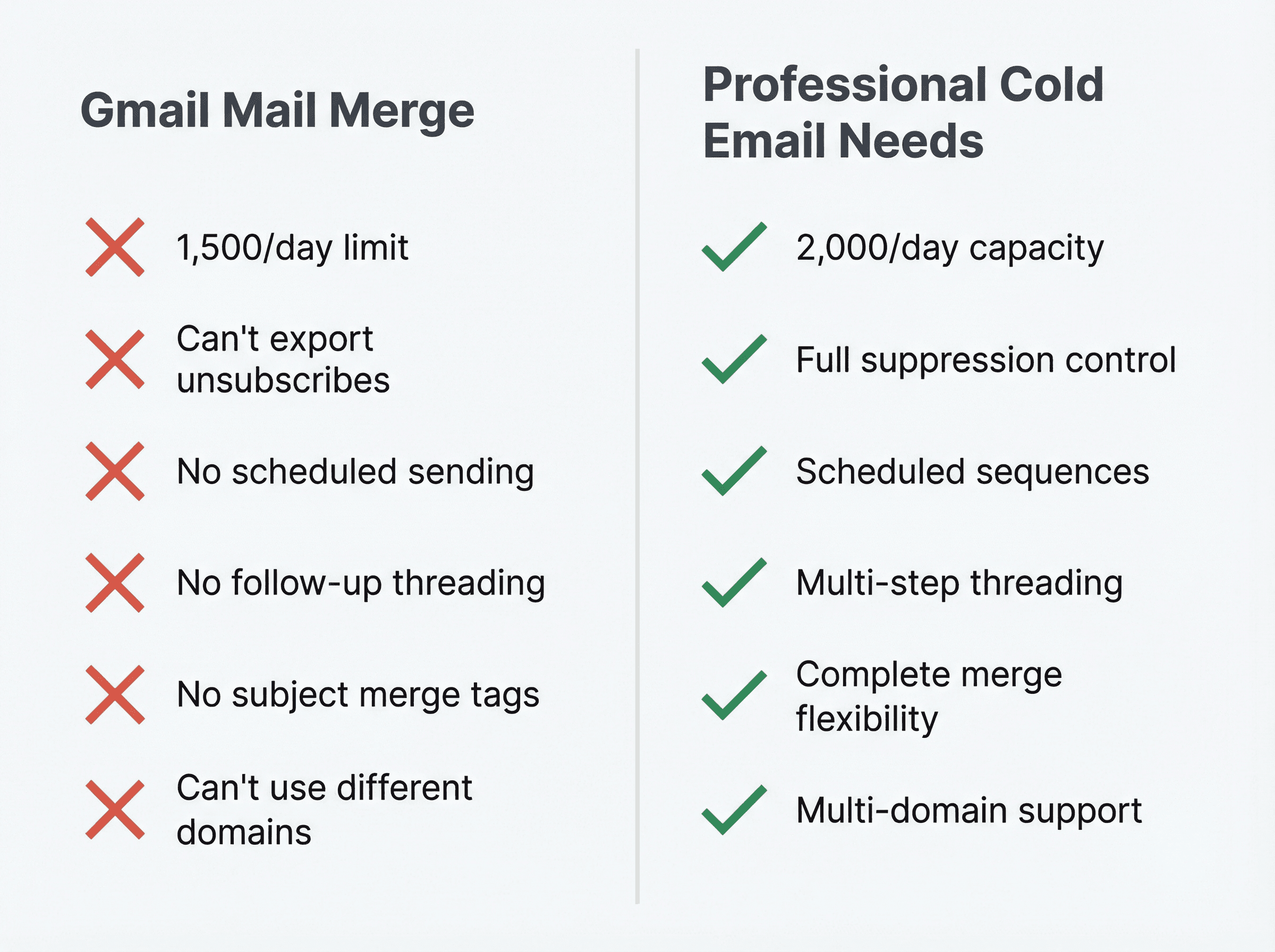
You can add up to 1,500 recipients in the "To" line per message
You can send up to 1,500 recipients per day using mail merge
Once you've sent 1,500 emails in a day (regular + mail merge combined), you can't send more mail merge until reset; the remaining 500 of your 2,000/day are reserved for regular email
Mail Merge Unsubscribe Limitations
Gmail automatically adds a unique unsubscribe link to each mail merge message, and you get notifications when people unsubscribe or resubscribe. But the problem is you can't export a list of unsubscribed recipients.
Mail Merge Feature Restrictions
No scheduled sending, no replies or forwards, limited merge tag usage (no subject line merge tags), and it can't send from a different domain including secondary domains or domain aliases.
For cold email specifically, mail merge is usually a trap because cold outbound needs follow-ups and threading control. You also need suppression lists you can audit. If you can't export who unsubscribed, you can't build a clean suppression workflow.
What Happens When You Exceed Sending Limits
Google is clear about the lockout behavior:
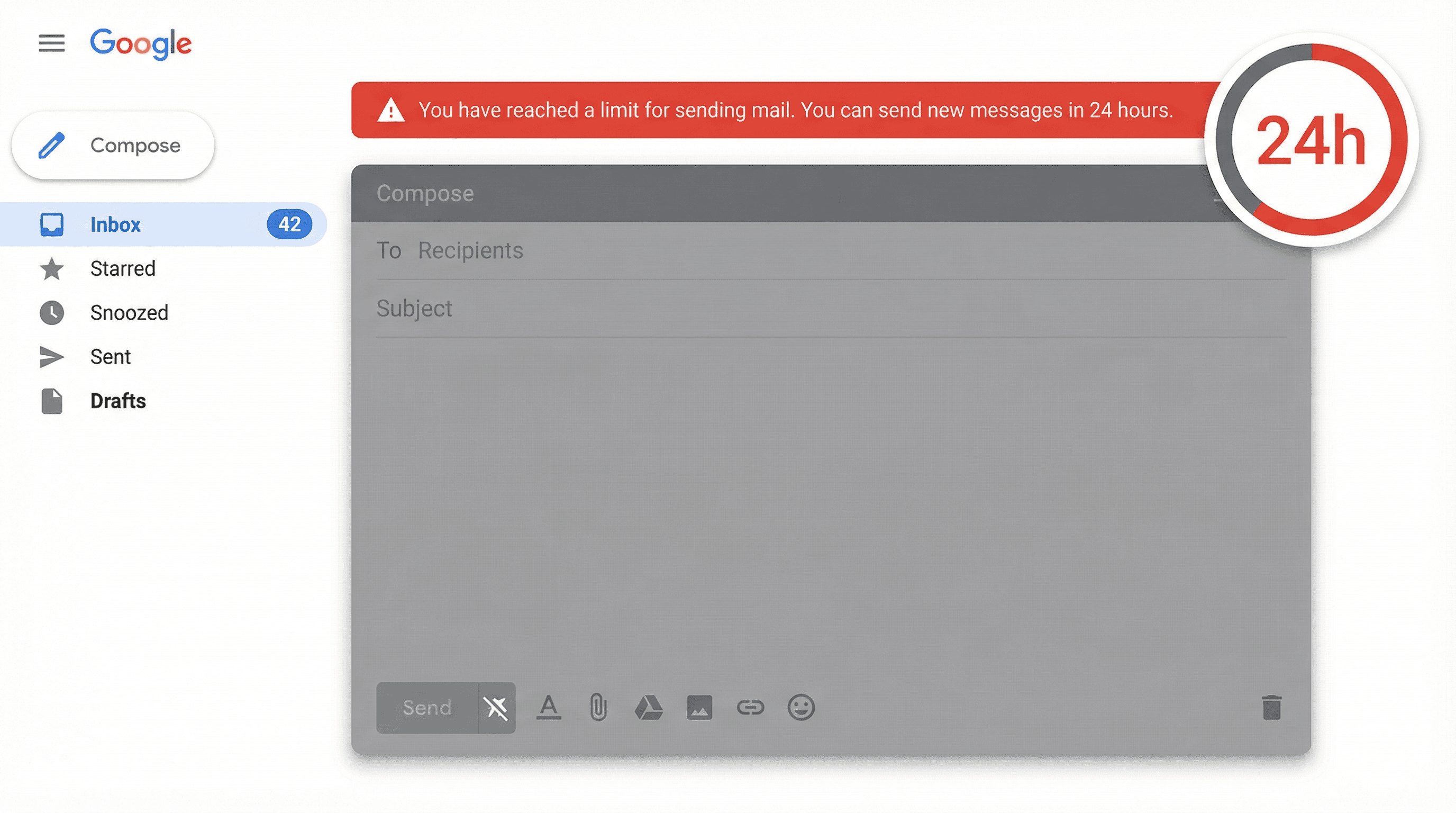
Users who exceed a sending limit can't send new messages for up to 24 hours
They can still log in, receive mail, and use other Google services
After the suspension period, limits reset and they can resume sending
Also important: Google can permanently restrict senders that send spam, and it can suspend an entire Workspace account or domain if abuse is domain-wide.
For free Gmail accounts, you can typically send again within 1 to 24 hours after hitting the limit threshold.
Safe Daily Cold Email Limits: Real-World Numbers
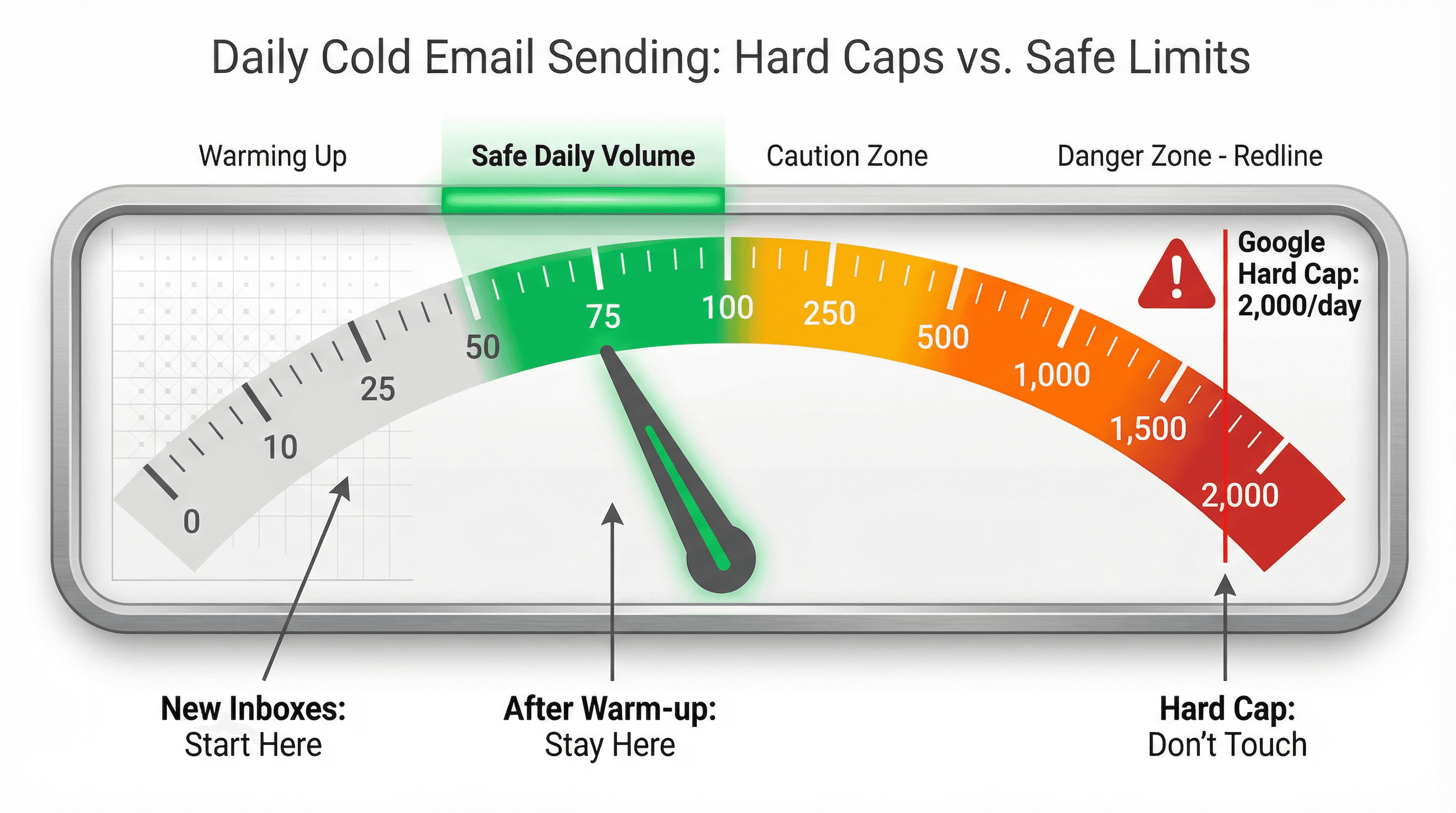
Google's 2,000/day is like the redline on an engine. You can touch it, but you probably shouldn't if you care about reliability.
Recommended Cold Email Volume Per Inbox
Based on cold outreach practice, not marketing newsletters:
After warm-up: Around 50-100 cold emails per day per email address
New inboxes: Start at approximately 10-20 per day and ramp gradually
Important consideration: Follow-ups count toward your daily send total, so "100/day" might only mean around 30-50 new prospects per day on a 2-3 step sequence
Why Stay Below Maximum Sending Limits?
Mailbox providers model "human sending." One inbox blasting hundreds of unsolicited messages looks like automation. Even if you're under quota, deliverability drops, spam complaints rise, and you hit throttles and blocks anyway.
Our deliverability troubleshooting research shows that complaint rate and sender reputation are the brutal levers that decide inbox versus spam.
How Many Inboxes Do You Need for Cold Email?
Cold email scaling is mostly arithmetic once you accept per-inbox limits.
Cold Email Inbox Calculator Variables
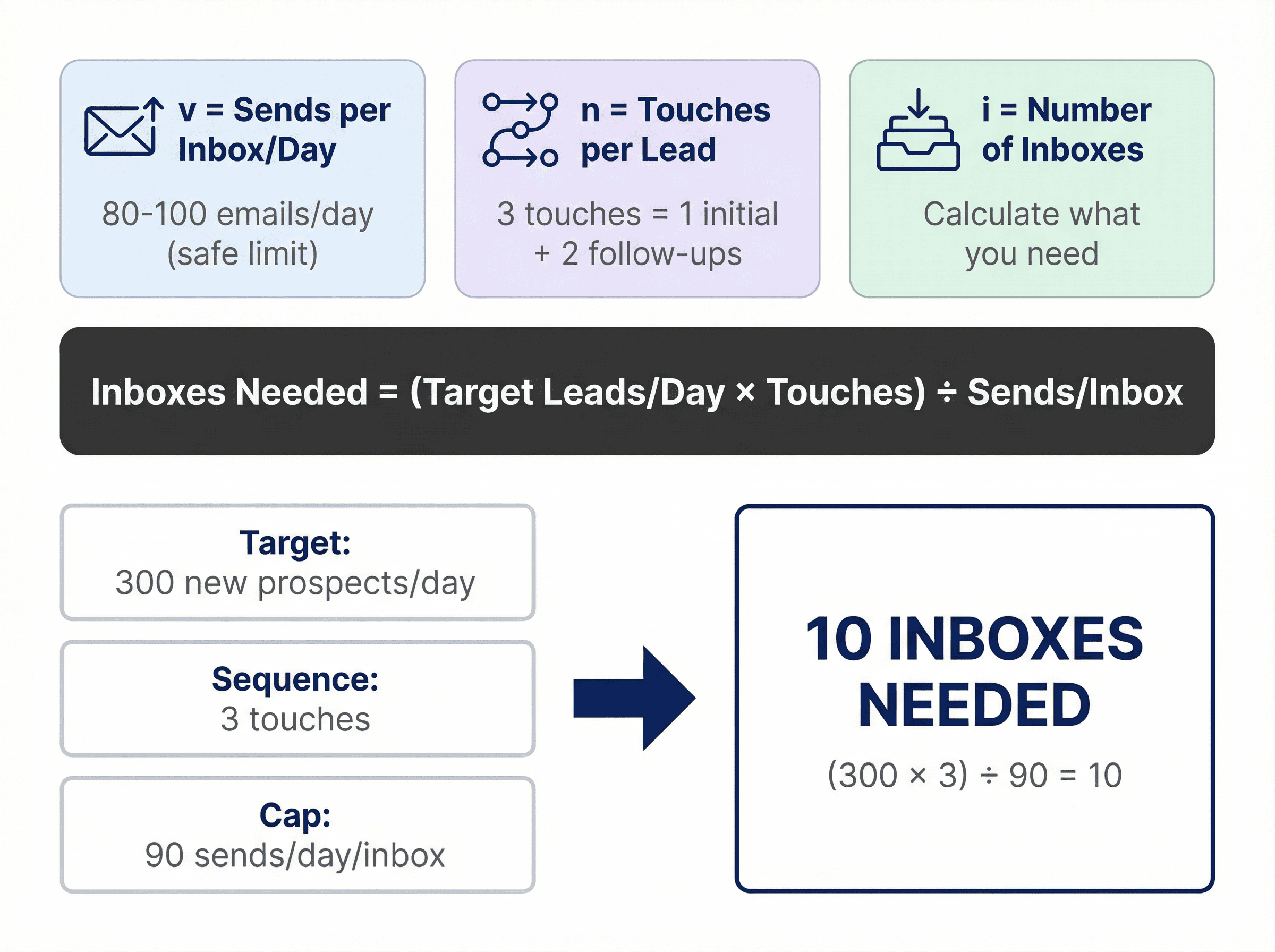
v = safe sends per inbox per day (including follow-ups)
Example: 80/day (conservative) or 100/day (aggressive but common)
n = total touches per lead in your sequence
Example: 3 touches = 1 initial + 2 follow-ups
i = number of inboxes
Cold Email Volume Formulas
New leads per inbox per day ≈ v / n
New leads per day total ≈ i × v / n
Inboxes needed ≈ (target new leads/day × n) / v
Inbox Requirements Examples
Example 1: You want 300 new prospects/day, sequence is 3 touches, you cap at 90 sends/day/inbox
Inboxes needed ≈ (300 × 3) / 90 = 10 inboxes
Example 2: You want 1,000 new prospects/day, sequence is 4 touches, you cap at 80 sends/day/inbox
Inboxes needed ≈ (1,000 × 4) / 80 = 50 inboxes
Notice what this does: it makes "single-inbox heroics" irrelevant. Scaling is infrastructure plus discipline.
Gmail Bulk Sender Requirements for Cold Email
This is where most "Google Workspace sending limits" articles become dangerously outdated.
What Is Gmail's 5,000/Day Bulk Sender Threshold?
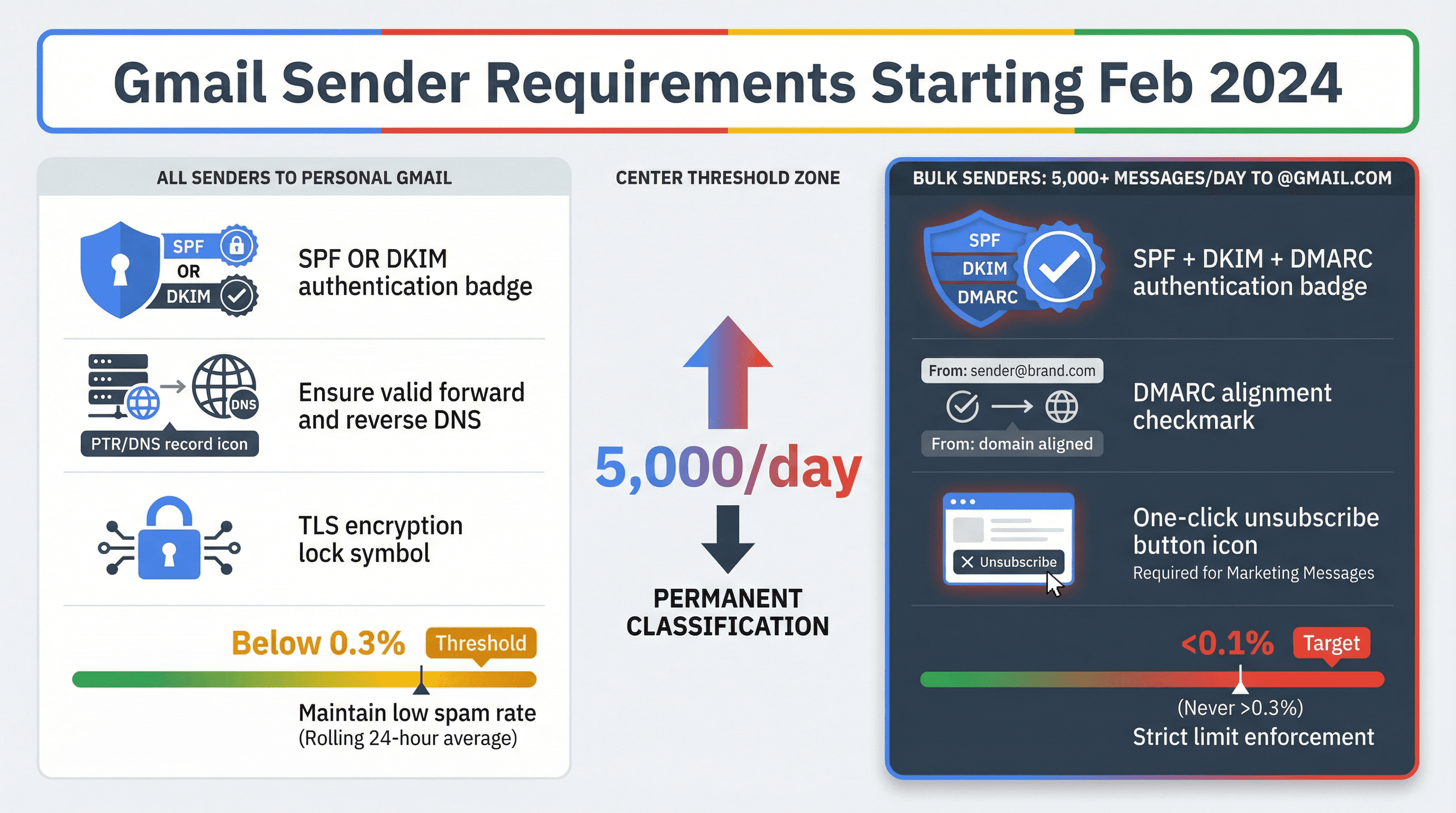
Gmail defines a "bulk sender" as anyone sending close to 5,000 messages or more to personal Gmail accounts within 24 hours. Messages from the same primary domain count toward the 5,000. Once you meet the criteria even once, bulk sender status is permanent.
Gmail's FAQ explicitly states: Starting November 2025, Gmail is ramping up enforcement on non-compliant traffic, including temporary and permanent rejections.
Do Bulk Sender Rules Apply to B2B Email?
The sender guidelines don't apply to messages sent to Google Workspace accounts
Enforcement applies only when sending to personal Gmail accounts
But all senders must meet requirements when sending to personal Gmail
Translation for B2B outbound:
If your list is mostly corporate domains, the "bulk sender" line might not hit often. But as soon as you have meaningful volume to @gmail.com leads, these requirements matter.
Gmail Bulk Sender Authentication Requirements
For anyone sending to personal Gmail accounts, Gmail's sender guidelines require (starting February 1, 2024):
SPF or DKIM for all senders
Valid forward and reverse DNS (PTR)
Use TLS for transmitting email
Keep spam rates in Postmaster Tools below 0.3% (the FAQ says target <0.1%, never hit 0.3%)
For bulk senders (5,000+ per day to personal Gmail):
SPF + DKIM + DMARC (DMARC policy can be p=none)
From: domain must align with SPF or DKIM domain (DMARC alignment)
One-click unsubscribe required for marketing and promotional messages
Gmail Unsubscribe Processing Time Requirements
Gmail's FAQ calls out that failing to honor unsubscribe requests within 48 hours makes you ineligible for mitigations.
Why Cold Email Must Follow Bulk Sender Rules
Cold email is basically "marketing/promotional" from the recipient's perspective. Gmail's FAQ is blunt that recipients, not Google, determine the nature of messages.
So if you're scaling outbound and touching lots of personal Gmail inboxes:
Implement list-unsubscribe headers (one-click) in your sending stack
Keep complaints insanely low (Gmail says <0.1% daily, never 0.3%+)
Gmail Error Codes When You Violate Limits
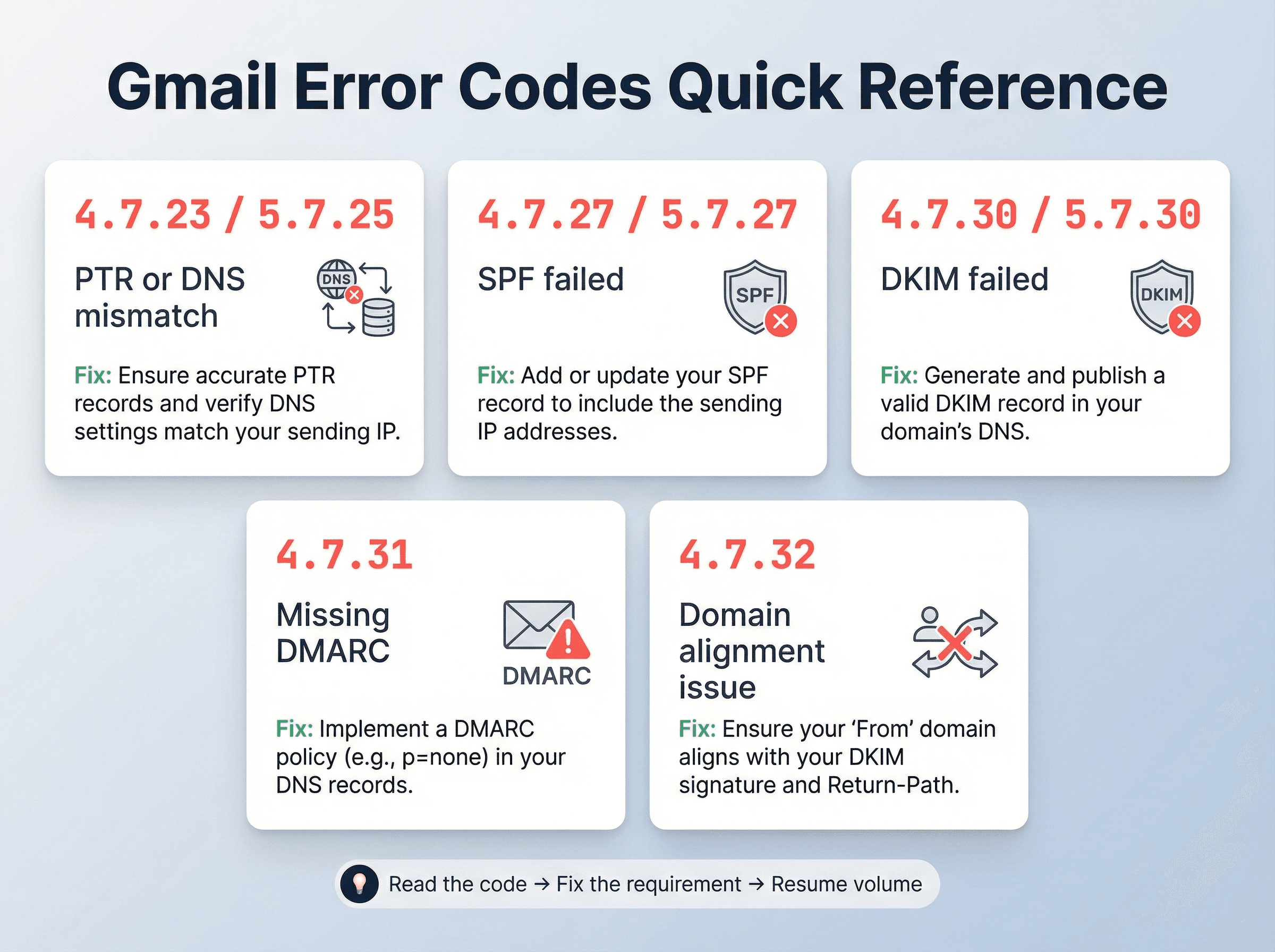
Gmail publishes the exact error codes for bulk sender requirement failures.
Common Gmail SMTP Error Codes
4.7.23 / 5.7.25: PTR or forward-reverse DNS mismatch (rate-limited or blocked)
4.7.27 / 5.7.27: SPF didn't pass
4.7.30 / 5.7.30: DKIM didn't pass
4.7.31: Missing DMARC policy
4.7.32: From: header not aligned with authenticated SPF/DKIM domain
Practical takeaway: You don't "guess" what's wrong anymore. You read the code, fix the exact requirement, and only then resume volume.
How to Monitor Gmail Sender Compliance in 2026
Gmail added a compliance status dashboard to Postmaster Tools to help senders track adherence to sender guidelines.
Also: Google has been migrating Postmaster Tools to a new version. The legacy Postmaster Tools interface deprecation was postponed, but they encourage transitioning to Postmaster Tools v2 (launched in 2024).
Google also says the domain and IP reputation dashboards will be retired (even though other dashboards exist in v2).
So in 2026, the most durable monitoring habit is: track compliance status plus spam rate and fix root causes fast, not "reputation score chasing."
Should You Use SMTP Relay for Cold Email?
Google Workspace has an SMTP relay service for on-premises devices and apps. It has totally different limits than Gmail user sending, and Google explicitly warns SMTP relay isn't meant to be used as a relay for email that originates from Gmail.
Google Workspace SMTP Relay Limits
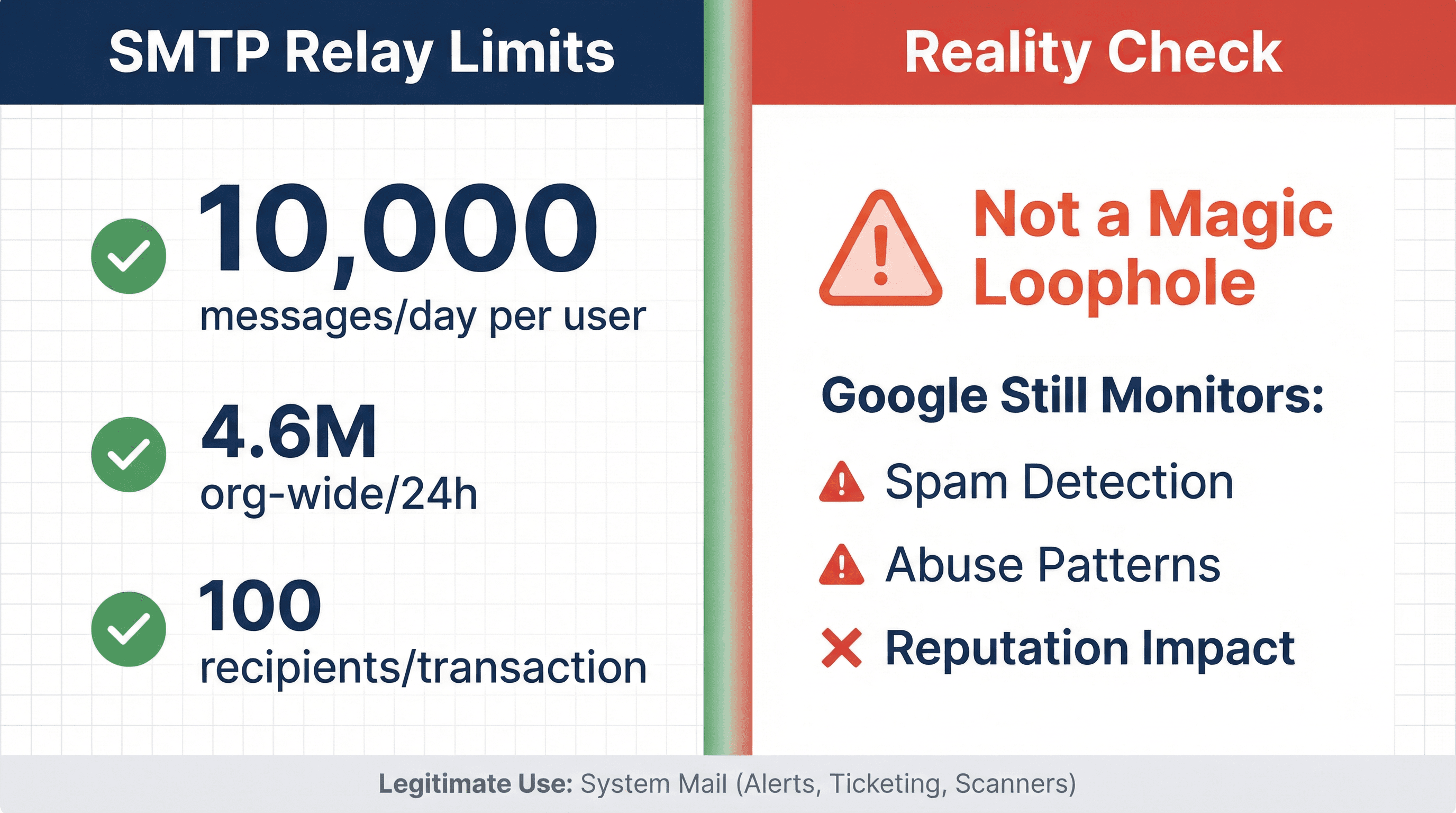
Org-wide maximum non-unique recipients: 4.6 million per 24h (and 319,444 per 10-minute window)
Per user: up to 10,000 messages per 24h and 10,000 unique recipients per 24h
100-recipient limit per SMTP transaction (per connection / RSET)
Google also notes: SMTP relay and Gmail user sending limits are independent and counted separately.
Based take: SMTP relay is awesome for legitimate system mail (alerts, ticketing, scanners). It's not a magic loophole for cold outreach. If you use it to push unsolicited volume, you're just moving the blast radius to a different subsystem, and Google still monitors for spam and abuse.
What Most Articles Miss About Google Workspace Limits
Most articles stop at "2,000/day." Even good ones. But the gotchas that actually break outbound programs are:
① Trial to paid ramp lag (paid at least $100 USD + up to 75 days)
② External + unique recipient caps (cold email is external; for 1:1, 2,000 messages/day and 2,000 unique external recipients/day basically bind together)
③ Mail merge has a hard 1,500/day wall and weak suppression controls
④ Bulk sender status is permanent once you hit 5,000/day to personal Gmail
⑤ November 2025 enforcement ramp and explicit failure codes you must act on
⑥ Spam rate math is savage: Gmail says target <0.1% daily; never touch 0.3%+
How to Scale Cold Email Without Getting Blocked
This is the "done right" path, independent of tools:
Keep Per-Inbox Volume Conservative
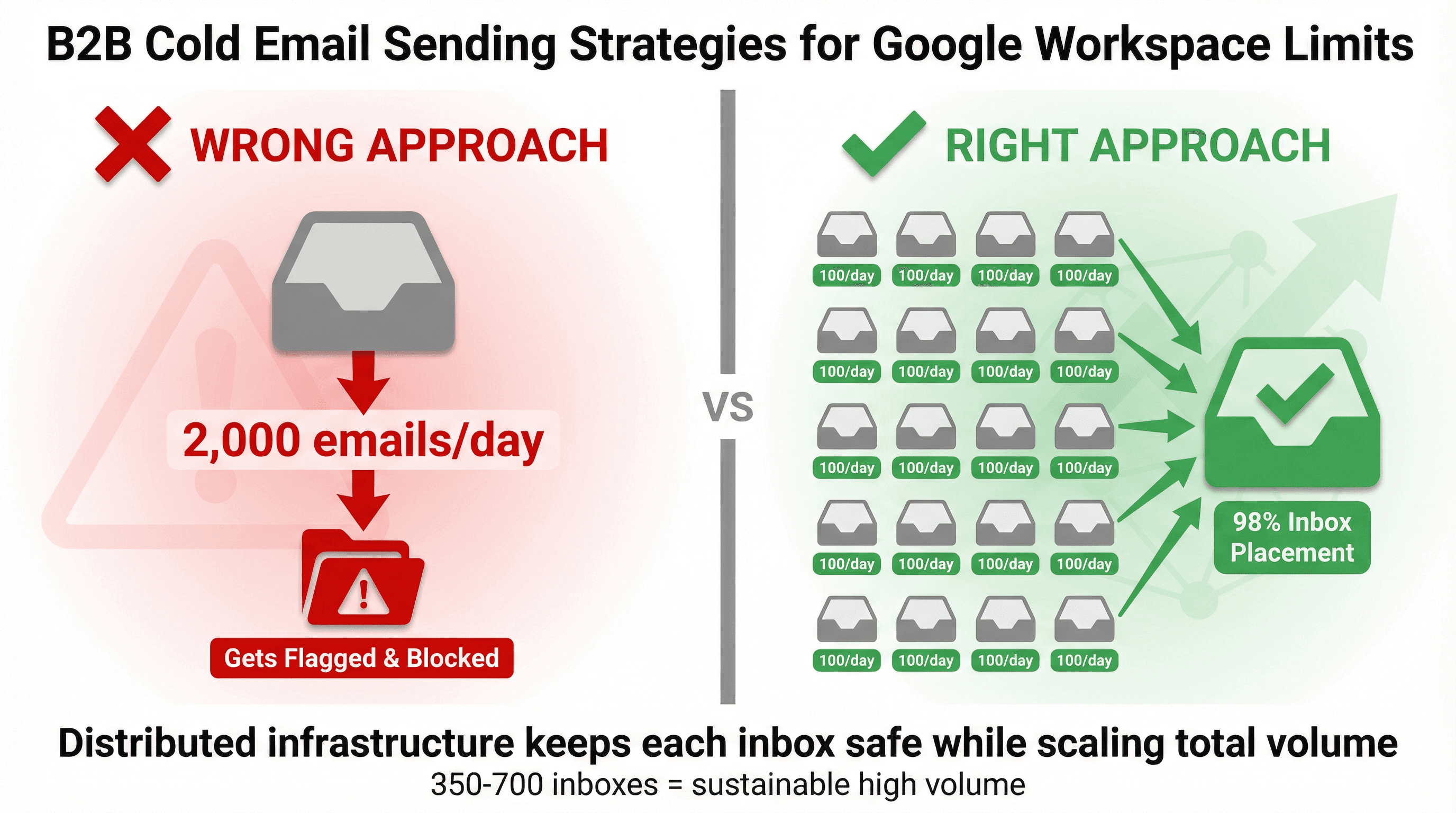
Aim for 50-100 per day per inbox after warm-up, start at 10-20/day new. Don't chase the 2,000/day cap.
At Outbound System, our infrastructure uses 350-700 Microsoft U.S. IP inboxes distributed across multiple domains, with each inbox sending moderate volumes. This distributed approach lets us send over 52 million cold emails with 98% inbox placement while keeping every inbox well below concerning thresholds.
Monitor Deliverability Metrics, Not Just Volume
Our deliverability guidance consistently puts bounce and complaint control at the center of inboxing. When teams come to us after their DIY cold email lands in spam, it's almost always because they ignored these fundamentals.
Set Up SPF, DKIM, and DMARC Authentication
Gmail requires SPF or DKIM for all senders to personal Gmail, and SPF+DKIM+DMARC for bulk senders. This isn't optional anymore.
Add One-Click Unsubscribe to Reduce Spam Complaints
Gmail requires one-click unsubscribe for marketing and promotional messages for bulk senders, and they explicitly connect this to spam rate outcomes. Even if you're below the bulk threshold, giving recipients an easy out reduces the likelihood they'll hit "report spam" instead.
Warm Up Domains Before Sending Cold Email
New domains get distrusted. Our warm-up guide and deliverability fix guide both treat gradual ramping as non-negotiable.
Write Cold Emails That Get Replies
If your offer is irrelevant, people don't "politely ignore" (they hit spam). Our sales email writing guide is built around getting replies, not opens. (Apple's Mail Privacy Protection makes open rates unreliable anyway.)
How We Help Clients Scale Cold Email Without the Technical Headaches
Look, this guide gives you everything you need to run cold email on Google Workspace yourself. But the reality is most teams don't want to manage dozens of inboxes, warm-up protocols, DNS records, and daily deliverability monitoring.
That's where Outbound System comes in.
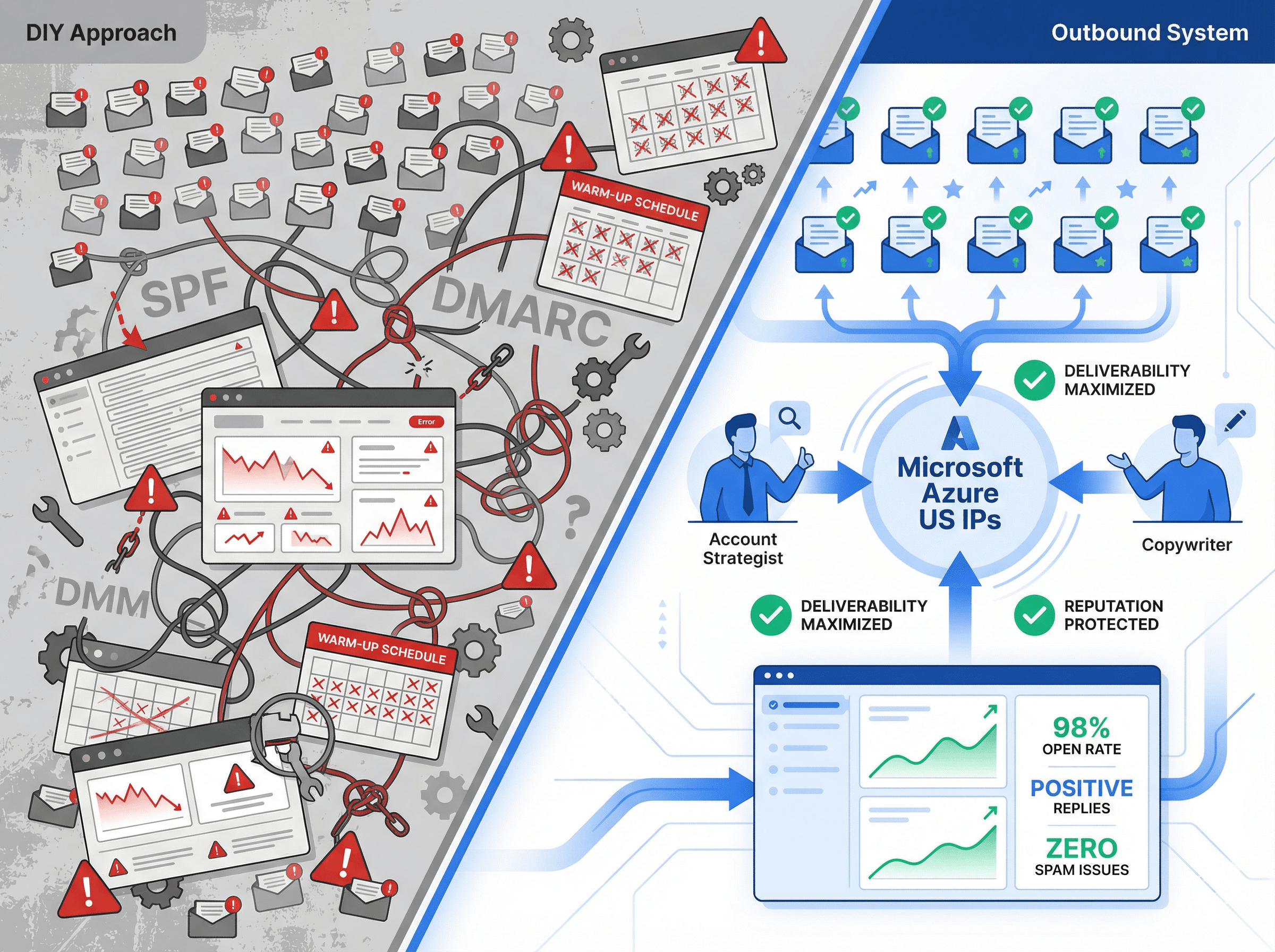
Here's what our platform actually looks like. We've built the infrastructure, monitoring, and optimization systems so you don't have to:
We handle the entire cold email infrastructure so you can focus on closing deals:
Private Microsoft Azure U.S. IP infrastructure with 350-700 inboxes (depending on your plan) to distribute sending and protect deliverability
9-step waterfall enrichment that triple-verifies email data before sending, keeping bounce rates near zero
AI personalization with human copywriting that drives 6-7% response rates across our client base
Unified inbox and real-time metrics so you can focus on replying to interested prospects
Dedicated account strategist who handles A/B testing, campaign optimization, and deliverability monitoring
Our Pricing Is Transparent and Month-to-Month
Plan | Monthly Price | Emails per Month | Contract |
|---|---|---|---|
Starter | $1,499/month | Up to 15,000 | Month-to-month |
Growth | $2,499/month | Up to 30,000 | Month-to-month |
Scale | $3,999/month | Up to 60,000 | Month-to-month |
Both plans include everything listed above, plus direct CRM integrations, A/B testing, and no long-term contracts. We've generated $26M+ in closed revenue for clients across 1,000+ accounts.
If DIY cold email sounds overwhelming, book a free 15-minute consultation and we'll show you exactly how we'd structure your outbound program.
Frequently Asked Questions
How many cold emails can I send per day from Google Workspace?
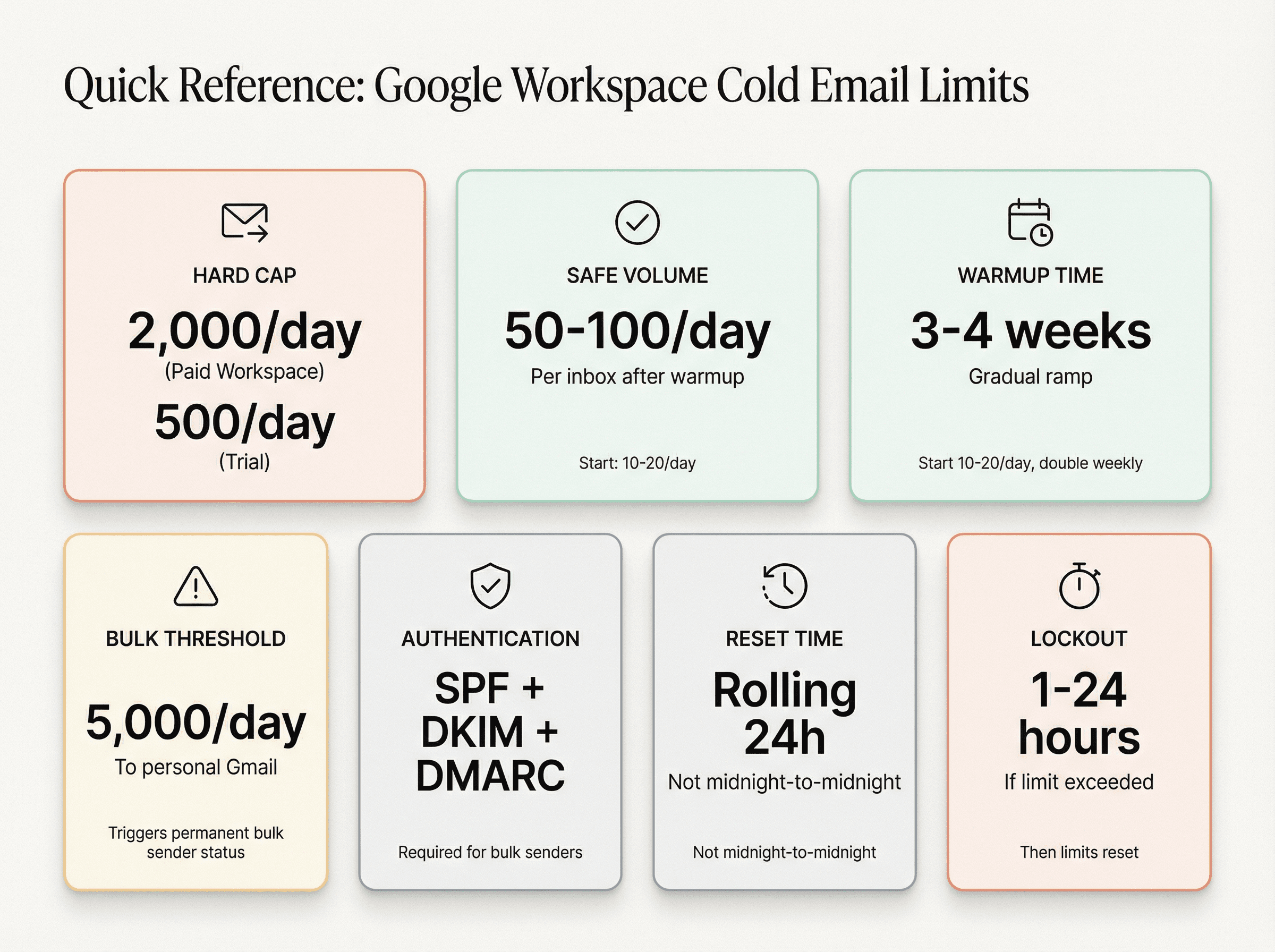
Hard cap: 2,000 outgoing messages per user per rolling 24 hours (500 on trial).
Real-world safe: Around 50-100 per day per inbox after warm-up; start lower on new inboxes. Our research shows this range keeps you deliverable.
Do follow-ups count toward the daily limit?
Yes. Every message sent counts toward the daily send cap, which is why "100/day" can mean far fewer new prospects per day depending on your sequence length.
Do aliases increase my sending limit?
No. Messages sent from an alternate address or alias count toward the same user limits.
What's the reset time for sending limits?
Rolling 24 hours. If you hit a limit, Google says you can't send new messages for up to 24 hours.
Does the Gmail "5,000/day" bulk sender rule apply to B2B Google Workspace recipients?
Google says the sender guidelines apply to personal Gmail accounts, not to messages sent to Google Workspace accounts. But if you send to @gmail.com at scale, you must comply.
Should I use Gmail Mail Merge for cold email?
Mail Merge is capped at 1,500/day and lacks strong suppression or export controls for unsubscribes. It's fine for simple newsletters or announcements; it's usually not ideal for sequenced cold outreach.
How long does it take to warm up a new Google Workspace inbox?
Most teams warm up gradually over 3-4 weeks, starting at 10-20 emails per day and roughly doubling weekly. Our complete warm-up guide walks through the exact schedule.
What happens if I exceed Google's sending limits?
Google will block you from sending for 1-24 hours. You can still receive email and use other services. After the suspension lifts, your limits reset. Repeated violations can lead to permanent restrictions.
Can I use multiple Google Workspace accounts to send more emails?
Yes. This is how high-volume programs scale. Instead of sending 1,000 emails from one account, send 200 each from 5 accounts. This spreads risk and keeps each inbox in the safe zone. Our infrastructure methodology relies on many small-volume inboxes.
What are the bulk sender requirements for sending to Gmail?
For 5,000+ emails per day to personal Gmail, you need SPF+DKIM+DMARC authentication, one-click unsubscribe for marketing messages, and spam rates below 0.3% (target <0.1%).
Why did my cold emails suddenly start going to spam?
Common causes: poor authentication (missing SPF/DKIM), high bounce rates (bad data), spam complaints (irrelevant messaging), or volume spikes. Our spam troubleshooting guide covers all the root causes and fixes.
Is Google Workspace better than Microsoft 365 for cold email?
Both work well. Google Workspace has a 2,000/day limit per user; Microsoft 365 has around 10,000 recipients/day but also throttles aggressively. Most teams choose based on what their prospects use (Gmail often gets slightly higher response rates in B2B).
What's the difference between trial and paid Google Workspace limits?
Trial accounts are limited to 500 emails per day. Paid accounts get 2,000/day, but the upgrade isn't instant (it requires paying at least $100 cumulatively and can take up to 75 days after meeting that threshold).
Can I use SMTP relay to send more cold emails?
Google's SMTP relay has higher limits (10,000 messages/day per user) but it's designed for system mail, not cold outreach. Using it for unsolicited email moves the problem to a different subsystem (Google still monitors for abuse).
How do I check my Gmail sender reputation?
Use Google Postmaster Tools to monitor your domain's reputation, spam rate, and deliverability. If your reputation drops to "Low" or spam rates spike, pause sending and fix the issues before resuming.
What authentication records do I need for cold email?
At minimum: SPF and DKIM. For bulk sending (5,000+/day to personal Gmail): add DMARC with at least p=none policy. Set these up before you send your first cold email. Our authentication setup guide walks through the exact DNS records.
What's a safe bounce rate for cold email?
Keep it under 2%. High bounce rates damage sender reputation fast. Use email verification services to clean your list before sending.
How many inboxes do I need to send 1,000 cold emails per day?
If you're running a 3-touch sequence (initial + 2 follow-ups) and capping each inbox at 90 sends/day, you need approximately 34 inboxes.
The formula: (target new leads/day × touches per sequence) / safe sends per inbox
So (1,000 × 3) / 90 ≈ 34 inboxes.
Should I spread sends throughout the day?
Yes. Don't send all 100 emails at 9:00 AM. Email providers monitor hourly rates. Spread sends across morning, midday, and afternoon with randomized timing.
What's the error message when I hit the sending limit?
Common messages include "You have reached a limit for sending mail" or "You exceeded the maximum recipients." Google provides specific error codes for authentication failures (4.7.27 for SPF, 4.7.30 for DKIM, etc.).
Can Google permanently ban my account for cold email?
Yes, if you send spam or repeatedly violate limits. Google can permanently restrict individual accounts or entire domains. That's why staying well under limits and following sender guidelines is critical.
Resources for Going Deeper
Want to master cold email infrastructure? These guides from our team dive into the operational details:
How Many Cold Emails Can You Send Per Day? (Practical per-inbox safe limits, warm-up ramps, and scaling math)
Why Your Cold Emails Go to Spam (Root causes: reputation, complaints, authentication, list quality; plus fixes)
How to Warm Up Email Domains (Step-by-step warm-up logic and pacing)
Cold Email Infrastructure Setup: Complete Guide (Domains, inbox pools, tracking reality via Apple MPP, operational setup)
10 Cold Email Best Practices to Book More Meetings (Targeting, copy, sequencing, and testing)
How to Write Sales Emails That Close Deals (Copy mechanics that drive replies: the only metric that matters)
How to Outsource Cold Email in 2026 (What to demand from a partner: Gmail requirements, complaint management, unsubscribe, infrastructure)
Stay Under the Radar While Scaling Volume
Google Workspace gives you a big-looking number: 2,000 emails per day. Cold email punishes you for treating it like a goal.
The winning approach is boring:
Stay way under quota per inbox
Scale via infrastructure and relevance, not brute force
Comply with Gmail's sender requirements if you touch personal Gmail at volume
Monitor spam rate like your business depends on it (because it does)
If you want to run cold email yourself, this guide gives you the blueprint. If you'd rather hand it off to people who've sent 52 million+ cold emails and know exactly how to stay under the radar while scaling volume, book a call with Outbound System.
Either way, treat Google's limits as guardrails, not targets. Keep volumes realistic, grow slowly, authenticate everything, and watch your metrics. That's how you build an outbound engine that runs smoothly on Google Workspace for the long haul.