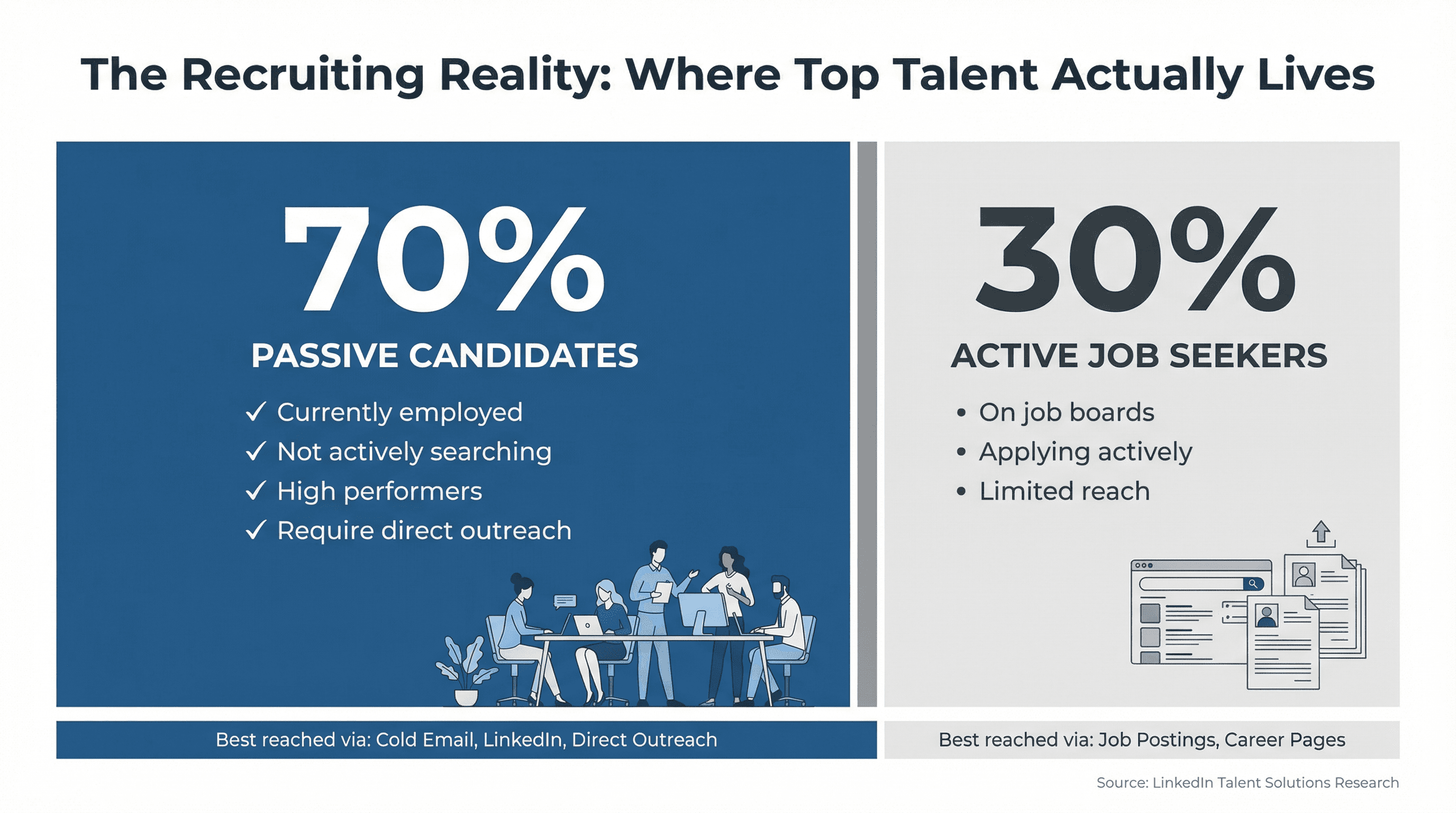
Recruiting has fundamentally changed. The best candidates aren't scrolling job boards or waiting for opportunities to find them. According to LinkedIn's research, roughly 70% of the global workforce consists of passive candidates who aren't actively job hunting. These high-performers are happily employed, building products, closing deals, and solving problems at their current companies.
If you're relying solely on job postings, you're fishing in a pond that only 30% of candidates swim in. The other 70%? You have to go find them.
That's where cold email becomes your secret weapon. Not the spammy "we have an exciting opportunity" template that gets deleted in three seconds. We're talking about strategic, personalized outreach that opens conversations with people who would never see your job ads.
This guide breaks down everything you need to know about cold email for recruiters in 2025. We'll cover the technical setup that keeps you out of spam folders, the messaging frameworks that get responses, the sequences that convert passive candidates into interviews, and the compliance requirements you can't ignore. Whether you're an agency recruiter building client relationships or an in-house talent acquisition pro sourcing passive candidates, this playbook will transform how you fill roles.
Why Cold Email Beats Job Boards for Finding Top Talent
Cold email isn't just another recruiting channel. It's become essential for anyone trying to hire top talent in competitive markets. Here's why it's so powerful:
Cost-effectiveness at scale
LinkedIn InMail costs roughly $10 per message. If you're reaching out to 50 candidates per week, that's $500 weekly just on messaging.
Cold email? Once you've set up your infrastructure, the incremental cost per email is essentially zero. You can reach hundreds of qualified candidates without breaking your budget.
Access to passive talent
Job boards attract active job seekers. Cold email lets you tap into that massive 70% of professionals who aren't looking but might be interested in the right opportunity. These passive candidates often represent your best hires because they're currently employed, performing well, and not desperate for any job that comes along.
Direct, personal communication
Email lands in someone's primary inbox alongside their important work communications. It feels more direct and personal than a social media message or a generic job alert. When done right, a personalized cold email can make a candidate feel specially chosen, not mass-marketed.
Dual-purpose for agencies
If you're an agency recruiter, cold email serves two critical functions: finding candidates for open roles and winning new clients for your business. The same fundamental principles (good targeting, personalization, clear value) apply to both use cases.
Scalable with proper systems
Cold email can scale dramatically when you have the right infrastructure. Leading cold email agencies manage to send thousands of emails weekly by distributing sending across multiple warmed addresses while maintaining quality.
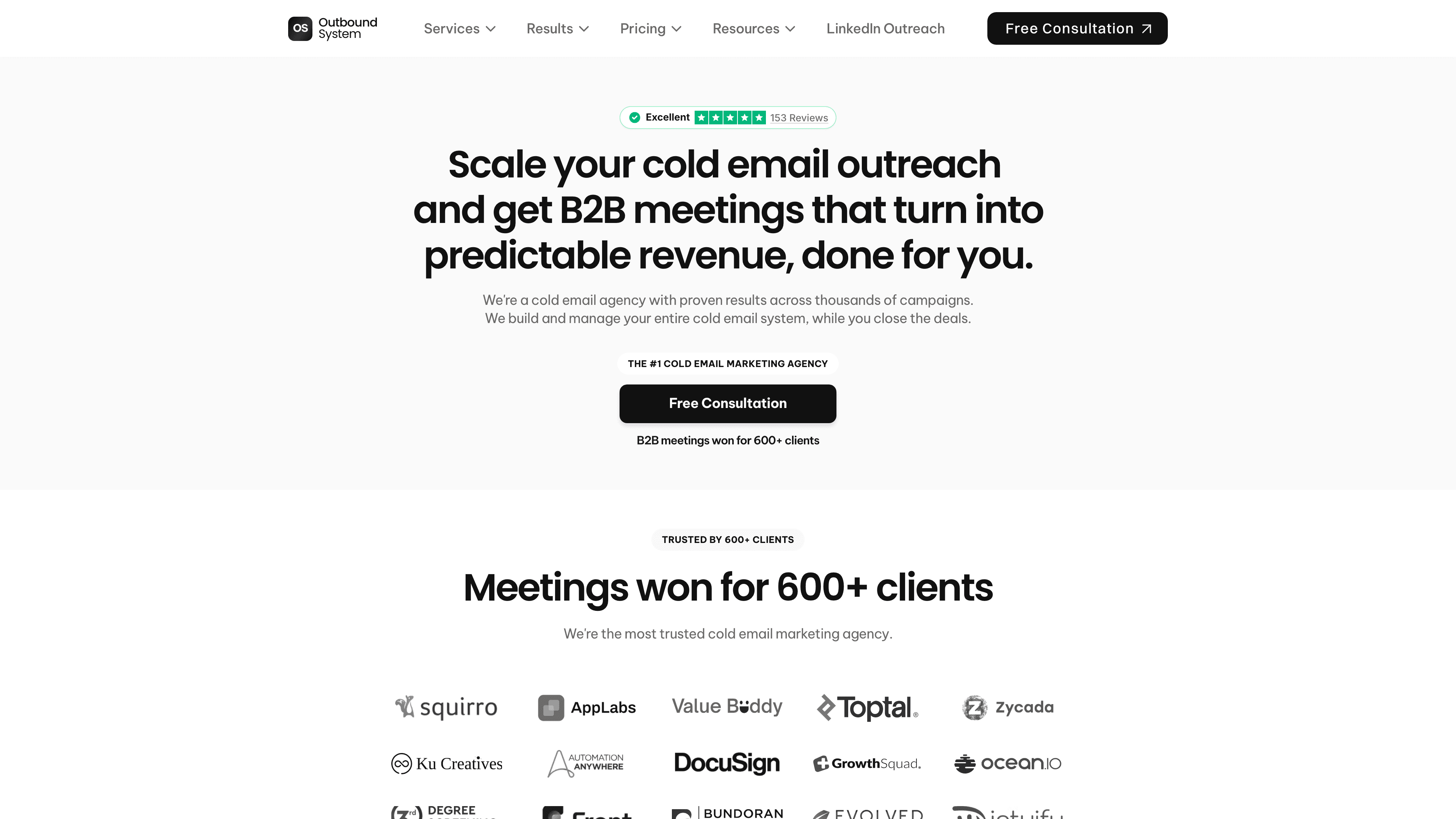
For example, Outbound System uses 300+ email inboxes across multiple domains, strategically warmed and rotated to achieve a 98% inbox placement rate and 6-7% response rates.
Even if you're not operating at that volume, understanding how to properly scale cold email means you can reliably reach more candidates without getting blocked or flagged as spam.
The recruiting landscape has shifted. Relying only on applicants is like opening a restaurant in the desert and wondering why nobody shows up for dinner. You have to go where the talent is. Cold email lets you reach them directly.
What Changed in 2025: New Email Rules Recruiters Must Follow
Before we get into tactics, you need to understand what's changed in the past 18 months. Email providers have gotten significantly stricter, and recruiters who ignore these changes are seeing their messages disappear into spam folders.
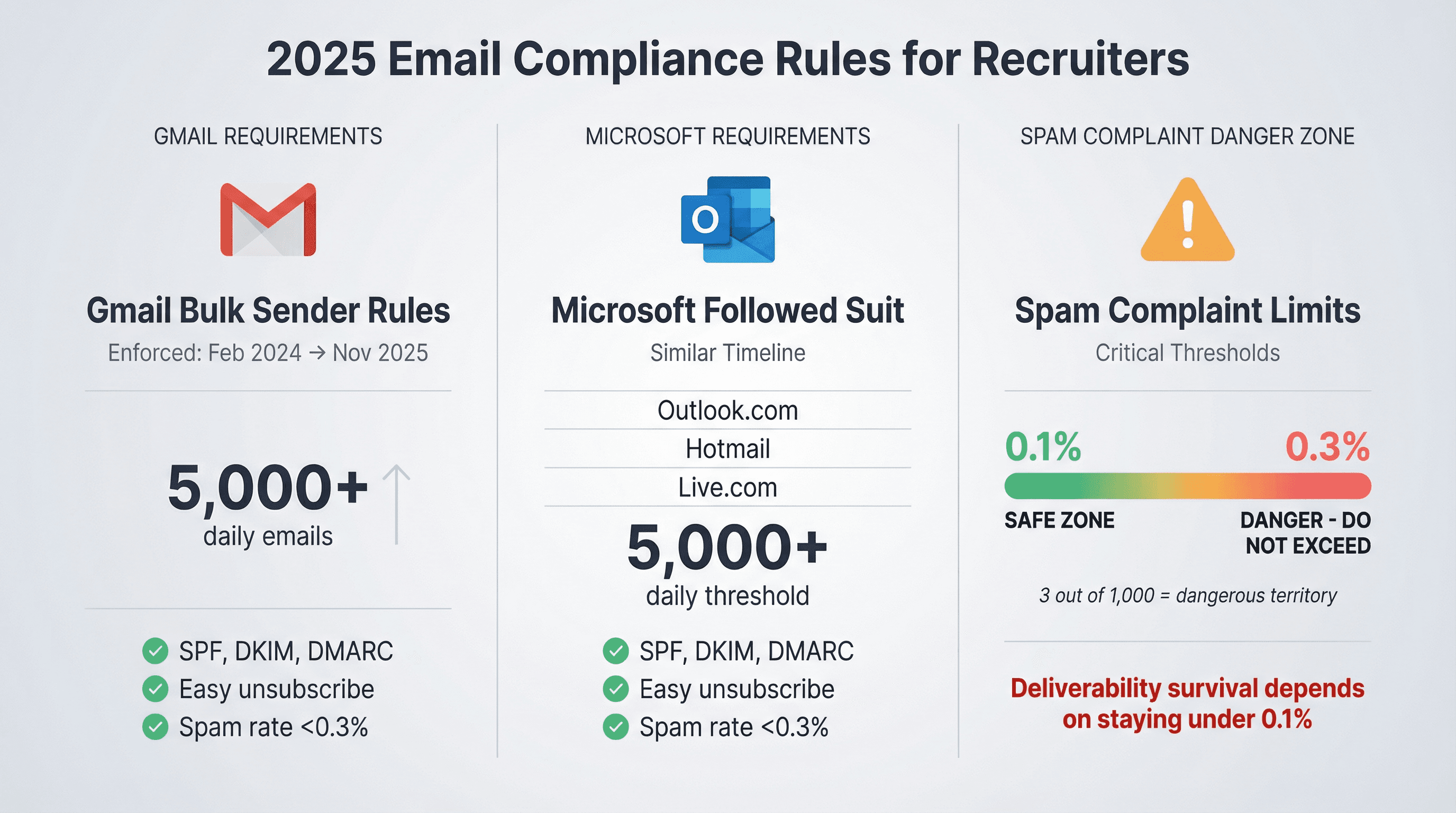
Gmail's new bulk sender requirements
In February 2024, Gmail rolled out new requirements for anyone sending 5,000+ messages daily to Gmail accounts. These requirements include proper authentication (SPF, DKIM, DMARC), easy unsubscribe options, and maintaining spam complaint rates below 0.3%.
What matters for recruiters: Even if you're not sending 5,000 emails daily, these requirements signal where the entire industry is headed. Gmail's enforcement ramped up in November 2025, with non-compliant traffic facing temporary and permanent rejections.
Microsoft followed suit
Microsoft announced similar requirements for Outlook.com, Hotmail, and Live.com addresses. Domains sending 5,000+ emails daily need proper authentication and must keep complaint rates extremely low.
Spam complaint thresholds are unforgiving
Critical compliance threshold: Gmail's guidance is explicit: keep spam complaint rates under 0.1% and absolutely don't reach 0.3%. That's not marketing talk. That's deliverability survival. If even 3 out of 1,000 recipients mark your email as spam, you're in dangerous territory.
Open rates became unreliable
Apple's Mail Privacy Protection can preload remote content in ways that make opens unreliable and obscure signals like IP address and location. Some emails register as "opened" even when the recipient never read them.
Serious recruiting teams now focus on replies and booked meetings, not vanity metrics like open rates.
These changes mean you can't just blast emails and hope for the best. You need a proper system.
How to Set Up Cold Email Infrastructure (Technical Foundation)
Success starts before you write a single word. You need the technical pieces in place so your emails actually reach the inbox instead of getting filtered to spam.
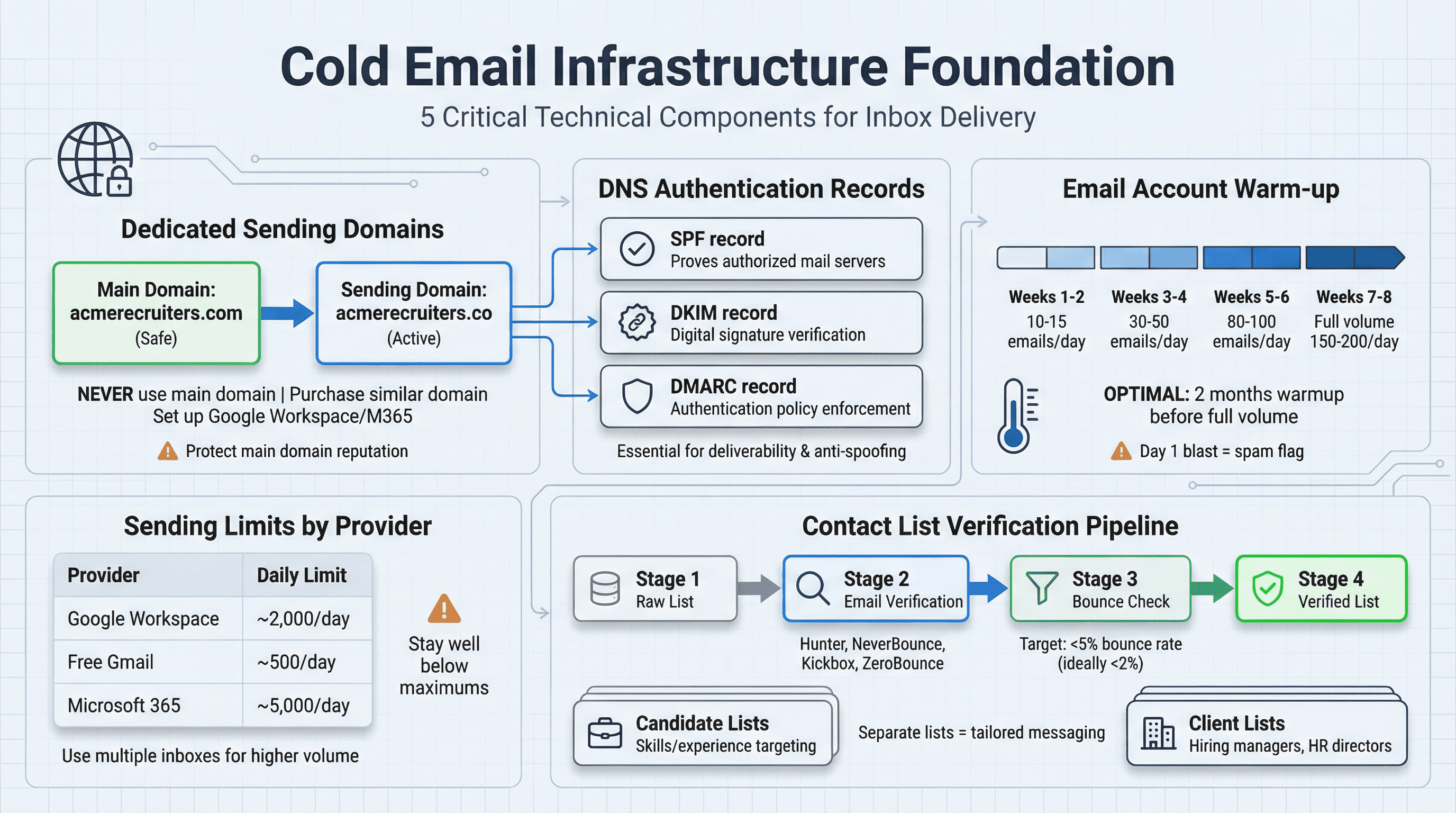
Use dedicated sending domains
Never send thousands of cold emails from your main company email. If something goes wrong (spam complaints, high bounces), you don't want to burn your primary domain's reputation. Using your company domain for cold outreach is risky because damage to sender reputation can affect all company emails.
What to do instead:
→ Purchase a domain similar to your company's main domain. If your company is acmerecruiters.com, you might buy acmerecruiters.co or acmerecruitinggroup.com for cold outreach.
→ Set up Google Workspace or Microsoft 365 on this domain and create professional email addresses (jane@acmerecruiters.co). Never use free Gmail or Yahoo addresses for business cold email.
Authenticate your domain properly
Configure these three DNS records for your sending domain:
SPF (Sender Policy Framework): Proves which mail servers can send on behalf of your domain
DKIM (DomainKeys Identified Mail): Adds a digital signature to verify emails haven't been tampered with
DMARC (Domain-based Message Authentication): Tells receiving servers what to do if SPF or DKIM checks fail
Without these authentication records, your emails are far more likely to be rejected or marked as suspicious. Setting up proper email authentication is critical for preventing email spoofing and improving deliverability.
Most email providers offer step-by-step instructions for configuring these records. Tools like PowerDMARC or EasyDMARC can also help guide the setup.
Warm up your email accounts
Don't blast 200 cold emails from a brand-new address on day one. That's a massive red flag to spam filters. Email providers track sending patterns and reputation. A sudden spike from zero to high volume looks like spam.
The proper warm-up process:
① Start by manually sending 10-15 emails daily to colleagues or friends who will reply. This creates positive engagement signals.
② Gradually increase volume over 2-3 weeks until you reach your target daily send rate.
③ Better yet, use automated warm-up services. These tools connect to your account and gradually send emails to a network of addresses, automatically replying to simulate real conversations.
It's best to warm up your email address for about 2 months before you start sending cold emails at scale. Yes, that feels slow when you're eager to contact candidates. But this patience pays off by preventing your account from getting shut down once you ramp up volume.
Know your sending limits
Different email providers have different limits:
Provider | Daily Sending Limit |
|---|---|
Google Workspace | ~2,000 recipients/day |
Free Gmail | ~500 recipients/day |
Microsoft 365 | ~5,000 recipients/day |
These are upper bounds, not targets. Staying well below these numbers is wise for maintaining good deliverability. If you need higher volume, set up multiple inboxes and distribute sending across them. Learn more about how many cold emails you can send per day.
Build and verify your contact lists
High bounce rates destroy your sender reputation. Even if you buy contact information, ensure you're verifying email addresses to prevent bounces.
Use email verification services like Hunter, NeverBounce, Kickbox, or ZeroBounce to check if addresses are valid before you send. This step is critical for keeping your bounce rate under 5% (ideally under 2%). For a comprehensive approach to building quality prospect lists, see our guide on cold email list building.
List segmentation matters:
Create separate lists for candidates versus clients if you're doing agency BD. The messaging for these audiences is completely different.
• For candidates: Focus on people with skills/experience matching your open roles who might be open to opportunities.
• For clients: Target hiring managers, HR directors, founders, or other decision-makers at companies you want to partner with.
Thoughtful targeting beats high volume every time.
How to Write Recruiting Cold Emails That Get Replies
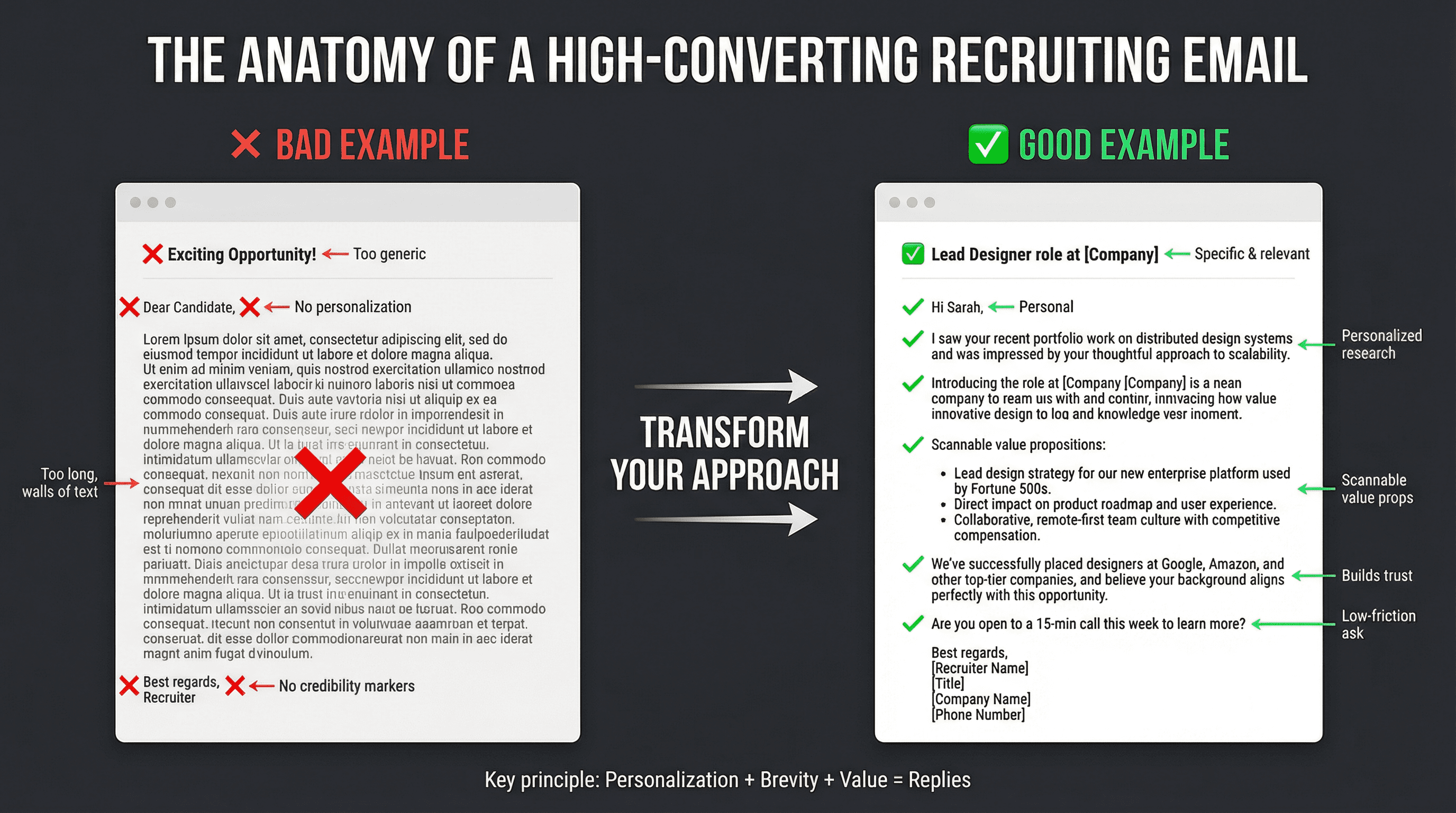
Now we get into the art of recruiting cold email. The technical setup gets you to the inbox. Great copy gets you the reply.
Subject lines that get opened
Your subject line is make-or-break. 35% of email recipients open emails based on subject line alone. Many people decide in a split second whether to click or ignore.
Effective subject line principles:
→ Keep it short and specific (6-8 words, roughly 60 characters). Many people read emails on mobile where long subjects get cut off.
→ Avoid clickbait or deceit. Never use fake "RE:" prefixes or sensational phrases. These can get you blacklisted and anger recipients.
→ Personalize when possible. Emails with the recipient's name in the subject often see higher engagement. Even adding their company name helps.
Good candidate subject lines:
• "Opportunity for Lead Designer"
• "Your next UX lead role?"
• "Senior Engineer role at [Company Name]"
• "Quick question about [Their Skill]"
Good client subject lines:
• "Idea to fill your dev openings"
• "[Company] hiring for sales leadership?"
• "Candidate for your open director role"
Spark curiosity without sounding spammy. Highlighting a specific benefit like "Increase your dev headcount by 20% from our database" or mentioning social proof like "We just placed a candidate at [Competitor]" can work well.
Keep emails short and skimmable
Busy professionals don't read long, dense cold emails. Research shows that initial outreach emails around 100-150 words performed well for reply outcomes.
The ideal structure:
Intro (one line): A personalized greeting that establishes why you're reaching out to them specifically.
Value proposition (2-4 sentences or bullets): What's in it for them. For candidates, this is the opportunity. For clients, this is your service value. Use bullet points to make it scannable.
Call to action (one line): A simple question or next step. "Would you be open to a brief call?" or "Can we set up a 10-minute chat this week?"
Sign-off: Professional closing with your contact info.
Use short paragraphs or bullet lists to make the email easily scannable. Walls of text are intimidating and get skipped. Research suggests using bullet points to highlight three key benefits of the role. This works beautifully for making your pitch digestible.
Write in a conversational, human tone. Not overly formal, but not sloppy. You want to sound like a friendly professional reaching out, not a spam robot or pushy salesperson.
Personalize beyond just inserting a name
Generic templates get deleted. Thoughtful, researched messages get responses.
Research shows that candidates complain when recruiters "never mentioned anything beyond their first name." That's the hallmark of a mass blast, and it's a turn-off.
Personalization strategies for candidate outreach:
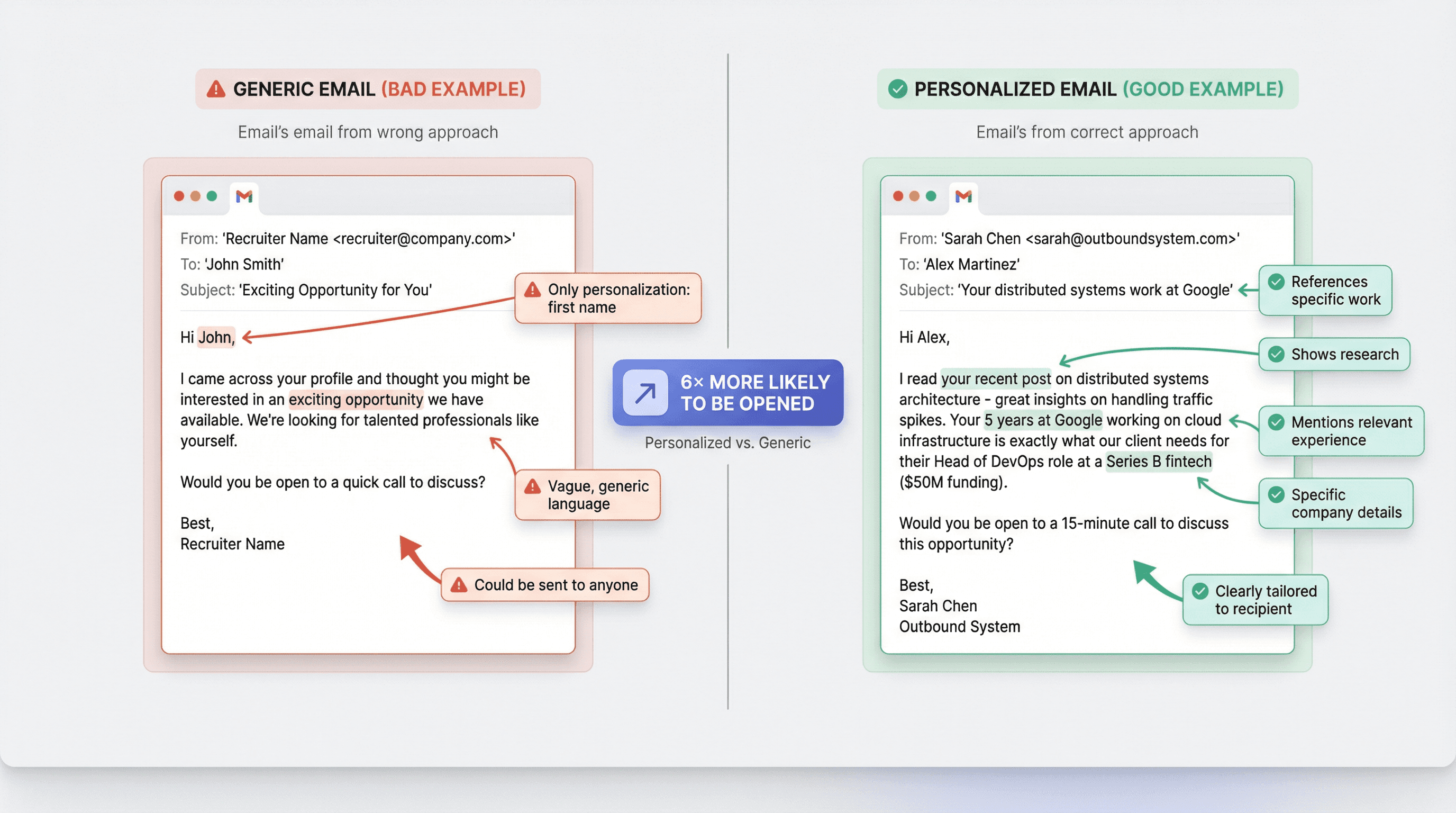
• Reference a specific project, article, or accomplishment: "I read your recent post on distributed systems architecture - great insights."
• Mention how their experience fits the role: "Your 5 years at Google working on cloud infrastructure is exactly what our client needs for their Head of DevOps."
• Note common connections or alma mater: "We're both part of the University of Texas alumni network - Hook 'em!"
• Use location when relevant: "I see you're based in Chicago. Our client's office is downtown as well."
Personalization strategies for client outreach:
• Reference company challenges: "I noticed [Company] has five open engineering roles - I specialize in exactly this type of technical recruiting."
• Mention company achievements: "Congrats on your recent Series B funding. That growth typically requires building teams quickly."
• Reference LinkedIn posts: "I saw your post about how hard it is to find good frontend developers. That caught my eye because that's precisely what I help with."
• Cite relevant work: "We've helped place engineers at similar companies and would love to do the same for you."
Personalization impact: Personalized emails are 6× more likely to be opened than generic ones. Even if that exact number varies, the principle holds: when people see content clearly tied to their situation, they pay attention.
Focus on value, not your needs
The reader should immediately grasp what they stand to gain. This is your core value proposition.
For candidates:
Highlight why this opportunity matters. Is it a step up? A well-known company? A mission-driven organization? Give specific, appealing details.
"We're hiring a Lead Data Scientist for a fintech company that just secured $50M in funding. You'd have the chance to build their data team from the ground up."
Emphasize the Employee Value Proposition (EVP). Candidates want to know what they'll get in return: growth opportunities, generous equity, remote flexibility, learning budget. Tailor this to what you think they value.
"The company offers a generous equity package and remote-first flexibility, plus they cover courses and certifications."
Frame it around their benefit, not your quota. Instead of "I have a position I need to fill," say "I have an opportunity that could be a great next step for you because..."
For clients:
Emphasize your specialization: "We specialize in placing senior SaaS sales reps. Our focus means we have vetted candidates ready for roles like the ones on your careers page."
Highlight speed: "On average our placements are made 30% faster than industry standard" (if you have that data).
Note quality and guarantees: "We thoroughly vet every candidate. As a result, 90% of our placements stay at least 2 years. We even offer a 90-day replacement guarantee."
Mention ROI: "Our clients see an average of 3:1 ROI in the first year due to improved hiring efficiency."
Quantify value when possible. Numbers jump out: "20%," "$5M," "3 weeks." They lend credibility and make your claims concrete.
Build trust with social proof
Adding credibility markers dramatically increases response rates by reassuring recipients you're legitimate and effective.
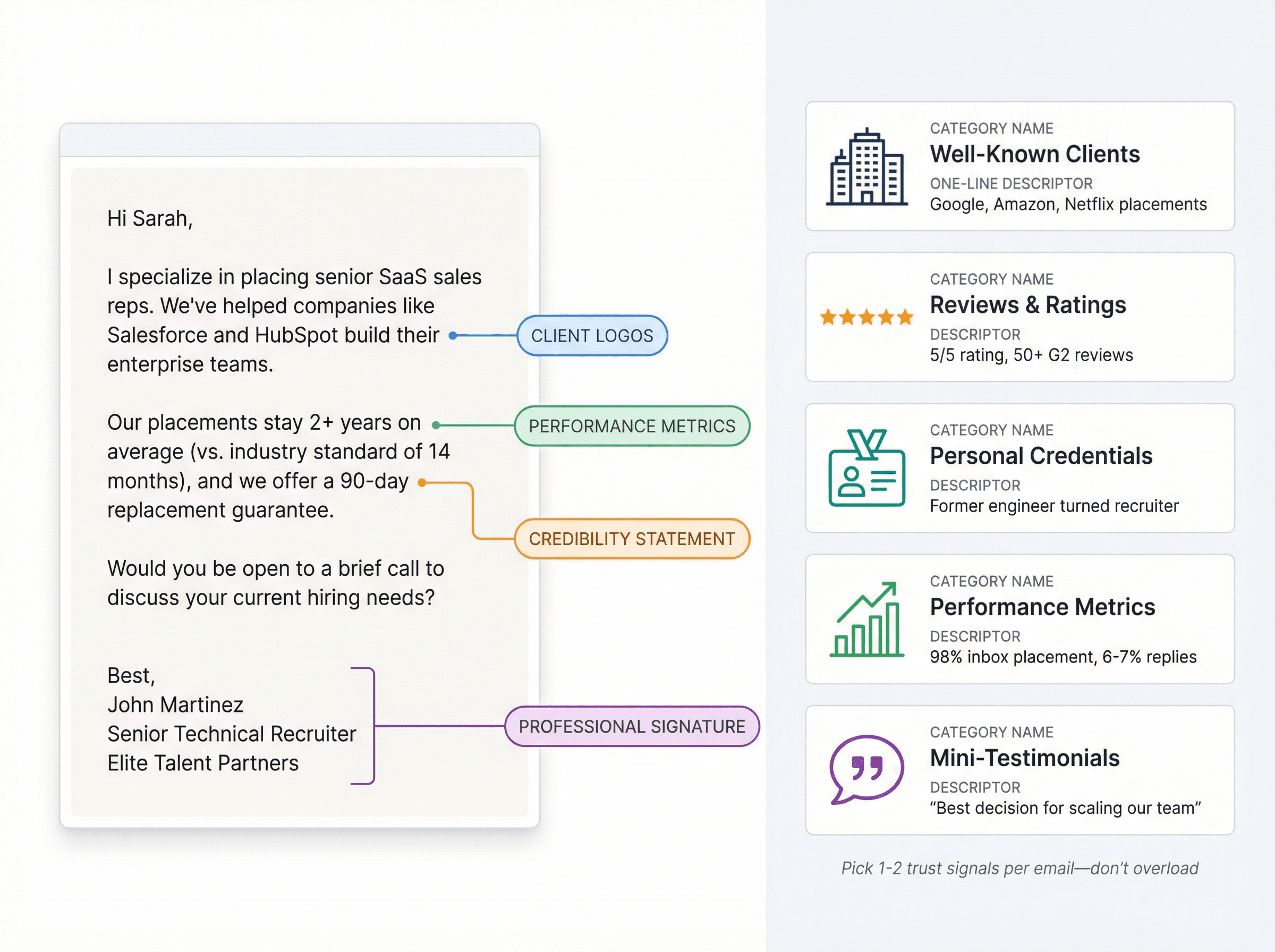
Ways to add social proof:
• Mention well-known clients or placements: "We've placed software engineers at Google, Amazon, and Netflix" or "Helped [Competitor] hire their entire marketing team."
• Highlight reviews or ratings: "Rated 5/5 by over 50 clients on G2" (if true).
• Share your credentials: "As a former software engineer turned recruiter, I understand the technical side deeply."
• Reference data: For example, Outbound System maintains 98% inbox placement resulting in 6-7% response rates. That kind of specific performance metric builds credibility.
• Use mini-testimonials: "One client recently said hiring us was the 'best decision' for scaling their team."
Don't overload your email with credentials. Pick one or two relevant trust signals and include them briefly. The goal is to differentiate yourself from spam while keeping the message focused.
Match your tone to the audience
Tone signals professionalism and cultural fit.
Address people appropriately. First name basis works for most industries today. An executive search email might say "Dear Mr. Wells" whereas a startup recruiting email might say "Hey John."
Be respectful of their time: "I'll be brief" or "I know you're busy, so I'll get right to it" acknowledges their schedule.
Avoid overly casual language unless you're certain it fits. Friendly and professional beats full of emoji or slang.
Mirror industry culture. Software engineers? Slightly more relaxed. Bank executives? More formal. Use your judgment.
The email's tone is a preview of working with you. Candidates judge if you seem trustworthy and competent. Clients judge if you understand their business environment.
End with a clear call to action
Every cold email needs a specific next step. Don't leave the recipient guessing.
For candidates:
"Would you be available for a quick 15-minute call to discuss this opportunity?"
"If you're interested, I'd love to set up a brief chat. Does next Tuesday afternoon work?"
"Is this something that might interest you? Happy to share more details if so."
For clients:
"When's the best time to catch you for a brief call?"
"Are you open to a 10-minute discussion on how we can help with your hiring needs?"
"Would you like me to send over some candidate profiles for your open roles?"
Make it one specific action. Don't say "Please reply or call me or schedule a meeting." That's too many choices. One clear ask works best.
Lower the barrier. Asking for a quick call is a small commitment. Asking for their full resume and references up front is too much.
Good recruiting cold emails always have a clear call-to-action. Some effective CTAs: "When's the best time to catch up with you?" or "Click here to schedule a meeting."
After the CTA, sign off with a professional email signature including your title, company, phone number, and LinkedIn link. A detailed signature builds trust and shows you're a real professional, not a bot.
How to Follow Up Without Being Annoying (The System)
One email rarely does all the work. People are busy. They miss emails. They read your note and intend to reply later but forget.
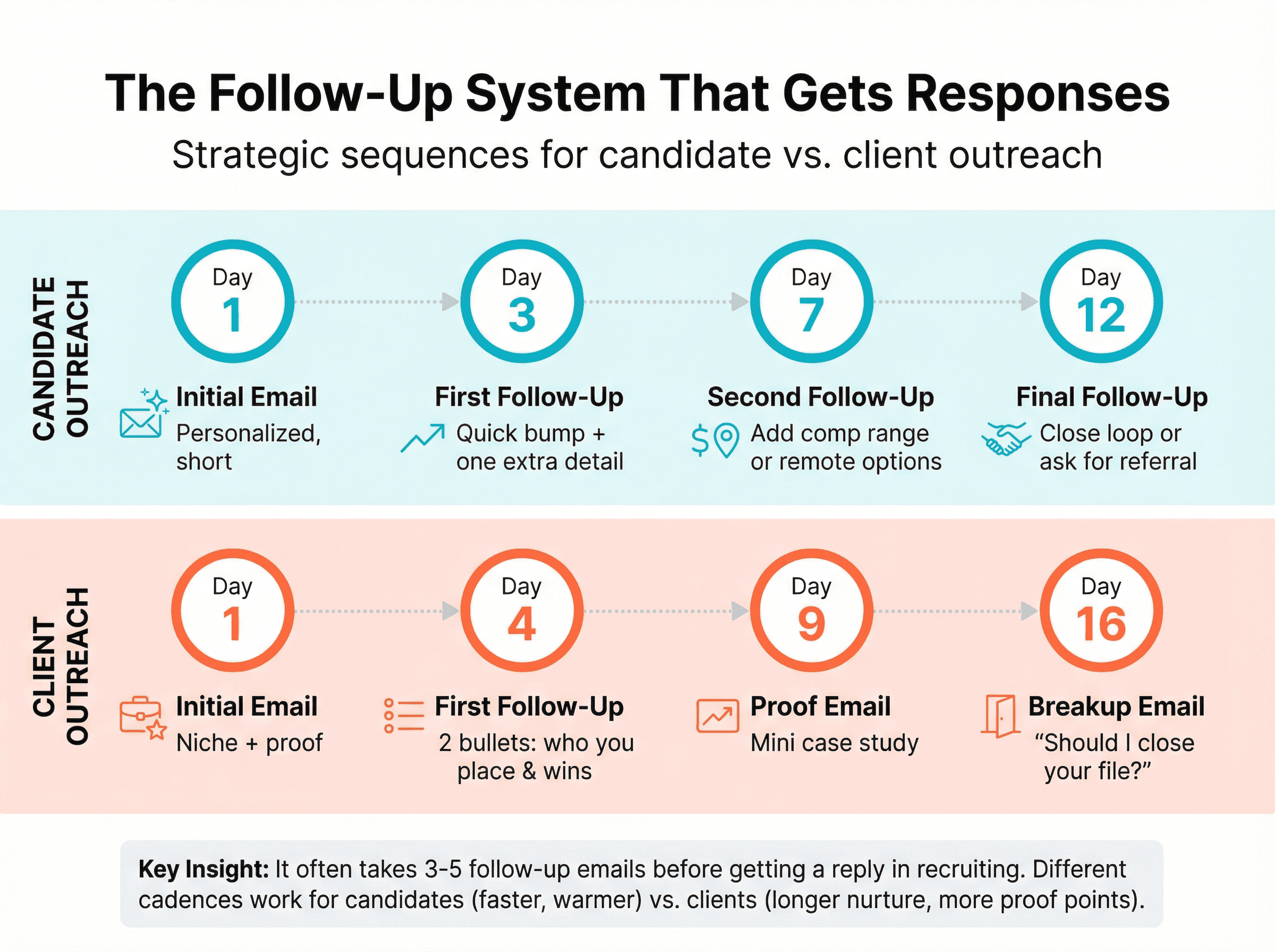
That's why polite follow-ups are essential. Data shows it can require multiple touchpoints to get a response. In recruiting specifically, it often takes 3-5 follow-up emails before getting a reply. Learn more about effective follow-up tactics.
Plan your follow-up sequence
Don't just send random follow-ups. Map out a strategic sequence.
Candidate follow-up cadence:
Day 1: Initial email (personalized, short)
Day 3: First follow-up (quick bump with one extra detail)
Day 7: Second follow-up (add clarity like comp range or remote options)
Day 12: Final follow-up (close the loop or ask for referral)
Client follow-up cadence:
Day 1: Initial email (niche + proof)
Day 4: First follow-up (2 bullets about who you place and where you win)
Day 9: Proof email (mini case study)
Day 16: Breakup email ("Should I close your file?")
Keep follow-ups short and varied
First follow-ups can be extremely brief. A simple "Just bumping this to the top of your inbox" works.
Later follow-ups should add new information or angles:
"The hiring manager is moving quickly and prioritizing people with [skill]."
"We just placed a similar role at [Company]. I'm confident we could help you hire just as successfully."
"By the way, one of our candidates for the role just completed a major project that's directly relevant."
Vary the content. If you send the same "just checking in" every time, it gets old and ineffective.
Use the breakup email technique
After 4-5 attempts with no response, send a final message giving them an easy out:
"If now isn't the right time or you're not interested, no worries. Please feel free to let me know or just ignore this and I won't reach out again. If you change your mind down the line, I'm here to help."
This kind of email sometimes prompts a response (either "thanks, not interested" or "sorry I've been swamped, let's talk"). It shows you respect their decision.
Include opt-out options
Always provide a clear way for people to decline or unsubscribe. Not only is this required by CAN-SPAM, but it maintains a positive brand image.
A simple line in your signature or final email works: "P.S. If you're not interested, let me know and I won't reach out again."
Honor opt-outs immediately and avoid spamming anyone who indicates they're not interested.
Consider multi-channel touches
Email doesn't exist in isolation. After your first email, you might:
• Send a LinkedIn connection request referencing that you emailed
• Drop a quick InMail or LinkedIn message: "Hi [Name], I sent an email last week about a role I think you'd love. Just wanted to make sure it didn't get lost."
• Make a phone call (especially for senior or high-value candidates)
Mix channels strategically. Just don't be stalkerish. The goal is to increase visibility while staying respectful.
What Metrics Actually Matter for Recruiting Cold Email
Track these metrics weekly to understand what's working:
The 5 metrics that matter
1) Delivery health (bounces, blocks)
Keep bounce rate under 5%, ideally under 2%. High bounces hurt sender reputation and trigger blocks.
2) Spam complaints
Critical for Gmail. Keep spam complaint rates below 0.1% and absolutely don't reach 0.3%.
3) Reply rate
The percentage of people who replied. Research shows that multi-step sequences substantially outperform one-off emails for reply outcomes.
For cold recruiting emails, 2-5% response rate is solid in many B2B contexts. Candidate outreach can see higher rates (10-20%) when targeting very relevant candidates with compelling roles.
4) Interested rate
Not all responses are equal. Track how many turn into the desired outcome (candidate interested in proceeding, or client agreeing to a call).
5) Meetings booked / screens booked
The ultimate metric. Replies that lead to actual conversations and movement in your pipeline.
De-prioritize open rates
Apple's Mail Privacy Protection can preload remote content, making many emails register as "opened" even when users didn't read them. Leading cold email teams advise prioritizing engagement metrics like replies and clicks, which remain reliable post-MPP.
You can still use open data for diagnostics (zero opens might suggest deliverability issues), but don't obsess over open rates.
Optimize based on data
If metrics are lacking, adjust your strategy:
→ Low opens? Rework subject lines. Try sending at different times (mid-morning around 10-11am often works well for B2B).
→ Low response despite high opens? Your email content isn't compelling. Experiment with different value propositions, shorten the email, or increase personalization.
→ Low positive responses? Maybe you're targeting people who aren't a fit. Re-examine your list criteria or try a different offer.
→ High bounces or spam flags? Pause and fix foundational issues. Clean the list, ensure compliance, slow down sending. Check out our guide on fixing cold emails going to spam.
A/B test systematically: Try two subject lines or two email body versions. Keep other variables consistent and test on decent sample sizes.
Use your CRM or email tool's analytics to see which follow-ups generate the most replies. Sometimes the majority of responses come on the 2nd or 3rd email, confirming that persistence pays off.
Legal Requirements: How to Stay Compliant
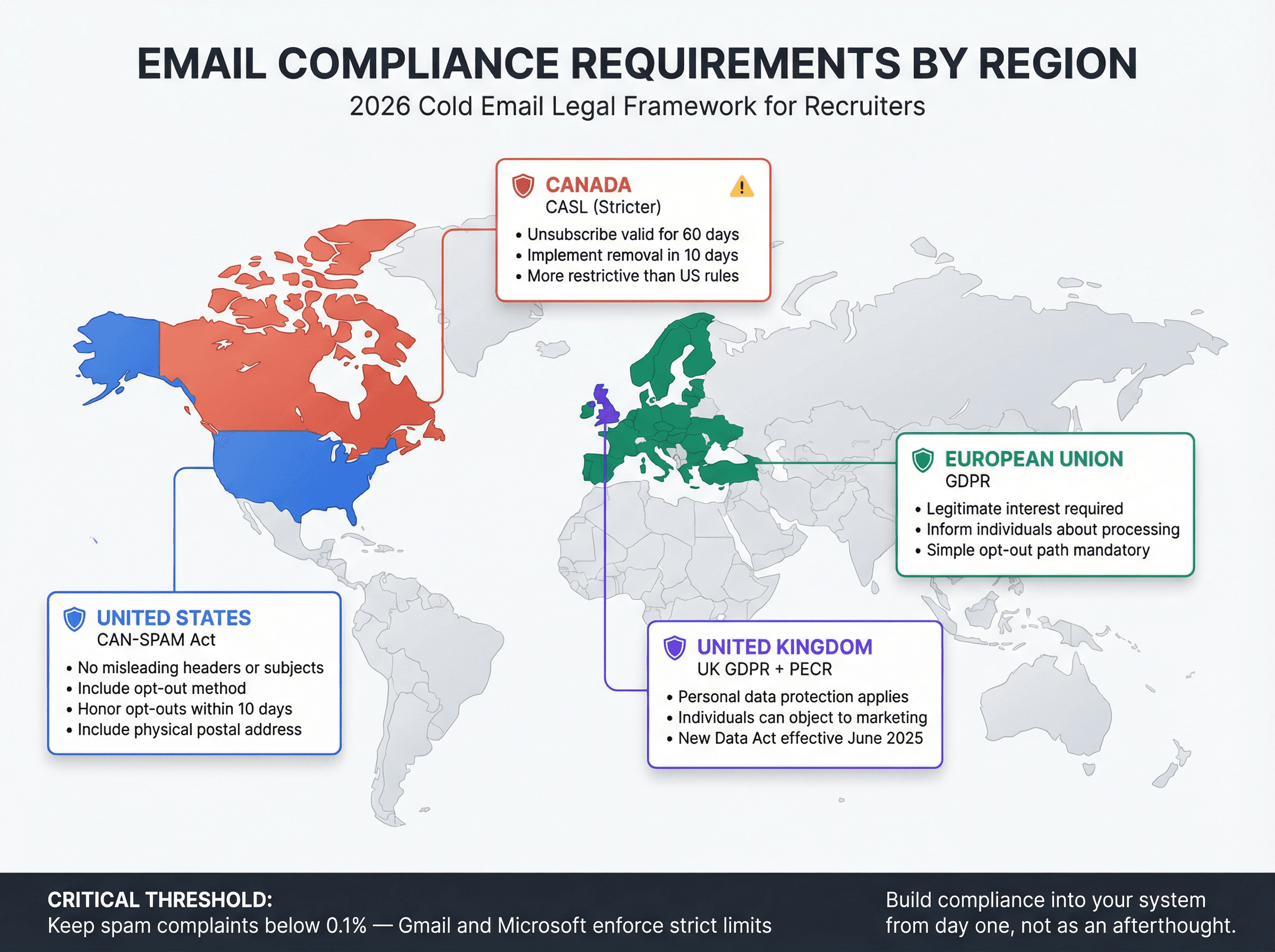
Compliance isn't optional. Laws vary by region, and violations can result in serious penalties. For a comprehensive overview, see our guide on email outreach compliance rules.
United States: CAN-SPAM Act
The FTC's CAN-SPAM guidance requires:
• Don't use misleading header info or subject lines
• Include an opt-out method
• Honor opt-outs within 10 business days
• Include a physical postal address
• You're responsible even if a vendor sends on your behalf
Canada: CASL (stricter than US)
Canada's anti-spam law is more restrictive. Canadian regulations emphasize that unsubscribe mechanisms must remain valid for 60 days and requests must be implemented within 10 business days.
European Union: GDPR
The European Commission explains that legitimate interest can be a lawful basis, but you must:
• Inform individuals about the processing
• Ensure your interests don't seriously impact their rights and freedoms
Recruiting outreach involves processing personal data (email, role history). You need a defensible lawful basis, clear notice, and a simple opt-out path.
United Kingdom: UK GDPR + PECR
ICO guidance highlights that UK GDPR applies if you process personal data for direct marketing, and individuals can object. Note that guidance is under review due to the Data (Use and Access) Act coming into law June 19, 2025.
Practical takeaway: If you recruit across borders, build compliance into your system from the start, not as an afterthought.
How to Scale Cold Email as a Recruiting System
Once you've mastered the best practices, you can scale intelligently.
Use multiple inboxes for volume
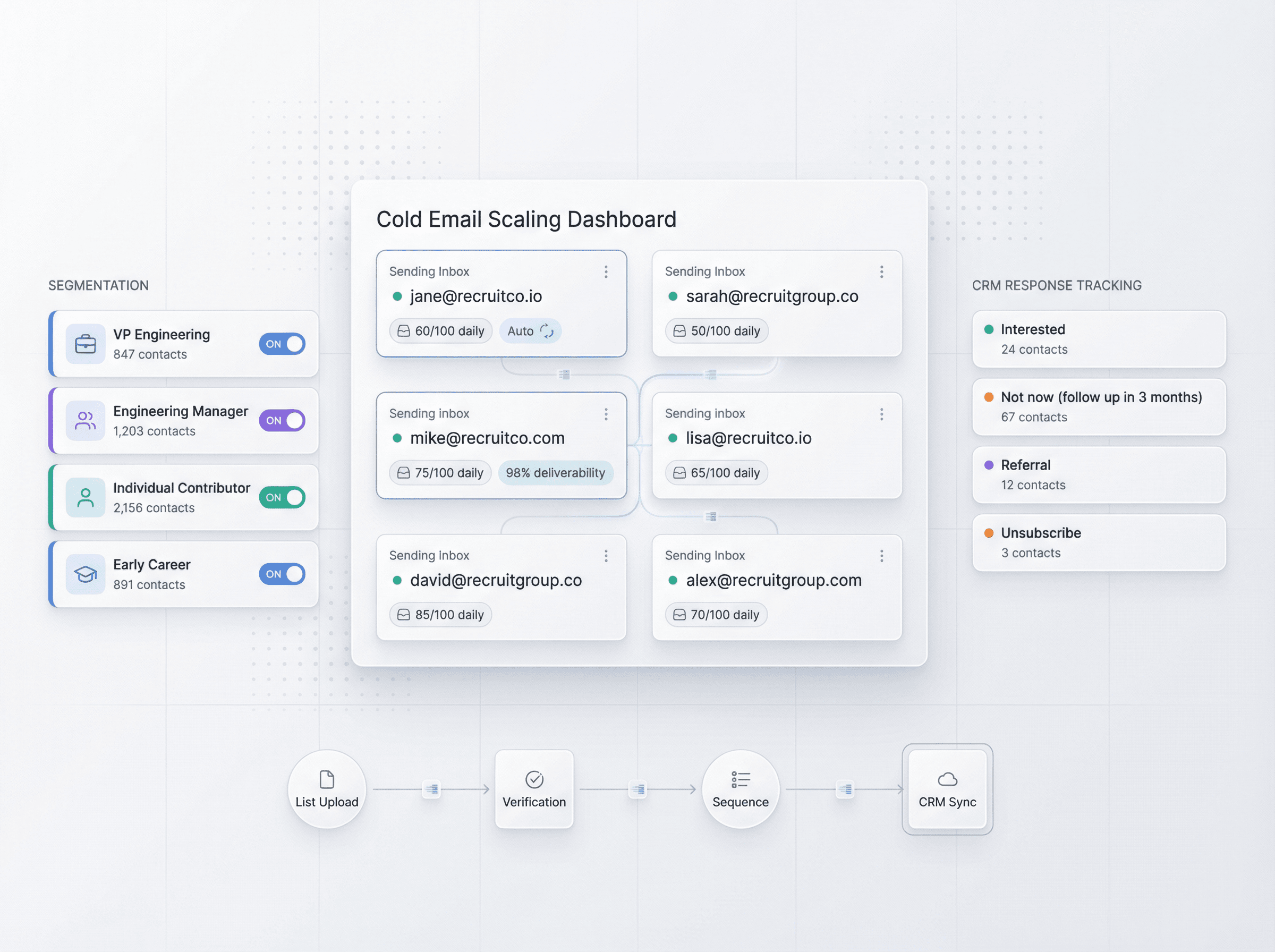
If you need to send 300+ emails daily, don't send them all from one address. Set up 3-5 inboxes on 2-3 domains and distribute sending. Each inbox sends 60-100 emails daily, staying well under limits and maintaining good reputation.
This distributed approach is how sophisticated outbound teams achieve scale. Outbound System uses hundreds of Microsoft Outlook inboxes across several domains, with each sending only modest amounts to stay under spam radar.
Segment ruthlessly
Don't blast one message to every contact. Segment by:
→ Role level: VP Engineering ≠ Engineering Manager ≠ Individual Contributor
→ Industry: Fintech candidates care about different things than healthcare candidates
→ Geography: Remote vs. on-site requirements matter
→ Career stage: Early career vs. senior leadership
Tailored messages to specific segments dramatically outperform generic blasts.
Use automation tools wisely
Consider email automation platforms designed for cold outreach:
Outbound System provides done-for-you infrastructure, deliverability management, copy, list building, and optimization. Starting at $1,499/month (up to 15,000 emails/month), they handle the technical complexity while you focus on closing candidates and clients.
Other approaches: If you're managing campaigns yourself, you'll need email automation software that can help with sequencing and tracking while maintaining personalization at scale. For ideas on alternatives, see our comparison pages.
Whatever you choose, maintain personalization. Don't sacrifice quality for quantity.
Track everything in your CRM
Use labels or tags to categorize responses:
• Interested
• Not now (follow up in 3 months)
• Referral
• Unsubscribe
This prevents embarrassing mistakes like continuing to email someone who already replied or asked to opt out.
10 Recruiting Cold Email Mistakes to Avoid
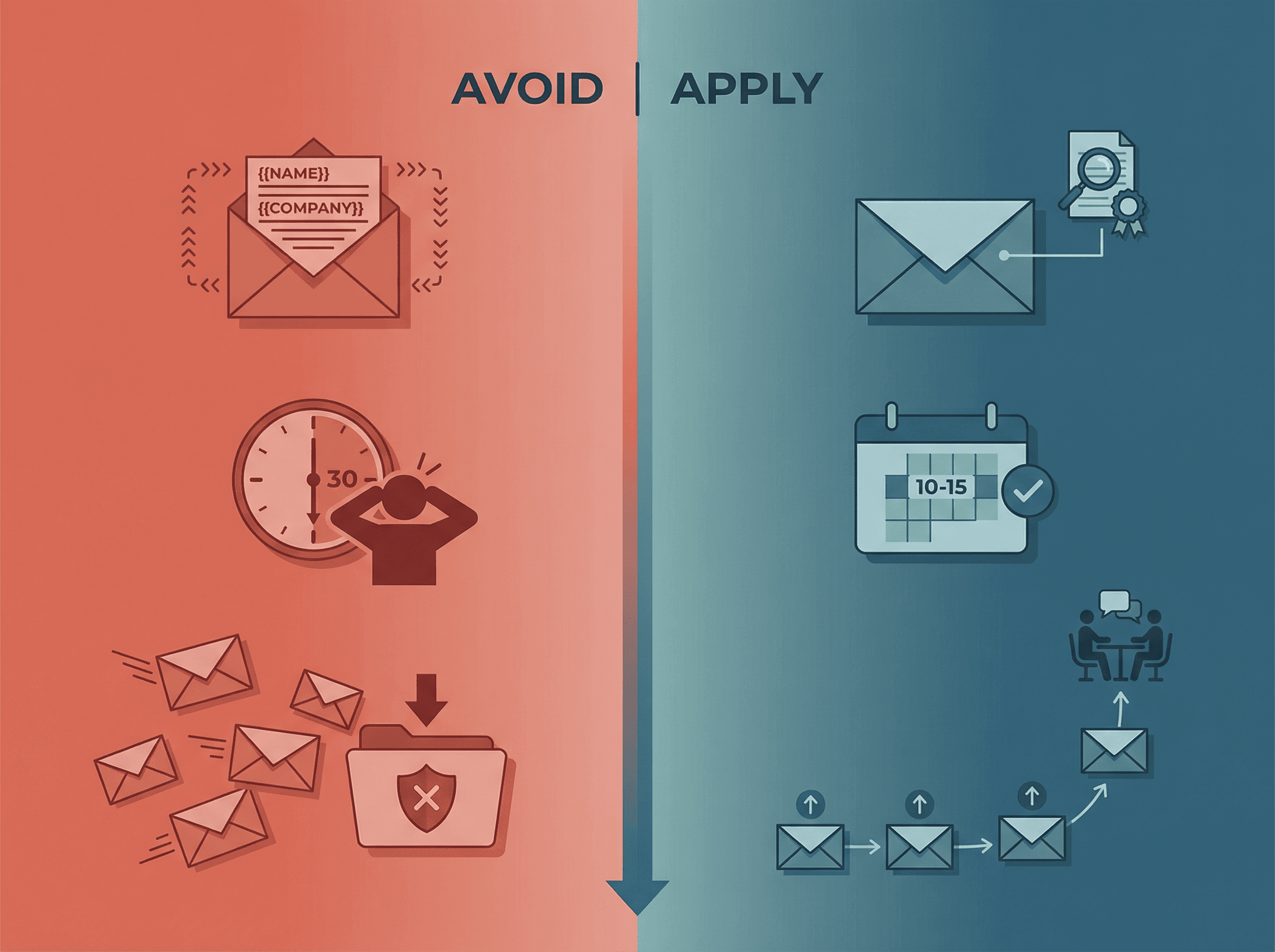
1. No reason you picked them → Add a real skill/project signal
2. Vague role details → Include level + function + key requirement
3. No upside → Add comp band or at least a range + remote/hybrid info
4. Too long → Cut by 30% and stick to one CTA
5. Asking for 30 minutes → Ask for 10-15 minutes instead
6. No follow-up → Run a 4-step sequence, not one email
7. No opt-out → Add a simple unsubscribe line
8. Tracking open rates religiously → Track replies and outcomes
9. Blasting one list → Segment by persona
10. No reply routing → Use labels to organize responses
Recruiting Cold Email FAQs
How many cold emails should I send per day as a recruiter?
Start with 20-30 daily from a single warmed inbox. Once you have proven deliverability and good engagement, you can scale to 50-100 daily per inbox. If you need higher volume, use multiple inboxes. Learn more about daily sending limits.
Is cold email legal for recruiting?
Yes, when done correctly. B2B recruiting messages are generally compliant with CAN-SPAM (US), CASL (Canada), and GDPR (EU) as long as you have legitimate interest, include opt-out options, and honor removal requests.
What's a good response rate for recruiting cold emails?
For candidate outreach, 10-20% response rate (including any reply) is solid when targeting relevant candidates. For client BD, 2-5% is typical. Your "interested" rate (positive replies) will be lower, often 3-10% for candidates and 1-3% for clients.
Should I use my company email or a separate domain?
Use a separate domain for cold outreach to protect your main company domain's reputation. Purchase a similar domain and set up professional email addresses on it.
How long should my recruiting cold email be?
Aim for 100-150 words. That's typically 3-5 short paragraphs or a few bullet points. Longer emails get skipped.
When's the best time to send recruiting cold emails?
Mid-morning (10-11am in the recipient's timezone) often sees good engagement for B2B emails. Test different times to see what works for your audience.
How many follow-ups should I send?
Plan for 3-5 follow-ups spaced over 10-14 days. Many recruiting responses come from the 2nd or 3rd email in a sequence. See our guide on effective follow-up emails.
What if someone marks my email as spam?
One spam complaint isn't the end of the world, but you need to keep the rate very low. If you're getting regular spam complaints, review your targeting, personalization, and opt-out options.
Can I use email templates for recruiting?
Yes, but always personalize them. Templates provide structure, but you must customize with specific details about the recipient, role, or company. Check out our high-converting email templates for inspiration.
What's the difference between cold email and LinkedIn recruiting?
Both work, and they complement each other. Cold email is more cost-effective at scale and lands in primary inboxes. LinkedIn gives visual context and is good for warmer outreach. Many recruiters use both channels together. Learn more about LinkedIn outreach strategies.
Start Reaching Passive Candidates with Strategic Cold Email
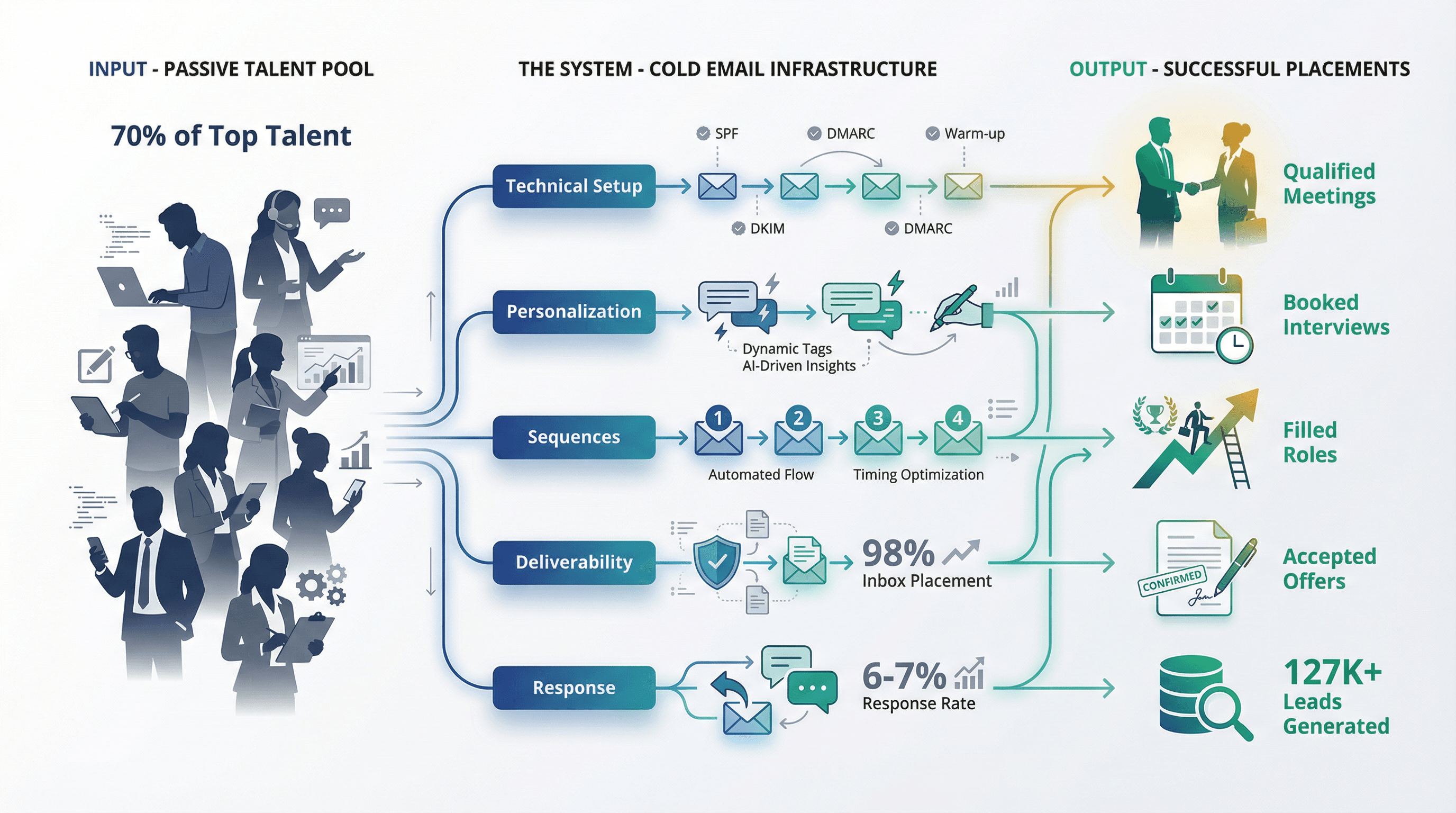
Cold email isn't just another tactic. When done properly, it's a complete system for accessing the 70% of top talent that will never see your job postings.
The recruiters winning in 2025 understand this. They've invested in proper technical infrastructure. They've learned to write messages that resonate. They persist with thoughtful follow-ups. They track what matters and optimize based on data.
Most importantly, they recognize that cold email is about building relationships, not blasting messages. Every email you send represents your professionalism and your ability to match great candidates with great opportunities.
Whether you're an agency recruiter trying to book more client meetings or an in-house recruiter trying to fill hard-to-source roles faster, the principles in this guide will transform your approach.
Start with proper setup. Master the fundamentals of great copy. Follow up strategically. Measure what matters. Stay compliant. And remember: the goal isn't to send more emails. The goal is to start more meaningful conversations that lead to successful placements.
If you want this set up as a done-for-you system with proven infrastructure, deliverability management, and optimization, Outbound System specializes in exactly this kind of outbound recruiting. Book a free 15-minute consultation to see if it makes sense for your recruiting goals.
Now go reach those passive candidates and clients. They're not going to find you. But with the right cold email system, you'll find them.