When someone searches "email sending limits by provider," they're usually facing one of these scenarios:
Planning cold email campaigns and need to know how many inboxes to provision.
Troubleshooting quota exceeded errors and trying to figure out what went wrong.
Choosing a provider that can handle their sending volume without getting flagged.
Avoiding suspension because they hit a limit they didn't know existed.
This guide covers the hard limits (what providers officially document) and the hidden limits (the ones that actually hit you first in real campaigns). We'll break down exactly what you can send from Gmail, Microsoft 365, Outlook.com, Yahoo, Zoho, iCloud, ProtonMail, and other major providers.
Why Most Email Sending Limit Guides Are Wrong
Most guides treat "email sending limit" like it's a single number you can max out.
That's not how it works in practice.
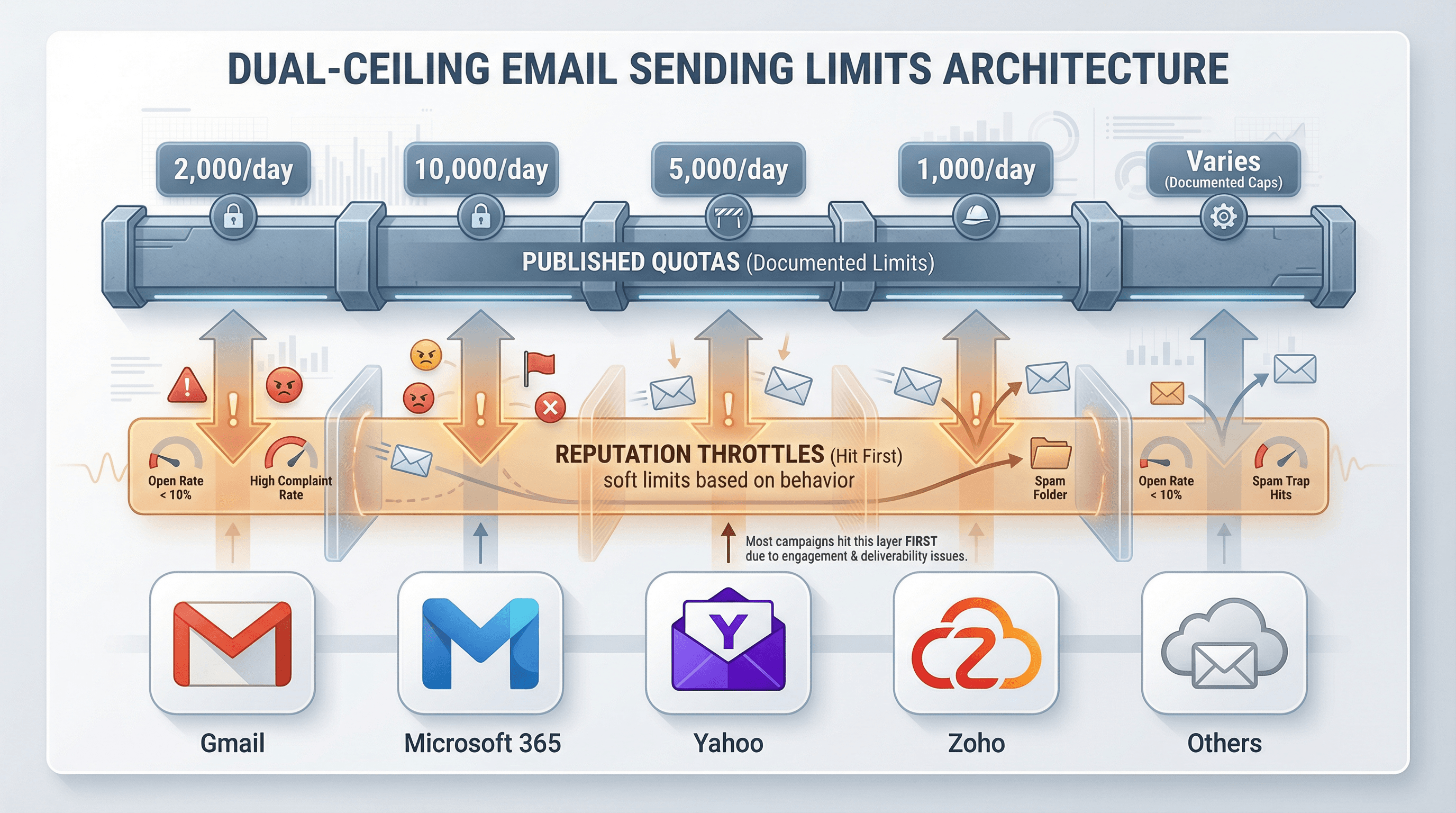
There are actually two separate ceilings that govern your sending:
1. Quota limits (Hard caps like "2,000 emails per day")
2. Reputation throttles (Soft limits that slow or stop you based on complaints, bounces, and engagement)
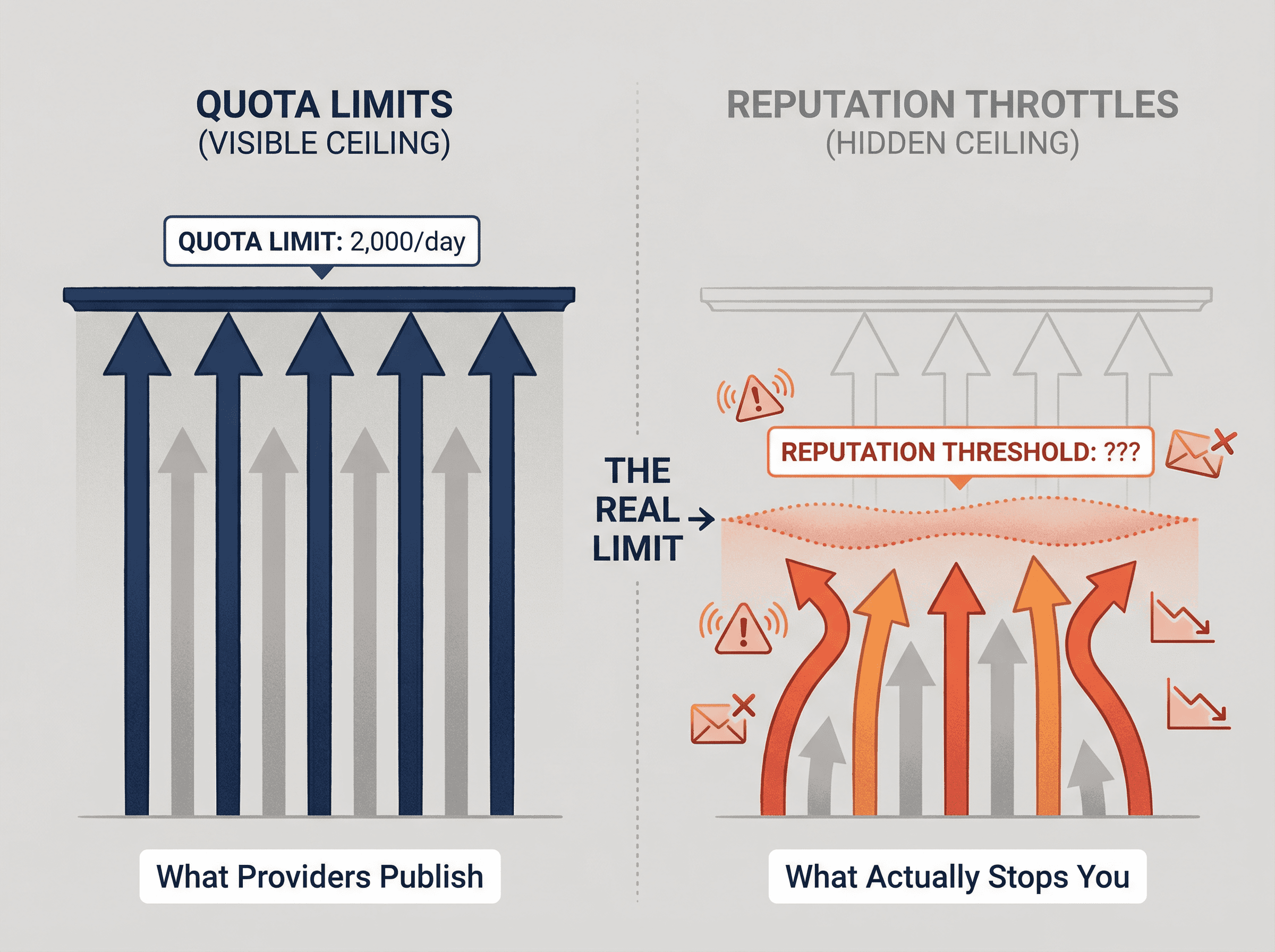
You can stay perfectly under the quota limit and still get throttled hard if recipients aren't engaging. And for outbound campaigns, the reputation throttle is almost always what kills you first. Understanding email sender reputation is critical to sustainable sending.
The providers publish the quotas. They don't publish the reputation thresholds because spammers would just optimize right up to them. But those hidden limits matter more than the numbers in their documentation.
Email Sending Limits by Provider: Quick Reference
Before diving deep, here's what the major providers officially allow. These are documented limits, not necessarily safe operating volumes for cold outreach.
important definitions
Messages per day = Number of emails you send (one email can go to multiple recipients)
Recipients per day = Total count of recipients across To/CC/BCC fields
Rolling 24-hour window = Some providers count limits on a sliding 24-hour basis, not midnight-to-midnight
Provider limits table
Provider | Account Type | Messages/Day (or Hour) | Recipients/Day | Recipients/Message | What Actually Hits Teams |
|---|---|---|---|---|---|
Gmail | Free/Personal | 500 emails/day | Not separately stated | 500 recipients/email | Consumer Gmail is strict and easy to trip with any pattern that looks like outreach. Source: Google Help |
Gmail (Google Workspace) | Paid Business | 2,000 messages/day (1,500 for mail merge) | 10,000 total recipients/day; 3,000 external recipients/day | 2,000 recipients/message (max 500 external); SMTP: 100; Gmail API: 500 | Limits are rolling 24-hour and hitting one can suspend sending for up to 24 hours. Source: Google Help |
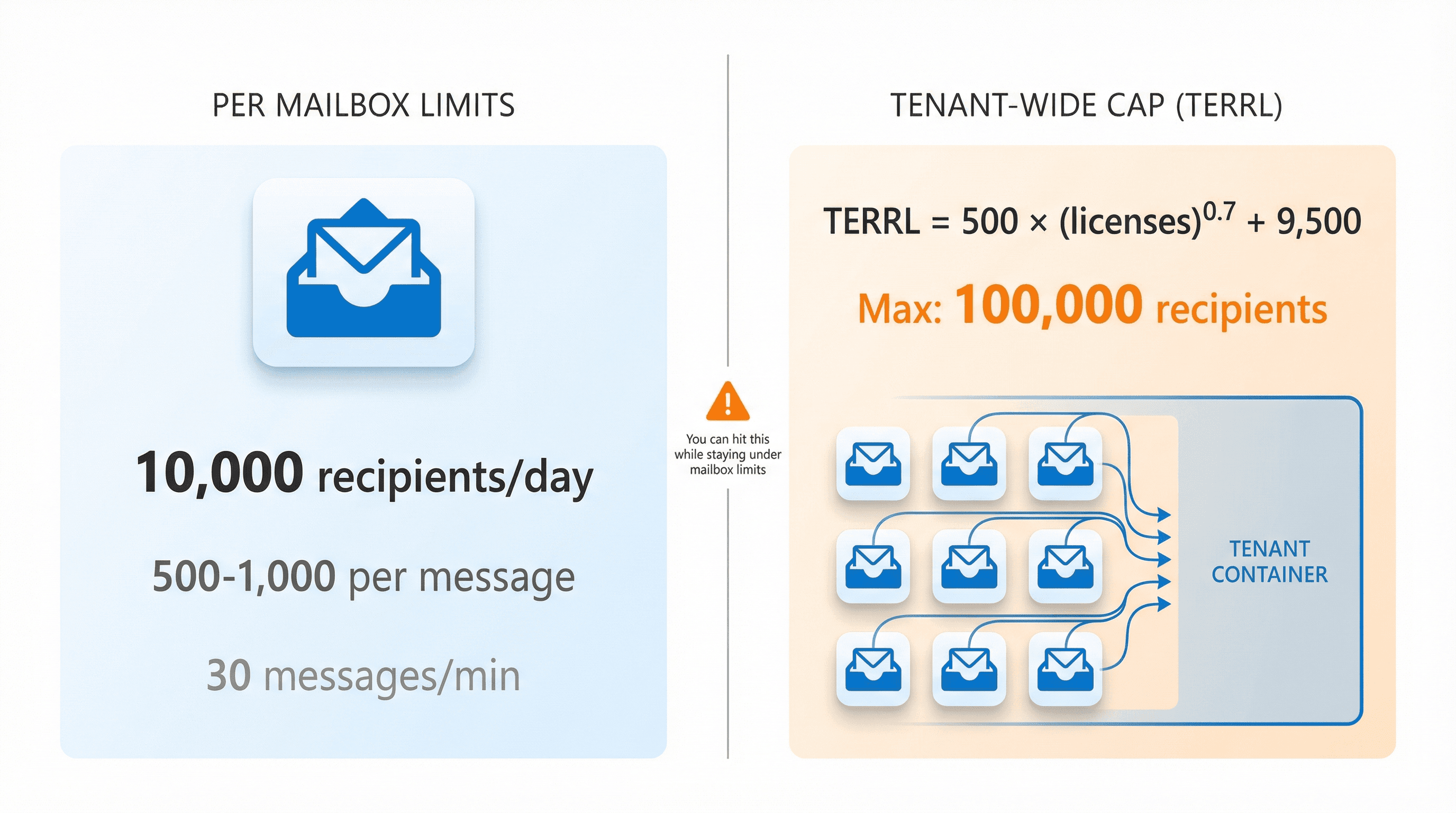
Microsoft 365 (Exchange Online) | Business Mailbox | No message limit documented | 10,000 recipients/day | 500 default (can increase to 1,000); 30 messages/min | You can hit tenant-wide external recipient caps even if each mailbox looks fine. Source: Microsoft Learn |
Outlook.com | Consumer | Varies by reputation; 5,000 for subscribers | 5,000 daily (subscribers); 1,000 daily "non-relationship recipients" | 500 recipients/message | Free accounts can have much lower limits; reputation matters more than age. Source: Microsoft Support |
iCloud Mail | iCloud Account | 1,000 messages/day | 1,000 recipients/day | 500 recipients/message | Apple is explicit about these caps, but reputation is your real bottleneck. Document published March 17, 2025. |
Yahoo Mail | Personal | Yahoo doesn't disclose user sending limits | Not published | Not published | You can't plan around a published quota. Watch Yahoo error messages and plan around reputation instead. Source: Yahoo Help |
Zoho Mail | Paid Plans | External: 50-500 emails/hour (dynamic); Internal: 1,000 emails/hour | Hourly model (rolling) | External: 150 recipients/message (paid) / 100 (free) | Limits are reputation-based on a 1-hour rolling window; bulk sending is explicitly "not supported." Source: Zoho |
ProtonMail | Free | 50 emails/hour; 150/day | Counts recipients (10 recipients = 10) | 100 recipients max per email | ProtonMail is blunt: not designed for bulk; suspicious activity triggers 48-hour sending bans. Source: ProtonMail |
Fastmail | Paid Plans | Basic: 4,000/day; Standard: 8,000/day; Professional: 16,000/day (Trial: 120/day) | One email to multiple recipients counts as one per recipient | Not stated as a hard cap | Fastmail explicitly says it's not a bulk email service and can permanently close accounts for duplicative sending. Source: Fastmail |
Gmail and Yahoo Bulk Sender Requirements (2024-2025 Changes)
Even if your mailbox quota is modest, you can still trigger ecosystem-wide enforcement if your domain behaves like a bulk sender. This is why proper DMARC, DKIM, and SPF setup has become non-negotiable.
Gmail: 5,000+ messages/day to gmail addresses
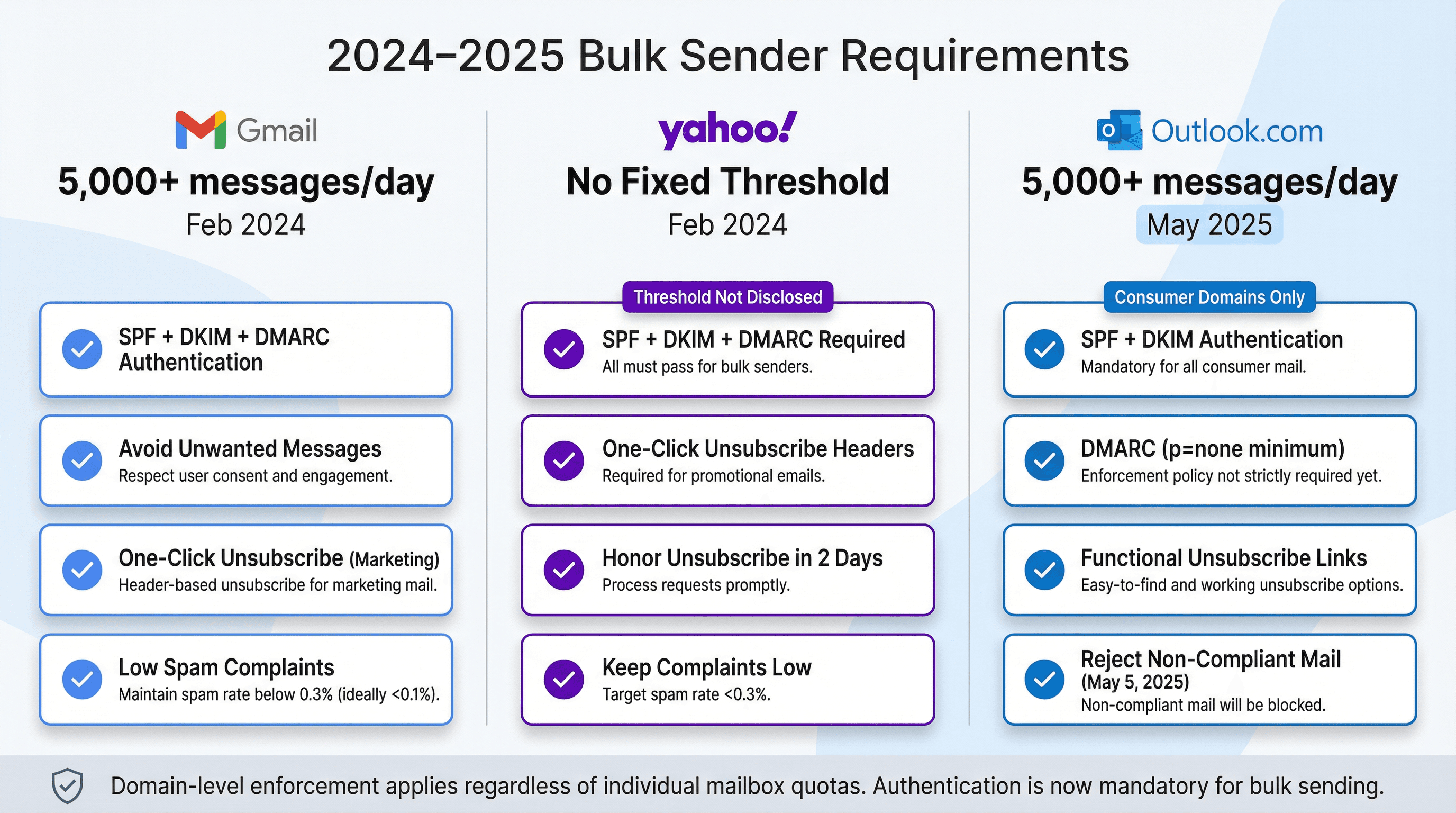
Starting February 2024, Gmail requires bulk senders (5,000+ messages per day to Gmail accounts) to:
• Authenticate outgoing email properly
• Avoid unwanted or unsolicited messages
• Make unsubscribe easy
Google's sender guidelines specifically state that if you send more than 5,000 per day, your marketing messages must support one-click unsubscribe.
Yahoo: no fixed threshold, enforcement began february 2024
Yahoo's sender hub says enforcement of sending standards began in February 2024. Requirements for bulk senders include SPF + DKIM + DMARC, one-click unsubscribe headers for marketing mail, honoring unsubscribes within 2 days, and keeping complaints low.
The key nuance: Yahoo says it will not specify a volume threshold for what constitutes a "bulk sender." Source: Yahoo Sender Hub
Outlook.com: 5,000+ messages/day consumer threshold
Microsoft announced new requirements for domains sending over 5,000 emails per day to Outlook.com consumer domains (hotmail.com, live.com, outlook.com). This includes mandatory SPF, DKIM, and DMARC (at least p=none with alignment), plus functional unsubscribe links. Enforcement described as starting May 2025, with rejection for non-compliant mail beginning May 5, 2025. Source: Microsoft Tech Community
Microsoft 365 Tenant Limits vs. Mailbox Limits
If you use Microsoft 365 or Exchange Online for outbound, there are mailbox-level limits and tenant-level limits. Missing the tenant limit is a common cause of mysterious blocks.
This is exactly why our Microsoft Azure infrastructure is designed to distribute sending across hundreds of inboxes.
Mailbox-level limits (per mailbox)
Exchange Online documents:
Recipient rate limit: 10,000 recipients per day
Recipient limit: 500 recipients per message (default), can be increased to 1,000
Message rate limit: 30 messages per minute
Also: If you're sending from the default onmicrosoft.com domain, Microsoft notes a limit of 100 external recipients per organization per day until you add a custom domain.
Tenant External Recipient Rate Limit (TERRL)
Microsoft also enforces a tenant-wide cap called Tenant External Recipient Rate Limit (TERRL). The Exchange Online limits documentation notes it's a daily limit based on "number of email licenses," capped at 100,000 recipients.
Microsoft's tech community post (updated December 19, 2025) provides the formula:
TERRL = 500 × (number of email licenses)^0.7 + 9,500
Why this matters: If you run lots of mailboxes under one tenant (common in agencies), you can be under 10,000 per day per mailbox and still smack into TERRL at the tenant level.
What Counts Toward Your Email Sending Limit?
Providers count more than just the emails you manually press send on.
Examples:
• Google Workspace counts messages sent from aliases, delegated users, and even vacation responders toward user limits. Source: Google Help
• Zoho includes alias mail, delegate sending, and even automated out-of-office replies in quota calculations. Source: Zoho
If you're running automations, shared mailboxes, or "send as" setups, your math can be wrong by 2-5x.
How to Calculate Email Sending Capacity Without Getting Banned
Here's the clean way to plan capacity without pretending quotas equal deliverability. For a complete walkthrough of infrastructure planning, see our cold email infrastructure setup guide.
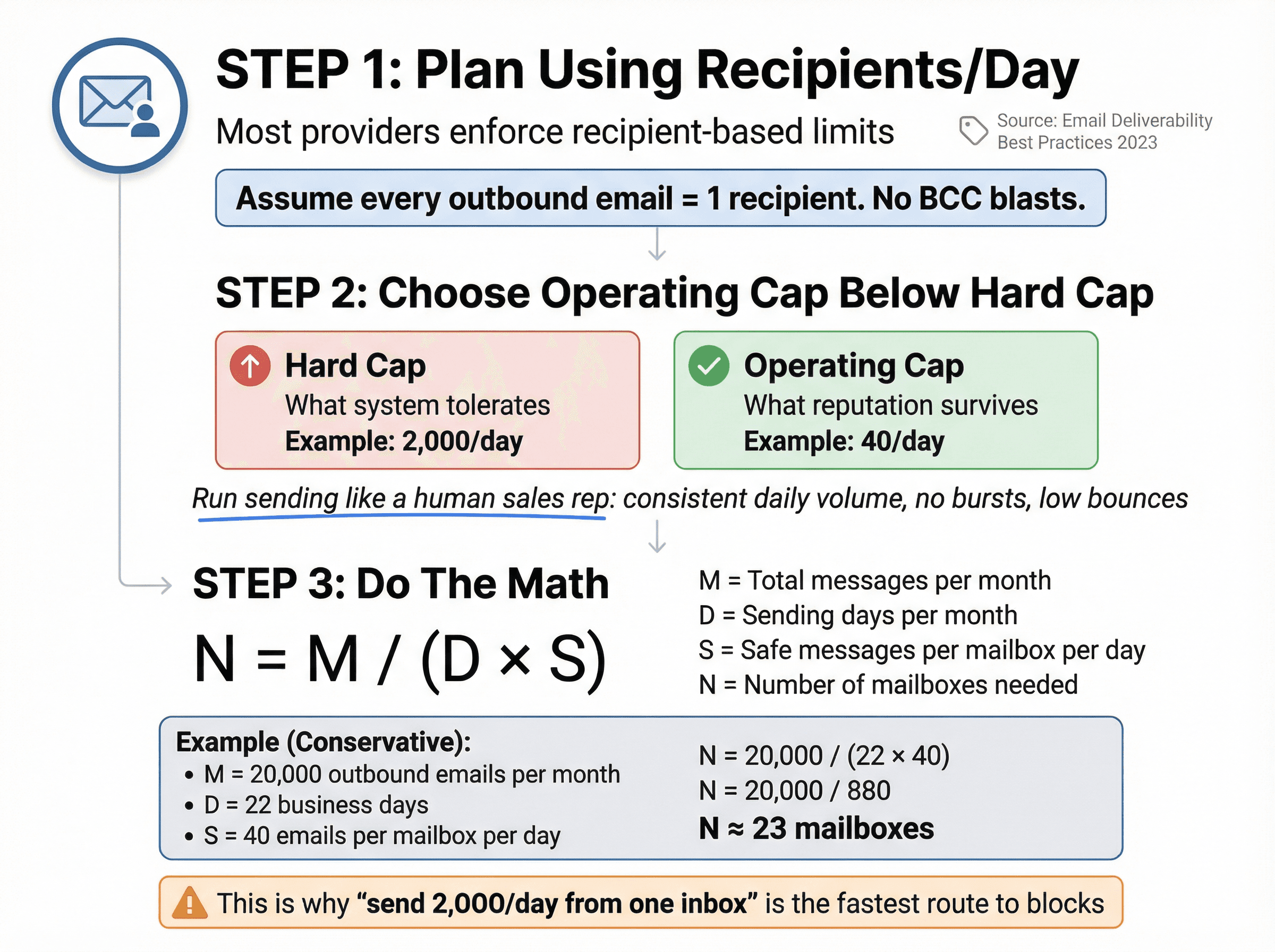
Step 1: Plan using "recipients/day," not "emails/day"
Most providers enforce recipient-based limits somewhere (Google Workspace, Microsoft, Outlook.com). Source: Google Help
Rule: Assume every outbound email = 1 recipient. No BCC blasts.
If you send 1:1 emails, this approximation is solid.
Step 2: Choose an operating cap below the provider's hard cap
Hard caps are "how much the system tolerates."
Operating caps are "how much your reputation survives."
Practical model: Run your sending as if each mailbox is a human sales rep:
• Consistent daily volume
• No bursts
• Low bounces
• Clear opt-out
You'll see why this matters in the troubleshooting section. For more on sustainable sending volumes, check out how many cold emails you can send per day.
Step 3: Do the math
Let:
M = Total messages you want to send per month
D = Sending days per month (e.g., 22 business days)
S = Your chosen safe messages per mailbox per day
N = Number of mailboxes needed
N = M / (D × S)
Example (conservative, not maxed out):
• You want 20,000 outbound emails per month
• You send on 22 days
• You cap at 40 emails per mailbox per day
N = 20,000 / (22 × 40) = 20,000 / 880 ≈ 23 mailboxes
This kind of math is exactly why "we'll just send 2,000 per day from one inbox" is the fastest route to blocks.
What to Do When You Hit Email Sending Limit
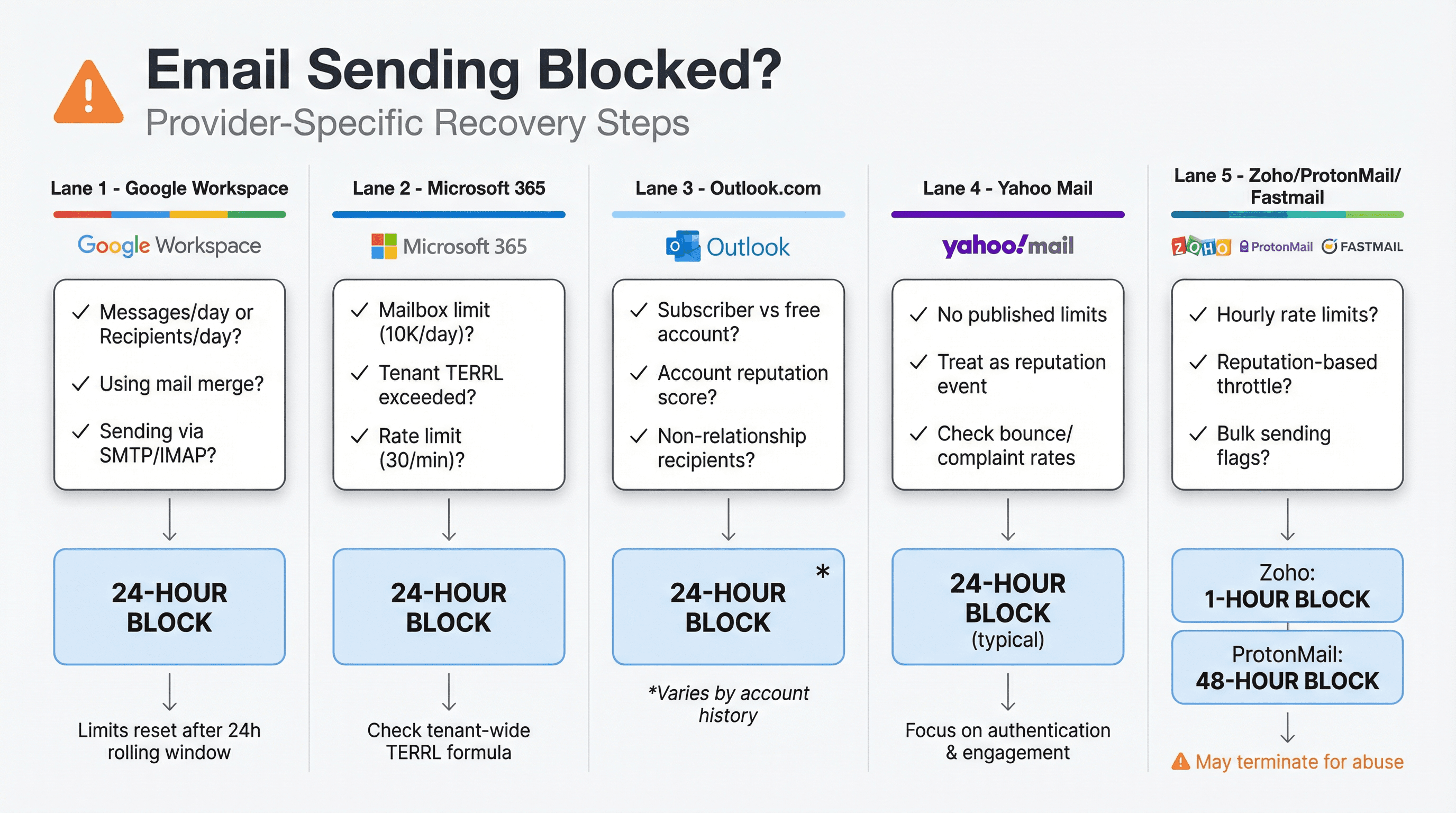
Google Workspace / Gmail
Google Workspace explicitly says if you exceed a limit, users can't send new messages for up to 24 hours, then limits reset. Source: Google Help
What to check:
• Are you hitting messages per day or recipients per day? (They're different.)
• Are you using mail merge? It has its own lower cap.
• Are you sending via SMTP/POP/IMAP? Per-message recipients can drop to 100.
If your cold emails are consistently landing in spam, our guide on how to fix cold emails going to spam provides specific troubleshooting steps.
Microsoft 365
If you hit mailbox limits (10,000 per day, 30 per minute), you'll see throttling or rejections.
If you hit tenant TERRL, you'll see tenant-wide inability to send externally until the window resets. The TERRL formula and behavior are detailed by Microsoft Tech Community.
Outlook.com Consumer
Microsoft states limits can be lower for non-subscribers and depend on usage history. Source: Microsoft Support
What worked for someone else isn't portable to your account.
Yahoo Mail
Yahoo explicitly doesn't disclose user sending limits. Source: Yahoo Help
If you get blocked, treat it like a reputation event, not a quota math problem.
For deliverability into Yahoo/AOL mailboxes, follow Yahoo's sender requirements (authentication, low complaints, proper unsubscribe, RFC compliance).
Zoho / Protonmail / Fastmail
All three are unusually direct about not being bulk email services and will throttle or terminate accounts for abusive patterns:
Zoho: "Bulk/burst sending not supported," external limit is dynamic, and blocks last up to 1 hour. Source: Zoho
ProtonMail: Free is 50 per hour + 150 per day, and "smart spam detection" can halt sending for up to 48 hours. Source: ProtonMail
Fastmail: Explicitly prohibits duplicative email and can permanently close accounts. Source: Fastmail
How Outbound System Handles Email Sending Limits at Scale
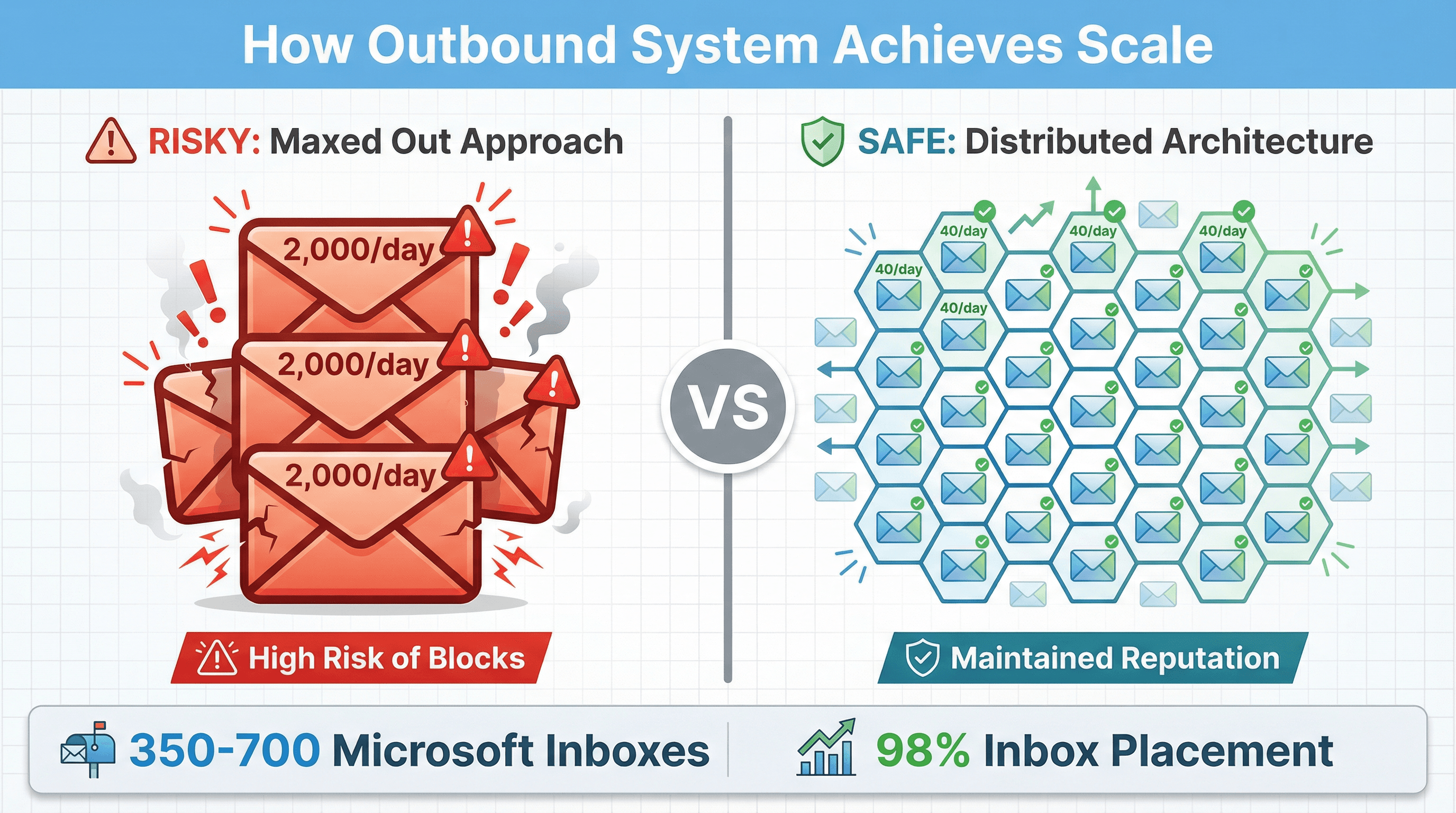
If your goal is outbound (not newsletters), your job is: stay under quotas, but more importantly, build and maintain reputation.
This is exactly why we built Outbound System the way we did.
Instead of maxing out a few accounts, we distribute sending across hundreds of warmed Microsoft U.S. IP inboxes:
→ Starter ($1,499/month): up to 15,000 emails per month
→ Growth ($2,499/month): up to 30,000 emails per month
→ Scale ($3,999/month): up to 60,000 emails per month
Each individual inbox sends a small, natural volume. Collectively, this achieves the scale you need for serious B2B outreach while keeping every address well below danger thresholds.
We pair that infrastructure with:
9-step waterfall enrichment (triple-verified data to minimize bounces)
AI personalization with human copy (2.8x better response rates than templates)
Real-time monitoring and A/B testing (catch issues before they become suspensions)
Dedicated account strategists (who actually understand how these limits work in practice)
The result: 98% inbox placement and 6-7% response rates across our campaigns. We've sent 52M+ cold emails and generated 127,000+ leads for 1,000+ B2B clients without the infrastructure headaches.
Outbound System's cold email service provides turnkey infrastructure, data enrichment, and AI personalization. Explore plans and features at Outbound System Cold Email Agency.
If you're serious about cold email at scale, book a 15-minute consultation to see how we handle this for you.
Schedule a free consultation to discuss your cold email infrastructure needs and see if Outbound System is the right fit.
Additional resources from Outbound System
If you want to go deeper on the infrastructure side:
• How Many Cold Emails Can You Send Per Day? (Safe volumes vs. theoretical maximums)
• Cold Email Infrastructure Setup: Complete Guide (Technical implementation walkthrough)
• How to Warm Up Email Domain (Gradual ramp-up protocols)
• Why Your Cold Emails Go to Spam (And How to Fix It) (Deliverability troubleshooting)
• Email Deliverability Best Practices Guide (Authentication, reputation, hygiene)
Gmail Sending Limits: Free vs Google Workspace
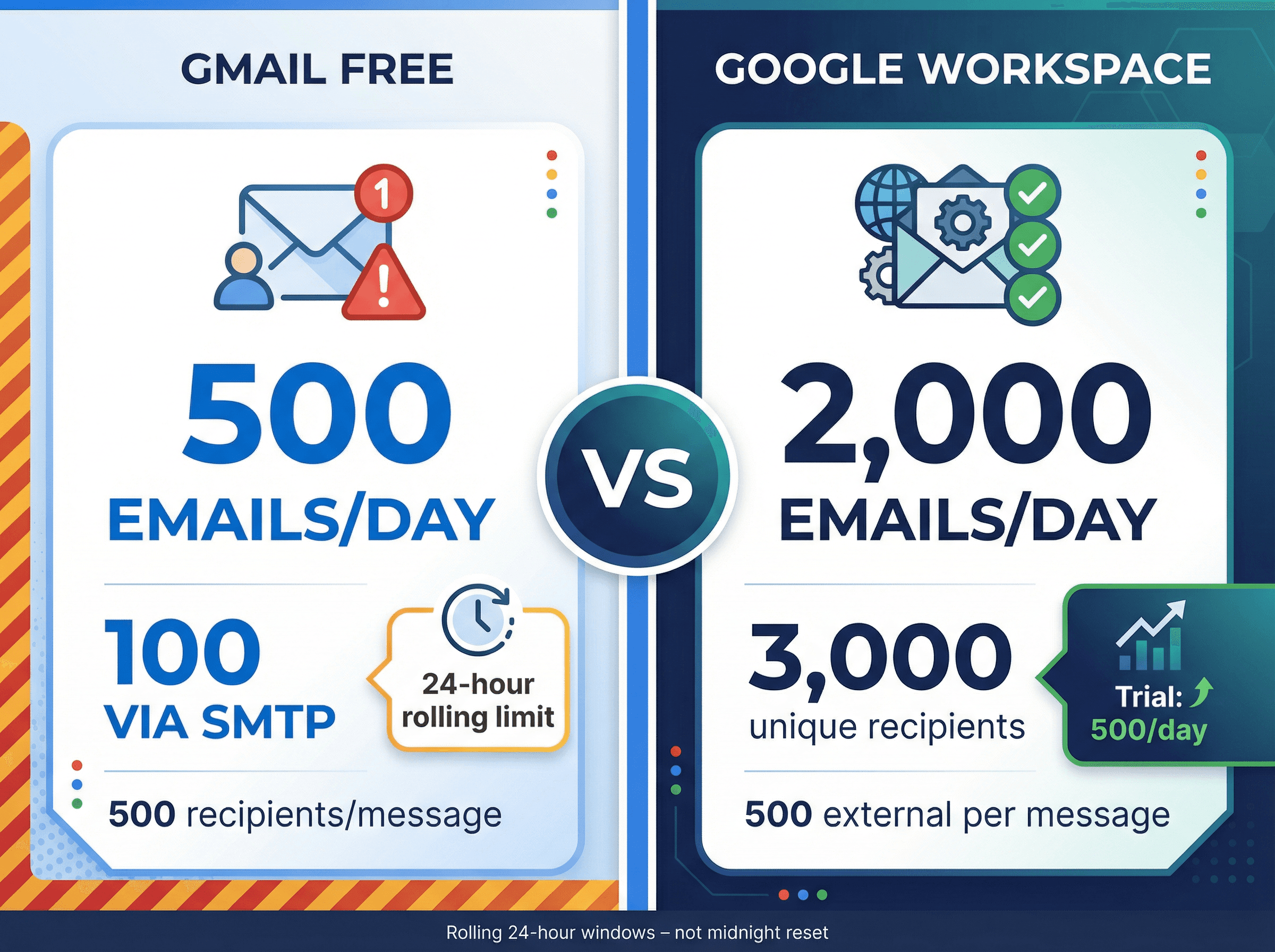
Google's platforms (free Gmail and paid Google Workspace) have strict but clearly defined limits.
Free Gmail (personal accounts)
Designed for casual use, free Gmail accounts are heavily restricted:
Daily send limit: 500 emails per 24 hours via the Gmail web interface
SMTP limit: 100 emails per day if sending through SMTP (third-party apps)
Recipients per message: 500 addresses maximum
Recommended rate: About 20 emails per hour to avoid spam detection
Attachment size: 25 MB per email
Important: Gmail's 24-hour limit is rolling, not reset at midnight. If you send 500 emails at 2 PM, you must wait until 2 PM the next day to regain full sending ability.
Exceeding the limit results in a block on sending for 1-24 hours. You can still receive emails, but outbound attempts fail with "You have reached a limit for sending email."
Google Workspace (paid business accounts)
Workspace accounts have far higher limits:
Daily send limit: 2,000 emails per user per day (technical maximum for established accounts)
During free trial: 500 per day limit until you convert to paid and build account history
Unique recipients: Up to 3,000 unique recipients per day (of those, up to 2,000 can be external)
Recipients per message: 2,000 addresses per email, but only 500 of those can be external
Attachment size: 25 MB per email
POP/IMAP (SMTP) limit: Still 2,000 per day overall, but only 100 recipients per message when using SMTP/IMAP
Google Workspace's higher limits make it suitable for cold outreach on a modest scale. But 2,000 per day is a ceiling, not a target. Sending at that volume from a single account, especially a new one, will likely get you flagged.
Microsoft Outlook.com and Office 365 Sending Limits
Microsoft's ecosystem includes Outlook.com for personal email and Office 365 (Exchange Online) for business mail.
Office 365 (exchange online for business)
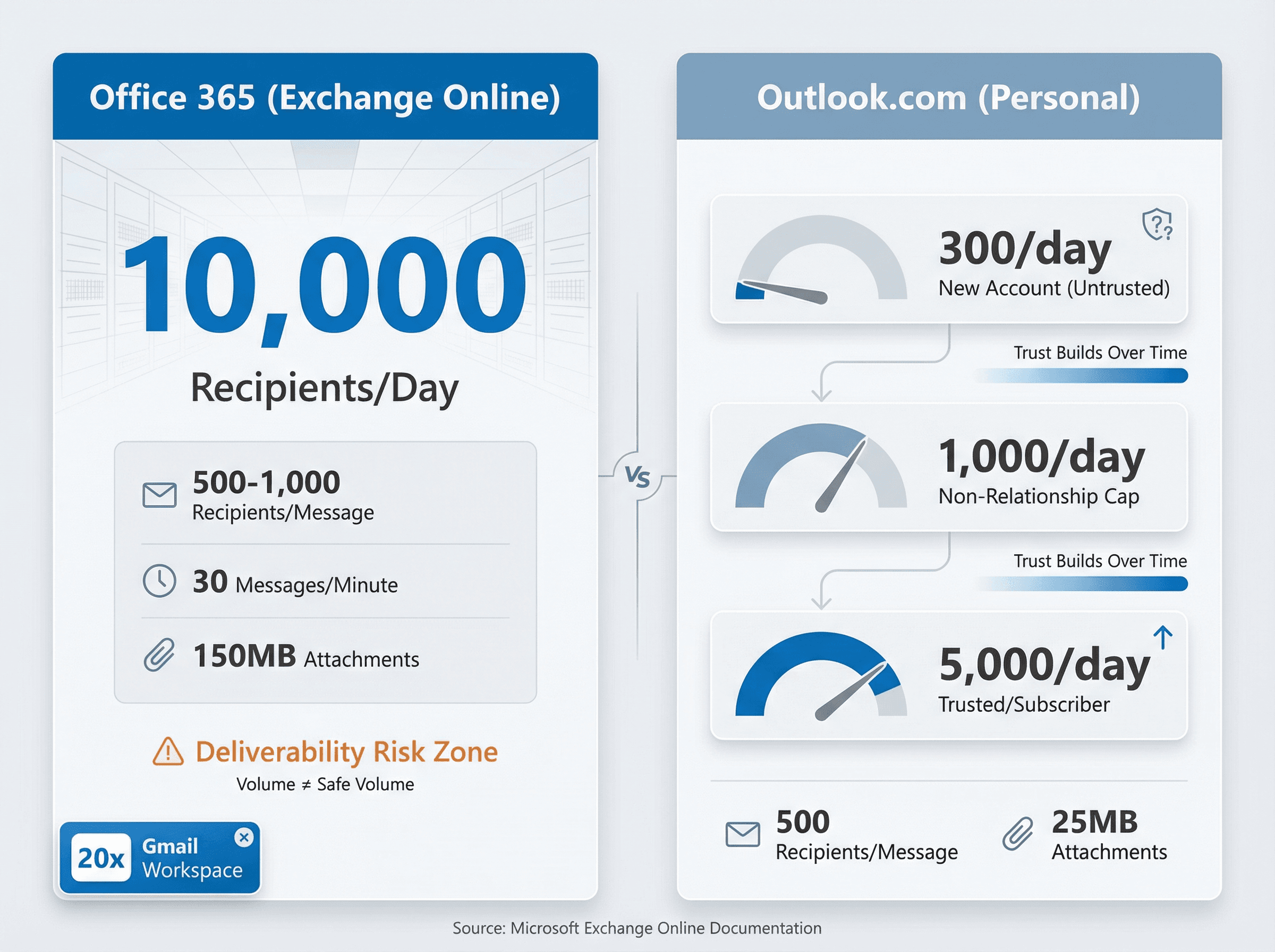
Business Office 365 accounts are quite generous:
Limit Type | Value |
|---|---|
Daily recipient limit | 10,000 recipients per day |
Recipients per message | 500 max (admins can raise to 1,000) |
Send rate limit | 30 messages per minute |
Attachment size (desktop) | 150 MB |
Attachment size (web) | 34 MB |
Office 365 technically lets one mailbox send to 10,000 people in a day. That's 20x the Gmail Workspace limit.
But deliverability will suffer if you push anywhere near that volume from one account, especially to external addresses. Microsoft notes that Exchange Online isn't designed for bulk mailing scenarios.
Academic Accounts: Educational Office 365 accounts have stricter limits as of May 2025. Faculty and staff are capped at 2,000 recipients per day, and student or alumni accounts at 500 per day.
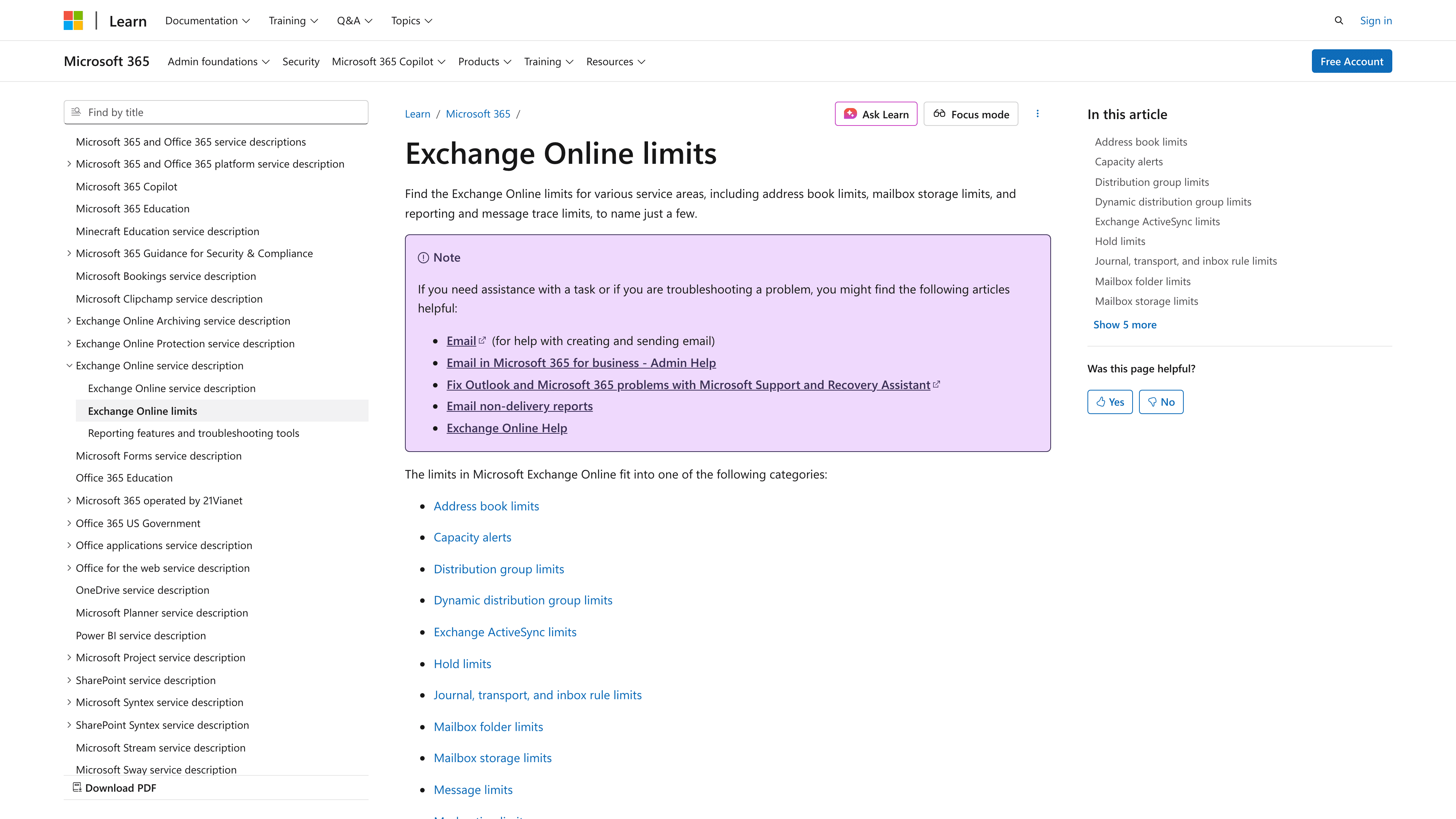
Microsoft's official Exchange Online documentation details the 10,000 recipient daily limit and other constraints. See Microsoft Learn for the complete technical specifications.
Outlook.com (free personal email)
Consumer Outlook.com (Hotmail/Live) has lower limits that expand over time:
Daily send limit (new accounts): About 300 recipients per day for a new, untrusted account (commonly observed, not officially published)
Daily send limit (trusted/subscriber): Up to 5,000 recipients per day if your account is a Microsoft 365 subscriber or has a long history
Recipients per message: 500 addresses per email
Hourly rate limit: Not officially documented, but roughly 100 emails per hour is a safe estimate
Attachments: 25 MB per message for free accounts
Tip: Outlook.com uses an internal concept of "non-relationship recipients" (people you've never emailed before), which is capped at 1,000 per day. So even if your overall limit is higher, you can't suddenly email 5,000 strangers.
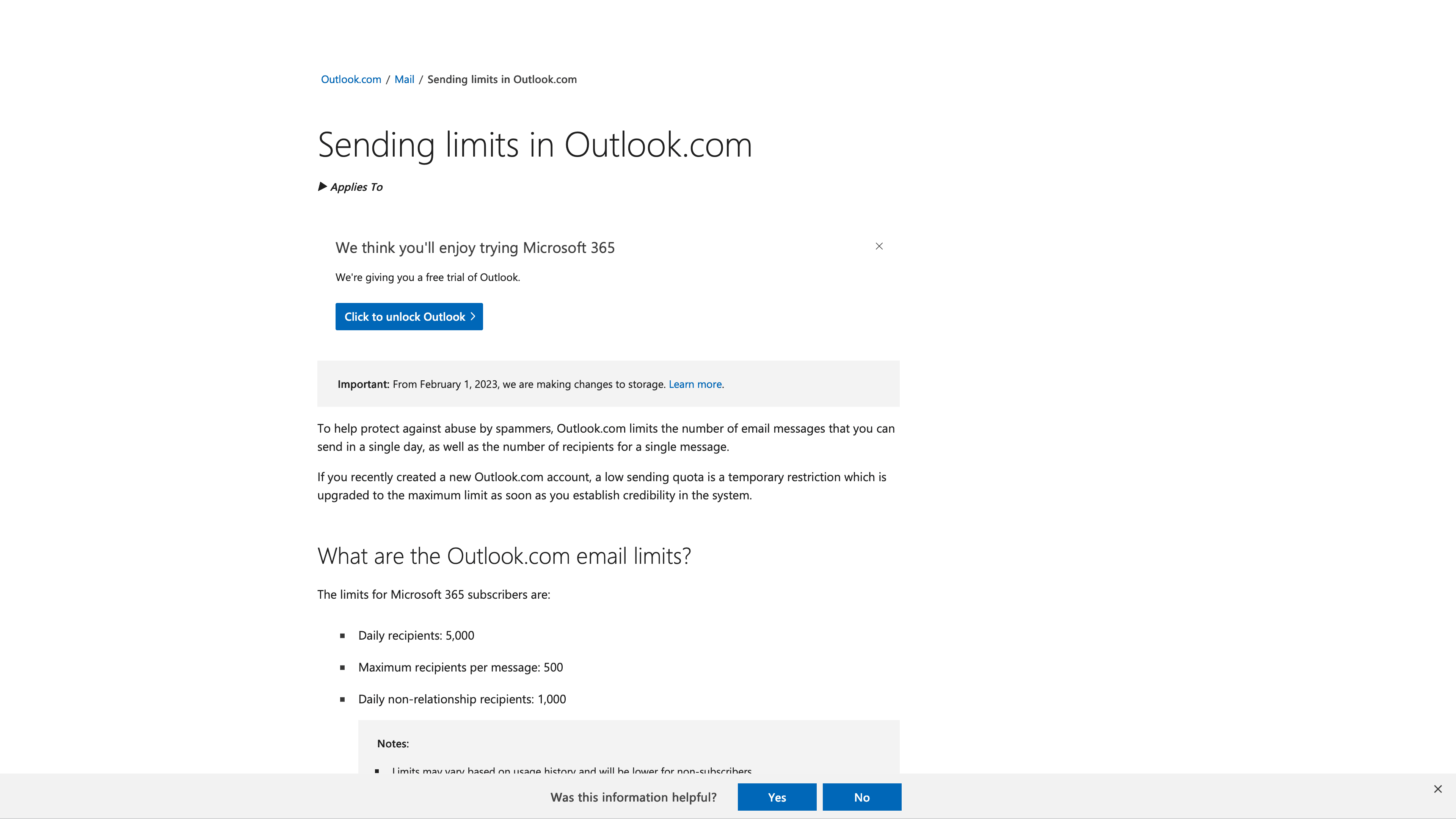
Microsoft's Outlook.com help page explains the variable limits based on account age and subscription status. Check Microsoft Support for your account's specific limits.
Yahoo Mail Sending Limits
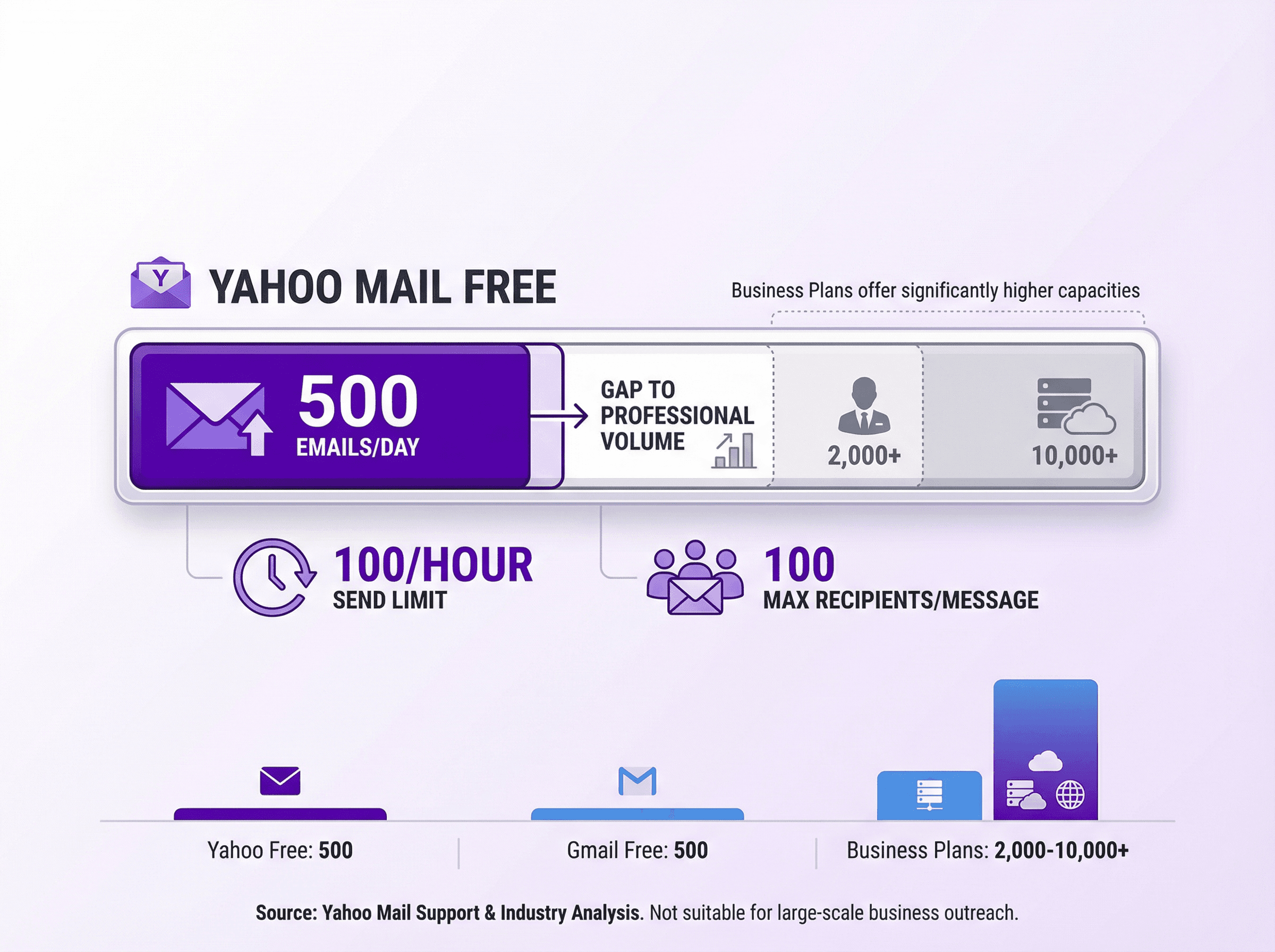
Yahoo Mail limits are similar to Gmail's free tier, but with less transparency:
Daily send limit: 500 emails per day for Yahoo Mail free accounts (hard limit)
Hourly limit: About 100 emails per hour (not officially published)
Recipients per message: 100 recipients per email
Attachments: 25 MB on free accounts, up to 20 MB for Yahoo Mail Plus (paid)
Yahoo counts each recipient separately. One email sent to 50 addresses consumes 50 of your 500 daily allocation.
If you hit Yahoo's limit, your account will be temporarily blocked from sending (usually 24 hours), similar to Gmail.
Yahoo Mail is not ideal for bulk or cold email. The limits are low and deliverability for mass sends is poor compared to Google or Microsoft.
(AOL Mail, now part of the same company as Yahoo, has virtually identical limits: 500 emails per day with 100 recipients max per message.)
Zoho Mail Sending Limits
Zoho Mail offers both free and paid plans with custom domain email. Limits depend on your plan level:
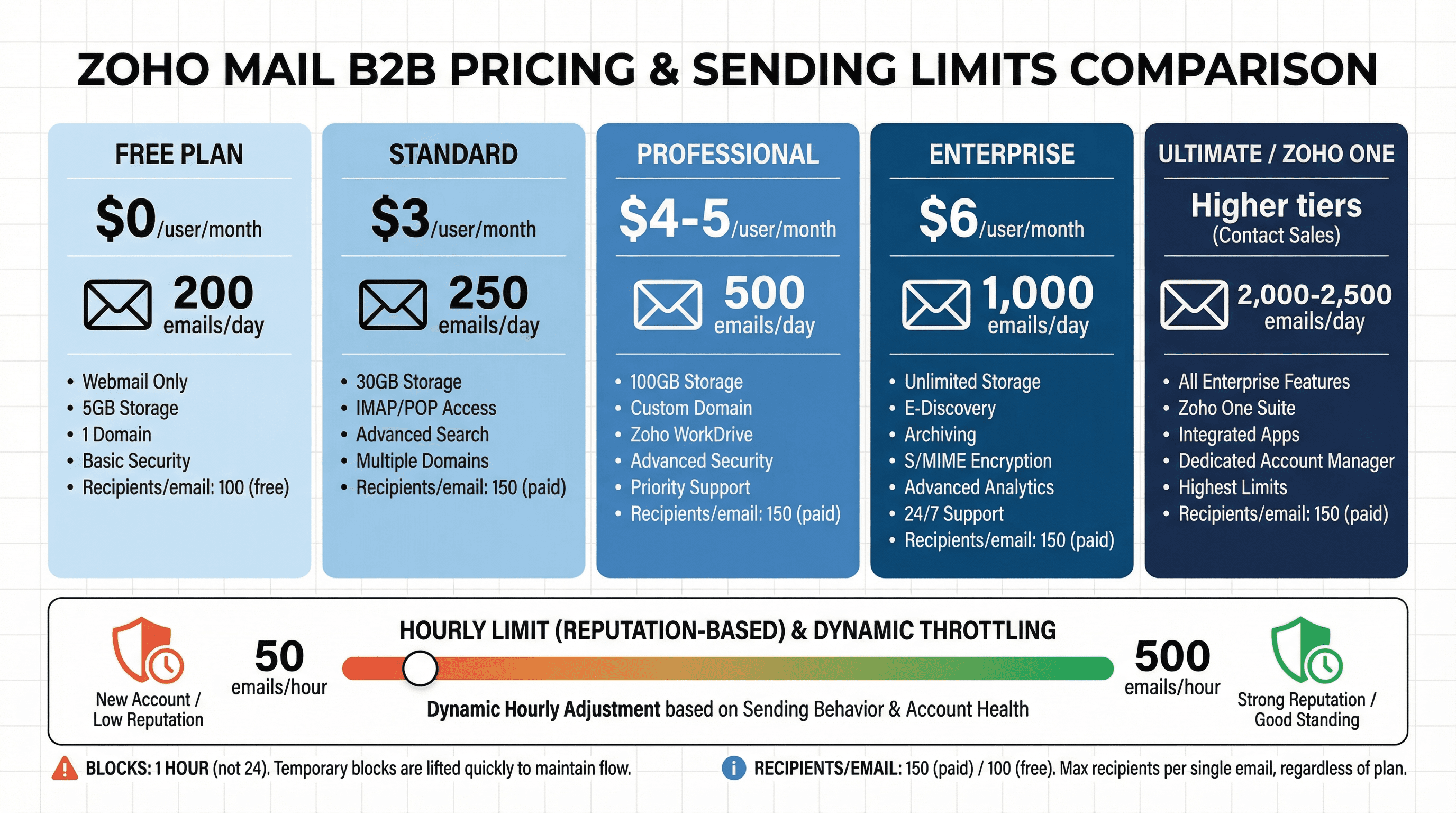
Plan | Price | Daily Limit |
|---|---|---|
Free Plan | $0 | 200 emails/day |
Standard Plan | $3/user/month | 250 emails/day |
Professional Plan | $4-5/user/month | 500 emails/day |
Enterprise Plan | $6/user/month | 1,000 emails/day |
Ultimate/Zoho One | Higher tiers | 2,000-2,500 emails/day |
Zoho also imposes hourly limits and dynamic reputation-based throttling. An account in good standing might send up to 50 emails per hour initially and scale toward 500 per hour with strong reputation. They mention a "50-500 emails per hour" range for outbound sending that adjusts based on spam complaints and bounce rates.
Recipients per email: Paid accounts can send to 150 external recipients in one email; free accounts are capped at 100 recipients per message.
What happens if you exceed: Zoho blocks sending for 1 hour (instead of 24 hours). After an hour, the limit resets. Repeated offenses still hurt your domain's reputation.
Zoho support recommends gradually increasing volume and using their Campaigns or ZeptoMail services for true bulk sending.
Apple iCloud Mail Sending Limits
Apple's iCloud Mail is intended for personal use. Limits are not highly publicized, but known from experience:
Daily send limit: 1,000 messages per day (total emails from an iCloud address in 24 hours)
Recipients per message: 500 recipients max on a single email
Hourly limit: Unofficial sources suggest around 100 emails per hour
Attachment size: 20 MB per email
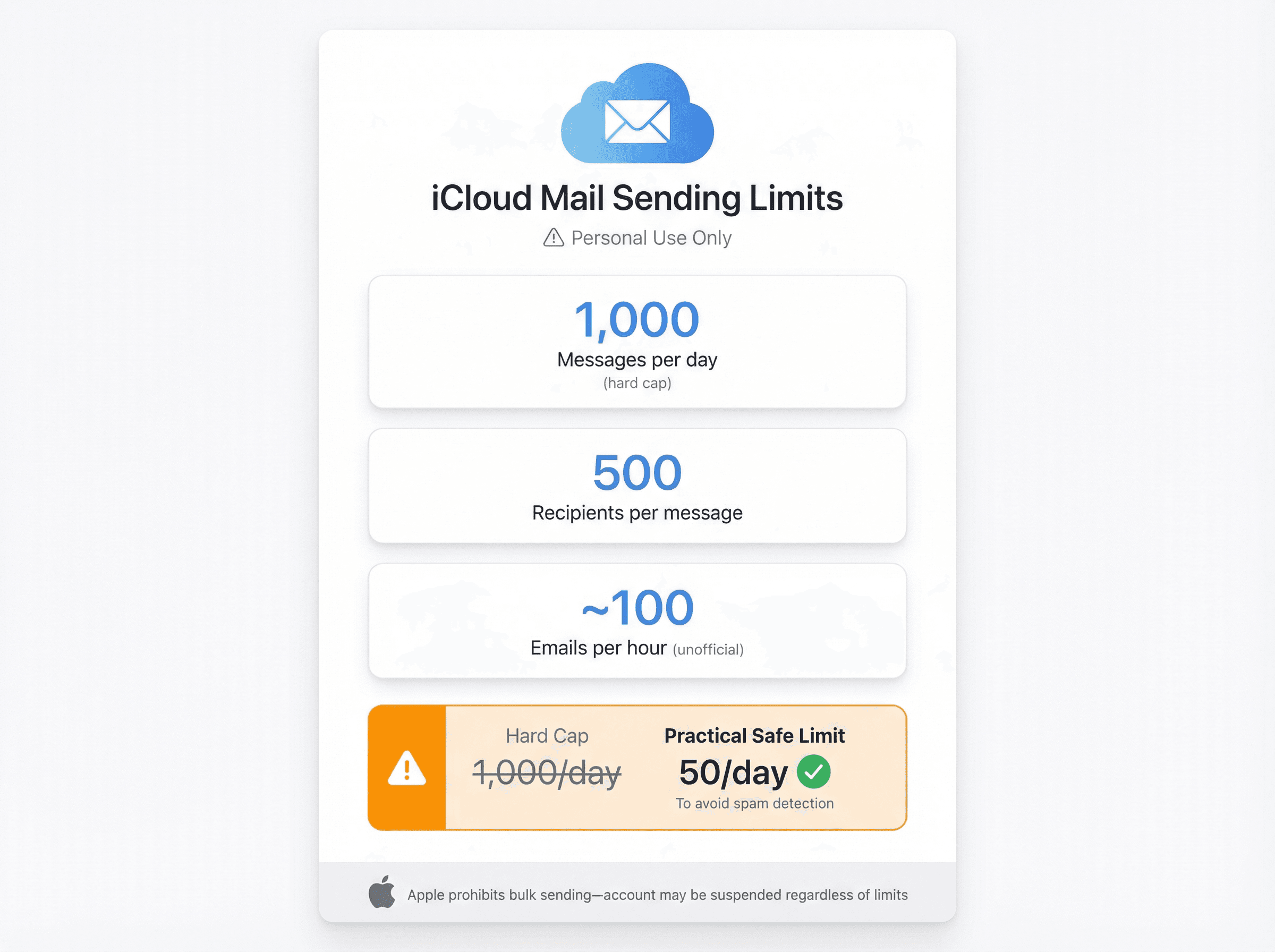
Huge caveat: Apple explicitly states iCloud email is for personal use, not bulk sending. If you try to run a newsletter or cold campaign on iCloud, you might get shut down even if you stay under the numerical limits.
Many marketers observe that about 50 emails per day per iCloud account is the practical safe maximum to avoid Apple's spam detection.
1,000 emails per day is the hard cap, but tread carefully. If you need to send bulk email, you're better off with another provider.
ProtonMail Sending Limits
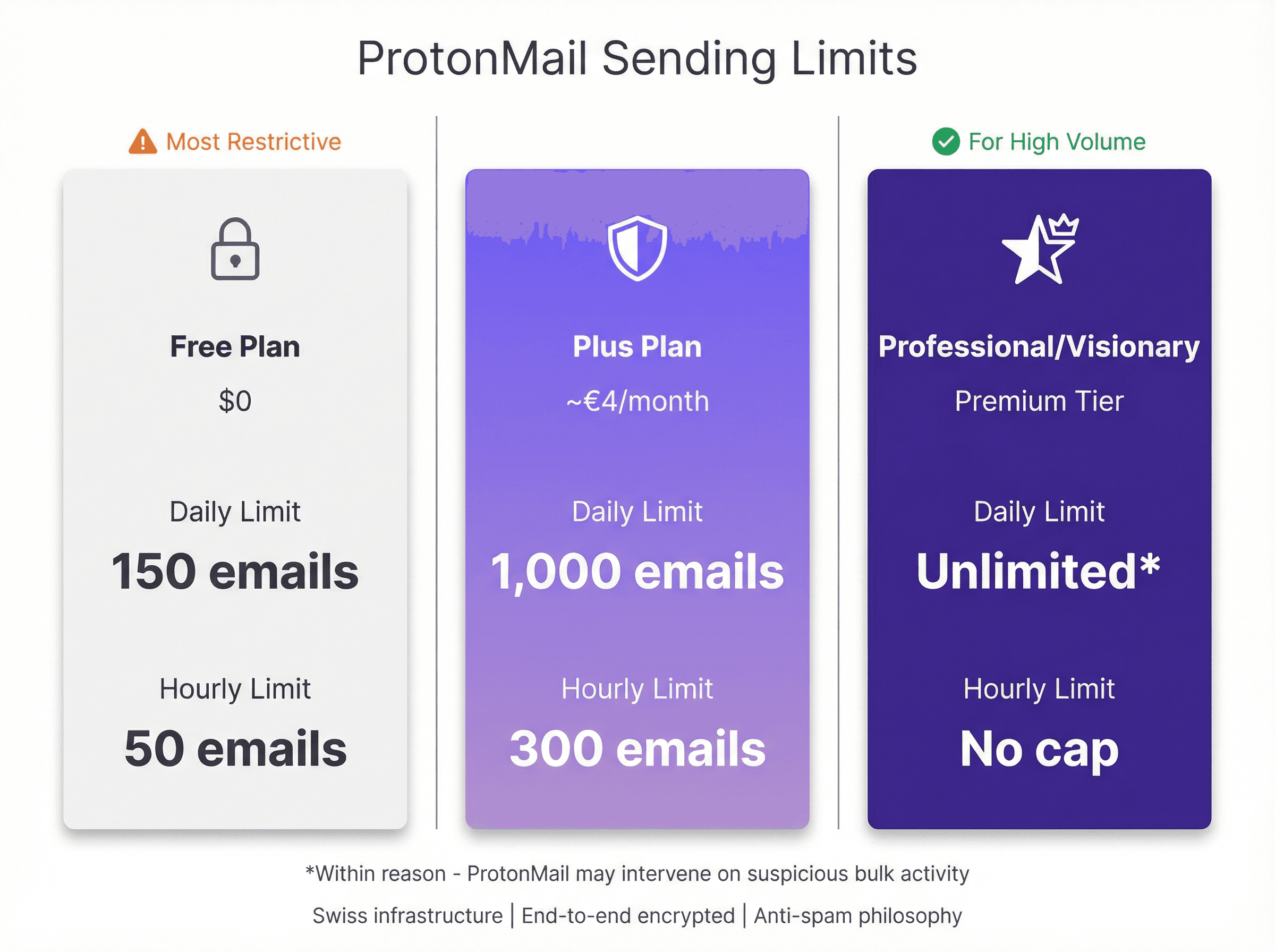
ProtonMail is a privacy-focused email service with low limits unless you pay:
Free Plan: 150 emails per day, with a further cap of 50 emails per hour
Plus (Paid) Plan: Up to 1,000 emails per day and about 300 emails per hour (~€4/month)
Professional/Visionary (Higher Plans): Unlimited daily emails (within reason) for top-tier plans
ProtonMail's philosophy is anti-spam. They may intervene if even a paid account suddenly blasts thousands of messages. Also, ProtonMail's infrastructure is encrypted and located in Switzerland, which can raise deliverability questions for bulk mailing.
ProtonMail is not ideal for newsletters or marketing at scale. But for individual outreach requiring security (sensitive B2B communications), a paid Proton account can handle reasonable volume.
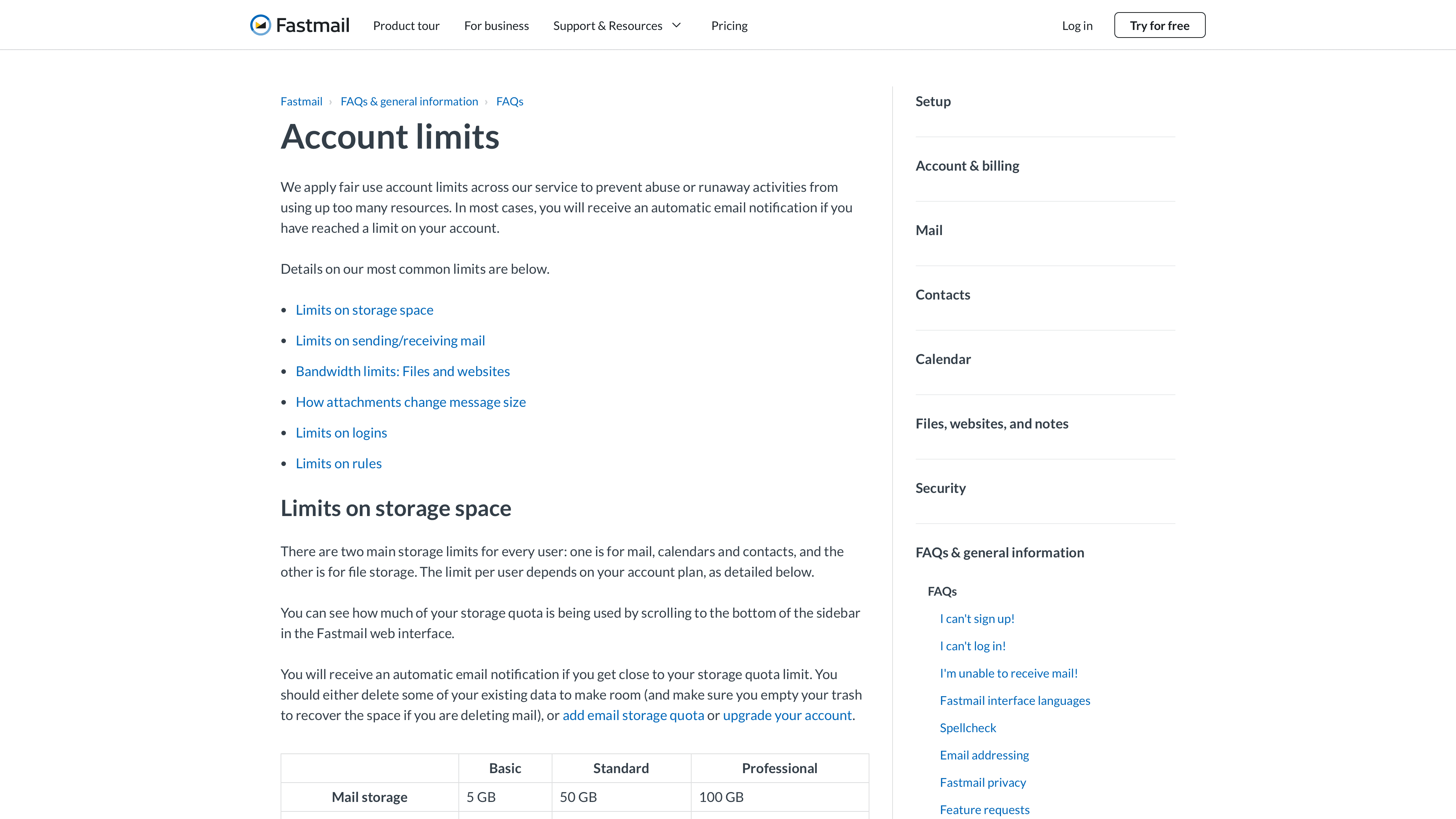
Fastmail's documentation clearly outlines sending limits by plan tier, from 4,000/day (Basic) to 16,000/day (Professional). Review all account limits at Fastmail Help.
Other Email Provider Sending Limits
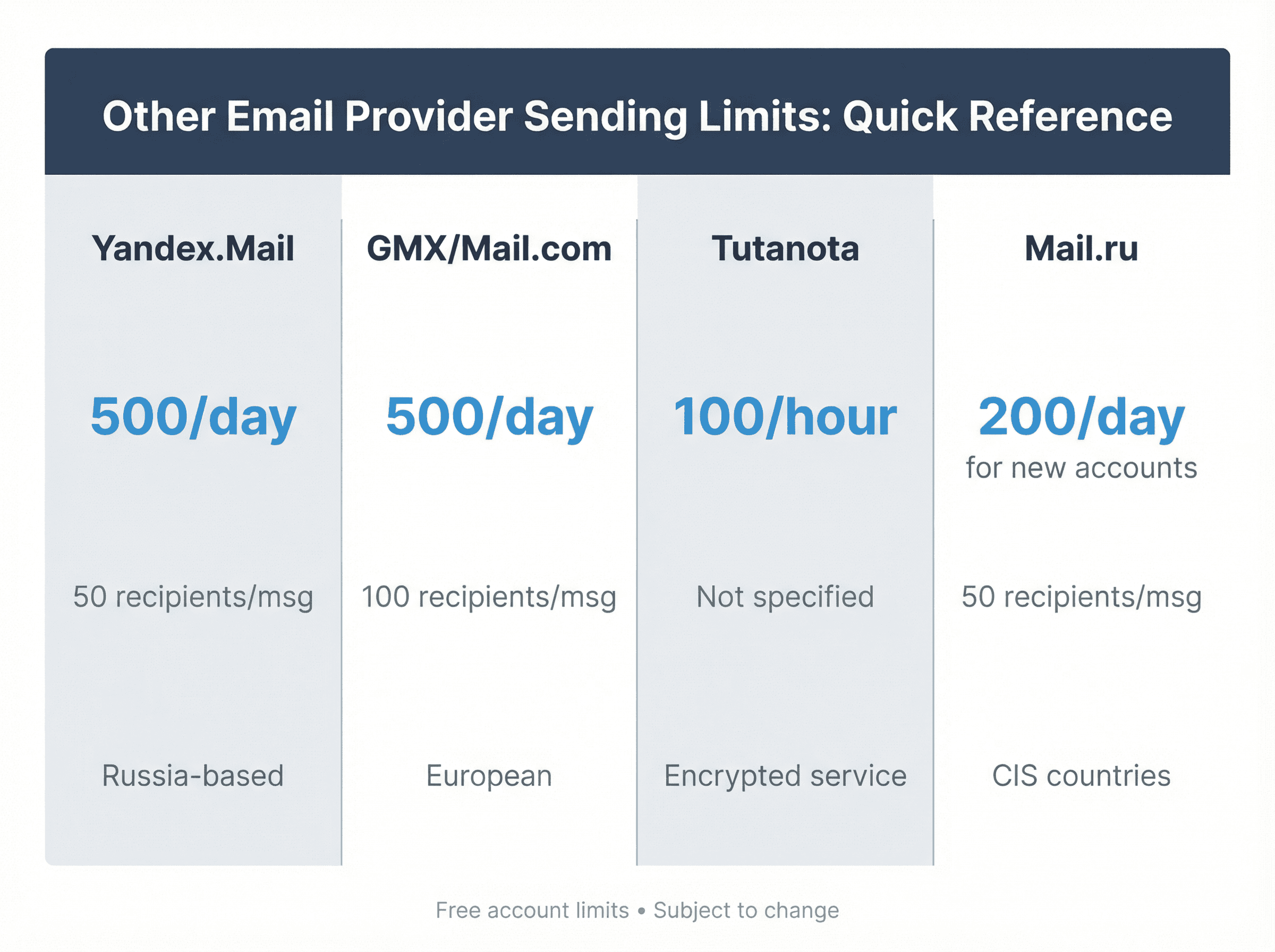
Yandex.Mail: Russia-based service. Limits are roughly 500 emails per day, no more than 50 recipients per message for free accounts. Attachments can be huge (up to 1 GB).
GMX / Mail.com: European free email providers. GMX Mail allows around 500 emails per day like Yahoo. Mail.com (same company as GMX) likely has similar limits. Both enforce a max 100 recipients per email policy.
Tutanota: Encrypted service. Limits to about 100 emails per hour for free users. Daily limit isn't published but expect it to be low.
Mail.ru: Popular in CIS countries. Mail.ru reportedly limits new accounts to 200 emails per day, which can increase over time. Each email can have up to 50 recipients.
As a rule of thumb, most free personal email services cap you between 300 and 500 emails per day. Virtually all will suspend sending for a day if you hit the limit.
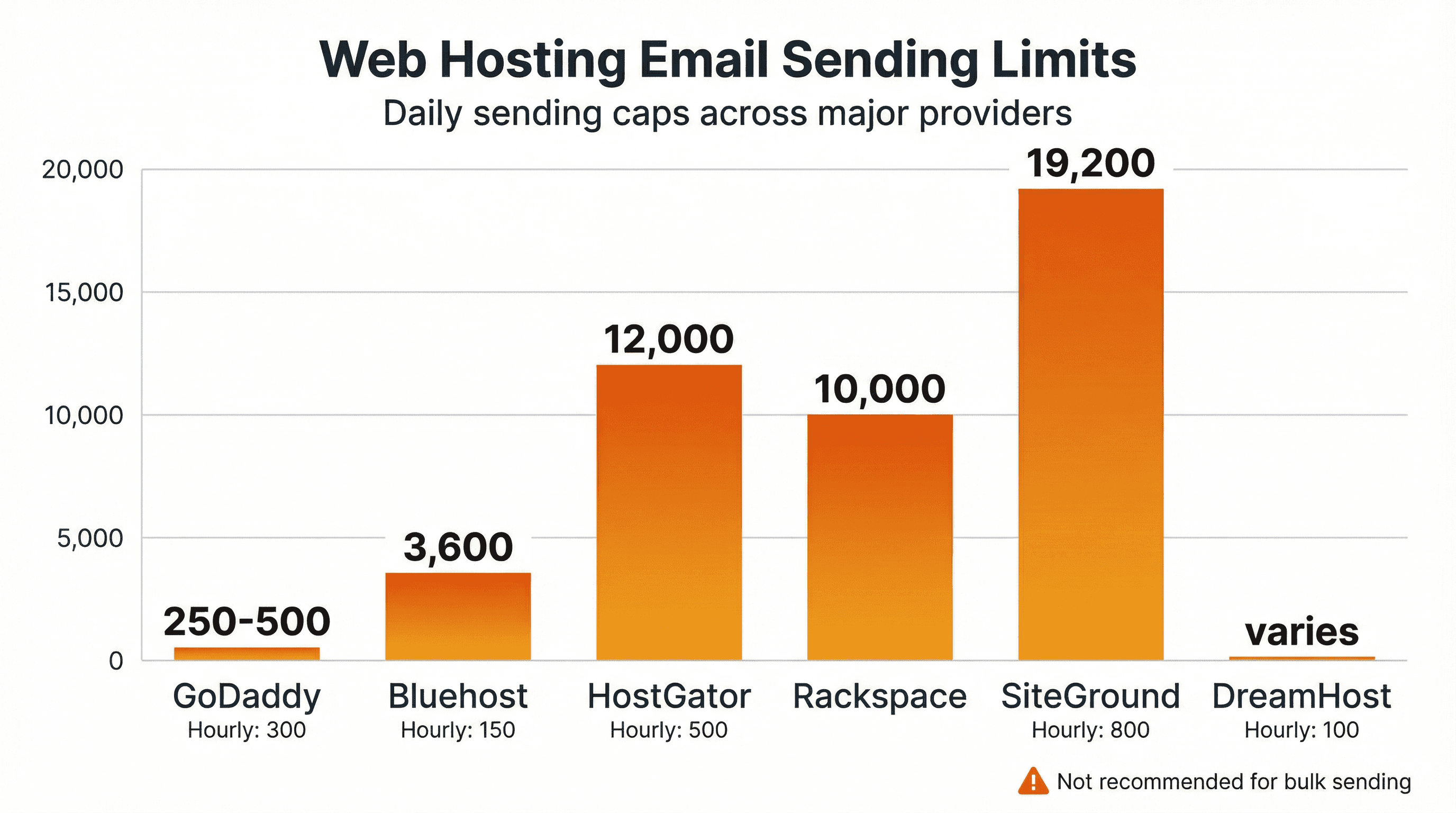
Web Hosting Email Sending Limits
Many people send email from addresses tied to web hosting (yourname@yourcompany.com via hosts like GoDaddy or HostGator). These hosts have restrictive limits to prevent spam on shared servers:
Host | Daily Limit | Hourly Limit | Recipients/Email |
|---|---|---|---|
GoDaddy Email | 250-500 (tier-dependent) | 300 messages | 100 |
Bluehost | ~3,600 (if evenly spread) | 150 emails | Not specified |
HostGator | 12,000 theoretical | 500 per hour per domain | Special rules for 900+ lists |
Rackspace Email | 10,000 recipients | Not specified | Proactive blocking on complaints |
SiteGround | ~19,200 theoretical | 800 emails | 80 |
DreamHost | Cumulative recipients | 100 recipients | Not per-email limit |
Recommendation: If you're doing serious email outreach or marketing, avoid sending through generic web host SMTP servers. Not only are limits low, but deliverability is often poor (shared IPs that may be blacklisted due to other users).
Web hosts are fine for transactional emails or occasional team emails, but they're not built for campaigns.
What Happens When You Exceed Email Sending Limits?
Hitting an email sending limit usually results in a temporary send suspension. The exact behavior varies by provider:
Gmail/Google Workspace: If you go over the limit (e.g., 2,001 emails in a day), Gmail will block you from sending for up to 24 hours. You'll still receive incoming mail, but outgoing attempts return an error. The 24-hour timer is rolling, and any attempt to send during the timeout may extend it further.
Outlook/Office 365: Office 365 will stop delivering messages once you hit 10,000 recipients in 24 hours. Further sends bounce with an NDR (non-delivery report). You have to wait 24 hours from when the first message that exceeded the limit was sent.
Yahoo/AOL: They bounce emails exceeding the daily quota. Typically, send capability returns in 24 hours. Repeatedly hitting the limit can lead to longer suspensions.
Zoho: Imposes a 1-hour sending freeze if you hit the hourly limit. After an hour it resets. Continuous limit hits or spam sending can lead to 24-hour blocks or requiring admin intervention.
Others: Most providers follow the pattern of a 24-hour suspension. You lose the ability to send new emails for the rest of the day. You usually do not lose access to your account (you can still log in, read emails, etc.), you just can't send.
If you find yourself blocked, do not keep trying to send. You'll just prolong the ban. Use the time to evaluate why you hit the cap and how to avoid it in the future.
How to Stay Below Email Sending Limits
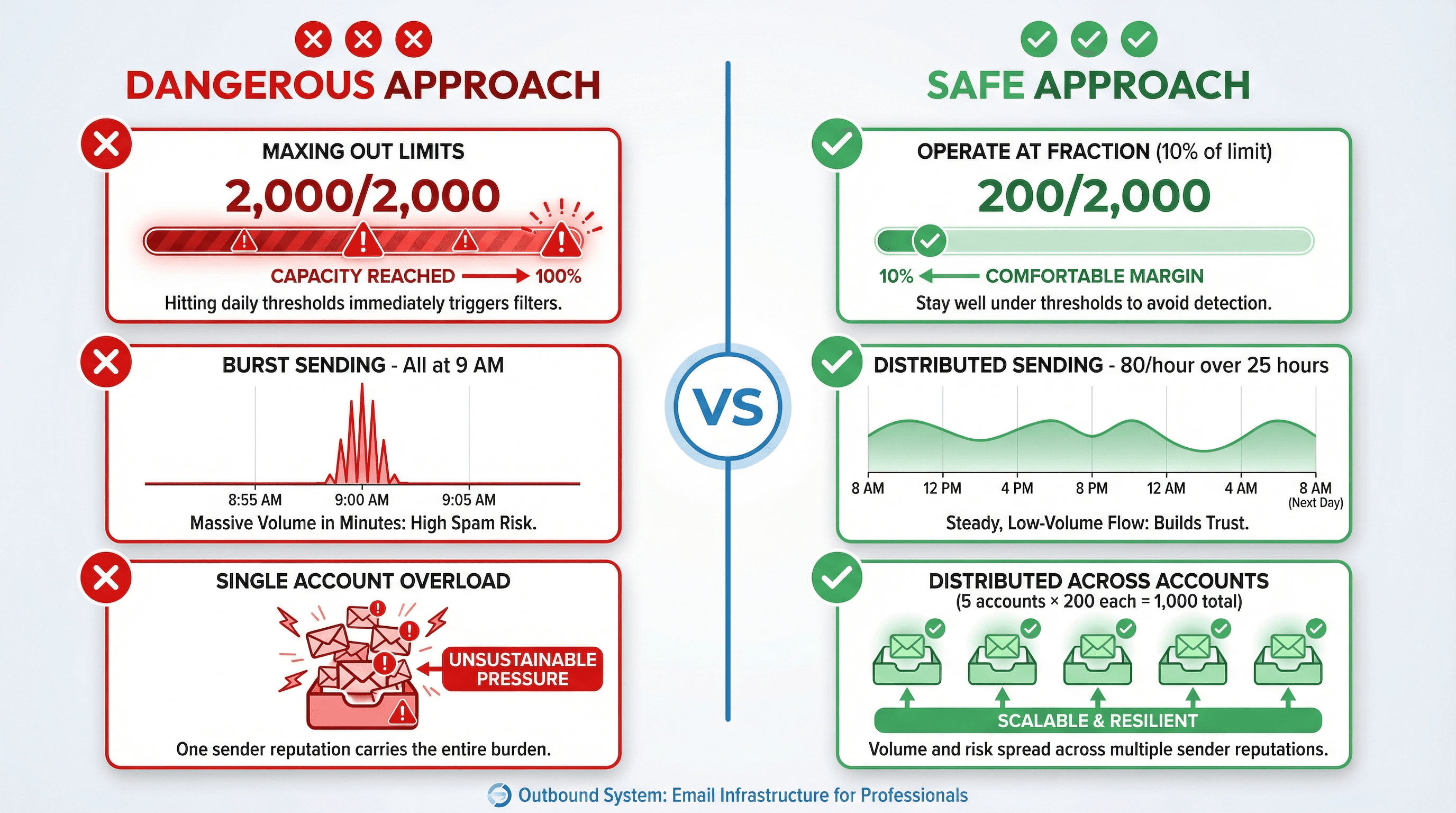
Just because your provider allows X emails per day doesn't mean you should send that many, especially not right away. For comprehensive guidance, see our cold email best practices and email deliverability explained guide.
Don't max out your limit (use a fraction of it)
Email deliverability experts often suggest using only 10% of the technical limit for cold outreach at first.
Even business accounts should operate at a fraction of their capacity during outbound campaigns. If Gmail Workspace gives you 2,000 per day, sending 100-200 per day is a far safer starting point. Pushing to the limit is a red flag for spam filters.
Never use free personal accounts for bulk email
Free Gmail, Yahoo, Outlook.com, etc. might have decent limits (300-500 per day), but using them for outreach is a bad idea. They have poorer deliverability for unknown recipients, and providers monitor them closely for spam.
Don't send cold emails from a free @gmail or @yahoo address. It looks unprofessional and you'll get flagged quickly. Invest in a custom domain and a professional service.
Warm up new accounts and domains
If you just created an email account or a brand new domain, start with very low sending volume and ramp up over weeks. Our detailed guide on how to warm up email domains walks through the exact protocols.
For example:
① Week 1: Send 20 per day
② Week 2: Send 50 per day
③ Week 3: Send 100 per day
Warming up establishes a positive reputation (especially if those early emails get replies or at least no spam complaints). All providers have internal scoring. A sudden spike from 0 to max limit will almost surely trigger filters. For professional email warming, check out our email warmup service.
Spread your sending throughout the day
Don't dispatch your entire day's allotment in one go.
If Workspace gives 2,000 per day, it's better to send about 80 per hour for 25 hours than 2,000 at 9 AM. Slower, consistent sending looks "human" and avoids tripping hourly throttles.
Many automation tools can randomize send times to mimic natural behavior (sending 1 message every couple minutes). The key is avoiding big spikes.
Use multiple accounts or domains for scale
Once you need to send thousands of emails per day, don't do it all from one account, no matter the limits.
Instead, split across multiple sender accounts. For example, instead of one account sending 1,000 emails, use five accounts sending 200 each. This keeps each individual sender well under the radar.
It's exactly the model Outbound System uses: hundreds of warmed inboxes sending in parallel so each address stays safe while collectively achieving volume.
Consider dedicated email sending services
Traditional ESPs (Email Service Providers) and SMTP services are designed for bulk sending. Platforms like SendGrid, Mailchimp, Amazon SES, Mailgun, Mailjet can send tens of thousands to millions of emails per day if your use case is valid.
These services don't have the same per-mailbox limits (they operate on different models, often based on credits or plan levels), but you'll need to manage domain reputations, IP warming, and compliance.
If you're doing cold outreach, be cautious. Some ESPs don't allow unsolicited emailing on their platforms. Always check terms and ideally warm up your sending IPs with opt-in traffic first.
Maintain list hygiene and quality content
Nothing will get you blocked faster than high bounce rates or spam complaints.
Even if you're within send limits, providers have algorithms monitoring recipient reactions. A spam complaint rate above 0.1% is very dangerous.
Make sure you're sending to verified, engaged contacts. Include an unsubscribe link for bulk sends (Google and Yahoo now require it for any mass mail in 2024+). If a small number of people mark you as spam, your effective sending limit will drop to zero because everything will go to junk.
Monitor and adapt
Keep an eye on your sending logs, bounce messages, and any alerts from your provider. For detailed tracking guidance, see how to track cold email campaigns.
If you get warning emails (some services send a warning at 90% of your limit), pause your sends. If you notice lots of bounces, clean your list before sending more. It's cheaper to throttle yourself for a day than to get your account suspended and have to do damage control with support.
By following these practices, you ideally never hit the hard sending limits. Your outreach will be smooth and gradual. It's like staying well below the redline on your car's RPM gauge. You preserve the engine (your sender reputation) for the long haul.
Email Provider Documentation Sources
When the provider shows an explicit date, we're listing it. When they don't, we're labeling it as "no date shown" and using accessed January 30, 2026.
Reality Check: Quotas Are Not Your Target
If you're doing outbound and optimizing for booked meetings:
Quotas are not your target. They're the cliff edge.
The actual game is: Low complaints, low bounces, real engagement, clean authentication, easy unsubscribe.
2024-2025 made authentication and unsubscribe requirements much less optional at scale (Gmail/Yahoo/Outlook.com). Source: Google Help
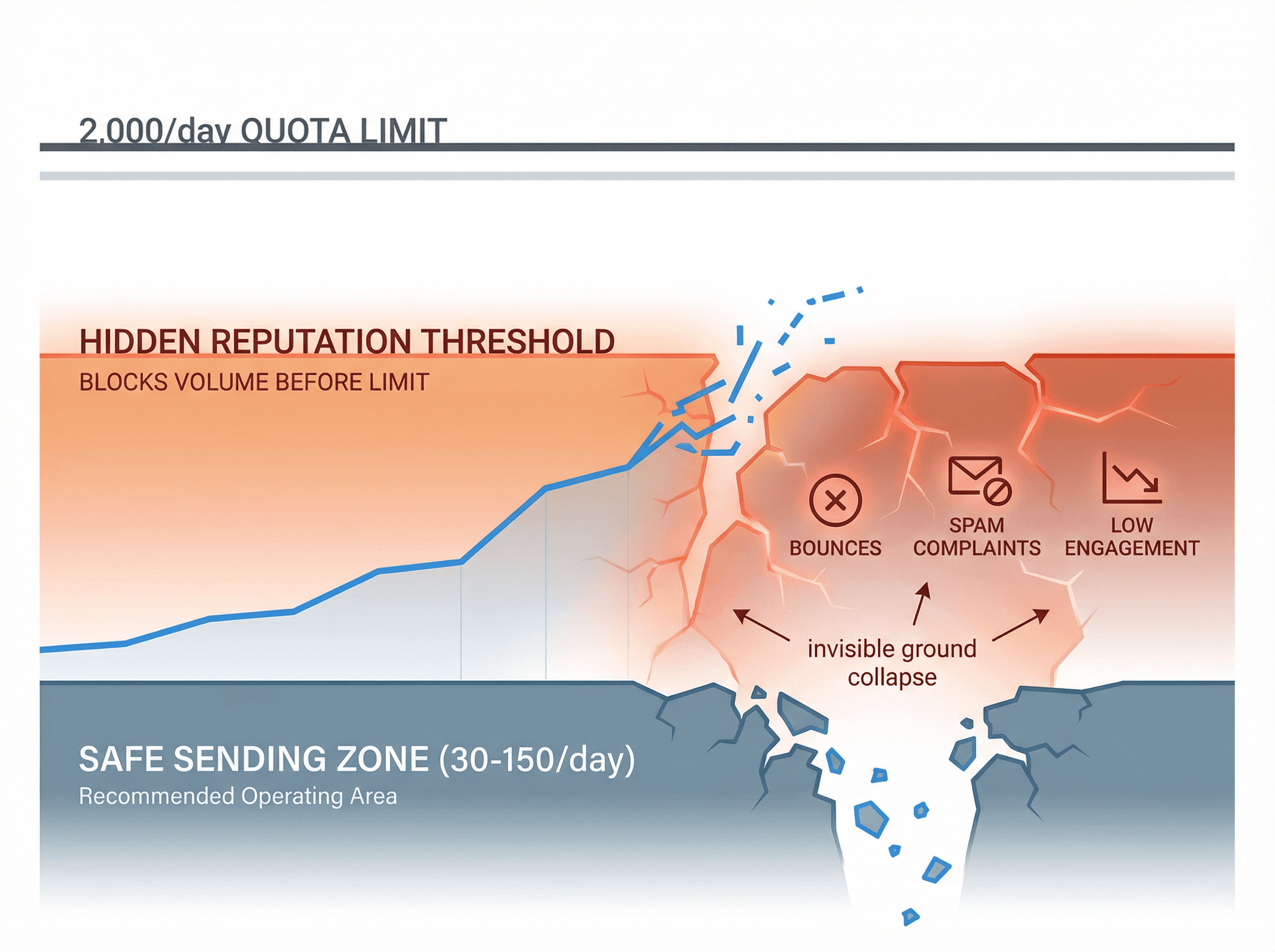
The providers publish the limits. They don't publish the reputation thresholds that really govern your sending. But those hidden thresholds matter more.
Knowing these limits helps you plan infrastructure and avoid obvious mistakes. But the real skill is staying so far under them that you never come close to testing them in the first place.
Frequently Asked Questions
What's the difference between daily message limits and daily recipient limits?
Message limits count how many individual emails you send (one email = one message, regardless of recipients). Recipient limits count total recipients across To/CC/BCC fields. One email to 10 people can count as 1 message but 10 recipients. Google Workspace, Microsoft 365, and most providers enforce both separately, so you need to watch whichever hits first.
Can I increase my email sending limit by contacting support?
For most consumer accounts (free Gmail, Yahoo, Outlook.com), no. The limits are hard-coded and support won't raise them. For business accounts (Google Workspace, Office 365), support sometimes raises recipient-per-message limits (like 500 to 1,000), but almost never daily sending caps. If you need more volume, you need more accounts or a dedicated sending service.
How long does it take to warm up a new email account?
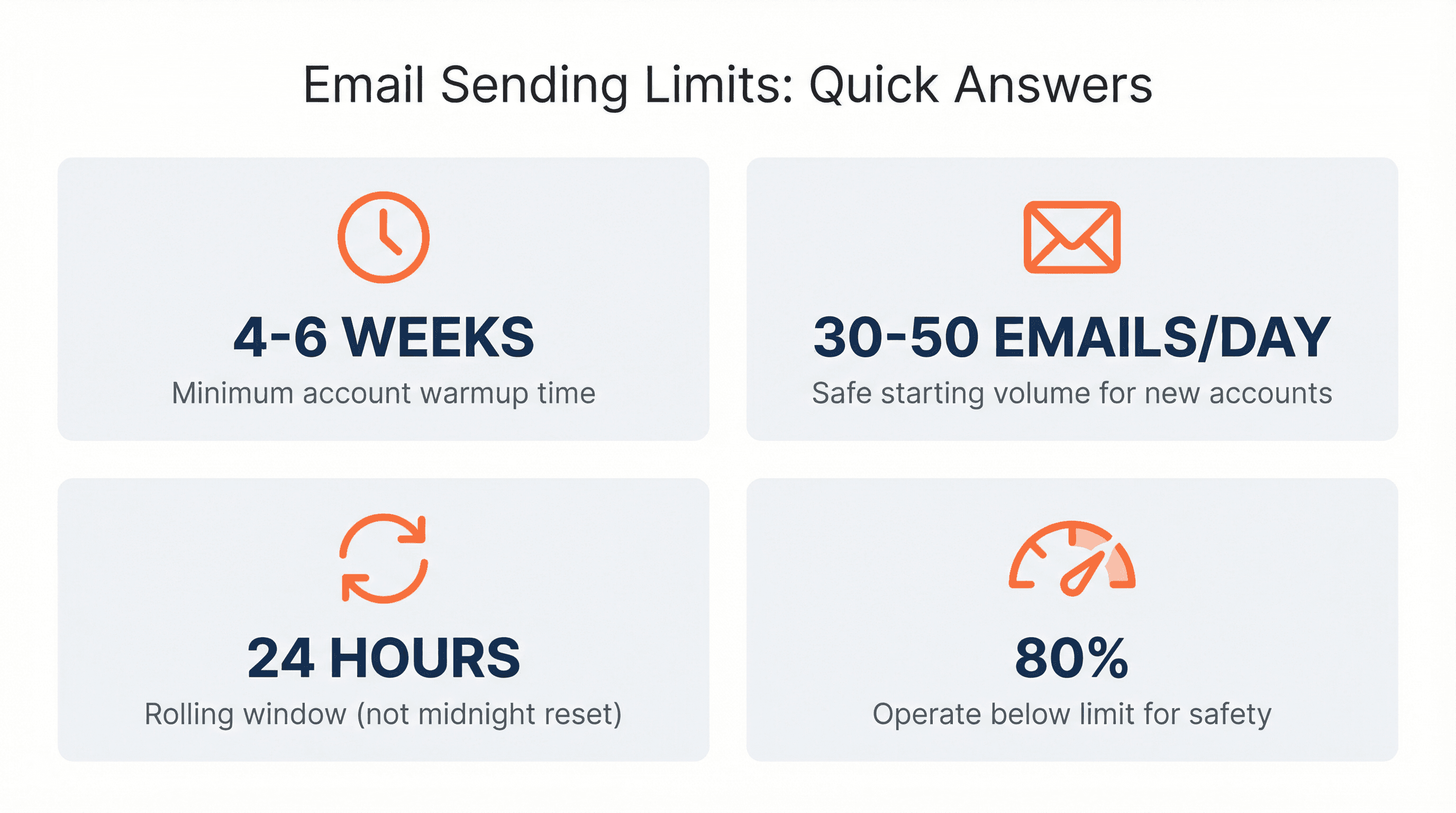
Plan for 4-6 weeks minimum of gradual ramp-up. Start at 10-20 emails per day in week 1, then increase by 50-100% each week while monitoring engagement. If you see good reply rates and zero spam complaints, you can accelerate. If engagement is poor, slow down. The account's domain age, authentication setup (SPF/DKIM/DMARC), and recipient responses all factor into how fast you can scale safely.
What happens if I hit a sending limit during an important campaign?
You'll be blocked from sending for 1-24 hours depending on the provider (Gmail/Microsoft: 24 hours; Zoho: 1 hour). During that time, your emails will bounce with quota errors. There's no way to override or pay to lift the block early. You just have to wait. This is why operating well below limits is critical for campaigns you can't afford to pause.
Are "unlimited" email sending plans really unlimited?
No. Services advertising "unlimited" sending (like some ProtonMail or Fastmail higher tiers) always have acceptable use policies that restrict bulk or duplicative sending. They mean unlimited for normal business correspondence, not unlimited for mass campaigns. Read the terms carefully. Most explicitly forbid using their service for cold email or newsletter blasts.
Why do different sources cite different limits for the same provider?
Providers change limits over time and don't always announce updates clearly. Also, limits can vary based on account age, reputation, and subscription level. What works for an aged, trusted account won't work for a brand new one. When you see conflicting numbers, default to the most conservative estimate and verify with the provider's current official documentation.
Can I use multiple free email accounts (Gmail, Yahoo, etc.) for cold email campaigns?
Technically yes, but it's a terrible idea. Free accounts have: (1) low deliverability to unknown recipients, (2) no custom domain (looks unprofessional), (3) aggressive spam filtering, (4) higher risk of permanent suspension for commercial use. You'll spend more time managing suspensions than running campaigns. Use business accounts with your own domain instead.
What's the safest daily sending volume for cold email outreach?
Start with 30-50 emails per day per mailbox for new accounts, then scale to 80-150 per day maximum for established accounts with good engagement. Even though Google Workspace allows 2,000 and Microsoft allows 10,000, those are theoretical maximums. Real-world safe volumes are far lower. Distribute higher volumes across multiple accounts rather than maxing out individual mailboxes.
Do email sending limits reset at midnight or on a rolling 24-hour basis?
Rolling 24-hour basis for most providers (Gmail, Google Workspace, Yahoo, Outlook.com). If you send 500 emails at 2 PM on Monday, you can't send more until 2 PM on Tuesday. Some providers (Microsoft 365, Zoho) use hourly rolling windows for certain limits. This means you need to track send times precisely, not just assume a midnight reset.
Can I send email to a purchased list without hitting spam filters?
No. Purchased lists almost always have: (1) high bounce rates (bad addresses), (2) zero prior engagement (triggers spam detection), (3) high complaint rates (people mark as spam). Even if you stay under sending limits, you'll destroy your sender reputation within days. Only send to contacts who've explicitly opted in or have an existing business relationship with you.
How do I check if i'm close to hitting my sending limit?
Google Workspace: Check admin console reports or use the Gmail API to query sent message counts. Microsoft 365: Review mailbox usage reports in Exchange admin center. Other providers: Most don't provide real-time quota tracking. Keep your own sending logs in whatever tool you use (CRM, automation platform, etc.) and calculate manually. Set alerts at 80% of your daily limit so you can throttle proactively.