Your cold emails land in the inbox. Your prospect opens them. And then... nothing.
Or at least, that's what your metrics are telling you. The uncomfortable reality is this: your tracking data might be lying to you. Between Apple's Mail Privacy Protection preloading pixels and security bots clicking every link before humans even see your message, those open rates and click-through numbers you're staring at? They're basically fiction.
And if you're still using your email tool's default shared tracking domain (you know, the one that looks like clicks.randomvendor.io/abc123), you're making it worse. Way worse.
A custom tracking domain isn't just some technical checkbox anymore. It's table stakes for serious cold email in 2026. This guide will walk you through exactly what it is, why it matters more than ever, and how to set it up without breaking things.
What Is a Custom Tracking Domain?
When you send tracked cold emails, your sending platform needs to measure two things: opens (did they see it?) and clicks (did they engage?). To do this, your tool does something sneaky but necessary.
For open tracking, they embed a tiny invisible image (a 1×1 pixel) in your email. When the recipient's email client loads that pixel, it fires a request to the tracking server, which logs the open. Simple, right?
For click tracking, they replace your actual links with redirect URLs that hit their tracking server first. These specialized redirect URLs log the click before forwarding the person to your real destination.
Both of these tracking mechanisms need to live somewhere on the internet.
That "somewhere" is a domain. By default, that domain is shared across everyone using your email tool.
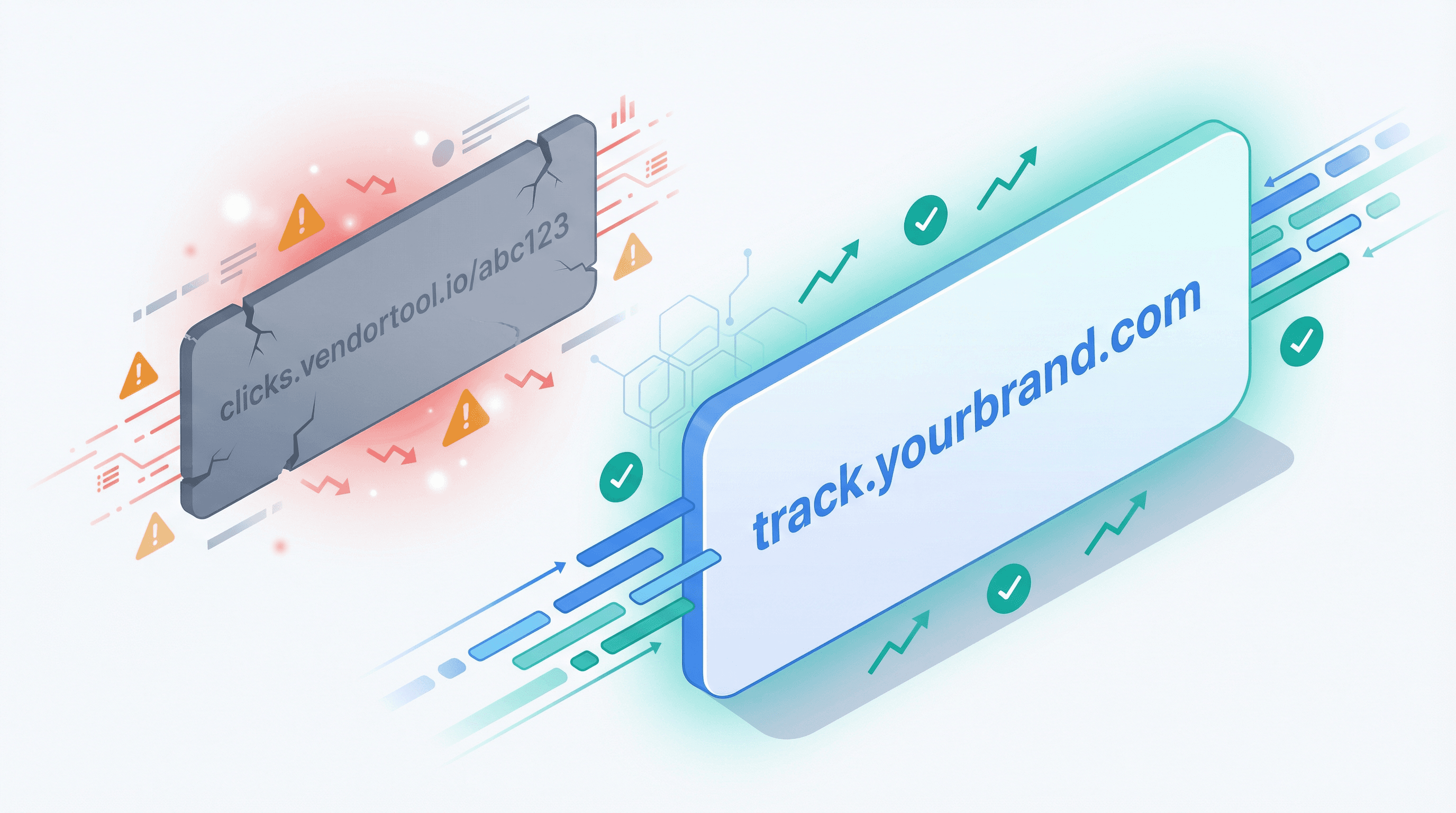
A custom tracking domain (also called a branded tracking domain or link branding) means you use your own subdomain for all this tracking activity. Instead of your links going through track.emailvendor.com, they go through track.yourbusiness.com.
Example:
• Without custom tracking: Your link shows as https://clicks.instantlyapp.com/xyz789 (generic vendor domain)
• With custom tracking: Same link shows as https://t.yourdomain.com/xyz789 (your branded subdomain)
Documentation from major email platforms explains it plainly: link branding makes your tracked links and open-pixel images originate from your domain instead of theirs. And when inbox filters evaluate your email, they're looking at those links and checking the domain's reputation.
Why Custom Tracking Domains Improve Deliverability
Setting up a custom tracking domain takes maybe 15 minutes (plus DNS propagation time). So why bother?
Shared Tracking Domains Damage Your Sender Reputation
Help documentation from major cold email platforms spell this out clearly: their default tracking URL is shared across customers unless you set up a custom domain. What does that mean for you?
If some spammer using the same tool sends garbage emails through that shared tracking domain, the domain gets flagged. Blacklisted. Marked as suspicious.
And guess whose emails inherit that stink? Yours. Even if your copy is perfect and your list is clean.
Industry best practices emphasize this point: using a custom tracking domain separates your reputation from other senders. You're not gambling on shared infrastructure where one bad actor can poison the well for everyone.
Critical Insight: A custom tracking domain isolates your sender reputation. You control it. You own it. Nobody else's mistakes drag you down.
How Custom Tracking Domains Improve Inbox Placement
Most people don't realize this: spam filters don't just look at your "From" address. They're also judging every link inside your email.
Email infrastructure experts are direct about this: link branding helps deliverability because you're not relying on click tracking through a domain you don't control. Inbox providers check the root domain's reputation for every link.
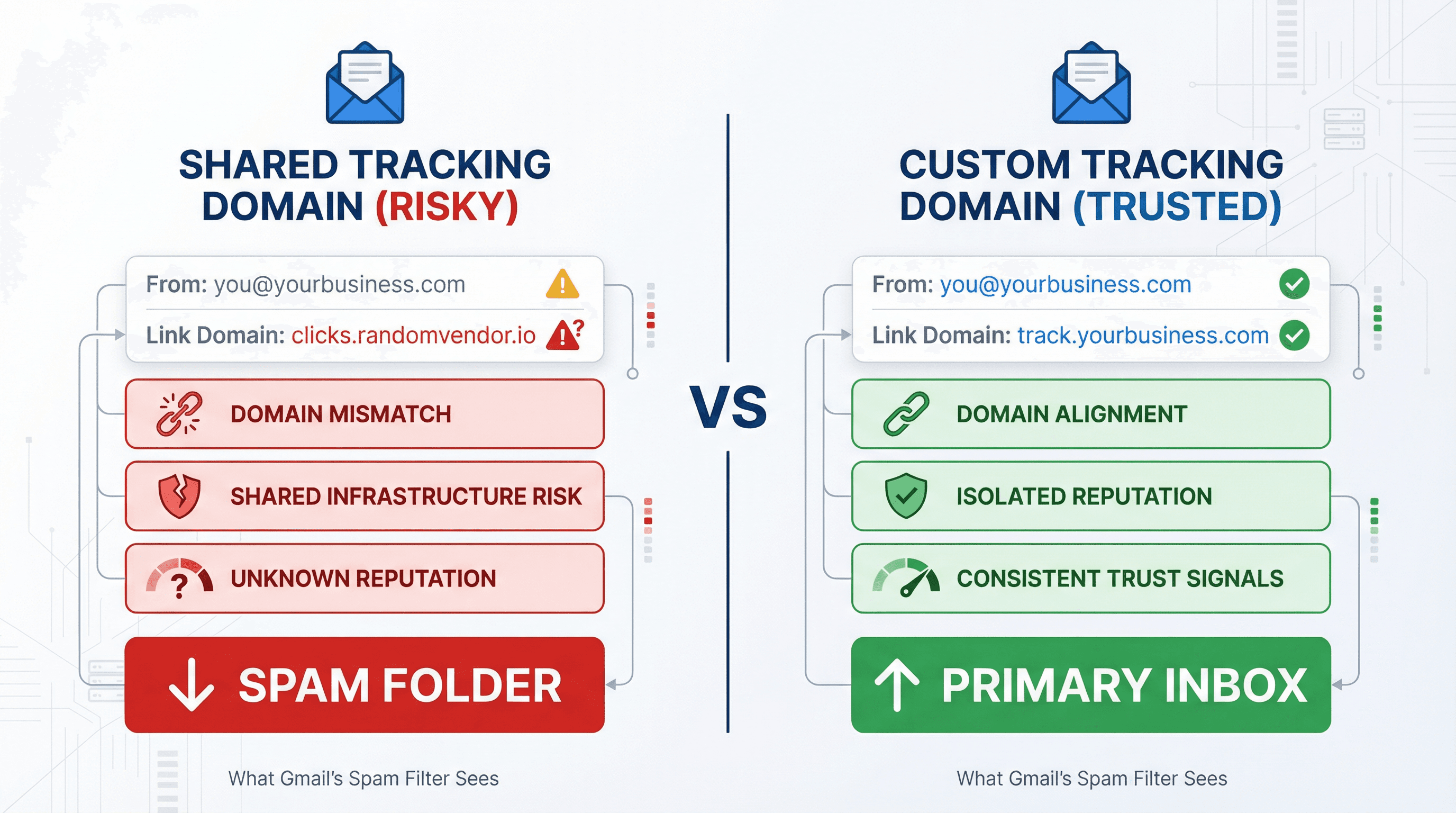
Think about what your email looks like to Gmail's spam filter:
→ From: you@yourbusiness.com (looks legit)
→ Link domain: clicks.randomvendor.io (wait, who's that?)
That mismatch creates friction. It looks inconsistent. It looks phishy.
But when your tracking domain matches your sender domain? Everything aligns. The email comes from brand.com, the links point to track.brand.com, and the filters see consistency instead of suspicious mismatches.
Consistency = trust signals = inbox placement.
By 2026, inbox algorithms are more sensitive to domain alignment than ever before. Our tracking cold email guide consistently shows that controlling every domain that touches your email significantly impacts deliverability.
Custom Tracking Domains Give You Cleaner Analytics
Platform documentation frames custom tracking domains as a way to separate your metrics from other accounts. When you're on a shared domain, your data gets mixed into a massive pool of other senders.
With your own tracking domain, the numbers you see are yours. No cross-contamination. No wondering if that spike in opens came from your campaign or someone else's volume bleeding into the shared pool.
Plus, some corporate email security systems straight-up block known tracking domains. Using a custom domain that isn't on those generic blocklists means better tracking penetration and more reliable engagement data.
Why Recipients Trust Branded Links More
Real humans hover over links before clicking. It's instinct in 2026.
When someone sees click.emailtool.com/xyz, they immediately know it's a mass email. It screams automation. It triggers skepticism.
But track.yourcompany.com/xyz? That looks like it belongs to you. Email marketing research explicitly calls out trust and brand consistency as reasons custom tracking can increase engagement over time.
People are more likely to click links they recognize and trust. Branded tracking removes friction in the click decision.
The Truth About Cold Email Tracking in 2026
But let's get brutally honest about what tracking actually tells you in 2026.
Why Open Rates Are Unreliable in 2026
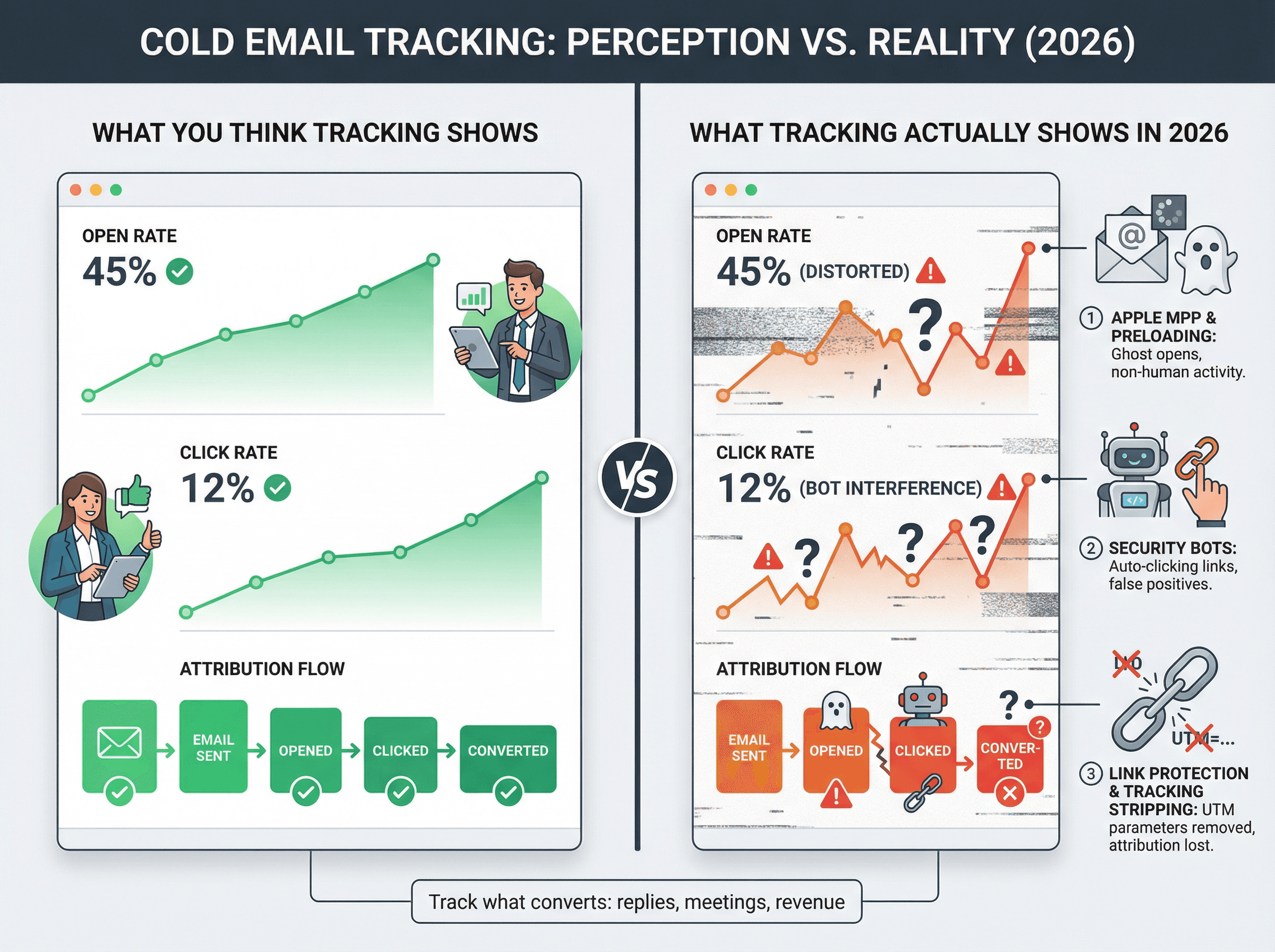
Mailchimp's Apple MPP FAQ explains the problem clearly: Apple Mail Privacy Protection can preload tracking pixels even if the person never opened your email. The pixel fires, you think they opened it, but they didn't.
Twilio's 2025 MPP guide (which covers 2026 implications) explicitly calls open rates "noisy" and says open tracking is unreliable.
The Reality in 2026: Open rates are now more of a "maybe they saw it" metric than a definitive measure. Track what actually converts: replies and meetings booked.
How Security Bots Inflate Click Tracking Data
Our tracking cold email guide breaks this down in detail: corporate security systems often click every link in an email before a human even sees the message. They're scanning for malware, phishing, malicious redirects.
Those bot clicks show up in your dashboard as engagement. But they're not real. No human touched anything.
Platform documentation acknowledges this explicitly, explaining that bots inflate metrics and recommending you treat opens and clicks as ranges rather than exact counts.
How Apple Link Tracking Protection Breaks Attribution
If you're trying to track UTM parameters or conversion sources, Twilio notes that Apple's Link Tracking Protection strips tracking parameters from links in Mail and Safari. Your attribution data gets mangled before people even click through to your site.
Is Cold Email Tracking Still Worth It?
No. But naive tracking is.
You need to use tracking like a diagnostic tool, not your primary scoreboard. At Outbound System, we track what actually matters:
① Deliverability signals (are emails landing?)
② Replies and meaningful engagement
④ Revenue closed
Opens and clicks are hints. They tell you something might be working (or broken). But they're not your North Star anymore.
And when you do track, using a custom domain keeps you in control instead of gambling on shared infrastructure.
Do You Need a Custom Tracking Domain?
When to Set Up a Custom Tracking Domain
• You track clicks at all (even occasionally)
• You track opens (despite the noise)
• Your tool inserts unsubscribe links that use tracking URLs
• You want to avoid shared-domain reputation risk
When You Can Skip Custom Tracking
• You send no links at all and tracking is fully disabled
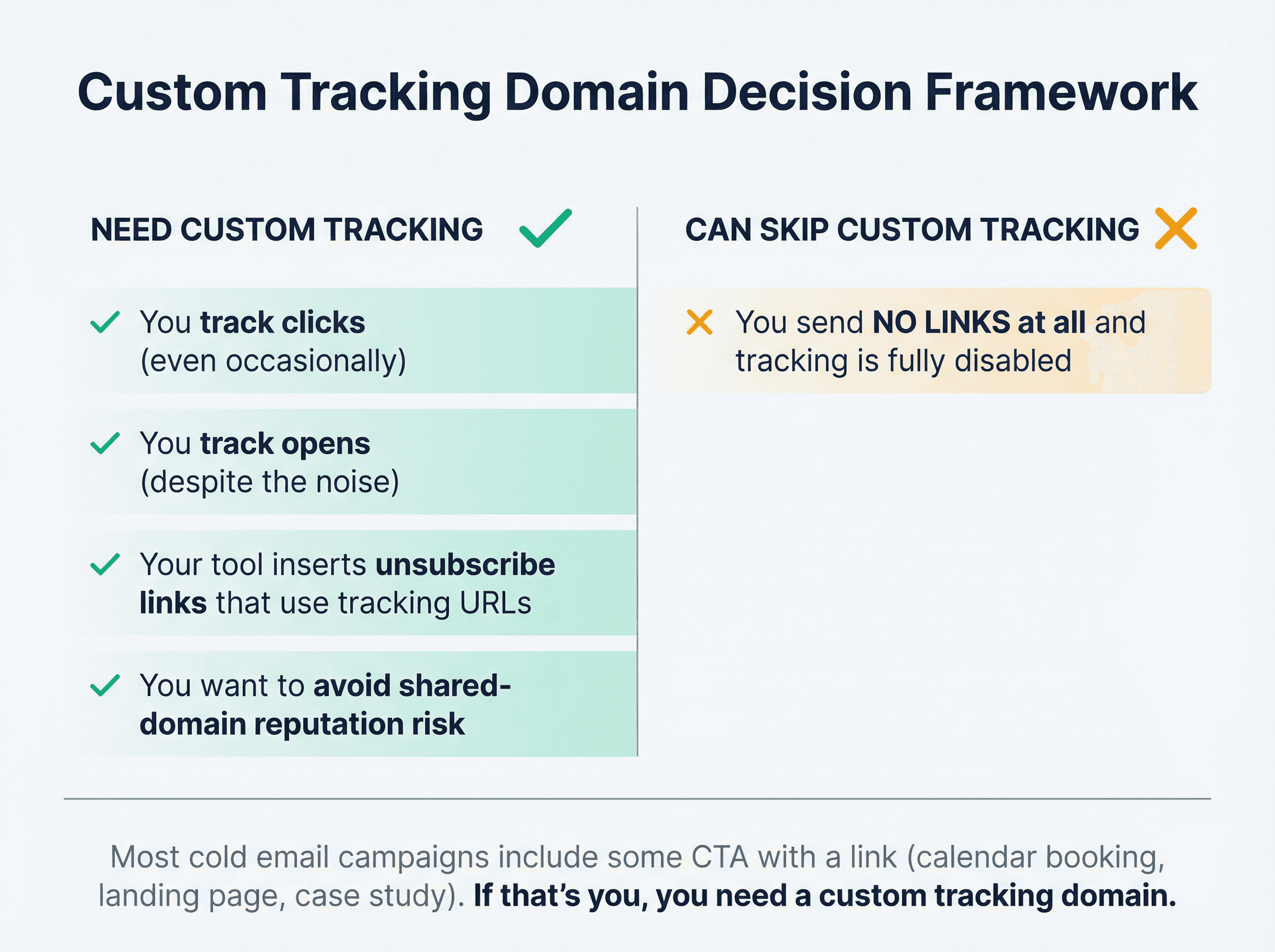
Platform documentation explicitly says if you're not including links, a custom tracking domain may not be necessary. Makes sense.
But most cold email campaigns include some call to action with a link (calendar booking, landing page, case study PDF). If that's you, you need a custom tracking domain.
Best Approach for Cold Email in 2026
Default approach: Turn off open tracking. Keep links minimal. Focus on replies and meetings booked.
Our tracking cold email guide is basically a manifesto for this approach. Track what actually converts (meetings, revenue), not vanity metrics.
When you do track clicks/opens: Use a custom tracking domain so you're not gambling on shared vendor infrastructure.
Industry experts take this stance even further: if you can't set up a custom tracking subdomain, they recommend turning off open and click tracking entirely to protect your domain reputation.
That should tell you how seriously the industry treats this now.
Custom Tracking Domain Setup Patterns (Which to Choose)
Aspect | Pattern A: One Per Domain | Pattern B: Universal Domain |
|---|---|---|
Setup | Separate subdomain per sending domain | Single tracking domain for all campaigns |
Example | Sending from | One tracking subdomain across all domains |
Isolation | ✓ Contains blast radius if one domain gets flagged | Risk spreads across all campaigns |
Best For | New domains, testing campaigns, risk management | Aged domains with bulletproof reputation |
Our Recommendation | ⭐ Start here for cold email teams | Only if your domain is aged and well-warmed |
Pattern A (Recommended): One tracking subdomain per sending domain.
Industry best practices suggest organizing tracking domains by associated email domain, especially when domains are new or you're testing riskier campaigns. Email platform documentation recommends separate subdomains per domain when you're managing multiple sending domains.
This is the safest, most scalable pattern for cold email teams.
Pattern B: One tracking domain for everything (only if your domain is strong).
Some teams use a single tracking subdomain across all campaigns. Platform documentation describes a "per-business" approach when your primary domain is aged and well-warmed. Industry guidance mentions using a single domain if you have an aged domain with solid reputation.
Our take: Most cold email teams should start with Pattern A. Keep things isolated until you have bulletproof domain reputation across the board.
How to Set Up a Custom Tracking Domain (Step-by-Step)
This works the same way across most platforms. You're essentially creating a controlled alias in DNS that points to your email tool's tracking infrastructure.
Step | What You Do | Why It Matters |
|---|---|---|
① Pick Subdomain | Choose short, clean name ( | Builds trust, avoids sketchy appearance |
② Add DNS Records | Create CNAME (sometimes TXT) in your DNS provider | Points subdomain to tracking infrastructure |
③ Enable SSL/HTTPS | Auto-provisioned by most platforms | Required for deliverability in 2026 |
④ Wait for Propagation | DNS changes spread globally (minutes to 24h) | Nothing works until DNS is live |
⑤ Verify Setup | Use platform's "verify CNAME" button | Confirms everything is configured correctly |
⑥ Test Everything | Send test emails, check links, verify HTTPS | Catches issues before real campaigns |
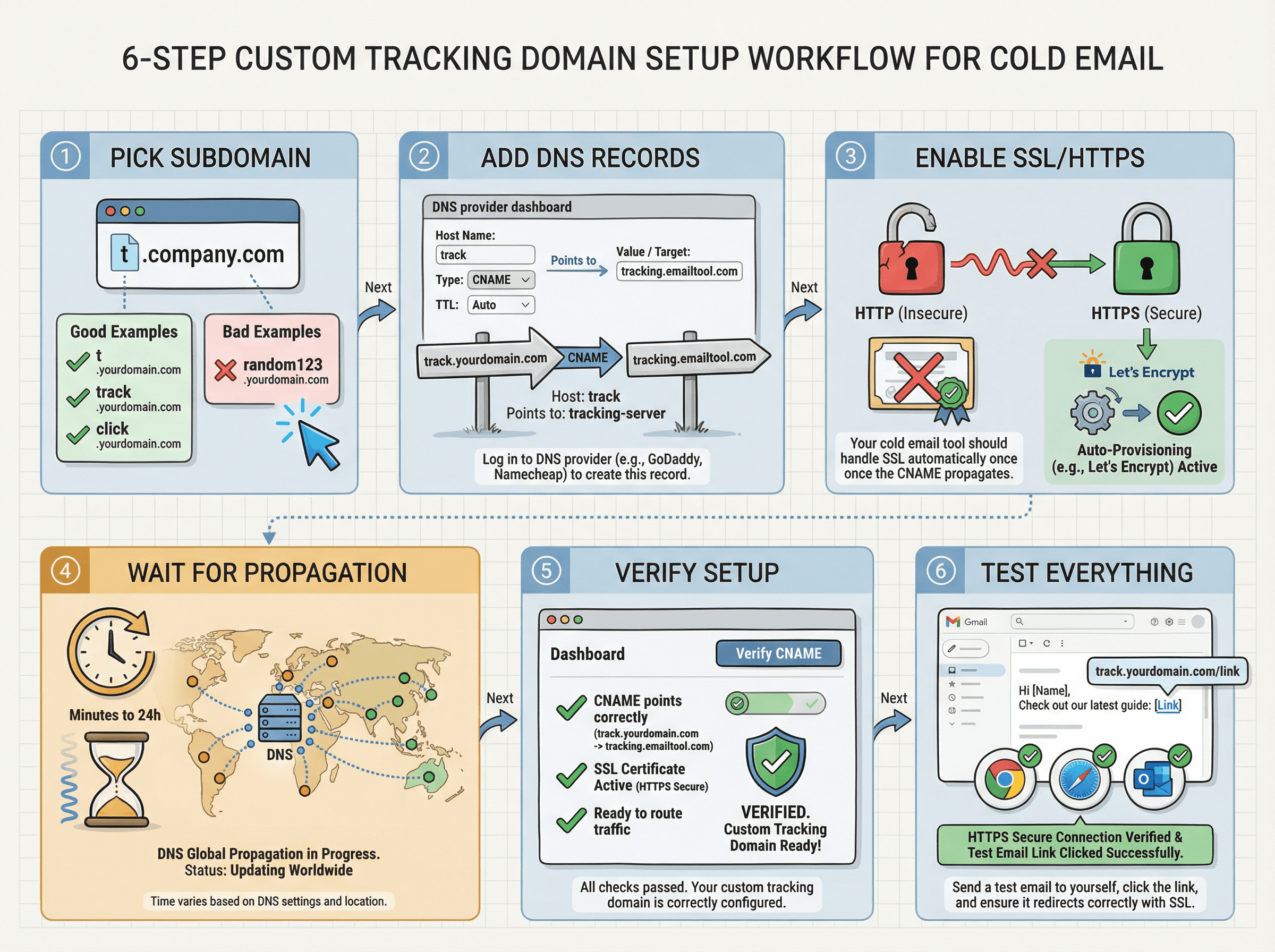
Step 1: Choose Your Tracking Subdomain
Choose something short and clean:
Good options: t, track, click, go, link
Avoid: Weird strings, random numbers, anything that looks sketchy
For example, if you send from company.com, you might use track.company.com as your tracking domain.
Don't use your root domain for tracking (not company.com itself). Use a subdomain. This isolates tracking activity from your main domain. If something goes wrong with tracking, it won't directly impact your primary domain's reputation.
Industry best practices recommend using a custom tracking subdomain as a deliverability protection measure.
Step 2: Add CNAME Records to Your DNS
Almost always, this means adding a CNAME record. Sometimes also a TXT record for verification (some platforms require this).
A CNAME record basically says "for this subdomain, point to this other address."
In your DNS provider's dashboard:
① Create a new CNAME record
② Set the host/name to your tracking subdomain (e.g., track)
③ Set the value/points to field to the target your email tool provides (every platform gives you a specific address to use)
Step 3: Enable SSL/HTTPS for Your Tracking Domain
Modern emails must use secure links (HTTPS, not HTTP). By 2025, Gmail and Yahoo started outright blocking emails with non-SSL tracking links.
Most platforms automatically provision an SSL certificate (usually Let's Encrypt) once your CNAME is in place. Some platforms require adding a TLS certificate for the subdomain.
Some email service providers support automated HTTPS tracking via Let's Encrypt, or you can do it manually.
Security Requirement: Insecure links (HTTP) are a deliverability killer in 2026. If your tracking domain isn't showing as secure, that's a problem.
Step 4: Wait for DNS Propagation
After adding the CNAME, DNS changes need time to spread across the internet. This usually takes anywhere from a few minutes to 24 hours (though it's typically on the faster end).
Be patient. Don't panic if your email tool doesn't immediately recognize the domain.
You can use tools like WhatsMyDNS or MXToolbox to check if your CNAME is live globally.
WhatsMyDNS lets you check DNS propagation across multiple global locations, helping you verify your CNAME record is working before proceeding.
Step 5: Verify Your Custom Tracking Domain Setup
Most platforms have a "verify CNAME" or "check setup" button in their dashboard. Once your DNS is propagated, hit that button.
The tool will check that:
• The CNAME points correctly
• SSL is active and valid
• Everything is ready to route tracking through your domain
When everything shows green/verified, save the settings and activate the custom domain.
Step 6: Test Your Custom Tracking Domain
Send yourself a test email with tracking enabled.
Check:
• Hover over the links: Do they show your tracking subdomain?
• Click the links from different browsers and email clients
• Confirm they resolve over HTTPS (no security warnings)
• Verify open tracking works (if you're using it)
Testing catches DNS typos, SSL issues, and configuration mistakes before they impact real campaigns.
Custom Tracking Domain Setup for Major Platforms
Major Cold Email Platforms
Most modern cold email platforms support custom tracking domains. Look for these typical requirements in your tool's documentation:
Then enable "Custom Tracking Domain" in your account settings.
Important Notes:
• Doc freshness varies by platform (always check your tool's latest documentation)
• Some platforms require both CNAME and TXT records for verification
• SSL certificate issuance may take a few minutes after DNS propagation
For ESP/API Sending
If you're sending through an email service provider or API (common for lifecycle/marketing sequences, less common for cold email), most major ESPs call this "link branding" and require adding a TLS certificate.
Follow your specific platform's documentation carefully for the exact setup method.
Common Custom Tracking Domain Setup Mistakes
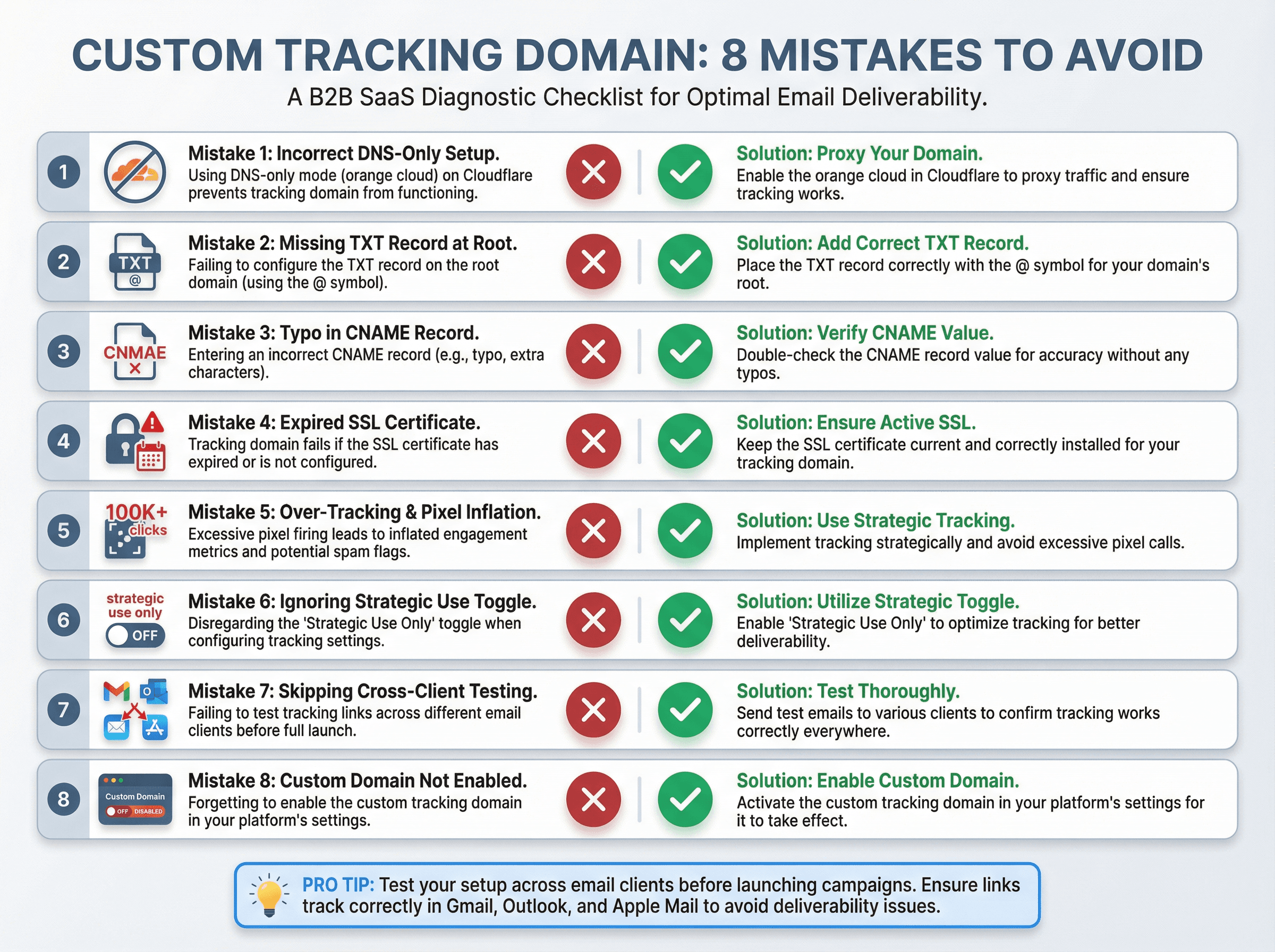
Mistake 1: Cloudflare Proxy Breaks SSL Certificate Provisioning
Some platforms explicitly say to set Cloudflare CNAME records to DNS only (not proxied).
Industry guidance says the same for automated HTTPS tracking.
Why? When you proxy through Cloudflare, certificate issuance breaks because Let's Encrypt needs to reach the actual tracking server directly.
If your tracking domain isn't verifying, check if the Cloudflare proxy is on. Turn it off.
Mistake 2: Missing Required TXT Verification Record
Some platforms require a TXT record at @ for verification.
Platform documentation notes you may be prompted for additional TXT verification in some cases.
Read your tool's docs carefully. If they mention a TXT record, don't skip it.
Mistake 3: DNS Typos or Wrong CNAME Target
The number one setup issue is a typo in the CNAME record or pointing it to the wrong target.
If the CNAME isn't correct, your tracking links won't work (clicks won't log, or redirects will fail).
Double-check:
• Spelling of the subdomain
• Spelling of the target domain
• You created a CNAME (not an A record)
Use a global DNS checker after setup to verify it resolves correctly.
Mistake 4: Expired SSL Certificate Breaks Your Links
An unsecured link (HTTP instead of HTTPS) kills deliverability in 2026.
Most tools auto-provision SSL certs. But those certs can expire if not auto-renewed. An expired certificate means broken links and blocked emails.
Make sure renewal is automated. Set calendar reminders if you installed a cert manually.
Mistake 5: Treating Open and Click Data as Truth
Apple MPP inflates opens via pixel preloading.
Custom tracking domains improve control, not perfect data accuracy. Remember that.
Mistake 6: Tracking Everything All the Time
Industry experts explicitly recommend only turning tracking on for short-term tests. They warn that excessive tracking increases deliverability risk.
Use tracking strategically, not as an always-on default.
Mistake 7: Not Testing Across Email Clients
Different email clients (Gmail, Outlook, Apple Mail) sometimes handle redirect links differently.
Send test emails to yourself using multiple providers. Confirm:
• Links redirect properly
• They're not getting stripped or rewritten by corporate filters
• Everything works on mobile and desktop
Better to catch weird behavior in testing than in a live campaign.
Mistake 8: Forgetting to Enable the Custom Domain
This sounds silly, but make sure your campaigns have tracking enabled and are using the custom domain after setup.
Sometimes users set everything up but forget to toggle "use custom tracking domain" in the tool's settings.
Confirm in a live campaign that links show your domain. If not, go back to settings.
Cold Email Tracking Strategy That Actually Works in 2026
At Outbound System, we help clients send 52M+ cold emails and book 127K+ qualified meetings. This is the tracking framework we actually use (and recommend).
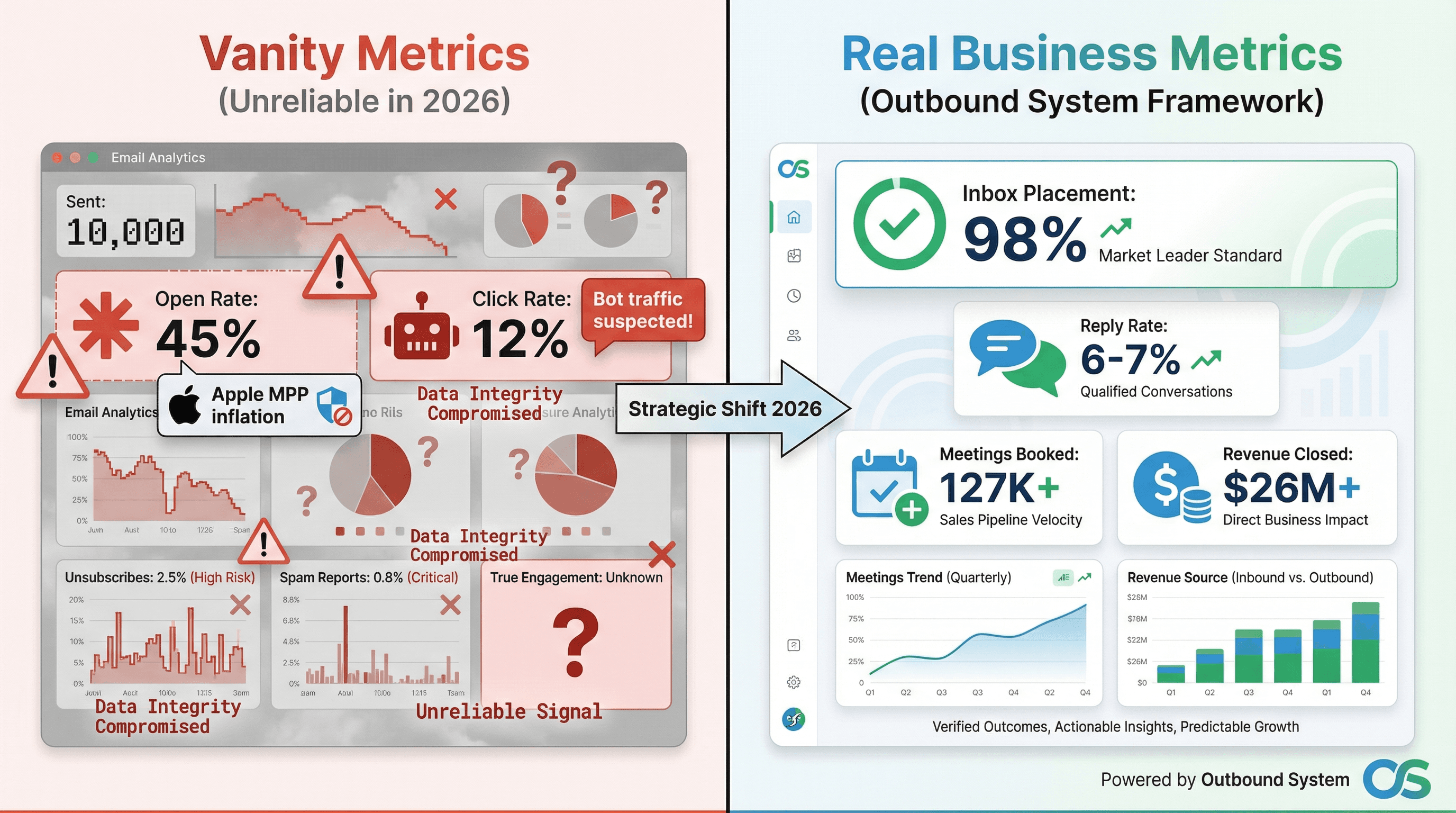
Track What the Market Can't Fake
Our tracking cold email guide says the classic open-rate and click-rate dashboard is distorted. Instead, track:
• Deliverability signals (bounce rates, inbox vs spam placement)
• Human engagement (replies, conversations)
• Meetings booked (qualified sales calls)
• Revenue attribution (deals closed from cold email)
These metrics survive privacy changes and bot noise.
Use Opens and Clicks as Diagnostics (Not KPIs)
Major email platforms emphasize opens are unreliable.
Our tracking guide notes clicks can be bot noise.
Opens and clicks are hints. They tell you something might be working or broken. But they're not your primary success metric.
How to Control Your Tracking Domain Reputation
Long-Term Strategy: All major cold email platforms converge on the same principle: control the domain. Don't inherit someone else's reputation.
A custom tracking domain is how you keep control.
Custom Tracking Domain Best Practices
Maintain Domain Hygiene
Treat your tracking domain like part of your cold email infrastructure.
• Run DNS checks periodically (monthly or quarterly) to ensure nothing changed
• Avoid frequently changing your tracking domain (consistency builds reputation)
• Monitor for blacklist appearances (rare, but catch it early if it happens)
Security First
• Enable HSTS for your tracking subdomain (forces HTTPS)
• Monitor access logs for unusual activity
• Keep SSL certificates renewed (automate if possible)
Your tracking domain is an extension of your brand. Protect it.
Monitor Performance Metrics
After switching to a custom tracking domain, watch:
• Deliverability (inbox placement rates)
• Engagement (reply rates, meeting bookings)
• Bounce rates (should improve or stay stable)
Use tools to check if your tracking domain appears on any blacklists. Set up alerts so you catch issues early.
Coordinate With Sending Domains
Your tracking domain works best in tandem with:
• Properly authenticated sending domains (SPF, DKIM, DMARC)
• Warmed-up sending infrastructure
• Clean list hygiene
Tip: If you send cold email from a dedicated domain (e.g., sales@brand-mail.com instead of your primary corporate domain), use a tracking subdomain under that same domain (track.brand-mail.com). Keep everything aligned.
We generally recommend not using your primary company domain for cold email at all. Use alternative domains for outbound, with their own tracking subdomains. This spreads risk and protects your main domain's reputation.
Audit Periodically
Build a simple routine to audit your cold email infrastructure. Quarterly or monthly, check:
• DNS records (SPF, DKIM, CNAME) are intact
• SSL certificate is valid and not expiring soon
• No new spam filter rules are blocking your tracking
These check-ups catch issues before they impact campaigns.
How Outbound System Handles Custom Tracking Domains
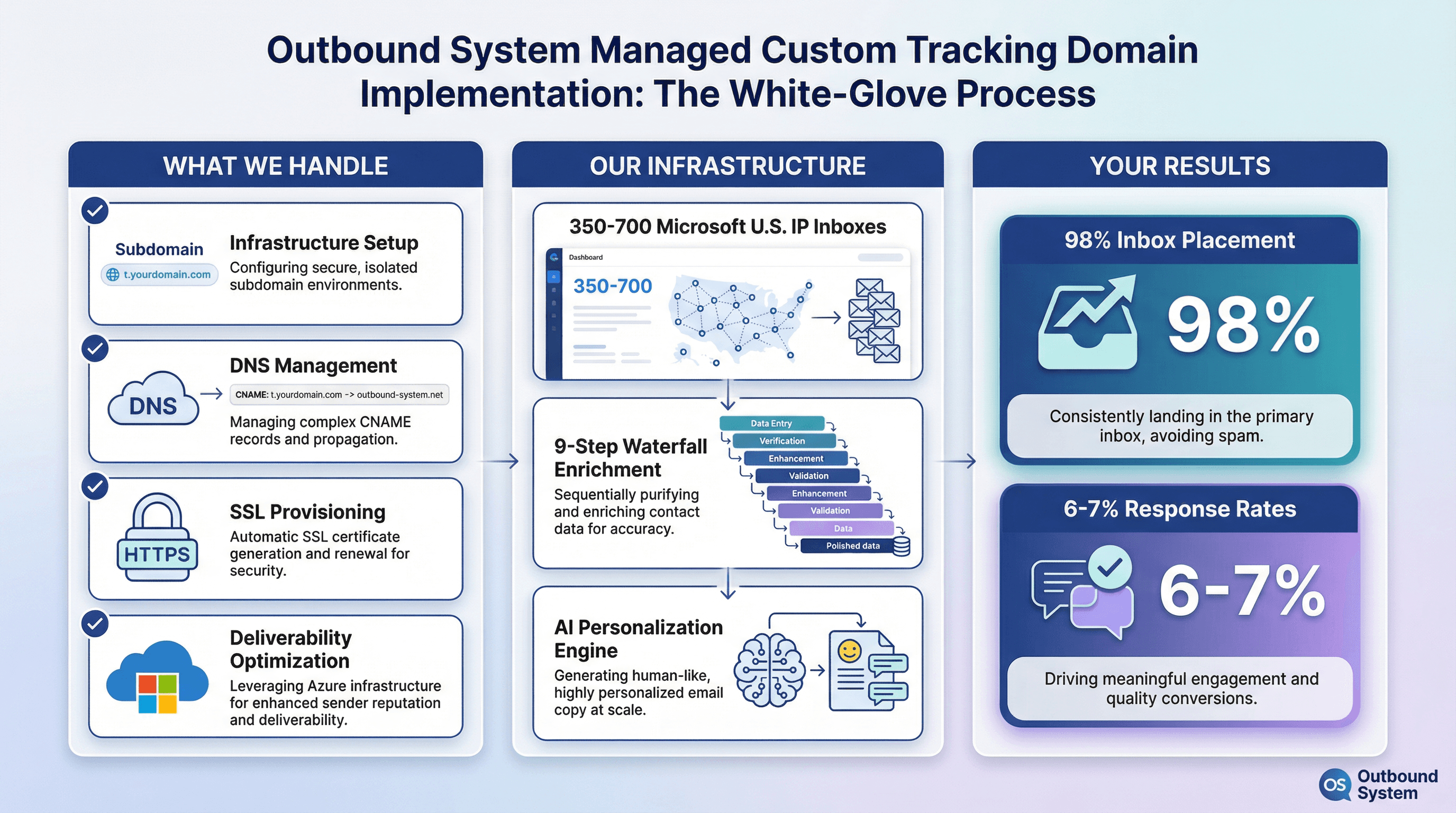
At Outbound System, we manage cold email infrastructure for 1,000+ B2B clients. Custom tracking domains are part of our standard setup.
When you work with us, we handle:
• Infrastructure setup: We configure tracking subdomains aligned with your sending domains (Pattern A, usually)
• DNS management: We give you exact CNAME records and verify everything is working
• SSL provisioning: HTTPS tracking is enabled and monitored
• Deliverability optimization: Your tracking links use private Microsoft Azure U.S. IP infrastructure, not shared pools
We combine this with:
• 350 to 700 Microsoft U.S. IP inboxes (depending on your plan) for distributed sending
• 9-step waterfall enrichment for triple-verified contact data
• AI personalization plus human copywriting for high-converting sequences
The result? 98% inbox placement and 6 to 7% response rates across our client base.
If you want cold email infrastructure that works (without spending hours debugging DNS records), book a 15-minute consultation and we'll handle it for you.
Frequently Asked Questions
Does Custom Tracking Improve Deliverability?
It can, because it removes reliance on a shared tracking domain and makes links originate from a domain you control.
Email platform documentation explicitly connects link branding to deliverability and trust signals. Industry guidance argues it protects reputation by isolating you from other senders.
It's not a silver bullet, but it removes a major deliverability risk factor.
Should Tracking Domain Match Sending Domain?
For cold email, usually yes. Keep your tracking subdomain under the same root as your "From" domain (or at least a closely related root).
This reduces trust mismatches and keeps reputation management simpler. Most platforms nudge you in this direction for good reason.
Does Custom Tracking Affect SPF/DKIM/DMARC?
Not directly. SPF/DKIM/DMARC authenticate your sender domain. Tracking is about link and pixel domains.
But both live in DNS, so teams often confuse them. If you need the full authentication checklist, check out our dedicated guide.
Is It Worth Tracking Opens Anymore?
Opens can still help you detect "something is wildly wrong" (like if opens suddenly tank, you might have a deliverability issue).
But Apple MPP makes them unreliable as a primary metric. For cold email, prioritize replies and meetings booked.
Will Custom Tracking Stop Bot Clicks?
No. Bots will still click.
What a custom domain does is:
① Keep the tracking infrastructure under your control
② Make it easier to analyze patterns (since you're not mixed with other senders)
Industry bot filtering guidance is the right mental model: treat engagement as ranges and watch for mismatched signals (like clicks without replies).
How Long Does DNS Propagation Take?
Usually a few minutes to a couple hours, but it can take up to 24 hours to fully propagate globally.
Use DNS checker tools to monitor progress. Don't panic if it's not instant.
What If My SSL Certificate Expires?
Your links break. Browsers and email clients flag them as insecure. Your emails might get blocked entirely.
Make sure certificate renewal is automated. Most platforms handle this for you, but double-check.
Can I Use Multiple Tracking Domains?
Yes. If you manage multiple sending domains, set up a separate tracking subdomain for each.
This keeps everything isolated and aligned (Pattern A from earlier). If one domain has issues, the others aren't affected.
Do I Need Custom Tracking for Plain-Text Emails?
If you're sending pure plain-text with no links and tracking completely disabled, you technically don't need a custom tracking domain.
But as soon as you include a link (booking calendar, case study, landing page), you should set one up. Most cold email campaigns include some call to action.
What If My Tool Doesn't Support Custom Tracking?
Switch tools. Seriously.
Any serious cold email platform in 2026 supports custom tracking domains. If yours doesn't, that's a red flag about their infrastructure and feature set.
Final Thoughts
A custom tracking domain has evolved from "nice-to-have" to mandatory infrastructure for serious cold email in 2026.
What you get:
• Control over link reputation (no more gambling on shared domains)
• Better deliverability through domain alignment
• Cleaner, more reliable analytics
• Higher trust and click-through rates
What it costs:
• 15 minutes of DNS setup
• Occasional monitoring to ensure everything stays healthy
The ROI is massive.
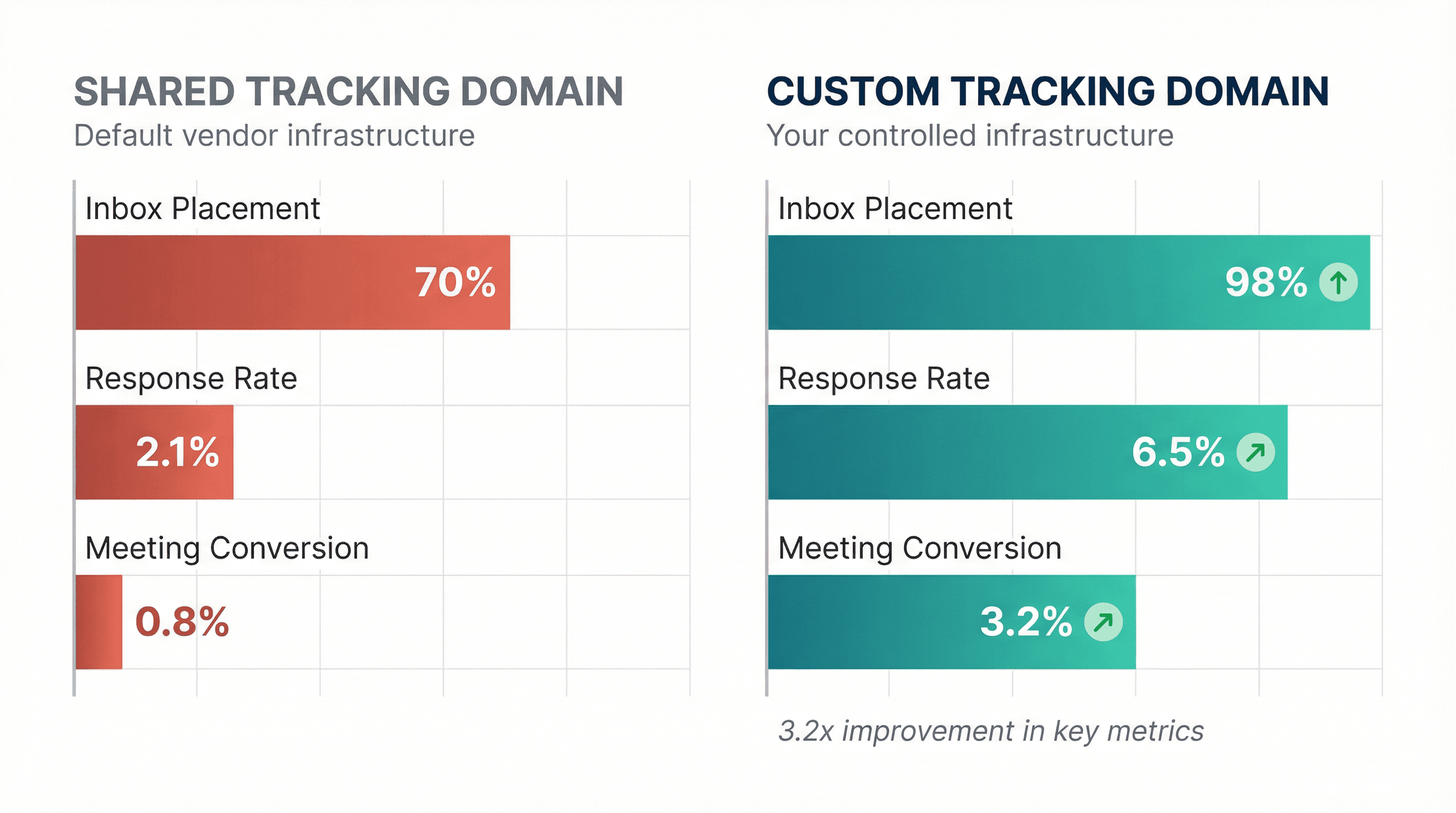
More emails hit the inbox. More prospects engage. More meetings get booked.
If you're sending cold email at scale and you don't have a custom tracking domain set up, you're leaving money on the table.
Set it up this week. Your future reply rates will thank you.
And if you want someone to handle all this infrastructure for you (so you can focus on closing deals instead of debugging DNS records), talk to us at Outbound System. We've sent 52M+ cold emails, booked 127K+ qualified meetings, and closed $26M+ in revenue for our clients using infrastructure that actually works.
Book a 15-minute consultation and we'll show you how we do it.