You finally got a reply.
After sending hundreds of cold emails, optimizing subject lines, and personalizing outreach, someone actually responded. But now you're staring at that reply wondering: what do I say that doesn't kill this opportunity?
Most cold email advice ends at "get replies." Nobody talks about what happens next. And that's where deals actually get made or lost.
When a prospect replies to your cold email, you're not just answering a question. You're either moving them closer to a meeting, or you're watching a warm lead go cold because you took too long, said the wrong thing, or made them do too much work.
Research shows you're 21 times more likely to qualify a lead if you respond within 30 minutes versus waiting longer. Speed matters. But speed alone won't save a bad response.
This guide breaks down exactly how to respond to every type of cold email reply you'll get: interested prospects, information requests, objections, angry responses, and everything in between. We'll cover the templates, the timing, and the thinking that turns replies into booked meetings.
Why Most Cold Email Replies Never Convert to Meetings
Most sales teams obsess over reply rates. They should be obsessing over what happens after the reply.
You can have a 10% reply rate and book zero meetings if you handle responses poorly. Or you can have a 3% reply rate and convert half of those into calls if you know what you're doing.
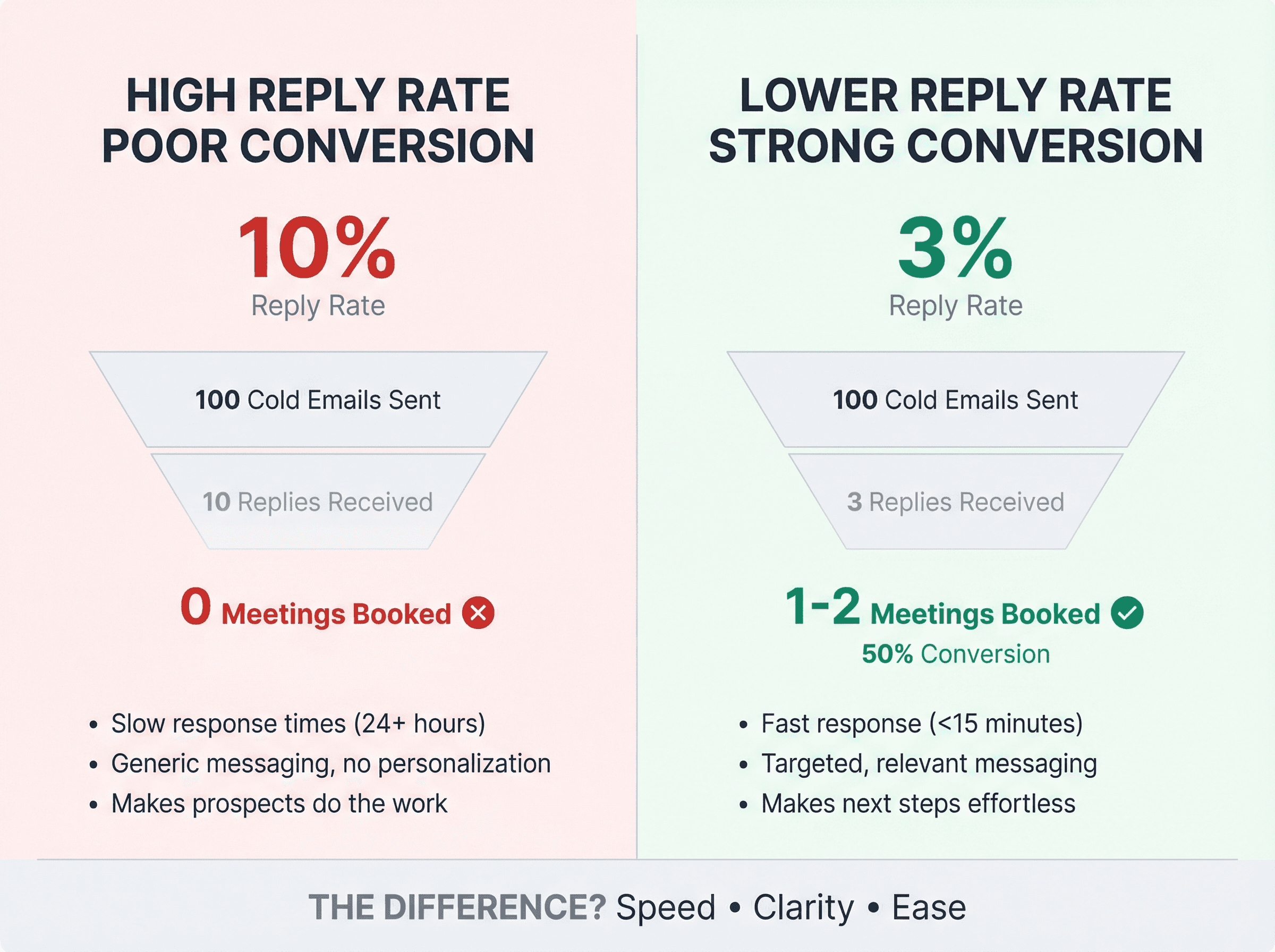
The difference? How fast you respond, what you say, and whether you make the next step easy.
At Outbound System, we see this play out across hundreds of client campaigns. The teams that book the most meetings aren't necessarily the ones with the best initial emails. They're the ones who respond to replies like pros.
How Fast Should You Respond to Cold Email Replies?
If you're not responding to hot replies within 15 minutes, you're leaving money on the table.
Interest decays fast. A prospect who replies with "Yes, let's talk" at 10 AM might get distracted, change their mind, or talk to a competitor by noon. Their day gets busy. Your email gets buried. The moment passes.
Studies show you're 100 times more likely to connect with a lead if you respond within 5 minutes versus waiting 24 hours.
But this isn't just about speed for speed's sake. It's about momentum. When someone replies to a cold email, they're in a specific headspace: they're thinking about their problem, they're curious about solutions, and they're engaged right now. That window closes fast.
Cold Email Response Time Benchmarks
Here's what response time should look like in 2026:
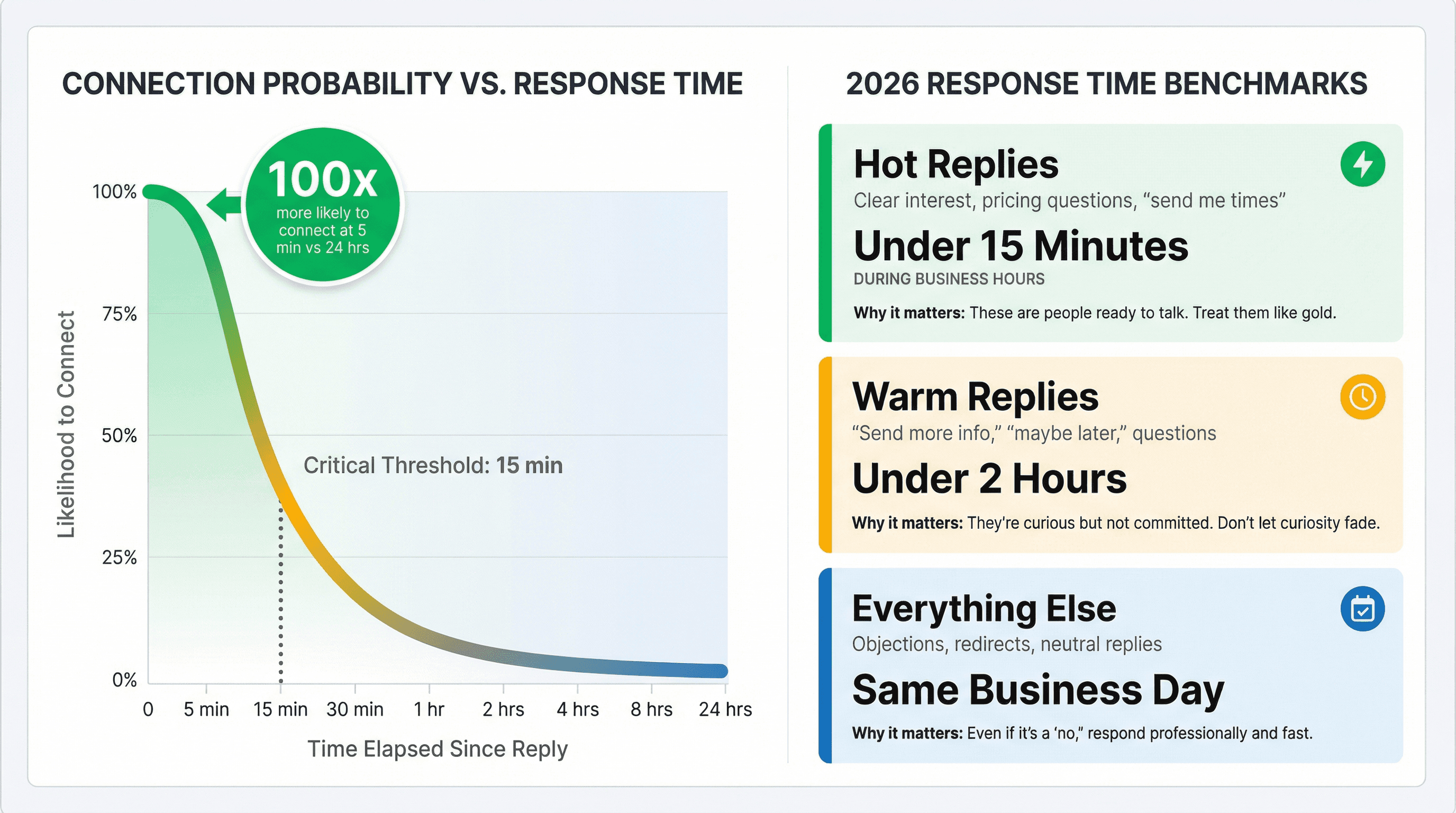
Reply Type | Target Response Time | Why It Matters |
|---|---|---|
Hot replies (clear interest, pricing questions, "send me times") | Under 15 minutes during business hours | These are people ready to talk. Treat them like gold. |
Warm replies ("send more info," "maybe later," questions) | Under 2 hours | They're curious but not committed. Don't let curiosity fade. |
Everything else (objections, redirects, neutral replies) | Same business day | Even if it's a "no," respond professionally and fast. |
If you can't consistently hit these windows, you don't have a copy problem. You have an operations problem. Fix your inbox management before you worry about your subject lines.
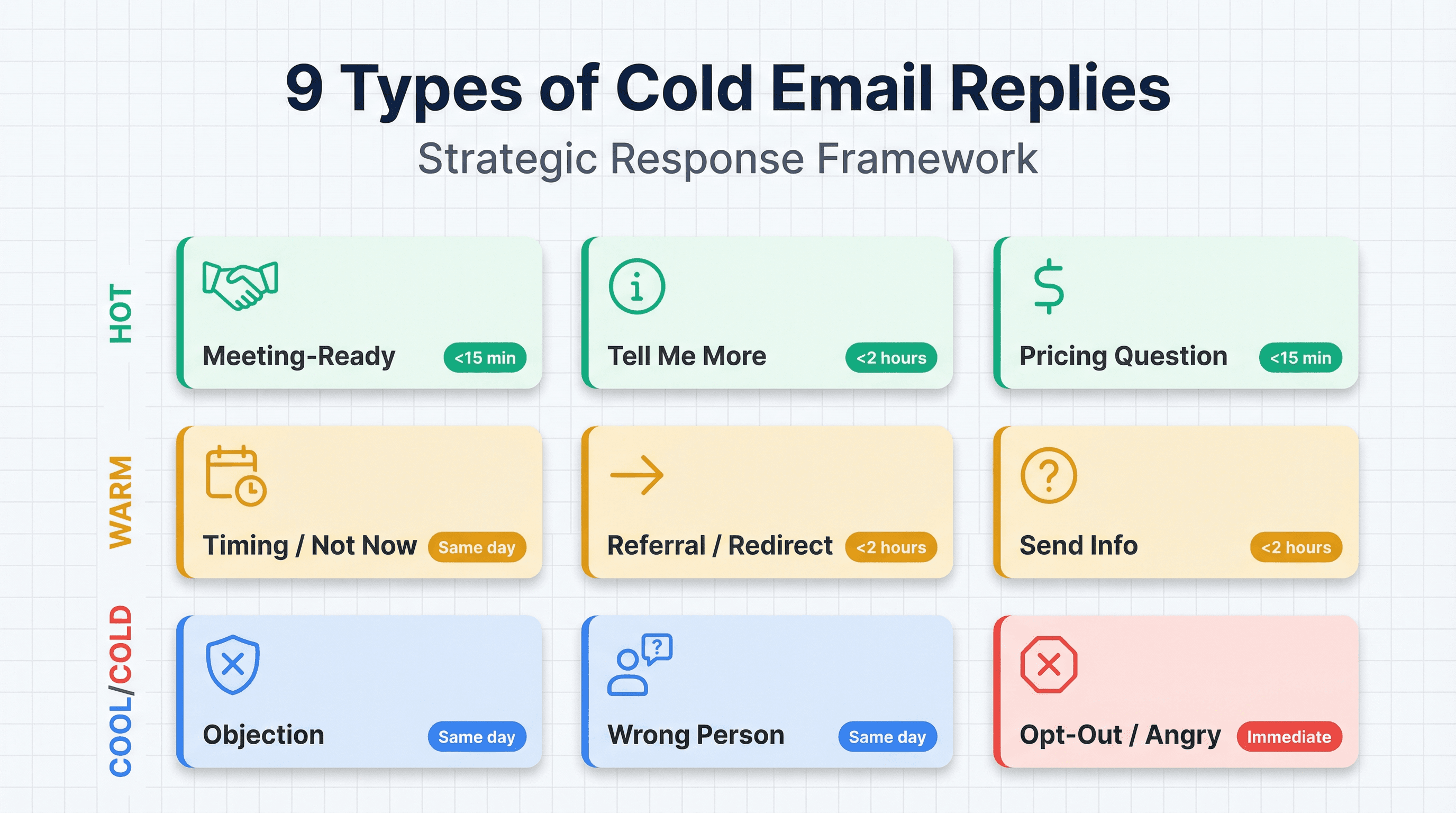
9 Types of Cold Email Replies (And How to Respond)
Every cold email reply falls into one of nine buckets. Your response strategy changes based on which bucket you're in.
1. "Yes, Let's Talk" Replies (Meeting-Ready)
What it looks like:
"This sounds interesting, can we schedule a call?"
"Send me some times that work"
"Let's discuss this"
Your job: Lock the meeting immediately.
Template:
Why it works: You're not making them do scheduling labor. You gave two specific options, then opened the door if those don't work. No back-and-forth about "finding a time."
Alternative (if they prefer calendar links):
Use this when they explicitly asked for a link, or when they seem self-serve oriented. Don't lead with the calendar link and make them do the work.
Critical mistake to avoid: Don't respond to "Yes, let's talk" with "Great! Here's my calendar link." That's lazy. Give them times first, calendar link as backup.
2. "Tell Me More" Replies (Interested But Vague)
What it looks like:
"This sounds interesting, can you tell me more?"
"I'm curious, what exactly do you do?"
"How does this work?"
Your job: Give a brief answer that creates curiosity, then propose a call.
Template:
Why it works: You answered their question in two sentences, showed you understand their world, and made the next step easy. You didn't dump a 12-paragraph explanation that overwhelms them.
What NOT to do: Don't send a wall of text explaining every feature. That kills momentum. Give them just enough to stay curious, then get on a call where you can actually tailor the conversation.
3. How to Handle "Send Me More Info" Replies
This is the trickiest reply type. It usually means one of these:
"I'm curious but busy"
"I don't trust you yet"
"I want to screen you without a call"
"I'm politely deflecting"
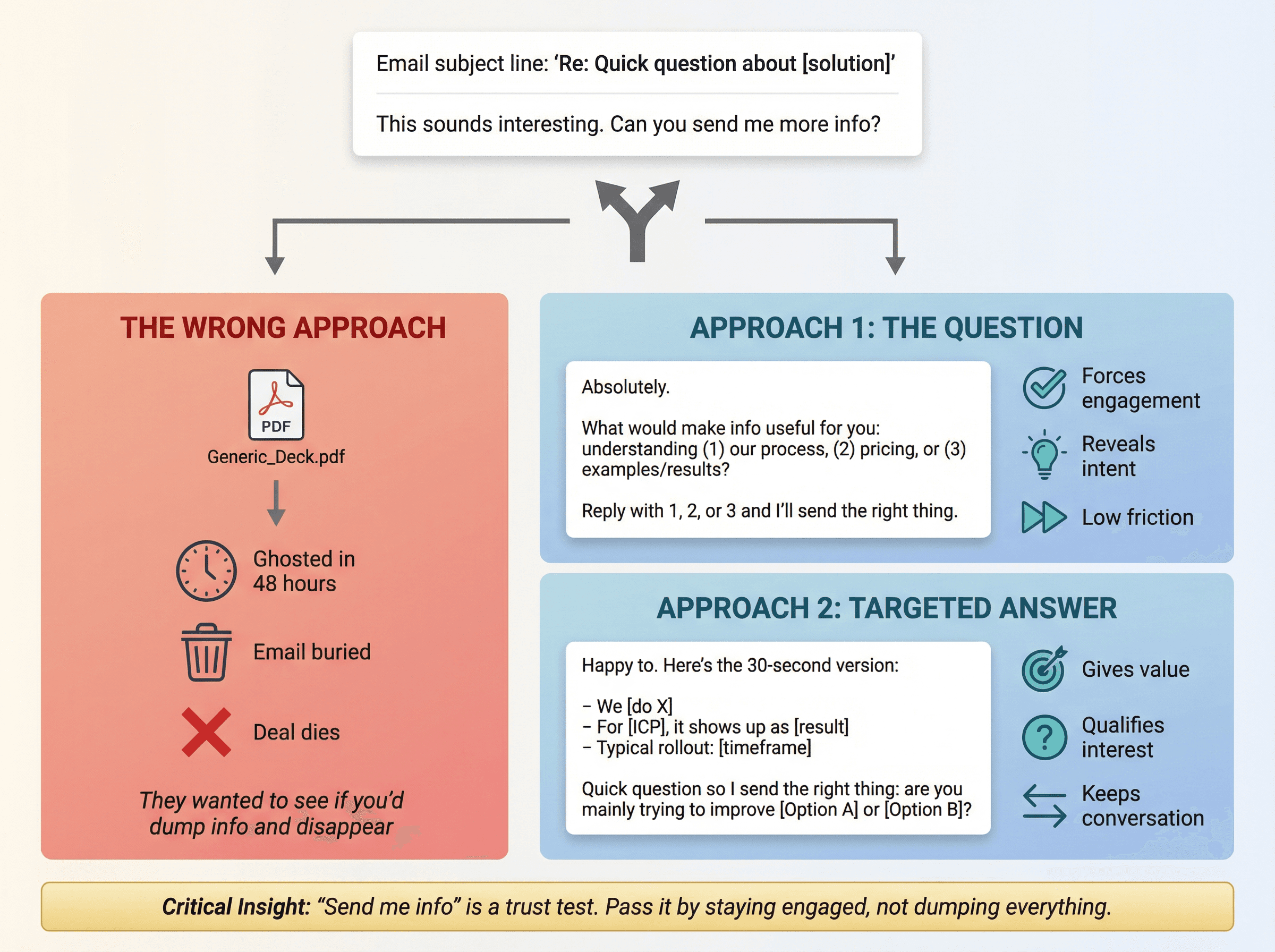
Template A (The Question):
Why this works: You're not sending a generic PDF. You're making them engage, which tells you (a) if they're actually interested and (b) what matters to them. Plus, replying with a single number is so easy that even busy people will do it.
Template B (The Targeted Answer):
Why this works: You gave them something (three bullets that answer "what/who/how"), but you also asked a qualifying question. If they answer, you send targeted info and book a call. If they ghost, they weren't that interested anyway.
Critical insight: "Send me info" is often a test. They want to see if you'll dump a deck and disappear, or if you'll stay engaged and helpful. Pass the test by giving focused info, not everything you've got.
4. How to Answer Cold Email Pricing Questions
Pricing replies are high intent. Don't get cute.
Template A (Give a Range):
Template B (If pricing is complex):
Why it works: You answered honestly without creating 20 follow-up questions. You gave a ballpark, explained the variable, and asked a qualifier that helps you send accurate numbers.
Critical mistake: Never reply to a pricing question with "It depends, let's hop on a call to discuss." That feels evasive. Give them something, even if it's a range. Then suggest a call to dial in specifics.
At Outbound System, our pricing is transparent (Starter at $1,499/month, Growth at $2,499/month, Scale at $3,999/month). We lead with numbers because hiding pricing creates friction. If your pricing is complex, explain why in the email, don't just dodge.
5. How to Respond to "Not Now" or Timing Objections
What it looks like:
"We're focused on other priorities right now"
"Circle back next quarter"
"Reach out in 6 months"
Your job: Turn it into a scheduled future touch, not a dead end.
Template A (Permission + Date):
Template B (The Honest Exit):
Why these work: Template A gets you a specific date and context (which makes your follow-up relevant). Template B shows respect and reduces spam complaints. Most people will say "sure, email me in Q3," which gives you permission. Some will say "don't follow up," which saves you time.
Critical insight: Most "not now" replies are real. Don't try to overcome timing objections with aggressive follow-up. Get permission, set a reminder, and actually follow up when you said you would.
6. How to Handle Cold Email Referral Replies
What it looks like:
"I'm not the right person, talk to [Name]"
"Email John, he handles this"
Your job: Make the handoff effortless.
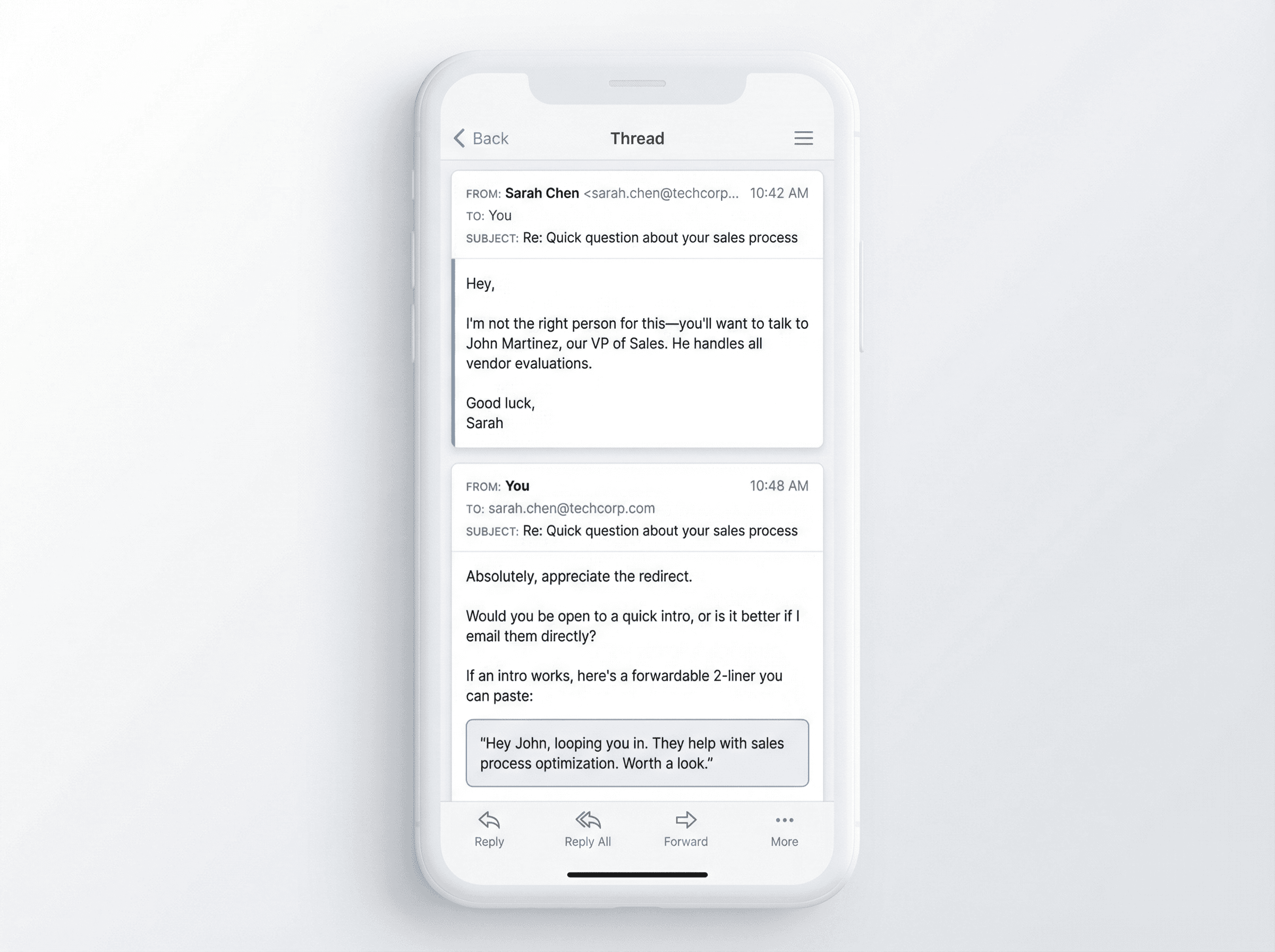
Template:
Why it works: You gave them two options (intro or direct contact), and if they choose intro, you literally wrote it for them. All they have to do is forward. Friction eliminated.
Bonus: Always thank the person who redirected you. Even if you never work with their company, they just did you a favor. Send a quick "Thanks for the redirect, I appreciate it. Won't bother you again."
7. "Wrong Person" Replies: What to Say
Template A (Find the Owner):
Template B (If they won't help):
Why Template B matters: Exiting gracefully is underrated. Sometimes prospects redirect you later if you don't push. Plus, you're representing your company. Being polite protects your brand.
8. How to Respond to Cold Email Objections
Objections aren't rejections. They're opportunities to clarify, reframe, or discover if this is actually a fit.
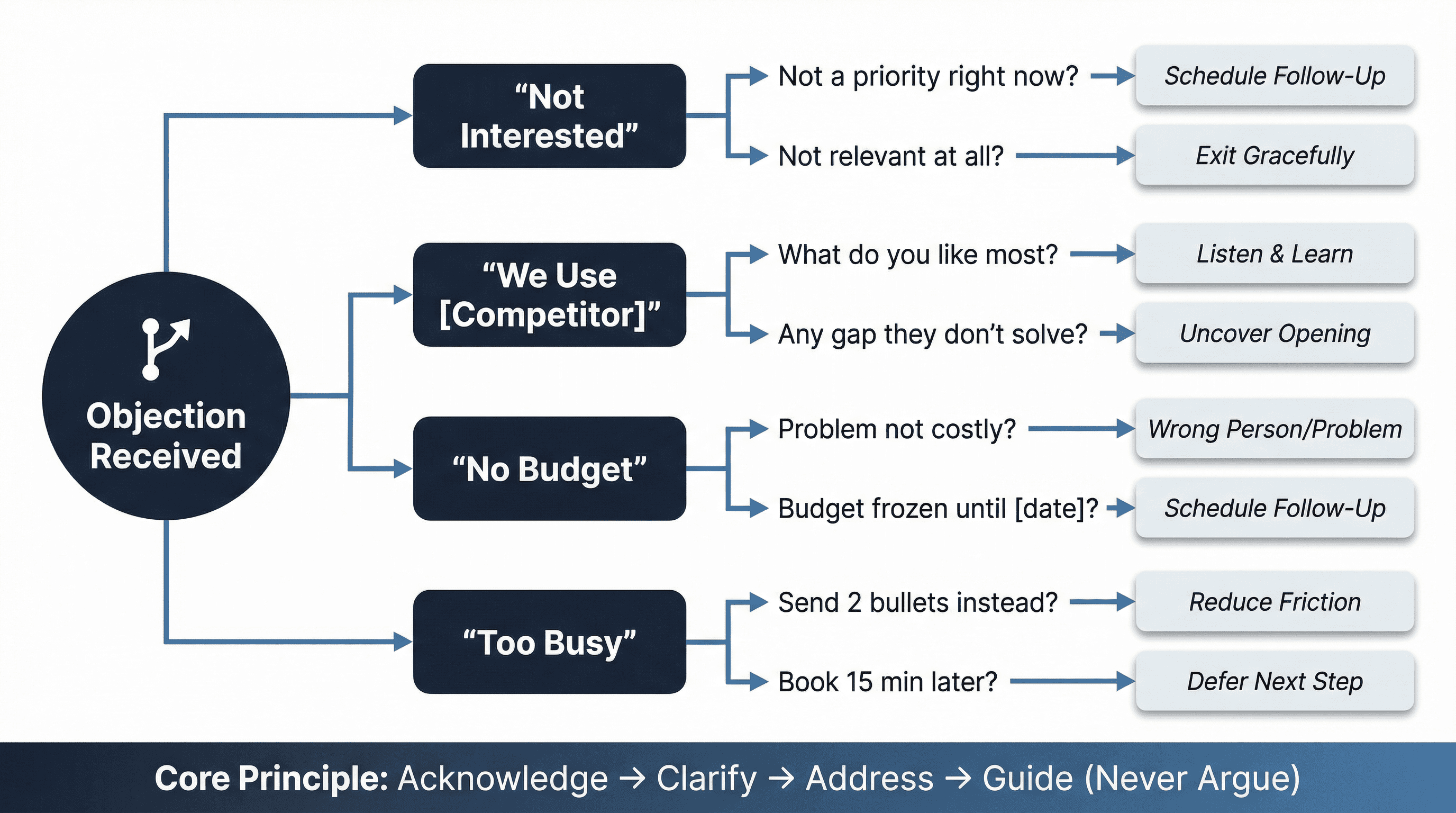
"Not interested"
This can mean: not relevant, not now, not you, or just annoyed.
Template:
If they say "not relevant," stop. If they say "not a priority," you might have a timing issue worth revisiting later.
"We already use [Competitor]"
Template:
Why it works: You're not attacking the competitor. You're listening. And if they reveal a gap, you just got an opening.
"No budget"
Template:
If (b), schedule a follow-up. If (a), you're talking to the wrong person or solving the wrong problem.
"Too busy"
Template:
Then send two bullets, not a deck.
Critical principle for all objections: Acknowledge, clarify, address, and guide toward next steps. Never argue. Never dismiss. Listen, then reframe.
9. How to Handle Opt-Out and Angry Cold Email Replies
If someone says "unsubscribe," "remove me," or "stop," your only job is to comply immediately.
Template:
That's it. No follow-up questions, no "before you go...", nothing. Just confirm and stop.
Why this matters in 2026:
Gmail's sender guidelines require bulk senders to honor unsubscribe requests within 48 hours. Yahoo requires it within 2 days. CAN-SPAM gives you 10 business days.
But here's the thing: waiting a week to process opt-outs destroys your sender reputation and increases spam complaints. At Outbound System, we process opt-outs immediately (real-time suppression lists). This protects email deliverability for our clients.
For angry/profane replies: Usually best to not respond at all. They want you gone. Disappear. Don't try to apologize or explain. Just remove them and move on.
Cold Email Reply Management Workflow That Scales
If you want this to work without babysitting every response, build it as a system:
A. Tag in 10 Seconds
Use the 9 buckets above. No extra creativity. Just tag:
Meeting-ready
Info Request
Pricing
Timing
Referral
Objection
Wrong Person
Opt-out
Angry
B. Hot Reply SLA
Meeting-ready, pricing, clear interest: respond within 15 minutes
Everything else: same business day
C. One Response Goal
Before you type anything, write at the top of your internal note:
"Book meeting"
"Get 1 qualifier"
"Get referral intro"
"Schedule follow-up date"
"Confirm opt-out"
If you can't name the goal, your email will ramble.
D. Log the Outcome
Track:
• Bucket (which of the 9 types)
• Time-to-first-response (how fast you replied)
• Meeting booked (yes/no)
• Reason lost (ghosted after info, not a fit, timing, competitor)
This becomes your conversion optimization loop. You can't improve what you don't measure.
Common Cold Email Reply Mistakes That Kill Deals
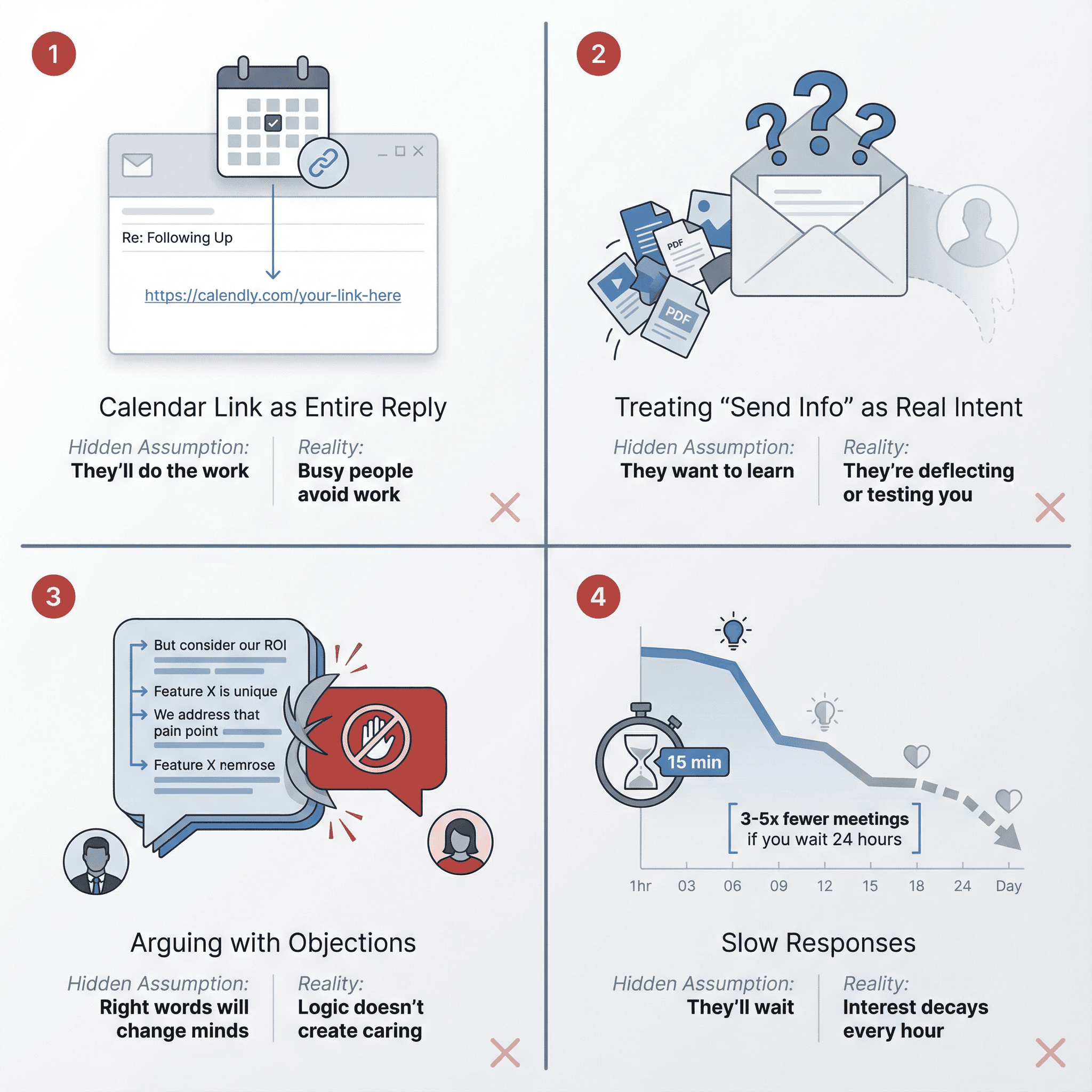
Mistake 1: Sending the calendar link as your entire reply
Hidden assumption: "They'll do the work."
Reality: Scheduling is work. Busy people avoid work. Give them specific times first, calendar link as backup.
Mistake 2: Treating "send info" as real intent
Hidden assumption: "They want to learn."
Reality: They might be deflecting. Your job is to convert it into a micro-commitment (answering a question, taking a call).
Mistake 3: Arguing with objections
Hidden assumption: "If I say the right words, they'll change their mind."
Reality: You can't logic someone into caring. You can clarify and exit cleanly. Sometimes the best outcome is preserving the relationship for later.
Mistake 4: Slow responses
Hidden assumption: "They'll wait."
Reality: Interest decays. Every hour you wait, the chance of booking that meeting drops. At Outbound System, we see this in the data: teams that respond within minutes book 3-5x more meetings than teams that wait a day.
Cold Email Reply-to-Meeting Conversion Benchmarks
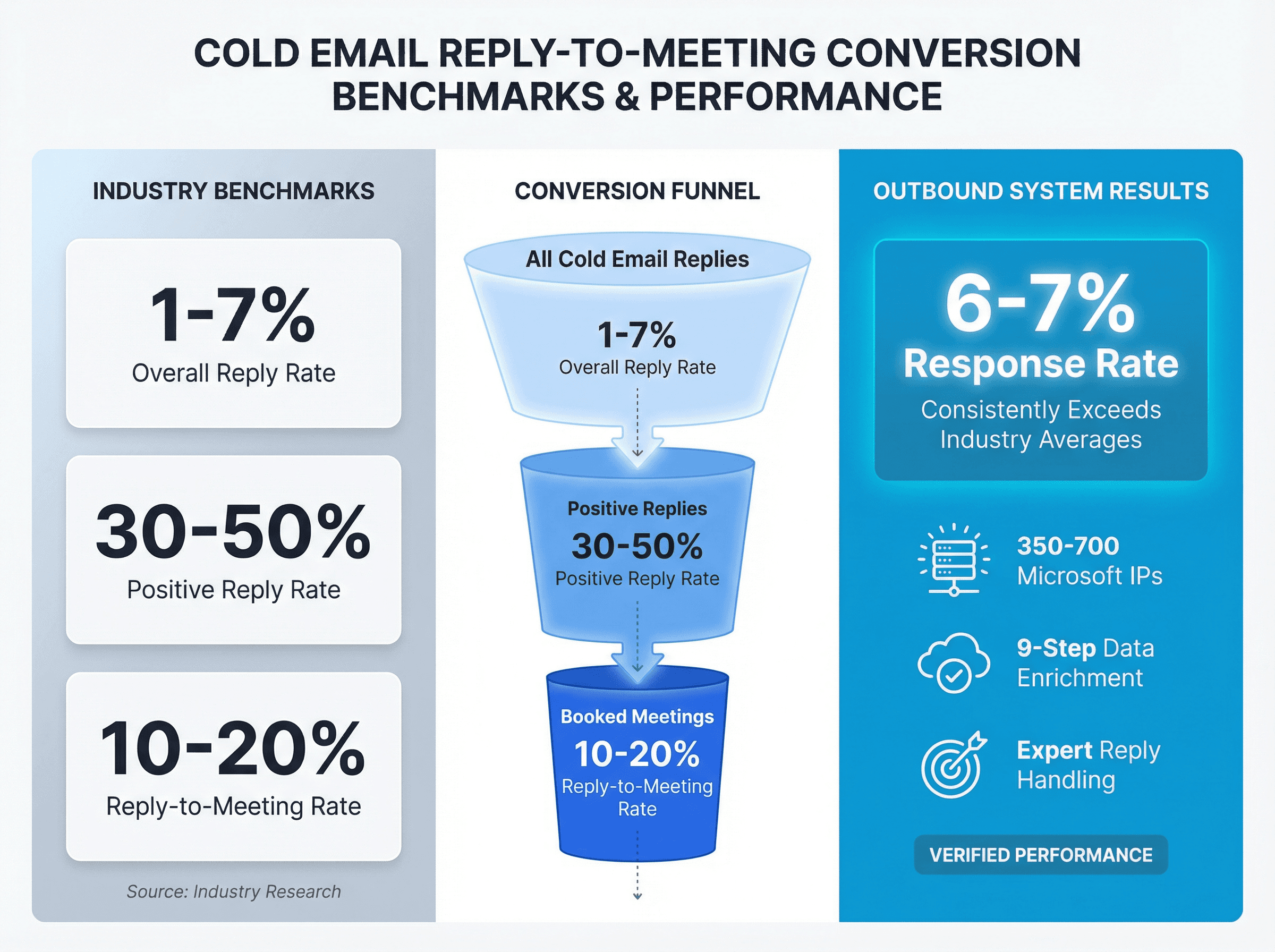
Benchmarks vary wildly by industry, offer, and list quality. But here's what you should aim for:
Metric | Target | Source |
|---|---|---|
Overall reply rate | 1-7% | Industry research |
Positive reply rate | 30-50% of total replies | Industry standard |
Reply-to-meeting rate | 10-20% | Industry benchmarks |
At Outbound System, we achieve 6-7% response rates across client campaigns, with meeting-booked rates that consistently exceed industry averages. The difference? Infrastructure (350-700 Microsoft IPs), data quality (9-step enrichment), and reply handling that treats every response like an opportunity.
How Outbound System Handles Replies for Clients
Most cold email tools stop at sending. They don't help you convert the replies into meetings.
We built Outbound System to solve exactly that problem.
Here's what's included in every plan:
→ Unified inbox management:
All replies from all campaigns in one place. No juggling multiple email accounts. No missed responses.
→ 5-second reply notifications:
Hot leads get flagged immediately. Your team responds fast, or we respond on your behalf (depending on your setup).
→ Dedicated account strategist:
Someone who actually knows your campaigns, understands your offer, and helps optimize reply handling. Not a chatbot.
→ Real-time metrics:
Reply rates, positive replies, meetings booked. You see exactly what's working.
→ Microsoft Azure U.S. IP infrastructure:
98% inbox placement means more replies reach you in the first place. Learn more about our deliverability approach.
Pricing
Plan | Monthly Price | Emails per Month | Contract |
|---|---|---|---|
Starter | $1,499/month | Up to 15,000 | Month-to-month |
Growth | $2,499/month | Up to 30,000 | Month-to-month |
Scale | $3,999/month | Up to 60,000 | Month-to-month |
Both plans include:
• AI personalization
• 9-step waterfall data enrichment
• Unified inbox
• Real-time metrics
• Dedicated strategist
See full pricing and features.
The bottom line: We don't just send emails. We help you turn replies into booked meetings. That's the difference between a tool and a system.
What to Do After Getting a Cold Email Reply
Cold email advice usually ends at "get more replies." But that's only half the game.
The expensive skill is turning replies into next steps without creating friction or complaints.
Most teams:
• Respond too slowly
• Send too much information
• Make prospects do too much work
• Ignore objections instead of reframing them
• Forget to follow up when they said they would
You can fix all of that by treating reply handling as a core skill, not an afterthought.
Speed matters. Clarity matters. Making the next step easy matters.
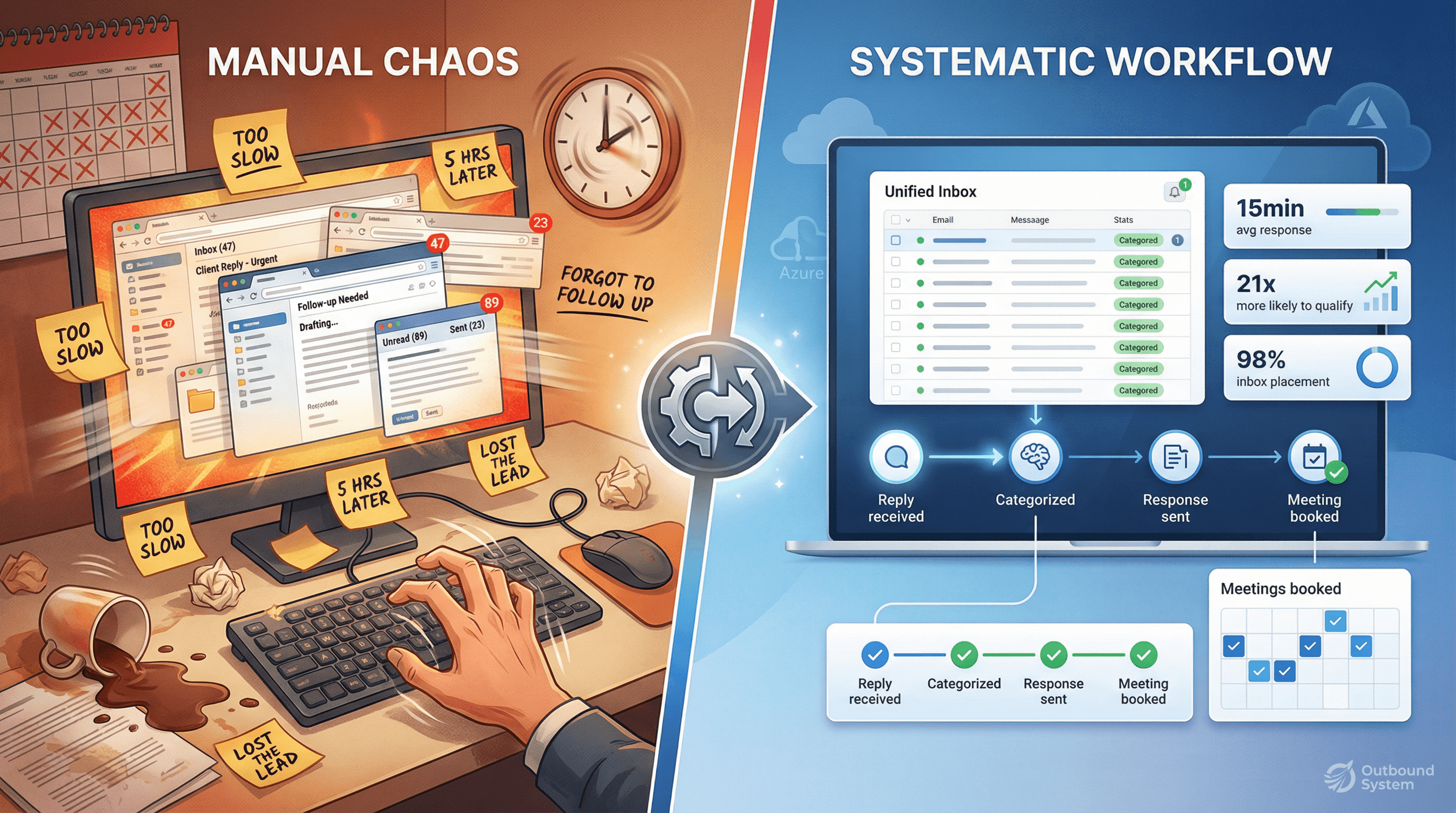
And if you don't have the bandwidth to respond to replies the right way, fast enough, consistently? That's where a service like Outbound System makes sense. We handle the entire workflow: sending, managing replies, booking meetings, and handing you qualified conversations.
FAQs About Responding to Cold Email Replies
How fast should I respond to a cold email reply?
For hot replies (clear interest, pricing questions), aim for under 15 minutes during business hours. For warm replies ("send info," questions), aim for under 2 hours. Everything else should get a response the same business day. Research shows you're 21x more likely to qualify a lead if you respond within 30 minutes.
What if someone replies with "send me more info"?
Don't dump a 10-page deck. Instead, ask what specifically they want to know: pricing, process, or results. Make them pick 1, 2, or 3. This forces engagement and tells you if they're actually interested. Then send targeted info (2-3 bullets max) and propose a call to go deeper.
Should I use calendar links in my reply?
Yes, but not as your only option. Lead with two specific time options ("Tuesday at 2 PM or Wednesday at 10 AM?"), then add "or here's my calendar link if those don't work." This reduces friction while still giving them an easy out if they prefer self-scheduling.
How do I handle objections like "We already use a competitor"?
Don't attack the competitor. Ask what they like about it, then ask if there's any gap they wish was solved better. If they reveal a pain point, you have an opening. If they're truly happy, exit gracefully and stay on their radar for when things change.
What should I say to an angry or rude reply?
Usually: nothing. If someone replies with profanity or hostility, the best response is often no response. Just remove them from your list and move on. If they asked a question (even rudely), you can send one brief, factual reply, then stop. Never retaliate or argue.
How long should I wait before following up if they don't reply to my response?
If you answered their question or sent info, give them 3-4 business days, then send one polite follow-up. Example: "Just checking if you had any questions about the material I sent. Happy to clarify. If now isn't a good time, I can reach out next month." If no response after that, move on.
What's the best way to handle "not now, circle back later" replies?
Get specific. Ask when to follow up and why that timing is better ("What's different then?"). This gives you context for your future outreach. Then set a calendar reminder and actually follow up when you said you would. Most salespeople forget. Don't be most salespeople.
Should I respond to out-of-office auto-replies?
No, but use them. Note when the person returns and schedule a follow-up for right after. If they provided an alternate contact, consider reaching out to that person if it's appropriate.
How many templates should I have for different reply types?
Have base templates for the 9 common reply types (meeting-ready, info request, pricing, timing, referral, objection, wrong person, opt-out, angry), but always customize before sending. Templates save time, but personalization wins deals.
What metrics should I track for reply handling?
Track these:
• Time-to-first-response (how fast you replied)
• Reply-to-meeting booked rate (% of replies that turn into meetings)
• Reason lost (ghosted, not a fit, timing, competitor)
• Positive reply rate (% of all replies that show interest)
This data tells you where your process breaks down.
Ready to stop leaving meetings on the table?
At Outbound System, we manage the entire cold email workflow: sending, reply handling, and booking meetings. You get qualified conversations handed to you, not a pile of responses you have to figure out.
Book a 15-minute consultation to see if we're a fit.