You're a B2B SaaS founder (or the first sales hire) searching "cold email for B2B SaaS startups," and you're not looking for templates.
You're trying to do something more specific:
Book qualified sales meetings without burning your domain, getting spam-filtered, or wasting months.
Prove (or disprove) ICP + positioning fast, with real conversations and real objections.
Build a repeatable outbound system you can scale (and hire into) once it works.
This guide is built for that outcome. It's also built for the reality of 2024 to 2026 deliverability: inbox providers have tightened the rules. Google's and Microsoft's bulk sender requirements make authentication, complaint rates, and unsubscribe handling non-negotiable if you want consistent inboxing.
What Changed in Cold Email (And Why SaaS Founders Care)
The environment got harder, but it didn't get random. Three forces explain almost everything:
How Inbox Providers Enforce Sender Trust in 2025
Google's sender guidelines (effective Feb 2024) require authentication, and for bulk senders, DMARC and one-click unsubscribe for promotional mail, plus keeping spam complaint rates low.
Microsoft announced similar enforcement for Outlook.com consumer domains for high-volume senders (5,000+ emails/day), including SPF, DKIM, and DMARC requirements and rejection of non-compliant mail starting May 5, 2025.
Translation for SaaS startups: You can't "copy + paste templates and blast" anymore. Not because it's morally bad (it is), but because it literally stops getting delivered.
Why B2B Buyers Ignore More Emails Than Ever
Research shows a steady year-over-year decline in reply rates since 2019, with reply rates down by more than half since 2019, while unsubscribe and bounce rates were relatively consistent. That pattern suggests a core issue: engagement, not just deliverability.
Industry data also indicates a decline in average reply rates from 2023 to 2024 (6.8% to 5.8%) attributed to inbox fatigue and stricter anti-spam policies.
Why You Can't Trust Open Rates Anymore
Apple's Mail Privacy Protection and newer inbox behaviors make open tracking noisy, and even Google notes open rates aren't something they can verify as an accurate signal of delivery or performance.
Translation: If your cold email strategy depends on open rates, you're driving with a broken speedometer.
Cold Email Is a Distribution Channel, Not a Strategy
From first principles, cold email is just a way to start conversations with people who haven't opted in.
A conversation happens when your email answers, in the buyer's brain: "Is this relevant to me, right now, enough to reply?"
That means cold email success is a system with 5 parts:
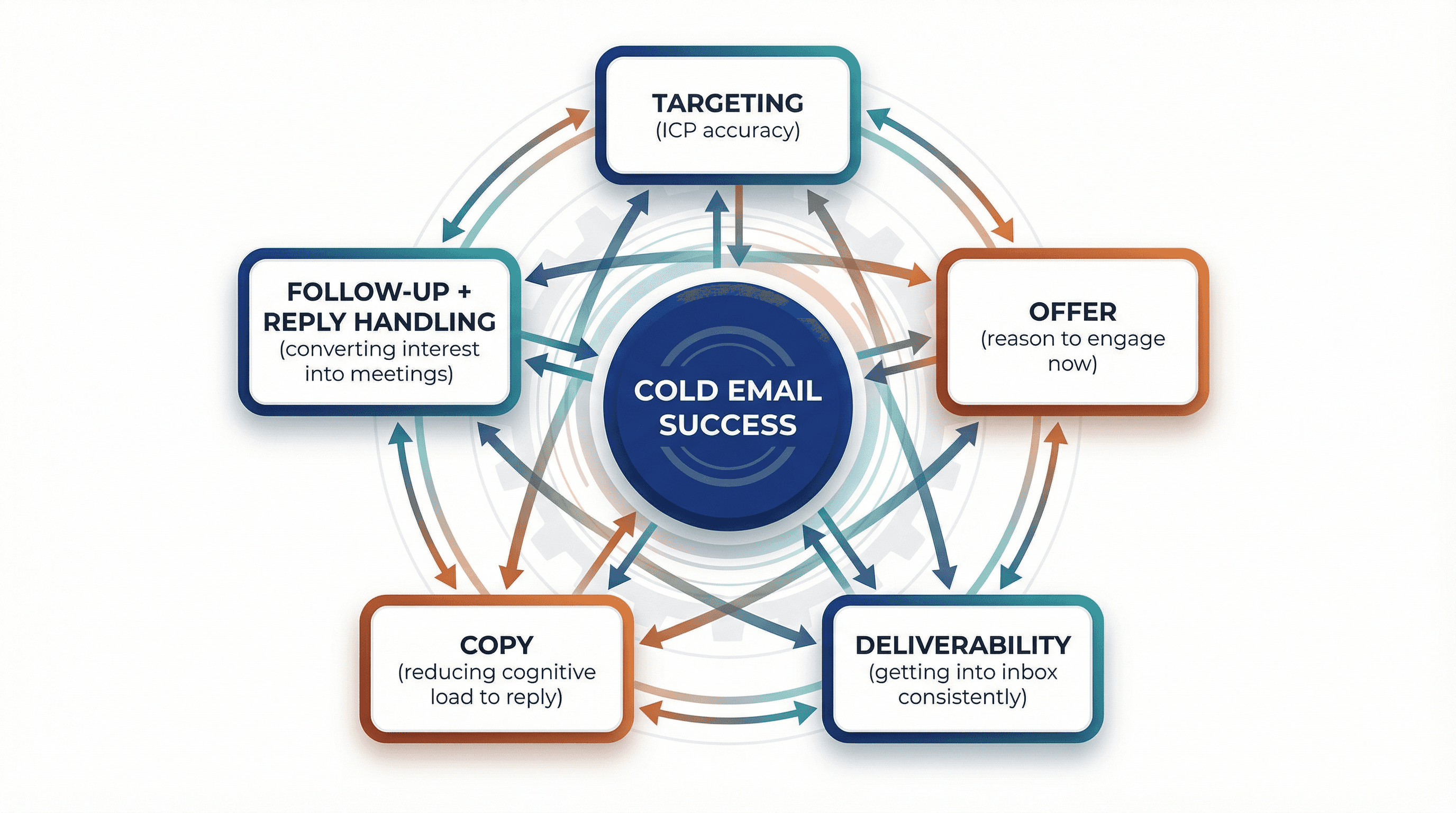
1. Targeting (ICP accuracy)
2. Offer (reason to engage now)
3. Deliverability (getting into the inbox consistently)
4. Copy (reducing cognitive load to reply)
5. Follow-up + reply handling (converting interest into meetings)
If any one part is weak, the whole thing collapses.
Should B2B SaaS Startups Use Cold Email?
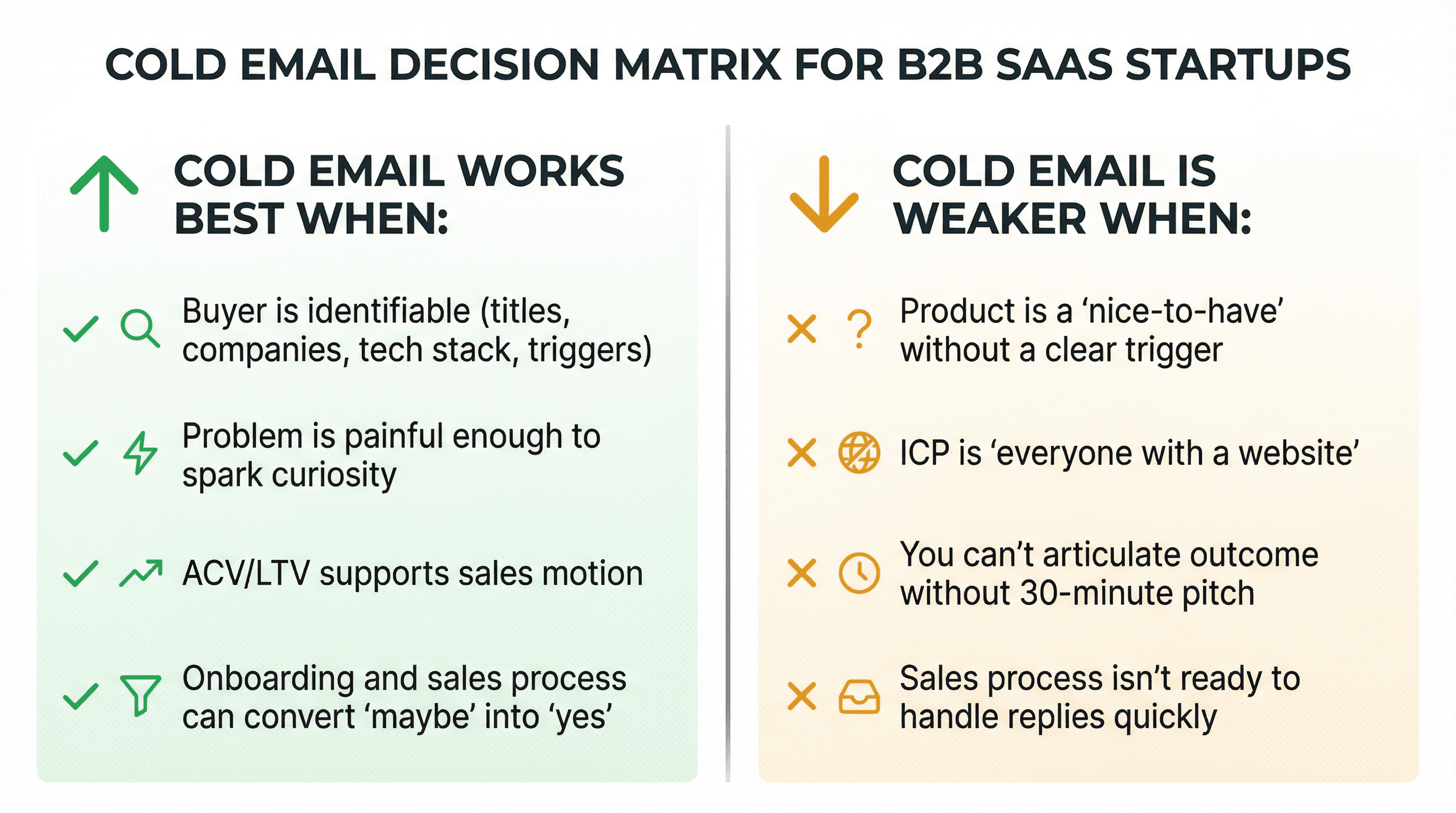
Cold email is strongest when:
• Your buyer is identifiable (titles, companies, tech stack, triggers)
• Your problem is painful enough that a stranger can spark curiosity
• Your ACV/LTV supports sales motion (or at least sales-assisted)
• Your onboarding and sales process can convert "maybe" into "yes"
Cold email is weaker when:
• Your product is a "nice-to-have" without a clear trigger
• Your ICP is "everyone with a website"
• You can't articulate a specific outcome without a 30-minute pitch
• Your sales process isn't ready to handle replies quickly
A brutal but useful test:
If you can't write a 1-sentence value proposition that a buyer would believe from a stranger, you don't have a cold email problem. You have a positioning problem.
Good news: cold email is also one of the fastest ways to fix positioning, because it forces you into real objections.
How to Build an ICP for Cold Email Outreach
Most SaaS ICPs fail because they're descriptive (industry, size) instead of causal (why they would buy).
A cold emailable ICP has 3 layers:
Layer A: Firmographics (Who They Are)
• Industry (but be careful: "SaaS" isn't an industry, it's a business model)
• Company size (employees, revenue)
• Geography (matters for compliance and timing)
• Growth stage (early, scaling, enterprise)
Layer B: Pain Mechanics (Why They Would Buy)
This is the part most people skip. You need:
A painful job-to-be-done
What specific problem keeps them up at night? Not generic pain like "need better software" but specific friction like "pipeline hygiene breaks at 30+ reps" or "SOC2 pressure increases when enterprise deals start."
A measurable cost of the problem
Can you quantify time wasted, revenue lost, or risk created? "Manual reconciliation breaks when volume hits X" is more compelling than "reconciliation is tedious."
A plausible reason the problem exists at that ICP
Why does this company type have this problem? Connecting the dots makes your targeting credible.
A reason to care now (trigger)
What changed to make solving this urgent? Triggers give you timing.
Examples of pain mechanics in SaaS:
→ RevOps: "pipeline hygiene breaks at 30+ reps"
→ Security: "SOC2 pressure increases when enterprise deals start"
→ Finance: "manual reconciliation breaks when volume hits X"
→ Product analytics: "teams ship blind when adoption drops"
Layer C: Trigger Events (Why Now)
Triggers make cold email feel less "cold" because they give you timing.
Common SaaS triggers:
• Hiring (new VP Sales, RevOps, Security lead)
• Funding rounds
• Tech stack change (new CRM, new data warehouse)
• New compliance requirement
• Competitor migration signals
• New market expansion (new geo, new segment)
Practical segmentation rule: Start with 1 narrow wedge that has high pain + clear trigger + clear buyer. Then expand.
How to Create a Cold Email Offer That Gets Replies
Most SaaS cold emails try to sell the product.
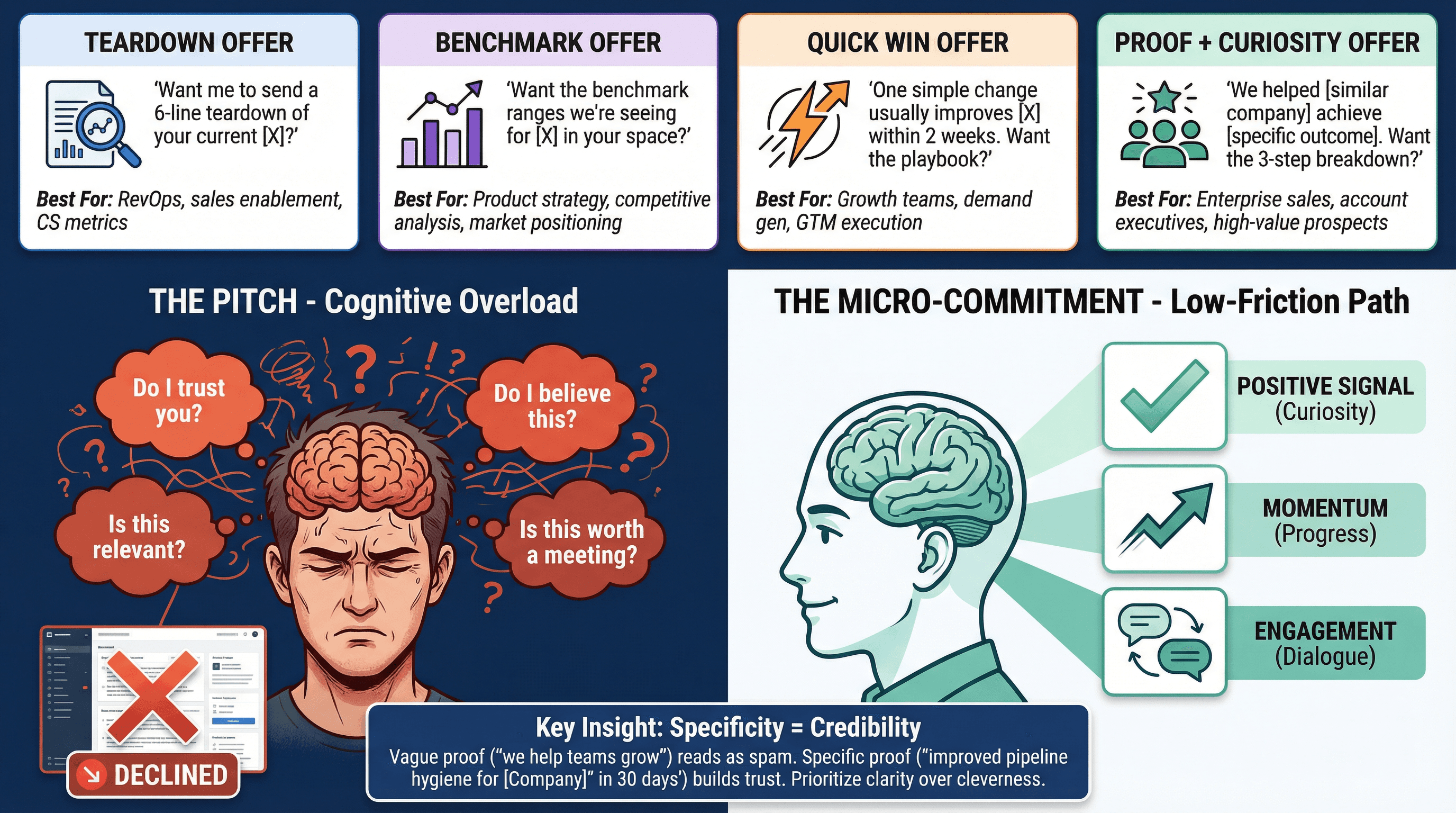
Research on millions of cold emails found that pitching in the first email can drop reply rates by as much as 57%.
Why? Because a pitch forces the buyer to do heavy work:
• "Do I trust you?"
• "Do I believe this?"
• "Is this relevant?"
• "Is this worth a meeting?"
A good cold email offer does the opposite: it creates a micro-commitment.
Best Cold Email Offers for B2B SaaS
Offer Type | What It Is | Best For |
|---|---|---|
The "teardown" offer | "Want me to send a 6-line teardown of your current X?" or "Can I share 3 gaps I noticed in your onboarding flow?" | Product-led + marketing ops + CRO-type improvements |
The "benchmark" offer | "Want the benchmark ranges we're seeing for X in your space?" or "We put together a 1-page benchmark for teams at your stage." | RevOps, sales enablement, CS metrics |
The "quick win" offer | "We found one simple change that usually improves X within 2 weeks. Want the playbook?" | Outbound, retention, activation, pipeline ops |
The "proof + curiosity" offer | "We helped [similar company type] achieve [specific outcome]. Want the 3-step breakdown?" | Most B2B SaaS when you have credible social proof |
Key constraint: Your proof must be credible and specific. Vague proof ("we help teams grow faster") reads as spam.
How to Build a B2B SaaS Cold Email List
Deliverability is partly a technical problem, but it starts as a data problem. Bad data creates bounces (hurt reputation), spam complaints ("who are you?"), and low engagement (filters learn you're unwanted).
The List Quality Checklist
Quality Factor | What to Verify | Why It Matters |
|---|---|---|
Right person | Actual decision-maker or strong influencer (role + responsibility) | Emailing an intern when you need the VP wastes everyone's time |
Right company | Matches your firmographics and pain mechanics (ICP fit) | Even perfect copy won't help if they're not in-market |
Right timing | Evidence they might care now (trigger or need) | Recent hiring, funding, tech changes, or seasonal factors |
Right address | Valid and deliverable email (verified) | Unverified addresses = high bounces = damaged reputation |
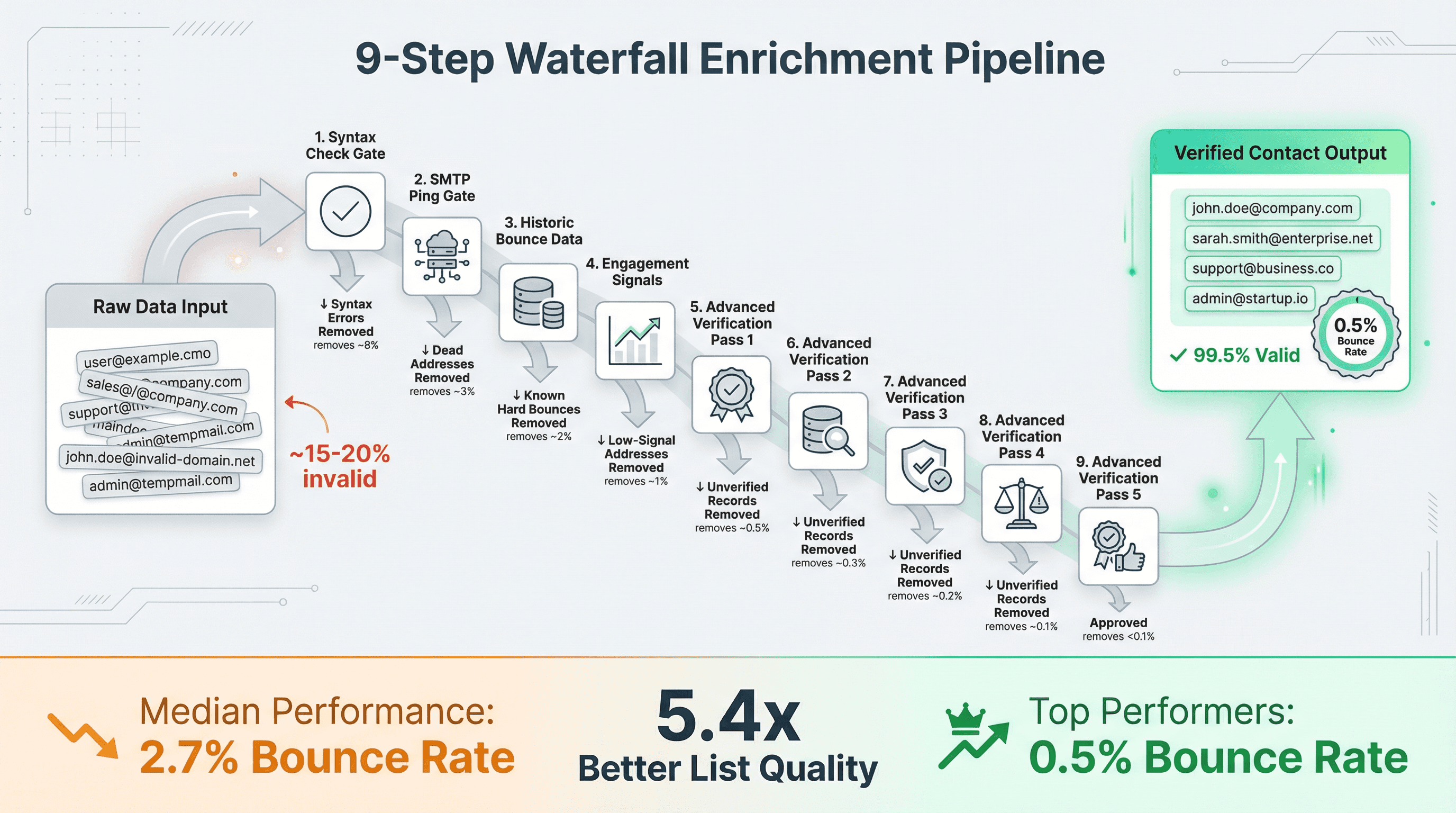
Benchmarks show a median bounce rate around 2.7% versus about 0.5% for top performers. That's a massive difference in sender health.
Actionable target: Design your system so you can keep bounces low enough that you're not constantly damaging reputation.
How to Build Your List
Use LinkedIn Sales Navigator
The gold standard for B2B prospecting. Filter by role, company size, industry, geography, and more. You won't get emails directly, but you get names and companies.
Leverage Data Providers
Tools like Apollo, ZoomInfo, or Lusha provide contact databases with emails. They're paid subscriptions but can jumpstart your list.
Find Emails with Purpose
Services like Hunter.io, Snov.io, or Clearbit can find email patterns or known addresses for a domain. Some offer browser extensions that work as you browse LinkedIn profiles.
Verify Everything
Use NeverBounce, ZeroBounce, or Bouncer to check if addresses are valid before sending. This is non-negotiable for protecting your reputation.
Don't Overstuff a Single Company
Reaching out to 1-2 contacts per company yields about a 7.8% reply rate, but blasting 5-10 people at the same company drops reply rate to ~2.5-3.8%. Why? Internally, those emails get identified as spam if multiple people compare notes.
Focus on the 1-3 individuals who most likely are decision-makers. If you don't hear back, try others later.
At Outbound System, we emphasize multi-step enrichment and verification to reduce bounce risk at scale. Our 9-step waterfall enrichment process combines syntax checks, SMTP pings, historic bounce data, and engagement signals to minimize hard bounces and improve reply probability.
Cold Email Deliverability Requirements for 2025
This section is where most "cold email guides" stay vague. We're not doing that.
The Minimum Bar: SPF, DKIM, DMARC
SPF (Sender Policy Framework): Tells receivers which servers are allowed to send mail for your domain.
DKIM (DomainKeys Identified Mail): Cryptographically signs messages to prove they weren't altered.
DMARC (Domain-based Message Authentication, Reporting & Conformance): Tells receivers how to handle mail that fails SPF/DKIM and provides reporting.
Google requires authentication standards for sending to personal Gmail, with stronger requirements for bulk senders (5,000+ emails/day).
Microsoft announced that for Outlook.com consumer domains, high-volume senders (5,000+ emails/day) must comply with SPF, DKIM, and DMARC, with rejection of unauthenticated mail beginning May 5, 2025.
If you want a step-by-step setup walkthrough, Outbound System published a DMARC/DKIM/SPF setup guide (Dec 20, 2025).
How to Avoid Spam Complaints in Cold Email
Google's sender guidance makes it very explicit: keep spam rate low and avoid hitting 0.3% or higher, with a recommendation to stay under 0.1%.
Critical insight: This is why "spray and pray" dies eventually. Even if you inbox at first, complaint signals accumulate and destroy your sender reputation.
One-Click Unsubscribe Requirements
Google requires one-click unsubscribe (RFC 8058 style List-Unsubscribe headers) for marketing and promotional messages, and recommends honoring unsubscribe requests within 48 hours.
Whether you call your message "sales" or "marketing," behave like a responsible sender:
→ Make opting out easy
→ Suppress quickly across all campaigns
Outbound System's CAN-SPAM guide discusses building suppression handling into your outreach system (Jan 3, 2026).
Do Open Rates Matter for Cold Email?
Open rates are noisy because Apple Mail can generate "machine opens," and other inbox changes complicate attribution. Google also explicitly warns that open rates aren't a reliable metric they can verify for delivery or performance.
So what do you measure instead?
• Reply rate
• Positive reply rate
• Meeting rate (booked meetings / unique prospects)
• Spam complaint rate (Postmaster Tools where available)
• Bounce rate
Learn more about why you shouldn't always track cold email open rates.
How to Set Up Cold Email Infrastructure
Use a Dedicated Sending Domain
Protect your primary domain (YourSaaS.com) by using a different domain or subdomain for outbound campaigns. Purchase "YourSaaS.co" or use "get.yourSaaS.com" as the sending domain.
Warm Up Gradually
When a domain is new, don't blast 500 emails in a day. Start with 20-50 emails/day per inbox initially. After a week of consistent sending and positive engagement, bump up to 50-100/day, then 100-150, and so on.
Never exceed ~100 cold emails/day from a single inbox on major providers like Google Workspace or Office365. If you need to send more, add more inboxes/domains rather than pushing one account to its max.
Expect warm-up to take 2-4 weeks for a brand new domain to reach significant volume. Learn more about how to warm up your email domain.
Scale with Multiple Inboxes
If you need to send 1,000 emails/week, use one inbox sending ~200/day for 5 days. But if you need 1,000 emails/day, set up 10 inboxes sending 100 each, or 20 inboxes sending 50 each.
At Outbound System, we use 350 to 700 Microsoft U.S. IP inboxes depending on the tier, designed to maintain high deliverability through distributed sending patterns. This infrastructure achieves 98% inbox placement by keeping per-inbox send volumes low enough to mimic natural human patterns. Learn more about our Microsoft Azure cold email infrastructure.
Monitor and Test
Use tools like Mail Tester or GlockApps to check your spam score. Send test emails to yourself at different providers (Gmail, Outlook, Yahoo) to see if they land in Spam or Promotions.
Watch for:
• Open rates dropping suddenly (might indicate spam foldering)
• Bounce increases (data quality or reputation issues)
• Spam complaint notifications (targeting or content problems)
Google Postmaster Tools and Microsoft SNDS can provide insights into your domain's reputation if you have enough volume.
How to Write Cold Emails That Get Replies
The best cold email copy isn't "well-written." It's easy to process.
Research suggests:
→ Best reply rates come from emails around 100 words or fewer
→ Highest reply rates come from 3 to 4 sentences
Why this works: The recipient's brain is doing triage. Short messages reduce cognitive load. Your goal isn't to close the deal. It's to earn the next step.
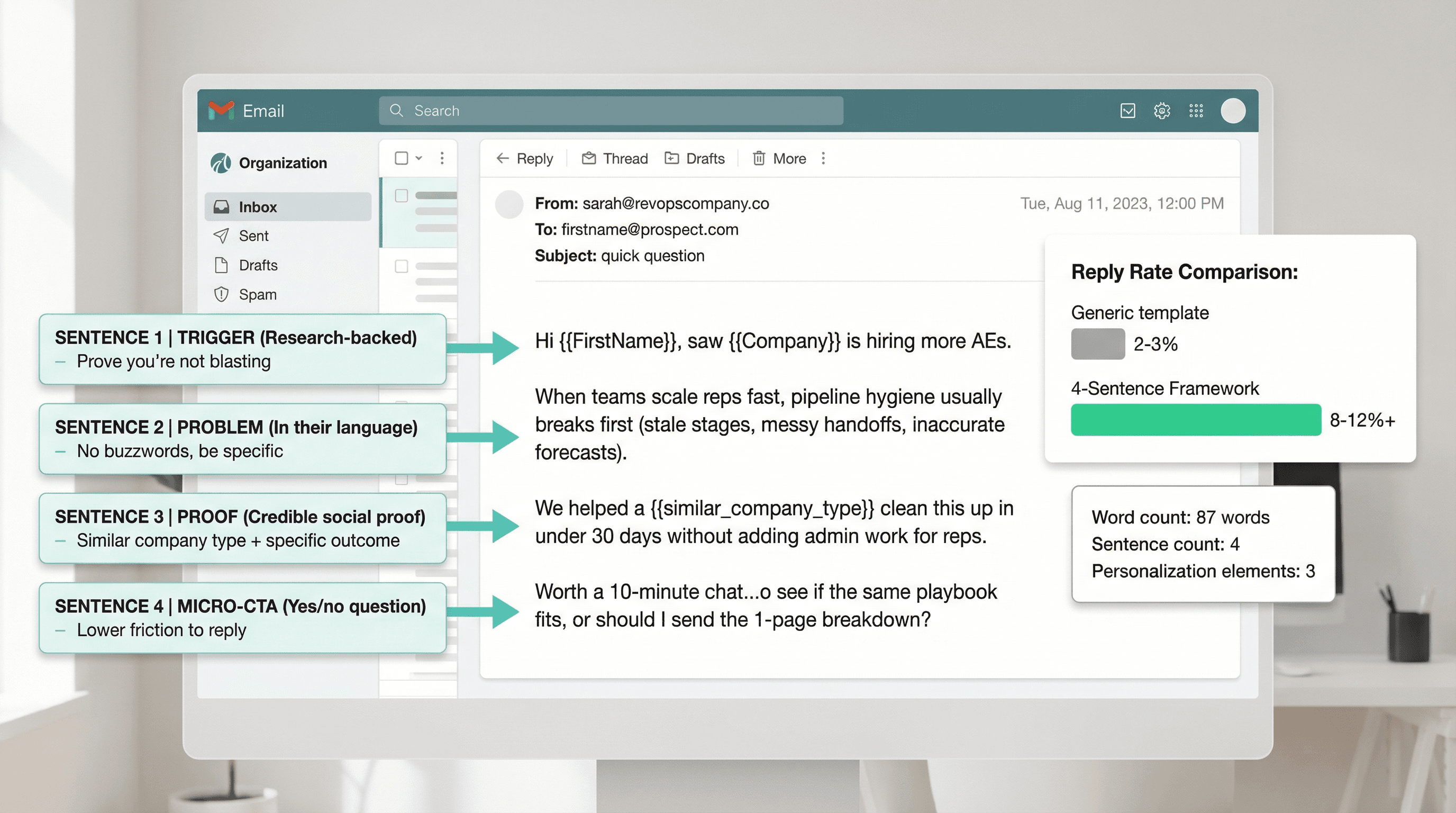
The 4-Sentence Cold Email Framework
Sentence 1: Trigger or relevant observation
Prove you're not blasting.
Sentence 2: Problem statement in their language
No buzzwords. No "AI-powered platform" nonsense.
Sentence 3: Proof that reduces risk
A similar company type, outcome, or credible insight.
Sentence 4: A micro-CTA
A "yes/no" or "worth it?" question.
Example (RevOps SaaS):
Subject: quick question
Hi {{FirstName}}, saw {{Company}} is hiring more AEs.
When teams scale reps fast, pipeline hygiene usually breaks first (stale stages, messy handoffs, inaccurate forecasts).
We helped a {{similar_company_type}} clean this up in under 30 days without adding admin work for reps.
Worth a 10-minute chat to see if the same playbook fits, or should I send the 1-page breakdown?
What to Avoid in Cold Email Copy
Research explicitly calls out that pitching and buzzwords hurt performance, and even subject lines with buzzwords or numbers can reduce opens.
Avoid:
• "all-in-one platform"
• "single pane of glass"
• "10x ROI"
• "AI-powered"
• Heavy jargon (TCO, MTTR) unless your buyer actually uses it daily
For more examples, check out our high-converting cold email templates.
Cold Email Subject Lines That Get Opened
Keep it brief: Aim for <50 characters. Many people check email on mobile, where longer subjects get cut off.
Personalize when possible: Including the recipient's first name or company name can lift open rates. Emails with personalized subject lines see around a 50% higher open rate on average. Adding the company name can boost opens by another ~22%.
Spark curiosity or highlight value: "Cut [Company]'s cloud costs by 30%?" or "Idea for improving [Metric] at [Company]" or even simply "Quick question, [Name]."
One high-performing format in 2025 was literally "Hi {{first_name}}", which sounds plain but achieved ~45% open rates because it feels casual and personal.
How Long Should Cold Emails Be?
While "shorter is better" is the general rule, there's nuance. Some studies show emails around 75-100 words hit a sweet spot. And another study noted that 6-8 sentence emails (~150-200 words) actually had the best results in certain cases, possibly because they provided enough context to be credible.
Translation: Be concise, but don't sacrifice clarity. It's okay to use up to ~150 words if needed to convey your message. Just make sure every sentence earns its keep.
Why Personalization Increases Cold Email Replies
Highly tailored emails can achieve 18% reply rates versus 9% for generic broadcasts. The extra effort here can literally double your reply rate.
Personalization beyond the name:
→ Mention a trigger event ("Congrats on your recent funding round...")
→ Reference content ("I saw your CEO's post about data security...")
→ Observation ("Noticed you're hiring SDRs, which often means outbound is scaling...")
These details prove you're not just blasting everyone with the same spiel. Learn more about effective first line strategies.
Cold Email Follow-Up Sequences That Work in 2025
Most cold email sequences fail for one of two reasons:
Too few touches (you assume one email should work)
Too many low-quality touches (you irritate people and tank reputation)
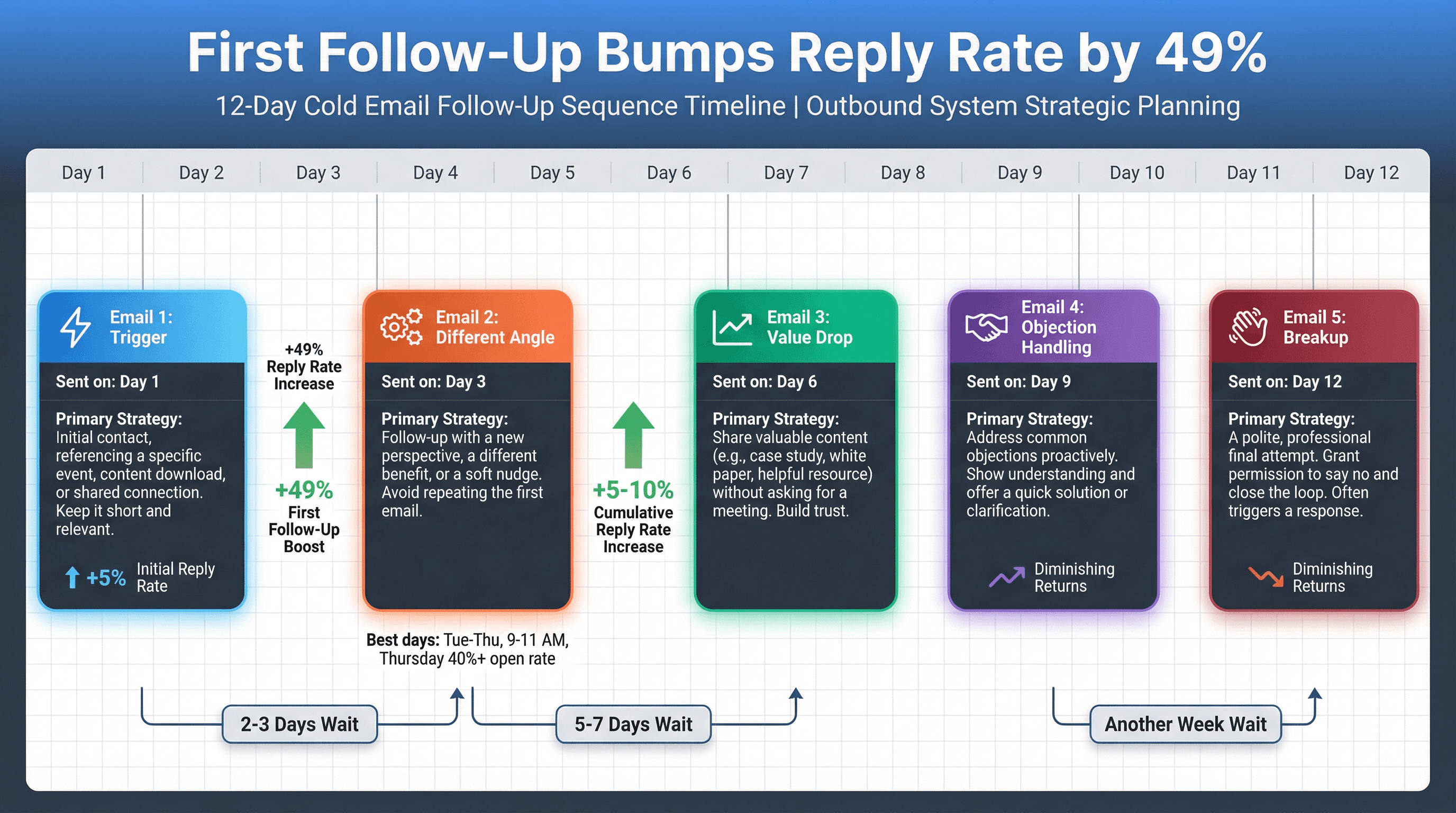
Industry analysis suggests the required number of touches increased 17% to nearly 5 touches in 2024. That's the baseline reality: you need follow-up.
The 5-Touch Cold Email Sequence
Day 1: Email 1 (trigger + problem + proof + micro-CTA)
Day 3: Email 2 (different angle, same offer)
Day 6: Email 3 (value drop: benchmark, teardown, checklist)
Day 9: Email 4 (objection handling: "usually teams ask...")
Day 12: Email 5 (breakup that preserves brand)
How to Write a Breakup Email
Subject: close the loop
Hi {{FirstName}}, should I close the loop here?
If solving {{problem}} is on your radar this quarter, happy to send the 1-page breakdown or point you to a relevant example.
If not, no worries. Want me to stop reaching out?
Learn more about how to write effective follow-up emails.
How to Add Multi-Channel to Cold Email
Best practices (updated Jan 7, 2026, based on 2024 data) suggest that initiating a prospecting flow with a cold call can double the email reply rate, and leaving a voicemail can also double the likelihood of an email reply.
If your startup has the bandwidth, a simple upgrade is:
→ Call before Email 2
→ Leave voicemail
→ Mention the voicemail in Email 2 (briefly)
For more on multi-channel strategies, see our guide on cold email vs LinkedIn outreach and cold calling vs cold emailing.
Best Time to Send Cold Emails
Best days: Tuesday, Wednesday, or Thursday
Best time: 9-11 AM in the recipient's timezone
Thursday 9-11 AM often shows the highest open rates (north of 40% in some analyses). Thursday has the advantage that if a meeting is requested, it can often be scheduled for the next week.
Experiment with off-peak: Some busy execs process email at 6-7 AM or 8-9 PM. When fewer emails are being received, yours might stand out more.
Learn more about the best time to send cold emails and best days to email B2B prospects.
How Many Follow-Ups Should You Send?
The first follow-up is usually the most effective: it can bump response rates by about 49% relative to just one email. The second follow-up might add a smaller boost (a few extra percentage points). By the third, if they haven't responded, returns diminish heavily.
Sequences of 3 emails (initial + 2 follow-ups) often see the highest overall reply rates. Sending just one email is leaving a lot on the table: 4-6 emails can yield 50% higher reply vs. a single email.
Spacing strategy:
1st Follow-Up: ~2-3 days after initial
2nd Follow-Up: ~5-7 days after the first follow-up
3rd Follow-Up: Another week after the second
After that, if no response, step back for a longer cooling period.
Cold Email Metrics That Matter for SaaS
Here's the most common SaaS founder mistake:
You see low replies and assume the fix is "better copy."
Sometimes it is. Often it isn't.
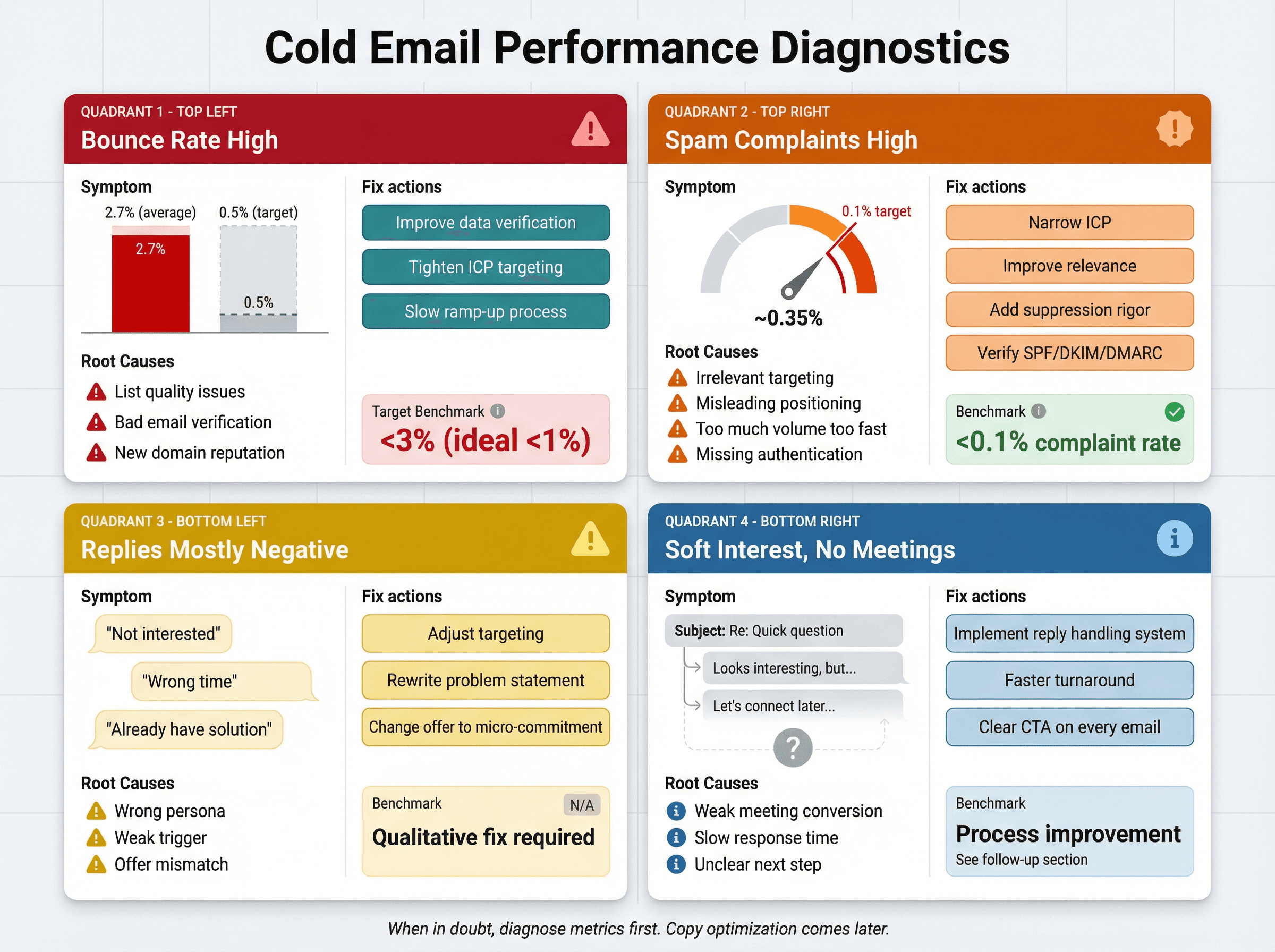
Use this diagnostic stack:
Symptom | Likely Causes | How to Fix | Target Benchmark |
|---|---|---|---|
Bounce Rate High | List quality issues, bad verification, new domain reputation problems | Improve data verification, tighten ICP, slow ramp | <3% (ideal <1%) |
Spam Complaints High (Or Inboxing Drops) | Irrelevant targeting, misleading positioning, too much volume too quickly, missing authentication | Narrow ICP, improve relevance, add suppression rigor, verify SPF/DKIM/DMARC | <0.1% spam complaint rate |
Replies Are Mostly Negative | Wrong persona, weak trigger, offer mismatch | Adjust targeting, rewrite problem statement, change offer to micro-commitment | N/A (qualitative fix) |
You Get "Soft Interest" But No Meetings | Weak meeting conversion, slow response time, unclear next step | Reply handling system (see next section) | N/A (process improvement) |
Cold Email Response Rate Benchmarks
Average campaigns: 1-5% reply rate
Well-targeted campaigns: 5-10% is solid
Highly optimized/personalized: 10%+ is great
For context, Outbound System achieves 6-7% average response rates across millions of cold emails through relentless optimization and targeting. In SaaS, where average is often 1-3%, even 6% is outperforming the market significantly.
How to Handle Cold Email Replies and Book Meetings
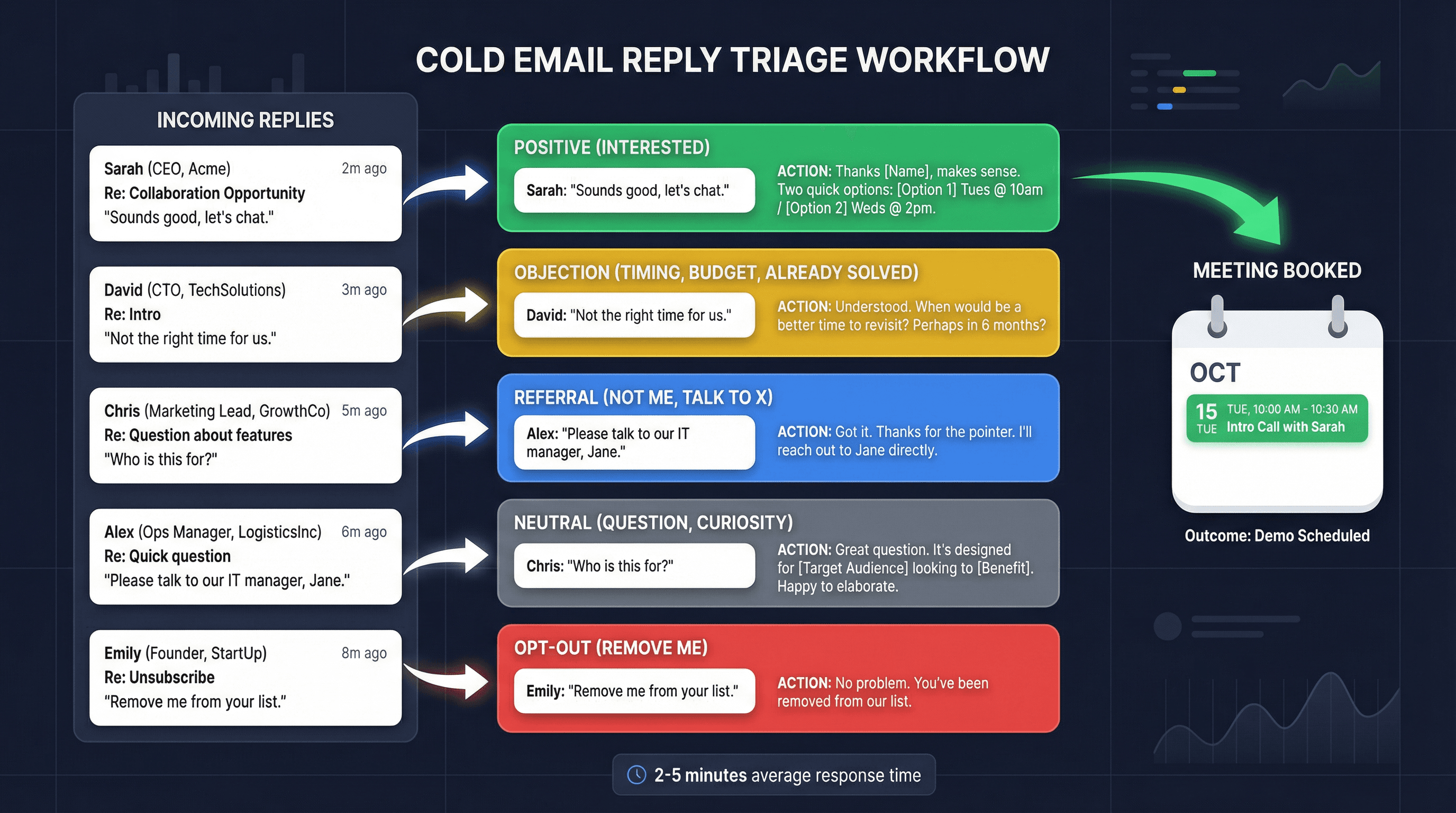
Cold email doesn't "book meetings." People do. You need a system to handle replies the same day, ideally within minutes.
Categorize Every Reply Into 5 Buckets
1. Positive (interested)
2. Objection (timing, budget, already solved)
3. Referral (not me, talk to X)
4. Neutral (question, curiosity)
5. Opt-out (remove me)
Cold Email Reply Scripts
Positive reply → book:
Thanks {{FirstName}}, makes sense.
Two quick options:
• {{DayOption1}} {{TimeWindow1}}
• {{DayOption2}} {{TimeWindow2}}
Which works, and should anyone else join (RevOps / Sales Ops / Finance)?
Not the right person → referral:
Got it, thanks. Who owns {{problem}} at {{Company}}?
If you can point me to the right person, I'll reach out and I'll stop emailing you.
Opt-out:
Understood. I'll remove you right now.
How to Handle Unsubscribe Requests
CAN-SPAM requires honoring opt-out requests, and the FTC guidance emphasizes prompt processing (often within 10 business days).
Google recommends fulfilling unsubscribe requests within 48 hours for sender reputation and spam reduction.
Critical: If you run multiple campaigns or channels, treat suppression as a single source of truth across everything. At Outbound System, we maintain a central suppression list that works across all inboxes and campaigns to ensure if someone opts out from one inbox, they never receive mail from any of our other sending accounts.
Cold Email Compliance for B2B SaaS
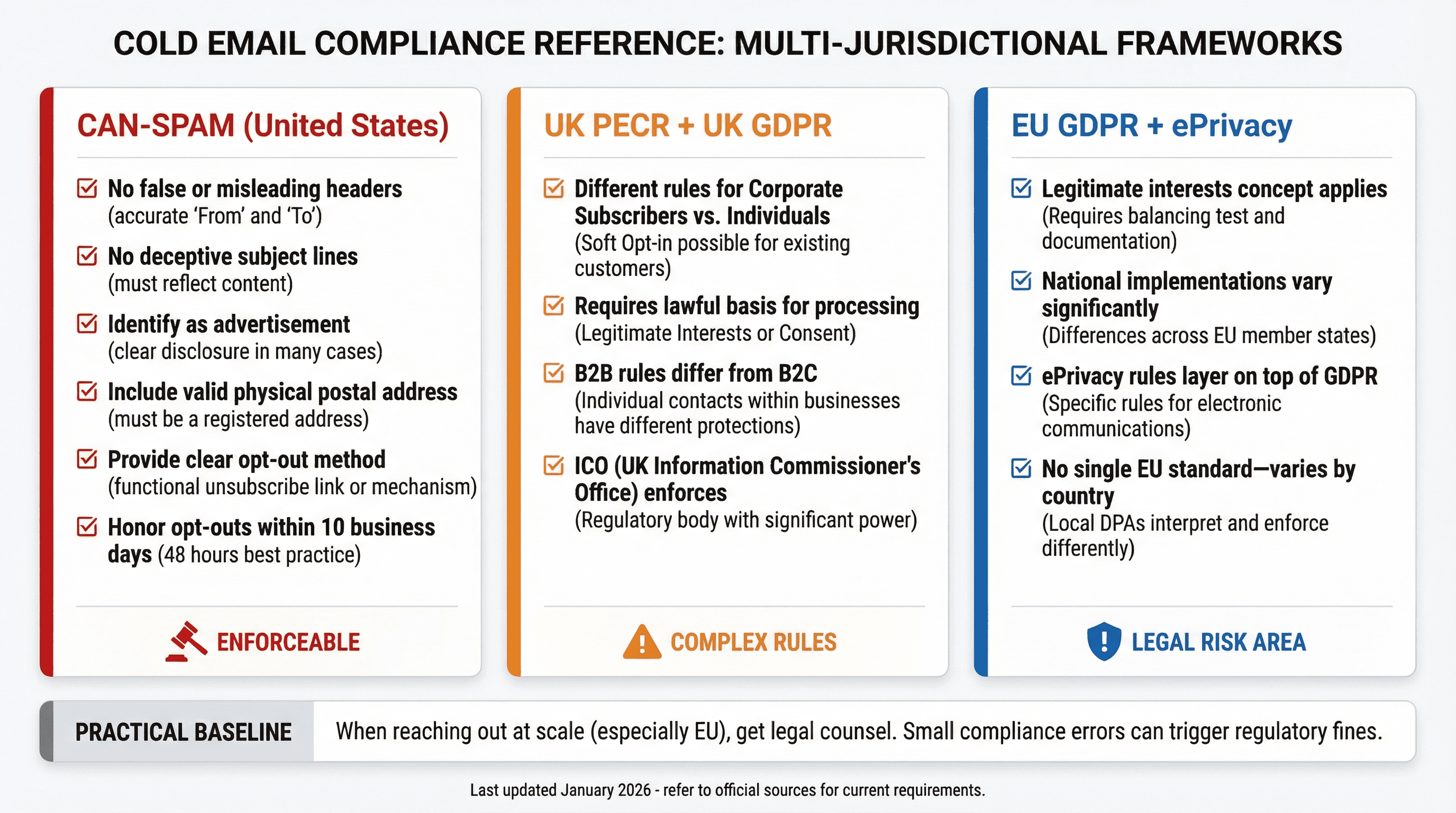
Cold outreach compliance is messy because it's a mix of sender policies (Google/Microsoft/Yahoo rules) and national laws (CAN-SPAM, GDPR, PECR, etc.). Here's the practical baseline.
CAN-SPAM Requirements for Cold Email
The FTC's CAN-SPAM guidance includes requirements like:
→ Do not use false or misleading headers
→ Do not use deceptive subject lines
→ Identify the message as an ad (in many cases)
→ Include a valid physical postal address
→ Provide a clear opt-out method and honor opt-outs promptly
Outbound System also has a 2026 CAN-SPAM cold email requirements guide tailored for outbound programs.
UK Cold Email Rules (PECR + UK GDPR)
The UK ICO has specific guidance for business-to-business marketing. In general, rules differ between corporate subscribers and individuals (including some sole traders and partnerships).
EU Cold Email Rules (GDPR + ePrivacy)
GDPR includes the concept of "legitimate interests," and the GDPR text itself notes that direct marketing may be regarded as carried out for a legitimate interest in some contexts.
But ePrivacy rules and national implementations vary across EU countries, so you can't assume "B2B is always fine everywhere." Treat this as a legal risk area and get counsel if you're emailing into the EU at scale.
Learn more about email outreach compliance rules.
14-Day Cold Email Launch Plan for SaaS Startups
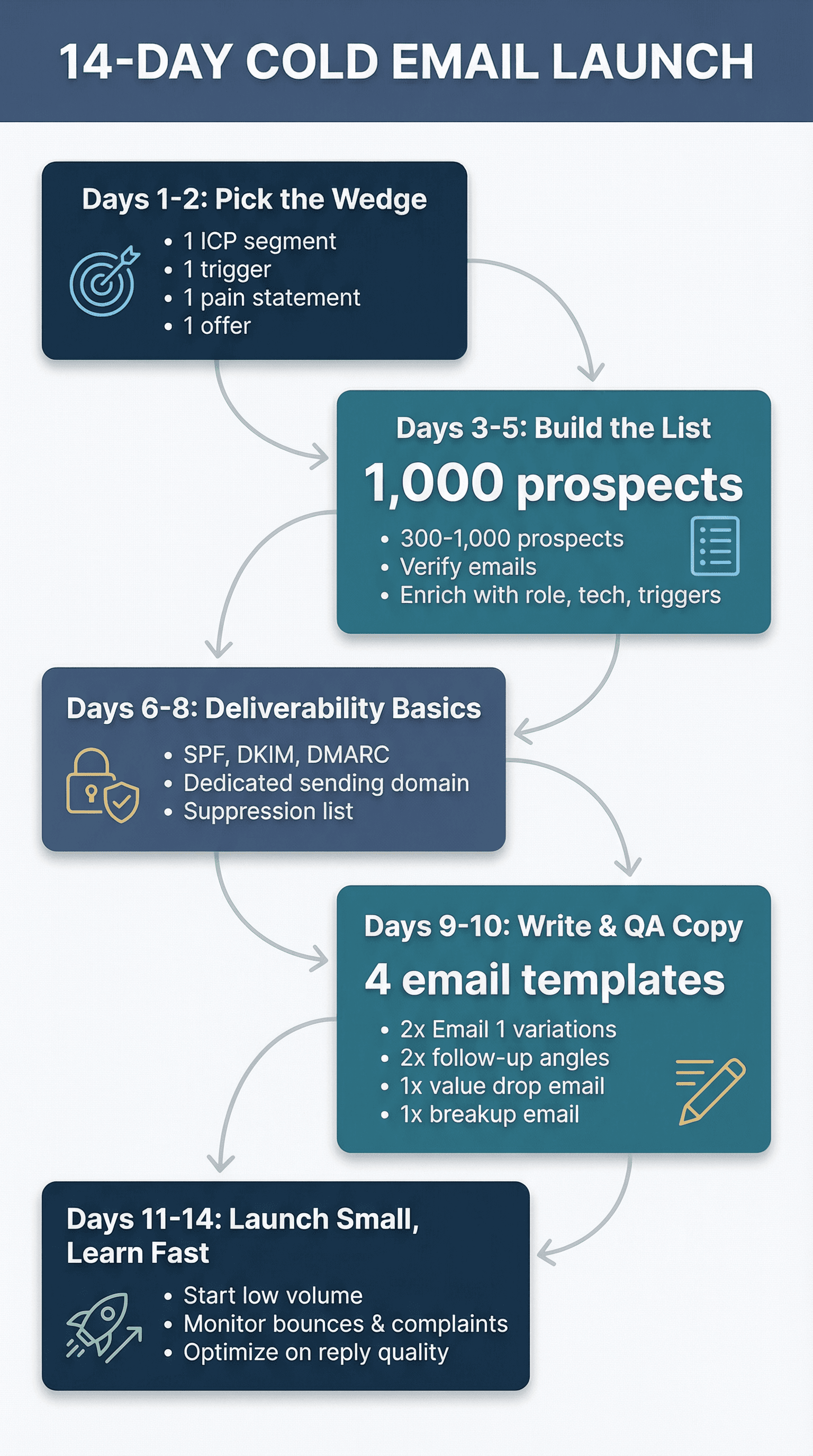
Days 1-2: Pick the Wedge
• 1 ICP segment
• 1 trigger
• 1 pain statement
• 1 offer
Days 3-5: Build the List
• 300 to 1,000 prospects is plenty to start
• Verify emails
• Enrich with role, tech, trigger evidence
Learn more about how to build a prospect list and cold email list building strategies.
Days 6-8: Set Up Deliverability Basics
• SPF, DKIM, DMARC
• A dedicated sending domain if you're protecting your main brand
• Suppression list process
Google and Microsoft policies make this step non-negotiable.
Read our comprehensive guide on cold email infrastructure setup.
Days 9-10: Write and QA Copy
• 2 variations of Email 1
• 2 variations of follow-up angle
• One value drop email
• One breakup email
Keep Email 1 under ~100 words and 3-4 sentences as a default baseline.
Check out our cold email best practices for more guidance.
Days 11-14: Launch Small, Learn Fast
• Start low volume
• Monitor bounces and complaints
• Optimize based on reply quality, not vanity metrics
What Makes Cold Email Worth It for B2B SaaS
If you take one thing away, make it this:
Cold email is a system that produces learning.
Your job is to build a loop:
1. Hypothesis (ICP + offer)
2. Campaign (small, controlled)
3. Signals (reply quality, meeting rate, complaint rate)
4. Iteration (one variable at a time)
5. Scale what works
That's how top performers win even when the channel gets harder.
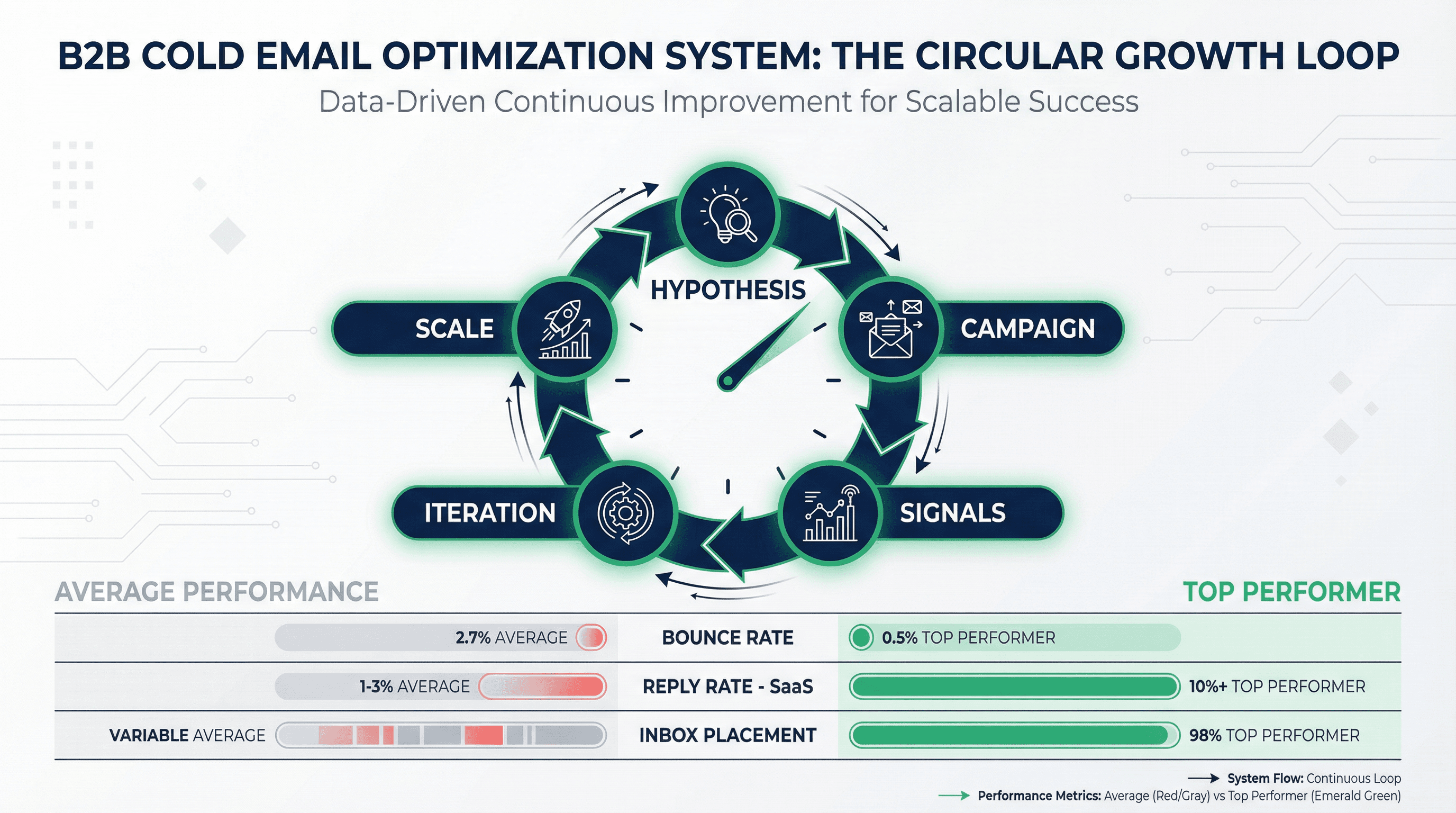
Research is blunt: cold email can feel dead for average execution, but top performers still book far more meetings, and small choices (like avoiding pitching, keeping emails short) matter.
Metric | Average Performance | Top Performer |
|---|---|---|
Bounce Rate | 2.7% | 0.5% |
Reply Rate (SaaS) | 1-3% | 10%+ |
Inbox Placement | Variable | 98% |
DIY vs Done-For-You Cold Email Agency
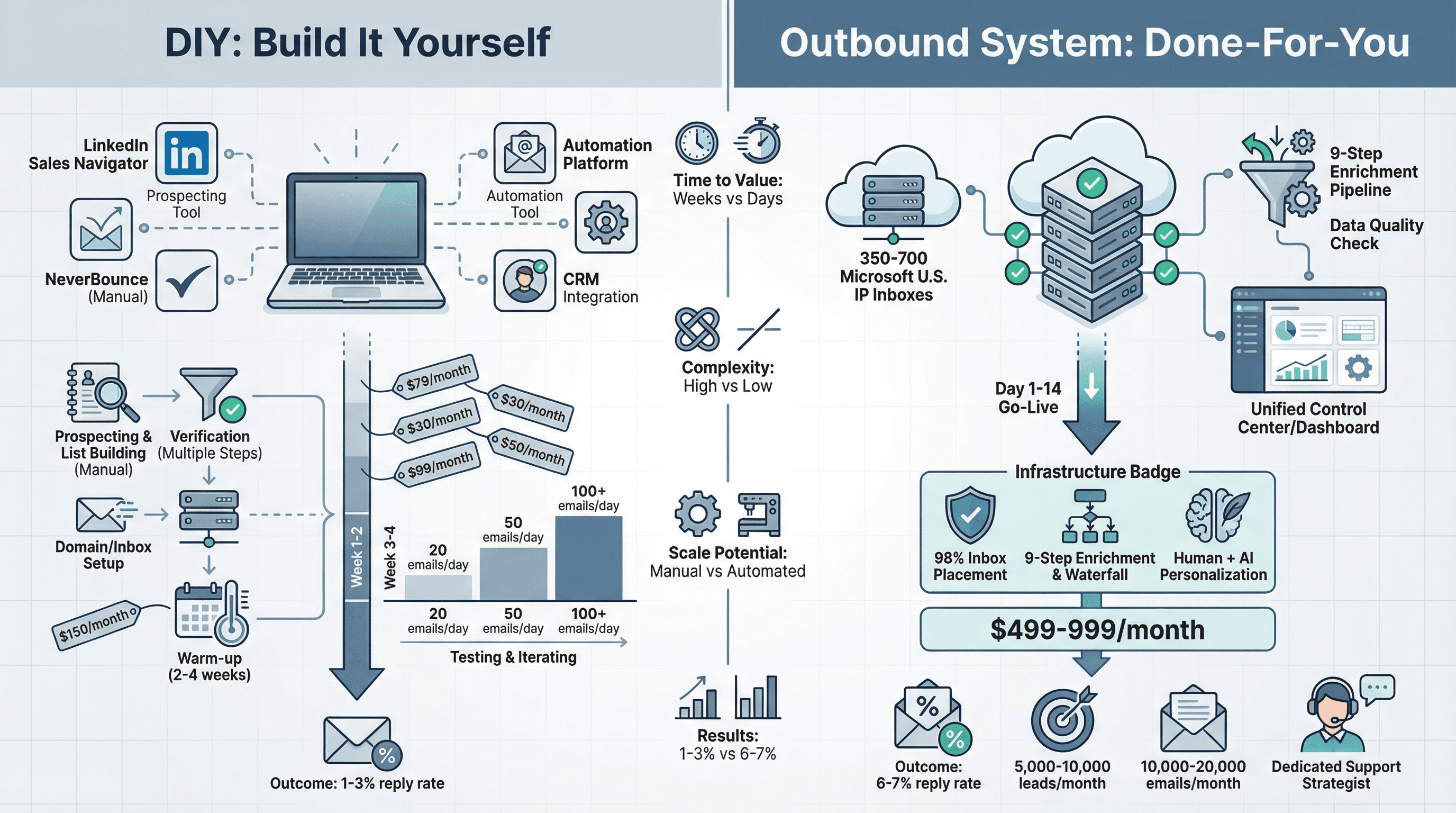
At this point, you have two paths:
Path 1: Build It Yourself
You can implement everything in this guide with:
• LinkedIn Sales Navigator for prospecting
• Email verification service (NeverBounce, ZeroBounce)
• Cold email automation tools
• Your own domains and inboxes
• Time to warm up, test, and iterate
Path 2: Partner with a Done-For-You System
Outbound System positions itself as a done-for-you cold email agency: list building, enrichment, deliverability, copy, and meeting booking.
What a fully managed system looks like:
→ Infrastructure: 350-700 Microsoft U.S. IP inboxes (depending on tier) that maintain high deliverability through distributed sending
→ Data quality: 9-step waterfall enrichment combining syntax checks, SMTP pings, historic bounce data, and engagement signals
→ Deliverability: 98% inbox placement achieved through careful volume distribution and domain management
→ Copy + optimization: Human-written copy with AI personalization, A/B testing, real-time metrics
→ Reply handling: Unified inbox, dedicated strategist, meeting booking support
Pricing context:
Plan | Monthly Price | Emails per Month | Contract |
|---|---|---|---|
Starter | $1,499/month | Up to 15,000 | Month-to-month |
Growth | $2,499/month | Up to 30,000 | Month-to-month |
Scale | $3,999/month | Up to 60,000 | Month-to-month |
Both plans include all infrastructure, enrichment, and strategist support. These are month-to-month contracts with no long-term commitments.
When to consider done-for-you:
• You want to focus on closing deals, not managing infrastructure
• You need proven systems faster than you can build them
• You're ready to scale beyond what one person can manage
• You value having experts handle deliverability engineering
When to DIY:
• You're validating the channel with <500 prospects
• You enjoy the technical learning curve
• You have time to iterate and optimize
• Budget is extremely tight in early stages
For reference, Outbound System has sent 52M+ cold emails generating 127K+ leads and $26M in closed revenue across 1,000+ B2B clients. The infrastructure and methodology described throughout this guide reflects what works at scale.
You can book a free consultation to discuss your specific needs, or read more case studies to see real results.
Additional resources from Outbound System:
→ Infrastructure setup and costs
→ CAN-SPAM cold email requirements
→ Cold email vs LinkedIn tradeoffs
Frequently Asked Questions
Is cold email still effective for B2B SaaS in 2026?
Yes, but with important caveats. Well-executed cold email still works, but the bar is higher than it was 2-3 years ago. Industry data shows reply rates have declined since 2019, but top performers still significantly outperform average senders.
The key difference: you can't succeed with spray-and-pray tactics anymore. You need proper targeting, authentication, deliverability infrastructure, and genuinely relevant messaging. When done right, SaaS startups regularly achieve 5-10% reply rates and book 10-30 meetings monthly from systematic cold email.
What's a realistic cold email response rate for a B2B SaaS startup?
Average campaigns: 1-5% reply rate
Well-targeted campaigns: 5-10% is solid
Highly optimized: 10%+ is achievable
For context, SaaS typically sees lower engagement than some industries due to inbox saturation. If you're achieving 6% reply rate in SaaS, you're outperforming most of the market. Outbound System averages 6-7% across millions of sends through systematic optimization.
Of those replies, aim for at least 50% to be positive (interested in discussing further). If most replies are negative or opt-outs, your targeting or messaging needs work.
How many cold emails should I send per day when starting?
Start conservatively: 20-50 emails per day per inbox for the first 1-2 weeks. This is the warm-up phase where you're building sender reputation.
After consistent sending with positive engagement (replies, low bounces, no spam complaints), gradually increase to 50-100/day, then up to 100-150/day maximum per inbox.
Never exceed ~100 cold emails/day from a single inbox on providers like Google Workspace or Office365, even if their official limits are higher. If you need more volume, add more sending domains/inboxes rather than pushing one to its limit.
For context, Outbound System uses 350-700 inboxes to send high volumes while keeping each individual inbox at low daily sends that mimic human patterns.
Learn more about how many cold emails you can send per day.
Do I need to set up a separate domain for cold emailing?
Yes, strongly recommended. Use a different domain or subdomain for outbound campaigns to protect your primary domain's reputation.
If your main domain is YourSaaS.com (used for website and employee emails), purchase "YourSaaS.co" or use "get.yourSaaS.com" for cold email sending.
Why this matters: If things go wrong with cold emails (spam complaints, blacklisting), your main domain stays protected. You can also ramp up sending and warm-up on the dedicated domain without risking existing email flows.
Make sure any alternate domain clearly ties back to your company and is included in your signature for transparency.
How long does it take to warm up a new domain for cold email?
Expect 2-4 weeks to properly warm up a brand new domain to significant volume. Here's a realistic timeline:
Week 1: 20-30 emails/day, focus on getting some replies
Week 2: 50-75 emails/day if Week 1 went well
Week 3: 100-125 emails/day
Week 4: 150+ emails/day (or stabilize at 100/day per inbox)
The key is gradual, consistent increase with positive engagement signals. If you see bounces spiking or suspect spam foldering, hold steady or reduce volume temporarily.
Trying to skip warm-up and blast 500 emails on Day 1 will almost certainly result in spam folder placement and reputation damage.
Read our guide on email warmup services and what to do when email warmup isn't working.
What should I do if my cold emails are going to spam?
Immediate diagnostic steps:
Check authentication: Verify SPF, DKIM, and DMARC are properly configured using tools like MXToolbox
Review bounce rate: If >5%, your list quality is hurting you
Test spam score: Use Mail-Tester.com or GlockApps to check what's flagging your emails
Check spam complaints: If using Google Workspace, check Postmaster Tools for complaint rate
Common fixes:
→ Slow down sending volume (you may have ramped too fast)
→ Improve list verification (bad addresses create bounces)
→ Reduce links and images in emails (plain text performs better)
→ Make content more personalized and less promotional-sounding
→ Remove spam trigger words and excessive punctuation
→ Ensure your signature includes contact info and physical address
If problems persist, you may need to pause, fix authentication issues, and restart warm-up process from lower volume.
Read our comprehensive guide on how to fix cold emails going to spam.
Should I include an unsubscribe link in cold B2B emails?
This is debated, but the practical answer: Yes, include an easy opt-out method.
Google requires one-click unsubscribe for promotional messages. While purely personalized B2B emails might be argued as "business communication," it's safer to include it.
Benefits of including unsubscribe:
• Reduces spam complaints (people click "unsubscribe" instead of "report spam")
• Shows professionalism and respect
• Keeps you compliant with evolving requirements
Options:
Formal unsubscribe link (automated)
Simple text: "If you'd prefer not to hear from me, let me know and I won't reach out again."
Either works. What's non-negotiable: you must honor opt-outs immediately and suppress across all campaigns and channels. CAN-SPAM allows 10 business days, but best practice is same-day removal.
Can I use AI to write my cold emails?
You can use AI to assist, but don't rely on it entirely. Here's why:
AI's strengths:
• Brainstorming subject line variations
• Drafting initial frameworks
• Suggesting personalization angles
• Creating multiple versions for A/B testing
AI's weaknesses:
• Generic, obvious patterns that scream "AI-written"
• Lack of specific knowledge about your ICP's real pain
• Tendency toward buzzwords and hype
• Missing nuance and authentic voice
Best approach: Use AI as a starting point, then heavily edit for:
• Specificity (real triggers, real proof points)
• Authenticity (natural language, not corporate speak)
• Conciseness (AI tends to be wordy)
• Unique insights only you can provide
Your best emails will come from understanding your ICP deeply and writing like a human to a human. AI can speed up iteration, but it can't replace genuine relevance.
Learn more about AI SDR vs Human SDR in cold email contexts.
How do I handle replies when someone's not interested?
If they say "not interested" or "not a priority right now":
Thank them professionally and move on gracefully:
"Understood, thanks for letting me know. I'll mark you down as not interested and won't follow up. If priorities change down the road, feel free to reach out."
Then immediately suppress them from all future campaigns.
If they're hostile or annoyed:
Stay professional and apologize:
"I apologize for the unwanted outreach. I've removed you from our list and you won't hear from us again."
If they say "wrong person, talk to [Name]":
Thank them and ask for an intro:
"Got it, thanks. Would you mind introducing me to [Name], or should I reach out directly?"
Then suppress the original contact and try the referral with context that they were referred.
Critical: Treat every opt-out and "not interested" as final. Never re-email someone who explicitly declined. This protects your reputation and shows respect.
What tools do I actually need to start cold emailing as a SaaS startup?
Minimum viable stack:
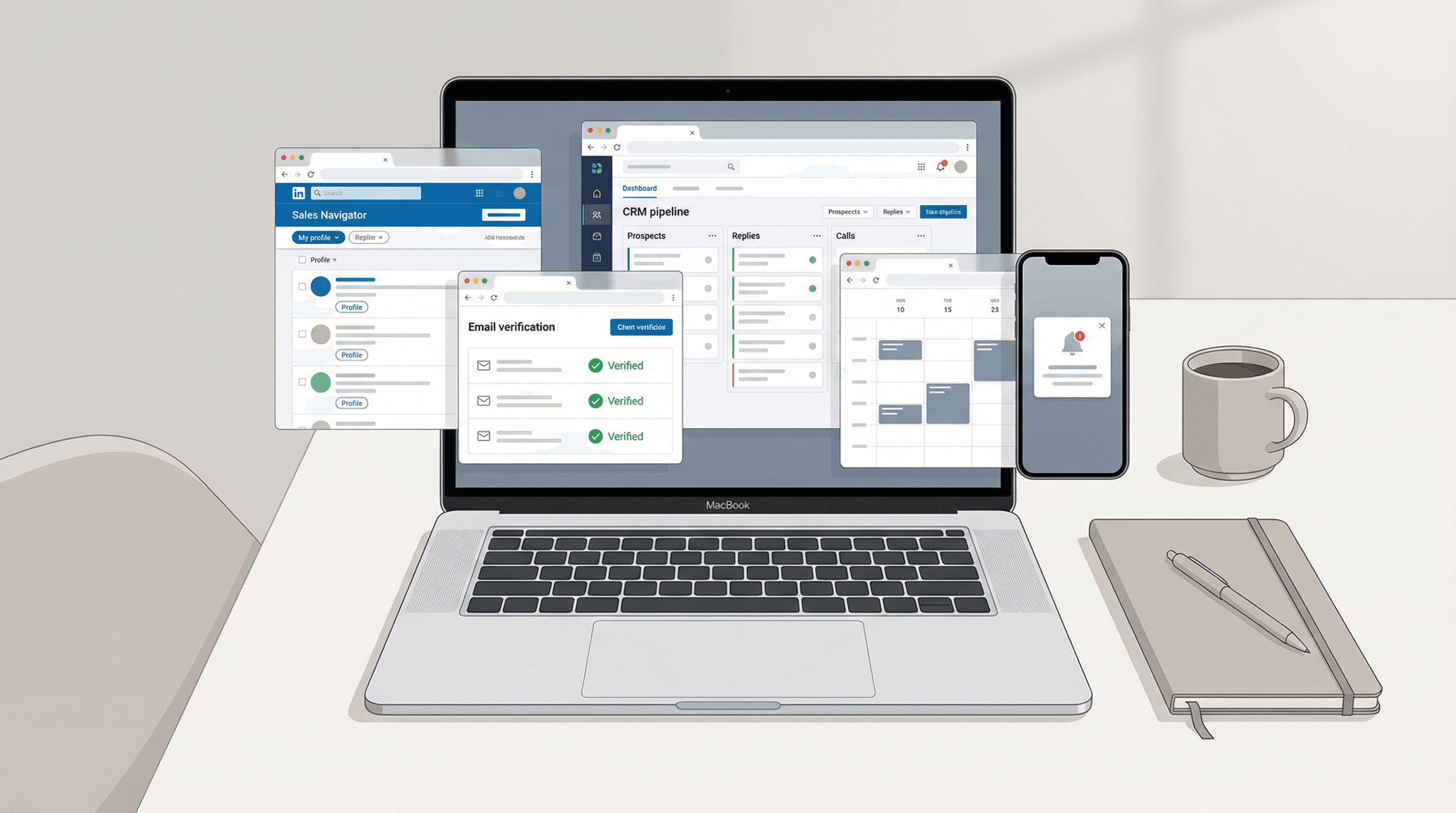
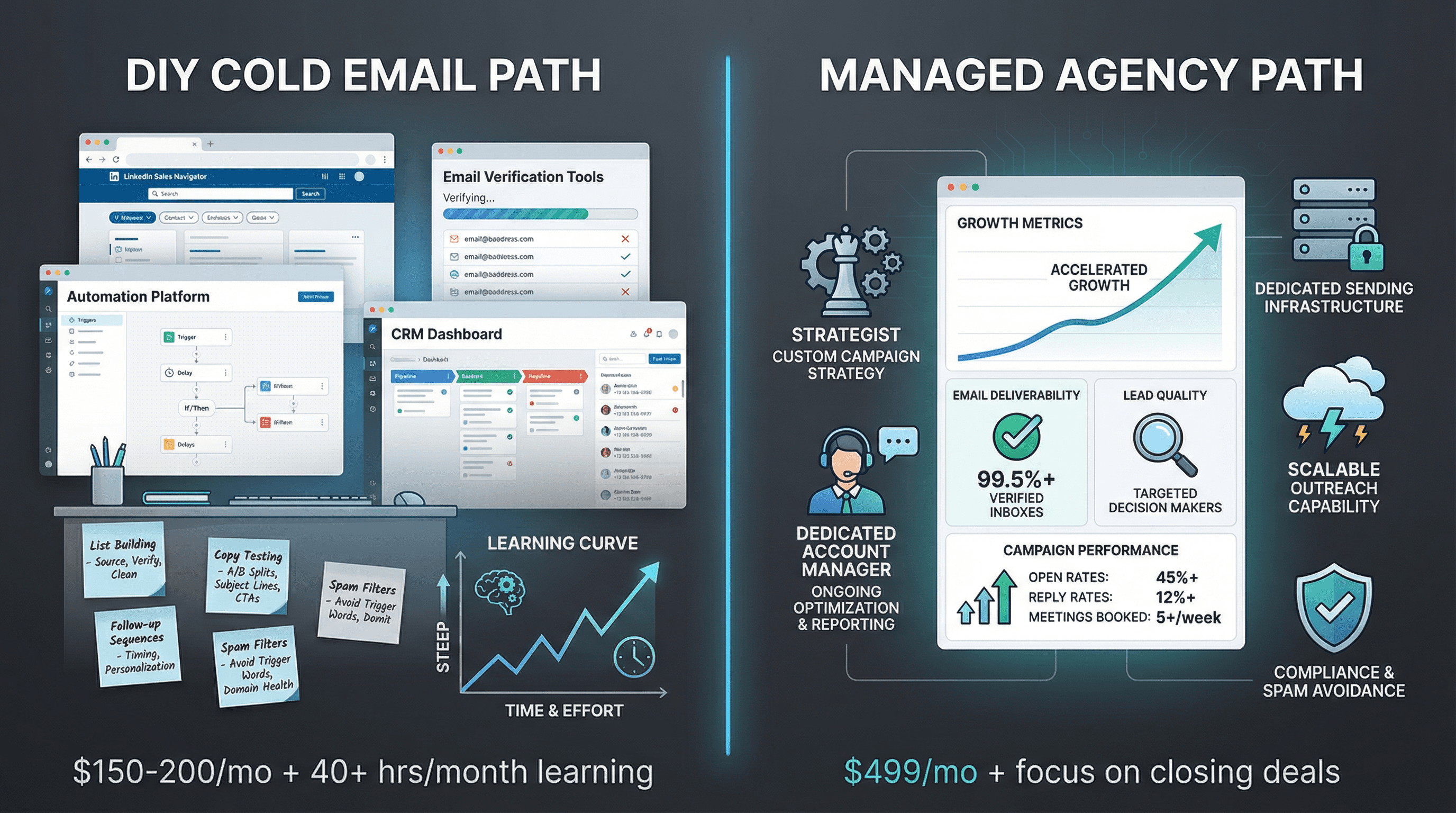
LinkedIn Sales Navigator ($79.99/mo) - for building targeted prospect lists
Email verification (NeverBounce, ZeroBounce) - ~$10-30 for initial list verification
Cold email automation platform - ~$59-99/mo for basic plans
Simple CRM (HubSpot free tier) - for tracking conversations
Your own domain (~$12/year for alternate domain) + email accounts (Google Workspace or Microsoft 365)
Total initial cost: ~$150-200/month plus ~$10-30 one-time for list verification.
As you scale, consider adding:
• Multiple domains/inboxes for volume
• Advanced verification and enrichment (ZoomInfo, Apollo)
• Dedicated warm-up services
• Professional sending infrastructure
Or at that point, consider a done-for-you cold email agency like Outbound System ($1,499/month) that bundles infrastructure, enrichment, and expertise so you can focus on closing deals instead of managing tools.
Learn more about how much cold email agencies cost and compare with our cold email agency ROI calculator.