You searched "LinkedIn connection requests being ignored." You're not just trying to "get more connections."
You're trying to:
• Get requests accepted by the right people (not random networkers)
• Avoid LinkedIn restrictions, invitation limits, temporary blocks, and suspensions
• Start real conversations that lead to meetings and revenue (not dead-end connections)
This is a troubleshooting and system guide. Not another "write a better message" post.
Why LinkedIn Connection Requests Get Ignored?
A connection request is judged in seconds.
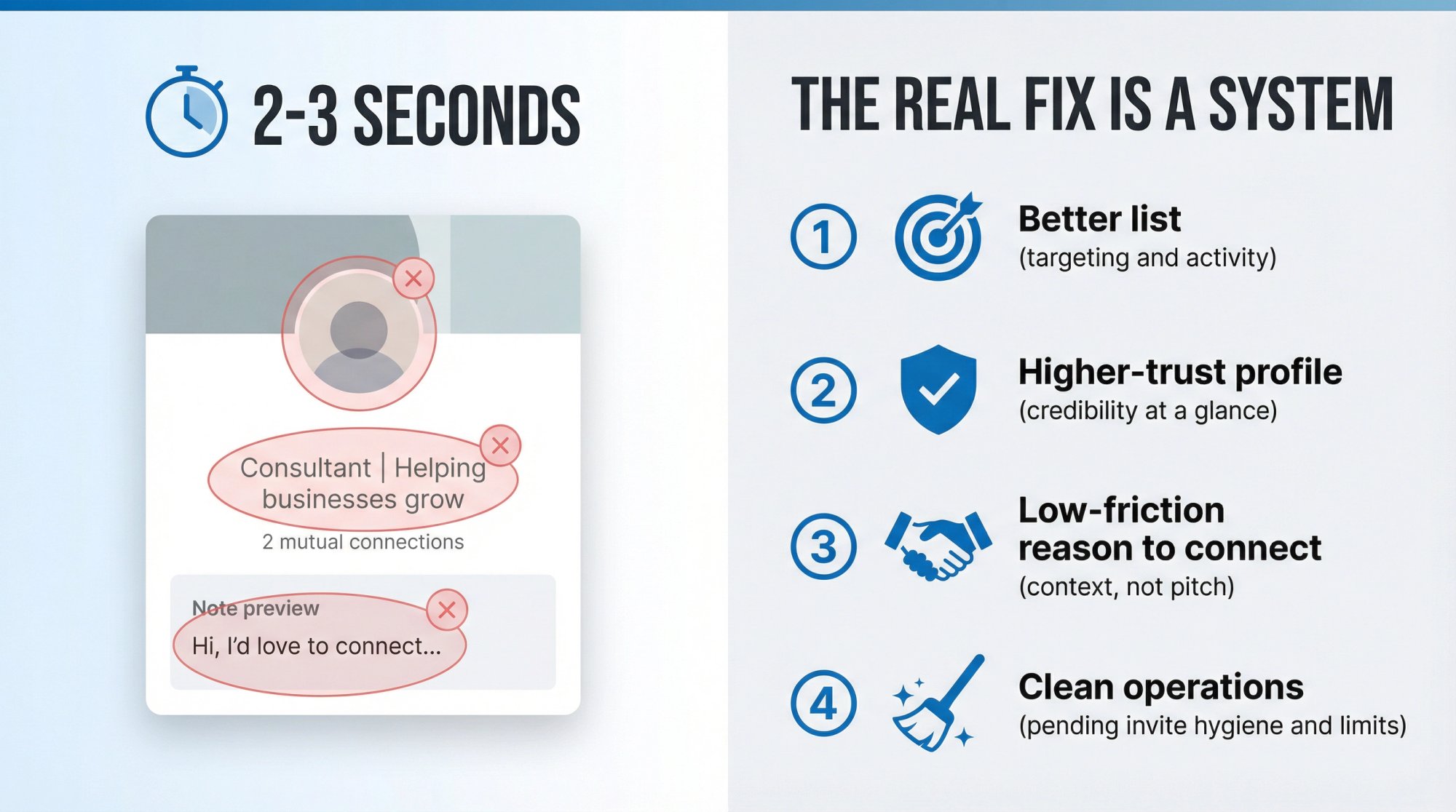
The recipient sees your name and profile photo, your headline, mutual connections or shared context (sometimes), and an optional note (if you add one).
If any of those signals scream "spam" or "irrelevant," you get ignored.
Critical insight: LinkedIn itself says members often ignore or mark invitations as spam when they don't know the sender. Invitation limits exist to protect member experience and keep requests relevant.
So the real fix is a system:
① Better list (targeting and activity)
② Higher-trust profile (credibility at a glance)
③ Low-friction reason to connect (context, not pitch)
④ Clean operations (pending invite hygiene and limits)
How LinkedIn Connection Requests Work in 2026
Before optimizing anything, you need to understand the rules of the game.
LinkedIn Connection Request Limits Explained
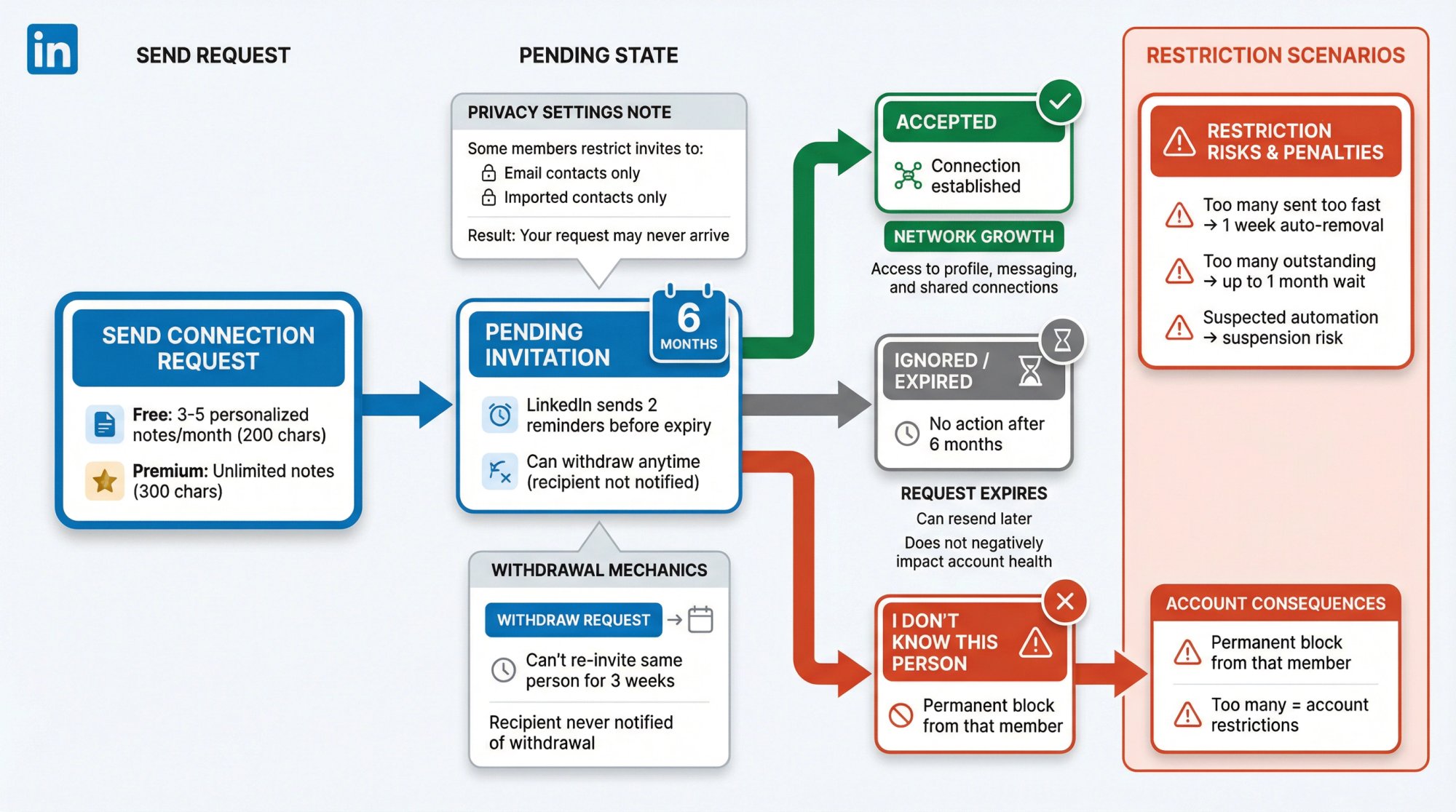
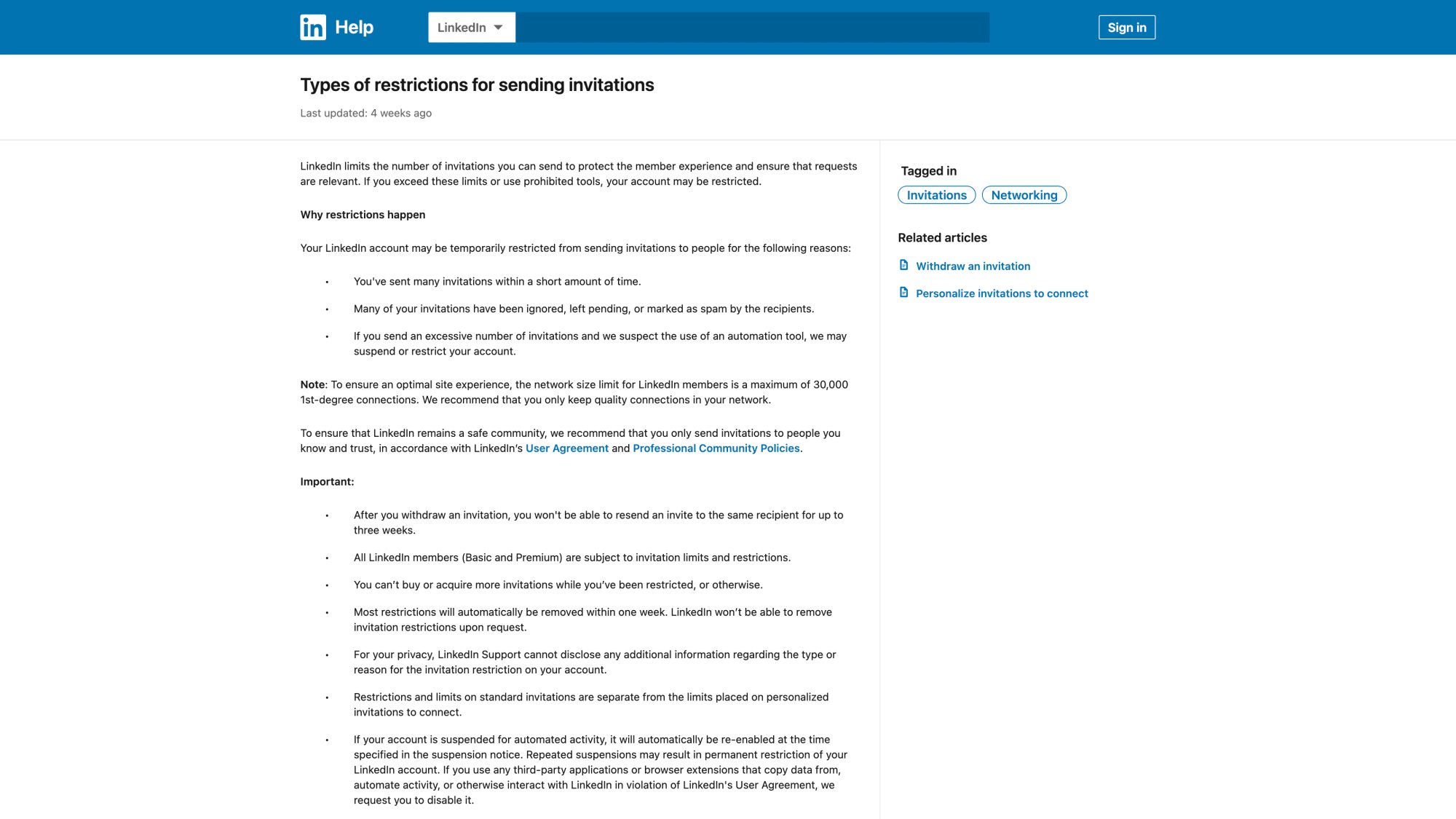
LinkedIn states it limits invitations to protect member experience and ensure requests are relevant. If you exceed limits or use prohibited tools, you may be restricted.
Key official points:
• Most invitation restrictions are removed within about one week automatically. LinkedIn won't remove them on request.
• If you're restricted due to too many outstanding invitations, LinkedIn suggests waiting up to one month before trying again.
• LinkedIn warns that suspected automation can trigger suspension or restriction. Repeated suspensions may lead to permanent restrictions.
When LinkedIn Connection Requests Expire
LinkedIn confirms invitations expire after 6 months and sends up to two reminders before expiry. To stop reminders, you can withdraw the invitation.
This matters because "ignored" doesn't always mean "rejected."
It often means they didn't see it, didn't care, or they're inactive.
How to Withdraw LinkedIn Connection Requests
→ The recipient is not notified when you withdraw an invitation
→ You can't send a new invitation to the same member for up to three weeks after withdrawing
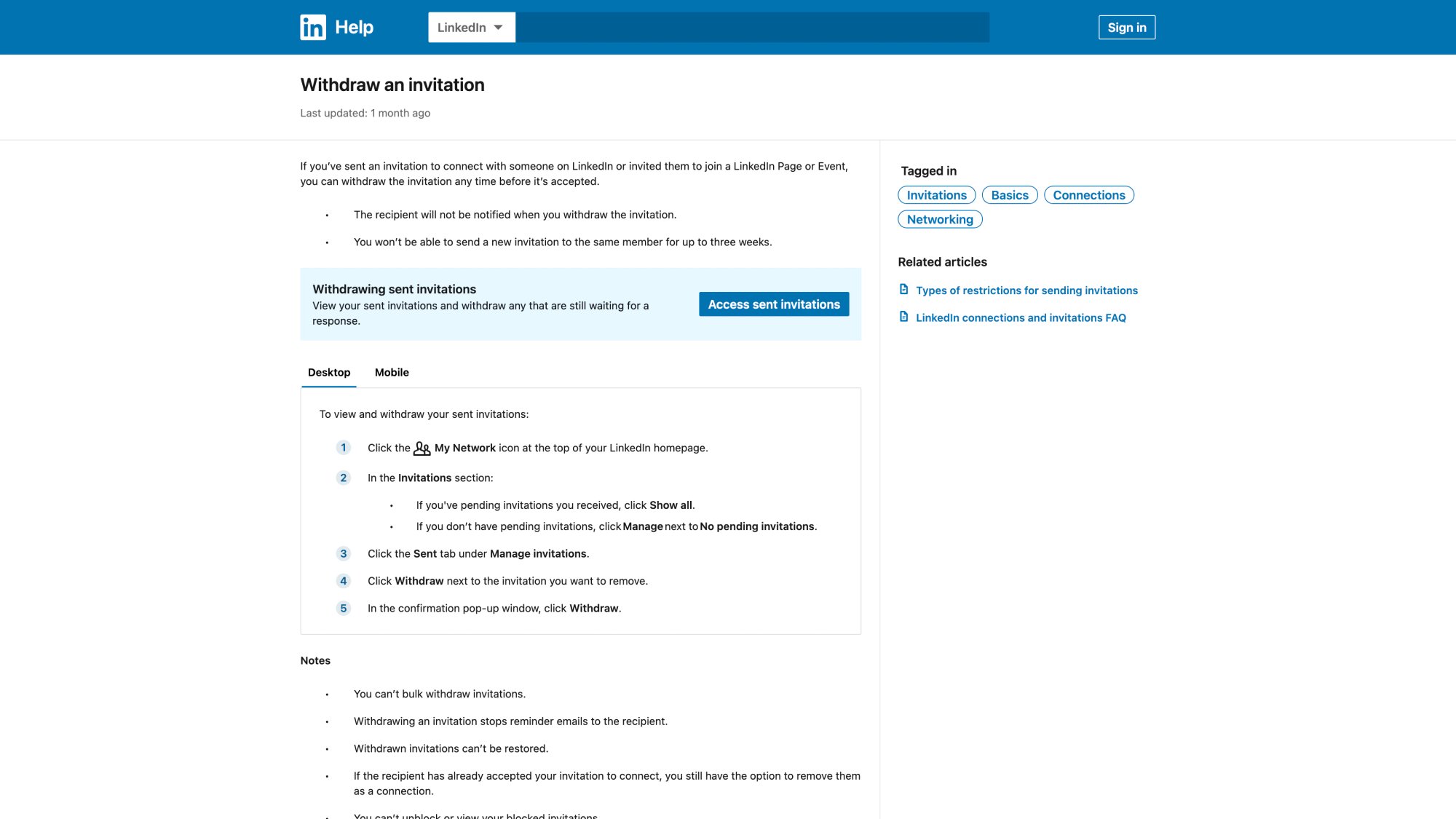
So don't panic-withdraw everything. Withdraw strategically.
What Happens When Someone Clicks "I Don't Know This Person"
If someone ignores your invitation and chooses "I don't know this person":
It prevents you from sending them another invitation in the future
If you receive too many "I don't know" responses, you can be restricted
You cannot see who selected it
Translation: send fewer, better invites, especially to people with zero context.
LinkedIn Privacy Settings That Block Connection Requests
LinkedIn lets members limit invitations to everyone (recommended), only people who know their email or are in imported contacts, or only people in imported contacts.
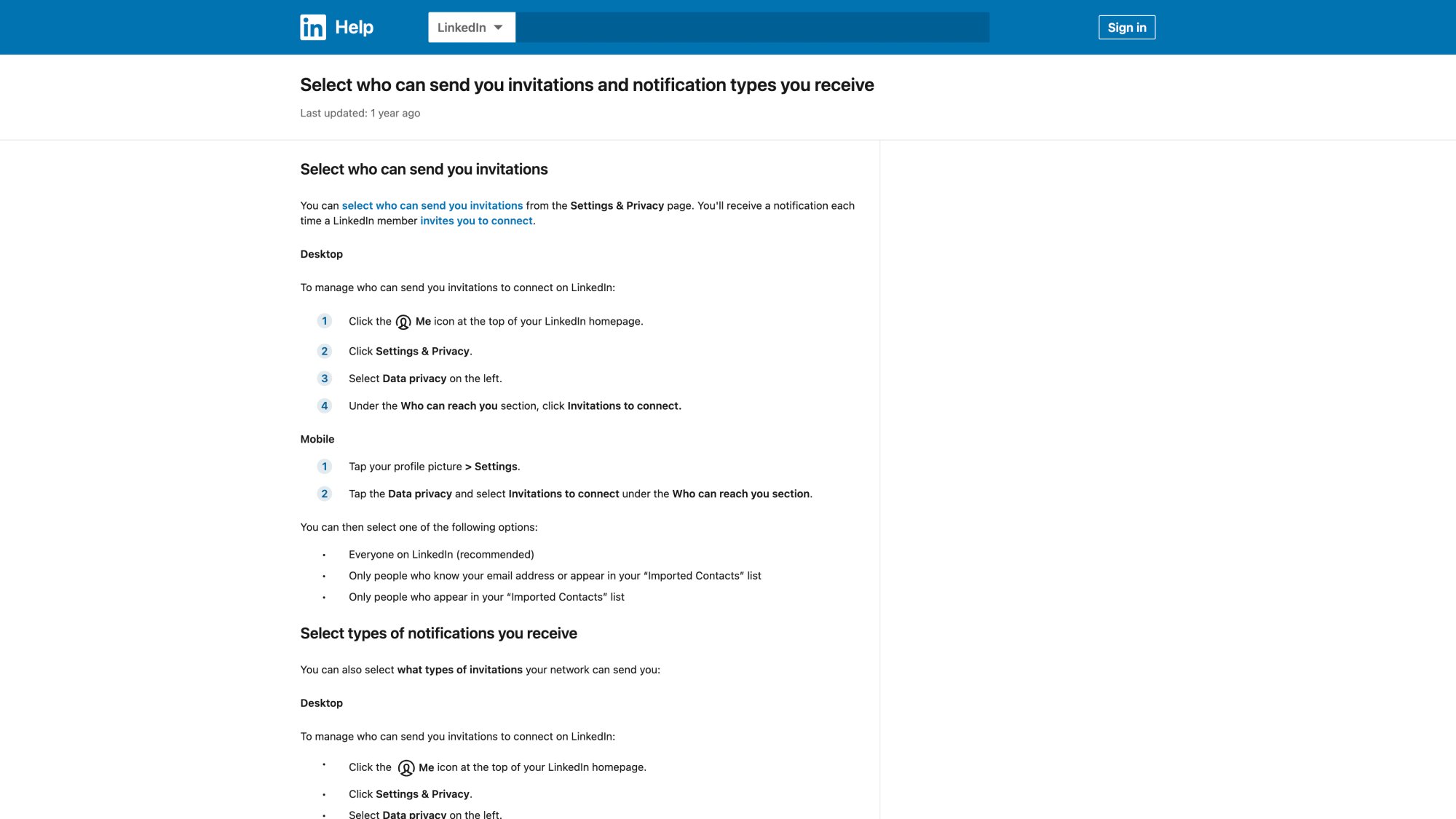
If you're targeting executives, this setting alone explains a chunk of "nothing happens" outcomes. You may be forced into InMail, warm intros, or email instead.
LinkedIn Personalized Note Limits (2026 Update)
This is one of the biggest "2026" changes most sellers miss.
LinkedIn Help indicates that basic/free members can only add a personalized message to a small number of invites per month. The Help Center has inconsistent numbers across pages:
Source | Monthly Note Limit | Character Limit |
|---|---|---|
5 personalized notes | 200 characters | |
3 personalized notes | 200 characters | |
Premium accounts | No stated monthly cap | 300 characters (documented) |
What to do with this: treat personalized notes as a scarce resource.
Use them for your highest-value targets, not for everyone.
Why Your LinkedIn Connection Requests Are Being Ignored (12 Root Causes)
Below are the most common causes we see, and how to diagnose fast.
1. You're Targeting Inactive LinkedIn Users
If someone logs in once a month, your invite may sit for weeks.
Fix: use activity filters (for example, "posted recently" in Sales Navigator) and prioritize people who are actively engaging.
2. Your LinkedIn Profile Doesn't Pass the "2-Second Trust Test"
LinkedIn explicitly recommends updating your profile and adding a photo for credibility and recognizability.
Common trust-killers:
• No clear photo
• Generic headline ("Consultant | Helping businesses grow")
• Empty About section
• No proof (no featured, no case studies, no clear outcomes)
Fix (minimum viable):
① Clear headshot
② Benefit-driven headline (who you help, plus outcome)
③ 3-5 credibility bullets (results, logos, proof, niche)
3. Your LinkedIn Headline Looks Like Spam
If your headline reads like a pitch, people assume the request is a setup for a spam DM.
Fix: write your headline like a role plus outcome, not a promise to sell.
Examples:
Bad: "I help CEOs scale revenue | Book a call"
Better: "Outbound Systems for B2B firms | Meetings booked, infrastructure included"
4. Your Connection Request Has Zero Context
If you're a total stranger with no mutuals, no groups, no comments, no shared event, you're asking for trust with nothing earned.
Fix: create proximity first (see the "Warm Path" system below).
5. Your LinkedIn Connection Note Is a Sales Pitch
Connection requests are not mini cold emails.
Pitching in the note increases the chance of "Ignore" or "I don't know."
Fix: the goal is permission to connect, not a meeting.
6. You're Sending Too Many LinkedIn Invites Too Fast
LinkedIn says restrictions can happen when you send many invitations in a short amount of time.
Fix: smooth pacing and quality targeting. No spikes.
7. Too Many LinkedIn Invitations Get Ignored or Left Pending
LinkedIn explicitly lists "ignored, left pending, or marked as spam" as a cause of restrictions.
Even if you're not restricted, a high "pending rate" is a signal your targeting and messaging is off.
Fix: tighten targeting and clean up pending invitations (later section).
8. You Have Too Many Outstanding LinkedIn Invitations
LinkedIn notes a specific restriction scenario: too many outstanding invites means wait up to a month.
Fix: reduce outstanding invites. Withdraw older low-probability ones.
9. Prospects Have LinkedIn Invitation Restrictions Enabled
Some prospects only allow invites from people who know their email or imported contacts.
Fix (switch channel):
→ Warm intro
→ InMail (if you have credits)
→ Engage via content first
10. Your LinkedIn Connection Request Isn't Relevant to Them
Even with a clean profile, if the recipient can't see why they should connect, they won't.
Fix: align your request to their world (role, trigger, commonality).
11. Your LinkedIn Account Looks New or Suspicious
New accounts, low activity, or weird behavior patterns can reduce trust.
Fix ("season" your account):
Regular posts/comments
Real connections
Complete profile
12. You're Using Risky LinkedIn Automation Tools
LinkedIn explicitly warns that third-party apps/extensions that automate or scrape in violation of policies can lead to suspension/restriction and asks users to disable them.
Fix: if you're in "LinkedIn jail," remove questionable extensions, stop automation, and cool down. If you need safe LinkedIn automation, consider a managed service with proper throttling.
How to Fix Ignored LinkedIn Connection Requests (The Complete System)
This is the system we recommend if your invites are being ignored.
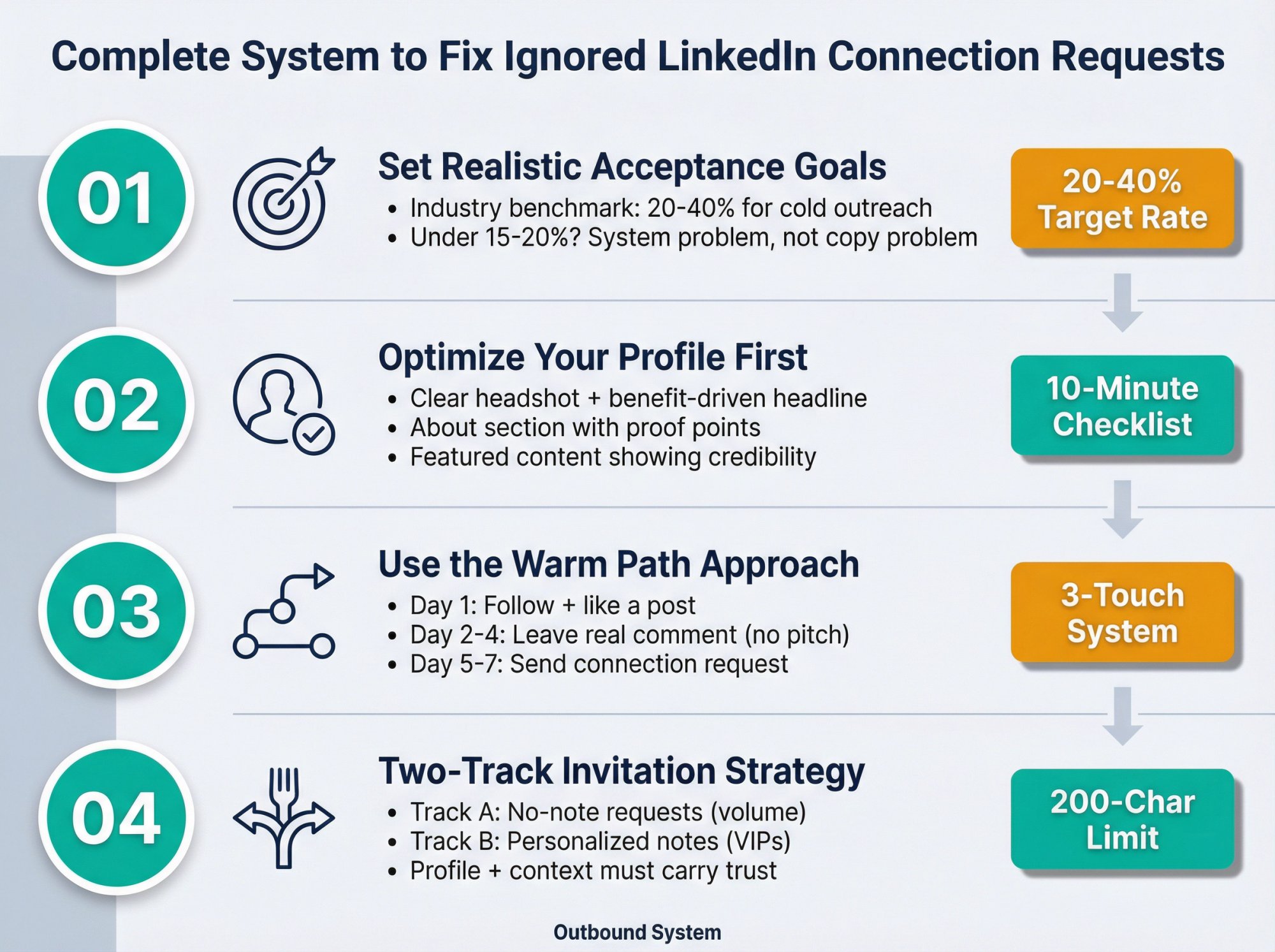
Step 1: Set a Realistic LinkedIn Connection Acceptance Goal
A key insight from large datasets: connection acceptance rates are not 80-90% for cold outreach.
Benchmarks vary. Industry research shows average LinkedIn connection acceptance rates typically fall in the 20-40% range for cold, outbound-style outreach to prospects who don't know you.
Practical takeaway: For cold, outbound-style connects, a realistic target is often 20-40%, depending on niche, seniority, and how warm you make it. If you're under about 15-20% consistently, you have a system problem (targeting/profile/context), not a "need better templates" problem.
Step 2: Optimize Your LinkedIn Profile Before Sending Connection Requests
LinkedIn itself recommends improving recognizability and credibility (including adding a profile photo).
Use this 10-minute profile checklist:
Element | Recommendation |
|---|---|
Photo | Clear headshot (no sunglasses, no logos) |
Banner | One line: "Who you help + outcome" (keep it simple) |
Headline | Role + outcome + niche (not a pitch) |
About | 1 line: who you help |
Featured | 1 case study / 1 offer explainer / 1 credibility asset |
Experience | Outcomes, not duties |
Activity | 2-3 thoughtful comments per week |
If you want a deeper internal resource on building a profile that converts before outreach, Outbound System's LinkedIn lead generation guide emphasizes treating your profile like a storefront and engineering it around your ICP.
Step 3: Use the "Warm Path" Before Sending Connection Requests
LinkedIn literally recommends alternatives like following someone and interacting with their posts to establish familiarity.
Here's the warm path that works without being creepy:
① Touch 1 (Day 1): Follow + like a post (or react)
② Touch 2 (Day 2-4): Leave a real comment (one insight, no pitch)
③ Touch 3 (Day 5-7): Send a connection request
Why this works: your name becomes familiar, and your comment shows you're not a bot.
Step 4: Use a Two-Track LinkedIn Invitation Strategy
Because LinkedIn limits personalized notes for many free accounts, you need two tracks.
Track A: No-Note LinkedIn Connection Requests (Volume Track)
Use this when:
• You don't have a strong shared context
• You're sending to a wider list
• You want to conserve personalized notes
How to win without a note:
Your profile + headline + recent activity must carry the trust.
Track B: Personalized-Note LinkedIn Requests (VIP Track)
Use this when:
• It's a high-value account (enterprise buyer, perfect-fit founder, strategic partner)
• You have strong context (commented on their post, same event, referral)
• You want a reply, not just acceptance
Character limit reality: LinkedIn documents a 200-character limit for personalized notes for many users.
LinkedIn Connection Request Message Templates (200 Characters)
These are designed to fit within about 200 characters, keep it human, and avoid pitching.
The Best-Performing LinkedIn Connection Note Structure
Context + relevance + low-friction ask
Templates (Copy/Paste)
1. Comment-based
Saw your post on {topic}, especially the point about {detail}. I work with {audience} on {problem}. Would love to connect and learn how you're approaching {topic}.
2. Same role / peer
Hey {First}, I'm also in {role/space}. Always looking to learn from others doing {specific thing}. Open to connecting?
3. Trigger event
Congrats on {new role / funding / launch}. I work with {similar companies}. No pitch, would love to connect and follow your journey at {Company}.
4. Mutual connection
Hey {First}, I noticed we're both connected to {Mutual}. I'm in {space} as well. Would love to connect.
5. Local / community
Hi {First}, I'm also in {city/region}. Always happy to connect with other {industry} folks here.
6. Group / event
Hey {First}, saw you in {group/event}. I'm digging into {topic} right now too. Want to connect?
What Not to Send in LinkedIn Connection Requests
"Hi {First}, I help companies like yours grow revenue. Can we book 15 minutes?"
Anything with a calendar link in the note
Anything that sounds auto-generated ("I came across your profile and was impressed...")
For more on messaging strategy and copywriting, see our guide on personalization that actually works.
How to Clean Up Pending LinkedIn Connection Requests
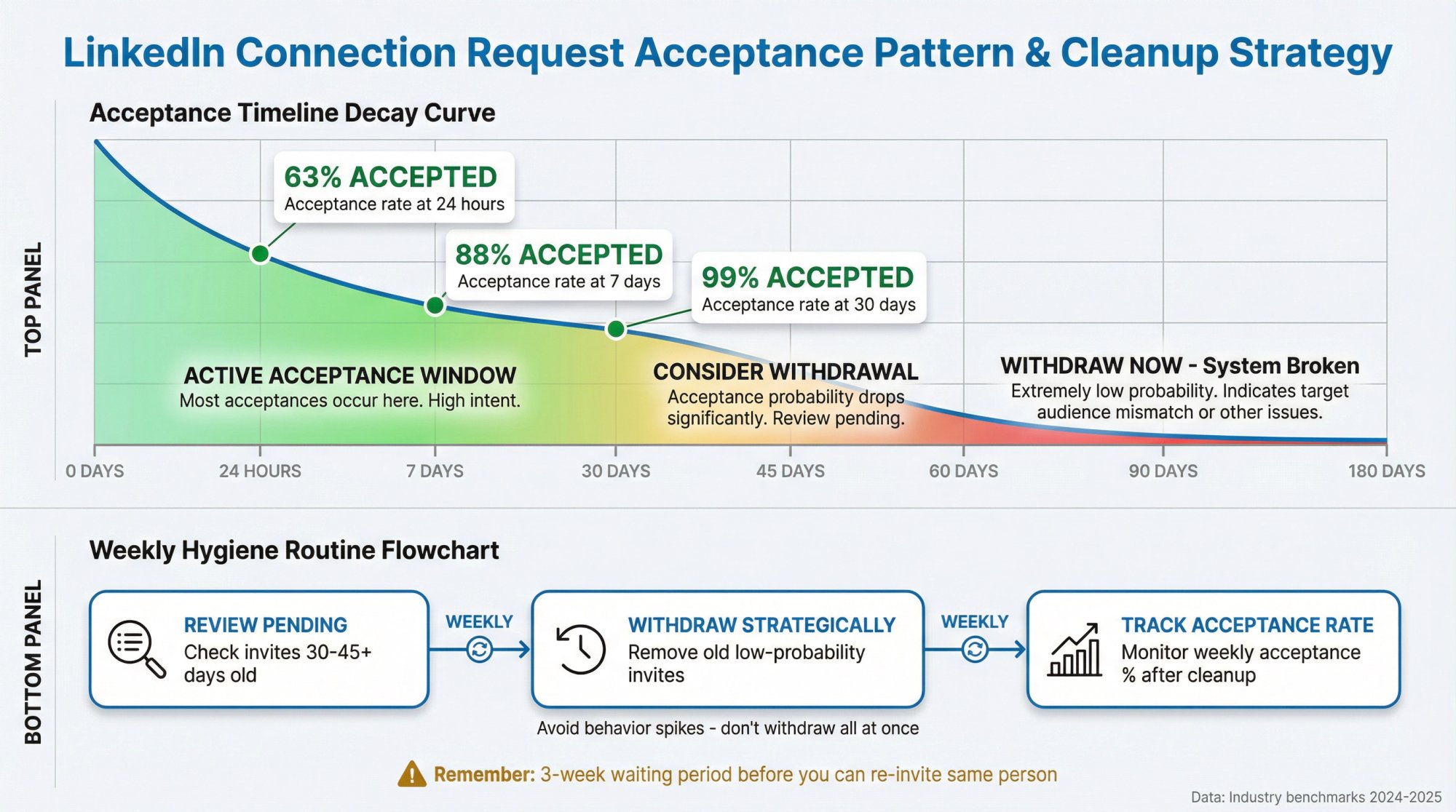
Step 1: Check Your LinkedIn Connection Request Acceptance Window
Research shows that most accepted invites happen relatively quickly.
About 63% accepted within 24 hours, about 88% accepted within 7 days, and about 99% accepted within 30 days.
If you have hundreds of invites pending for 60-180 days, your system is broken.
Step 2: Strategically Withdraw Old LinkedIn Connection Requests
LinkedIn allows you to withdraw an invitation any time before it's accepted. The recipient isn't notified, and you can't re-invite them for up to three weeks.
Recommended hygiene routine (weekly):
→ Withdraw invites older than 30-45 days unless you have a warm reason to keep them pending
→ Don't withdraw your entire sent list at once (avoid behavior spikes)
→ Track your weekly acceptance rate after cleanup
Step 3: Reduce LinkedIn Invitation Volume and Rebuild Quality
If your account is at risk (limits/restrictions), follow LinkedIn's own guidance:
• Wait out restrictions (often up to one week)
• If restricted due to too many outstanding invitations, wait up to a month
• Improve profile recognizability and add context
• Avoid prohibited tools/extensions
When to Stop Sending LinkedIn Connection Requests (Switch Channels)
Sometimes the best connection strategy is not connecting at all.
LinkedIn itself recommends alternatives to connecting:
Follow and engage with posts
Join relevant groups
Send an InMail
Use Sales Navigator for better targeting
When to Use LinkedIn InMail Instead of Connection Requests
If a prospect restricts invitations (or never accepts), InMail can be a plan B.
LinkedIn's documented InMail character limits:
• Subject: up to 200 characters
• Body: up to 1,900 characters
(You still need to be concise. LinkedIn notes shorter InMails tend to perform better.)
When to Use Email Instead of LinkedIn Connection Requests
If your outreach motion depends on volume, LinkedIn will always be constrained by platform limits and safety systems.
Outbound System's own multi-channel perspective (LinkedIn for trust + email for scale) is worth reviewing if your goal is meetings, not just connections.
When you need to scale B2B outreach, combining LinkedIn with cold email campaigns provides the volume and control that LinkedIn alone can't deliver.
LinkedIn Connection Request KPIs to Track Weekly
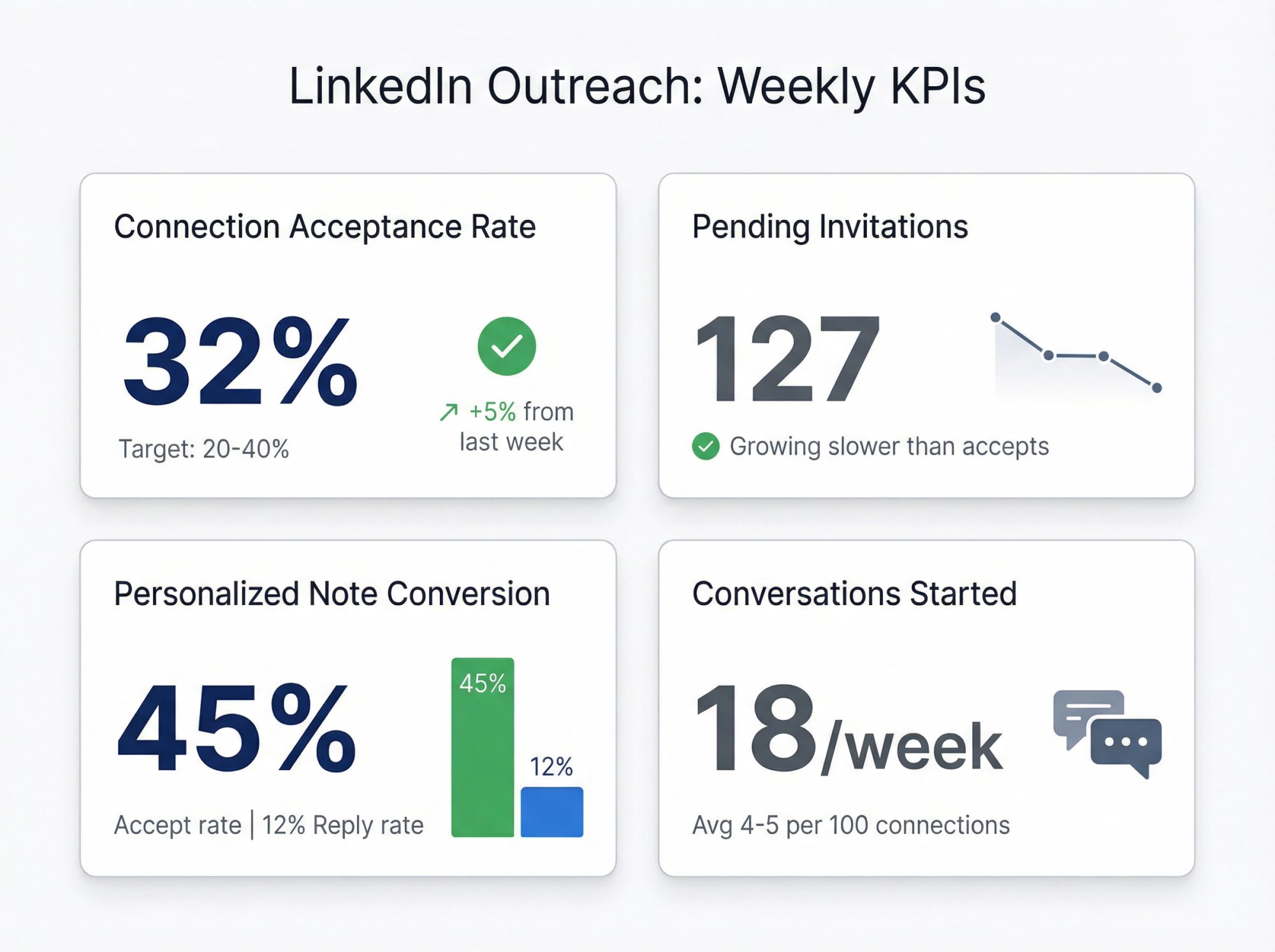
Track these weekly:
1. LinkedIn Connection Request Acceptance Rate
• Target: 20-40% (cold), higher if warm
• Benchmark references: 26-37% average in recent datasets
2. Pending LinkedIn Invitation Count
• If it's growing faster than acceptances, you're drifting into low-quality outreach (and restriction risk)
3. Personalized Note Conversion Rate
• Of the small number of invites you personalize, what % accept and what % reply?
4. Conversations Started Per Week
• Connections don't matter unless they turn into replies
For more on tracking and optimizing B2B sales metrics, see our guide on data-driven outbound strategy.
Frequently Asked Questions About LinkedIn Connection Requests
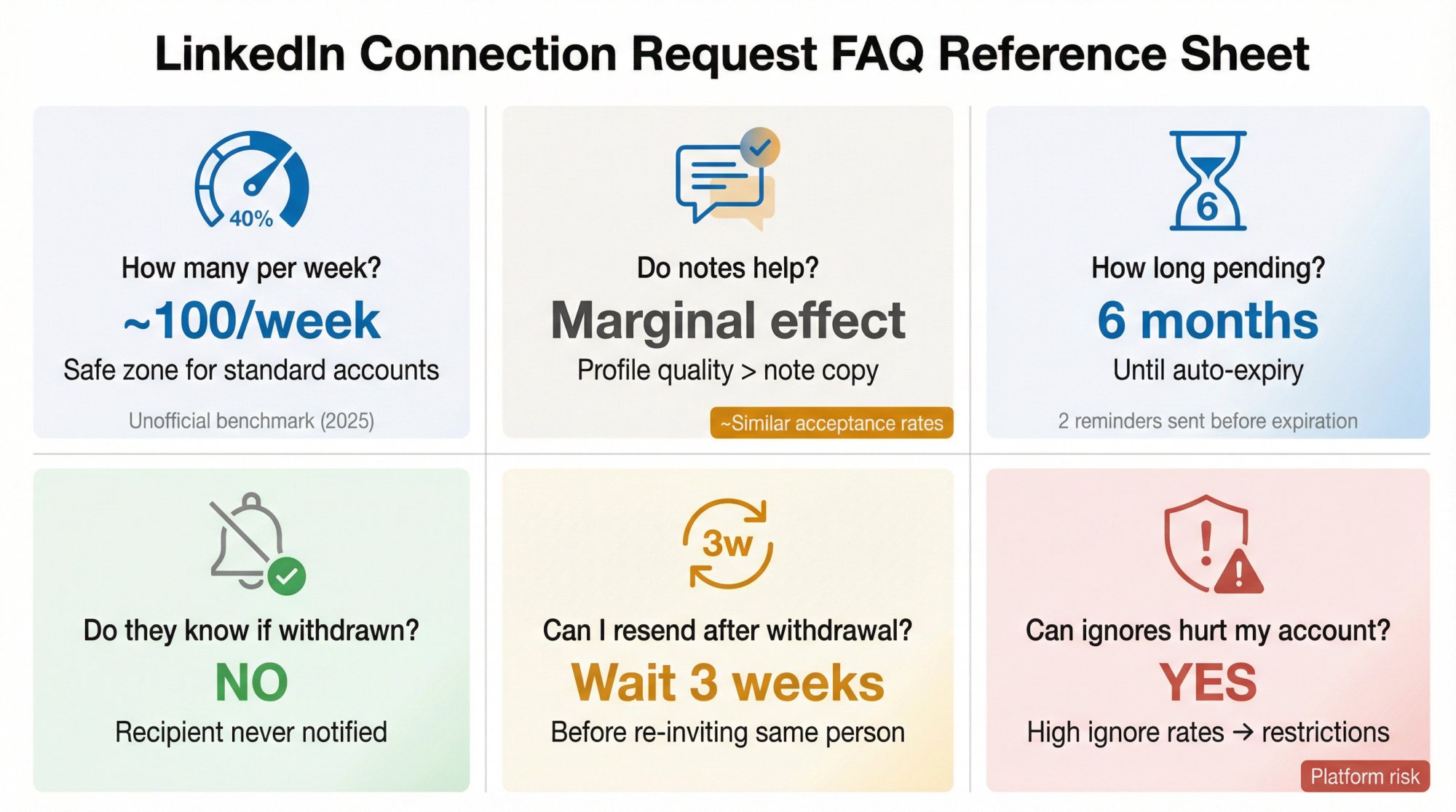
How Many LinkedIn Connection Requests Can I Send Per Week?
LinkedIn does not publicly publish a single hard number in the Help Center. What they do confirm is that limits exist, and exceeding them can trigger restrictions.
Industry benchmarks vary, and may differ by account reputation and behavior. Outbound System's field guidance based on managing 600+ LinkedIn profiles puts the "safe zone" around 100/week for standard accounts (2025 observation).
Does Adding a Note Increase LinkedIn Connection Acceptance Rates?
Surprisingly, large datasets suggest the effect on acceptance can be small.
Research indicates acceptance rates are often similar with and without a message, though adding a message can improve reply rate when prospects do accept.
Interpretation: a note can help when it adds real context, but it's not a magic button. Profile + targeting quality still dominate.
How Long Do Pending LinkedIn Connection Requests Stay Pending?
LinkedIn says invitations expire after six months, and they send up to two reminders before expiration.
If I Withdraw a LinkedIn Connection Request, Do They Know?
LinkedIn says the recipient is not notified when you withdraw.
Can I Resend a LinkedIn Connection Request After Withdrawing?
LinkedIn states you can't send a new invitation to the same member for up to three weeks after withdrawal.
Can Ignored LinkedIn Connection Requests Hurt My Account?
Yes. LinkedIn lists "ignored, left pending, or marked as spam" as a reason restrictions can happen.
Done-For-You LinkedIn Connection Request Services
If you're consistently getting ignored (or you're worried about restrictions), the fastest path is usually not "more templates."
It's a system: targeting + profile optimization + safe pacing + conversation handling.
Outbound System runs managed LinkedIn outreach as part of a broader outbound lead generation system. If you want someone to build the infrastructure and operate it month-to-month, start with our LinkedIn lead generation overview.
We manage 600+ LinkedIn profiles with careful throttling and human-like pacing to reduce platform flags.
Our approach includes Sales Navigator targeting, human-written message sequences, thousands of messages monthly, and 5-second reply notifications.
Here's what you get:
Service Element | What We Do |
|---|---|
Profile Safety | Careful throttling, human-like pacing |
Setup Speed | 5 days (vs 14+ days with other providers) |
Targeting | Sales Navigator filters, ideal customer profiles |
Messaging | Human-written sequences, no templates |
Volume | Thousands of messages monthly per profile |
Notifications | 5-second reply alerts |
Dashboard | Real-time metrics, CRM integrations |
Support | Dedicated account management, strategy calls |
Three tiers are available:
Plan | Price/month | Open InMails | Profiles | New Prospects/mo |
|---|---|---|---|---|
Growth | $499 | Up to 800 | 1 | 500 |
Scale | $699 | Up to 1,600 | 2 | 1,000 |
Enterprise | $999 | Up to 3,200 | 4 | 2,000 |
All tiers include human-written copy, profile optimization, connection nurture, A/B testing, and dedicated account management.
If you want to discuss your specific situation and see if managed LinkedIn outreach makes sense, book a free 15-minute consultation.
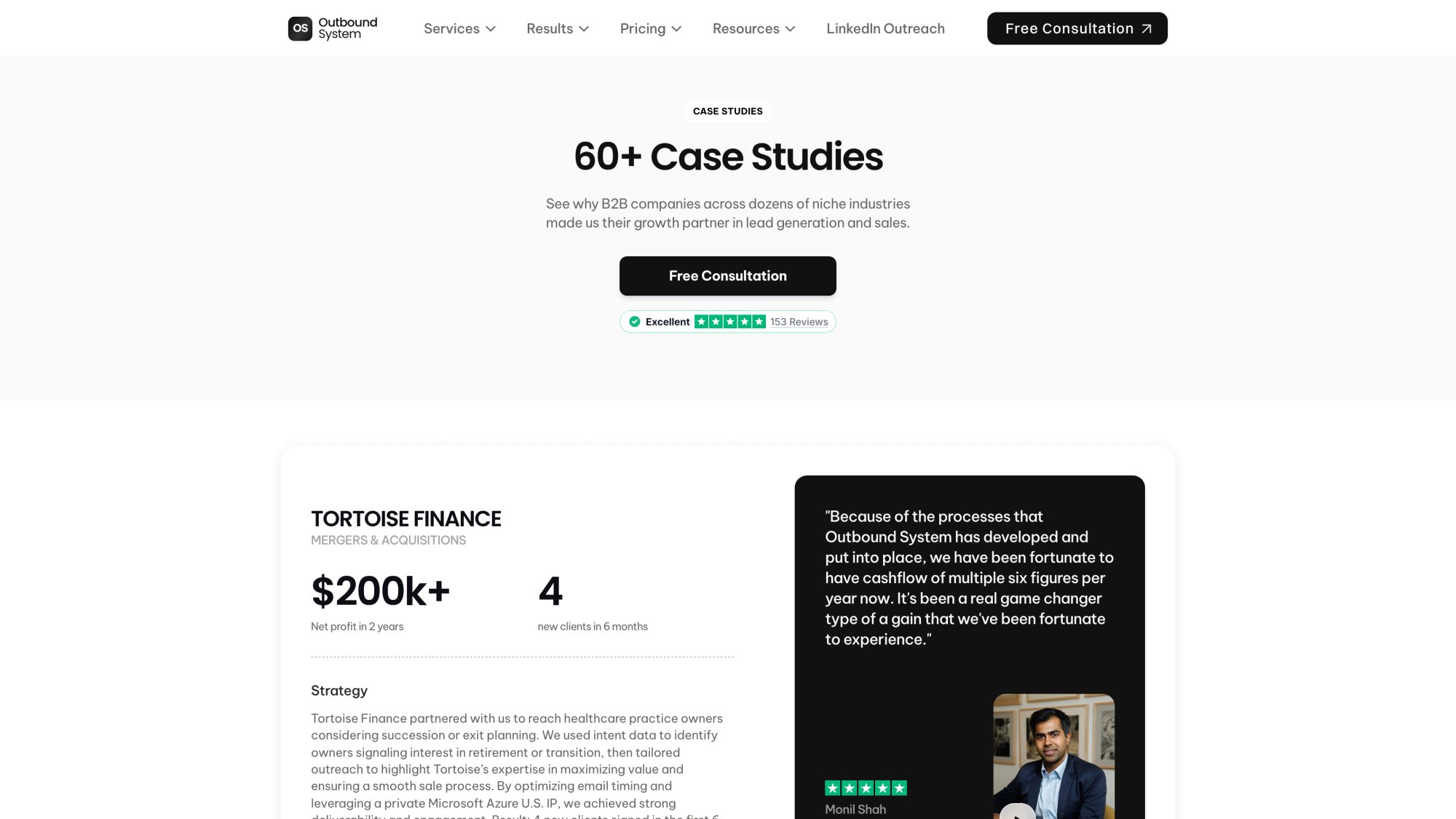
You can also explore our case studies to see how we've helped 600+ B2B companies generate qualified meetings through systematic LinkedIn outreach.