Key takeaways
No, pending LinkedIn connection invitations do not expire automatically; an unaccepted invite sits in your “Sent” folder indefinitely until the recipient accepts, ignores or you manually withdraw it.
Leaving more than 300 to 500 unaccepted invitations in your Sent folder hurts your account trust score and can trigger LinkedIn’s weekly invitation throttle (reducing your limit from 100-200/week down to 20-50/week).
Once you withdraw a pending LinkedIn invitation, LinkedIn enforces a mandatory 3-week (21-day) cooldown before you can send a new connection request to that same person.
To maximize booked meetings from LinkedIn in 2026, withdraw unaccepted invites after 30 days and trigger a 15-second AI phone call the moment a prospect accepts and replies positively (lifting booking conversion from 30% to 73%).
Updated November 3, 2026. Checked against LinkedIn Help documentation and Outbound System’s production data across 1,000+ client outbound campaigns.
Do LinkedIn connection invitations expire automatically in 2026?
No, LinkedIn connection invitations never expire automatically. Once you click “Connect” on a prospect’s profile, that pending invitation remains in your Sent invitations queue indefinitely until the recipient clicks Accept, clicks Ignore, or you manually withdraw the invitation yourself. However, letting unaccepted invitations pile up above 300 to 500 pending requests damages your LinkedIn account health, lowers your weekly invitation allowance (typically 100 to 200 connection requests per week in 2026), and increases the risk of “Please enter this person’s email” or “You’ve reached the weekly invitation limit” restrictions.
Across our client campaigns on Outbound System, managing pending invitations is one of the fastest fixes when a sales rep’s LinkedIn acceptance rate suddenly drops below 25%. Here are the exact 2026 rules for pending invitations, the 3-week withdrawal cooldown, step-by-step instructions to clean up your queue, and how to turn accepted connections into booked phone calls.
What are LinkedIn’s connection and pending invitation limits in 2026?
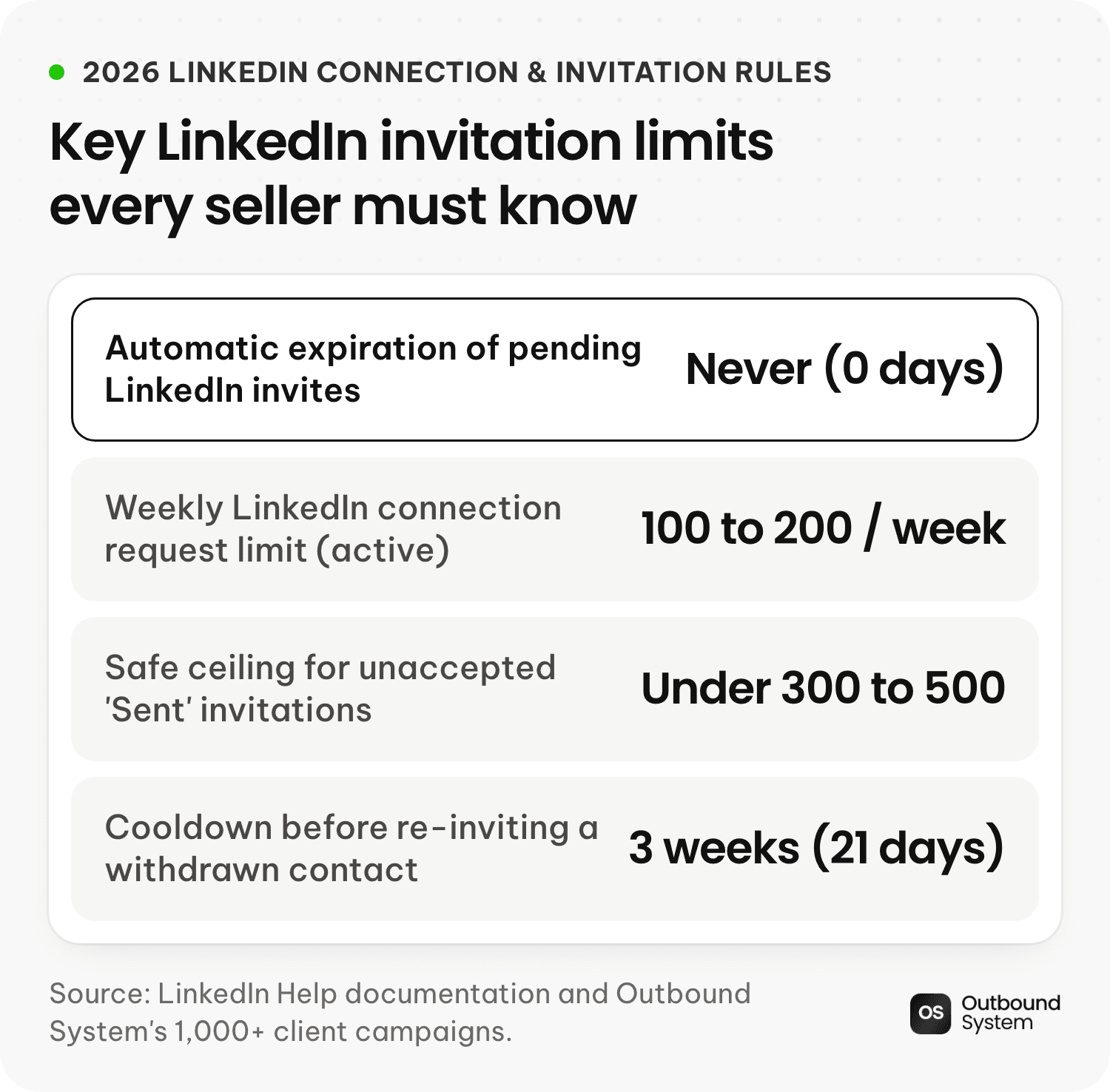
LinkedIn does not publish every internal anti-spam threshold on a single page, so sales teams often hit invisible walls without knowing why. Based on LinkedIn’s official Help Center documentation and our data across 1,000+ managed outreach accounts (see our full LinkedIn connection request limit guide), here are the exact limits enforced in 2026:
LinkedIn limit or rule | 2026 rule / threshold | What happens if you exceed it |
|---|---|---|
Automatic invitation expiration | Never (0 days) | Unaccepted requests stay in |
Weekly connection request limit | 100 to 200 invitations per week (resets 7 days after your first invite of the cycle) | LinkedIn blocks further invites with the “You’ve reached the weekly invitation limit” popup |
Personalized note character limit (Free vs. Paid) | 300 characters on paid plans (Sales Navigator / Premium); 5 notes/month at 200 chars on many Free tiers | Free accounts must send blank (no-note) connection requests once their monthly note quota runs out |
Safe ceiling for pending “Sent” invitations | Keep under 300 to 500 pending invites (hard system ceiling historically ~1,500 to 3,000) | High pending-to-accepted ratios signal low-quality mass outreach and throttle your weekly limit |
Cooldown after withdrawing an invitation | 3 weeks (21 days) (official LinkedIn rule) | You cannot re-send a connection request to that exact person for 21 days after clicking Withdraw |
Maximum total 1st-degree connections | 30,000 connections | Above 30,000, your profile switches to Follow-only unless you remove existing connections |
Why should you withdraw pending LinkedIn invitations after 21 to 30 days?
When we audit a prospect’s LinkedIn account and find 1,200+ pending invitations sitting in their Sent folder from 2024 and 2025, two things are almost always happening:
Over 90% of LinkedIn accepts happen in the first 14 days. If a prospect has not accepted your connection request after 21 to 30 days, they either do not log into LinkedIn or they scrolled past your invite. Leaving it sitting there for 8 months accomplishes nothing.
LinkedIn’s algorithm tracks your “Unaccepted Invite Ratio.” If you send 150 invites a week and 800 old invites are sitting unaccepted in your Sent queue, LinkedIn’s spam filter flags your account as a low-relevance mass requester. Cleaning your Sent queue down to under 250 to 300 pending invites (withdrawing anything older than 30 days) routinely restores full weekly sending capacity and lifts acceptance rates back into the 30% to 45% range (see our guide on how to fix LinkedIn connection requests being ignored).
How do you view and withdraw pending LinkedIn invitations (Step by Step)?
You can check and withdraw your unaccepted LinkedIn connection requests on desktop or mobile in under 60 seconds:
Click My Network in the top navigation bar of LinkedIn (or open this direct URL in your browser:
https://www.linkedin.com/mynetwork/invitation-manager/sent/).Next to the Invitations header, click Manage (or See all).
Click the Sent tab at the top of the Invitation Manager box, then select People.
Scroll to the bottom of your Sent list to find the oldest pending invitations (labeled “Sent 1 month ago”, “Sent 3 months ago”, etc.).
Click Withdraw next to the person’s name, and confirm by clicking Withdraw in the popup modal.
Does the other person get notified when you withdraw a LinkedIn invitation?
No. When you withdraw a pending connection invitation on LinkedIn, the recipient does not receive a notification telling them you withdrew it; the invitation simply disappears from their pending queue.
Keep two rules in mind when withdrawing:
The 3-Week Cooldown Rule: According to LinkedIn’s official Help documentation, once you withdraw an invitation, you must wait 3 weeks (21 days) before you can send a new invitation to that same recipient.
Don’t withdraw 500 invites in 5 minutes: Just like sending too fast triggers rate limits, clicking Withdraw 500 times in a row looks like bot activity. Withdraw 50 to 100 old invitations per day (oldest first) until your Sent queue sits cleanly under 300.
How do you turn accepted LinkedIn invitations into booked meetings in 2026?
Cleaning up your pending invitations fixes your acceptance rate, but accepted connections do not pay the bills, held sales meetings do.
Across our 2026 outbound studies, the biggest mistake teams make on LinkedIn is sending a 3-paragraph pitch the second someone clicks Accept, followed by a passive Calendly link when the prospect replies “Sure, send me some info.”

As we proved in our 15-second AI appointment setter study, sending a booking link to a warm LinkedIn or email reply converts only 30% to 33% of interested prospects (with a 40% to 50% show rate). When you connect your LinkedIn sequencer (such as HeyReach) or CRM to Outbound System’s AI voice agents so that every positive LinkedIn reply triggers a phone call within 15 seconds to 5 minutes:
Booking conversion jumps from 30% to 73% because you catch the prospect while they are still looking at their phone or laptop.
Meeting show rates jump from 40% to 75% to 90% because the prospect verbally agrees to the time slot and confirms their email address out loud.
If they don’t answer on dial one, the AI follows up 6 to 9 times across rotating local area-code numbers, capturing the 50.5% of meetings that book on Attempts #2 through #9 (see how many follow-up calls it takes to book a meeting).
Frequently asked questions
Do LinkedIn InMails expire?
Unlike connection requests (which never expire), unused InMail credits expire after 90 days if you accumulate more than 3x your monthly plan allotment (for example, up to 150 accumulated credits on a 50-InMail/month Sales Navigator Core plan; see our what is InMail on LinkedIn guide and LinkedIn Premium vs. Sales Navigator comparison). Once sent, an InMail message stays in the recipient’s inbox until they read or reply to it.
Does withdrawing a LinkedIn invitation give you your weekly invite credit back?
No. LinkedIn counts your 100 to 200 weekly invitations at the moment you click Connect. Withdrawing 50 old invitations today will improve your overall account health for future weeks, but it will not unlock 50 extra invitations for the current 7-day rolling window.
Should I send a personalized note or a blank LinkedIn connection request?
Across our B2B campaigns, blank connection requests (no note) or a casual 6-to-10-word peer note (“Hey Sarah, saw your post on {{topic}}, would love to connect”) consistently beat 300-character sales pitches by 15% to 25% in acceptance rate. Save your question for 24 hours after they accept the connection.
Can Outbound System run LinkedIn outreach and AI calling together for us?
Yes. We offer both managed LinkedIn lead generation and our in-house outbound AI voice agent platform ($1,499 to $3,999/month, month-to-month), wired directly into HeyReach, HubSpot, Monday, Cal.com and Calendly so every warm connection and positive reply gets called in seconds. Book a demo to see the full system in action.
Outbound System
We write the copy, build the lists and run the campaigns, month-to-month. Every decision is backed by data from 10,400+ campaigns.

Matthew Johnson is the founder and CEO of Outbound System, which runs cold email, LinkedIn outreach and AI calling for 1,000+ active B2B clients. He has personally sold over $12 million in B2B services, and his team has sent 52 million+ cold emails and helped clients close $26 million in revenue.
About Outbound System
Outbound System runs done-for-you cold email, LinkedIn outreach and AI calling for B2B companies. 1,000+ active clients and 10,400+ campaigns launched.